Disclosure: Some links in this post are affiliate links. As an Amazon Associate I earn from qualifying purchases, at no extra cost to you. Learn more
Specs are compiled from manufacturer listings and verified buyer reviews and can change over time — please confirm the key details on the product page before buying.
You want a laptop that still feels fast three years from now, without paying flagship prices. the balance is a mid-range machine with at least 16GB of RAM and a 512GB or larger SSD. That combo keeps up with years of browser tabs, spreadsheets, and video calls. The picks below range from an Apple M5 machine that handles AI workloads to a 165Hz gaming laptop that stays cool under load. Every one avoids the two traps that make cheaper machines feel old fast: soldered-in memory you cannot expand, and storage so small you are juggling files by month three.
This guide is built by comparing the manufacturers’ published specifications and the patterns across verified customer reviews, so you get each pick’s real strengths and trade-offs instead of marketing spin.
Whether you are replacing a five-year-old machine or buying your first serious laptop, this guide breaks down the real differences between the best mid priced laptops and the marketing noise around them.
Top Picks



How To Choose The Best Mid Priced Laptops
The biggest mistake buyers make in this price range is chasing the processor name while ignoring memory and storage. A fast chip paired with 8GB of RAM and a tiny drive will feel slower in daily use than a modest chip with 16GB and a large SSD. Here is what actually matters.
Memory and Storage
Look for 16GB of RAM as your starting point. That is enough to keep a dozen browser tabs, a spreadsheet, and a video call running at the same time without the machine stuttering. For storage, 512GB is the practical minimum, and 1TB gives you real breathing room for photos, project files, and a library of games. A PCIe SSD boots the machine and opens files far quicker than an older spinning hard drive.
Processor and Graphics
The processor model number tells you the generation, and newer generations generally run more efficiently. If you edit video, play games, or run AI tools, the graphics chip matters as much as the processor. Integrated graphics handle everyday work fine; a dedicated graphics chip is what you need for smooth 1080p gaming or demanding creative apps.
Side-by-Side Comparison
| Model | Best For | Memory | Storage | Max CPU Speed | Amazon |
|---|---|---|---|---|---|
| Apple 2025 MacBook Pro M5★ Best Overall | AI and creative work | 24GB Unified | 1TB SSD | — | Amazon |
| HP 15 inch Laptop (15-dy5399nr)Best Value | Everyday and school | 16GB | 512GB SSD | 4.4 GHz | Amazon |
| Lenovo V15 (Ryzen 5 5500U)Best for Multi-Tasking | Budget work and light gaming | 16GB | 512GB SSD | 4 GHz | Amazon |
| Dell 15.6″ DC15250 | Portable work on the go | — | — | 4.6 GHz | Amazon |
| Lenovo 2026 Premium Business (Ryzen 5 7535HS) | Coding and data work | 16GB DDR5 | 512GB SSD | 3.4 GHz | Amazon |
| ASUS 2021 Vivobook 16 | Students and light gaming | 16GB DDR4 | 1TB SSD | 4.7 GHz | Amazon |
| HP Pavilion 15 (i7-1165G7) | All-day desk and travel work | 16GB | 512GB SSD | 4.7 GHz | Amazon |
| Acer Nitro V (i5-13420H) | Entry-level gaming | 8GB DDR5 | 512GB Gen 4 SSD | 4.6 GHz | Amazon |
| NIMO 15.6 AI-Ready | Streaming and vlog production | 16GB | 512GB SSD | 4.9 GHz | Amazon |
| Microsoft Surface Laptop (2024) | AI apps and all-day battery | 16GB | 1TB SSD | — | Amazon |
| Dell 16 Plus (Ultra 9 288V) | Data and spreadsheet work | 32GB | — | 5.1 GHz | Amazon |
| MSI Katana 15 HX | Serious gaming at home | 32GB DDR5 | 1TB NVMe SSD | 5.8 GHz | Amazon |
| ASUS ROG Strix SCAR 18 (2025) | Competitive gaming and content | 32GB DDR5-5600 | 2TB PCIe Gen 4 SSD | 5.4 GHz | Amazon |
Detailed Reviews
1. Apple 2025 MacBook Pro Laptop
Our pick — 4.5+★ from 450+ verified ratings; the strongest balance of quality and price.
A 10-core M5 chip with 24GB of unified memory for AI and video work.
The M5 chip here pairs a 10-core CPU and 10-core GPU with 24GB of unified memory and a 1TB SSD. Unified memory is a single pool that the processor and graphics cores share directly, which means the machine does not stall when you switch between demanding apps. When the 24GB capacity is compared against the 16GB in the HP 15 inch Laptop, the difference in how many apps you can keep open at once is meaningful. If you run photo or video editing software, that headroom keeps the whole workflow smooth.
The 14.2-inch Liquid Retina XDR display (XDR means extended dynamic range, so bright highlights and deep blacks appear more lifelike on screen) hits 1600 nits peak brightness and a 1,000,000:1 contrast ratio. That brightness is what makes the screen usable outdoors or near a bright window without washing out. The display also holds up against the 15.6-inch panel on the Lenovo V15, which measures 15.6 inches against this screen’s 14.2 inches and offers a standard FHD panel rather than an XDR one.
What wins buyers over is the combination of speed and quiet operation. The machine stays silent even under loads that would spin up fans on a typical laptop, and the all-day battery holds its performance whether you are plugged in or not. The 12MP Center Stage camera, three studio-quality mics, and six speakers with Spatial Audio (a format that places sound around you rather than straight ahead) round out the experience. On the hardware side, there are three Thunderbolt 4 ports, a MagSafe 3 charging port, an SDXC card slot, an HDMI port, and a headphone jack, with support for up to two external displays. The setup process divides opinion, with some buyers finding it quick and others less so.
The case for the M5
- The M5 chip with a 10-core CPU and 10-core GPU handles heavy creative workloads without slowing down.
- 24GB of unified memory leaves plenty of headroom for demanding multitasking and AI-assisted tasks.
- The 14.2-inch Liquid Retina XDR display at 1600 nits peak brightness stays legible in bright rooms and outdoors.
- Three Thunderbolt 4 ports, an SDXC card slot, and an HDMI port cover most connectivity needs without a dongle.
Worth knowing first
- Setup generates mixed reactions — some users find it quick, others less so.
- The macOS app-drag installation method is different enough that Windows veterans will need a week to adjust.
- It runs on macOS only, so Windows-only applications are off the table.
Best fit: Creative professionals and anyone who runs video editing or AI-accelerated software that needs 24GB of memory.
Think twice if: Your workflow is built around Windows-only applications that cannot run on macOS.
2. HP 15 inch Laptop
A 3.75-pound 15.6-inch laptop with a 12th Gen i5-1235U and 16GB of RAM.
For buyers who want a laptop that simply works for school, spreadsheets, and streaming, this HP 15 pairs a 12th Generation Intel Core i5-1235U processor with 16GB of RAM and a 512GB SSD. The processor tops out at 4.4 GHz and carries a 12 MB L2 cache, while the Lenovo V15 runs at 4 GHz with 8 MB of cache. That means the HP has a higher ceiling for burst tasks like opening a big spreadsheet or compressing a video clip. The 16GB of RAM compared against the Apple MacBook Pro’s 24GB shows the gap buyers at this tier accept, but it is more than enough for everyday multitasking.
The 15.6-inch full-HD IPS screen uses micro-edge bezels, which gives you more visible screen area in the same body. The weight figures at 15 positive mentions, and long-term buyers confirm the “lightweight, good for travel” impression that surfaces in reviews. The 512GB SSD is a solid-state drive, meaning it has no moving parts and boots the machine far faster than a platter hard drive would. HP bundles a charger, QuickDrop for wireless file transfer with your phone, and a True Vision HD camera with automatic noise removal for video calls.
The honest catch is battery life, which generates mixed feedback depending on how hard you push the machine. The keyboard also draws criticism for a cheap feel, and the white letters on silver keys are hard to read without direct light. Neither issue sinks the laptop — a second unit of this model still works as designed for everyday tasks — but they are worth knowing before you buy.
Where it shines: Speed and portability are the two things buyers mention most. The i5-1235U at 4.4 GHz handles office work, browsing, and video playback without hesitation, and the 16GB of RAM keeps multiple apps open without stutter.
The honest trade-off: Battery life is rated 7 hours but draws mixed reports in real use, and the keyboard letters are hard to read in low light — manageable quirks, not deal-breakers.
Reach for this if: You want a lightweight everyday laptop for school, remote work, or travel at a sensible mid-range price.
Look elsewhere if: You need a keyboard with high-contrast keycaps or a battery that holds up through a full day of unplugged heavy use.
3. Lenovo V15 Laptop
The Windows 11 Pro machine that brings pro features and wired networking to a value-minded buyer.
This Lenovo V15 keeps everyday work moving with its AMD Ryzen 5 5500U processor, which runs six cores and twelve threads, plus 8 MB of L3 cache. Cache is the fast memory the processor uses to keep frequently accessed data close by, so more cache means fewer trips to slower storage. Compared with the HP 15 inch Laptop, the HP carries 12 MB of cache against this machine’s 8 MB, but this Lenovo closes the gap with a hexa-core design that spreads work across tasks more effectively. It also runs at up to 4 GHz versus the HP’s 4.4 GHz, and the difference in everyday use is small.
The 15.6-inch full-HD screen measures 15.6 inches diagonally at 1920 x 1080. Buyers who connect an external monitor report the display works perfectly well in that setup, though the panel itself is the most common complaint — several describe it as unremarkable, and night mode helps soften the look. The keyboard gets consistent praise, though the trackpad sits far enough left that some buyers find themselves mis-clicking until they adjust. The 512GB PCIe NVMe SSD handles fast boot and file transfers, and Windows 11 Pro adds mobile device management, Group Policy, and Remote Desktop features that matter for business use.
The real-world battery experience is the standout caveat: heavy use drains in roughly 45 minutes, while power-save stretches it to about 1.25 hours. That makes it a stay-near-a-plug machine rather than something you carry to a full day of meetings. Port selection is generous — USB 3.0 Type-A, USB 2.0 Type-A, USB Type-C, HDMI, RJ45 wired Ethernet, and a headphone/microphone combo — which covers dongle-free desk setups.
What earns its spot: The six-core Ryzen 5 5500U with Windows 11 Pro at this price is a serious value equation for work laptops, and the included RJ45 Ethernet port is rare in this tier.
Who should look closer: Buyers who want a dedicated numeric keypad and business-class software features without paying premium prices.
Great match for: Office workers and students who need Windows 11 Pro features and wired networking at a desk setup.
Skip if: You regularly work untethered — the battery drains quickly under sustained load.
4. Dell 15.6″ Laptop DC15250

A 15.6-inch Dell with a 13th Gen i5-1334U and lifted hinges for desk work.
If your laptop spends eight hours a day open on your desk or in your lap, this Dell 15 is built around that reality. The 13th Generation Intel Core i5 1334U processor reaches 4.6 GHz, which puts it above the Lenovo V15’s 4 GHz ceiling for tasks that spike briefly like opening large files or compressing a folder. The lifted hinges tilt the keyboard up, giving your wrists a more natural angle over a long shift. Express Charge support is also included for quick top-ups when you are near an outlet.
Dell ComfortView software helps reduce blue light emissions, which matters if you stare at spreadsheets for hours. The screen draws praise for brightness and clarity, and reviewers running presentations, writing documents, and watching videos report it holds up across all of them. The backlit keyboard and separate numeric keypad add practical value for data entry and number-heavy work.
The honest catch here is battery life, which is the most-discussed drawback, alongside heat under sustained load. On a lap, the bottom-center vents near the hinge can put warm air against your legs, so long unplugged sessions will want a table. Port count is also limited — just two USB ports, so a hub is a sensible add-on if you use external drives and peripherals together. The onboard fan is also on the louder side during heavy use. None of these are dealbreakers for desk-based work, but they matter if you split time between a desk and a couch.
The standout feature: The combination of the 13th Gen i5-1334U at 4.6 GHz and Dell’s ergonomic hinge design makes this a comfortable daily driver for desk and office work.
One thing to plan for: With only two USB ports, budget for a hub if you run a mouse, a drive, and a monitor at the same time.
Suits you if: You want an ergonomic, screen-friendly laptop for long work sessions at a desk or in a home office.
Pass on it if: You need a full day of unplugged battery and cool lap temperatures — the short battery and warm underbelly are the main limits.
5. Lenovo 2026 Premium Bussiness Laptop
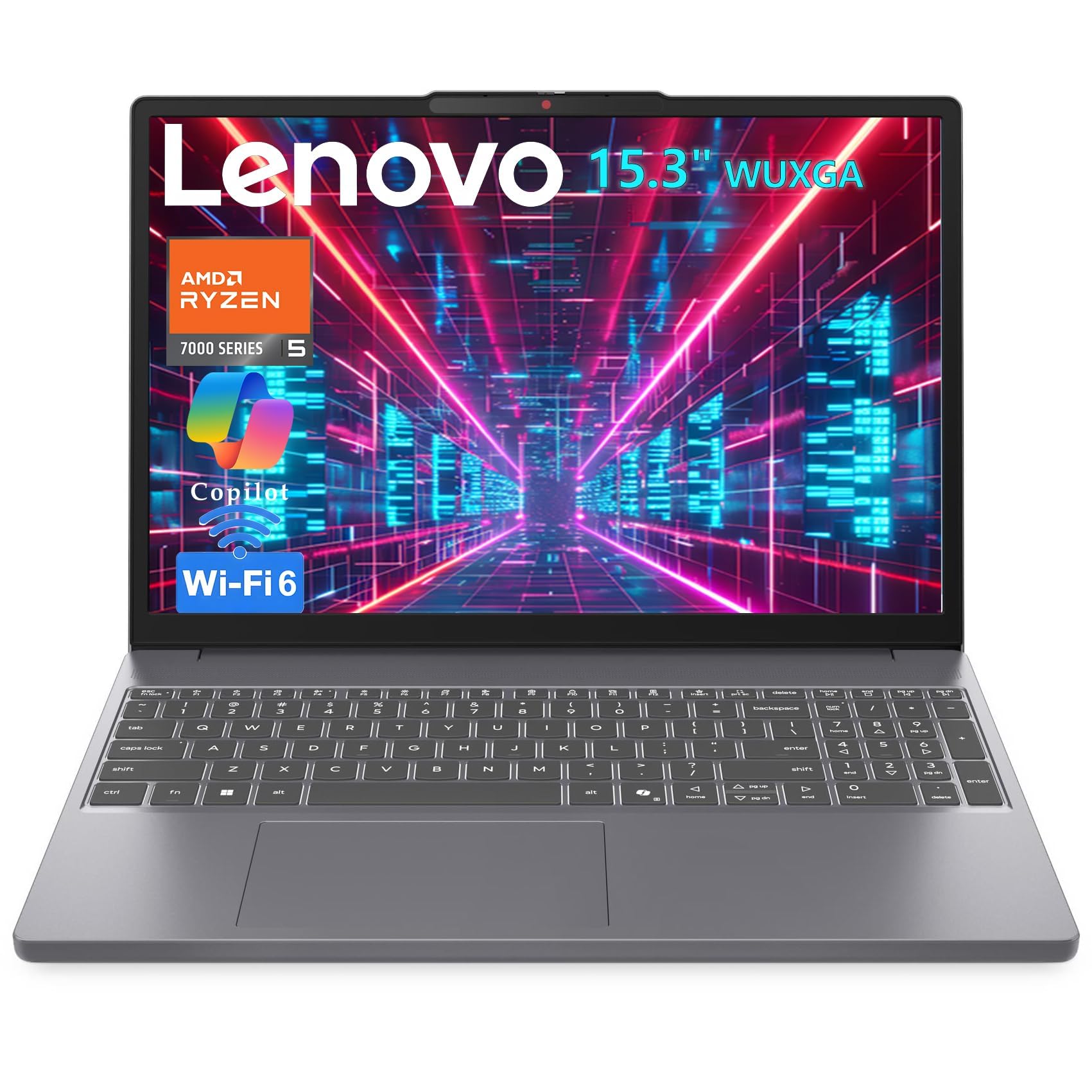
A 3.51-pound Ryzen 5 7535HS laptop with a 16:10 1920 x 1200 display.
At 3.51 pounds and 0.67 inches thin, this Lenovo slips into a backpack without weighing you down — which matters if your commute involves a walk, a train, and a flight of stairs. Inside, the AMD Ryzen 5 7535HS runs six cores and twelve threads, with a 1920 x 1200 IPS display at 60 Hz and 300 nits brightness. The 16:10 screen aspect gives you 11% more vertical space than a standard FHD layout, so you see more lines of code or rows of data before scrolling. The 16GB of DDR5 memory (the newest generation of RAM, which moves data faster than the DDR4 used in older machines) and a 512GB PCIe SSD keep Docker containers and IDEs responsive.
The screen’s anti-glare coating is a real benefit if you work near a window, and the privacy shutter on the HD webcam is a nice touch for video calls in shared spaces. Connectivity covers Wi-Fi 6, Bluetooth 5.3, USB-C with power delivery and DisplayPort, HDMI, and an SD card reader, so you can drive a monitor or transfer card footage without extra adapters. USB-C PD charging also lets you top up with a phone charger in a pinch. Given the strong customer score and the very recent release date, this pick is only just starting to find its audience.
The trade-off is speakers that do not get loud enough for music, and a trackpad that a buyer described as “a bit lacking.” The chassis is plastic rather than metal, which keeps the weight down and the price affordable. If you spend most of your time in an IDE or on a data set, those are easy things to live with. Keep the seller in mind during purchase — a small number of buyer complaints in this space have centered on reseller return handling rather than the machine itself.
Engineered for: Developers, analysts, and students who need DDR5 speed, a 16:10 screen for more vertical content, and a lightweight frame for commuting.
What you are trading: The plastic build and modest speakers are the cost of the HS-series processor and DDR5 memory at this price.
Right call if: You code, run spreadsheets, or edit 1080p video on the move and want DDR5 speed without a premium chassis.
Keep looking if: You want a metal body or loud built-in speakers for music and video without headphones.
6. ASUS 2021 Vivobook 16

A 16-inch 1920 x 1200 screen with a 1TB SSD and an i7-1255U.
Storage is usually the first thing budget-minded buyers regret, and this Vivobook 16 sidesteps that with a 1TB PCIe M.2 SSD. That is twice the 512GB found in the HP 15 and the Dell 15, so you can carry years of documents, videos, and game installs without juggling folders. The processor is an Intel Core i7-1255U running 10 cores and 12 threads, with a 12 MB Intel Smart Cache and a max turbo frequency of 4.7 GHz. That ceiling is higher than both the HP 15’s 4.4 GHz and the Lenovo V15’s 4 GHz.
The display measures 16 inches diagonally at 1920 x 1200, which is taller than a standard 1080p panel, so you see more vertical content while keeping the full width. Ultra-slim NanoEdge bezels shrink the frame, so the laptop does not feel as bulky as a 16-inch machine usually does. The 16GB of DDR4 RAM (the previous generation of memory, still fast for everyday work) handles multiple browser tabs and applications at once.
The main note buyers raise is a mismatch between listing and received processor: a couple of reviews describe ordering an Intel model and receiving an AMD chip instead. That is a listing accuracy issue rather than a fault in the machine itself, and the build quality and price-to-performance ratio get consistent praise. The keyboard layout has off-center lettering that takes a few days to adjust to, though the key feel itself earns positive comments. Ports include USB 2.0 Type-A, USB 3.2 Gen 1 Type-C, two USB 3.2 Gen 1 Type-A, HDMI 1.4, and a 3.5mm combo audio jack.
Why students love it: A 16-inch 1920 x 1200 screen and 1TB SSD give you more screen real estate and storage than most laptops in this tier.
Don’t overlook: Confirm the processor configuration with the seller if you specifically need the Intel chip listed, since a few buyers received a different one.
Made for: College students and home users who want a big screen plus a full terabyte of storage for long-term use.
Not ideal if: You need the smallest, most compact machine possible — a 16-inch screen naturally takes more bag space than a 14-inch one.
7. HP Pavilion 15 Laptop

An i7-1165G7 laptop rated for 8 hours of battery with 50% fast charge in 45 minutes.
The HP Pavilion 15 runs an 11th Gen Intel Core i7-1165G7 processor with 16GB of RAM and a 512GB PCIe NVMe M.2 SSD. The processor reaches 4.7 GHz, putting it in the same speed bracket as the ASUS Vivobook 16 and above the Lenovo V15’s 4 GHz ceiling. HP rates the battery at up to 8 hours, and Fast Charge takes it from 0 to 50% in roughly 45 minutes. An i7-1165G7 running 16GB of RAM at that speed keeps everyday productivity tools running smoothly, even with a browser full of tabs.
The speakers are custom-tuned with Bang & Olufsen, and the micro-edge 15.6-inch Full HD screen combined with a larger screen-to-body ratio makes video and movies feel closer to a theater than a typical laptop shot. Wi-Fi 6 (the newest mainstream wireless standard, faster and less congested than Wi-Fi 5) and Bluetooth 5.0 round out connectivity. The full-size keyboard with numeric pad and Precision Touchpad fits comfortably into desk work. ENERGY STAR certification and EPEAT Silver registration also reflect HP’s energy-efficiency choices.
Wireless connectivity is where this model takes its lumps — a small run of buyers report adapter or Wi-Fi issues that required attention. General quality and reliability also split opinion: the machine has an enthusiastic long-term fan base, including one buyer who reports it is “still going strong” after years of service and another who says it is “great for work and entertainment.” A few users note the fans run loud during gaming sessions. If you are primarily a browser-and-documentation user, the reliable impression is much stronger than if you push the machine hard.
What buyers value most: Fast speed and a comfortable 8-hour battery rating with fast-charge support — the combination works well for a full workday away from an outlet.
The known weakness: Wi-Fi adapter reliability is where complaints cluster, so keep the manufacturer’s support channel bookmarked in case yours needs a reset.
Good for you if: You want a proven 15.6-inch machine with an i7-1165G7, a comfortable keyboard, and solid all-around performance.
Be cautious if: Rock-solid wireless stability is your top priority — a small group of owners had to troubleshoot their Wi-Fi adapter.
8. Acer Nitro V Gaming Laptop

An RTX 4050 gaming laptop with a 165Hz 15.6-inch screen and 8GB of DDR5.
This Acer Nitro V is your entry point to dedicated laptop graphics. The NVIDIA GeForce RTX 4050 provides 194 AI TOPS (trillion operations per second, a measure of how much AI processing the graphics chip can handle for tasks like image upscaling), and the 15.6-inch FHD IPS screen runs at a 165Hz refresh rate. That refresh rate matters in fast-paced games because it refreshes the image up to 165 times per second, which cuts down on motion blur and ghosting so you can land quick shots.
The Intel Core i5-13420H reaches 4.6 GHz, matching the Dell 15’s ceiling and beating the Lenovo V15’s 4 GHz. The 8GB of DDR5 memory is on the lean side, and the machine supports up to 32GB across its two slots, so if you upgrade the RAM yourself, you get the most out of the RTX 4050. The 512GB PCIe Gen 4 SSD keeps Windows and game files loading quickly. Wi-Fi 6 and Killer Ethernet E2600 Gigabit Ethernet cover home and cafe connections, and there is a Thunderbolt 4 port for charging, data transfer, and video over a single cable.
The honest caveat is RAM. Running demanding games or heavy multitasking on 8GB gets cramped, and multiple owners describe the purchase as a “project” laptop — one that really wants a memory upgrade soon after arrival. The cooling system earns positive feedback for keeping things steady, though fan noise in performance mode is noticeable. Battery life is also short when the RTX 4050 is working hard, which is normal for a gaming laptop, and it is best thought of as a machine that lives near a wall outlet.
The spec that matters: The RTX 4050 with 194 AI TOPS paired with a 165Hz screen lets 1080p games run smooth with proper anti-blur, and the Thunderbolt 4 port future-proofs your peripheral setup.
Prep before you buy: Budget for a RAM upgrade to 16GB or 32GB, because 8GB DDR5 fills up fast under demanding games and heavy multitasking.
This is your laptop if: You want real RTX 4050 gaming performance and a fast 165Hz screen at entry-level gaming laptop money.
Give it a pass if: You want to run heavy games without a RAM upgrade or need long battery life away from an outlet.
9. NIMO 15.6 AI-Ready-Laptop

An 8-core Ryzen 7 8745HS laptop with Radeon 780M graphics, USB4, and a 2-year warranty.
This NIMO runs an AMD Ryzen 7 8745HS with 8 cores and a maximum speed up to 4.9 GHz — the highest turbo clock in this entire roundup, above even the 32GB Dell 16 Plus at 5.1 GHz’s main competitor tier. The AMD Radeon 780M graphics use RDNA 3 architecture, which is a jump closer to dedicated-graphics performance than typical integrated chips. For 1080p gaming frame rates, photo editing renders, or 4K home theater playback, the Radeon 780M is more than capable. The 16GB of RAM and 512GB SSD keep multiple browser tabs, large datasets, and creative applications running at once.
The 15.6-inch FHD display pairs with a backlit keyboard and an independent fingerprint reader (the sensor that logs you in with a touch instead of a password) for security and convenience on the go. USB4, full-function Type-C with power delivery, DisplayPort and data, plus HDMI 2.1 support dual 4K monitors without extra dongles. Wi-Fi 6E (a newer wireless standard that adds a 6GHz band for less interference in crowded networks) and Bluetooth 5.2 keep connections stable, and there is a physical privacy shutter over the webcam. The 100W fast charger refills the battery quickly.
Buyers running Linux report this machine feels fast and snappy after reimaging, and it handles titles like Borderlands and No Man’s Sky smoothly through Steam. The catch worth knowing is heat: it warms up after extended use, and the common workaround is to improve the machine for better airflow. The NIMO also had a small number of early units with charging issues, which the seller resolved through its 90-day return policy and 2-year warranty. If the machine works as expected on arrival, it is a lot of processing power for the money.
Why creators notice: An 8-core Ryzen 7 8745HS at up to 4.9 GHz plus Radeon 780M graphics and USB4 connectivity is a serious workload tool for OBS broadcasting and video encoding at this tier.
Q&A to note: Extended sessions warm the chassis, so plan to improve it with a stand for steady airflow — a simple habit that keeps performance consistent.
Get this if: You stream, vlog, or run creative workloads that benefit from 8 cores, USB4, and a 2-year warranty.
Give it a miss if: A proven brand track record matters more to you than the raw spec sheet.
10. Microsoft Surface Laptop (2024)

The 20-hour-battery machine that turns a laptop into something closer to a tablet.
Microsoft rates this Surface Laptop at up to 20 hours of battery life, which is the longest figure in this roundup — it bests the HP Pavilion 15’s 8 hours and the Lenovo V15’s much shorter real-world runtime by a wide margin on paper. That makes it a genuine full-day-plus machine if you keep the workload moderate. The 15-inch touchscreen supports full touch interaction, and with the Snapdragon X Elite (a 12-core processor built on an ARM architecture, the same family of chip designs used in phones) running the show, apps feel fluid whether you tap or type. The 1TB SSD matches the Apple MacBook Pro’s storage for holding large project files.
Copilot+ PC status means the machine is built around Microsoft’s AI features, including Windows Hello face recognition for logging in with a glance. The Elite build quality, keyboard, and speakers get consistently strong feedback, and the machine runs cool under ordinary use. It uses the same power adapters and docking stations as previous Surface models, which makes switching over easy if you already own Surface accessories. Reviewers describe it as a true solid laptop build rather than a wobbly tablet-on-a-stand setup.
The ARM processor is the catch. Most mainstream apps run fine, but some applications and games lack ARM builds, so software like certain 3D design tools can be a problem. Virtual machine software has limitations too, though Docker and WSL2 are supported. That means if your workflow depends on x64-only Windows applications or heavy 3D authoring, this laptop could frustrate you. Buyers who primarily live in a browser and Microsoft 365 will have a smooth ride.
What makes it special: The 20-hourbattery rating plus a 15-inch touchscreen and 1TB SSD make this the longest-endurance laptop here, and it bests the HP Pavilion 15’s 8 hours by a wide margin on paper.
The one limitation: The Snapdragon X Elite runs on ARM architecture, so x64-only Windows apps, some games, and certain virtual machine tools may not run without a compatible build.
Right for you if: You want the longest battery life in this roundup, a responsive 15-inch touchscreen, and 1TB of storage for travel and all-day use.
Steer clear if: You rely on x64-only Windows software, heavy 3D tools, or games without ARM builds.
11. Dell 16 Plus Laptop QHD+, Intel Core Ultra 9 288V, 32GB RAM

A 32GB workstation that turns an eight-hour spreadsheet marathon into a comfortable shift.
Intel’s Core Ultra 9 288V sits at the top of this Dell’s spec sheet, paired with 32GB of RAM and reaching up to 5.1 GHz. The QHD+ display (a higher-than-FHD resolution that fits more on screen and shows finer detail) on a 16:10 panel means you can stack two app windows side by side without squinting. Buyers who spend the day in spreadsheets and data analysis specifically call this out, describing the screen as easy on the eyes even after eight hours. The FHD+ webcam enables Windows Hello face login and accurate video calls.
The DDR5 memory at 32GB handles multiple applications and light games with many tabs open. For anyone working with photos, large data models, or video capture and editing, the combination of the Ultra 9 processor and a fast SSD keeps the machine responsive. Dell builds this one from aluminum and puts it through military-grade durability testing, so the chassis holds up to daily commuting. The 1 Year Onsite Service means Dell comes to you if a covered hardware issue cannot be resolved remotely, and 6 Months Dell Migrate handles moving files from your old machine.
Port selection is where this laptop takes heat. Owners mention only one USB-A, two USB-C, one Thunderbolt, and an audio jack, with no SD or microSD card reader — so photographers and anyone with legacy peripherals should plan for a dongle or hub. A shortened spacebar has caused typing errors for some users, and a light blue color choice marks it as a personal machine rather than a stealth one. There is also a backlit keyboard auto-off behavior that some find annoying. None of these are hardware faults, but they matter if you live with an SD card in your workflow.
Built for heavy multitasking: The Core Ultra 9 288V at 5.1 GHz paired with 32GB of RAM gives this laptop the headroom to run multiple apps and browser tabs without slowing down, and the QHD+ 16:10 display keeps comfortable viewing for long work sessions.
Plan for adapters: With only one USB-A, two USB-C, one Thunderbolt, and an audio jack, a hub is nearly essential if you use an SD card reader or legacy peripherals.
Great pick if: You work with spreadsheets, data sets, or photo workflows all day and want a QHD+ screen, 32GB of RAM, and onsite service coverage.
Look at something else if: You need an SD card slot or a wide stable of USB-A ports built in.
12. msi Katana 15 HX 15.6” Gaming Laptop

A 24-core gaming rig that runs modern titles at max settings — and sounds like a jet when the fans kick in.
This MSI Katana 15 HX runs the Intel Core i9-14900HX, a 24-core hybrid processor with a max speed of 5.8 GHz — the highest clock in this roundup. It pairs with an NVIDIA GeForce RTX 5070 built on the Blackwell architecture (the newest generation of graphics silicon from NVIDIA), 32GB of DDR5 memory expandable to 64GB, and a 1TB NVMe SSD reading at up to 7,000MB/s. The QHD 165Hz display with 100% DCI-P3 color (a wide color-gamut spec, so colors stay accurate for creative work) keeps up with fast games without motion blur, and the Cooler Boost 5 system uses dual fans and a 5-heat-pipe design to hold frame rates steady.
Owners describe it as a beast for gaming, with one running modern and older titles without a single compatibility problem and another pushing 7 Days to Die at max settings on an external 32-inch monitor. The 4-zone RGB keyboard with highlighted WASD keys and the full port set — USB-C Gen 2, HDMI up to 8K, multiple USB-A, RJ45, Wi-Fi 6E, and Hi-Res Audio — cover every gaming setup. The 165Hz non-OLED antiglare screen earns praise for brightness.
The honest trade-off is heat and battery. Under heavy gaming, the fans are genuinely loud, and the laptop needs a cooling pad to stay in safe temperature range. The battery drains in roughly 45 minutes to 2 hours depending on load, so it is a plug-in machine. There are also scattered reports of reliability issues over time, with a small number of units developing screen flicker or shutdown problems after several months. That is not unheard of in the high-power gaming segment, but it is worth keeping the warranty handy.
Where it earns its place: A 24-core i9-14900HX at 5.8 GHz, an RTX 5070 with Blackwell architecture, and 32GB DDR5 that expands to 64GB deliver top-tier gaming and creation performance in this price band.
What to prepare for: Customers note loud fans under load and roughly 45 minutes to 2 hours of real-world battery, so plans for a cooling pad and near-constant charging are part of owning this machine.
Built for you if: You want top-tier gaming performance, QHD at 165Hz, and 32GB of DDR5 with room to expand to 64GB — and you play at a desk near power.
Not the one if: You need quiet operation or long unplugged sessions — this machine is loud and thirsty under load.
13. ASUS ROG Strix SCAR 18 (2025) Gaming Laptop

An 18-inch mini-LED powerhouse that turns fast games into cinema and keeps cool doing it.
The 18-inch ROG Nebula HDR display is the star here, packing Mini LED technology with 2,000+ dimming zones, dual ACR layers, a 240Hz refresh rate, and 100% DCI-P3 color. Those dimming zones control brightness in tight clusters, which is what produces deep blacks alongside bright highlights in the same frame. The 240Hz refresh is the fastest in this article, so fast-motion games stay sharp frame to frame. An NVIDIA GeForce RTX 5080 Laptop GPU and Intel Core Ultra 9 275HX processor at 5.4 GHz drive the visuals, while 32GB of DDR5-5600 memory and a 2TB PCIe Gen 4 SSD reading up to 7,000MB/s handle the load.
Cooling is engineered to match the power: an end-to-end vapor chamber, tri-fan technology, and Conductonaut extreme liquid metal applied to the chipset. That combination keeps the chip cool under long gaming sessions, which is a documented strength across owner feedback. A MUX Switch with Advanced Optimus boosts gaming performance by routing frames directly from the dedicated GPU when you want maximum frame rate and switching to the integrated GPU for battery savings when you do not. The chassis has a customizable AniMe Vision lid display, a full-surround RGB light bar, and a Stealth Mode that turns off all lighting for a professional look.
The catch is straightforward: this is a desktop replacement in every sense. It is heavy, and the thermal design works, but demanding games will still push heat out loud. Some reviewers point out thermal performance that runs hot, while others report zero thermal issues — your cooling-pad-and-desk setup matters. The tool-free access panel, a slide-latch design that lets you upgrade RAM, SSD, and fans without a screwdriver, is a genuine convenience for buyers who plan to expand later.
The wow factor: The 18-inch ROG Nebula HDR Mini LED display with 2,000+ dimming zones, 240Hz, and 100% DCI-P3 delivers a level of image quality that the other laptops in this roundup do not reach, backed by the RTX 5080 and Ultra 9 275HX at 5.4 GHz.
The reality check: Server-grade thermal performance helps hold frame rate under load, but buyers still describe it as running hot and loud when pegged, and the size and weight make it a home-base machine.
If you are all-in on gaming: This is the machine for a desk-based player who wants the sharpest 18-inch HDR panel, the fastest refresh rate, and top-tier RTX 5080 graphics at once.
Look elsewhere if: You want something you can carry daily — the 18-inch size and desktop-class thermals keep it firmly planted on a desk.
Know the Specs
RAM: Why 16GB Is the Practical Floor
RAM is the short-term working memory that holds everything open on your screen right now. When you run out, the machine starts shuffling data to the SSD, and that is when things feel sluggish. For everyday work in a browser, 16GB is the comfortable minimum. For heavy multitasking with video editing, spreadsheets, or virtual machines, 32GB gives real headroom. Some laptops let you add more memory later through accessible slots; others solder it in permanently, so check before buying if expansion matters to you.
SSD Storage and Why 512GB Is the Starting Point
A solid-state drive (SSD) has no moving parts, so it boots the system and opens files much faster than an old spinning hard drive would. Capacity is what limits how long the laptop stays useful before you start deleting things. 512GB covers documents, photos, and a moderate game library. 1TB or 2TB is worth the extra if you work with video files or install many large games. A PCIe Gen 4 SSD also transfers files noticeably faster than an older generation drive.
Common Questions
Is 16GB of RAM enough for everyday laptop use?
How much storage do I actually need on a laptop?
Should I choose an Intel processor or an AMD one?
Do I need a dedicated graphics card in a mid-range laptop?
Can I upgrade the RAM or SSD on these laptops later?
What is a 165Hz or 240Hz refresh rate and does it matter?
How long does a laptop battery actually last in this price range?
Will my old peripherals and software work with these laptops?
Is a touchscreen worth it on a mid-range laptop?
How do I choose between a 14-inch and a 15-inch or 16-inch laptop?
The Bottom Line
For most buyers, the mid priced laptops winner is the Apple 2025 MacBook Pro M5 because its 24GB of unified memory, 1TB SSD, and 14.2-inch Liquid Retina XDR display handle creative and AI-heavy work without stalling. If you want a lightweight Windows machine for everyday work and travel, the HP 15 inch Laptop delivers speed and portability at a sensible mid-range price. And if you want serious gaming performance without going all the way to a desktop replacement, the MSI Katana 15 HX with its 24-core i9-14900HX and RTX 5070 is the one to reach for. One final nudge: if coding and data work dominate your day, the DDR5 speed and lightweight frame of the Lenovo 2026 Premium Business make it well worth a look.
How we choose
We do not accept paid placement. Every pick is matched to a real buyer and a real use-case; we do not hands-on test units.
Sources
Specifications: manufacturer listings and product documentation. Review insights: verified customer reviews, as of October 2026. Pricing: not shown on this page (it changes often); check the current price via the retailer link.
As an Amazon Associate, Aappliancez earns from qualifying purchases. This does not affect which products we feature.