Disclosure: Some links in this post are affiliate links. As an Amazon Associate I earn from qualifying purchases, at no extra cost to you. Learn more
Specs are compiled from manufacturer listings and verified buyer reviews and can change over time — please confirm the key details on the product page before buying.
You do not need an expensive studio setup to sound good on a podcast, a stream, or a work call. A handful of genuinely affordable USB and XLR microphones now deliver clear, natural voice capture that would have cost a fortune a few years back.
This guide is built by comparing the manufacturers’ published specifications and the patterns across verified customer reviews, so you get each pick’s real strengths and trade-offs instead of marketing spin.
You want a microphone that sounds good without spending a lot, but the choice depends on how you record. This guide to mics on a budget covers both plug-and-play USB mics and dynamic XLR mics (XLR is a three-pin pro audio connector that needs an audio interface) so you can match one to your voice and your room.
Top Picks

How To Choose The Best Mics on a Budget
Both paths have good options. Knowing which camp you are in stops you from buying the wrong tool.
USB or XLR — the fork in the road
A USB microphone has its own converter built in, so it plugs straight into a computer or phone with no other box needed. An XLR microphone uses a three-pin cable and needs an audio interface or mixer to connect, which adds a piece of gear but often sounds more isolated from room noise.
Pickup pattern decides what the mic hears
A cardioid pattern listens mostly from one side and ignores the rear, which is why it is the standard for voice. A supercardioid pattern is a tighter version of that, aimed squarely at one speaker so typing and mouse clicks get pushed down even further.
Do not overlook the desk thumps
Every keystroke and knuckle rap travels up a stand and into the recording as a low rumble. A built-in shock mount (a suspension that lets the mic float inside its frame) absorbs those bumps so they never reach your file.
Side-by-Side Comparison
| Model | Best For | Connection | Pickup Pattern | Key Spec | Amazon |
|---|---|---|---|---|---|
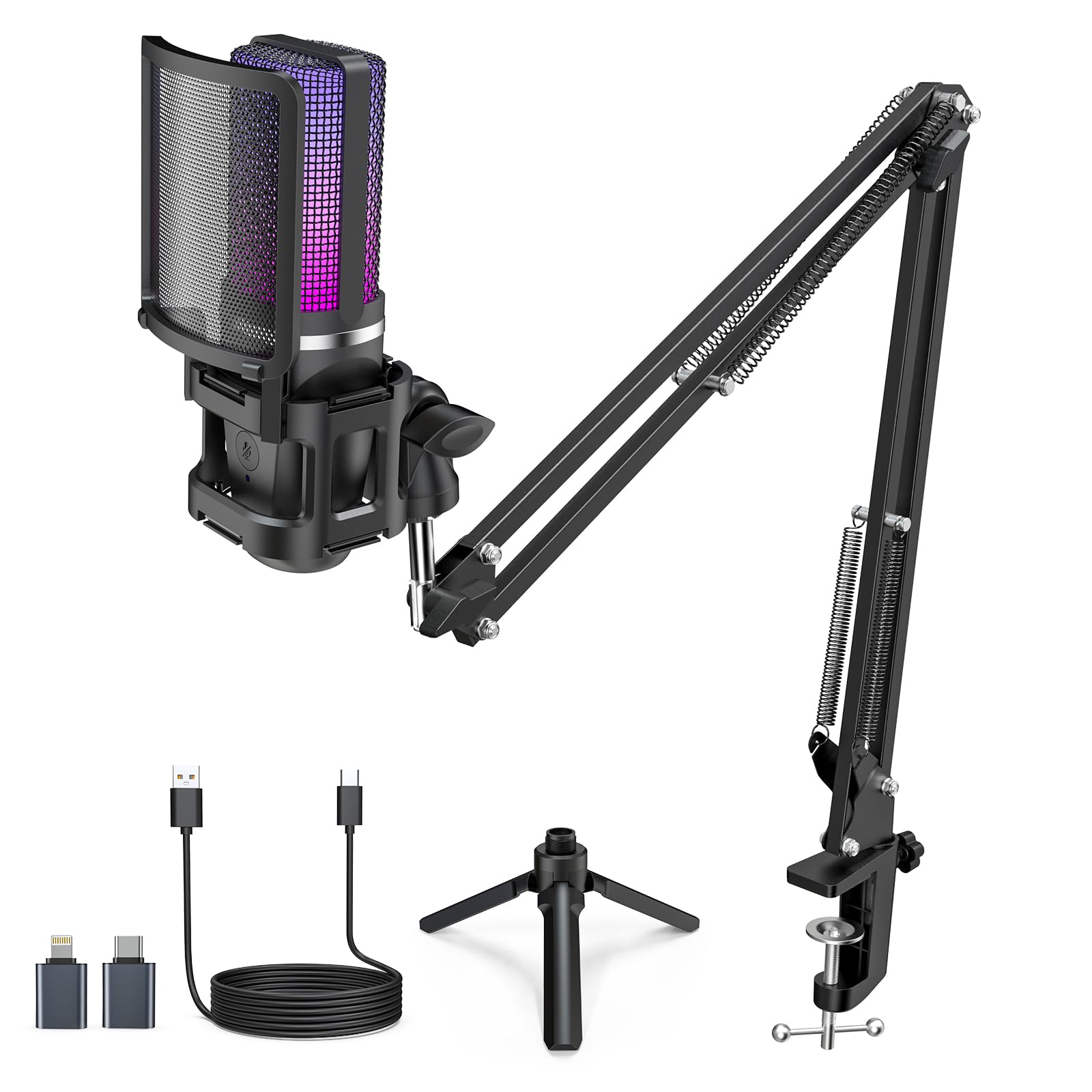
| ZealSound Podcast Microphone★ Best Overall | Beginners wanting a full kit | USB | Cardioid | 96 KHz sampling | Amazon |
| HyperX SoloCast 2Top Performer | Compact gaming setups | USB-C to USB-A | Cardioid | 24-bit / 96kHz | Amazon |
| MAONO PD100S | Home studio podcasters | XLR | Cardioid | 60–14kHz frequency range | Amazon |
| Razer Seiren V3 Mini | Streamers wanting room-noise rejection | USB Type-A | Supercardioid | 20Hz–20KHz range | Amazon |
| JLab Talk | Multipurpose recording with pattern options | USB-C | Four modes | 96kHz/24BIT | Amazon |
| FIFINE KS5 Bundle | Gamers wanting a mixer too | XLR/USB | Dynamic | 4-channel mixer | Amazon |
| PreSonus PD-70 | Broadcast-style voice capture | XLR | Cardioid | Dynamic broadcast capsule | Amazon |
Detailed Reviews
1. ZealSound Podcast Microphone with Noise Reduction
A USB podcasting kit that includes a boom arm, pop filter, shock mount, and phone adapters in one box.
If you want a single box that covers everything a first-time podcaster needs, this is the mic to start with. It captures voice at 96 kHz sampling, a high resolution that keeps speech detailed rather than thin, so your recordings come out full and natural. The cardioid pickup pattern listens from the front and ignores the rest, which is exactly what you want pointed at your mouth on a desk. A detachable pop filter softens the hard “p” and “b” bursts that can crack a recording, and the shock mount absorbs the low rumble from a bump on the desk.
You get a full recording kit in one box: the microphone, a scissor boom arm that extends up to 30.8 inches and rotates 360°, a desk clamp that fits surfaces up to 1.8 inches thick, a foldable tripod, a shock mount (a cradle that stops desk bumps from thumping through the mic), a pop filter (a screen that softens plosive bursts like P and B), and both a Lightning-compatible adapter and a USB-C adapter for phone recording. Setup is plug-and-play on Windows, Mac, Chromebook, PS4 and PS5, and it works as a mobile mic without buying a separate adapter. The manufacturer’s spec sheet lists 110 db of audible noise, which is on the higher side, so the built-in noise reduction matters here — it helps tame everyday background hiss. Compared with the PreSonus PD-70, which lists an audible noise rating of 80 db, this one leans harder on its noise-reduction feature.
Buyers report it is a capable entry-level mic for beginner live streamers, and sound quality is what they mention most. The recurring gripe is the boom arm: owners mention that “after a while the boom mic arm that it came with broke, but it lasted 1.5+ years.” Some also note the included USB cord can introduce a faint static, and swapping to a better cable cleared it right up. Neither is a dealbreaker for a starter rig, but they are worth knowing. With a 4.4-star rating across 900+ reviews, this is a solid value pick if you want to be recording the same day you unbox it.
What You Unbox
- Boom arm, tripod, pop filter, and shock mount all included
- Lightning and USB-C adapters for phone recording from the start
- Zero-latency 3.5mm headphone monitoring for real-time voice checks
- One-touch mute with a large red indicator you can see at a glance
Where It Slips
- Higher audible noise rating of 110 db leans on the noise-reduction feature
- Boom arm has been reported to give out after extended use
- Included USB cord can cause slight static; a better cable fixes it
Best for: First-time podcasters and streamers who want a ready-to-record bundle with no add-ons to buy.
Look elsewhere if: You plan to rely heavily on the desk stand alone, since some users found the mounting piece hard to detach from the boom arm.
2. HyperX SoloCast 2 – Gaming USB Condenser Mic
A USB-C condenser with a built-in pop filter and internal shock mount that fits under a monitor.
The SoloCast 2 is built for the desk of a gamer or streamer who does not want a full arm-and-boom rig. It records at 24-bit / 96kHz, which is high-resolution capture that keeps voices full and rounded rather than flat. The cardioid pattern pulls sound from the front and cuts the sides, so keyboard clatter and rear speakers stay out of your feed. A built-in foam pop filter and a suspension system that acts as an internal shock mount both come standard, so knocks on the desk do not bleed into the stream.
Tap-to-mute is where this design quietly excels — a light tap cuts the mic, and an LED shows when it is live. The compact tiltable stand sits under a monitor without eating your workspace, and the threaded base takes standard 3/8″ and 5/8″ mounts for anyone adding a boom arm later. Customers note clear, natural sound up to 25-30 feet away, with the trade-off being that it is very sensitive from the start. This is a case where the frequency response difference matters: against the ZealSound’s 96 kHz, the SoloCast 2’s 20 KHz response is a narrower band, but it is still plenty for voice. The tighter focus on the spoken range is actually a benefit if you are recording speech all day rather than music.
The recurring gripe is that “the mic is very sensitive — picks up background noise even with Discord suppression.” A high-pass filter (a setting that cuts low rumble) built into the HyperX NGENUITY software helps, but room treatment or a boom arm closer to your mouth does more. Fans and fridges can sneak in if you sit far from the mic. That is the honest trade for a mic this clear and open. Reliability is what earns its keep — owners lean on it long term, and the build holds up to daily use. It sits at 4.6 stars across 800+ reviews, one of the strongest scores in this group.
Where it shines: The all-in-one design — pop filter, shock-mount-style suspension, tiltable stand, and mic-arm threads are all built in, so there is nothing else to buy for a quick setup. For comparing sizes, the SoloCast 2 is far more compact than the ZealSound, measuring 53 x 1.52 x 1.7 inches versus the ZealSound at 16.65 x 7.95 x 26 inches.
Worth grabbing if: You stream or game at a desk and want clean voice capture in a footprint that disappears under a monitor.
Think twice if: Your room is loud and untreated — this mic will faithfully capture the fan noise you’d rather it ignored.
3. MAONO PD100S XLR Podcast Microphone

An all-metal XLR dynamic mic with a 60Hz–14kHz range tuned for warm, centered voice.
The PD100S is a dynamic XLR microphone, which means it uses a moving coil instead of a condenser element — a design that naturally ignores more room sound. Its frequency range runs from 60Hz to 14kHz, tuned to sit your voice warm and centered in the mix. A cardioid pattern with a “talk to the mic top” pickup style keeps the focus on you. Inside, a double-layer pop filter and noise-isolation tech tame the hard plosive bursts that can ruin a take. Because it is XLR, it needs an audio interface or mixer to connect — the trade-off for better isolation is one extra piece of gear.
Owners describe it as a professional-feeling mic that punches above its price. The all-metal body is the most-praised single trait, and the value for money comes in right behind. Reviewers point out that it handles spoken word well — some compare it to a well-known broadcast mic that costs several times more. The included boom arm and a 6.56-foot XLR cable mean you can set up without extras. Compared with the PreSonus PD-70, this one has a slightly lower frequency ceiling at 14 kHz versus the PD-70’s tailored response, but both lean warm for voice. For live streaming and podcasting, it holds its own.
The honest catch is that the sound quality earns mixed marks — some find it shines with a bit of EQ tweaking, while others note that without EQ it is good but not spectacular. Owners using it with a Fethead-style inline preamp report it gets noticeably louder and cleaner, which points to it wanting a little more gain than some interfaces provide. The build and reliability, however, are not in question. Its 4.5-star rating across 800+ reviews reflects a mic that buyers trust to last.
The case for a dynamic: If your room echoes, a dynamic XLR mic like this one rejects far more of that echo than a condenser. The 600-ohm impedance is a standard spec that plays well with most audio interfaces and mixers. Shoppers say: “Very good product! Great construction. Awesome sound quality.”
One more thing: Budget in an interface if you do not own one — the PD100S is XLR-only, so a USB port alone will not connect it.
Reach for this if: You already own an audio interface and want a metal-bodied dynamic mic that sounds warm on voices.
Skip if: You want to plug into a laptop and start recording with no extra hardware.
4. Razer Seiren V3 Mini USB Microphone

A USB condenser with a supercardioid pattern that rejects keyboard and mouse noise.
The Seiren V3 Mini uses a supercardioid pickup pattern, which is a tighter version of the standard cardioid — it listens in an even narrower front-facing cone. That tighter focus is why typing and mouse clicks tend to stay out of your feed. A custom condenser capsule captures fine detail at the higher frequencies, so your voice keeps its crispness even when you speak quietly. It connects over USB Type-A and runs on a 20Hz–20KHz frequency range, covering the full span of human hearing. There is a built-in shock absorber in the tiltable stand to absorb accidental knocks, and the stand detaches when you want to mount it on a boom arm.
Setup is genuinely plug-and-play. You connect the USB cable to a PC and it works with Discord, OBS Studio, and XSplit without drivers. A tap-to-mute sensor sits on top, and an LED indicator tells you at a glance whether the mic is live. Razer Synapse software opens up studio-level sample rates and separate volume mixes for playback and your audience. Across 1,500+ reviews it holds a 4.6-star rating, making it the most-reviewed pick in this group and the crowd favorite on score and volume combined.
The mixed note is the noise-cancellation feature. Some owners find it superb while others report it barely works — which likely depends on how much room noise is already present. A supercardioid mic (a pickup pattern that listens mostly to what is directly in front) helps by its nature, but it is not a replacement for treating a noisy room. The trade-off for the tight pattern is that you need to stay on-axis with the mic; move too far off to the side and your voice drops away. That is a reasonable trade for clean rejection of keyboard clatter. Owners also praise its compact size and the responsive mute, and plenty call it a solid mic for the money.
Why It Wins
- Supercardioid pattern suppresses keyboard and mouse noise better than a standard cardioid
- Compact footprint sits under a monitor with room to spare
- Plug-and-play with Discord, OBS, and XSplit — no drivers
- Detachable stand converts to a boom-arm setup
What to Weigh
- Noise cancellation gets inconsistent marks from buyers
- Tight pattern means you must stay close and on-axis
- USB Type-A only, so newer USB-C-only devices need a cable swap
Made for: Streamers and gamers who want a small, tidy mic that keeps desk noise out of the broadcast.
Not ideal for: Anyone recording from across the room — the tight pickup expects you to stay close.
5. JLab Talk USB Microphone

A USB condenser with cardioid, omnidirectional, stereo, and bidirectional modes in one body.
The JLab Talk is the flexible one. It carries three studio-quality condensers and records at 96kHz/24BIT, a resolution that keeps your file detailed and dynamic rather than squashed. The headline feature is its four directional pattern modes — cardioid, omnidirectional, stereo, and bidirectional — each suited to a different job. Cardioid for solo voice, omnidirectional for a full-room meeting, stereo for music, and bidirectional for a two-person interview across a table. A 20Hz–20kHz frequency range covers the whole audible spectrum.
Control is straightforward. A gain knob handles sensitivity, a volume control sets loudness, and a 3.5mm AUX input gives you zero-latency monitoring so you hear yourself in real time. The 6.5-foot USB/USB-C cable plugs straight into a device with no drivers needed. There is also a 5/8″ threaded input for mounting to a camera tripod or other stand — handy if you film as well as record. At 9 db of audible noise, it runs very quiet on paper.
The honest trade-off is durability. Reports surface of this mic breaking after about nine months of use, so it is not the one to pick if you expect to hand it down. Sound quality also earns mixed feedback — some find it very good, while others hit reverb or echo issues in a room that is not treated. The four patterns are genuinely useful, but the echo problem means a soft furnishing or a closet recording setup does more for this mic than any setting will. It holds a 4.2-star rating across 500+ reviews, which reflects plenty of happy owners alongside those durability notes.
Pattern flexibility is the draw: Few mics in this price range give you cardioid, omnidirectional, stereo, and bidirectional in one body. If you switch between solo podcasts and two-person interviews, that alone justifies picking this over a single-pattern mic.
Best pick for: Creators who record more than one kind of audio and want pattern options without buying multiple mics.
Consider another option if: You want a mic that will still be working a decade from now — durability is the weak spot here.
6. FIFINE KS5 Gaming Microphone Set with Mixer

A dynamic XLR/USB mic paired with a four-channel mixer with faders, mute, and headphone monitoring.
The KS5 answers a different question than the other mics here — it asks if you want a full broadcast desk, not just a microphone. It pairs a dynamic XLR/USB mic with a gaming audio mixer that gives you a physical volume fader, individual mute control, and headphone monitoring. You can run the mic over XLR for cleaner isolation or over USB for a simpler plug-and-play path. The mixer has four channels and five kinds of RGB lighting effects that can stay static or flow. There is a voice changer built in for entertainment, and the whole set works with Xbox consoles, OBS, and desktop speakers.
What wins buyers over here is the value of the bundle — a dynamic mic and a control mixer together, and value for money is the most-praised thing by a clear margin. Buyers report clean, full mic sound once the gain is set right, with physical faders that make live adjustments fast. A buyer put it plainly: “The controls are easy to use and the sound quality is great.” If you compare it to the HyperX SoloCast 2, this setup has a studio-style mixer and a dynamic XLR option; the SoloCast 2 is a lighter, more compact desk mic with far less to set up.
The honest catch is the controls themselves. Some owners note the XLR mic volume can run too low at times, and there is a quirk worth noting: the RGB, mute, monitoring, and volume functions only work over USB, not XLR. That is a design limitation rather than a fault, but it matters if you plan an all-XLR signal chain. Weighing all of that, the durability has held up for owners past a year of daily use, and the setup stays easy. It sits at 4.6 stars across 800+ reviews.
Where the mixer earns its keep: Physical faders, mute controls, and RGB on the mixer match what you see on a full studio desk, at a fraction of the outlay. The dynamic capsule also brings natural noise rejection to your voice.
Ideal for: Streamers and gamers who want the tactile feel of faders and mutes rather than software-only control.
Less suited for: Anyone who wants an all-XLR signal path — the mixer’s key controls only function over USB.
7. PreSonus PD-70 Dynamic Vocal Microphone

A cardioid dynamic XLR mic with a tailored vocal response and an included windscreen.
The PD-70 is built for the mic-and-interface podcaster who wants voice to sit in front of everything else. It is a dynamic broadcast microphone, so it captures your voice with a tailored frequency response tuned for clarity on vocals, guitars, basses, and drums. The cardioid polar pattern rejects off-axis sounds for better isolation, which is why this type of mic shrugs off room echo that flattens a condenser. An included windscreen softens plosives and harsh consonants without you needing an external pop filter. It works with any audio interface that has a microphone preamp, and its 350-ohm impedance plays well with a wide range of gear.
Owners describe the quality as outstanding for the price, and sound quality comes in a close second, with people comparing it to a well-known broadcast mic that costs several times more. Its metal construction is praised for feeling solid, and buyers who have leaned on it for two years or more keep it as a daily driver. It fits a popular SM7B-style windscreen, which is a nice bit of crossover for anyone with that setup already. Against the HyperX SoloCast 2, which lists an audible noise rating of 79 db, the PD-70 lists 80 db — a hair higher but the same general class, and the dynamic design means far less room sound reaches your file in practice.
The honest catch is that some owners describe it as surprisingly heavy, which matters for extended handheld use. It also needs real gain: paired with a basic USB interface, users report it can push a preamp hard and a small inline preamp makes a clear difference to loudness and clarity. Treat it as a mic that wants proper gain staging, not a quick plug-and-go. There is also some mixed feedback on reliability in a minority of cases. Overall it holds a 4.6-star rating across 400+ reviews from buyers who wanted broadcast-quality voice on a budget.
Why broadcasters pick it: A dynamic capsule with a cardioid pattern and a metal body is the classic combination for spoken-word recording, and the included windscreen means no add-ons to start. If you record in a normal room without acoustic treatment, this design does more for you than a condenser will.
Best suited to: Podcasters and live streamers with an audio interface who want a solid metal dynamic mic that flatters voice.
Think again if: You want a lightweight handheld mic or a USB plug-and-play path — this one is heavy and needs an interface.
Know the Specs
Connection: USB versus XLR
A USB microphone has its own audio converter built in, so it plugs straight into a computer or phone and needs no extra gear. An XLR microphone sends an analog signal over a three-pin cable and needs an audio interface or mixer to convert it. USB tends to be simpler and cheaper to start with; XLR tends to give you more control and better isolation from room noise. A USB mic needs no interface, so you can record the day it arrives.
Pickup Pattern: What the Mic Hears
A pickup pattern describes the direction the microphone listens best. Cardioid focuses on the front and ignores the rear, which is why it is standard for voice. Supercardioid is a tighter version of cardioid, aimed even more narrowly at one speaker. Omnidirectional hears all around, which suits a group in one room. Choosing the right pattern is often the difference between a clean file and one full of keyboard noise.
Sampling Rate in kHz
Sampling rate describes how many times per second the mic measures your voice, written in kHz. A higher number captures more detail at higher frequencies, so speech keeps its sparkle instead of sounding dull. A mic rated at 96 kHz captures fine detail, while one rated at 20 kHz covers the full range of human hearing. For spoken voice, anything in that 20 kHz range is plenty; the higher figures help with detail and headroom.
Audible Noise in db
Audible noise in db measures how much background hiss the microphone itself adds to your recording. A lower number means a quieter floor, so your voice stands out more cleanly. This is why microphones with built-in noise reduction can still work well even when their noise figure runs higher. Pairing a mic with a quiet room and proper gain hygiene always helps.
Common Questions
Will a USB mic work on my phone as well as my computer?
Do I need an audio interface to use an XLR microphone?
What is the difference between cardioid and supercardioid?
Why does my recording hum or pick up my keyboard?
Is a dynamic mic better than a condenser for podcasting?
How long does the included boom arm last?
Can I hear my own voice while recording, without a delay?
Do these budget mics need software or drivers?
Which pickup pattern is best for recording two people in one room?
Will a budget mic sound good enough for a real podcast?
The Bottom Line
For most buyers, the best pick among these mics on a budget is the ZealSound Podcast Microphone because it hands you the mic, boom arm, tripod, pop filter, shock mount, and phone adapters in one purchase, so you are recording the day it arrives. If you stream at a desk and want the cleanest voice-to-noise ratio in a footprint that disappears under a monitor, the HyperX SoloCast 2 is the one to reach for. And if you record in a room you cannot treat and already own an audio interface, the PreSonus PD-70 dynamic mic puts your voice firmly out front.
How we choose
We do not accept paid placement. Every pick is matched to a real buyer and a real use-case; we do not hands-on test units.
Sources
Specifications: manufacturer listings and product documentation. Review insights: verified customer reviews, as of October 2026. Pricing: not shown on this page (it changes often); check the current price via the retailer link.
As an Amazon Associate, Aappliancez earns from qualifying purchases. This does not affect which products we feature.