Disclosure: Some links in this post are affiliate links. As an Amazon Associate I earn from qualifying purchases, at no extra cost to you. Learn more
Specs are compiled from manufacturer listings and verified buyer reviews and can change over time — please confirm the key details on the product page before buying.
Buying a Micro ATX case depends on one question: how big a graphics card and cooler do you want to fit without losing half your desk? Every pick below lists its exact motherboard support, GPU clearance (the maximum graphics card length it fits), and radiator size (the liquid-cooling radiator it holds), so you can match it to parts you already own. The Lian Li A3-mATX takes the top spot for one reason: it fits a 415mm graphics card and a 360mm radiator into a 26.3L shell (26.3 litres of internal volume), so a full-size build still sits small on your desk. It also holds 4.5+ stars from buyers who have built in it.
This guide is built by comparing the manufacturers’ published specifications and the patterns across verified customer reviews, so you get each pick’s real strengths and trade-offs instead of marketing spin.
Here is the honest rundown of the best MATX Cases you can build a PC around today.
Top Picks


How To Choose The Best MATX Cases
Start with the parts you already own, not the photos. A Micro ATX case is just a box with a fixed set of clearances, and if your graphics card is longer than the number printed on the box, it will not go in. The picks below range from a 26.3L cube to a roomier tower, and each one solves a different problem.
Measure your graphics card first
Graphics card length is the number that kills builds. The Lian Li A3-mATX takes cards up to 415mm, the JONSBO Z20 up to 363mm, and the Cooler Master N200 up to 355mm. The Okinos Aqua 3 stops at 320mm. If your card is a triple-fan model, check that figure before anything else.
Decide how much cooling you actually need
Air cooling is simpler and one less thing to install. A liquid all-in-one cooler, often called an AIO, needs a radiator mount that matches its size. The ASUS Prime AP201 and the Lian Li A3-mATX both take a 360mm radiator, while the MONTECH AIR 100 tops out at 280mm at the front. Check the radiator size your cooler needs against the case’s mount before buying either.
Plan for cable room, not just component room
Every case here fits the parts; the difference is how much space is left behind the motherboard tray for cables. The ASUS AP201 gives you a 32mm gap for tucking cables away. Tight cases like the Thermaltake View 170 ask you to route cables before you seat the motherboard. For a first build, pick a case with a wide cable gap like the ASUS AP201’s 32mm.
Side-by-Side Comparison
| Model | Best For | Max GPU | Radiator Support | Fans Included | Amazon |
|---|---|---|---|---|---|
| Lian Li A3-mATX★ Best Overall | Big parts, small shell | 415 mm | 360 mm | None | Amazon |
| MONTECH AIR 100 ARGBBest Value | First build with lighting | 330 mm | 280 mm | 4 x 120 mm ARGB | Amazon |
| Okinos Aqua 3 | Showcase glass on a budget | 320 mm | — | 3 x 120 mm ARGB | Amazon |
| Thermaltake View 170 TG | Dual glass, AIO builds | 340 mm | 280 mm | 3 x 120 mm ARGB | Amazon |
| Cooler Master N200 | Old-school storage and optical bays | 355 mm | 240 mm | 2 x 120 mm | Amazon |
| ASUS Prime AP201 | All-mesh, tool-free, quiet builds | 338 mm | 360 mm | None | Amazon |
| JONSBO Z20 | Carrying a build to a LAN | 363 mm | 240 mm | — | Amazon |
Detailed Reviews
1. Lian Li A3-mATX PC Case
Our pick — 4.5+★ from 450+ verified ratings; the strongest balance of quality and price.
A 26.3L cube that swallows a 415mm graphics card and a 360mm radiator without blinking.
That number is the whole argument. Cards up to 415mm long go in here, which is 330mm more headroom than the MONTECH AIR 100 allows, so the biggest triple-fan models still clear the side panel. You get this in a shell measuring 17.4″D x 7.63″W x 12″H, so it sits narrow on a desk instead of sprawling.
What wins people over is the look. The walnut front panel gets more praise than any other feature, and it softens a mesh box that would otherwise read as plain black hardware. Buyers report steady thermals too — one build with a Ryzen 9800X3D and an RX 9070XT stayed under 76°C while gaming. The steel mesh side and top panels are doing that work. There are no fans in the box, so budget for your own.
The catch is cable management, and it is the one complaint that shows up again. Behind the motherboard tray the space runs thin, and buyers describe it as tricky to work with, though the mesh hides the mess once panels go on. Experienced small-form-factor builders shrug it off; first-timers should watch a build video first. The panels also flex slightly when you press on them, which is the trade-off for the slim frame.
What earns the top spot
- 415mm GPU clearance — the longest figure in this lineup
- 360mm radiator support for serious liquid cooling
- Walnut front panel that buyers keep bringing up
- 26.3L footprint that stays narrow on a desk
- Holds 4 internal bays and up to 10 x 120mm fans
What to plan around
- No fans included — add your own airflow budget
- Cable management behind the tray is a squeeze
- Perforated panels flex a little under finger pressure
Reach for this if: you have a long graphics card or a 360mm radiator and want a small, good-looking box to hold it.
Look elsewhere if: this is your very first build and you want slack in every corner for cables.
2. MONTECH AIR 100 ARGB Case
Four ARGB fans arrive already wired, so your first build lights up without buying a single fan.
That bundle is the reason this case earns its spot. Four pre-installed 120mm ARGB fans with a lighting controller mean airflow and glow from day one, controlled by a button on the case or software on a compatible motherboard. Build quality is the thing buyers talk about most, and it earns the most praise in this lineup, with value for money right behind it. The swivel tempered-glass door and quick-release mesh front make it easy to get inside and clean.
The layout suits a normal-sized build. It takes a graphics card up to 330mm, a CPU cooler up to 161mm tall, and an ATX power supply up to 160mm long. Radiator room is a 280mm unit at the front or a 240mm on top. Pre-installed cable loops and Velcro straps give your power and data cables a path, which takes the guesswork out of the back of the case.
Here is the honest bit: the included fans keep things cool but a few builds note they could push harder and run a touch loud at full speed. Cable management is workable rather than generous, so a modular power supply helps. Neither one is a reason to walk away — it is the usual give-and-take of an entry-level case with fans thrown in.
Where it shines: the swivel glass door with a handle plus tool-less panels make swapping parts a five-minute job, and the magnetic mesh front pops off for dusting.
The realistic catch: the fans are decent rather than powerful, so a heavy overclock build may want a stronger set down the road.
Best first build: anyone who wants lights, glass, and four fans without adding a single part to the order.
Think twice if: you are planning a 360mm radiator — this one tops out at 280mm.
3. Okinos Aqua 3 Micro ATX Case

Two full panes of glass wrap the corner, so your parts are the show, not the case.
Glass covers both the front and the side for a 270° view, with diamond-cut angles where they meet. Three 120mm ARGB fans ship pre-installed, and a four-port ARGB controller at the back syncs them with your motherboard or runs them from a button. That fan count is a third of what the Lian Li A3-mATX can hold, but you get them included rather than added later.
Inside it takes a graphics card up to 320mm and a CPU cooler up to 164mm tall. It is the shortest card clearance in this lineup, so measure before you commit to a long card. The front I/O is the standout on the connectivity side: two USB 3.0 ports, audio jacks, and a Type-C 3.2 Gen 2 port rated at 10Gbps, which makes moving files from an external drive quick. The top and bottom dust filters are magnetic and lift straight out.
The trade-off is thin metal. The panels flex a little, and the slot covers are punch-out style rather than reusable, though two spares come in the box. Cable room down at the bottom takes patience, and buyers suggest pulling unused modular power cables to keep airflow clear. The two glass panes give the widest view of your parts in this lineup, so handle them with care.
Built for: builders who want the glass-panel look and a fast USB-C port on the front.
Measure first if: your graphics card runs longer than 320mm — it will not fit here.
4. Thermaltake View 170 TG ARGB Case
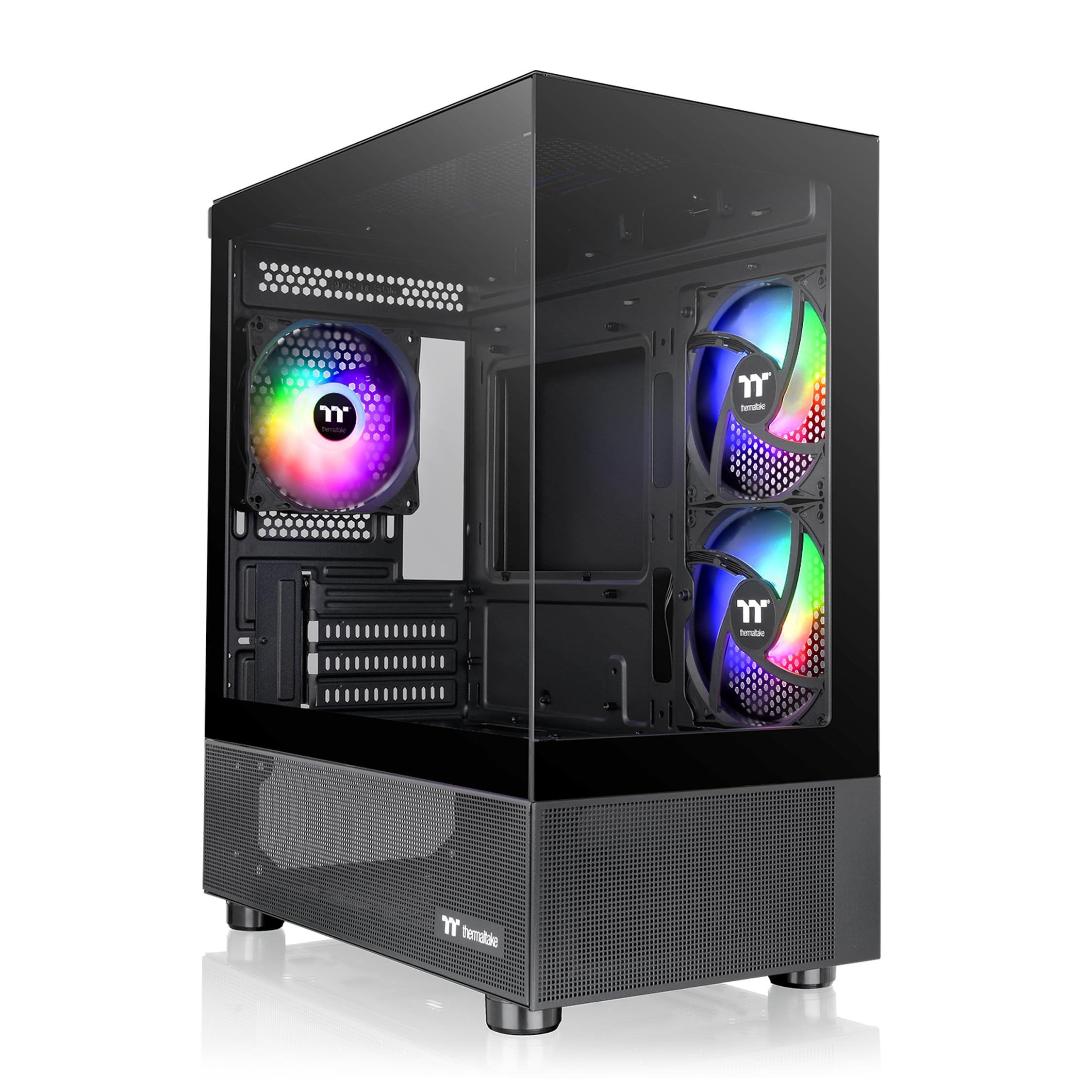
A pillarless glass corner with three ARGB fans already inside, for a build that looks like a display piece.
The glass runs from front to side without a pillar between them, so nothing cuts the view of your hardware. Three 120mm ARGB fans come pre-installed, and a 280mm radiator fits at the top. Graphics cards up to 340mm go in, which is longer than the Okinos Aqua 3 allows but shorter than the Lian Li A3-mATX’s 415mm figure. Design earns the most praise from buyers, with value right behind it.
It takes a 240mm AIO without complaint, and the top mount keeps the radiator out of your way during the build. Inside there is a roomy basement area for drives and cables. Builders like how much better it looks once the glass panels go on and the frame stops feeling light.
The hidden cost is cable routing, which is genuinely tight when a Micro ATX board is installed. The board blocks rear access, so you route cables up and over the top instead. A few builds also note there is no built-in ARGB controller and no USB-C on the front, only USB 2.0 ports. Route cables up and over the top before installing the board, since the Micro ATX board blocks rear access.
Why builders like it: the glass corner plus three included fans means the look is finished the day it is built, and 240mm AIO installs go smoothly.
Worth knowing: no front USB-C and no ARGB hub built in — you will want a motherboard with its own lighting software.
Suits you if: the glass-front-and-side look is what sold you, and you are building with a slim Micro ATX board and a 240mm AIO.
Consider the ASUS AP201 instead if: you want tool-free panels and a mesh front rather than glass.
5. Cooler Master N200 Mini Tower Case

The one case here that still has a slot for a Blu-ray drive and room for three hard drives.
Storage is what sets this case apart. It holds up to three 3.5″ hard drives and four 2.5″ solid-state drives, and it keeps a set of optical drive bays you will not find on the newer glass boxes. Two 120mm fans come pre-installed. Build quality is the feature buyers call out most, and it is the most-discussed point across its reviews by a wide margin, with appearance close behind.
The clearances are generous for a compact tower. Graphics cards up to 355mm fit — 35mm more than the Okinos Aqua 3’s 320mm limit, though 8mm short of the JONSBO Z20’s 363mm. Compared to the Okinos Aqua 3’s 320mm limit, this one leaves 35mm more room for a long card. CPU air coolers up to 160mm tall go in, and it takes a 240mm liquid cooler at the front.
It is an older design, and a couple of rough edges show. Cable room behind the side panel is modest, so a modular power supply helps you avoid a rat’s nest. The front HD audio connector is fragile, so ease the front panel off rather than yanking it. For a build that needs optical media and stacked drives, there is still nothing else quite like it here.
The storage argument
- Holds three 3.5″ HDDs and four 2.5″ SSDs in 6 internal bays
- Optical drive bays for physical media
- 355mm GPU clearance for long cards
- Two 120mm fans included from the start
The old-design tax
- Modest cable room behind the side panel
- Front audio connector is fragile when removing the panel
- No glass or ARGB lighting in this design
Pick this when: you need optical drive bays, stacked hard drives, or a no-frills box that sits quietly under a desk.
Skip the glass look only if: you want a modern showcase build — the plain metal face here is deliberately restrained.
6. ASUS Prime AP201 Micro-ATX PC Case

Every panel is a mesh screen pierced with more than 57,000 holes — this thing breathes.
The mesh is the reason people buy it. Over 57,000 precision-machined 1.5mm holes across the panels keep air moving and let you see your parts inside. It takes a radiator up to 360mm and up to six fans, so high-heat hardware has somewhere to dump that warmth. Cable room behind the motherboard tray measures a 32mm gap, which is the most generous of anything here, and tool-free side panels clip on and off without tools.
The footprint is a 33L box that still fits an ATX power supply up to 180mm long, a graphics card up to 338mm, and storage drives. Builders praise the case quality more than any other single thing, and easy buildability is close behind. Once the panels go on, this all-mesh shell runs quietly without needing high fan speeds.
Two things to know before you buy. First, 3.5″ hard drive mounting is not universal — the mounting points misalign in some setups, so plan on an adapter bracket if you have a spinning drive. Second, the bottom fan mounts sit close to a long graphics card, and there is no front fan mount. With no front fan mount and bottom mounts close to a long card, it is built for air cooling first.
Standout spec: the 32mm cable gap and tool-free panels make this the calmest build experience in the lineup, and the all-mesh shell keeps open-build temps calm too.
One honest note: if you are stacking spinning 3.5″ drives, budget for a mounting adapter — support for them is not universal here.
Made for: silent air-cooled builds where airflow and clean cable routing matter more than glass and lights.
Go a different way if: you want a tempered-glass showcase or need to fit three 3.5″ drives without an adapter.
7. JONSBO Z20 Micro-ATX Mini Tower PC Case

A 20L metal cube with a handle you can grab with one hand and carry to the next LAN night.
That handle is what separates it from everything else here. It is detachable, and the case is built from 2mm bent steel panels with a large field of square openings that double as cooling vents. It takes a graphics card up to 363mm if the rest of the hardware allows it, which is longer than the Cooler Master N200’s 355mm and shorter than the Lian Li A3-mATX’s 415mm. A 240mm AIO fits at the top at 60mm thickness, and an air cooler up to 164mm on Intel or 163mm on AMD.
Inside it runs a 4-slot layout with the power supply mounted at the bottom and adjustable through multiple gears so a long card can have the clearance it needs. Front I/O includes one USB 3.2 Gen 1 Type-A port, one USB 3.2 Gen 2 Type-C port, and audio with a mic jack. Storage is one 3.5″ drive plus two 2.5″ SSDs, or three 2.5″ SSDs. Builders call the steel rigid and free of sharp edges, and the compact size keeps the whole thing easy to lift.
The build is fiddly the first time. Bracket removal order matters, the pictorial manual takes interpretation, and the tight bottom clearance makes plugging in front-panel wiring a job to do before the motherboard goes down. A metal frame section can block a right-angle 24-pin adapter. Expect a fiddly first build — bracket order and front-panel wiring need planning before the motherboard goes in.
Take this home if: you move your PC between rooms or to a friend’s house and want a sturdy 20L box to carry it in.
Build it slowly if: this is your first PC — the assembly order and tight front-panel access reward planning before screws.
Know the Specs
GPU clearance (the length in mm)
This is the maximum length of graphics card the case will hold, measured nose to tail. It is the first number to check because it cannot be worked around — a card that is 5mm too long stays out. In this lineup the Lian Li A3-mATX goes up to 415mm, while the Okinos Aqua 3 stops at 320mm. Match this figure to the card you already own or plan to buy.
Radiator support (240mm, 280mm, 360mm)
A liquid cooler’s radiator comes in fixed widths, and the case has to have a mount that matches. A 360mm radiator needs a case built to take it, which here means the Lian Li A3-mATX or the ASUS Prime AP201. If you plan to air-cool, radiator support matters less and CPU cooler height becomes the number to watch.
Internal bays (storage room)
Bays count the drive slots inside the case for 3.5″ hard drives and 2.5″ solid-state drives. If you keep a media library, the Cooler Master N200 with 6 bays and space for an optical drive is the pick. If everything lives on NVMe drives, bay count drops way down the priority list.
Mesh vs tempered glass panels
Mesh panels (perforated metal that lets air through) keep your parts cooler and hide cables, while glass panels show off your hardware and trap a little more heat. The ASUS Prime AP201 is all mesh, so it runs quiet without spinning the fans fast. The Okinos Aqua 3 and Thermaltake View 170 use glass instead, so you can see the build. Pick mesh for cooler, quieter builds and glass if showing off your parts matters more.
Common Questions
Will my long graphics card fit in a Micro ATX case?
Can a Micro ATX case fit a 360mm radiator?
Do I need to buy extra fans for the Lian Li A3-mATX or ASUS AP201?
Is Micro ATX case size hard to build in for a beginner?
Can a Micro ATX case hold an ATX power supply?
What is the difference between mesh and glass panels for airflow?
Which Micro ATX case has the most storage room?
How much does the carrying handle on the JONSBO Z20 actually help?
Does the Okinos Aqua 3 have a USB-C port on the front?
Can a Micro ATX case take a Mini-ITX motherboard?
The Bottom Line
For most builders, the matx cases winner is the Lian Li A3-mATX because it fits the longest graphics cards and biggest radiators in this group inside a shell that stays narrow on your desk. If you want fans and lighting included without adding a thing to the order, the MONTECH AIR 100 ARGB hands you four ARGB fans from the start. And for a build that carries to a friend’s house, the JONSBO Z20 gives you a detachable handle on a 20L steel cube.
How we choose
We do not accept paid placement. Every pick is matched to a real buyer and a real use-case; we do not hands-on test units.
Sources
Specifications: manufacturer listings and product documentation. Review insights: verified customer reviews, as of October 2026. Pricing: not shown on this page (it changes often); check the current price via the retailer link.
As an Amazon Associate, Aappliancez earns from qualifying purchases. This does not affect which products we feature.