Disclosure: Some links in this post are affiliate links. As an Amazon Associate I earn from qualifying purchases, at no extra cost to you. Learn more
Specs are compiled from manufacturer listings and verified buyer reviews and can change over time — please confirm the key details on the product page before buying.
If you game on a Mac, you already know the drill: your keyboard gets you through menus, but platformers, racing games and anything with a camera feel wrong without a proper pad. The catch is that macOS treats gamepads differently from Windows, so a controller that plugs in and works instantly on a gaming PC can sit there doing nothing on your Mac until you find the right button combo. The seven picks below all genuinely connect to Mac hardware over Bluetooth or a cable, and each one solves a different problem — drift-proof sticks, retro layouts, tiny carry size, or budget pricing.
This guide is built by comparing the manufacturers’ published specifications and the patterns across verified customer reviews, so you get each pick’s real strengths and trade-offs instead of marketing spin.
Start with your hands and your game library rather than the spec sheet, because the shape of the pad matters more than any single number. Below, every controller is matched to the Mac gamer it actually suits, from drift-free Hall Effect sticks to pocketable retro pads, so you can find the best Mac Bluetooth Controller for how you really play.
Top Picks


How To Choose The Best Mac Bluetooth Controller
Mac gaming has one quirk that trips up almost every first-time buyer: Apple’s Bluetooth stack is pickier than Windows about how a gamepad announces itself. Some pads pair the moment you hold the power button, others want a specific two-button combo you will only find in a manual. Before you look at stick types or battery numbers, confirm the pad officially lists macOS, because that single line decides whether setup takes ten seconds or ten frustrated minutes.
Hall Effect sticks are the anti-drift upgrade
Your cursor creeping across the screen on its own, even with your thumb off the stick, is called drift — and it is the number one reason gamers replace a controller. Ordinary joysticks cause it because two physical contacts rub together every time you move the stick, and over months that wear carves a dead spot. Hall Effect sticks (joysticks that read position with a magnetic field instead of touching parts) remove that contact, so nothing rubs and drift never gets a chance to start. This is the single most valuable spec on this list, and every controller below that carries it is worth the extra look.
Connection method decides your lag
Bluetooth is the easiest way to link a pad to a Mac because there is no cable and no dongle to lose. A 2.4 GHz dongle (a tiny USB receiver that talks to the pad on its own private signal) trades a little convenience for lower, steadier latency, which matters in fighting games and shooters. USB-C wired is the fallback that always works and never needs charging.
Layout and size decide comfort
Symmetrical sticks, where both thumbsticks sit side by side at the bottom like a PlayStation pad, feel natural for retro and fighting games. Offset sticks suit shooters. And pad weight matters more on a Mac than you would think, because many people play at a desk with the pad resting on the same surface as the keyboard. A lighter pad is easier to pick up and stash; a heavier one often feels more solid in your hands.
Side-by-Side Comparison
| Model | Best For | Connectivity | Stick Type | Buttons | Amazon |
|---|---|---|---|---|---|
| PlayStation DualSense — Midnight Black★ Best Overall | Mac owners who also own a PS5 | Bluetooth, USB Type-C | Standard thumbsticks | 14 | Amazon |
| abxylute C5PBest Value | Drift-free sticks on a tight budget | Bluetooth, 2.4 GHz dongle, USB-C | Hall Effect sticks & triggers | — | Amazon |
| Hyperkin “Cadet” | Retro NES play at a distance | Bluetooth via included adapter | Standard d-pad layout | 16 | Amazon |
| JDDWIN LED Wireless | Someone new to Mac pads on a budget | Bluetooth, USB wired | Hall Effect joystick | 16 | Amazon |
| 8Bitdo SN30 Pro — Gray | Pocketable retro pad for Mac and Pi | Bluetooth, USB-C | Hall Effect joysticks | 16 | Amazon |
| 8Bitdo SN30 Pro — Crystal Purple | 2D games and everyday Mac use | Bluetooth, USB-C | Hall Effect joysticks | 16 | Amazon |
| Kuitmor Hello Kitty Switch Pro | A MacBook desk that values style | Bluetooth, USB-C | Hall Effect joysticks & triggers | 16 | Amazon |
Detailed Reviews
1. PlayStation DualSense™ Wireless Controller – Midnight Black
Our pick — 4.5+★ from 49,500+ verified ratings; the strongest balance of quality and price.
Fourteen buttons, haptics you can feel, and a Mac that treats it like a natural fit.
The DualSense is the rare pad that feels like a console accessory on a Mac rather than a compromise. Its standout feature is the pair of adaptive triggers — motors inside each trigger that push back against your finger with varying levels of force and tension, so a bowstring tightens and a brake pedal stiffens as you press. Ordinary controllers give you a spring that feels identical every time; here the trigger itself becomes part of the game. Haptic feedback (physically responsive feedback sent to your hands) works the same way, delivering in-game actions that a rumble motor alone cannot match.
For Mac owners who also own a PS5, this is the obvious choice, because one pad covers both machines via Bluetooth or the USB Type-C cable. It carries a built-in microphone for online chat and lets you plug a headset straight into the 3.5mm jack, with a dedicated mute button to kill voice capture without digging through menus. Fourteen buttons is the most of any pick here — the Hyperkin “Cadet” sits at 16 but that count includes its retro layout, while the DualSense spreads its extra controls across modern shoulders, sticks and share keys.
Build quality is what wins people over, followed closely by color. The Midnight Black shell makes the buttons look clear and bright, like drops of water on dark glass, and the whole thing sits in your hands with a texture that reads as premium rather than plastic. What one owner calls out is endurance: as buyers report, the controller “One owner reports two years of use with zero stick drift.” Treat the thumbsticks with a little respect, though. The standard potentiometer sticks here can still wear into drift over a long life — the recurring note across the pad’s long review history — and the battery life sits in the middle of the pack. Almost every complaint is a nitpick against an enormous base of happy owners.
grip that stays put
- Haptic feedback and adaptive triggers deliver force and tension you can actually feel per action
- Built-in mic, dedicated mute button, and a 3.5mm headset jack for voice chat without extra gear
- Connects to Mac via Bluetooth or the USB Type-C cable in the box — no dongle to lose
- Midnight Black finish holds up over years of desk use
needs charging often
- Stick drift over a very long life is the single most frequent gripe in the pad’s review history
- Battery life sits in the middle — expect to charge it, not to forget about charging it
daily driver: Mac gamers who want console-grade triggers and haptics and already own a PS5 to share it with.
budget alternative: if your main worry is drift over many years — the abxylute C5P and both 8Bitdo SN30 Pro models use Hall Effect sticks specifically to avoid it.
2. abxylute C5P Wireless Gaming Controller
The drift-proof bargain that makes costly pads look overrated.
Hall Effect sticks and triggers, on a pad that costs less than most wired Xbox knockoffs — that is the abxylute C5P in one line. Those sticks use magnetic sensing instead of physical contact, rated for 5 million stick cycles, so the stick drift that kills standard controllers never develops. It also crams in features you normally pay much more for: three connection modes (2.4 GHz dongle, Bluetooth, or wired), programmable MR and ML back keys, and a symmetrical console-style layout that suits retro and fighting games.
Size is where it swings the other way from the DualSense. At 3.94 x 0.79 x 7.09 inches and 0.36 kg, it is dramatically more compact than the PlayStation pad’s 8.27 x 7.48 x 2.87-inch body — roughly a 2.1x gap in footprint — so it tucks beside a MacBook or slips into a bag far more easily. The trade is that it feels light in the hand. Almost every owner flags the same thing at first, then stops caring once the sticks prove accurate. What wins people over is overall quality and value, and the smooth, precise feel of those Hall Effect sticks is where it delivers most.
What rarely gets mentioned is the depth of device support: PC, Switch, PS3, PS4, Android, iOS, Steam, and macOS all ride along on the same three-mode connection. One warning in the listing is worth repeating — it is emphatically not made for Tesla, and it will not talk to Xbox consoles. A second caveat is the dual-purpose back buttons, which can lock out other inputs when held on certain consoles; fine for most gamers, awkward for one specific use. For a compact Mac pad around three-quarters of the price of the DualSense, the fundamentals win easily.
pairs with phones: Hall Effect joysticks and triggers at this tier is the whole story — no more replacing pads because the cursor creeps on its own.
fiddly first setup: plug the dongle in for PC or Mac when latency matters most, and keep Bluetooth for couch use.
mobile gamer you want the drift-proof bits without paying the naming tax, and a pad small enough to live in a laptop bag.
desktop only you need Xbox support or a heavier, denser feel in your hands.
3. Hyperkin “Cadet” Wireless Controller for NES/PC/Mac/Android

A rectangle that remembers exactly how a 1980s controller felt.
If your Mac is mostly an emulator machine, the Hyperkin “Cadet” scratches an itch no modern pad touches. It is a faithful NES-shaped rectangle, built to the ergonomics of the original brick, and it runs on a built-in rechargeable lithium-ion battery (via Micro port) for up to 6 hours of continuous gameplay per charge. Sixteen buttons cover every NES input plus the shoulders you need on PC and Mac emulators. The included Bluetooth adapter pushes its range out to 30 feet, so you can sit back on the sofa while the Mac stays at the desk.
In use the pad disappears the way a good retro controller should. Responsiveness is the standout — Punch-Out timing and Super Mario jumps land spot on, and the d-pad and buttons feel comparable to the originals. It also occasionally surprises: one buyer notes it “pairs in seconds” and works through objects from 20 feet away, with a second unit ordered so two people can play together. Setup is genuinely fast when it decides to behave — the pairing happens the moment you press the button, no fiddling.
What sours the experience is the adapter. Some owners mention the Bluetooth dongle does not fit an original front-loader NES port cleanly and wobbles loose, which is a problem if you are also playing on original hardware. On Mac and PC emulators the same dongle plugs into USB and behaves, so the flaw is largely a NES-hardware story rather than a Mac one. Pairing two controllers is also fiddlier than it should be, with tiny buttons that need a fingernail. If you are Mac-only and want the NES feel, this is a good buy — just expect to spend a couple of minutes on first setup.
NES fans: Mac emulator players who want a physical NES pad in their hand, not a pale imitation.
modern shooters: you plan to use it primarily with an original front-loading NES, where the dongle fit is a known weak point.
4. JDDWIN LED Wireless Gaming Controller

A light-up pad that throws in motion, audio and a speaker for a friendly price.
On paper this looks like a bargain grab-bag: a 3-axis gyroscope plus 3-axis accelerometer for 6-axis motion sensing (tilt and twist controls that track how you move the pad), a multi-color light bar that stands in for player identity, dual vibration motors, a built-in speaker, and a 3.5mm TRRS stereo headphone jack (a standard round audio plug for wired headphones). Bluetooth wireless reaches up to 10 meters, so you can sit across the room from your Mac, and there is USB wired play-and-charge if you would rather skip the battery altogether. The Hall Effect joystick is the headline upgrade over a bog-standard pad, going some way toward keeping drift off the table.
Two things to know before you buy. The controller has a speaker but no microphone, so voice chat needs an external headset plugged into that 3.5mm jack (Apple headphones, annoyingly, will not work). And the light bar plus speaker only matter on games that actually use them — on Mac emulators they are decorative. Buttons number 16, matching most modern pads, and the shape is easy on the hands. The 3.5mm jack is the underrated feature for anyone who wants their game audio coming out of the pad rather than the Mac’s own speakers.
Compatibility is the honest catch. Reviewers split down the middle here — some never have a problem, others fight connection dropouts or find the pad shuts itself off after a minute or two. It is not a Mac-specific complaint, since the pad was built around PS5, but it is a pad that rewards patience on setup day.
light-up shell: the 3.5mm jack and speaker mean game audio can come from the pad itself, which is rarer than it should be at this tier.
stiff triggers: pairing can be fussy on first setup, and there is no microphone — plan for an external headset.
RGB lovers: Mac gamers who want motion sensing and audio-in-controller features without spending much.
tournament play: anyone who wants plug-and-play reliability first and features second — the 8Bitdo SN30 Pro is safer on that front.
5. 8Bitdo SN30 Pro Gamepad

A pocket-sized classic that recharges in about the time it takes to make coffee.
Eighteen hours of play on a 1-2 hour charge — that is the number that keeps the gray SN30 Pro in people’s bags. The 480mAh rechargeable lithium-ion battery is small, but the pad sips power, so it holds out for a week of light retro gaming between top-ups. Physical size is deliberately tiny, designed to slip into a pocket, which makes it the obvious companion for a MacBook on the move. Hall Effect joysticks are the other upgrade, giving you higher precision and sensitivity without the stick drift that eventually kills cheaper sticks.
Apple compatibility is explicit here. 8Bitdo lists iPhone, iPad, macOS and Apple TV as officially supported alongside Switch, PC Windows, Steam Deck, Android and Raspberry Pi, so the odd, finicky pairing dance is not something you need to fight. Alongside the essentials — full button set with clickable joysticks, rumble, motion controls, home and screenshot buttons, USB-C connector, a proper d-pad — you get 6-axis gyro sensing (tilt and twist controls) and dual micro-vibration motors that vary their effect with the game scene. A turbo function is tucked in for anyone who wants rapid-fire without thumb strain.
Small is the whole point and the whole caveat. If you have large hands, expect it to feel cramped after a long session — that is an ergonomics note, not a defect. It is also a retro-first pad, which means clicky non-analog triggers that fire to maximum instantly rather than ramping like a PlayStation trigger; great for fighting and platform games, less good for racing sims. Firmware is updatable over USB-C, so 8Bitdo can patch quirks after you buy.
retro platformers: Mac users who want an ultra-portable pad for on-the-go emulation with 18 hours between charges.
rumble seekers: it is built for retro, and its 1-2 hour charging window means you do want to top it up between trips.
6. 8Bitdo SN30 Pro Controller

The transparent retro, tuned for pixel-perfect comfort and long sessions.
The Crystal Purple is the same SN30 Pro formula wearing a translucent shell, and the numbers shift slightly: 16 play hours on a 1-2 hour charge from its built-in lithium-ion battery, and a weight of 280 g that gives it a bit more heft in hand than the gray version. The button count, layout and Hall Effect joystick story carry over. It deals with Switch, Switch 2, Windows, macOS, Android, Steam and iPhone, so Mac users get the same officially-supported setup with the fun of a see-through shell.
This is the version to pick if you spend real hours in 2D games — platformers, fighting games, indie adventures — where a proper d-pad beats analog sticks. The retro cross-shaped d-pad and four shoulder-button design pay homage to a classic shape while adding modern rumble and motion controls on top. Setup is friendly too; the pad works straight from the start and firmware can be updated via USB-C if 8Bitdo ships a fix. Some Mac owners find pairing needs a specific hold rather than the one printed in the manual, but the pad shows up in macOS once you find that combo.
Medium hands are the balance, and if your hands are bigger you may find it snug after a long stretch. The joysticks sit in a slightly awkward spot for players raised on modern offset layouts, so treat this pad as a d-pad-first controller that happens to have sticks — not the other way round. What owners praise most is the overall quality of the build, with sturdy plastic, crisp buttons and sticks, and no rattle in the shell.
drift-free sticks
- Hall Effect joysticks make drift a non-issue over the pad’s working life
- Dedicated retro d-pad and four shoulder buttons suit platformers and fighters
- 16-hour battery at 280 g gives it more presence than a featherweight plastic pad
- USB-C connector, home and screenshot buttons, and clickable joysticks all present
small for big hands
- Built for medium hands — very large hands can feel cramped in a long session
- Sticks sit in an unusual spot for players used to offset layouts
The pick if you grew up on a two-button d-pad: the transparent shell and satisfying click are aimed squarely at retro-purists who also want modern rumble and motion.
fighting games: a modern shooter-first pad with fat thumbsticks and long throw triggers — the DualSense fits that brief better.
7. Kuitmor Hello Kitty Switch Pro Controller
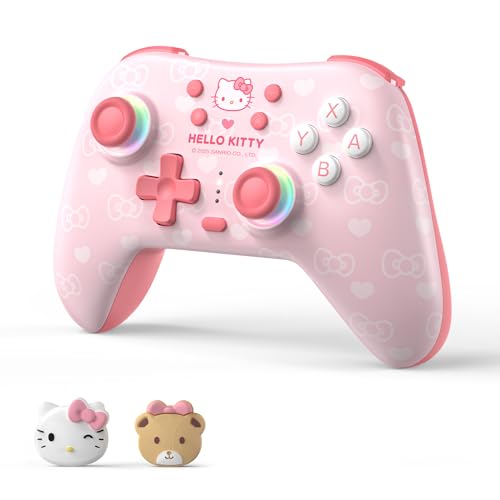
Hall Effect under the pink — Sanrio style with serious hardware inside.
Strip the Hello Kitty styling away and this is a well-specified pad: 1000mAh rechargeable battery, Hall Effect sensors on both joysticks and triggers, two programmable back buttons, adjustable Turbo rapid-fire, and 6-axis gyro motion with dual vibration motors. The pink shell has a customizable RGB breathing light and officially licensed Sanrio styling. It connects to Switch 2, Switch, OLED, Lite, Windows PC, Steam, Steam Deck, Android and iOS via Bluetooth or wired USB-C, and there is a wake-up function for Switch owners that powers the console on from the pad.
For MacBook users specifically, this is the rare cute controller that actually earns its place next to Apple hardware — one owner plays Apple Arcade on a MacBook Pro and reports zero lag over a wired connection, no stick drift, and comfortable hours-long sessions. The pairing needs a specific button hold (X plus Home, from off) but works reliably once you find it, and a companion app remaps buttons. Battery life gets a strong response — the 1000mAh cell holds up well past a single tournament. Ergonomic feel is the standout trait; the matte grip, back-button placement and trigger push-back are what owners rave about most.
Two honest notes. This specific listing has no 2.4 GHz receiver — it is Bluetooth and wired USB-C only, and if you want a dongle you will need the matching variant. And one owner found that although it pairs with Switch 2 in general, the wake-up feature works on Switch 1 but not the newer console, so Switch 2 users may still power on manually. Neither issue touches Mac duty, where Bluetooth is the default connection anyway.
Hello Kitty fans: a MacBook owner who wants a controller that looks like it belongs on a kawaii desk mat and still packs Hall Effect sticks and back buttons.
serious players: no 2.4 GHz dongle in this version and wake-up is Switch 1 only — a design choice, not a fault.
Know the Specs
Hall Effect sticks and why they matter on a Mac
A standard joystick wears a carbon pad against a sensor with every move, and over months that friction carves a dead spot that shows up as drift. Hall Effect sticks replace the contact with a magnetic field, so the sensor reads position without touching anything. That is why pads like the abxylute C5P, both 8Bitdo SN30 Pro models, the JDDWIN LED and the Kuitmor Hello Kitty all lead with Hall Effect — the stick drift that forces most gamers to replace a controller never develops.
Battery capacity and charging time
Capacity is usually listed in mAh (milliamp-hours — the total charge a battery can hold) and it only translates to real hours when paired with the pad’s own draw. The Kuitmor names a 1000mAh cell, the gray SN30 Pro runs its 480mAh pack for 18 hours, and both SN30 Pro models top up in 1-2 hours via USB-C. The DualSense leans on USB Type-C, the Hyperkin charges over Micro. Short charge times matter most when you forget to plug in before a session.
Reading the connection modes
Bluetooth is the default on nearly every Mac pad, and it travels through the same wireless stack as your headphones or trackpad. A 2.4 GHz dongle uses a private radio band with tighter timing, which is why the abxylute C5P recommends its dongle for the lowest lag. USB-C wired is the fallback that never runs out of charge and never drops a signal. Some pads, like the JDDWIN LED, support play-and-charge so you can use them wired while the battery refills.
Motion sensing and haptics explained
A 6-axis sensor pairs a 3-axis gyroscope (which reads rotation) with a 3-axis accelerometer (which reads tilt and movement) so the pad can track aim and gesture in supported games. Haptic feedback is a step beyond vibration — motors sit inside the triggers and body and push back against your finger with varying levels of force and tension depending on the in-game action. The DualSense’s adaptive triggers are the fullest expression of this; most other pads here stick with dual vibration motors.
Common Questions
Will a PS5 DualSense controller work with a Mac over Bluetooth?
What is Hall Effect on a controller and why do Mac gamers ask for it?
Can the Hyperkin Cadet connect to a Mac for emulator play?
How does the abxylute C5P compare to the DualSense for Mac gaming?
Which controller has the longest battery life on this list?
Can I use two controllers at the same time on a Mac for local multiplayer?
Do I need a 2.4 GHz dongle for Mac gaming or is Bluetooth enough?
Is the DualSense’s adaptive trigger and haptic feedback worth it for macOS games?
How do standard thumbsticks wear out and lead to drift?
Which controller is easiest for someone new to Mac gaming?
The Bottom Line
For most Mac gamers, the closest thing to a no-compromise pick is the PlayStation DualSense — 4.5+ stars from 49,000+ Amazon ratings, adaptive triggers, haptic feedback and a built-in mic, all connectable to Mac via Bluetooth or USB Type-C. If you want drift-proof Hall Effect sticks without the console price, the abxylute C5P is the sharper value, and its dongle-based connection keeps lag off the table. For 2D and retro on the go, the 8Bitdo SN30 Pro and its gem-shelled sibling remain the d-pad-first picks, while the Kuitmor Hello Kitty proves a cute pad can hide serious hardware.
How we choose
We do not accept paid placement. Every pick is matched to a real buyer and a real use-case; we do not hands-on test units.
Sources
Specifications: manufacturer listings and product documentation. Review insights: verified customer reviews, as of October 2026. Pricing: not shown on this page (it changes often); check the current price via the retailer link.
As an Amazon Associate, Aappliancez earns from qualifying purchases. This does not affect which products we feature.