Disclosure: Some links in this post are affiliate links. As an Amazon Associate I earn from qualifying purchases, at no extra cost to you. Learn more
Specs are compiled from manufacturer listings and verified buyer reviews and can change over time — please confirm the key details on the product page before buying.
An M.2 AI accelerator card is a small add-in board that takes object detection, pose estimation, and vision-model work off your main processor and runs it on a dedicated chip. Most buyers fixate on the TOPS rating and ignore the wattage and software support that decide real-world speed.
This guide is built by comparing the manufacturers’ published specifications and the patterns across verified customer reviews, so you get each pick’s real strengths and trade-offs instead of marketing spin.
Before you buy, decide which job you are solving: running AI on your own hardware, or adding fast storage. The picks below split into two groups — true AI accelerators and fast NVMe storage. One group runs Frigate camera detection; the other gives you a boot drive or more drive bays. The slot, wattage and model-format details on each m.2 ai accelerator card below are what keep you from buying twice.
Top Picks


How To Choose The Best M.2 AI Accelerator Card
Before you compare accelerators, be honest about the two different jobs on this list. Half of these products run vision models on an edge device. The others are storage or networking expansion that happens to live on an M.2 slot or PCIe card. Mixing them up means buying a 26 TOPS accelerator when a bigger NVMe drive was the actual fix.
Match the slot before you match the spec sheet
A module only works if your board has the right physical slot. M-key M.2 slots carry PCIe lanes, which is what an accelerator needs. Some boards also route the Wi-Fi slot as a USB connection, and a Coral USB stick and a PCIe module are not interchangeable there.
Check the lane width too. A PCIe Gen 3 link is the common baseline here, and when one card splits those lanes across several devices, each device gets a fraction of the total bandwidth. That is fine for capacity and always-on network storage, less fine if you expected peak speed from every drive at once.
Treat wattage as a feature
A low-power card is easier to live with. A module that draws a couple of watts in typical use barely shifts your board’s thermal picture, while a higher-draw part needs host-managed airflow. Wattage is the most overlooked number on the box, and it sets how much airflow your case has to supply.
Software support decides the setup day
Every accelerator needs a toolchain. Some accept your model as-is through ONNX or TFLite. Others want a compiler step that converts a model into a dedicated format before it will run. Whether your model needs that conversion step is the real difference between a plug-in job and an afternoon at the command line.
Think about what you will feed it
Camera-count matter. A chip that handles a dozen 2K camera streams with barely any load is doing far more useful work than a benchmark number suggests. Be clear about how many streams, at what resolution, and at what frame rate you expect before you commit.
Side-by-Side Comparison
| Model | Best For | AI Engine | Interface | Power / Capacity | Amazon |
|---|---|---|---|---|---|
| KingSpec SSD 512GB★ Best Overall | Fast, cheap boot drive | — | M.2 2280 NVMe Gen3x4 | 512 GB, up to 2400MB/s read | Amazon |
| Coral USB Edge TPUMost Proven | Raspberry Pi + Frigate setups | Google Edge TPU | USB 3.0 Type-C | 5Gb/s transfer | Amazon |
| MemryX Cascade 100M | Multi-camera object detection | 25 TFLOPS, 4× MX3 | M.2 2280 M-key, PCIe Gen 3+ | 1 W–12 W | Amazon |
| Khadas VIM3 Basic | Maker board with built-in NPU | NPU at 5.0 TOPS INT8 | M.2, USB 3.0, GPIO | 2+16GB | Amazon |
| GeeekPi AI HAT+ | Turning a Pi 5 into an AI box | Hailo, 26 TOPS | Raspberry Pi 5 PCIe Gen 3 | — | Amazon |
| waveshare Hailo-8 M.2 | Fast Frigate inference, module only | Hailo-8, 26 TOPS | M.2 PCIe | 2.5 W typical | Amazon |
| SABRENT EC-PM2L | NAS builds needing storage + network | — | PCIe 3.0 x4 | 3× M.2 slots + 10GbE | Amazon |
Detailed Reviews
1. KingSpec SSD 512GB M.2 NVMe Gen3x4 2280
Our pick — 4.5+★ from 1,500+ verified ratings; the strongest balance of quality and price.
The smart-money first upgrade: a half-terabyte boot drive that wakes a slow machine in one slot.
Here is the honest starting point for most buyers. If your computer feels sluggish and you are eyeing an accelerator card, the fix you actually need is usually storage speed, not AI horsepower. This drive reads at up to 2400MB/s over an M.2 NVMe Gen3x4 connection — a four-lane pipe that lets the stick pull data far faster than an old spinning drive or a SATA SSD ever could. That translates into a Windows desktop that appears in seconds instead of minutes.
The 512GB capacity is the one number to weigh honestly. It is a real upgrade over a 256GB boot partition, but once Windows and a couple of large games land on it, the free space shrinks fast. If you store a video library on the same drive, plan around it. Buyers who cloned their old system across describe the process as painless: “It fit into my laptop nicely and was easy to install. Just watch a video if you’re not sure how it goes in.”
The supporting spec sheet is what makes this one the pick rather than a random cheap stick. It carries 3D NAND TLC/QLC flash and a main controller that keeps operations steady under load. It supports S.M.A.R.T, TRIM, Wear Leveling, LDPC ECC and E2E Data Protection — the maintenance routines that keep a drive healthy and catch errors before they cost you files. There is a 3-year warranty behind it, and the maker throws in lifetime technical support, which is a rare thing on a value drive. Compared with the SABRENT expansion card further down, this is a single-device solution: no lane splitting, no drivers, no clearance worries. It just lives in one slot and works.
What earns its keep
- Up to 2400MB/s read speeds make boot and app loads feel instant
- Genuine data-protection features: S.M.A.R.T, TRIM, Wear Leveling, LDPC ECC and E2E
- 3-year warranty plus lifetime technical support
- Works in Windows 7-10 and Linux distributions including Ubuntu, RHEL and CentOS
Where it stops short
- 512GB fills quickly once games and media land on it
- Shipped without a heatsink, so a hot case gives it no extra help
- Fast for its class but not a top-tier benchmark drive
Reach for this if: you want the most affordable way to make an ageing desktop or laptop feel new again.
Look elsewhere if: your library is already past half a terabyte, or you genuinely need dedicated AI inference hardware.
2. Coral USB Edge TPU ML Accelerator
A thumb-drive-sized coprocessor that turns a busy Raspberry Pi into a calm one.
The number that tells this story best is not the TOPS rating — it is the CPU percentage. Take a home Frigate setup on a Raspberry Pi 5 idling between 65% and 75% CPU, add this dongle on a powered hub, and the load collapses to about 4%. The board goes from constantly sweating to having room to breathe. That headroom is what lets a single small computer also run Home Assistant and a DNS filter without dropping camera frames.
Inside sits a Google Edge TPU, an inference coprocessor built for vision models rather than general math. It connects over USB 3.1 Gen 1 at 5Gb/s, so it does not need an M.2 slot at all — a real advantage on boards where M.2 is already taken by an NVMe drive. It runs on Debian Linux, works with TensorFlow, and supports MobileNet and Inception architectures, plus custom architectures. Google Cloud compatibility is included in the spec sheet.
Buyers report that it scales camera work well. It is accurate enough to spot people, cars and animals, and it has run across multiple cameras in a Home Assistant setup while making the whole system more stable. One buyer summed up a Home Assistant and Frigate build with: “Works as advertised.” The catch is real: flashing drivers, configuring the card and passing it through to a virtual machine (VM) take patience. A good setup guide is the difference between a smooth install and a frustrating one. The unit also runs warm during use, which is normal for a TPU (a chip built to run AI models) working continuously.
The setup reality: this is not a plug-and-play dongle for a beginner. You have to flash the drivers and pass the USB device through to a virtual machine (VM) — that is the hill to climb. With the right guide, it is climbable.
Right for: anyone building or expanding a Frigate camera server on a Raspberry Pi or a small NUC who wants their CPU back.
Wrong for: a project that needs raw LLM or large-model inference — this chip is tuned for vision networks.
3. MemryX Cascade 100M M.2 AI Accelerator Module
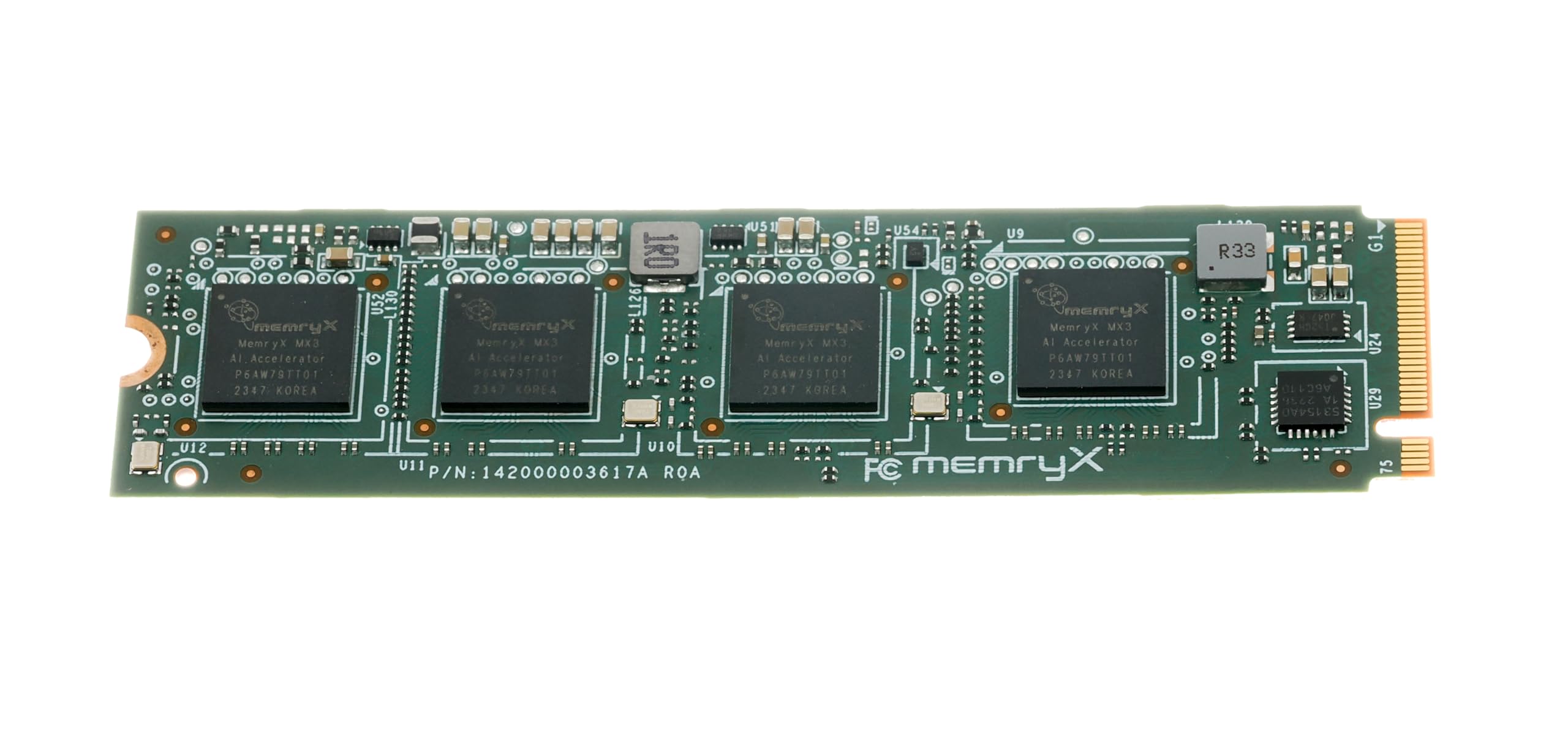
Four accelerators on one M.2 stick, built for a wall of cameras running flat out.
Four MemryX MX3 accelerators share a single M.2 2280 M-key module here, and together they deliver 25 TFLOPS of AI inference — the raw math rate for running trained models. That is a serious amount of compute for something the length of a stick of gum. The 42 MB of distributed on-chip weight storage is what keeps latency low during batch-1 pipelined inference, meaning one frame at a time rather than in bulk, which is exactly how a live camera feed arrives.
The real attraction for many buyers is the open approach. Owner feedback highlights a developer hub with tutorials and public examples aimed squarely at AI beginners. Crucially, the stack supports your own model as-is instead of demanding one from a pre-tuned collection, and it accepts ONNX, TensorFlow, Keras and TFLite models on Linux and Windows hosts. A dozen 2K cameras impose what owners describe as negligible load. That is a very different experience from a chip that buckles when you add the fourth stream.
The trade-off to understand before you buy is configuration. Setting this up with Frigate NVR means command-line work and recompiling your detection models into the MemryX format. It is not plug-and-play, and the API version you match has to line up with what your software supports. Physical fit matters too: it wants a PCIe Gen 3 or above M.2 M-key slot, and it draws between 1 W and 12 W, so it needs host-managed airflow. Owners running it in a small case beside an NVMe drive report heat as the biggest challenge of the build.
The payoff: the throughput per watt on offer here is the reason to choose it over a desktop GPU — far more cameras, far less electrical draw.
The ask: expect to spend real time in the terminal, and be ready to keep your software versions aligned.
Choose it when: you want to bring a large set of 2K cameras under detection without adding a power-hungry GPU to the build.
Pass it by when: your comfort level with command-line configuration is low, or your slot cannot supply the cooling this module wants.
4. Khadas VIM3 Basic Single Board Computer

A whole computer with an AI engine baked in, rather than a card you add to a computer.
This is a different animal from everything above. Instead of slotting an accelerator into an existing machine, the Khadas VIM3 gives you a full single-board computer with a neural processing unit already built into the chip — 5.0 TOPS of INT8 inference at up to 800MHz. The Amlogic A311D chip runs four 2.2GHz Cortex A73 cores alongside two 1.8GHz Cortex A53 cores on a 12nm process, designed to keep heat down. It supports TensorFlow and Caffe, the two frameworks a lot of vision projects start on.
The maker side of the board is genuinely rich. There is a 40-pin GPIO header carrying USB, I2C, I2S, UART and an ADC, an 8-channel I2S connection over the M.2 connector for a microphone-array project, plus MIPI-DSI and MIPI-CSI for displays and cameras. Three programmable LEDs, a programmable MCU, onboard SPI flash and a choice of switchable PCIe and USB 3.0 round out the connectivity. Dual independent displays and H.264/H.265 encoding make it workable as a small media machine too.
Be clear-eyed about the software. This board shines for builders who already know their way around Linux images and serial consoles. The included 2GB RAM and 16GB storage are set at purchase, so think about what your workload needs up front. Connecting peripherals is not always smooth: a generic USB touchscreen failed to register taps in Android, while a 20-inch monitor with a wireless mouse and keyboard behaved perfectly under Ubuntu.
Fit check: pick this if you want one compact board that handles AI inference, camera input and display output from a single component list. It rewards a builder who plans the whole system, not someone hunting a drop-in accelerator.
Made for: makers comfortable flashing images and building their own stack from scratch.
Think twice if: you wanted a card that plugs into a PC you already own — this replaces the PC.
5. GeeekPi AI HAT+ with Hailo Accelerator and Metal Case

The turnkey route: accelerator board, protective cage and cooling fan in a single box.
This kit hands you the whole package, where the waveshare module below asks you to source your own enclosure and cooling. Inside the box sits an AI HAT+ with a built-in Hailo neural accelerator rated at 26 TOPS (trillions of operations per second — a measure of AI speed). You also get a metal case that shields the Raspberry Pi 5 from dust and knocks, plus an active cooler that pairs an aluminium heatsink with a PWM fan (a fan whose speed the board controls). The 16mm stacking header and spacers let it all fit on top of a Pi 5 with the official Active Cooler still in place. That matters, because stacking an accelerator over an already-installed cooler is where most builds go wrong.
The performance gain is the reason to bother. In a Python object-detection workload on a Raspberry Pi 5 8GB, the stock board could not keep up. Once the 26 TOPS Hailo-8 got involved, the same analysis finished in just over half the time. The board talks to the Pi over its PCIe Gen 3 interface (the slot that connects add-on cards to the Pi). A current Raspberry Pi OS image auto-detects the Hailo accelerator and makes the NPU (neural processing unit — the AI chip) available for computing. The built-in rpicam-apps camera tools pick it up natively for compatible post-processing. It saves you the driver hunt entirely.
The catch worth knowing is mechanical. Standoffs and the GPIO header in some kits run short, leaving the Hailo board rubbing against the cooler’s fan screws. That is a spacing problem, not a dead unit, and it is solvable with your own standoffs and a header extender. Owners also describe setup and tuning as a time investment rather than a five-minute job, so budget an evening for it.
Why this kit wins
- 26 TOPS Hailo accelerator, protective metal case and PWM active cooler included together
- 16mm stacking header and spacers fit over a Pi 5 with the official cooler in place
- Auto-detected by an up-to-date Raspberry Pi OS — no driver install
- Metal case keeps access to USB-C power, micro HDMI, Ethernet, SD slot and GPIO
What to plan for
- Stacking hardware sometimes runs short, letting the board touch cooler fan screws
- Fan longevity is a weak point under continuous running
- Getting models running takes real setup time, not minutes
The best fit: a first-time Pi 5 AI build where you want one purchase to cover the accelerator, the shell and the cooling.
Not the fit: anyone who already owns a case and cooler and just wants the bare module.
6. waveshare Hailo-8 M.2 AI Accelerator Module

Frigate inference that drops from triple-digit milliseconds into the teens.
Picture a camera server on an old GTX 1050 pulling inference times of 120–175ms. Swap in this 26 TOPS Hailo-8 module and the same detections land in 10–20ms. Faster notifications follow, and detection starts working farther out because full 2K streams are now affordable to analyse. In a two-stream test at 1280×720 and 16 FPS, this module averaged around 18ms inference across 13 object types while barely touching 16% CPU. That is the argument for a purpose-built accelerator over a reused graphics card: the same job, done faster, while the rest of the machine stays free.
The efficiency number is the other headline. Typical power consumption is just 2.5 W, so it adds almost nothing to your board’s electrical or thermal load. It handles multiple streams and multiple models at once, supports TensorFlow, TensorFlow Lite, ONNX, Keras and PyTorch, and runs on both Linux and Windows. The rated operating range of -40°C to 85°C is far beyond anything a home build will see. A one-year warranty backs it. Against the GeeekPi kit, you are paying for the bare module and nothing else — no case, no cooler, no stacking hardware in the box.
Where buyers stumble is the toolchain, and it is worth saying plainly. Turning an ONNX model into the quantized.hef format this chip requires takes patience, and the compiler has a learning curve. It is focused on INT8 quantized models rather than everything you can throw at it. One practical quirk: a USB-C M.2 adapter did not work with this module — it needed a real NVMe slot, which means moving a drive to make room. The hardware delivers; getting to it is the work.
On the thermals: the module arrives without cooling, and it needs a heatsink or airflow to run continuously — factor that into your build.
Worth knowing: this is an INT8 vision accelerator, so LLM style workloads are outside its remit.
Perfect match: an experienced Frigate or computer-vision builder who already has cooling and wants the fastest per-watt inference on the shelf.
Better avoided: a beginner wanting one cable and zero configuration.
7. SABRENT 3X M.2 NVMe and 10GbE NAS Expansion Card
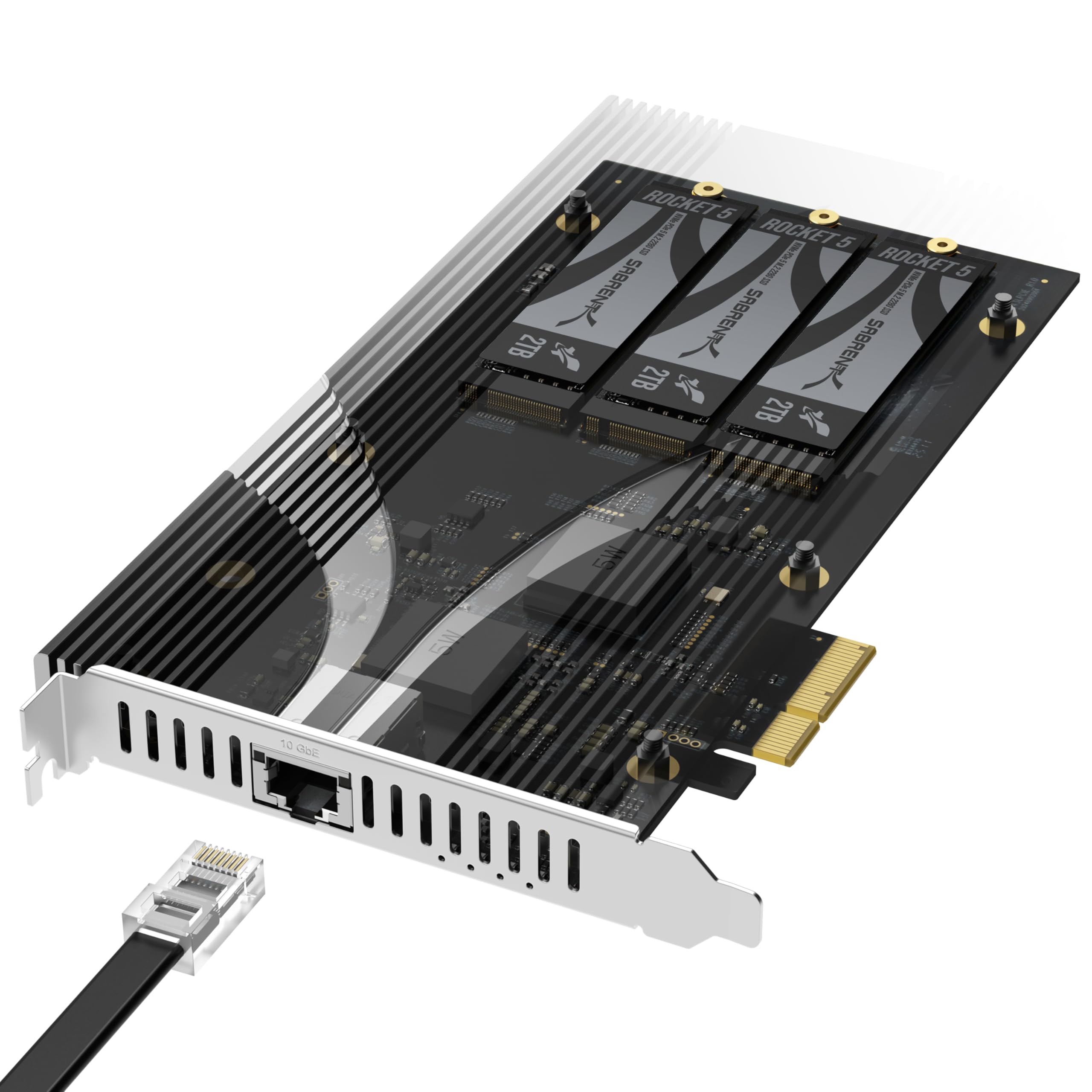
Three NVMe slots and a 10-gigabit network port, squeezed into one PCIe slot.
This card is not an AI accelerator at all — and that is exactly why it earns a place here. If your homelab or NAS (network-attached storage) build is full of spare drives and a 1GbE link (1 gigabit per second — a common home network speed) that is choking transfers, this card adds three M.2 NVMe slots plus a 10 Gigabit Ethernet port from a single PCIe 3.0 x4 or wider slot. The clever part is that it needs no PCIe bifurcation — no lane-splitting setup in the UEFI (the motherboard’s built-in setup screen) — a headache many multi-drive adapters force on you. It accepts M.2 NVMe drives in 2230, 2242, 2260 and 2280 lengths, from Gen 2.0 through Gen 5.0, and handles capacities of at least 8TB per slot. SSDs are sold separately.
The bandwidth is where you need to be realistic. Each M.2 slot runs at up to x2 PCIe 3.0, and the whole card totals x4, so the three drives share one link. This is built for capacity and always-on NAS work, not for one drive chasing peak numbers. The 10GbE port is a Marvell-based standard wired connection, backward compatible to 100Mbps with CAT 5e or better cabling and a compatible switch. It does not link straight to the M.2 slots — your operating system or NAS software decides what gets shared over the network.
Installation has a couple of sharp edges. The card ships with a pre-installed aluminum heatsink over the M.2 slots, so it takes up more room than a bare adapter and small-form-factor cases often cannot take it. Measure clearance first. Drivers are needed for the 10G port; it is not always automatic. And the M.2 hold-downs slide into the drive notch and screw from underneath, which is fiddly the first time. The good news is cooling: the big aluminum heatsink keeps drives in the low 30s °C at idle and the 30s °C to high-30s under load with normal airflow.
The trade: you get a huge amount of expansion from one slot, but each drive runs at a shared x2 slice rather than full speed.
Buy it if: you are building or upgrading a NAS and want more NVMe storage plus a 10GbE port without giving up SATA lanes.
skip it if: your case is compact — this card is deep and needs clearance.
Know the Specs
TOPS and TFLOPS
TOPS stands for tera-operations per second — roughly how many simple AI calculations a chip can complete in one second, measured in trillions. It is a peak figure, so a card hitting 26 TOPS can only sustain that under the exact workload it was tuned for. In practice, a lower number with good software beats a high number you cannot feed. Look at the TOPS alongside the frameworks supported and decide from there.
Wattage and airflow
Power draw in watts tells you two things at once: how much heat the chip makes, and how much load it puts on your board’s supply. A module at 2.5 W typical is nearly free to run. A module at up to 12 W needs host-managed airflow to stay comfortable. Both are fine, but the higher-draw part needs a build that can move air past it.
M.2 keys and PCIe lanes
An M-key slot carries PCIe lanes, which is what an accelerator wants. A B-key or a Wi-Fi-only slot may only carry USB. Lane width matters too: a full x4 link is fast, but split four ways between devices it becomes four x1 slices. Check the interface on the card against the interface on your board before committing.
Model formats and compilers
A model is only useful to an accelerator once it is in the right format. Some accept ONNX or TFLite directly, others want a conversion step into a proprietary file such as.hef for Hailo parts or the MemryX format for MX3 parts. That conversion is where setup time goes, so plan for it.
Common Questions
Will an M.2 AI accelerator card fit a Raspberry Pi 5?
Does a higher TOPS number always mean faster AI?
Can a Hailo-8 module run Ollama on a Raspberry Pi 5?
Do I need a heatsink or fan on an M.2 AI accelerator?
What is PCIe bifurcation and do I need it?
How is a Coral USB accelerator different from an M.2 card?
Can I run two accelerators at once for more throughput?
What model formats does a Hailo-8 accelerator accept?
Is an NVMe SSD better than an AI accelerator for my setup?
Will these cards work on Windows as well as Linux?
The Bottom Line
Start with what your machine is actually short of. If it feels slow loading anything, the KingSpec SSD 512GB is the most sensible first move — a 2400MB/s boot drive with a 3-year warranty and data-protection features that genuinely matter. Most people buying an “AI accelerator” for a home server end up needing this instead.
Running Frigate and want the biggest win for the least fuss? Reach for the waveshare Hailo-8 module at 26 TOPS and 2.5 W typical — provided you have cooling and a real NVMe slot. Building your first Pi 5 and want accelerator, case and fan bundled? Pick the GeeekPi AI HAT+. And if your NAS is starved for storage and network speed, the SABRENT EC-PM2L delivers three NVMe slots and 10GbE (10 Gigabit Ethernet) from a single x4 slot.
How we choose
We do not accept paid placement. Every pick is matched to a real buyer and a real use-case; we do not hands-on test units.
Sources
Specifications: manufacturer listings and product documentation. Review insights: verified customer reviews, as of October 2026. Pricing: not shown on this page (it changes often); check the current price via the retailer link.
As an Amazon Associate, Aappliancez earns from qualifying purchases. This does not affect which products we feature.