Disclosure: Some links in this post are affiliate links. As an Amazon Associate I earn from qualifying purchases, at no extra cost to you. Learn more
Specs are compiled from manufacturer listings and verified buyer reviews and can change over time — please confirm the key details on the product page before buying.
If your shots feel a fraction behind your hand, the mouse is usually the culprit — not your internet. A low latency mouse cuts the delay between the click you make and the click the game registers, and the picks below cover that job from budget-friendly to premium. The short answer: the Logitech G309 LIGHTSPEED is the safest all-round buy for most people, the SteelSeries Rival 3 Gen 2 is the entry-level pick if you want the lowest quoted click delay, and the GravaStar Mercury X Pro is the premium choice when you want an 8,000Hz polling rate from the start.
This guide is built by comparing the manufacturers’ published specifications and the patterns across verified customer reviews, so you get each pick’s real strengths and trade-offs instead of marketing spin.
Latency is measured in milliseconds, and at 1,000Hz versus 8,000Hz polling that gap shows up in every fast flick. Below you’ll find how polling rate, sensor quality and switch type decide which low latency mouse actually feels instant in your hand.
Top Picks


How To Choose The Best Low Latency Mouse
The one number that decides whether a mouse feels instant is polling rate — how many times per second the mouse reports its position to your PC. A standard mouse reports at 1,000Hz, once every millisecond. A competitive mouse reports at 8,000Hz, which is eight times more often, so your crosshair updates in smaller, faster steps. That is the whole reason these picks exist.
Start with polling rate, then work backwards
If you play fast shooters, look for a mouse that lists 8,000Hz polling and ships with the matching 8K dongle — the Corsair Sabre v2 PRO and the GravaStar Mercury X Pro both do. If you mostly play slower games or work all day, 1,000Hz is plenty, and the Logitech G309 handles it on a single AA battery for 300+ hours. Higher polling drains battery faster; that is a real trade, not a marketing line.
Sensor accuracy beats raw DPI numbers
DPI (dots per inch) tells you how far the cursor moves per inch of physical travel, but the number that matters for aim is sensor deviation — how closely the reported movement matches your actual hand. The ASUS ROG Strix Impact III Wireless quotes under 1% deviation on its 36,000 dpi AimPoint sensor, and the MCHOSE L7 Pro uses a PAW3395 rated to 26,000 DPI. Both are precise enough that your hand, not the sensor, is the limit.
Weight changes how fast your hand can react
A lighter mouse needs less force to start and stop, which matters in flick shots. The MCHOSE L7 Pro sits at 39g and the Corsair Sabre v2 PRO at 36g — both are in the ultra-light bracket. Heavier mice feel more planted but take more effort to redirect, so pick based on whether you flick or track.
Wireless mode is not automatically slower
2.4GHz RF (the dedicated dongle) is the low-latency path. Bluetooth is convenient for switching between a work laptop and a gaming PC, but it is the slower of the two, so treat it as a productivity mode rather than a competitive one. The Logitech G309 and ASUS ROG Strix Impact III both let you switch between the two.
Side-by-Side Comparison
| Model | Best For | Max Polling | Sensor | Weight | Amazon |
|---|---|---|---|---|---|
| Logitech G309 LIGHTSPEED★ Best Overall | Everyday gaming and work | — | HERO 25K | 86 g with AA battery | Amazon |
| SteelSeries Rival 3 Gen 2Entry-Level Speed | Entry-level competitive play | — | TrueMove Core 8.5K DPI | 0.16 kg | Amazon |
| ASUS ROG Strix Impact III Wireless | Battery life and dual wireless | — | ROG AimPoint 36,000 dpi | 57 g (excl. battery) | Amazon |
| MCHOSE L7 Pro | Ultra-light flick aim | 8,000Hz | PAW3395 26K | 39 g | Amazon |
| Corsair Sabre v2 PRO | Competitive FPS on a budget | 8,000Hz | MARKSMAN S 33,000 DPI | 36 g | Amazon |
| Logitech G PRO 2 LIGHTSPEED | Ambidextrous pro shape | 8 kHz (with PRO LIGHTSPEED RECEIVER) | HERO 2, up to 44K DPI | — | Amazon |
| GravaStar Mercury X Pro | 8K from the start | 8,000Hz | PAW 3950, 32,000 DPI | 49 g | Amazon |
Detailed Reviews
1. Logitech G309 Lightspeed Wireless Gaming Mouse
Our pick — 4.5+★ from 750+ verified ratings; the strongest balance of quality and price.
The wireless mouse that runs 300+ hours on one AA and still keeps LIGHTSPEED latency.
The G309 is the pick for the person who games at night and works on the same desk by day. Its HERO 25K sensor tracks exactly to the sub-micron with zero smoothing — meaning the mouse reports your hand movement with no software “averaging” that would blunt a fast flick. The low-latency LIGHTSPEED 2.4GHz link is the fast path, and you can flip to Bluetooth for a work laptop with a press. This is a crowd favorite too, holding 4.5+ stars across 700+ ratings, which is exactly the kind of cushion you want on a daily driver.
Battery is the headline. A single AA gets you 300+ hours, and if you add Logitech’s POWERPLAY wireless charging system the battery question disappears entirely. Owners keep circling back to that: the review pages sum it up as “batteries are better” — replaceable cells beat sealed ones that degrade. The LIGHTFORCE optical-mechanical switches combine optical speed with a mechanical click, so each press has a crisp feel without the delay of a pure mechanical contact.
Weight is where it asks you to compromise. It runs 86 g with the included AA battery installed, or 68 g with POWERPLAY and no battery. That is heavier than the 39 g MCHOSE L7 Pro and the 36 g Corsair Sabre v2 PRO, so flick-heavy players will feel the difference. It is also best used with a high-refresh display — a fast mouse on a 60Hz screen has its responsiveness capped by the panel, not the sensor.
Where it earns its keep
- 300+ hours on one AA battery, or unlimited with POWERPLAY charging
- HERO 25K sensor tracks to the sub-micron with zero smoothing for honest aim
- LIGHTSPEED 2.4GHz and Bluetooth in one mouse — fast for gaming, easy for work
- Six programmable buttons and swappable grip tape included in the box
Where it asks you to give
- 86 g with the AA battery is heavier than the ultra-light picks here
- The G HUB software is clunky and resource-heavy on some machines
- No hyperscroll wheel, which power users on long documents notice
Reach for this if: you want one wireless mouse that is fast in-game and painless on a work laptop, with battery you replace once in a blue moon.
Look elsewhere if: flick-shot weight matters more to you than battery freedom — the 68–86 g body is not in the featherweight class.
2. SteelSeries Rival 3 Gen 2 Gaming Mouse – Black
A wired mouse that quotes 1.35ms click latency — the fastest figure in this lineup.
On paper, the Rival 3 Gen 2 leads everyone here on click delay: SteelSeries quotes a near-instant 1.35ms click latency, which is the time between your finger pressing and the game receiving the command. The TrueMove Core 8.5K DPI optical sensor mirrors your movement one-to-one so your shots land where you aimed, and the switches are rated for 60 million clicks before the crispness fades. For anyone stepping up from a bundled office mouse, that combination is the real jump.
Owners describe the feel the way you’d want: “There is no noticeable input delay which is a must have for gaming.” The same buyer notes it suits big hands that prefer a slightly smaller shell, and that the lighting is very pretty. Build quality is the aspect that wins the most people over — this thing feels sturdier than its price tier suggests, helped by the ABS plastic shell and the improved Super Mesh paracord cable that reduces drag.
The honest catch is inconsistency. The lighting runs bright enough that some find it too much, and there are enough reports of a dead sensor or dropped input on this updated generation to make you buy with a return window in mind. The three-zone RGB sits under a transparent bottom, and a small number of users tie interference to it. If you are chasing the lowest possible latency on a wired connection, this is the value play — just test it hard in the first two weeks.
Verified delay figure: 1.35ms click latency, quoted by the manufacturer, makes this the headline spec for buyers who care about the gap between press and register.
What trust looks like here: 60 million click durability on the switches and a paracord cable that cuts drag — the two things most likely to wear out first on a wired mouse.
Best fit: a wired setup where every millisecond counts and budget matters more than wireless freedom.
Think twice if: you want zero setup risk — this generation has a small but real tail of sensor complaints that make a return window worth keeping.
3. ASUS ROG Strix Impact III Wireless Gaming Mouse

The wireless mouse that quotes up to 618 hours on SpeedNova 2.4GHz — the longest runtime here.
ASUS puts the battery number at the front of the box: up to 618 hours on the ROG SpeedNova 2.4GHz link, with 450 hours listed in the technical specs. Either figure is the longest quoted runtime here — the Logitech G309 lists 300 hours and the GravaStar Mercury X Pro 113 hours. ROG SpeedNova is the low-latency, energy-efficient wireless layer under it, so the fast mode and the long mode are the same mode. There is no charging port at all, so you run on regular or removable rechargeable cells and swap them in seconds.
Precision is the other half of the story. The ROG AimPoint optical sensor runs 36,000 dpi with an industry-quoted deviation under 1%, meaning the reported movement stays close to your actual hand across the whole range. It is also genuinely light at 57 g excluding battery and receiver, in a compact ambidextrous shell. A buyer who moved over from a heavier flagship put it plainly: “Does just as good as the more expensive models and is Lightweight.”
Two things to plan around. First, the USB-A dongle is the low-latency path, and you’ll want an adapter if your computer only offers USB-C. Second, a minority of users fight random Bluetooth dropouts — one described reconnecting dozens of times an hour — so treat the 2.4GHz dongle as the gaming mode and Bluetooth as the travel mode. The ROG Omni Receiver can pair multiple supported devices to one dongle, which helps if you run a ROG keyboard alongside it.
Why it holds this slot
- Up to 618 hours quoted on SpeedNova 2.4GHz wireless, the longest here
- 36,000 dpi AimPoint sensor with under 1% deviation
- 57 g ambidextrous shell that suits smaller and medium hands
- 2.4GHz RF, Bluetooth, and wired all available on one mouse
Small print worth reading
- No built-in charging port — you supply and swap batteries
- Bluetooth dropouts show up in a minority of reports; the dongle is the reliable path
- USB-A receiver needs an adapter on laptops with only USB-C
Suits you if: you want competitive wireless response paired with the longest battery figure on this list and never want to think about a charging cable.
Less ideal if: Bluetooth is your main connection — this pick is at its best on the 2.4GHz dongle.
4. MCHOSE L7 Pro Wireless Gaming Mouse, PAW3395 26K Sensor, 39g

Thirty-nine grams on a PAW3395 sensor with 8,000Hz polling — built for flick aim, not slow tracking.
The L7 Pro pairs a PAW3395 sensor rated to 26,000 DPI with a polling rate up to 8,000Hz, which is eight times the reporting frequency of a standard 1,000Hz mouse. That means the cursor position updates smaller and more often, so a fast flick that would otherwise skip is captured as a smooth line. The high hump and small waist angle are designed to fit several grip styles, and the ambidextrous shell keeps the option open if you switch hands.
Weight is the whole pitch: 39 g, which is lighter than a 49g rival the same buyers compared it to and light enough that a cordless link removes the last drag. Build quality draws the most praise — one owner compares it to a far pricier mouse built in the same factory, down to the super-light crispy clicks. Setup is simple with DPI headroom you can tune to a specific game’s sensitivity.
The trade you make for that featherweight body is runtime. The spec sheet lists a 80-hour average battery life, and the real-world complaint is that performance mode drains it fast — plan on frequent charging or running wired for long sessions. Side buttons are also stiff enough that a few users find them hard to press mid-fight. Buy it for the sensor and the weight; accept that battery management becomes a small habit.
The spec that sells it: 39 g on a PAW3395 sensor with 8,000Hz polling — the lightest dual-8K option in this lineup and the one most tuned to flick aim in fast shooters.
The honest rival check: the Attack Shark X3 at 49g felt too heavy and uncomfortable to the same buyers, which is exactly the gap 10g makes in a claw grip.
Pick this one for: an ultra-light flick machine where the polling rate and weight do the aiming for you, and battery management is a price you accept.
Not your mouse if: you want to set it down for a week without charging — the fast mode runs the 80-hour figure down quickly.
5. Corsair Sabre v2 PRO Wireless Ultralight FPS Gaming Mouse
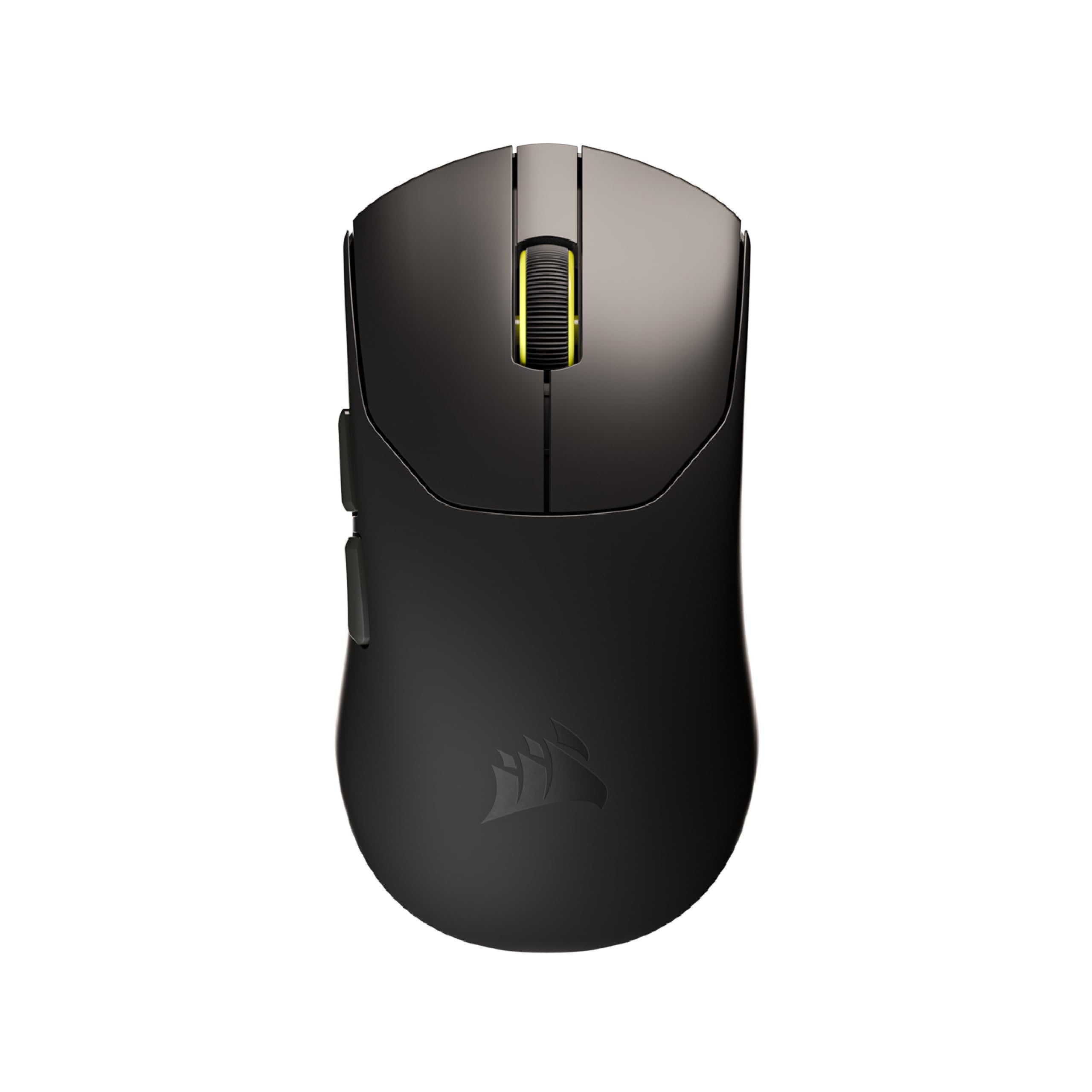
Thirty-six grams and 8,000Hz hyper-polling with the 8KHz receiver included — the cheapest route into competitive speed.
Corsair drops the number low here: 36 g body, and the MARKSMAN S sensor rated for 33,000 DPI with 750 IPS speed and 50G acceleration. Then there is the 8,000Hz hyper-polling, which the maker states delivers input up to eight times faster than standard polling — so the gap between your command and the game’s response shrinks dramatically. You get the 8KHz USB receiver in the box, so you don’t need a separate purchase to hit that rate.
The switches are custom-tuned mechanicals rated for up to 100 million clicks, which is a durability figure you rarely see at this tier. Battery is quoted at up to 70 hours on a charge, enough for several tournament sessions, though the maker notes that reaching the 8,000Hz rate depends on your CPU. Owners treat the 36 g shell as the win: the glide is smooth on the factory skates, and the lightweight body improves response speed while reducing the fatigue of long sessions.
Two caveats deserve an honest airing. The software is the Corsair Web Hub rather than its iCUE app, so button mapping and profiles require the browser-based route, and a small number of buyers report durability wear over a month of heavy use — side buttons and a microswitch are the usual suspects. It ships with a thin plastic shell that feels light, which is the trade for 36 g. Buy it for eight-fold polling and a scale number that beats most of this list; reserve space for a possible replacement within the first year.
The case for the Sabre
- 8,000Hz hyper-polling with the matching 8KHz receiver included
- 36 g body — lighter than both the 39 g MCHOSE and the 49 g GravaStar
- MARKSMAN S sensor at 33,000 DPI with 750 IPS and 50G acceleration
- Switches rated up to 100 million clicks
The fine print
- Setup runs through Corsair Web Hub, not iCUE, which limits some mapping
- 8,000Hz polling pulls battery harder than lower rates
- A minority report early wear on side buttons or a microswitch
Worth buying when: you want the maximum polling and minimum weight on a wired-or-wireless budget, and you don’t mind browser-based software for setup.
Look around when: you want a set-and-forget peripheral — plan on checking the side buttons within the first few weeks.
6. Logitech G PRO 2 Lightspeed Wireless Gaming Mouse

The ambidextrous pro-shape mouse with magnetic side buttons for both left and right hands.
The reason to pay for the PRO 2 is the shell. It has a genuinely ambidextrous, modular design with switchable magnetic side buttons — two left and two right in the box, plus optional button covers, so left-handed players get real side buttons instead of a blank wall. The HERO 2 sensor reaches up to 44,000 DPI with tracking up to 88 g-force of acceleration at over 888 IPS. That is not a spec most people will max out, but it means the sensor stays ahead of your hand at any sensitivity you choose.
LIGHTFORCE switches are the click mechanism, blending the speed and longevity of optical switches with the satisfying click feel of mechanicals. Battery runs up to 95 hours, and it charges over USB-C. Note the polling wording carefully: it supports an 8 kHz polling rate with the PRO LIGHTSPEED RECEIVER, which is sold separately, so the out-of-box number is lower. Real buyers on the pages call the wireless link excellent, the sensor accurate, and the shell comfortable, even while wearing through a whole workweek without a charge.
The obvious sticking point is price: this is the most expensive Logitech in the lineup, and value for money is the divide. The G HUB software is also more to learn than the simple setups on the budget picks. The symmetrical shape is not for everyone — people coming off a moulded ergonomic mouse will need an adjustment period — and 95 hours is well behind the ASUS’s 618 hours. What you pay for is the modular left- and right-handed fit, and that is a real thing rather than a spec trick.
The defining detail: swappable magnetic side buttons on BOTH sides, so a left-handed player configures two on the left without a second purchase.
The fair warning: the 8 kHz polling this mouse advertises requires Logitech’s PRO LIGHTSPEED RECEIVER, sold separately — the lower stock rate applies unless you add it.
For you if: you’re a left-handed player or want a symmetrical shell that also serves 3D work and productivity, and you value build quality over raw battery hours.
Pass if: you want the 8 kHz polling in the box — the extra receiver is a separate purchase.
7. GravaStar Mercury X Pro Wireless Gaming Mouse with 8K Dongle

A 49 g hollow magnesium-alloy shell that hits 8,000Hz polling with the included 8K dongle.
GravaStar’s selling feature is the frame. A hollow skeleton of magnesium alloy keeps the body at 49 g while staying rigid, and the open sides push air over your palm so your hand stays cooler during long sessions. Inside, the PAW 3950 sensor runs 32,000 DPI, and the included 8K dongle enables 8,000Hz polling for the minimal-latency response competitive players chase. Five programmable buttons plus RGB let you tune the layout in software.
Performance is the aspect owners praise most, and the description is consistent — accurate and responsive in fast shooters, easy to configure for polling rate, DPI, button functions and lighting effects. The feel is what surprises people: the rigid magnesium frame is credited with less hand fatigue and less of the sticky, oily feel that plastic shells develop, and a large-handed user found it more comfortable than a classic IntelliMouse Pro. The 113-hour battery figure is decent, though it lands well below the ASUS’s 618 hours and the Logitech’s 95.
The catch has nothing to do with the sensor. The scroll wheel feels soft and squishy with a stiff click, according to the same buyers who love everything else — a small annoyance on a premium mouse. Configuration lives in a browser-based tool that does not integrate with the brand’s keyboard software, so you end up in two places for RGB. A few report durability niggles in the mid-term.
What the frame buys you
- Magnesium alloy hollow skeleton at 49 g — rigid without the plastic feel
- 8,000Hz polling via the included 8K dongle, no extra buy needed
- PAW 3950 sensor at 32,000 DPI with 113-hour battery
- Five programmable buttons and RGB through the software
The honest trade-off
- Scroll wheel feels soft with a stiff click — noticeable on a premium shell
- No integration with the brand’s keyboard software for lighting
- 113-hour battery trails the longest runners in this lineup
The right call for: a competitive player who wants the 8K dongle included and prefers a metal frame over plastic, and doesn’t mind learning browser-based software.
The wrong call for: anyone who uses the scroll wheel constantly — the soft, stiff-click wheel is the odd detail on an otherwise strong premium mouse.
Know the Specs
Polling rate (Hz)
Polling rate is how often the mouse reports its position to the PC every second. A 1,000Hz mouse reports once per millisecond; an 8,000Hz mouse reports eight times more often, so the cursor updates in smaller, faster steps. This is the number that decides whether a fast flick feels smooth or skips. Higher polling costs battery life, so many mice let you drop to a lower rate for everyday work. The MCHOSE L7 Pro, Corsair Sabre v2 PRO and GravaStar Mercury X Pro all advertise up to 8,000Hz. Check whether the matching receiver is included or sold separately.
Click latency (ms)
Click latency is the time between pressing a button and the computer registering it, measured in milliseconds. A lower number means a more immediate response. The SteelSeries Rival 3 Gen 2 quotes 1.35ms, the fastest stated figure on this list. Optical switches, like the LIGHTFORCE optical-mechanical design on the Logitech G309 and PRO 2, remove the physical contact bounce of a pure mechanical switch, which is one reason they can react faster. On wireless mice, the 2.4GHz dongle path is faster than Bluetooth — the fastest link, not the easiest one, is what matters here.
Sensor DPI and deviation
DPI (dots per inch) sets how far the cursor moves for each inch of physical travel — higher DPI means a more sensitive mouse. More important for aim is deviation: how closely the reported movement matches your actual hand. The ASUS ROG Strix Impact III Wireless quotes under 1% deviation on its AimPoint sensor, which is the tightest stated figure here. Past a certain DPI, extra numbers do not help; a low-deviation sensor at 8,000 DPI will out-aim a high-DPI sensor with poor tracking.
Weight (grams) and switches
Lower weight means less force to start and stop a flick, which is why the lightest mice here cluster around 36 to 39 g. Heavier bodies feel more planted for steady tracking but require more effort to redirect. Switch type matters too: optical switches react faster and avoid double-click failures, while mechanical switches give a crisper tactile click. The Corsair Sabre v2 PRO rates its switches up to 100 million clicks; the SteelSeries Rival 3 Gen 2 rates its at 60 million. Whichever you choose, match weight and switch feel to whether you flick or track.
Common Questions
Does polling rate actually make a low latency mouse feel faster?
Is 2.4GHz wireless faster than Bluetooth on a gaming mouse?
Will a lighter mouse really improve my aim?
Do I need a separate receiver to get 8,000Hz polling?
How long does a low latency mouse battery actually last?
What DPI should I set a low latency mouse to?
Can a left-handed player find a low latency mouse here?
Is a wired mouse lower latency than a wireless one?
How do optical and mechanical switches change click delay?
Why does high polling drain a battery so quickly?
The Bottom Line
For most people, the low latency mouse that balances everything is the Logitech G309 LIGHTSPEED — a HERO 25K sensor, a 300+ hour AA battery, and a switching Bluetooth mode handle work and play without fuss. If the lowest quoted click delay is your priority and you are happy to stay wired, the SteelSeries Rival 3 Gen 2 leads that number at 1.35ms. And for a competitive player who wants an included 8K dongle and a rigid magnesium body, the GravaStar Mercury X Pro is the one to reach for.
One last nudge: if you want the longest battery in this lineup, the ASUS ROG Strix Impact III Wireless at up to 618 hours is the pick that lets you forget the cable entirely.
How we choose
We do not accept paid placement. Every pick is matched to a real buyer and a real use-case; we do not hands-on test units.
Sources
Specifications: manufacturer listings and product documentation. Review insights: verified customer reviews, as of October 2026. Pricing: not shown on this page (it changes often); check the current price via the retailer link.
As an Amazon Associate, Aappliancez earns from qualifying purchases. This does not affect which products we feature.