Disclosure: Some links in this post are affiliate links. As an Amazon Associate I earn from qualifying purchases, at no extra cost to you. Learn more
Specs are compiled from manufacturer listings and verified buyer reviews and can change over time — please confirm the key details on the product page before buying.
If you want the short answer: for most people the best pick here is the Steam Deck OLED 1TB, because it runs Linux from the start and it is the only machine on this list whose whole design assumes that operating system. Everything else here runs Windows or Android and asks you to install Linux yourself. That distinction — what the machine ships with versus what you have to put on it — is the single biggest decision you will make, and it matters far more than raw horsepower.
This guide is built by comparing the manufacturers’ published specifications and the patterns across verified customer reviews, so you get each pick’s real strengths and trade-offs instead of marketing spin.
Some of these handhelds boot straight into Linux, some need a thumb drive and an afternoon, and a few are really just small computers wearing a gamepad. The picks below split cleanly along that line so you can choose by how much setup you are willing to do, and by whether the fastest Linux handheld matters more to you than the largest game library.
Top Picks


How To Choose The Best Linux Handheld
The mistake almost every first-time buyer makes is shopping by processor name alone. A handheld is a system, and the part that decides whether you enjoy it is whether the operating system, the screen, and the battery all agree with each other. Start with the OS question, then work backwards into hardware.
Decide if you want Linux preinstalled or Linux later
Steam Deck models run SteamOS, which is Linux under the hood, straight from the start. Buyers report formatting a mini PC and putting Debian on it, and owners describe wiping a Windows mini PC for a Debian Linux server as a clean experience. That path works, but you are the one doing the work. If you want the fast route to a Linux handheld, buy one that already boots Linux.
Match the chip to what you actually play
An APU is the processor and the graphics chip squeezed into one piece of silicon, which is why handhelds can be this small. More graphics power means smoother framerates at higher settings, and it usually means more heat and more battery drain. If your library is emulated retro titles and indie games, you do not need the most powerful chip on this page — you need one that stays cool and sips power.
Weigh battery capacity honestly
Battery is measured in Whr (watt-hours, a measure of total stored energy — think of it as tank size rather than flow rate). A bigger number buys longer sessions only if the chip inside is efficient. A power-hungry handheld with a big battery can still die before an efficient one with a smaller cell, so read the two numbers together, never apart.
Know how you will get your games
Local storage fills up fast with modern titles, so microSD expansion matters. Cloud streaming asks for almost no storage but demands stable Wi-Fi and a paid subscription. Emulation asks for neither. Pick the source first and the hardware choice narrows itself down quickly.
Side-by-Side Comparison
| Model | Best For | Storage | Screen | Platform | Amazon |
|---|---|---|---|---|---|
| Valve Steam Deck OLED 1TB★ Best Overall | Linux from the start | 1 TB | 7.4″ HDR OLED | SteamOS | Amazon |
| Retroid Pocket 5Top Performer | Pocket retro emulation | 128 GB | 5.5″ 1080p | Android 13 | Amazon |
| ASUS ROG AllyMost Versatile | Windows game library | 512 GB | 7″ 1080p 120Hz | Windows | Amazon |
| abxylute One Pro | Cloud streaming | 64 GB | 7″ 1080p | Android | Amazon |
| Lenovo Legion Go S | Big-screen play | 512 GB | 8″ 120Hz IPS | Windows | Amazon |
| Steam Deck OLED 512GB | Linux on a budget | 512 GB | 1280 x 800 OLED | Linux | Amazon |
| BOSGAME E4 Air | Desktop Linux box | 256 GB | 4K output | Ryzen | Amazon |
| DreamQuest Mini PC | Linux server duty | 512 GB | 4K@60Hz | Ubuntu-ready | Amazon |
| SZBOX N200 Touchscreen PC | Debian on the go | 512 GB | 7″ 1280×800 | Win11 | Amazon |
Detailed Reviews
1. Valve Steam Deck OLED 1TB Handheld Gaming Console
Our pick — 4.5+★ from 600+ verified ratings; the strongest balance of quality and price.
The one handheld here that already speaks Linux, and its screen is the best on the page.
For anyone who types “Linux handheld” into a search bar, this is the machine the whole category is measured against. SteamOS underneath is a Linux system, so you are not converting anything — you are just using it. The 7.4-inch display is an OLED (organic light-emitting diode, a panel type where each pixel makes its own light) and it is listed at 1280 x 800 with HDR, which is why dark scenes look black rather than grey. That is a real advantage on a handheld you hold close to your face.
The refresh rate runs up to 90Hz, meaning the screen can redraw 90 times a second, so panning the camera stays smooth instead of smearing. A 50Whr battery is quoted at 3-12 hours of play depending on the game, and owners mention getting meaningfully longer sessions than the original model — one owner quoted here puts it plainly: “One owner reports the battery life, ease of use, and game quality all hold up in daily play.” The 1TB NVMe SSD (a fast solid-state drive) holds a large library without reaching for a card, and when it does fill up there is a microSD slot. Wi-Fi 6E is the fastest wireless standard in this lineup.
Compared with the 512GB Steam Deck OLED below it, you get double the storage in the same Linux-first package. The honest catch is compatibility depth — the ASUS ROG Ally runs Windows, so any title built for Windows simply launches there, while some Steam Deck titles need a ProtonDB check first. And at 3.7 pounds with the case, it is a bag item, not a pocket item.
What buyers rave about
- Genuine Linux handheld from the start — no conversion project required
- 7.4″ HDR OLED at 1280 x 800 with up to 90Hz refresh, the sharpest and smoothest panel here
- 1TB NVMe SSD plus microSD expansion, so your library travels with you
- 50Whr battery quoted at 3-12 hours of gameplay depending on the title
- Wi-Fi 6E for faster downloads than the Wi-Fi 5 and Wi-Fi 6 picks on this list
Where it asks something of you
- Windows-only titles sometimes need community compatibility checks before they launch
- 3.7 pounds with the carrying case — a backpack companion, not a jacket-pocket one
- Owners note the same hardware can be had cheaper buying direct from Valve
Reach for this if: you want Linux without a setup weekend and you value a big OLED panel and 1TB of internal room.
Think twice if: your library is mostly Windows-locked competitive shooters — the ROG Ally covers those with fewer hoops.
2. Retroid Pocket 5 Retro Handheld Game Console
A 5.5-inch pocket rocket that handles PS2-era libraries without breaking a sweat.
If “Linux handheld” to you means emulation, the Retroid Pocket 5 is the value play of this group. It pairs a Snapdragon 865 processor with an Adreno 650 GPU (the graphics chip) and 8GB of RAM on an Android 13 base, driving a 5.5-inch 1080p touchscreen. That resolution on a screen this small means dense, crisp visuals — and the review consensus backs it up, with screen quality called out as a strength even in bright daylight. What wins people over most is the build itself: device quality is the most-praised thing about this unit by a clear margin, and gameplay impressions follow closely behind.
Battery is a 5000mAh cell, which owners describe lasting days on light emulation and nearly a full day on heavier settings. Storage is 128GB with a microSD slot for ROM libraries — versus the Steam Deck OLED 1TB at 1TB and the abxylute One Pro at 64GB, that puts it squarely in the middle on room for games. Crucially, no games come preloaded, so budget an evening with setup guides if you are not comfortable with emulator configuration. Customers note that the setup ease splits both ways: straightforward with a video walkthrough, fiddly without one.
The trade-off is the one that follows every Android emulation device. A few owners note that when the screen turns off, some units restart, which can cost you unsaved progress — worth knowing if you play in short bursts. Card read and write speeds also run slow enough to drag out large installs, so installing locally beats playing off the microSD for bigger titles.
Why it earns the slot: a pocket-sized 1080p panel, Snapdragon 865 muscle, and a 5000mAh battery make this the strongest sub-6-inch option here for retro and indie libraries.
What to plan around: no preloaded games and a setup process that ranges from quick to tedious depending on your comfort with emulator front ends.
Best matched to: retro and PS2-era players who want something that genuinely fits a pocket and will not drain in an afternoon.
Less suited to: anyone expecting a console-style unbox-and-play experience — you are configuring emulators before your first game.
3. ASUS ROG Ally Gaming Handheld Console
Windows in your hands, which means every game you already own simply launches.
Here is the piece of hardware that makes Linux shoppers stop and think. It runs Windows, so the compatibility conversation disappears entirely — Steam, Xbox Game Pass, Epic, and GOG all sit on the same machine. The AMD Z1 APU (processor plus Radeon RDNA 3 graphics in one chip) is rated at 2.8 TFLOPs, and performance is the thing that carries this device: it is the most-praised aspect of the Ally by a wide margin. A 7-inch Full HD touchscreen with a 120Hz refresh rate — double the 60 redraws a second of a standard panel — and AMD FreeSync Premium keeps motion fluid when framerates dip.
Set against the Steam Deck OLED above, the practical split is this: the Ally plays anything Windows-native without a compatibility check, but it cannot casually power down mid-game the way SteamOS can. Compared with the Lenovo Legion Go S, the Ally is the lighter and smaller machine at 2.9 pounds, which matters if you actually hold it rather than dock it. It is often described as a capable docked mini-PC too, and microSD expansion plus user-swappable storage keep it upgradeable.
Battery is where the honest conversation lives, and owners are consistent about it — pocket gaming on the Z1 runs roughly 3-4 hours, which trails the Steam Deck OLED. That is the trade for the Windows library. You will also want to spend time in the settings menus; owners note that games run best after tuning, and this is not a device where every title hits maximum presets. Bonus for Game Pass subscribers: 90 days of Xbox Game Pass Ultimate is bundled.
The library argument: no compatibility guesswork — Windows titles, Game Pass, Epic, and GOG launch as they would on a desktop.
The honest counterweight: battery life is the weakest link here, and owners consistently confirm it — three to four hours is a session, not a weekend.
Buy it for: the widest game compatibility on this page and a 120Hz screen that stays smooth under load.
Look past it if: long unplugged sessions are your priority — the OLED Steam Deck stretches further per charge.
4. Lenovo Legion Go S

The biggest screen in the group, and it shows every detail you would miss on a smaller panel.
Screen size is the whole reason this one exists in the list. An 8-inch Lenovo PureSight IPS display (IPS is a panel type known for accurate color across wide viewing angles) at 120Hz, rated at 500 nits of brightness and 100% sRGB color accuracy, with 10-point touch. That 8-inch panel is meaningfully larger than the 7-inch screens on the ROG Ally and abxylute One Pro and the 7.4-inch OLED on the Steam Deck, and owners specifically call out the bigger display as a reason they enjoy it, alongside graphics quality in demanding titles like Arc Raiders.
Power comes from an AMD Ryzen Z2 Go processor with AMD Radeon graphics, backed by 16GB of memory and 512GB of storage. The meaningful comparison is against the ROG Ally, which carries less system memory, making this the better pick for high-demand titles that eat RAM. A 55.5Whr battery is the largest capacity figure on this page, and Legion ColdFront cooling is built in to keep the system from throttling during longer sessions. Front-firing speakers and dual near-field array microphones mean you can squad up without a headset.
Weight is the real story for a handheld this size — 1.6 pounds, which is light for an 8-inch device and noticeably easier to hold than the 3.7-pound Steam Deck with case. The Legion TrueStrike controllers carry an anti-slip texture for grip. On the honest side, the performance picture is genuinely mixed in owner feedback: some describe it running games well, and a few report titles that will not run at all, which points to settings and driver maturity more than hardware limits. It also ships with 3 months of PC Game Pass and one year of Legion Ultimate Support.
Go for it when screen real estate is your deciding factor and you want the largest panel and battery capacity in this lineup.
Pause if you need out-of-the-box certainty on every title — a minority of owners hit games that need driver or settings work first.
5. Steam Deck OLED 512GB Handheld Gaming Console

The same Linux-first experience as the top pick, with half the internal room.
Buyers who want the SteamOS experience without paying for the 1TB model land here. It runs Linux natively, and it shares the 1280 x 800 resolution of its bigger sibling. What its owners love is consistent: gameplay above all, then the OLED display, then battery life — the display is the second most-praised thing about this unit. That OLED (each pixel lights itself, so blacks are truly black) is the reason many people choose this machine over an LCD handheld, and it shows up most in dark, moody games.
The 512GB of storage is the main difference from the 1TB version above. Compared with the Retroid Pocket 5 at 128GB and the abxylute One Pro at 64GB, 512GB still puts you well ahead, and Wi-Fi downloads keep the library fresh. It is a Wi-Fi connection only — there is no cellular option. For anyone comfortable with a microSD card for the overflow, the storage gap narrows quickly.
The case for this one: native Linux, the same 1280 x 800 OLED panel, and 512GB — the middle ground between the top pick and the budget tier.
What owners flag: performance and value opinions both run mixed, with some reporting a unit that would not turn on and others feeling the price sits high for the hardware.
A good fit for Linux-minded players who are happy adding a memory card rather than paying for 1TB built in.
Not the one for anyone who wants the largest library installed internally from day one.
6. OnePro Cloud Handheld Portable Remote Play Gaming Console

A featherweight streaming shell that outsources the hard work to somebody else’s hardware.
This is not a Linux handheld, and it does not pretend to be — it is the lightest way to play big games without owning a big rig. At 430g with 8+ hours of battery, it is aimed at people who stream: Xbox Cloud Gaming, GeForce NOW, Amazon Luna, PlayStation Plus Premium, and Boosteroid over Wi-Fi, plus local streaming through Moonlight, PlayStation Remote Play, Steam Link, or PXPlay. The 7-inch 1080p display is consistently described as bright and sharp, and the lightweight, ergonomic feel is what buyers talk about most. If you have a subscription and solid Wi-Fi, you get AAA titles on a device that barely weighs anything.
Here is the fine print that matters: cloud streaming needs a broadband Wi-Fi connection of at least 5Mbps, and it needs your own subscriptions to Xbox or PlayStation services. That is real ongoing cost that a Steam Deck or ROG Ally owner does not carry. Native power is limited compared with the Windows handhelds above — owners describe it handling Android games and light emulation well, but this is not the machine for heavy local titles.
Where it beats the alternatives is portability and cloud latency. Reviewers point out no input lag at 300 Mbps with Moonlight and Artemis, and the internals pair a MediaTek Genio 510 chipset with a 2T2R MU-MIMO Wi-Fi module for a more stable stream. Compared with the ROG Ally at 2.9 pounds, this 430g shell is the one you throw in a bag without thinking. The screen supports up to 4K output over HDMI to a TV or AR glasses, and the digital joysticks switch between a precise tracking mode and a wider input mode.
Where it shines: 430g, 8+ hours of battery, and a bright 7-inch 1080p panel — the best travel companion here for streaming-focused players.
The recurring gripe: the shell’s power ceiling and the need for your own paid subscriptions and consistent Wi-Fi.
Pick this if you already pay for a cloud service and want a light, cheap way to play those titles anywhere with Wi-Fi.
Skip if you want strong standalone performance — local gaming is limited compared with the Windows options.
7. DreamQuest Mini PC Ryzen 5 7430U
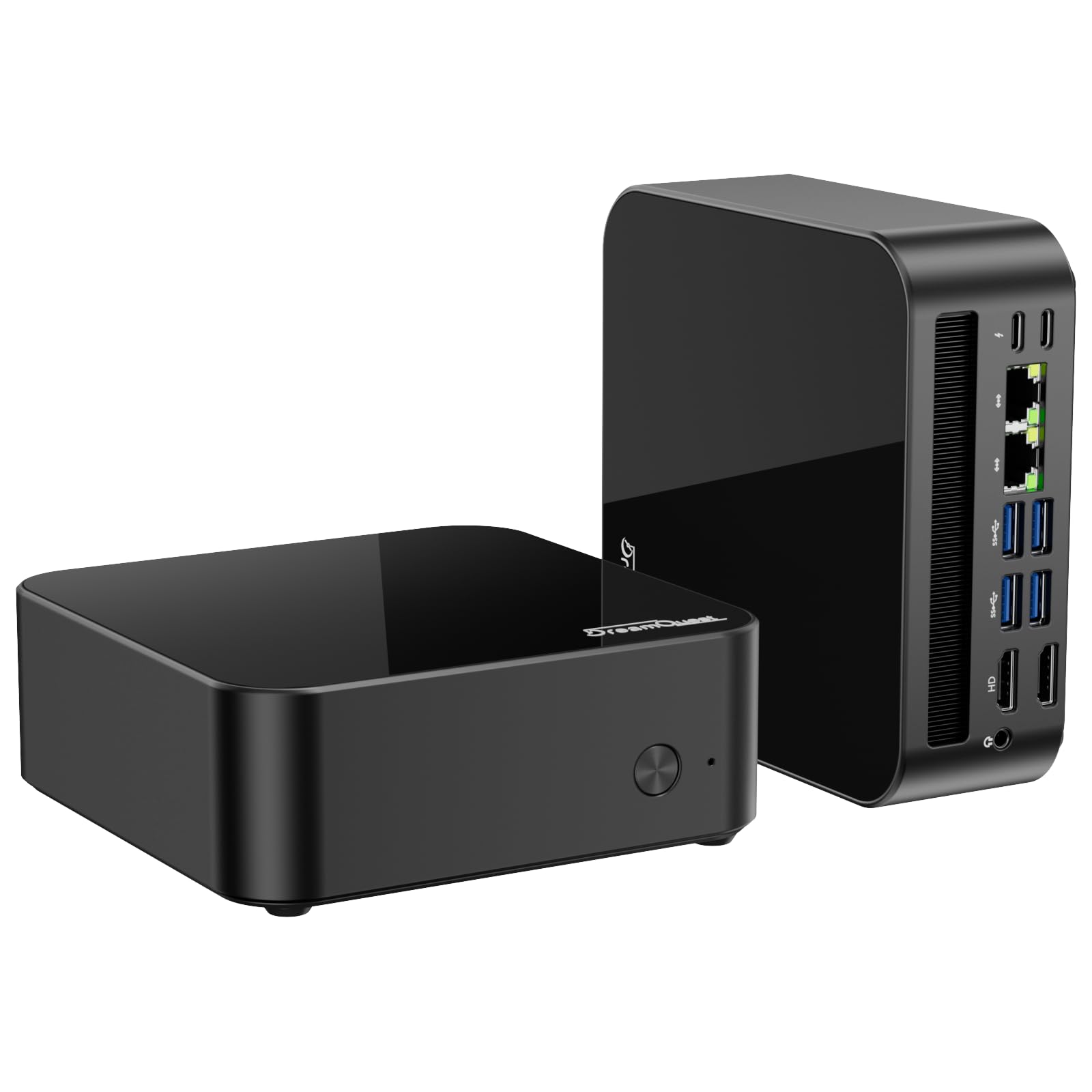
A pocket-sized desktop that boots Ubuntu from a thumb drive and then just keeps running.
If your version of a Linux handheld is a Linux box you carry and plug into a TV, this is where the value sits. The AMD Ryzen 5 7430U runs 6 cores and 12 threads with a boost up to 4.3GHz, backed by 16GB of dual-channel DDR4 RAM that can grow to 32GB, and a 512GB M.2 SSD expandable to 4TB across two slots. Crucially for this list, the manufacturer lists Ubuntu Linux compatibility right alongside Windows 11, plus PXE boot, Wake-on-LAN, RTC wake, and auto power-on — the enterprise-friendly features that actually matter when you deploy these for real work. Owners describe wiping Windows off it and running a Debian Linux server for weeks without trouble, and the review consensus lands squarely on performance and value.
Compared with the SZBOX N200 touchscreen PC below, this machine trades a built-in screen for much more processor: a Ryzen 5 7430U up to 4.3GHz against a modest N200. It drives triple 4K@60Hz displays over dual HDMI plus DP, so it makes a real desk setup. Add dual Gigabit LAN, Wi-Fi 6, Bluetooth 5.3, and two full-featured USB-C ports with PD charging, and the I/O is far beyond what its footprint suggests.
The trade-off is that it is not a handheld in the gaming sense — it needs a screen, keyboard, and mouse, and the integrated graphics are for office and media work, not AAA titles. There is also a mixed note on long-term reliability, with the manufacturer offering a 1-year warranty on the unit. If you want portability plus a screen, the handhelds above are the answer; if you want a tiny always-on Linux workhorse, this is the pick.
Ideal for anyone building a compact Linux server or desk machine that needs real processing power and expansion.
Not for gaming on the go — there is no screen or battery, and the integrated graphics handle office work, not modern games.
8. BOSGAME E4 Air Mini PC

A quiet little Linux candidate for the desk, as long as your ambitions stay modest.
This is the tier of mini PC that makes sense for a dedicated Linux box rather than a handheld. An AMD Ryzen 5 3500U (4 cores, 8 threads, up to 3.7GHz) pairs with Radeon Vega 8 integrated graphics, backed by 8GB of DDR4 RAM and a 256GB SATA SSD — the smallest main drive in this group, versus 512GB on the DreamQuest and SZBOX units. The pitch is everyday computing: spreadsheets, browsing, HD video, and light editing, at 3840 x 2160 output across three monitors via HDMI, DisplayPort, and USB-C. Networking is where it punches above its class, with dual Gigabit Ethernet, Wi-Fi 5, and Bluetooth 5.0.
Owners rate this well for setup ease and compact size, and its dual LAN ports plus a Ryzen chip make it a plausible headless Linux candidate if you can live with 8GB of RAM. Just do not buy it expecting gaming — Vega 8 integrated graphics will not carry modern titles and is not in the same league as the custom APUs in the Steam Deck, ROG Ally, or Legion Go S.
Longevity is the fair caveat to raise. The reliability picture is mixed, with the manufacturer offering a 1-year warranty on the unit and 3 years on parts. For a light home file server or media box, most shoppers say it works well; if you need it to run 24/7 without attention, the DreamQuest has stronger specs for the job.
Standout strengths
- Dual Gigabit Ethernet — rare at this size and genuinely useful for a Linux file or media server
- Triple 4K output over HDMI, DisplayPort, and USB-C for a full multi-monitor desk
- Compact footprint that sits behind a monitor without a sound
Points to weigh
- 8GB of RAM and a 256GB SATA drive cap what you can run comfortably
- Vega 8 integrated graphics rule out modern gaming
- Long-term reliability is the recurring question in owner feedback
Suits the buyer who wants a small, low-drama Linux box with great networking for light server or desk duty.
A miss for anyone chasing gaming performance or heavy multitasking workloads.
9. SZBOX N200 Mini PC Computer
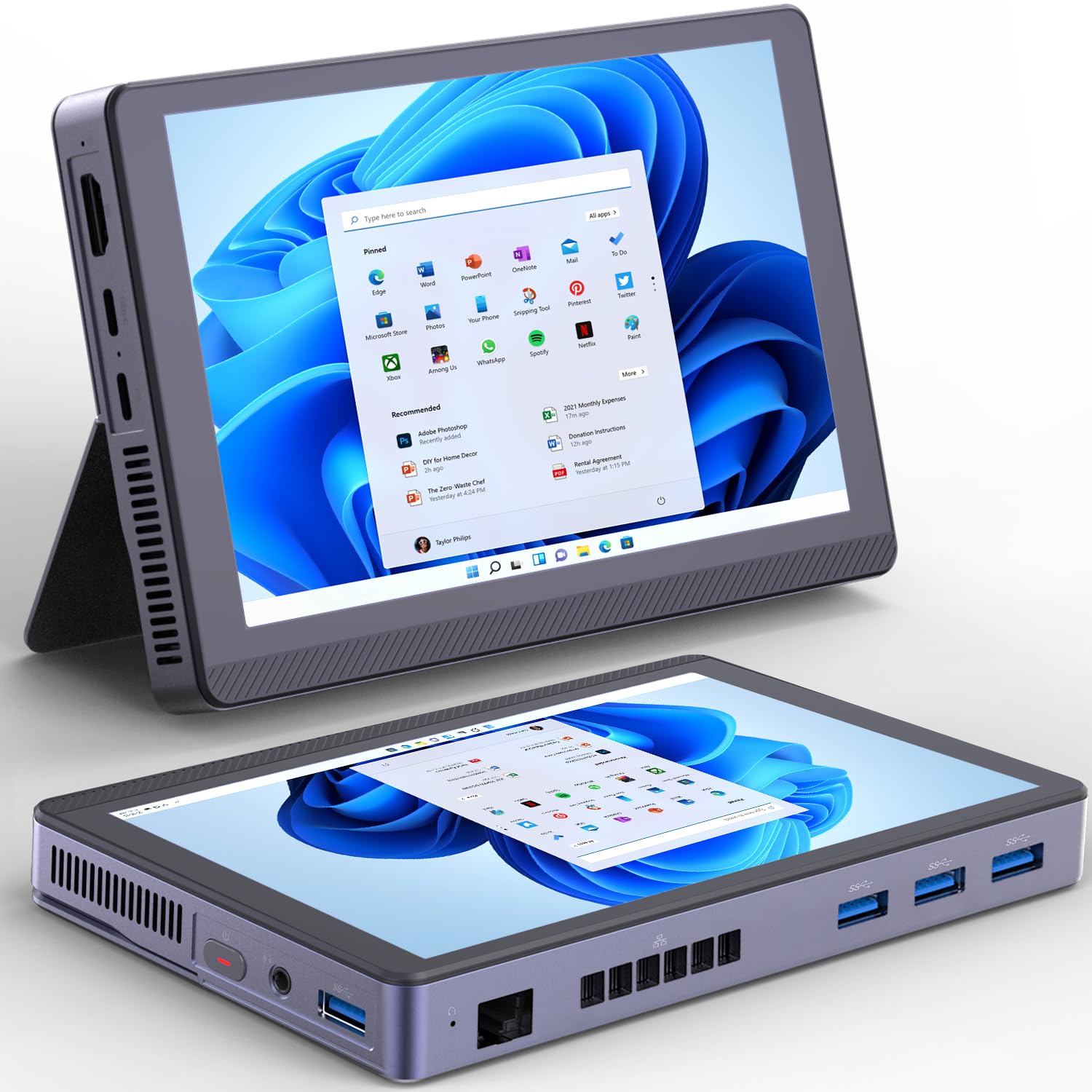
A 7-inch touchscreen Windows box that takes Debian and runs as a roaming network tool.
This is the odd, interesting one: a mini PC with its own 1280 x 800 touchscreen built in, so you have a screen even without a monitor. Under the hood sits a 12th Gen Alder Lake-N200 processor (4 cores, 4 threads, up to 3.7GHz, 6W TDP), 16GB of LPDDR5 RAM, and a 512GB SSD — three times the storage of the BOSGAME’s 256GB and the same as the DreamQuest. Wi-Fi 6 and Bluetooth 5.2 handle wireless, and a full-function USB-C with PD and DP 3.0 supports 4K output alongside HDMI for dual displays.
The Linux angle is exactly why it belongs here. Buyers report formatting it and installing Debian to use as a network discovery tool, and it works. There is a small cooling fan to keep the N200 stable, which matters because these low-power chips throttle without airflow. A 3400mAh battery covers over 3 hours of use — enough for watching video or light work untethered, though not a full day away from a charger. The price-to-capability math is what makes it a value pick, and the processor choice is the smart part: buyers who compared it against similar 7-inch models found the N200’s stronger GPU, Intel Wi-Fi 6, and 16GB of LPDDR5 the better call over the N150’s 12GB of DDR4.
The honest caveats are on the reliability side. Owners consistently note that when it works, the form factor and ports are great, but some units have crashed on sleep or shown overheating in enclosed spaces — so give it airflow and a hard reboot is occasionally required. Screen bubbles show up in a small number of reports.
The clever bit: a built-in 7-inch touchscreen means you can set up and use it without a monitor, which is unusual for a mini PC.
The reality check: reliability varies by unit — ventilation matters, and a handful of owners hit crashes on sleep.
Worth it for tinkerers who want a pocketable Linux-and-Windows box with a screen for network tools or travel use.
Look elsewhere if you need rock-solid uptime — the DreamQuest or BOSGAME are steadier picks for always-on duty.
Know the Specs
What the APU actually does
An APU is the processor and graphics chip built as one piece of silicon, the reason a handheld can fit in two hands and still run games. More graphics power means higher framerates and better settings, but it also means more heat and faster battery drain. That trade is why the ROG Ally feels powerful in short bursts while the Steam Deck OLED stretches further on a charge.
Why refresh rate and resolution move together
A 1080p panel puts more pixels on screen than the Steam Deck’s 1280 x 800, so the image looks sharper. Refresh rate — measured in Hz — is how many times a second the screen redraws. The ROG Ally and Legion Go S run at 120Hz, roughly twice the refresh of a standard 60Hz screen, which keeps fast camera pans smooth. You feel it most in motion, not in screenshots.
Common Questions
Which handhelds here actually run Linux from the start?
Can I install Linux on a Windows handheld like the ROG Ally?
How long does the battery actually last on each pick?
Is the Steam Deck OLED 1TB worth it over the 512GB version?
Do I need a paid subscription to use the abxylute One Pro?
How much storage do I need for emulation and retro libraries?
Can a mini PC replace a handheld for Linux gaming?
Why does the Retroid Pocket 5 come with no games preloaded?
Does screen type really matter on a Linux handheld?
Which of these has Wi-Fi 6E or newer wireless?
The Bottom Line
Start by deciding what “Linux handheld” means for you, and the choice almost makes itself. If you want Linux working the moment you press power, the Valve Steam Deck OLED 1TB is the pick — it is the only device here built natively around that system, and its 7.4-inch HDR OLED panel and 1TB NVMe SSD make it the machine to beat. If you want a broader game library and are willing to trade battery life, the ASUS ROG Ally runs Windows titles without a compatibility check. And for the lightest way to play cloud titles on the move, the abxylute One Pro weighs barely anything and lasts all day. Whichever you choose, confirm the platform first — that one detail decides how much of your first weekend goes into setup rather than play.
How we choose
We do not accept paid placement. Every pick is matched to a real buyer and a real use-case; we do not hands-on test units.
Sources
Specifications: manufacturer listings and product documentation. Review insights: verified customer reviews, as of October 2026. Pricing: not shown on this page (it changes often); check the current price via the retailer link.
As an Amazon Associate, Aappliancez earns from qualifying purchases. This does not affect which products we feature.