Disclosure: Some links in this post are affiliate links. As an Amazon Associate I earn from qualifying purchases, at no extra cost to you. Learn more
Specs are compiled from manufacturer listings and verified buyer reviews and can change over time — please confirm the key details on the product page before buying.
If your video calls make you look grey, shadowy, or weirdly orange, the problem usually is not your webcam — it is the light in the room. A dedicated light for your desk fixes that in one move: it puts soft, even brightness on your face so you look awake and natural on camera. The trick is picking the right shape and the right controls for the space you actually sit in, and that is exactly what this guide sorts out for you.
This guide is built by comparing the manufacturers’ published specifications and the patterns across verified customer reviews, so you get each pick’s real strengths and trade-offs instead of marketing spin.
You will see seven real options below, from clamp-on bars that span a whole desk to compact monitor lights you can angle onto your face. Every entry explains who it genuinely suits, so you can stop guessing about lighting for webcam setups and just pick the one that fits your desk and your camera angle.
Top Picks

How To Choose The Best Lighting for Webcam
You do not need studio gear to look sharp on a call. You need light that is soft, the right warmth, and placed where it lands on your face instead of your screen. Get those three things right and any of these picks will carry you through a day of meetings.
Start with color temperature, not brightness
Color temperature is how warm or cool the white looks, measured in Kelvin (K). Low numbers like 2900K lean warm and cozy, mid numbers around 4000K look neutral, and high numbers like 6500K–7000K read cool and crisp. A light that can slide across that whole range lets you match your room instead of fighting it. If your office has warm overhead bulbs and your light only does cool white, your face goes two-tone on camera.
Then check how faithfully it shows color
CRI stands for Color Rendering Index, a 0–100 score for how accurately a light shows true colors. The closer a light gets to 100, the more natural your skin, hair, and background look. A high-CRI light with a diffuser keeps skin tones from going grey or sallow.
Finally, pick the mount that fits your desk
Clamp lights grab the edge of a desk and free up surface space, but thin desks and thick desks both cause problems. Weighted-base lights sit anywhere and demand zero setup, though they eat desk room. Monitor-mount lights clip onto the screen itself and vanish from your setup, but the mounting hardware quality swings a lot. Measure your desk edge and your monitor before you commit.
Side-by-Side Comparison
| Model | Best For | Color Temp Range | Brightness Control | Mounting | Amazon |
|---|---|---|---|---|---|
| LED Desk Lamp with Clamp, Dual Head Monitor Light★ Best Overall | Whole-desk coverage | 3,200K–6,500K | 5 dimming levels | Clamp | Amazon |
| NEEWER 25W 12.9″ Streaming Key Light GL25BBest for Streaming | Streamers and Zoom calls | 2900K–7000K | Stepless | Clamp with stand | Amazon |
| Logitech G Litra Beam | Gaming setups | 2700K–6500K | On-board plus G HUB presets | 3-way adjustable stand | Amazon |
| ShineTech LED Desk Lamp for Home Office | Dual-monitor workstations | 3000K–6000K | 10 levels per temp | Clamp with EVA pad | Amazon |
| LitONES Zoom Lighting for Computer | Face fill for calls | 3000K–6500K | 10 levels | Metal base with rod | Amazon |
| Weilisi 10.2″ Desk Ring Light | Compact desk spaces | 3 color temperatures | 10 levels | Metal C-clamp | Amazon |
| Logitech Litra Glow Premium LED Streaming Light | Everyday video calls | Warm to cool adjustable | 5 levels plus presets | 3-way monitor mount | Amazon |
Detailed Reviews
1. LED Desk Lamp with Clamp, Dual Head Monitor Light, Remote
Our pick — 4.5+★ from 1,000+ verified ratings; the strongest balance of quality and price.
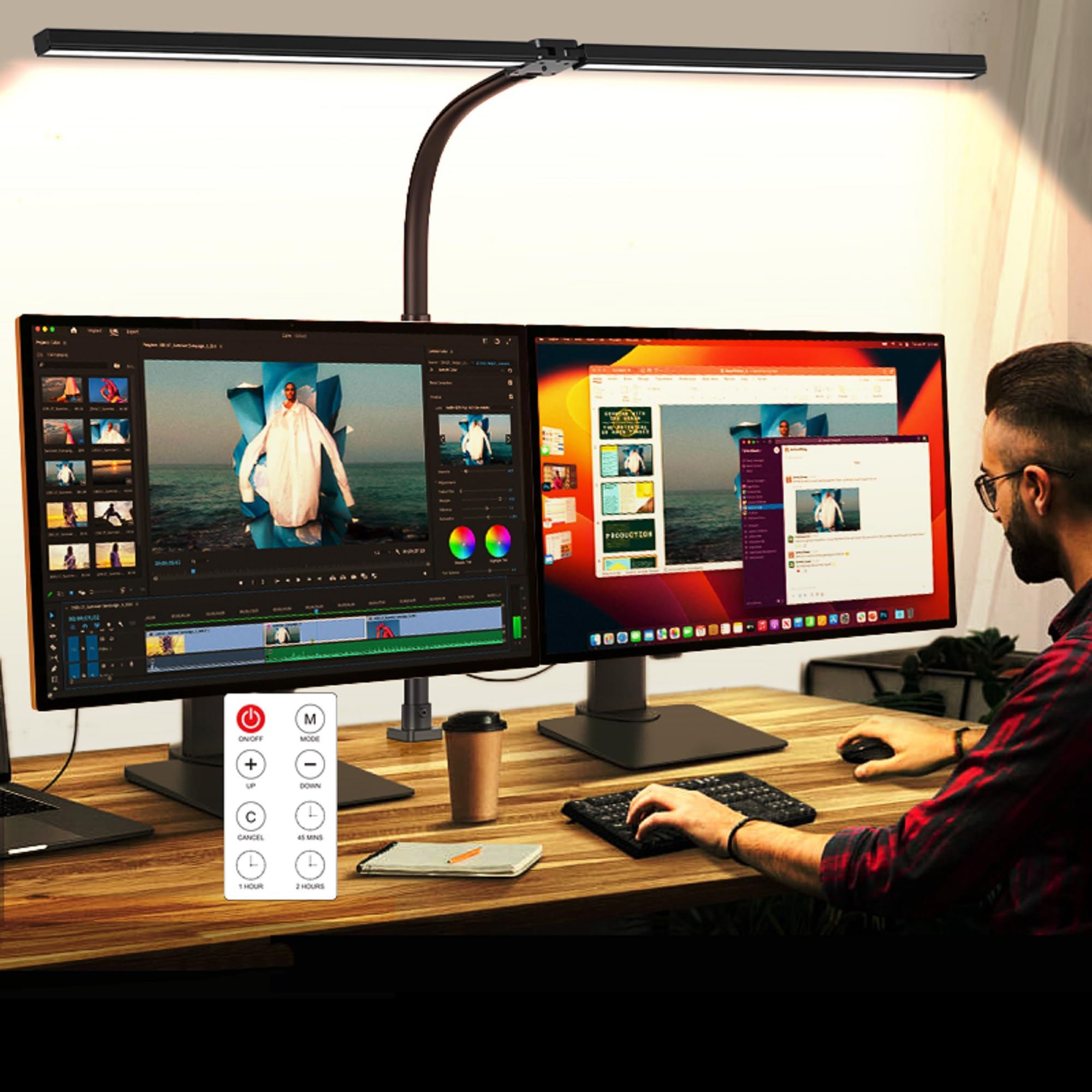
A 31.5-inch two-headed light bar that fills a whole desk, not just your face.
If your workspace is a wide desk with two monitors and you want one light to cover all of it, this is the one that does both jobs. The dual head design extends to 31.5 inches, so light spreads across the table instead of pooling in one spot. Height reaches up to 32.7 inches, which clears most monitor and laptop screens so you can aim the glow at your own face rather than the panel.
You can match your room light instead of fighting it. Five color temperatures run from 3,200K to 6,500K (Kelvin, the scale that measures how warm or cool a light looks), plus five dimming levels, and the memory function remembers whatever you picked last time. That range is narrower at the top end than the NEEWER GL25B’s 2900K–7000K, but for matching ordinary room light it covers everything you need. The anti-glare cover on the head reduces the harsh intensity that hits your eyes directly, so the glare that tires your eyes during long calls is cut down, and the timer can shut it down after 45 minutes, 1 hour, or 2 hours so late-night sessions do not run the light all night.
The clamp is the trade-off to weigh. It grips a desk edge and swings a gooseneck 360 degrees, which keeps your surface clear, but it needs a desk edge with enough thickness to bite. The remote handles color and brightness separately without you reaching for the buttons, which matters when you are on a call and want to nudge the brightness mid-sentence. Owners consistently report it is simple to install and great for evening use at a workbench or study desk.
What makes it the pick
- 31.5-inch dual head covers a full 71-inch desk
- Five color temperatures from 3,200K to 6,500K
- Memory function returns to your last setting instantly
- Remote control frees you from leaning in
Where it asks a little of you
- Needs a clamp-friendly desk edge to mount
- Anti-glare cover softens light but does not throw it far forward onto the camera
Take this one if: you run a wide desk and want one clamp light that keeps the whole workspace bright and flattering on camera.
Think twice if: your desk has no usable edge for the clamp, since the gooseneck and stand depend on that mounting point.
2. NEEWER 25W 12.9″ Streaming Key Light
A studio-grade key light that turns a plain office corner into something worth streaming from.
Content creators get the most out of this one. The 12.9-inch panel packs 176 LEDs behind a white diffuser, which delivers 2300 lux at 0.5m — that is the brightness figure measured half a meter from the panel, and it is genuinely bright. Its color temperature spans 2900K to 7000K, and it holds a CRI over 98, the color-accuracy score that keeps skin looking like skin instead of a washed-out yellow. Stacked against the MACASA clamp light at position 1, the GL25B covers a wider color range — 2900K–7000K against 3,200K–6,500K.
The edge-lit panel spreads light across a diffuser instead of firing raw LEDs at you. Rather than firing raw LEDs at you, the panel spreads light across a diffuser so there are no harsh hotspots and no glare bouncing off your glasses.
Control is where it pulls away from the cheaper options. You get a 2.4G remote that can run one light or several at once, plus a USB transmitter you can plug straight into a Windows or macOS machine for the Neewer Control Center app — no internet needed. The mounting uses a clamp with an extendable stand and a ball head adapter, so you get real height and tilt adjustment, though this is a desk-edge mount so it needs something to grip. On owners’ feedback, output quality is the standout, with the remote and adjustability both drawing steady praise — the recurring friction point is that several people wish for a more flexible mount.
The real edge: 2300 lux at 0.5m with CRI 98+ and a stepless dimmer makes this the most adjustable light on the list for matching a shot precisely.
The catch worth knowing: clamp-and-stand mounting is fussier than a weighted base, so budget a couple of minutes to position it before your first stream.
Reach for this if: you stream, film TikToks or YouTube videos, and want a key light you can dial in exactly.
Look elsewhere if: you want a plug-and-go lamp with no clamp, since the stand design still relies on a desk edge.
3. Logitech G Litra Beam Premium LED Gaming Light

Built for gamers who want their face lit before the match starts and after it ends.
Logitech’s TrueSoft technology is the centerpiece here. It uses balanced, full-spectrum LEDs tuned for cinematic color accuracy, so faces come out radiant rather than pink or blown out. Brightness and color temperature run from 2700K to 6500K, wide enough to swing from a warm morning look to cool late-night gaming without touching another setting.
The shape is what separates it from a full desk bar. The stand is a 3-way adjustable design with three mount points on the light itself, so you can angle it sideways, upright, or wherever your setup demands. It is compact — 6.46″L x 1.1″W x 9.25″H — which is a slimmer footprint than the ShineTech bar at position 4 by 64% on that dimension. The trade-off is that slim build comes with a shorter reach, so this is a face light, not a whole-desk flood.
Owners praise the brightness first — several classify it as clearly stronger than ring lights — followed by the build quality and the temperature control that lets you switch between warmer and cooler settings mid-session. Adjustability and overall value both draw mixed reactions; the common note is that the stand is bulky and a simple monitor mount would be a cleaner fit. The G HUB desktop app handles preset saving over USB or Bluetooth, so your favorite looks reload in a click.
Why gamers lean this way: the TrueSoft LEDs plus 2700K–6500K adjustment give natural color on camera that holds up during long streams.
One honest wrinkle: the stand runs bulky and tall for a gaming desk, and a monitor-mount light is the tidier alternative if you have one.
Pick this if: you game and stream on the same setup and want a light with cinematic color and flexible angles.
Consider another if: your desk is narrow and you would rather not give up space to a full stand.
4. ShineTech LED Desk Lamp

Twenty-five lighting modes and a 31.5-inch spread for people who sit at a desk all day.
This one solves a specific problem: a wide desk with two monitors where a small task light leaves the second screen in shadow. The double head extends to 31.5 inches and provides even coverage for desks up to 71 inches. Height clearance sits at 26.7 inches, which fits most monitors and laptops — and the brand itself notes this size balances coverage against space better than the larger 42-inch models.
Under the hood you are working with a 20W lamp rated at 1400 lumens, and it holds a CRI above 90. The control setup is the flexible part: 5 color temperatures from 3000K to 6000K, each paired with 10 brightness levels, giving 50 possible combinations. That is fewer temperature choices than the LitONES at position 5, which reaches 6500K at the top, but the sheer count of modes here gives you finer tuning at the low end. The 360-degree gooseneck and 180-degree adjustable heads mean you point light exactly where the work is.
You can clamp it to a desk up to 2.9 inches thick and not worry about scratches. The mount is a metal clamp with an EVA pad (a soft protective layer) to prevent scratches. Buyers report the lighting quality and brightness are high and the clamp holds firmly, with one recurring note that the clamp felt awkward on a very thick desk and the workaround was attaching it to a monitor instead. The auto-off timer can be set to 10 or 45 minutes, and the memory function reloads your last setting when you switch it back on.
The value story: at an entry-level tier, you get 50 lighting combinations, a 31.5-inch double head, and 50,000 rated LED hours.
What to plan for: the clamp needs desk thickness under 2.9 inches, so thick desks may need the monitor-mount workaround owners mention.
Best match for: home-office workers with dual monitors who want maximum coverage and lighting variety for the money.
Weigh this first: if your desk edge is deeper than 2.9 inches, the clamp may not seat properly and a base-mounted light would be easier.
5. LitONES Zoom Lighting
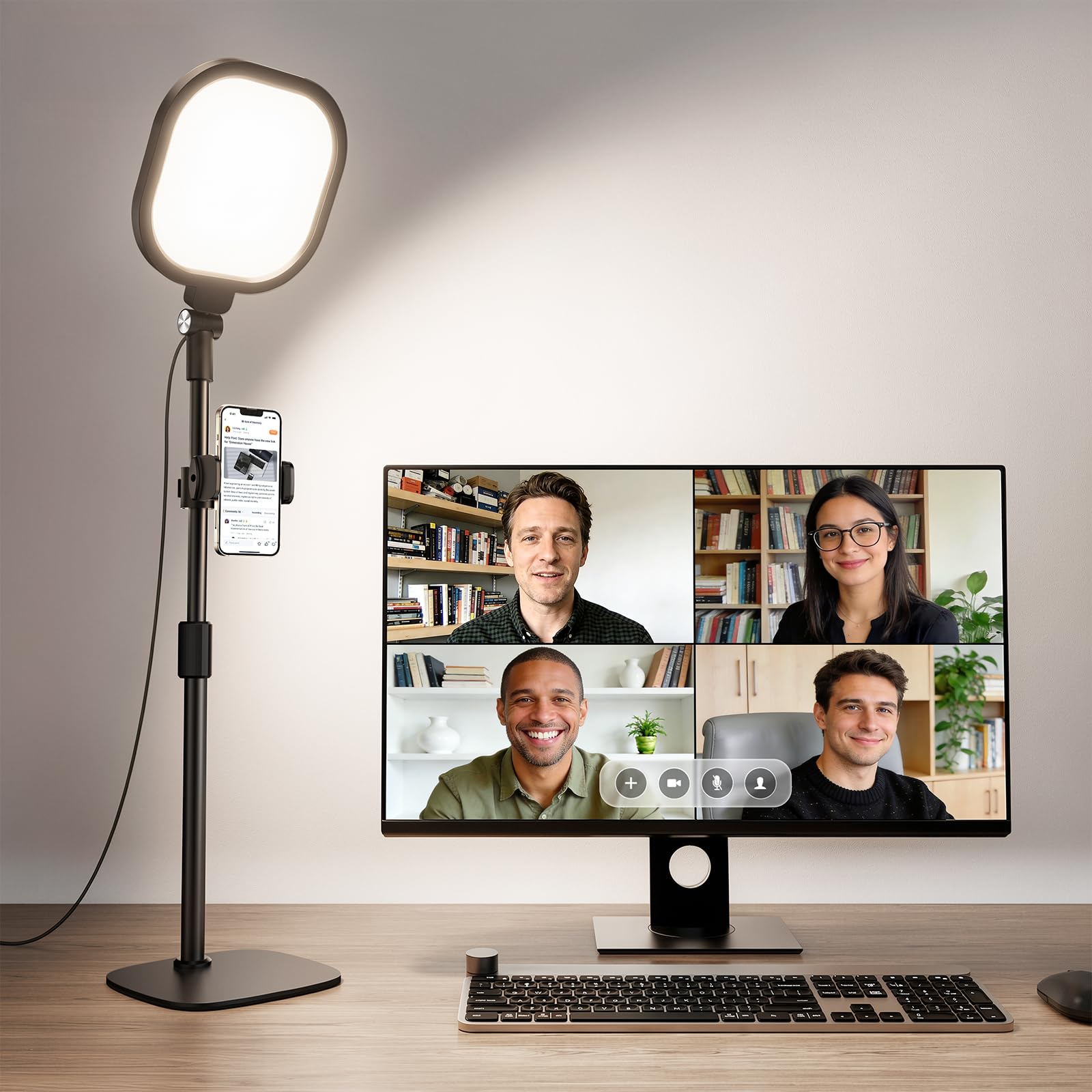
A freestanding face light that sits beside your laptop and needs no desk edge at all.
If your desk has no clamp-friendly edge, this is the escape hatch. It rests on a sturdy metal base with a non-slip pad, so it stands on its own without hardware. The 7-inch full-screen head sits on a rod that adjusts from 22 inches to 32.5 inches in height, letting you raise the light above your webcam for a natural top-down fill.
The color accuracy numbers are the reason to pick this one. It runs a CRI of 97.8 — right up there with the NEEWER GL25B’s CRI 98+ from position 2, which is not a coincidence for a light built around conference calls. You get 3 adjustable color temperatures across 3000K to 6500K and 10 brightness levels, which works out to 30 total modes. The edge-lit technology spreads light softly to eliminate glare, and it runs on a 10W USB supply (5V2A), so a laptop port or a power brick will run it.
The head rotates a full 360 degrees so you can aim it left, right, up, or down, and the bundle includes a universal 360-degree phone holder for recording straight from your phone. Buyers consistently rave about how evenly the light fills their face on camera, and the adjustable brightness and hue settings come up again and again. Owners also report it holds up through daily meetings without ever looking harsh. The main thing to know: it is the heaviest option on this list by a comfortable margin, so it stays put and is not something you pack up casually.
what separates it: you get a metal base and a 22-to-32.5-inch height range, so it works on any desk with no clamp required.
A detail to accept: with a 10W USB draw and a heavier build, this is a stay-on-the-desk light rather than a traveler.
This suits you when: your desk can’t take a clamp and you want a bright, accurate face light with a phone holder included.
Skip the idea if: you need something to toss in a bag, since the metal base and rod keep this one grounded.
6. Weilisi 10.2″ Desk Ring Light

A 10.2-inch clamp-on ring light built to disappear into a tight desk setup.
Small desks and cramped corners are where this light makes sense. The 10.2-inch full-screen panel is fitted to a telescoping stand with an 11.42-inch extendable pole, so it reaches up without dominating the surface. It grabs the desk with a big metal C-clamp that adjusts to a maximum clamp width of 2.34 inches and uses a non-slip silicone base to prevent scratches.
The movement is where it earns its spot. The head rotates a full 360 degrees so you can point it at your face, your keyboard, your camera, or anywhere else you need it. A separate 180-degree adjustment on the light head lets you tilt it top-down for overhead recording. It runs on a 5V/3A power adapter and offers 10 brightness levels with 3 color temperatures, so you can keep the light gentle or push it up. Its edge-lit LED design delivers uniform, shadow-free lighting — the shape that keeps shadows from cracking across your face during a call.
Two honest notes stand out from the buyer feedback. First, the tight joints hold the arm firmly in position, which stops the light from drifting but also means you need to move it deliberately. Second, the control switch sits on the cord, so depending on how you route it, the switch can end up tucked behind a monitor and awkward to reach. One earlier review did flag the basic three-mode lighting as thin for the money, though most owners describe it as a solid, sturdy light and easy to set up, with strong write-ups specifically for recording and video calls.
Why it works in small spaces: the 10.2-inch head plus an 11.42-inch telescoping pole fits on a desk where a full bar would not.
Plan around this: keep the cord switch accessible when you route it, because reaching behind a monitor to change brightness gets old fast.
Suits: you when desk real estate is tight and you want a clamp-on light that rotates anywhere you point it.
Not the one if: you want one wide bar instead of a round head to light a whole desk surface.
7. Logitech for Creators Litra Glow Premium LED Streaming Light

The monitor-mount light that made desk lighting a habit for everyday callers.
Logitech has been at this for a while, and the Litra Glow is the pick for people who just want their webcam calls to stop looking flat. TrueSoft technology delivers full-spectrum LED light tuned for natural skin tones, and the frameless diffuser spreads light wide and soft, killing the hard shadows that most desk lamps throw. It weighs 13.44 ounces, light enough to hang off a monitor without the mount feeling strained.
The mounting system is the reason to pay for this one. The patent-pending 3-way monitor mount adjusts height, tilt, and rotation, so you can fine-tune where the light hits your face down to the degree. Brightness and color temperature are adjustable from warm candlelight through to cool blue, and you get 5 brightness levels and 5 color temperature levels. Owners widely praise how easy it mounts on a monitor and how it pairs with a C920 webcam without setup headaches. What makes it a favorite among callers is the softness — no harsh eye reflections, meaning glasses stay clean on camera.
Both Logitech lights here share the same G HUB desktop app, and on the Litra Glow that app also auto-turns the light on and off with your Logitech webcam. It draws power over USB and carries UL certification for all-day use. The honest trade-offs: mounting and value both draw mixed feedback — a few people say the lowest brightness setting is still a touch bright, and others consider the price high for what it is. Its 3-way mount and G HUB presets make it the simplest set-and-forget pick for daily Zoom calls.
What wins people over
- Frameless diffuser for wide, shadow-free light
- 3-way mount with adjustable height, tilt, and rotation
- G HUB presets and webcam auto on/off
- UL-certified for all-day streaming
The small print
- Some say the lowest setting still runs a bit bright
- Mounting opinions are split — the mount works best on standard monitors
Ready to buy if: you take daily Zoom or Teams calls and want the simplest monitor-mount light with the most consistent performance.
Hold off if: you need a light that can also brighten a whole desk surface — this one is built to light your face, not your desk.
Know the Specs
Color Temperature (K)
Color temperature is how warm or cool white light looks, measured in Kelvin. Lower numbers in the 2700K–3000K range give a warm, comfortable glow, while higher values near 6500K–7000K throw a cooler, crisper light. That range matters when you are matching your light to the room behind you — a light that only does cool white will look blue next to warm overhead bulbs. The range to look for here is a wide one you can slide, not a fixed setting, so you can adjust as the daylight changes through the day.
CRI (Color Rendering Index)
CRI is a 0–100 score for how accurately a light shows true color. A score near 100 means your skin, hair, and background appear natural on camera; a lower score can leave skin looking grey or yellow. Lights built for face-to-face professions — video calls, streaming, makeup — tend to push toward the high nineties for that reason. If color accuracy on camera matters to you more than raw brightness, prioritize the CRI figure.
Lumens vs Lux
A lumen measures the total light a lamp puts out, while lux measures how bright the light is at a specific distance from the source. A light rated at 2300 lux at 0.5m is measured half a meter away; move further back and that figure changes. Since the distance from your light to your face is roughly fixed in a desk setup, a lux distance rating tells you more about camera lighting than a raw lumen count.
Mounting Options
A clamp grips the edge of your desk and keeps the surface clear, but it needs a desk edge thick and narrow enough for the jaws. A weighted base sits anywhere and asks nothing of your desk, though it takes up footprint. A monitor mount clips to the screen itself and vanishes from your setup entirely. There is no single best choice — it depends on your desk, your monitor, and how much surface you are willing to give up.
Common Questions
Will a clamp light damage my desk or monitor?
What color temperature should I use for video calls?
Do I need a light with a diffuser?
Can I control these lights from an app?
Will my ring light cause glare in my glasses on camera?
What is the difference between a key light and a fill light?
How long do LED lights like these usually last?
Do these lights work with any webcam?
How much desk space does a webcam light take up?
The Bottom Line
For most people, the LED Desk Lamp with Clamp, Dual Head Monitor Light is the best overall lighting for webcam here, because its 31.5-inch double head keeps a full 71-inch desk evenly lit while the 3,200K–6,500K range and remote control let you adjust your look without touching the lamp. If streaming and precise color control drive your decision, the NEEWER GL25B and its CRI 98+ panel at 2300 lux is the specialist pick. And for a home office where you simply want to stop looking flat on Zoom calls, the Logitech Litra Glow delivers soft, shadow-free light from a 3-way monitor mount you can set once and leave alone.
How we choose
We do not accept paid placement. Every pick is matched to a real buyer and a real use-case; we do not hands-on test units.
Sources
Specifications: manufacturer listings and product documentation. Review insights: verified customer reviews, as of October 2026. Pricing: not shown on this page (it changes often); check the current price via the retailer link.
As an Amazon Associate, Aappliancez earns from qualifying purchases. This does not affect which products we feature.