Disclosure: Some links in this post are affiliate links. As an Amazon Associate I earn from qualifying purchases, at no extra cost to you. Learn more
Specs are compiled from manufacturer listings and verified buyer reviews and can change over time — please confirm the key details on the product page before buying.
If you are left-handed, every standard mouse quietly forces your hand into someone else’s shape. The fix is not a flat mouse flipped around — it is a shell built from the start for your left hand, angled so your wrist sits in a handshake position instead of twisting flat. This guide covers seven of those, from a trackball that barely moves to a wired vertical unit built for six-hour spreadsheet days.
This guide is built by comparing the manufacturers’ published specifications and the patterns across verified customer reviews, so you get each pick’s real strengths and trade-offs instead of marketing spin.
You will see how battery life, hand size, and button layout split these apart, because the wrong size ruins an otherwise good mouse. The list below narrows it to the models that actually fit a left hand, which is the whole point of choosing a left handed ergonomic mouse.
Top Picks


How To Choose The Best Left Handed Ergonomic Mouse
The biggest mistake left-handed buyers make is buying a vertical mouse without checking the size against their own hand. A tall, bulky shell that swallows a small hand forces you to reach for buttons rather than rest on them. A shell that is too short leaves your palm hanging off the back. Get the size right and the angle does the rest of the work.
Check the tilt angle before anything else
A vertical mouse rotates your hand so the thumb points up, closer to a handshake. The Cherry MW 4500 uses a 45° design, which is a partial tilt — your hand still rests at an angle rather than fully upright. The Logitech Lift goes to 57 degrees, close to fully vertical. If you are coming from a flat mouse, a partial tilt is easier to adjust to. A steeper one takes a few days but puts your forearm in a more neutral line.
Match the shell to your hand length
Hand size decides more than any spec sheet admits. The Lekvey ships at 5″L x 2.5″W and is recommended for medium and large hands, and its own review pages show small-handed users struggling to reach the main button. The ELECOM EX-G comes in a Medium size that buyers with smaller hands describe as spot-on. If your hands are on the small side, a compact shell beats a roomier one every time.
Decide between battery, rechargeable, and wired
Battery figures on these mice range wildly. The Cherry MW 4500 is rated at 2 months, the Lekvey at 6 months, the Logitech Ergo M575S at 18 months, and the ELECOM EX-G at 23 months. A rechargeable model like the Perixx trades that for a charging pad and cable. Wired options like the Evoluent never need charging at all, which matters on a locked-down work machine where you cannot install pairing software.
Look at whether the buttons are programmable
Extra buttons only earn their place if you can assign them. The Evoluent’s six buttons get their own jobs through the free Evoluent Mouse Manager on Windows. The ELECOM EX-G uses the downloadable ELECOM Mouse Assistant software. The Logitech models lean on the Logi Options plus App. On the Cherry, right and left click swap at the touch of a button, which is a hardware fix rather than software. If you work on a Mac, check that the software you need exists for it.
Side-by-Side Comparison
| Model | Best For | Battery Life | Buttons | Connection | Amazon |
|---|---|---|---|---|---|
| Logitech Ergo M575S★ Best Overall | Minimal hand movement | 18 months | 2 | Bluetooth, USB | Amazon |
| Cherry MW 4500Budget Left-Hand Pick | Entry-level left-hand fit | 2 months | 6 | USB | Amazon |
| Lekvey Left Handed Mouse | Long battery, quiet clicks | 6 months | 6 | 2.4GHz USB | Amazon |
| Perixx PERIMICE-713LRX | Dual charging options | 10 days | 6 | 2.4 GHz wireless | Amazon |
| ELECOM EX-G M-XGM31DBSKBK | Smaller left hands | 23 months | 5 | USB | Amazon |
| Logitech Lift Left | Steep vertical angle | 24 months | 6 | Bluetooth / Logi Bolt | Amazon |
| Evoluent VM4L | Locked-down work PCs | — | 6 | Wired USB | Amazon |
Detailed Reviews
1. Logitech Ergo M575S Wireless Bluetooth Trackball Mouse
Our pick — 4.5+★ from 2,000+ verified ratings; the strongest balance of quality and price.
The mouse that moves your cursor without ever moving your whole hand.
If your desk is cramped or your shoulder aches from dragging a mouse across a pad, the M575S’s thumb ball answers a different question than a vertical mouse. A trackball means a ball under your thumb that steers the cursor — you keep your hand still and roll the ball instead of sliding the whole unit. That is what makes it work in a small or space-saving setup, and on any surface, including your leg.
The battery figure is the one that changes your routine. Logitech rates this at 18 months on a single AA, which is more than nine times the Cherry MW 4500’s 2-month rating. Practically, that is a mouse you forget about — no charging pad, no weekly top-up, just one battery swap every year and a half. Buyers report it runs shorter under very heavy use, with one reporting roughly three months of battery with heavy use, so how hard you work it matters.
What wins people over is plain functionality, and it is what the review pages talk about most. The quiet clicks get their own share of praise, which makes it a decent pick for shared offices and lecture halls. The Bluetooth connection frees up your one working USB port, and it pairs to the included Logi Bolt receiver if you prefer. Customization runs through three buttons and the Logi Options plus App, where you can change cursor speed.
What earns it first place
- Cuts hand and arm travel to almost nothing, so cramped desks and small setups work fine
- 18 months of use off a single AA battery included in the box
- Quiet clicks and Bluetooth or Logi Bolt connection, whichever your machine prefers
- Three customizable buttons with speed adjustment in the Logi Options plus App
Where it asks something of you
- Two buttons is the fewest here, and there is a real adjustment period coming off a sliding mouse
- If the ball pops out after a drop it can roll away, so treat the shell gently
Reach for this if: your desk is tight, your USB ports are spoken for, and you want to stop moving your arm entirely.
Think twice if: you rely on a stack of side buttons — two is all you get, versus six on the Lekvey and the Evoluent.
2. Cherry MW 4500 Ergonomic Wireless Mouse, Left-Handed
A partial tilt that eases a left hand sideways without throwing it fully upright.
The 45° form is the defining number here. Rather than standing your hand nearly vertical, the Cherry leans it partway over — a gentler first step for anyone who has never used an angled mouse. The sensor gives you three adjustable resolution levels from a 1200 dpi base, so you can slow the cursor for detail work or speed it up for a wide monitor. A status LED tells you when the battery is running down.
The catch is the pickup problem, and it is the recurring gripe on the review pages. The glossy shell slides smoothly across a pad, but when you hit the edge and need to lift and reset it, there is nothing to grab — as owners mention, “Slides nicely, feels ergonomic most of the time, but when reaching the edge of the mouse pad, it’s difficult to pick up the mouse to recenter it.” Grip tape is the usual workaround. The other honest limit is the battery: a 2-month rating means you will be swapping cells far more often than on the Logitech or ELECOM picks.
Where the six buttons go: you get a full spread including thumb buttons, and right and left click swap at the touch of a button — handy on a shared desk where the machine is set up for the other hand.
The sizing note: the shell runs on the larger side, and buyers with long fingers have hit double-clicks on the main button. If your hands are small, look at the ELECOM instead.
Pick this one when: your budget is tight and you want to test the angled-mouse idea without committing to a steep tilt.
Leave it on the shelf if: you switch mouse pads often mid-task or want to go weeks between battery swaps.
3. Lekvey Left Handed Ergonomic Vertical Mouse
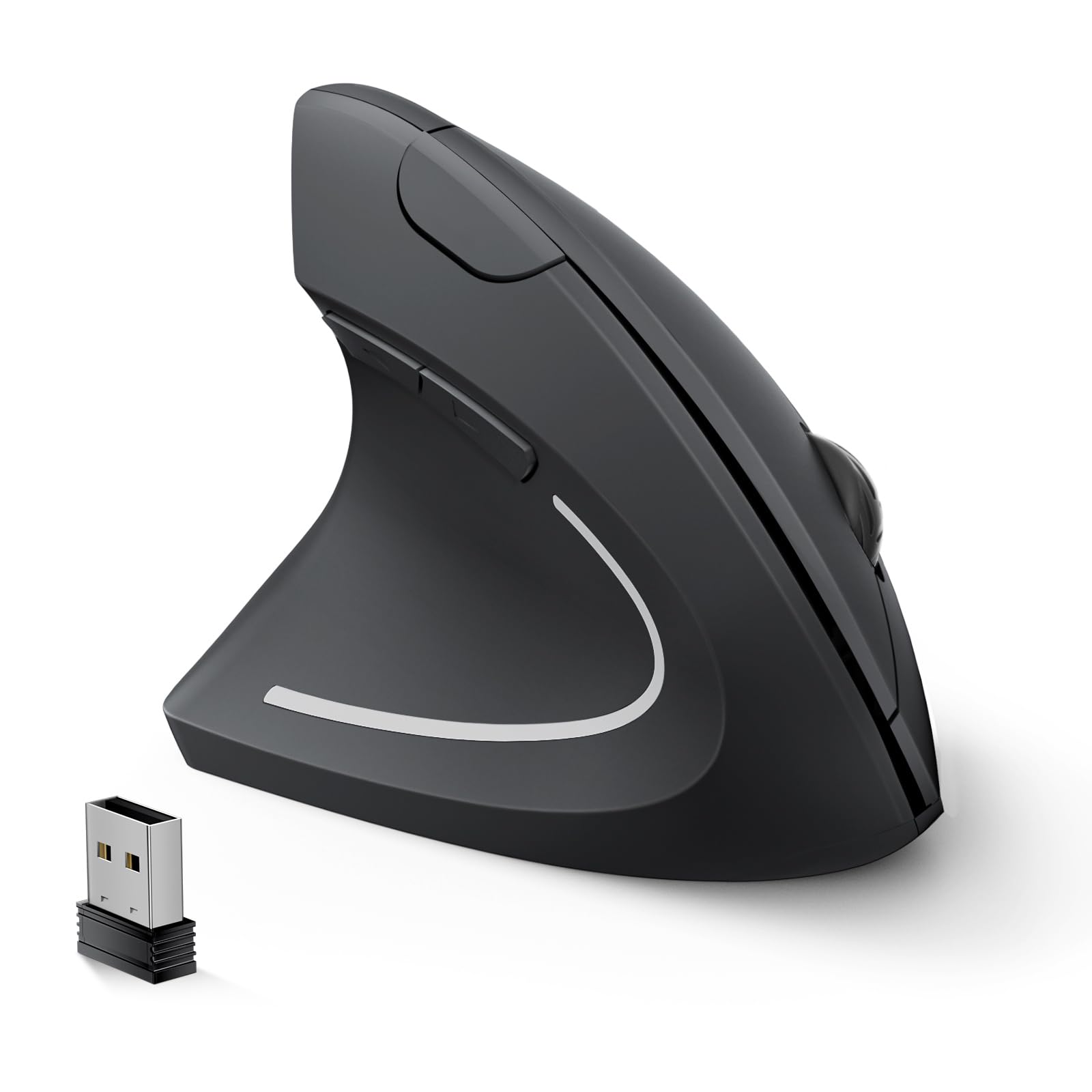
Six buttons, a full vertical shape, and months between battery changes.
This is the pick for a left hand that wants a full handful of controls without a recharge cable. The shell cradles your left palm in a handshake posture, and it carries six buttons — forward and back for web browsing, three DPI levels at 1000/1200/1600, and quiet clicks. Six is three times the Logitech M575S’s two, which matters if you live in a browser and want a back button under your thumb.
Battery life is where it separates from the Cherry. The Lekvey is rated at 6 months on two AAA batteries (not included), and it sleeps after 10 minutes of idle time and wakes on any click. That 6-month figure is compared against a 2-month rating on the Cherry, so you are changing cells roughly a third as often. Setup is plug-and-play over 2.4GHz from the USB receiver stored in the mouse’s bottom, with a rated range up to 33ft.
Customers note wrist strain easing within 3-5 days of use, and comfort is what the review pages circle back to. The size is the honest limit. The shell measures 5″L x 2.5″W at 2.88 ounces and is recommended for medium and large hands, and small hands hit trouble reaching the main left button. One buyer with short fingers called the button activation unacceptable for small hands. A few units have shipped with a stiff on/off switch or a glide that needs a mat, though the maker has replaced defective units for those buyers.
The monthly maths: rated 6 months on two AAA cells, with sleep mode after 10 minutes of idle time so a forgotten mouse does not drain itself overnight.
The one thing to check: measure your hand before ordering — this is a medium-to-large shell, and it is the single most common reason buyers send it back.
Best fit for: medium and large left hands that want browser buttons and a quiet click in a shared space.
Not for: small hands, or anyone unwilling to supply their own AAA batteries.
4. Perixx PERIMICE-713LRX Left Handed Vertical Mouse
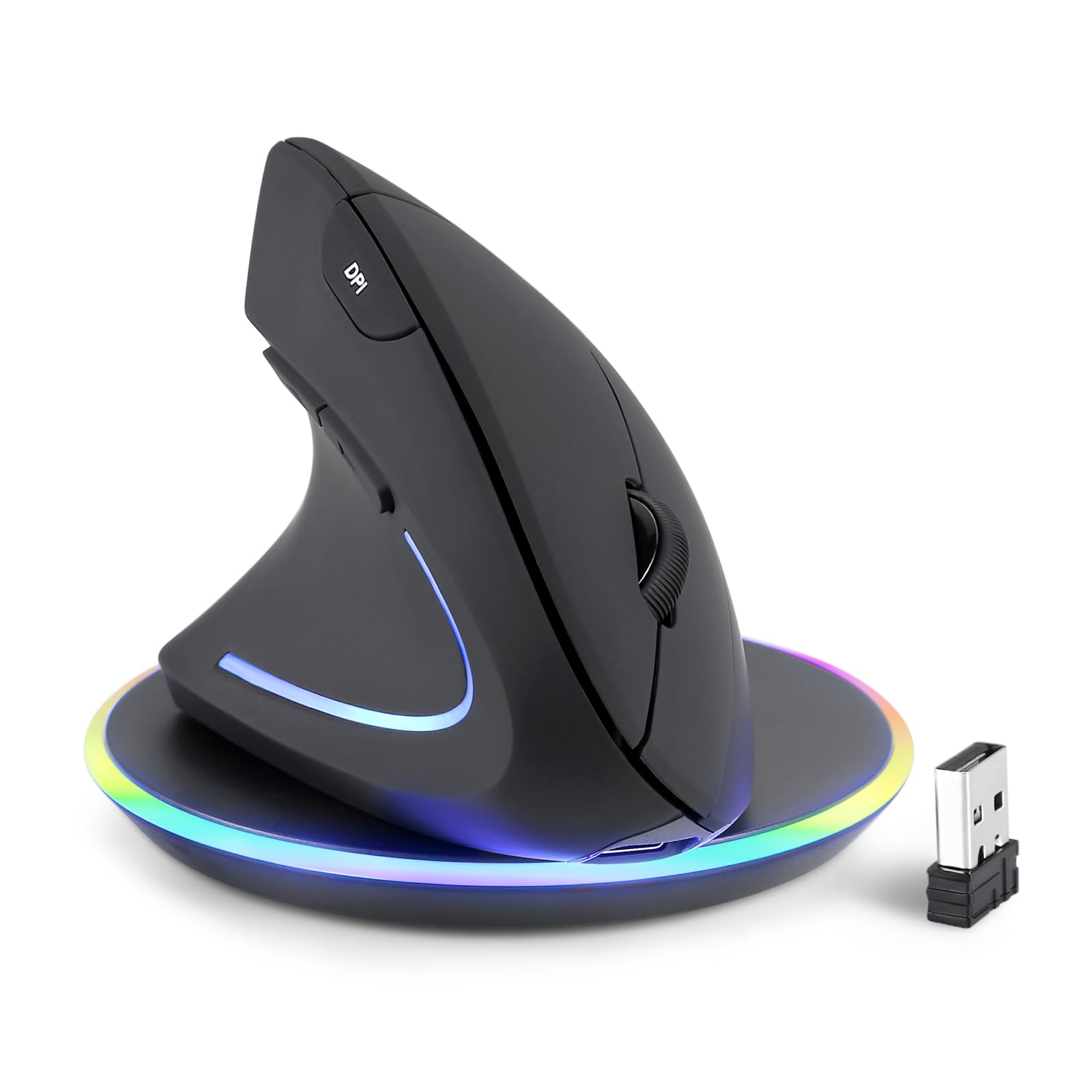
Two ways to top it up, and the charging pad comes in the box.
Most rechargeable mice give you one cable and call it done. The Perixx ships with both a USB-C wired charging path and a wireless charging pad, plus two charging cables in the package. That flexibility is the reason to consider it over a battery-only unit — set it on the pad overnight and start the day full. The adjustable DPI steps go higher than the Cherry’s three levels, at 1000/1600/2400/3200, so it can keep up on a large high-resolution display.
The trade is battery life, and it is a steep one. This is rated at 10 days between charges where the ELECOM EX-G runs to a 23-month figure, so you are in a docking routine rather than a swap-one-battery-a-year routine. The soft rubber coating and matte finish make it comfortable to hold for long stretches, and the quiet buttons suit a shared room — though the dpi button itself is not silent. There is no Bluetooth, so the dongle is your only connection, and back and forward buttons do not work on macOS.
Where it lands: the wireless pad and the USB-C cable give you a fallback if the pad ever dies, and the 3200 dpi ceiling is the highest adjustable setting on this list.
The size warning: the shell runs long at 4.92 inches, and reviewers with smaller hands found it too big. It suits a longer left hand rather than a compact one.
Worth it for: a left hand that prefers setting a mouse on a pad overnight over hunting for batteries.
Skip if: you want Bluetooth, macOS side buttons, or more than ten days between charges.
5. ELECOM EX-G Left Hand Wireless Ergonomic Mouse

An in-between tilt for hands that find full vertical too much to handle.
The EX-G sits at an angle between a flat mouse and a fully upright one, and that middle ground is why buyers who disliked a steep vertical mouse end up here. It carries a 2,000 dpi optical sensor, five near-silent buttons that can be reprogrammed through the downloadable ELECOM Mouse Assistant software, and a rated 23-month battery life — the longest of any wireless pick here. The 2-year warranty is also the longest on the list, well beyond the Perixx’s 12 months.
What buyers like most is the sizing, and it is the positive point the review pages single out. The Medium shell is designed for a smaller hand, and a buyer with smaller hands found it spot-on. It weighs 3.2oz and measures 4.5″L x 3″W. The honest counterweight is reliability — signal loss and a wonky sensor show up on the review pages, with complaints of pointer lag and erratic fine movement. For precision graphical work that is a real risk; for everyday office use many reviewers point out working perfectly for months on end. A 2-year warranty softens the gamble.
Why it earns a slot: the gentler wrist angle, the small-hand sizing, and the 23-month battery rating make it the natural fit for a compact left hand that wants to be wireless.
The bet you take: reliability is the mixed note on this model, so keep the warranty handy and treat it as a tool to be replaced if it misbehaves.
Choose it for: smaller left hands and a wrist that wants a subtle tilt rather than a steep one, backed by a 2-year warranty.
Pass if: you do pixel-level design work where any pointer lag is a deal you cannot take.
6. Logitech Left Handed Lift Vertical Ergonomic Wireless Mouse

A 57-degree shell for a small-to-medium left hand that wants near-vertical.
The angle is the headline. The Lift holds your hand at 57 degrees — close to fully upright — so your forearm lines up with your wrist instead of the wrist bending flat. That is a more committed tilt than the Cherry’s 45°, and it takes a few days to learn. The shell is built for small to medium left hands specifically, with a textured grip and a thumb rest sculpted for the left side. The buttons run whisper-quiet and the SmartWheel scrolls smoothly.
Run time here is a rated two years on the included AA battery, which makes the Perixx’s 10-day charging cycle look like a chore by comparison. You connect over Bluetooth Low Energy or the Logi Bolt USB receiver, and you can pair across Windows, macOS, iPadOS, Chrome OS, and Linux. The buttons are easy to reach and customizable, and you switch between up to three devices without re-pairing.
What people praise most is build quality and the comfort that comes with the angle. Users with elbow and wrist aches report the 57-degree shape helping through long days. The one thing to weigh honestly is the size: this is made for small to medium hands, and buyers with larger hands find it cramped. The auto driver install has also locked up USB ports on some machines, though a manual reinstall fixes it and the maker’s software recovers. If your hand is on the bigger side, the Evoluent below gives it more room.
The run-time play: a rated 24 months on one AA battery, plus Bluetooth to three devices at once, so switching machines never needs a dongle swap.
The size check: it is built for small-to-medium hands, so a large hand will feel cramped rather than cradled.
Suits you when: your left hand is small to medium and you want a steep, quiet, multi-device mouse that runs for years.
Look elsewhere if: your hand is large, or a flat desk angle is still comfortable for you.
7. Evoluent VM4L Ergonomic Vertical Mouse, Left Hand, Wired USB

No charging, no pairing, and a shell you can program six ways on Windows.
The cable is the whole point for some buyers. Plug this into a locked-down work machine and the basic buttons and wheel work on any system with USB — no driver needed, no IT request, no Bluetooth pairing. The wired USB connection also means there is nothing to charge, which fits a desk where the mouse never leaves its spot. improve that with six buttons you can program through the free Evoluent Mouse Manager on Windows, including different jobs in different applications.
Where this beats the wireless picks is the pointer control. The speed rocker changes sensitivity on the mouse itself in four hard-wired settings, shown by indicator lights, so you never open a settings panel to slow the cursor down. The broad lower lip under the left side gives your little finger somewhere to rest instead of dragging on the desk. The shell runs hands-on-side rather than the wrist-bending flat position, and for a left hand that is the difference that matters over a six-hour day.
Wrist comfort is what the review pages praise most, and the six programmable buttons are also a strong point. The trade is fine control: the light-touch buttons cause occasional accidental clicks, and several buyers have disabled the pinky-side button because it triggers when they tilt the mouse. A firm downward pressure helps precision. There are no Mac drivers, so the default mapping on a Mac is partial. And without a battery spec, the cable must reach your desk — the cord runs 6 ft, so check the layout before you buy.
Why it stands apart: four pointer speeds on the mouse, six programmable buttons, and zero setup on a machine that will not install software.
The precision note: the sensitive buttons are easy to trip, and the pinky button gets disabled by a fair share of buyers — plan to adjust the layout in the software.
Go for this: a locked-down work PC, a desk that stays put, and a left hand that wants the widest button range on the list.
Rule it out if: you need Mac-side button mapping, want untethered movement, or insist the buttons never misfire.
Know the Specs
Tilt Angle (45° to 57°)
The tilt is measured in degrees from flat. A 45° design, like the Cherry MW 4500, leans your hand partway over. A 57-degree shell, like the Logitech Lift, stands it close to vertical. The steeper the angle, the more neutral your forearm line, and the more adjustment time you need. Pick a gentler angle if you are new to vertical mice and a steeper one if you want to make a full change.
Battery Life and Type
Ratings here range from 2 months to 23 months for a wireless model, and some units recharge instead. The number describes how often you swap cells, not comfort. A long-rated AA model like the Logitech Ergo M575S, rated 18 months, suits a desk where nobody wants to think about charging. A rechargeable like the Perixx, rated 10 days, needs a docking habit. A wired model like the Evoluent needs nothing at all.
DPI (Cursor Sensitivity)
DPI stands for dots per inch — how far the cursor travels for each inch you move the mouse. Higher numbers mean faster cursor travel on a big screen. The Cherry MW 4500 sits at a 1200 dpi base with three levels, the Lekvey offers 1000/1200/1600, the Perixx steps 1000/1600/2400/3200, and the Evoluent uses four hard-wired speeds changed on the mouse itself. Match the ceiling to your monitor, then set it to what feels right.
Buttons and Programmable Software
Button count matters only when you can assign each one. The Evoluent, ELECOM, and Logitech models all map buttons through their own software. Check the OS the software runs on before you buy — the Evoluent has no Mac drivers and the Perixx back/forward buttons do not work on macOS. A six-button mouse with no working software feels like a two-button mouse with spare parts.
Common Questions
Is a left-handed vertical mouse better than a flipped right-handed mouse?
Will a vertical mouse fit my small hands?
How long does the battery last on a wireless left-handed ergonomic mouse?
Can I use a left-handed vertical mouse on a Mac?
Does a trackball count as an ergonomic left-handed mouse?
Why do the extra buttons not work on my left-handed mouse?
How long does it take to get used to a vertical mouse?
Is wired better than wireless for a left-handed ergonomic mouse?
Do these mice work with a laptop and a desktop at the same time?
The Bottom Line
For most left hands, the left handed ergonomic mouse that solves the most problems is the Logitech Ergo M575S. It moves your hand barely at all, it runs a rated 18 months on one AA battery, and the quiet clicks and Bluetooth keep it welcome in a shared space. If a steeper vertical angle sounds more comfortable, the Logitech Lift holds your hand at 57 degrees across three devices. And for a fixed work desk where nothing can be paired or charged, the wired Evoluent VM4L plugs in and works without a driver. Whichever you choose, measure your hand first — the wrong size ruins an otherwise good mouse, so start with the shape and let the specs follow.
How we choose
We do not accept paid placement. Every pick is matched to a real buyer and a real use-case; we do not hands-on test units.
Sources
Specifications: manufacturer listings and product documentation. Review insights: verified customer reviews, as of October 2026. Pricing: not shown on this page (it changes often); check the current price via the retailer link.
As an Amazon Associate, Aappliancez earns from qualifying purchases. This does not affect which products we feature.