Disclosure: Some links in this post are affiliate links. As an Amazon Associate I earn from qualifying purchases, at no extra cost to you. Learn more
Specs are compiled from manufacturer listings and verified buyer reviews and can change over time — please confirm the key details on the product page before buying.
If you write code all day and game at night, you need one machine that does both without choking — and the honest answer is that most laptops force you to pick a side. Gaming machines get loud, hot, and die in two hours. Ultraportables stay cool but stutter on anything graphics-heavy. The picks below are the ones that genuinely hold both jobs, starting with the M4 MacBook Air, the crowd favorite sitting at 4.5+ stars across 1,900+ owners.
This guide is built by comparing the manufacturers’ published specifications and the patterns across verified customer reviews, so you get each pick’s real strengths and trade-offs instead of marketing spin.
Every laptop here was matched to how coders and gamers actually use a machine — long compile sessions, side-by-side editor windows, and frames that hold steady. This breakdown of the laptops for coding and gaming covers what separates a great pick from a frustrating one.
Top Picks



How To Choose The Best Laptops for Coding and Gaming
Buying for code plus games means balancing two workloads that pull in opposite directions. Coding wants a comfortable keyboard, a sharp screen for reading dense text, plenty of memory for containers and browser tabs, and enough battery to work untethered. Gaming wants raw graphics power, a fast refresh rate, and a cooling system that keeps frames stable for hours. The trick is finding the machine whose strengths line up with which of those two you lean on more.
Refresh rate decides how smooth your scrolling feels
A refresh rate is how many times per second the screen redraws the image, measured in Hz. A 144Hz panel redraws faster than a standard 60Hz one, which you notice immediately when you flick through a long file or pan a camera in a game. Higher is smoother, but on a laptop it also draws more power, so a 360Hz panel will chew through battery faster than a 144Hz one doing the same job.
Memory and storage drive your compile times
Memory, listed in GB, is what lets your editor, browser, terminal, and a running game all stay open at once. Storage, usually an NVMe SSD in TB, decides how fast projects load and how many games you can keep installed. Look at whether the memory or storage can be upgraded later — that single detail decides whether the machine is still useful in a few years or whether you are buying again.
Thermals and fan noise keep the speed honest
A laptop’s first ten minutes always feel fast. What matters is minute sixty, once the chip is hot. Laptops with dedicated cooling — multiple fans, heat pipes, and vapor chambers — hold their clock speeds longer, and that shows up as stable frame rates and shorter builds. The trade-off is fan noise, which is the price a lot of these machines pay for sustained performance.
Side-by-Side Comparison
| Model | Best For | Processor | Memory / Storage | Display | Amazon |
|---|---|---|---|---|---|
| Apple MacBook Air 15-inch M4★ Best Overall | All-day coding battery | Apple M4 | 16GB / 256GB SSD | 15.3-inch Liquid Retina | Amazon |
| NIMO 17.3 FHD AI GamingBig Screen Value | Big screen on a budget | AMD Ryzen 7 8745HS | 16GB DDR5 / 1TB SSD | 17.3-inch FHD, 180° hinge | Amazon |
| Acer Nitro V 15.6″Budget Starter | Budget gaming starter | Intel Core i5-13420H | 16GB DDR4 / 512GB SSD | 15.6-inch FHD 165Hz | Amazon |
| Acer Nitro V 16S AI | Balanced coding + gaming | AMD Ryzen 7 260 | 32GB DDR5 / 1TB SSD | 16-inch WUXGA 180Hz | Amazon |
| Lenovo LOQ | Upgrade-friendly value | Intel Core i7-13650HX | 16GB / 1TB | 15.6-inch FHD 144Hz | Amazon |
| Acer Nitro V 17 AI | Large-screen AI workloads | AMD Ryzen 7 260 | 32GB DDR5 / 1TB SSD | 17.3-inch FHD 144Hz | Amazon |
| ASUS ROG Strix G16 | Serious gaming performance | Intel Core i7-14650HX | 16GB DDR5 / 1TB SSD | 16-inch FHD+ 165Hz | Amazon |
| ASUS ROG Strix G18 | Big-screen immersion | AMD Ryzen 9 8940HX | 16GB DDR5 / 1TB SSD | 18-inch FHD+ 144Hz | Amazon |
| MSI Katana 15 HX | High-FPS competitive play | Intel Core i9-14900HX | 32GB DDR5 / 1TB SSD | 15.6-inch QHD+ 165Hz | Amazon |
| Thunderobot Zero 16 Pro | Fastest display here | Intel Core Ultra 9 275HX | 32GB DDR5 / 2TB SSD | 16-inch QHD+ 360Hz | Amazon |
| Alienware 18 Area-51 | Desktop-class power | Intel Core Ultra 9 275HX | 32GB DDR5 / 2TB SSD | 18-inch WQXGA 300Hz | Amazon |
Detailed Reviews
1. Apple 2025 MacBook Air 15-inch Laptop with M4 chip
Our pick — 4.5+★ from 1,500+ verified ratings; the strongest balance of quality and price.
The machine that codes all day on battery and still whispers while it does it
If you are a developer who wants to write code at a coffee shop until the afternoon without hunting for an outlet, this is the one to beat. The M4 chip (Apple’s current processor) paired with up to 18 hours of battery life means you can compile, test, and push code for a full workday on a single charge. That 18-hour figure is the longest on this list, ahead of the NIMO 17.3’s 15.5 hours. At 3.32 pounds, it slips into any backpack without you noticing the weight on your shoulder.
Coding on this machine means macOS, which runs Microsoft 365 Copilot, Adobe Creative Cloud, and Google Workspace natively, plus every terminal and editor you already use. The 15.3-inch Liquid Retina display supports 1 billion colors, so text stays sharp and side-by-side editor windows have room to breathe. If you also carry an iPhone, iPhone Mirroring lets you see and control your phone from the Mac, and copy-paste moves between the two — one less thing to juggle while you work.
Gaming is where you need to set expectations honestly. The M4 chip handles video editing and lighter games smoothly, but this fanless ultraportable is built for indies, esports titles, and older AAA games rather than the newest blockbusters at max settings. The storage starts at 256GB, which fills fast once you install a few games and clone a couple of repos. Raw performance is the single most talked-about strength in the reviews, with buyers rerunning heavyweight work fluidly. Connecting displays is easy too — two Thunderbolt 4 ports, a MagSafe charging port, a headphone jack, Wi-Fi 6E, and support for up to two external displays.
Where it runs away with it
- Up to 18 hours of battery — the longest on this list, ahead of the NIMO 17.3’s 15.5 hours
- 3.32 pounds and fanless, so no whine and no heat under a heavy workspace
- 15.3-inch Liquid Retina screen with 1 billion colors and a 12MP Center Stage camera
- Two Thunderbolt 4 ports, MagSafe charging, Wi-Fi 6E, and support for two external displays
Where it asks for compromise
- 256GB SSD fills quickly once you load a game library and a few project clones
- Not a ray-tracing machine — the newest AAA releases will need settings turned down
- Newer AAA titles push it harder than a dedicated gaming GPU would
Buy it if: your day is code, build tools, and browser tabs, with lighter gaming in the evening.
Think twice if: you want max-settings Cyberpunk on a plane — the 256GB drive and fanless design are built for different work.
2. NIMO 17.3 FHD AI Gaming Laptop, AMD R7 8745HS
A 17-inch desk you can fold flat and still call portable
Start with the screen, because that is the whole point of this machine: a 17.3-inch panel that supports up to 4K resolution. If you work on full-width codebases and hate constantly zooming, or you want a display big enough to skip a monitor, that size is the reason to buy. The 180° hinge lets you lay it flat on a conference table for a shared review or client call. At under 2.1kg it is genuinely light for a 17-inch, and the metal body does not feel like a bargain-bin shell.
Underneath sits an AMD Ryzen 7 8745HS rated at 54W — desktop-grade power in a laptop body — alongside 16GB of DDR5 memory and a 1TB PCIe 4.0 SSD. For coding that combo means running virtual machines, a big browser, and a database without the fans screaming. What buyers keep coming back to is how reliably it handles daily work, and the build quality is the top positive point in the feedback by a clear margin. Buyers report “After nearly a year of daily use, this 17.3-inch NIMO laptop has proven to be a surprisingly dependable workhorse for the price.”
You can play esports titles like Valorant and stream 1080p without a stutter, thanks to a Radeon 780M graphics chip (a built-in graphics processor that shares system memory). A USB4 port (a fast connector that can also drive an external graphics dock) lets you add more graphics muscle later. A fingerprint reader sits in the touchpad and open up Windows 11 in under a second. The honest caveat is speed consistency — some owners find it blisteringly quick, others say it feels slow under load, and it can run hot enough to want a flat surface rather than a lap. You also get a 58Wh battery (a measure of battery capacity), a 100W USB-C charger, HDMI 2.1 (a video connector for high-resolution displays), three USB-A ports, and an SD reader. Two-year warranty and 90-day returns round it out.
Screen over specs: the 17.3-inch display and USB4 upgrade path are what make this unusual at its tier — a big workstation that still fits a backpack.
Worth it for: developers who need real screen real estate and a machine that can grow into an external GPU.
Look elsewhere if: you need predictable, benchmark-beating speed every single session — some owners find it hot under sustained load.
3. acer Nitro V 15.6” FHD IPS 165Hz Gaming Laptop
The entry ticket that still gives you a 165Hz screen and a real GPU
If you want a first gaming laptop that also handles coursework and side projects, this is where most people should start. The 15.6-inch FHD screen (1920 x 1080 resolution) refreshes at 165Hz — fast enough that menu scrolling and camera pans feel noticeably smoother than a standard panel. The NVIDIA GeForce RTX 5050 with 8GB of GDDR7 memory (a newer, faster kind of graphics memory) gives you genuine dedicated gaming hardware rather than an integrated chip sharing system memory. Powering it is an Intel Core i5-13420H running up to 4.6GHz across 8 cores and 12 threads, paired with 16GB of DDR4 memory and a 512GB PCIe Gen 4 SSD (a fast solid-state drive).
Where this earns its keep as a two-job machine is the everyday grunt. Performance is the strongest point owners mention, ahead of everything else, and it runs AAA games like Cyberpunk and Kingdom Come Deliverance 2 at medium-to-high settings. It doubles as a work-from-home PC with several hours of non-gaming use per charge. The 165Hz panel makes fast shooters feel responsive, which matters more than most people expect once they have used it. You get a USB-C port that supports DisplayPort and up to 65W charging, so one cable can drive an external monitor.
Be realistic about the trade-offs at this price. The sound gets mixed marks — some find it fine, others want more. There is a single SSD slot and no extra M.2 bay, so if you plan to store a large game library, plan around that 512GB ceiling. And the included charger is on the light side: under heavy gaming the base model can slowly drain even while plugged in, which owners fix by moving to a higher-wattage adapter. A Linux user noted the whole machine plays nicely with CachyOS alongside Windows. One thing to know: the Copilot button replaces the Right Ctrl key, which takes getting used to.
The value read: a proper dedicated GPU and a fast screen for less than its siblings — the compromises land in storage and charging, not in the core gameplay.
Reach for this if: you are buying your first gaming laptop and want real performance without stretching.
Not the one for: heavy AAA players who need a big drive and a beefier charger from the start.
4. Acer Nitro V 16S AI Gaming Laptop, Ryzen 7 260, RTX 5060

A 180Hz canvas with enough memory to run your editor and your game at once
What separates this machine from the cheaper Nitro V below it is memory: 32GB of DDR5 running at 5600MHz, double what most laptops at this level offer. For coding that means a virtual machine, a database, containers, and a dozen browser tabs can all breathe at the same time without the machine swapping to disk and stalling. The 1TB PCIe Gen 4 SSD holds your projects and a game library, and there is a second M.2 slot open if you want more later.
For gaming, the display is the headline: a 16-inch WUXGA panel at 1920 x 1200 that refreshes 180 times a second, with 100% sRGB coverage (meaning it shows the full range of colors most web and game content is built around — useful if you also do design work). Driving it is an AMD Ryzen 7 260 processor and an NVIDIA GeForce RTX 5060 with 572 AI TOPS (a measure of how fast the chip’s AI hardware can process data), built on NVIDIA’s Blackwell architecture. That RTX 5060 is a clear step above the RTX 5050 in the 15.6-inch Nitro V, which is the honest reason to pay more here. Performance is the most-praised quality across the reviews, well ahead of everything else.
The need-to-know items are heat and battery. Some owners get over 6-7 hours of light use; others find it drops fast under load and runs very hot during long sessions. The bright, smooth display gets consistently good feedback. Two M.2 slots let you expand storage down the line — but wait to open it up, because the second slot is the only one free.
Why it earns the middle slot: you are paying for double the memory and a faster GPU than the budget pick, which is real headroom for running code and games side by side.
The right fit for: developers who game seriously and run heavy local environments in parallel.
skip it if: all-day battery on the couch is your priority — the 32GB and RTX 5060 want to be plugged in under load.
5. Lenovo LOQ AI-Powered Gaming Laptop, i7-13650HX
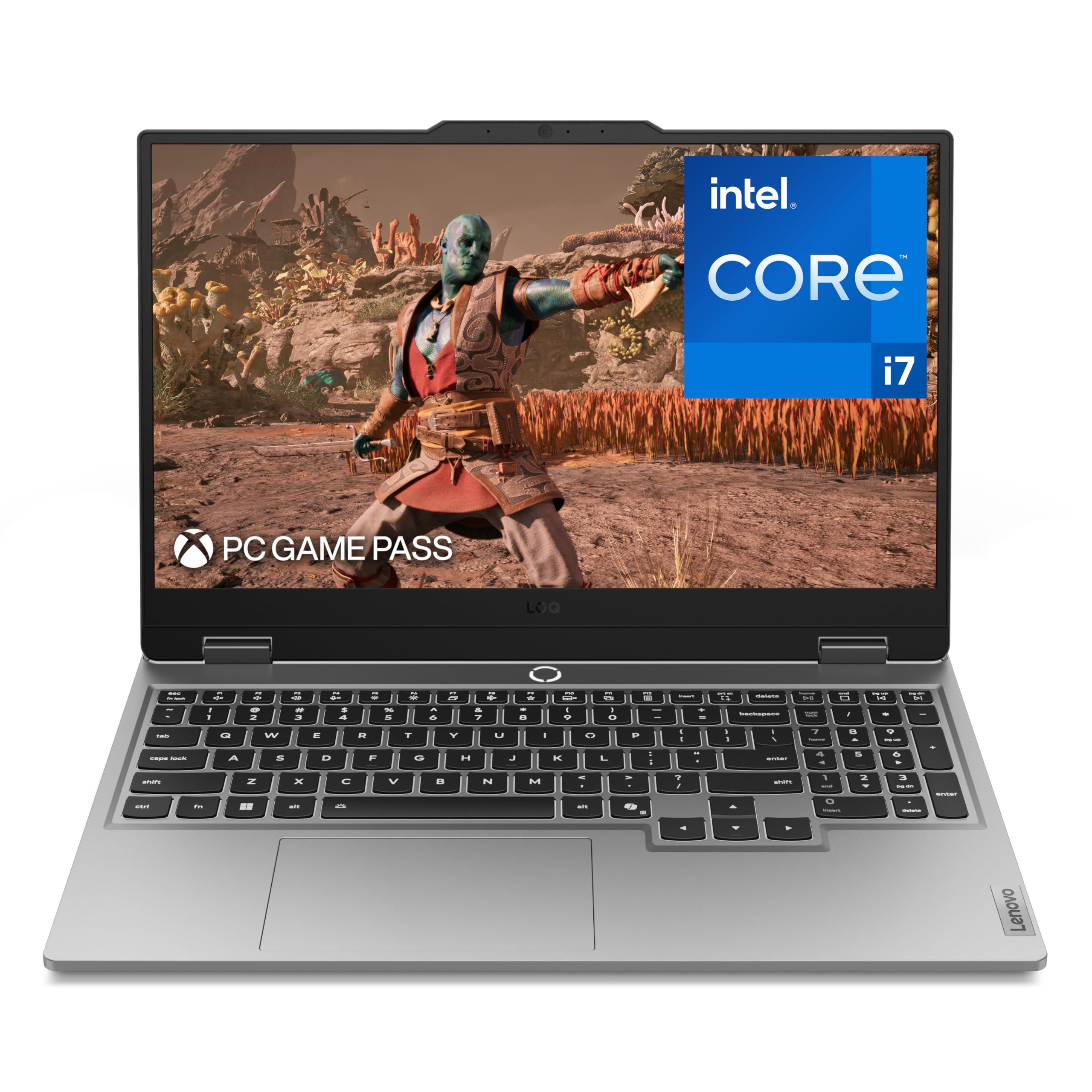
Think of it as a starter kit that keeps improving with every RAM stick you add
If you like to upgrade your own machine, this is the pick for you. The Lenovo LOQ ships with 16GB of memory and 1TB of storage, but the real story is what you can add later — owners have pushed it up to 64GB of DDR5, well past the 32GB the spec sheet lists. If you run virtual machines, local databases, or an AI workflow alongside your games, that headroom is worth more than any spec you see on the box today. Inside is an Intel Core i7-13650HX running up to 5.1GHz, paired with an NVIDIA GeForce RTX 5050 and a 15.6-inch FHD screen that refreshes at 144Hz with NVIDIA G-Sync, which syncs the display to your frame rate to cut tearing and stutter.
What keeps the performance steady is the cooling. Lenovo’s Hyperchamber uses turbo fans and copper heat pipes, and its AI Engine+ tunes the CPU, GPU, and system settings on the fly. Customers note it runs cool enough for hours-long gaming sessions as long as the vents stay clear — put it on a desk or a cooling pad, never a soft surface. A full layout keyboard with a white backlight and soft-landing switches makes long typing sessions comfortable.
Two things to weigh. Sound comes through low, and several buyers find it underwhelming — fine with headphones, not ideal for group sessions. The 7-hour battery figure is best-case; under high performance it drops to roughly an hour and a half, so treat the charger as a permanent companion. Finish near the keyboard can discolor over time, and the machine is on the heavier side for carrying around.
The case that wins: upgradeability is the point — a machine you can grow into over two or three years rather than replace.
The one to buy if: you want to start lean and add memory later as your projects and game library grow.
Know before you buy: speakers are quiet and the 7-hour battery shrinks to about 1.5 hours under performance mode.
6. Acer Nitro V 17 AI Gaming Laptop, Ryzen 7 260, RTX 5070
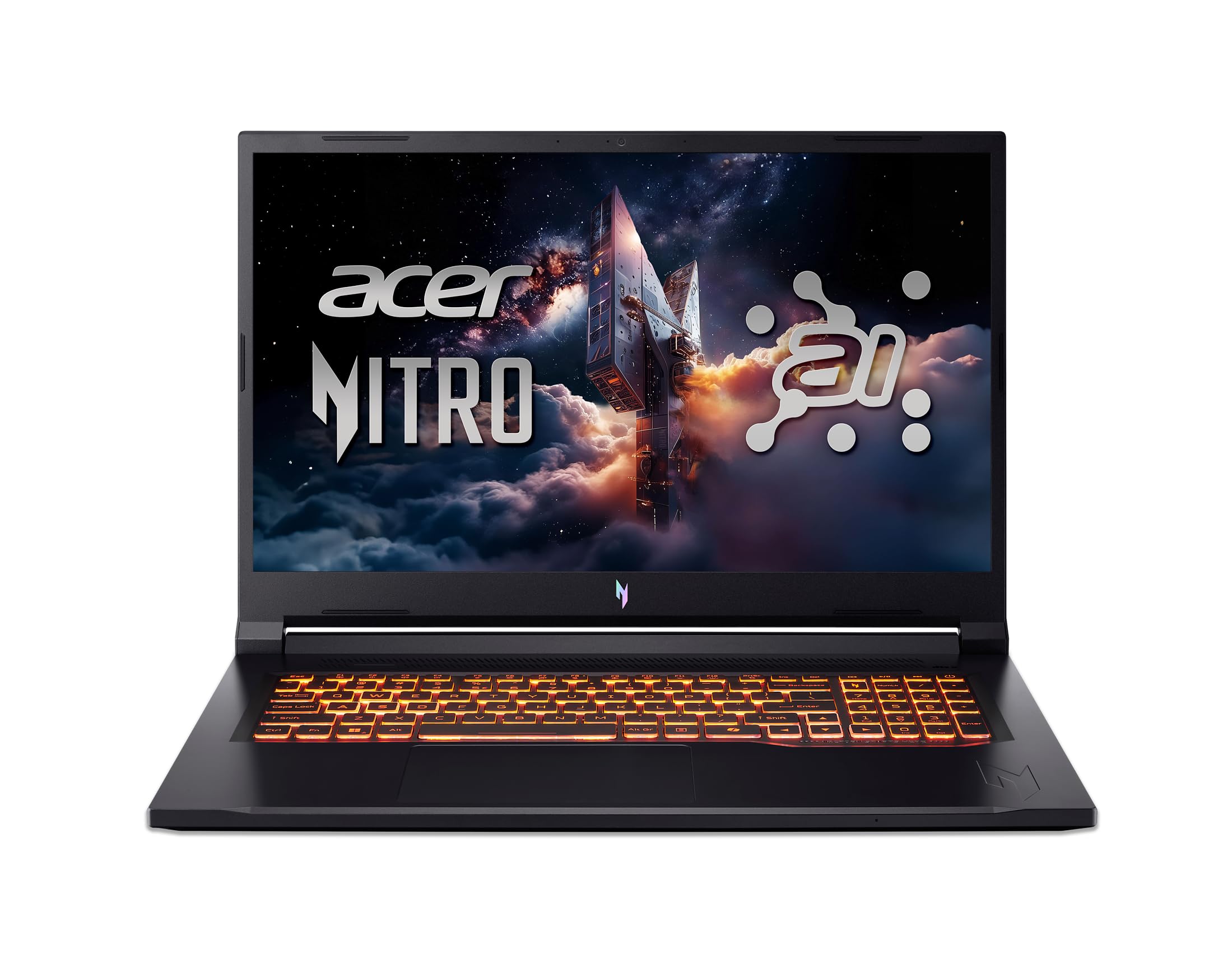
Same AI muscle as the 16-inch, stretched into a 17.3-inch workspace
If the 16-inch Nitro V feels cramped, this is what you buy. The display jumps to 17.3 inches at 1920 x 1080 with a 144Hz refresh rate — not the fastest panel on this list, but the extra width makes a real difference when you are splitting an editor, a terminal, and a browser across one screen. Storage and memory match its 16-inch sibling: 32GB of DDR5 at 5600MHz and a 1TB PCIe Gen 4 SSD, with a second M.2 slot left open for expansion.
The graphics step up, though. This carries an NVIDIA GeForce RTX 5070 with 798 AI TOPS (the AI-capable processing headroom of the GPU), a notch above the RTX 5060 in the smaller Nitro V. The AMD Ryzen 7 260 runs up to 5.1GHz. Wi-Fi 6E (a newer wireless standard with access to a less crowded radio band) helps with fast, stable connections, and there is an Ethernet port if you want the wired advantage for competitive play. Value is what buyers rate highest here, with the price being the most consistently mentioned strength in the feedback.
The honest catch: performance consistency gets mixed reports. Some owners describe it as fast, quiet, and cool; others report crashes every few hours. That is a real spread, so buy from a seller with a clean return policy and update the BIOS and drivers immediately — several owners found that fixed their stability issues. Notably, one thing owners agree on — this 17-inch is sleeker and less flashy than the 15.6-inch, and the screen is on the dim side, which matters more if you work near windows.
Where it fits: a large screen and strong AI processing for editors and researchers who want the bigger canvas without the 18-inch footprint.
Pick this if: big screen real estate and Ray tracing performance matter most to you.
Be aware: you may need to chase a driver or firmware update before it feels rock-solid — keep the return window handy.
7. ASUS ROG Strix G16 Gaming Laptop, RTX 5060

The machine that runs a demanding game and a build at the same time without flinching
This is the pick for someone who wants serious gaming performance and Pro-tier reliability in the same machine. The NVIDIA GeForce RTX 5060 with 8GB of memory, built on NVIDIA’s Blackwell architecture with DLSS 4 (AI-powered upscaling that boosts frame rates), pairs with an Intel Core i7-14650HX running up to 5.2GHz. Multitasking between an editor, a running game, and a live stream is handled by 16GB of DDR5-5600 memory and a 1TB PCIe Gen 4 SSD. The 165Hz FHD+ display with a 3ms response time (how fast a pixel changes color) keeps fast motion clean, and a new ACR film cuts glare and improves contrast.
Cooling is the star of this machine. An end-to-end vapor chamber, three fans, and Conductonaut Extreme liquid metal (a highly conductive thermal compound applied to the chipset) all work together to keep the system stable — cooling is among the most-mentioned positive aspects across the reviews. Wi-Fi 7 (the newest wireless standard, with higher throughput and lower latency than Wi-Fi 6E) gives you the fastest connection available. The RGB light bar around the chassis syncs with the keyboard and ROG peripherals, and Stealth Mode turns off all lighting for a professional setting.
Set expectations on two fronts. Battery life is short — around 2 hours in most conditions — so this is a machine that lives near an outlet. And while the base 16GB of memory is fine for gaming, owners pushing heavy virtual machines or large-scale local model work find it tight and upgrade to 32GB. A LAN port that occasionally loosens and disconnects is a small recurring complaint worth being aware of.
The performance proof: it handles demanding Steam games like No Man’s Sky and Fallout 4 without a stutter and keeps its cool doing it — the cooling is what the reviews single out most.
This is the one for: someone who wants a top-tier gaming build with serious CPU and cooling headroom.
Only if: you mostly game plugged in and can live with a battery that will not see you through a long day.
8. ASUS ROG Strix G18 Gaming Laptop, Ryzen 9 8940HX, RTX 5050
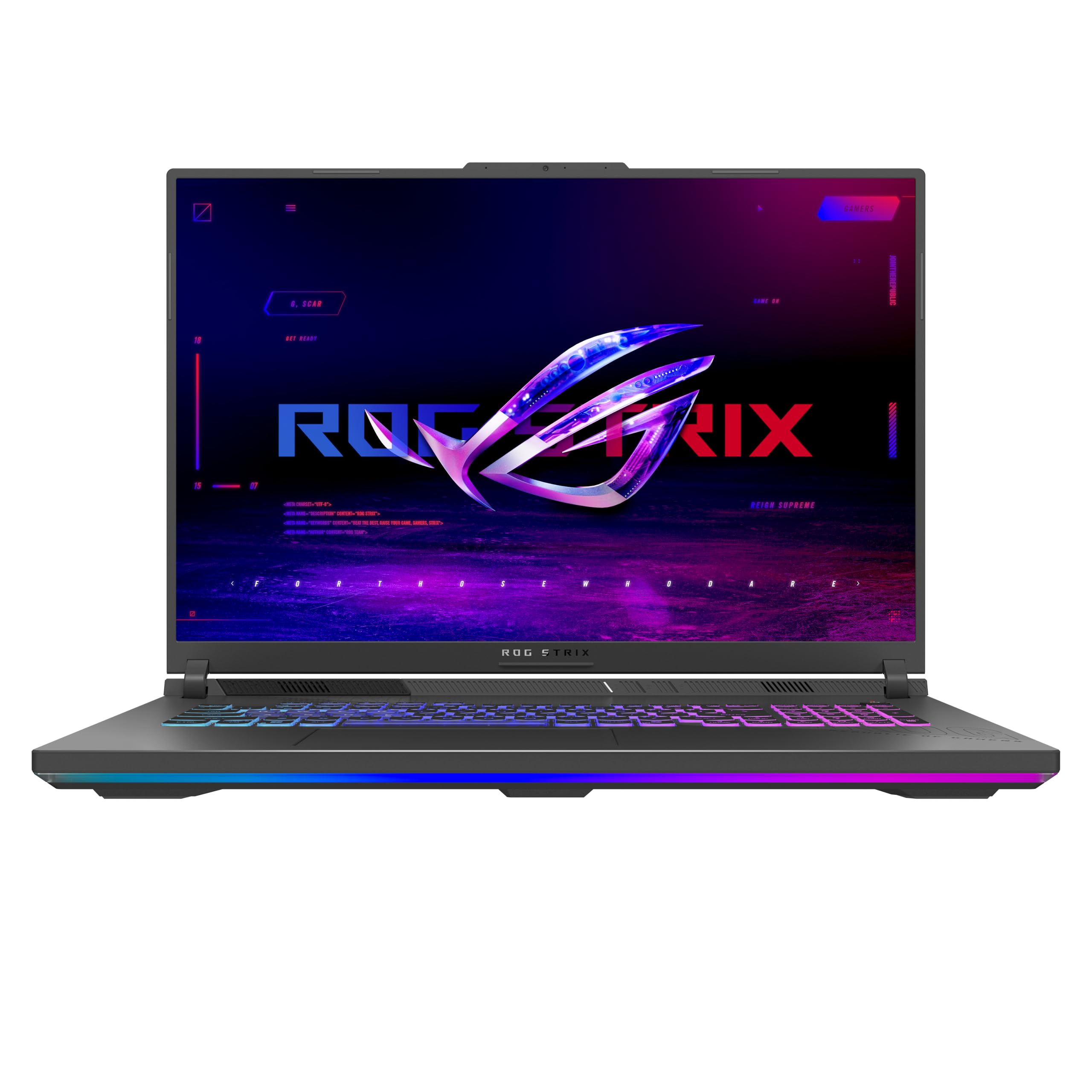
If you want the biggest screen on this list without going full desktop replacement
That 18-inch size is the reason to buy, full stop. The ROG FHD+ panel refreshes at 144Hz with a 3ms response time (pixel transition speed) and an anti-reflective film that cuts glare and boosts contrast. On a display this wide, three code panes or a full game map open up in a way a 15-inch simply cannot match. The AMD Ryzen 9 8940HX runs up to 5.3GHz with 16GB of DDR5-5200 memory and a 1TB PCIe Gen 4 SSD under the hood. The hardware itself draws the strongest praise from owners — that is the most-mentioned positive on this machine.
ROG’s cooling here uses tri-fan technology, a full-width heatsink, and full-surround vents. In practice that means the fans hum audibly at full throttle but stay quiet enough to vanish with headphones on, and the machine holds its frame rates through long sessions. Wi-Fi 6E is standard, along with USB, HDMI, and Ethernet for wired play. Stealth Mode kills the RGB for client calls and office use.
Two things you should know before buying. The wide 18-inch chassis is heavy — under 7 pounds — and the footprint is large enough that you should check it fits your backpack before committing. And while this is a strong machine for its price, the base configuration ships with an RTX 5050, not the more powerful options on the 16 or 17-inch models — if you are chasing the very highest frame rates, look up the stack. Some buyers also note the sound is solid but not exceptional despite the branding, and there is no fingerprint sensor.
The case for the G18: the biggest screen on this list paired with a high-end Ryzen 9 — that combination has no direct rival here.
Worth it if: screen size and desk-replacement use are your priorities and you rarely move it.
Not for: frequent travelers — check your bag dimensions before committing to an 18-inch.
9. msi Katana 15 HX 15.6” 165Hz QHD+ Gaming Laptop

A high-refresh QHD display sitting on top of a 24-core processor
If you run heavy local workloads — large monorepos, machine-learning experiments, or compiling across many threads — this is where the Intel Core i9-14900HX earns its place. That is a 24-core hybrid processor running up to 5.8GHz, and paired with 32GB of DDR5 memory and a 1TB NVMe SSD it makes light work of parallel jobs that bog down a smaller chip. Graphics come from an NVIDIA GeForce RTX 5070 with 8GB of dedicated memory built on Blackwell architecture with DLSS 4.
The display is the standout: a 15.6-inch QHD+ panel at 165Hz with 100% DCI-P3 color coverage (the wide color standard used in film and design work). That combination gives you sharp detail, accurate color, and smooth motion — good for color-sensitive work as well as games. Under the hood, a dual-fan, five-heat-pipe cooling system (MSI’s Cooler Boost 5) keeps the CPU and GPU from throttling during long sessions. The keyboard has 4-zone RGB with highlighted WASD keys, and connectivity covers USB-C Gen 2, HDMI (up to 8K output), multiple USB-A ports, RJ45 Ethernet, Wi-Fi 6E, and Bluetooth 5.4.
Two words of warning. This machine is heavy and it runs hot under load — a cooling pad is a common owner accessory. And it wants to be plugged in: real-world battery life lands around 2-3 hours, so plan around the charger. The i9 also draws a lot of power, and some reviewers point out sleep and hibernate quirks.
Where it justifies the tier: the QHD+ 165Hz screen and the 24-core i9 make this the pick for someone running multiple heavy jobs at once.
Best for: developers running parallel builds and local ML work who also want a high-refresh display for evenings.
Think twice if: you want something light or quiet — this one is heavy and it runs hot under sustained load.
10. Thunderobot Zero 16 Pro 5070Ti Gaming Laptop

The display here refreshes 360 times a second — no other laptop on this list comes close
This is the machine for the person who wants the sharpest, fastest panel here. A 16-inch QHD+ IPS screen at 2560 x 1600 with a 360Hz refresh rate (the fastest on this list), 600 nits of brightness, and 100% DCI-P3 coverage. For coding, that resolution gives you noticeably denser text than a standard FHD panel. For gaming, 360Hz is a motion-clarity jump that competitive players feel immediately — panning, flicking, and fast scrolling all look smoother. The note about the GPU direct-connection mode is worth flagging: you enable it in the control center to open up the highest refresh rate.
Power comes from an Intel Core Ultra 9 275HX with 24 cores up to 5.4GHz and an NVIDIA GeForce RTX 5070 Ti, alongside 32GB of DDR5 memory and a 2TB PCIe M.2 SSD — double the storage of most laptops here. Cooling runs through dual Night Owl fans, seven extended heat pipes, and 316 ultra-thin copper fins across a 163,000mm² thermal surface. Thunderobot also rates the chassis for 180G impacts and 74cm drops. Per-key RGB means every individual key can show its own color.
Now the honest part: this is the newest brand here, with the least track record, and the feedback reflects that. Some owners love it — running Fortnite, Starfield, GTA V, and Photoshop without complaint, and finding it cool and quiet. Others report charging failures and unresponsive support, and one gave it up entirely. That is a wide spread, so buy from a seller with a clean return window and be ready to test it thoroughly in the first week. Some minor things owners mention: RGB needs a free third-party app, and onboard speakers are mediocre.
What you are paying for: a 360Hz QHD+ display and 2TB of storage — genuine work-and-play specs at a price no established brand matches on paper.
Buy this if: display quality and storage capacity sit at the top of your list and you are comfortable with a newer brand.
Consider carefully if: you want a long track record backing the purchase — this is a new entrant with mixed feedback.
11. Alienware 18 Area-51 Gaming Laptop

An 18-inch machine built like a piece of furniture that happens to game
This is the top of the ladder: an 18-inch WQXGA display at 300Hz with a 3ms response time (how quickly a pixel changes color), an Intel Core Ultra 9 275HX with 24 cores running up to 5.4GHz, an NVIDIA GeForce RTX 5080, 32GB of DDR5 memory, and a 2TB SSD. For coding, that hardware runs heavy local models and multiple virtual machines without strain. For gaming, the RTX 5080 and 300Hz panel together deliver the fastest, smoothest experience on this list. Performance is the most-praised quality here — buyers describe it as fast, strong, and cool-running.
Heat dissipation is the other thing shoppers say positively. The Cryo-Chamber tilts the machine up and opens a larger air intake, with AlienFX fans visible through a clear Gorilla Glass panel. Ambient lighting inspired by the aurora borealis shifts color and movement across surfaces. Bluetooth 5.4 and dual Thunderbolt-capable connections make it easy to run a work setup plus a gaming setup on the same desk. There is no fingerprint reader.
Understand what you are buying: this is a desktop replacement, not a portable. It is heavy, runs hot in performance mode, and at this tier, you could buy a very capable standard laptop plus money left over. Feedback on value is mixed — some owners call it worth every bit, others find the premium hard to justify. One owner had internal speaker failures on client calls, so if audio reliability matters to you, plan on external speakers or headphones as a backup.
The honest math: this is the machine you buy when you want the absolute ceiling on performance and are not traveling with it.
For the buyer who wants: desktop-class power in an 18-inch chassis and does not care about portability.
Not the one if: you want to carry it between coffee shops and meetings — this one stays home or moves on a cart.
Know the Specs
Refresh Rate (Hz)
The refresh rate is how many times each second the screen redraws. A 165Hz display redraws twice as often as a standard 60Hz one, which makes scrolling, panning, and fast game motion look smoother. Higher refresh rates are better for competitive games but cost battery life — a 360Hz panel draws more power than a 144Hz one. If you split your time between coding and gaming, 144Hz to 165Hz is usually enough; step up to 300Hz or360Hz only if you play fast-paced competitive titles.
Memory (RAM) and Storage (SSD)
Memory, listed in gigabytes, is what lets you run an editor, a browser, containers, and a game at the same time. Storage, usually an NVMe SSD listed in terabytes, decides how fast projects load and how many games fit. Look at whether either can be upgraded later — a laptop with open slots can be stretched for years, while one with everything soldered in place has a fixed ceiling. For coding plus gaming, 16GB is a workable floor and 32GB gives real headroom.
Graphics Cards and AI TOPS
The graphics card handles both your game frames and any local AI work. Video memory, listed in GB, holds the textures and model data the GPU needs — more memory means higher settings and larger models. AI TOPS measures how much AI-style calculation the chip can do per second, so a GPU rated at 798 AI TOPS outpaces one at 572. If you run image generators or local language models, that number matters as much as frame rates.
Battery Life and the Honest Reality
Battery figures quoted for gaming laptops describe light use. Under a full game or a heavy compile, expect far less. A laptop rated at 18 hours may deliver 2 to 3 hours of real gaming, while a machine rated at 7 hours might give you around 90 minutes under load. If most of your work happens at a desk, battery matters less than cooling; if you code on the move, it matters more than anything else here.
Common Questions
Is a gaming laptop good enough for coding, or should I buy a developer machine?
How much RAM do I need for coding and gaming at the same time?
Does a higher refresh rate help for coding or only for games?
Will these laptops run Linux for development work?
How long does the battery actually last when gaming?
Is an 18-inch laptop too big for daily use?
Do I need a cooling pad for these gaming laptops?
Can I upgrade the storage and memory later?
Which laptop here is best for AI and machine learning work?
Do these laptops come with Windows or macOS?
What display resolution do I need for coding?
Should I buy a laptop with a dedicated GPU or integrated graphics?
The Bottom Line
For most people hunting the laptops for coding and gaming, the Apple 2025 MacBook Air 15-inch with M4 chip wins because it runs a full coding day on a single charge, stays silent under load, and weighs 3.32 pounds. If you want serious gaming performance with a cooling system built to hold frame rates, reach for the ASUS ROG Strix G16. And if your work involves large-screen AI projects or heavy local models, the Acer Nitro V 17 AI pairs 32GB of DDR5 with 798 AI TOPS and a 17.3-inch display. Whichever you pick, the honest nudge is this: buy for the workload you run most, because an upgrade-friendly machine like the Lenovo LOQ outlasts a more powerful one you outgrow.
How we choose
We do not accept paid placement. Every pick is matched to a real buyer and a real use-case; we do not hands-on test units.
Sources
Specifications: manufacturer listings and product documentation. Review insights: verified customer reviews, as of October 2026. Pricing: not shown on this page (it changes often); check the current price via the retailer link.
As an Amazon Associate, Aappliancez earns from qualifying purchases. This does not affect which products we feature.