Disclosure: Some links in this post are affiliate links. As an Amazon Associate I earn from qualifying purchases, at no extra cost to you. Learn more
Specs are compiled from manufacturer listings and verified buyer reviews and can change over time — please confirm the key details on the product page before buying.
If your laptop gets hot enough to slow down, a cooling pad is the cheapest fix you can buy. The KLIM Wind is the strongest all-round pick for most people, and it is the one to start with. The rest of this list covers bigger fan counts, fancier lighting, and desk-stand designs for specific setups.
This guide is built by comparing the manufacturers’ published specifications and the patterns across verified customer reviews, so you get each pick’s real strengths and trade-offs instead of marketing spin.
The best laptop cooling pads sit under your machine, push air through the vents, and stop the slowdown that heat causes. Below you will find the fans, the RPM, the noise levels, and the real temperature drops that separate a best laptop cooling pads pick from a pad that just glows.
Top Picks

How To Choose The Best Laptop Cooling Pads
A cooling pad only works if air reaches the vents on the bottom of your laptop. Before you look at fan counts or lighting, check where your machine pulls in air. Some laptops breathe from the bottom panel, and those get the biggest benefit.
Match the fan and the airflow to your machine
More fans do not automatically mean colder. A single large fan can move more air than several small ones. Rotations per minute, or RPM, tells you how fast a fan spins, and it is the number that usually tracks with cooling power. Higher RPM generally means more airflow, and more airflow means more heat pushed away from your laptop.
Check the size so your laptop actually sits on it
Measure your laptop before you buy anything. A pad built for a 15.6-inch machine will hold a 17-inch laptop, but the machine may hang over the edges. Some pads are designed for that overhang and stay stable, so read the listed size range rather than guessing from the photo.
Decide how much noise you can live with
Fans spinning fast make noise, and a pad that is quiet at low speed can get loud at full power. If you game with headphones, noise matters far less. If you take calls or study in a shared room, look for a pad with a stated decibel rating or one that owners describe as quiet.
Side-by-Side Comparison
| Model | Best For | Number of Fans | Fan Speed | Weight | Amazon |
|---|---|---|---|---|---|
| Laptop Cooling Pad with 4 Fans at 1200 RPM★ Best Overall | Best overall balance | 4 | Up to 1200 RPM | 0.73 kg | Amazon |
| Gaming Laptop Cooler with 13 Ultra Quiet FansMost Versatile | RGB lighting and large laptops | 13 | 6 fan speeds | 1.59 kg | Amazon |
| havit HV-F2056 Laptop Cooling Pad | Quiet everyday cooling | 3 | — | 697.3 g | Amazon |
| AICHESON Laptop Fan Cooling Pad 15 Fans | Gaming laptops up to 18 inch | 15 | 2800-3200 RPM per fan | — | Amazon |
| DEPGI Laptop Cooling Pad | Targeted cooling on one spot | 1 | 3-speed manual | — | Amazon |
| SHUWEI Laptop Stand with Fan | Sharing your screen at a desk | 1 | 3 speeds (40/52/85 CFM) | 3.68 lbs | Amazon |
| llano V10 Gaming Laptop Cooling Pad | Serious gaming and workstation use | 1 | Up to 3500 RPM | — | Amazon |
Detailed Reviews
1. KLIM Wind Laptop Cooling Pad with 4 Fans at 1200 RPM
Our pick — 4.5+★ from 44,000+ verified ratings; the strongest balance of quality and price.
Four fans at 1200 RPM that most owners never bother turning off.
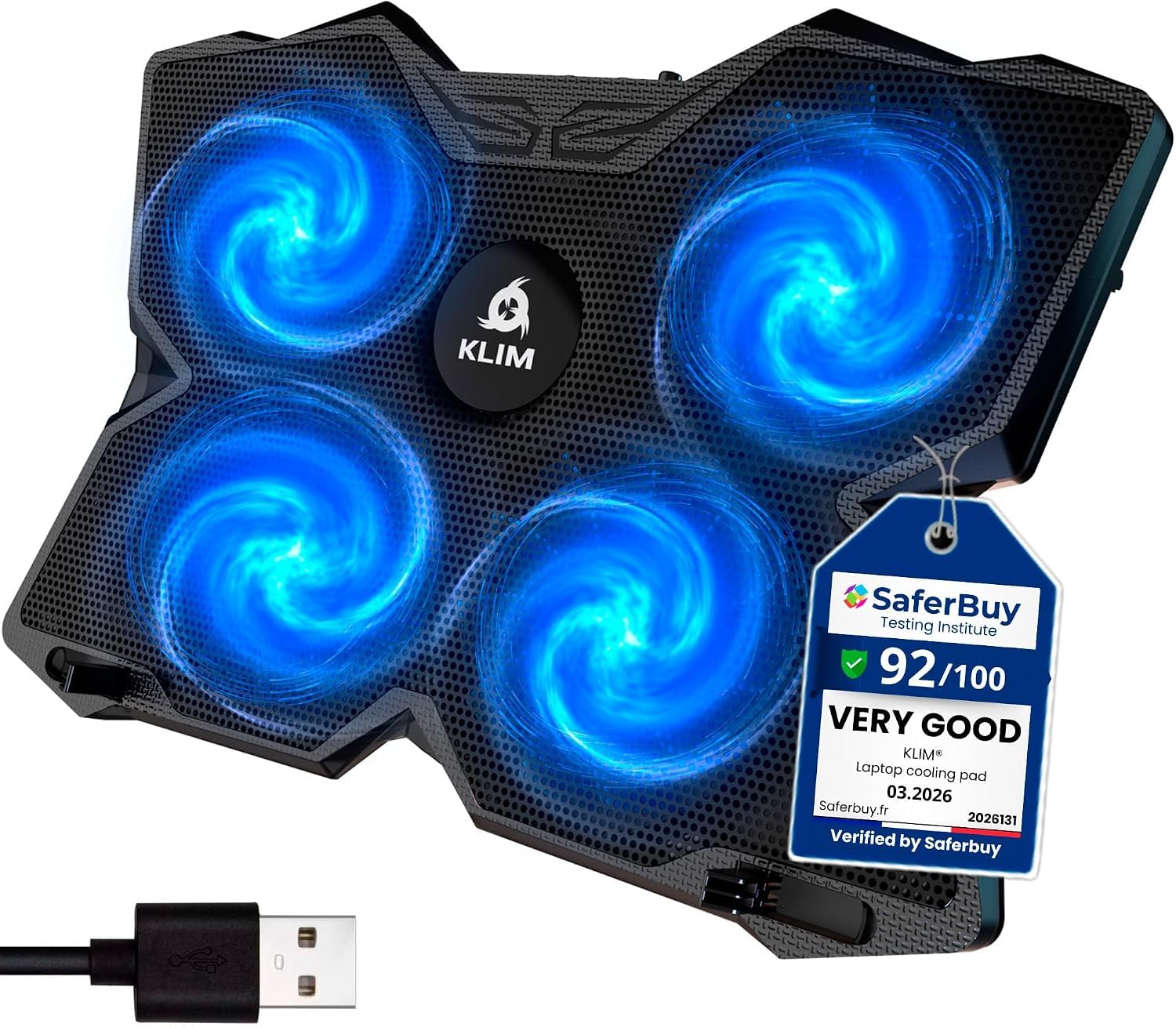
This is the pad people come back and buy a second time. It runs four fans at up to 1200 rotations per minute — that is how many times each fan blade spins in a minute — and it holds that airflow steadily for years. It sits at 0.73 kg, so it is light enough to drop in a bag without thinking about it, and it fits laptops from 11 inches up through 16 inches.
What wins people over is how long it keeps working. One long-term owner reports two years of daily use with only occasional vacuuming of dust and cat hair. That is the pattern: set the dials, forget the pad exists, and enjoy a laptop that stops screaming. The twin dials control the front and rear fans separately, so you can run half the pad quietly when you are just browsing and push everything up when a game loads.
The catch is honest and worth knowing. This exact model measures 1.22″L x 10.71″W x 1.22″H — that is a very shallow tray compared with something like the AICHESON at 15.74″L x 11.38″W x 1.38″H, which means the KLIM sits flatter and lower on your desk. Owners who love an aggressive typing angle sometimes want more lift than this gives. The two rear legs and front pegs do keep a 15.6-inch machine locked in place, but if you crave a steep incline, look at the DEPGI or the llano instead.
What Holds Up Over Time
- Four fans turning at up to 1200 RPM, enough to drop a hot laptop to reasonable temperatures quickly
- Twin dials let you run front and rear fans at different speeds
- Two USB ports so you do not lose the port you plug the pad into
- 0.73 kg, light enough for daily carry
Where It Falls Short
- Shallow 1.22-inch tray sits low, so the typing incline is mild
- The front pegs are described as sharp in owner reports — set the laptop down carefully
- LEDs stay on and cannot be switched off
Best for: anyone who wants a set-and-forget pad that cools quietly and lasts through years of daily use.
Look elsewhere if: you want a steep typing angle or a tray that lifts your screen higher off the desk.
2. KYOLLY Gaming Laptop Cooler with 13 Ultra Quiet Fans
Thirteen fans, ten lighting modes, and a screen that tells you what the pad is doing.
If you want the pad to be part of the setup rather than hidden underneath it, this is the one. Thirteen fans — three large and ten small — cover the whole underside of a big machine, and the count is the loudest number here: 13 fans against 3 on the havit HV-F2056 and 4 on the KLIM Wind. It measures 1.59 kg, which is roughly double the 0.73 kg of the KLIM Wind, so this is a desk pad first and a travel pad second.
Owners filling the review pages describe long gaming sessions with the laptop staying cool and the whole thing running quietly. The LCD screen is the piece people single out — it shows your fan speed and settings so you are not guessing with a blind button press. Ten RGB lighting modes remember your last choice, which means you set your color once and it stays. Nine tilt angles from 10° to 45° let you fight neck strain on a long session, and a silicone phone holder keeps your handset in view.
Two things to know before you commit. The phone holder grips your phone but cannot charge it, and the button layout takes a minute to learn — the right arrow is actually the power button. Owners also split on airflow: some find it strong, others call it weak on a large machine. If you have a 17-incher and need maximum pressure pushed through bottom vents, the llano V10 with its 4.72-inch turbo fan is the harder-working option.
What owners rave about: the memory on the RGB and the LCD readout are the two features that repeatedly come up as the reason this pad feels worth keeping. One buyer sums up the whole package: “13 fans (3 large, 10 small) keep gaming laptop cool during long sessions; quiet; smart LCD; RGB with memory; 9 height adjustments; phone holder; stable; extra USB port.”
The honest trade-off: at 1.59 kg it is a commitment to your desk, and the flimsy phone holder is the one weak spot owners keep flagging. Pair it with a bottom-vent laptop and you are fine; expect less from a machine that breathes out the sides.
Reach for this if: you want lighting, angle adjustment, and a readable status screen in one pad for a big gaming laptop.
Think twice if: you carry your pad to a café every day or need every ounce of airflow for a 17-inch machine.
3. havit HV-F2056 Laptop Cooling Pad for 15.6-17 Inch Laptops

The slim three-fan pad that keeps quiet no matter what you throw at it.
Three fans, a metal mesh top, and a tray that barely raises your desk setup. This pad measures 14.96″L x 11.02″W x 1.18″H, which is a fraction wider and flatter than the 1.22″L x 10.71″W x 1.22″H KLIM Wind, and it weighs 697.3 g.
What wins buyers over here is how little you notice it. Owners describe three fans that are whisper quiet, cooling done in the background while they game or binge-watch, and an improve typing angle that stops their hands from getting sweaty. One buyer reports “Works to cool down an otherwise overheated laptop… No longer any concerns about CPU overheating. Three fans are whisper quiet.” A 17-inch HP Envy stays cool through five hours of heavy use on this pad, and its own system fan never kicks in.
Two height settings give you a bit of lift, and there is an extra USB port plus a power switch so you can shut it off without unplugging. The recurring gripe is the surface itself — it is slick, and some laptops slide a little, so a set of small rubber bumpers is a smart add-on. The bundled cable is USB-A to USB-A, so if your laptop only has USB-C you will need an adapter before this works.
Where the value sits: a flat, stable, nearly silent pad that handles a hot 17-inch laptop without asking for much desk space or attention.
Who should look past it: if your laptop breathes through side vents, or you need a steep viewing angle, a bigger-fan pad like the AICHESON will do more for you.
Suits: office workers, students, and anyone who wants cooling they can forget about.
Not for: owners of steep-incline lovers or laptops that pull air from anywhere but the bottom.
4. AICHESON Laptop Fan Cooling Pad

Fifteen fans spinning at gaming-laptop speeds, built for an 18-inch machine.
When your laptop is big, hot, and pushing frames, this pad answers with sheer fan count and speed. Fifteen fans each turning between 2800 and 3200 rotations per minute. Compare that with the 1200 RPM ceiling on the KLIM Wind and you can feel the difference in airflow. The 15.74″L x 11.38″W x 1.38″H body is sized for 15, 15.6, 17, 17.3, and 18 inch laptops, so a full-size gaming rig sits fully supported rather than hanging over the edges.
The ergonomics are the part that surprises people. Four adjustable stands raise the screen level between 4.3 and 7.5 inches, and that range is the point — you stop hunching over a screen that sits too low. Owners describe quiet operation, nice height adjustments, and versatile light selections. One buyer is blunt about the purpose: “This gaming, laptop cooling pad is an absolute beast.” Two hidden anti-slip mats protect your laptop from sliding or scratching, and the pad even works as a stand for set-top boxes, routers, and controllers.
The fair caveat: with 15 fans pushing hard, this is a desk fixture at 15.74 inches long, not a travel accessory. A heavy machine stays put, but if you already own a smaller 13 or 14-inch laptop, this pad is far more real estate than you need. For an 18-inch gaming laptop, it is sized exactly right.
Why Gamers Pick It
- 15 fans at 2800-3200 RPM each for serious airflow on a large machine
- Raises screen height from 4.3″ to 7.5″ across four angles
- Fits laptops up to 18 inches without overhang
- Anti-slip mats protect the chassis and keep it in place
What to Weigh First
- Large footprint is desk-bound, not bag-friendly
- Owners with smaller laptops may find it oversized
- RGB lighting is a style choice, not a cooling function
Made for: 17 to 18-inch gaming laptop owners who want maximum airflow and a proper screen lift.
Overkill if: your laptop is under 15 inches or you need something that travels.
5. DEPGI Laptop Cooling Pad with 5.5″ Movable Fan

One big fan you slide into place, aimed exactly where your laptop gets hottest.
Most pads cool everywhere at once. This one cools where it counts. A single 5.5-inch fan slides freely across the tray so you can line it up with your laptop’s heat vents — the spots where air actually needs to go. That is a smarter use of a single fan than spreading weak airflow over a wide surface. The pad measures 16.54″L x 11.3″W x 1.7″H and fits 14 to 17.3-inch laptops.
What wins people over is the cooling itself. One buyer running an HP Zbook 17 G5 workstation reports the CPU “not go over 55°C” under load. A separate owner with an ASUS ROG Strix G16 (2025) calls it “really amazing” for the money. The built-in temperature sensor adjusts fan speed automatically based on how hot your laptop gets, and if you would rather control things yourself you can switch to three manual fan levels.
The trade-offs are real, so read carefully. This is a thick pad that lifts your laptop noticeably, and owners who split their time between gaming and office work find the minimum incline a bit uncomfortable for typing. A few report the small plastic pegs that hold the laptop in place can break, so treat them gently. And the USB ports here are power-only — they will charge a device but not pass data.
The clever bit: aiming a large fan straight at the intake vent is what makes a one-fan pad competitive, and owners notice the difference in real gaming sessions.
Worth knowing: at ≤40dB and 16.54 inches long, this is quiet but bulky — great for a desk setup, less so for a backpack, and the plastic hold-pegs need a light hand.
Best fit: gamers who want pinpoint cooling without a full bank of fifteen fans.
Pass if: you type at your laptop all day and need a shallow, flatter angle.
6. SHUWEI Laptop Stand with Fan and 360° Rotation
A stand that spins your screen around the room and cools while it does it.
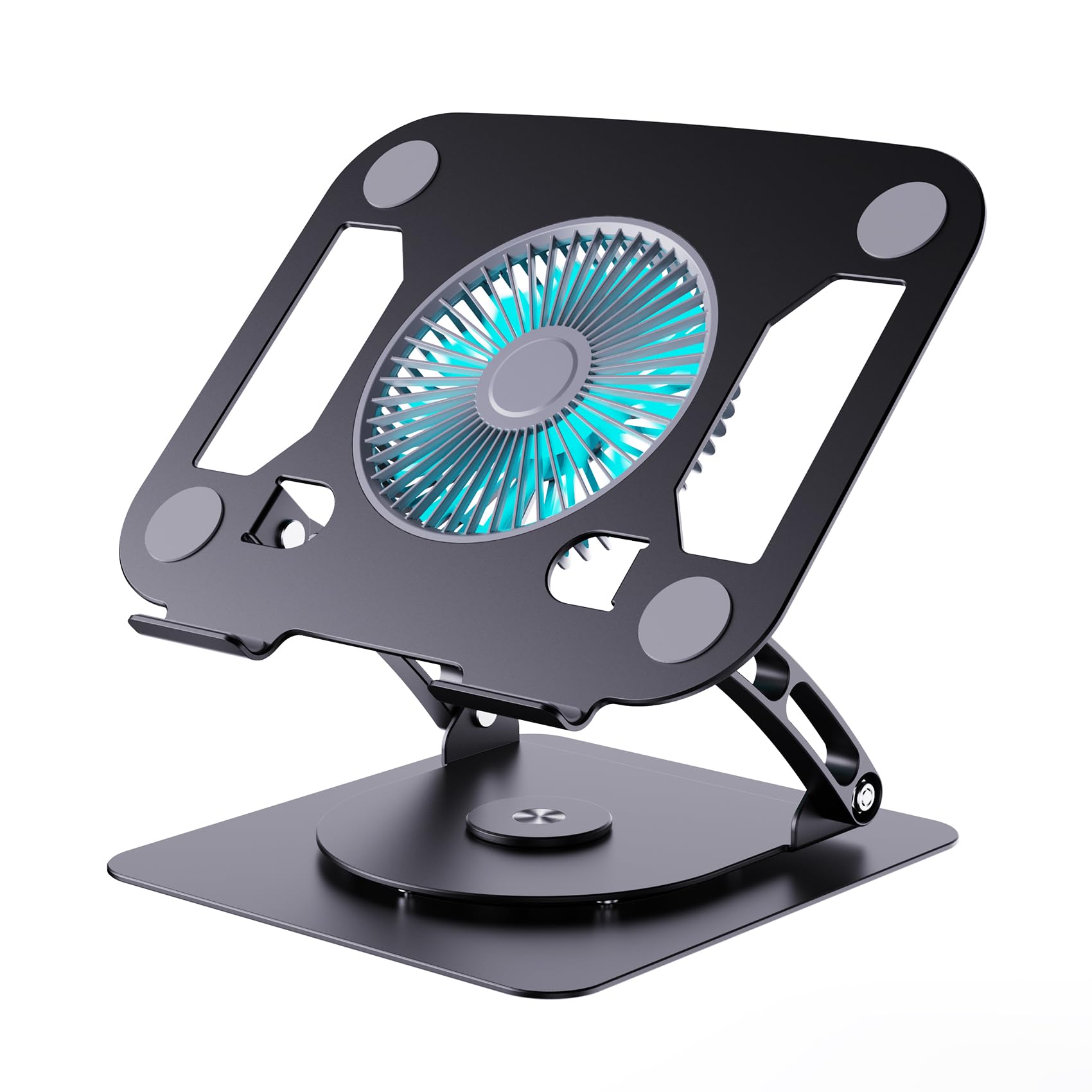
This is a different animal from the flat pads. The base rotates a full 360 degrees, so you can swing your laptop’s screen toward a colleague across the table without picking the machine up. It is built for open offices and shared desks, and it runs on a carbon steel frame weighing 3.68 lbs — that heft is the point, because it means no wobble when you type.
The cooling comes from a single enlarged fan with three wind settings you pick yourself: a soft mode at 40CFM, a medium mode at 52CFM, and a strong mode at 85CFM. CFM here means cubic feet per minute, the volume of air the fan moves. You can raise the panel to 11.8 inches and tilt it anywhere from 0 to 120 degrees, which puts the screen at eye level instead of below your chin. Owners describe a firm, stable support with no wobbling while typing and a fan that keeps the device at an ideal temperature.
The thing to watch is the fan itself. With only one fan and a stand-first design, this is about clean airflow and posture, not maximum temperature drop. If your priority is pushing a hot gaming laptop down 15 degrees, this is not the tool — a dedicated high-RPM pad will do more. If your priority is a stable, rotating, comfortable desk station with quiet background cooling, this delivers exactly that.
The standout: 360 degrees of rotation on a carbon steel base is a genuinely useful feature for anyone who shares a screen, and the 85CFM top speed keeps a working laptop comfortable.
The limit: one fan cooling set at room-friendly speeds will not transform a hard-running gaming machine. Treat this as a comfort and ergonomics upgrade with cooling built in.
Pick this if: you work at a desk, share your screen often, and want better posture with some cooling on the side.
skip it if: you need the strongest possible temperature drop for a gaming laptop.
7. llano V10 Gaming Laptop Cooling Pad with Turbo Fan

The turbo fan that pushes airflow through a sealed chamber instead of scattering it.
This pad does not win on fan count — it wins on engineering. One 4.72-inch turbo fan driven by a pure copper motor spins up to 3500 RPM, which is nearly three times the 1200 RPM ceiling on the KLIM Wind. More importantly, foam inserts seal against the bottom of your laptop so air is forced through the intake vents rather than bouncing off the case. Foam sealing is the whole trick, and owners repeatedly credit it for the results.
The numbers buyers report are the real story. Owners mention idle temps dropping from 42-48°C to 29-35°C and gaming CPU temps from 80-95°C to 55-75°C at a quiet 1200-1500 RPM. One owner compares it directly to five cheaper pads that only managed 2-3°C, calling this one “The Real Deal.” Another notes that at 1500 RPM it stays cool during games that would normally max out the laptop’s own fans. The removable dust filter keeps the intake clean, and you will want to clean it monthly.
Here is what you accept for that performance. This pad needs its own AC power adapter rather than drawing from your laptop’s USB port, so it is a stationary desk tool, not something you toss in a bag. It only helps laptops with bottom-facing intake vents. And the noise climbs sharply above 2500 RPM — quiet at 1500, but loud at full blast. If you want the strongest cooling and do not mind a wall outlet, this is the pick.
Where It Earns Its Place
- 4.72-inch turbo fan at up to 3500 RPM for serious airflow
- Foam seals force air through the laptop’s own intake vents
- Customers note 10-15°C average drops at a quiet 1200-1500 RPM
- Removable dust filter, physical buttons, and a 3-level stand
The Fine Print
- Needs its own AC adapter, so it stays on your desk
- Only works well on laptops with bottom intake vents
- Gets loud above 2500 RPM
- Physical buttons and no auto power-off
Go here if: you run a gaming or workstation laptop with bottom vents and want the biggest temperature drop in this lineup.
Not the one if: you need a portable pad that runs off USB power from your laptop.
Know the Specs
Fan speed and RPM
RPM stands for rotations per minute — how many times a fan blade completes a full spin in one minute. Higher RPM generally means more air moved, which is why a pad running at 2800-3200 RPM pushes harder than one capped at 1200 RPM. Speed is not everything, though. A large fan spinning slowly can move as much air as several small fans spinning fast, which is why sealing and airflow direction matter as much as the raw number.
Airflow and CFM
CFM means cubic feet per minute, the volume of air a fan moves. A pad listed at 40CFM moves less air than one at 85CFM. Matching your fan speed to your laptop’s heat output lets you stay quiet when browsing and push hard when gaming, which is exactly what a three-speed control lets you do.
Noise in decibels
A decibel is a unit for measuring sound. A pad rated at ≤40dB is in the range of a quiet library or a soft conversation, which is comfortable for calls and study. Fans get louder as they spin faster, so a pad that is whisper quiet at low RPM can still become noticeable at full power — matching speed to your room is the trick.
Laptop size compatibility
Cooling pads list a size range for a reason. A pad built for 11 to 16-inch laptops will hold a 17-inch machine, but the laptop will overhang the edges. Some pads, like the AICHESON, are sized specifically for 15 to 18-inch machines so nothing hangs off. Match the pad’s range to your actual screen size before buying.
Common Questions
Will a laptop cooling pad actually lower my CPU and GPU temperatures?
How many fans do I really need on a cooling pad?
Is a cooling pad too loud to use during calls or study?
Will a 15.6-inch cooling pad fit my 17-inch gaming laptop?
Does a cooling pad plug into my laptop or the wall?
What is the difference between a cooling pad and a laptop stand?
Why does sealing matter on a cooling pad?
How do I keep dust and hair out of my cooling pad fans?
Can I use a cooling pad with a MacBook or a non-gaming laptop?
Do the RGB lights affect how well a cooling pad cools?
The Bottom Line
For most people, the best laptop cooling pads winner is the KLIM Wind because it balances four fans at up to 1200 RPM, a light 0.73 kg body, and years of steady service without fuss. If you want maximum temperature drop for a gaming laptop, grab the llano V10 and its sealed 4.72-inch turbo fan. And for a quiet, slim pad that handles an everyday 17-inch machine, the havit HV-F2056 is the one to reach for. Whatever you pick, give the fans a quick clean now and then — that single habit keeps the airflow as strong as the day it arrived.
How we choose
We do not accept paid placement. Every pick is matched to a real buyer and a real use-case; we do not hands-on test units.
Sources
Specifications: manufacturer listings and product documentation. Review insights: verified customer reviews, as of October 2026. Pricing: not shown on this page (it changes often); check the current price via the retailer link.
As an Amazon Associate, Aappliancez earns from qualifying purchases. This does not affect which products we feature.