Disclosure: Some links in this post are affiliate links. As an Amazon Associate I earn from qualifying purchases, at no extra cost to you. Learn more
Specs are compiled from manufacturer listings and verified buyer reviews and can change over time — please confirm the key details on the product page before buying.
If you have ever stood in front of a rack of unlabeled patch cables with a toner and a sinking feeling, you already know what this guide fixes. The job is not printing text on a sticker — it is producing a cable tag that stays wrapped, stays legible, and survives the heat and handling of a live network closet. The picks below are the machines that actually do that.
This guide is built by comparing the manufacturers’ published specifications and the patterns across verified customer reviews, so you get each pick’s real strengths and trade-offs instead of marketing spin.
You do not need a specialist printer for every labeling job, but a cable tag is a different animal from a file-folder sticker — it wraps a moving jacket, tolerates flexing, and has to stay readable in a dim rack. The machines below each solve one slice of that problem, and the honest split is usually between a keypad unit that works offline and an app-driven printer that trades typing for a phone screen. Here is how to choose the right label maker for network cables.
Top Picks
How To Choose The Best Label Maker for Network Cables
A cable label has to survive three things a desk label never meets: it wraps around a round jacket, it flexes when the cable moves, and it sits in an enclosed rack where heat builds up. Buy for those three conditions first, and the rest of the spec sheet sorts itself out.
Start with the tape that actually wraps a cable
The machine is only half the purchase — the consumable does the wrapping. Heat-shrink tubing is a sleeve that slides over the wire and shrinks tight when heated, so the label becomes part of the cable and cannot peel off. Self-laminating and continuous tape give you a flat tag you fold over the jacket. The SUPVAN G15M ships with a 4.8mm heat-shrink tube and the Makeid P31 takes heat-shrink, nylon, self-laminating and all-weather PET tapes. Check that the printer you like actually lists tubing support, because a tape-only unit cannot be retrofitted for it.
Print resolution and head width decide legibility
Resolution measured in dpi (dots per inch) is how finely the machine places text, and it is the difference between a cable tag you can read from a step stool and one that turns into a gray smear. The Makeid P31 prints at 300 dpi, which is enough to hold small characters on a narrow wrap. Head width matters too: a wider head fits more lines in one pass. And the text sizes each machine offers set a hard floor on how small your label can go — the Brady M210 prints in 6 different text sizes from 6 point to 40 point, so you get genuinely small type for faceplates and large type for panel banners.
Speed, margin, and tape waste on big jobs
Labeling a full 48-port panel means 48 tags, and any waste per label multiplies across the job. The SUPVAN G15M prints with a 0.19″ margin, which the maker describes as half the size of similar machines. The Makeid P31 is rated at up to 60 labels per minute. The Brother PT-E560BT goes further with a dual auto-cutter that half-cuts a strip of labels so the backing stays intact and you peel and apply one at a time. The Brother PT-D410 adds about an inch of tape per print for alignment, and older models ran closer to half an inch — that is a real running cost on a project with hundreds of tags.
Keypad or phone app — pick your workflow
A built-in QWERTY keyboard means zero pairing, zero app updates, and zero dead batteries in a basement closet without power. The Brother PT-D410, LABELWORKS Epson LW-PX300 and Brady M210 all type directly on the device. A Bluetooth app printer such as the Makeid P31 or Brother PT-E560BT lets you design on a larger screen, import a database, and generate QR codes — but it depends on a working app and a working connection. If your labeling happens where Wi-Fi and phone signal do not, favor the keypad.
Side-by-Side Comparison
| Model | Best For | Pages/Minute | Power | Control | Amazon |
|---|---|---|---|---|---|
| Brother P-Touch PT-D410★ Best Overall | Home and small-office organizing | 20 | Rechargeable | Touch and QWERTY | Amazon |
| SUPVAN G15MBest for Heat Shrink | Heat-shrink cable marking on a budget | 60 | 1200 mAh rechargeable | Keyboard | Amazon |
| LABELWORKS Epson LW-PX300 | Wire marking with a lifetime warranty | 10 | 6 AA batteries | Push button | Amazon |
| Makeid P31 | Phone-driven job site labeling | 60 | 2000 mAh rechargeable | Android and iOS app | Amazon |
| Brady M210 | Rugged wire and panel marking | 0.39 | Li-ion rechargeable | App | Amazon |
| DYMO Rhino 5200 | Patch panel speed with hot keys | 1 | Battery | App | Amazon |
| Brother PT-E560BT | Laminated labels and heat-shrink at volume | — | Lithium-ion rechargeable | Bluetooth app and PC | Amazon |
Detailed Reviews
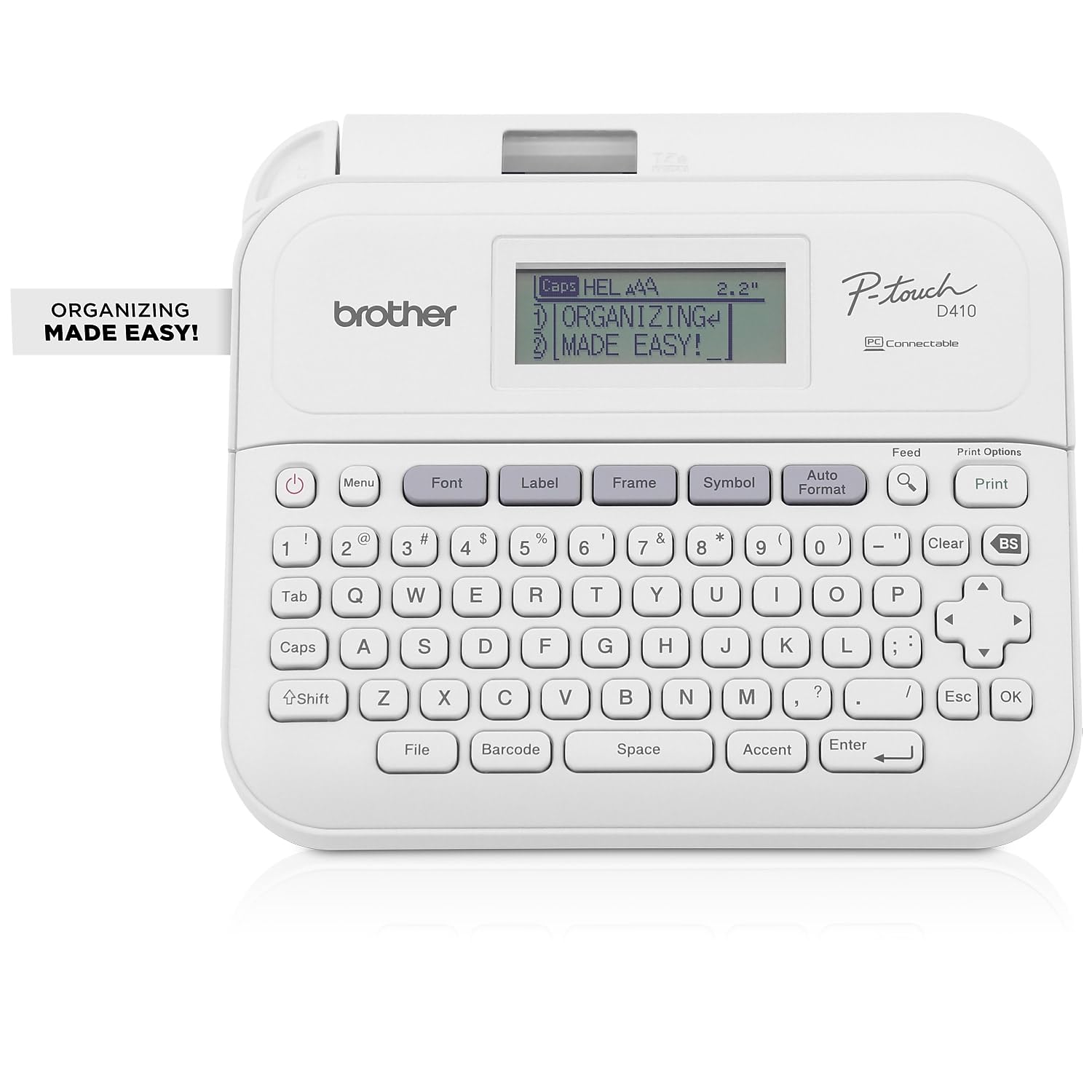
1. Brother P-Touch PT-D410 Home / Office Advanced Label Maker
Our pick — 4.5+★ from 850+ verified ratings; the strongest balance of quality and price.
The desktop workhorse that types its own labels without asking a phone for permission.
The number worth starting with is the tape ceiling: this machine prints on TZe tape up to roughly 3/4 inch wide, and that width is what lets a cable flag carry enough characters to read across a rack. It fits up to five lines of text on a single label and pulls from 15 fonts, 13 font styles, 120 designer frames, 700 symbols and 7 font sizes. In a network closet the symbol library earns its keep — you can print a port number, a switch name, and a direction arrow on one tag instead of three.
It runs 20 pages per minute against the LABELWORKS Epson LW-PX300’s 10, so a full panel of tags takes roughly half the passes. That margin is why it sits at the top of this list. Owners lean on two things above all: the machine is easy to use straight from the keypad with no setup, and the labeling itself is flexible enough to handle everything from toolbox drawers to file folders. The tape flexibility is real — “It’s very nice to be able to print on 12 and 18mm tape,” as buyers report. Plugging into a PC or Mac through USB opens the design tools and the 30 preloaded templates, which is where the 120 frames and 700 symbols stop being theoretical.
Here is the catch you should know before buying. The LCD has no backlight, and it is genuinely hard to read in a dim rack — that single flaw is the most-cited usability gripe. The second one is tape waste: each print throws away roughly an inch for alignment, and that adds up fast when you are labeling a 48-port panel. And the USB connectivity does not extend to iPad or iPhone, so the phone in your pocket is not a design surface here.
What earns its keep in a rack
- Prints on TZe tape up to roughly 3/4 inch wide, wide enough for a readable cable flag
- Five lines of text per label, plus 15 fonts, 13 font styles, 700 symbols and 7 font sizes
- 20 pages per minute — twice the LABELWORKS LW-PX300’s 10
- QWERTY keypad works with no pairing, no app, no connection
- USB to PC or Mac open up built-in design tools and 30 preloaded templates
Where it will frustrate you
- No backlight on the LCD, and it is hard to read in low light
- Roughly an inch of tape lost per print for alignment
- USB connectivity does not cover iPad or iPhone
Buy it for: a home lab, a small office closet, or a bench where you want labels typed and printed on the spot without a phone in the loop.
Think twice if: you do most of your labeling in a dark rack — the unlit screen is the one thing that will slow you down.
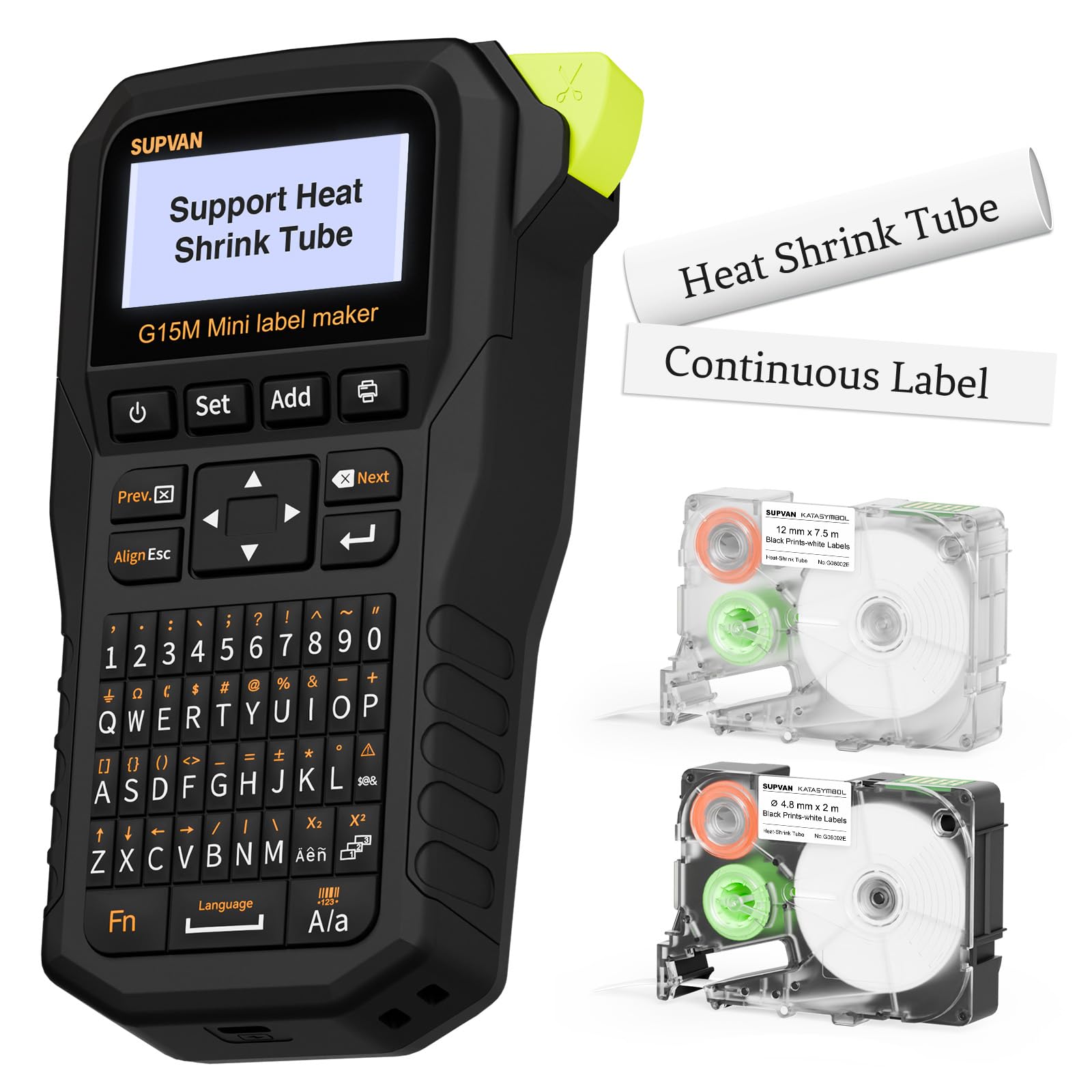
2. SUPVAN G15M Label Maker
A pocket-sized printer that ships with the heat-shrink tube most cable jobs actually need.
At 0.88 lb and 6.7″ deep by 1.7″ wide by 3.35″ tall, this thing is small enough to live in a tool bag beside your crimper — against the Brother PT-D410’s 8.9″ deep by 7.36″ wide by 12.3″ tall footprint, it is a different class of portable. The box already includes a 4.8mm heat-shrink tube at 2 meters, so you can shrink-mark a wire the day it arrives. Print quality is what owners talk about first, and it holds up on the small stuff: 4 lines on 1/2″ tape with tiny text, 2 lines on the small heat-shrink tube.
The engineering detail that matters on a big harness is the margin — labels come out with a 0.19″ margin, which the maker calls half the size of others, so you burn less tape per tag. Its thermal transfer printing is rated for 10 years with UV, heat and water resistance — the spec that lets a tag survive a garage or an outdoor run. Its 1200 mAh rechargeable battery is rated for up to 3 months of use on a single charge. It types on a keyboard rather than an app, with 9 font sizes, 6 font styles, 5 frames and 400+ icons, and the split tape backer makes the label easy to peel.
What you should plan around: the keys are small, so entering long cable codes by thumb-tapping is slow work, and the tape and tube colors stay limited to white and yellow with black print. Charging is the one recurring complaint in an otherwise strong picture — a subset of units report trouble taking a charge. If your harness project is large, batch printing works but takes a two-step quantity entry each time. For a wiring job with lots of short tags, that small keyboard is the trade-off you accept for a printer this portable.
Where it wins: the combination of included heat-shrink tubing, a 0.19″ margin and a 0.88 lb body makes this the most cable-ready unit per dollar on the list — it does not need an app or a PC to start.
Where it asks patience: small keys and a white-or-yellow tape palette mean you should not expect decorative labeling, and the rechargeable battery is the part to keep an eye on over time.
Reach for this if: you are marking a wiring harness, an automotive project, or a panel where heat-shrink tags are the right answer and you want the tubing in the box.
Look elsewhere if: you need long descriptive labels typed quickly — the compact keyboard will slow you down.
3. LABELWORKS Epson LW-PX300 Industrial Label Maker
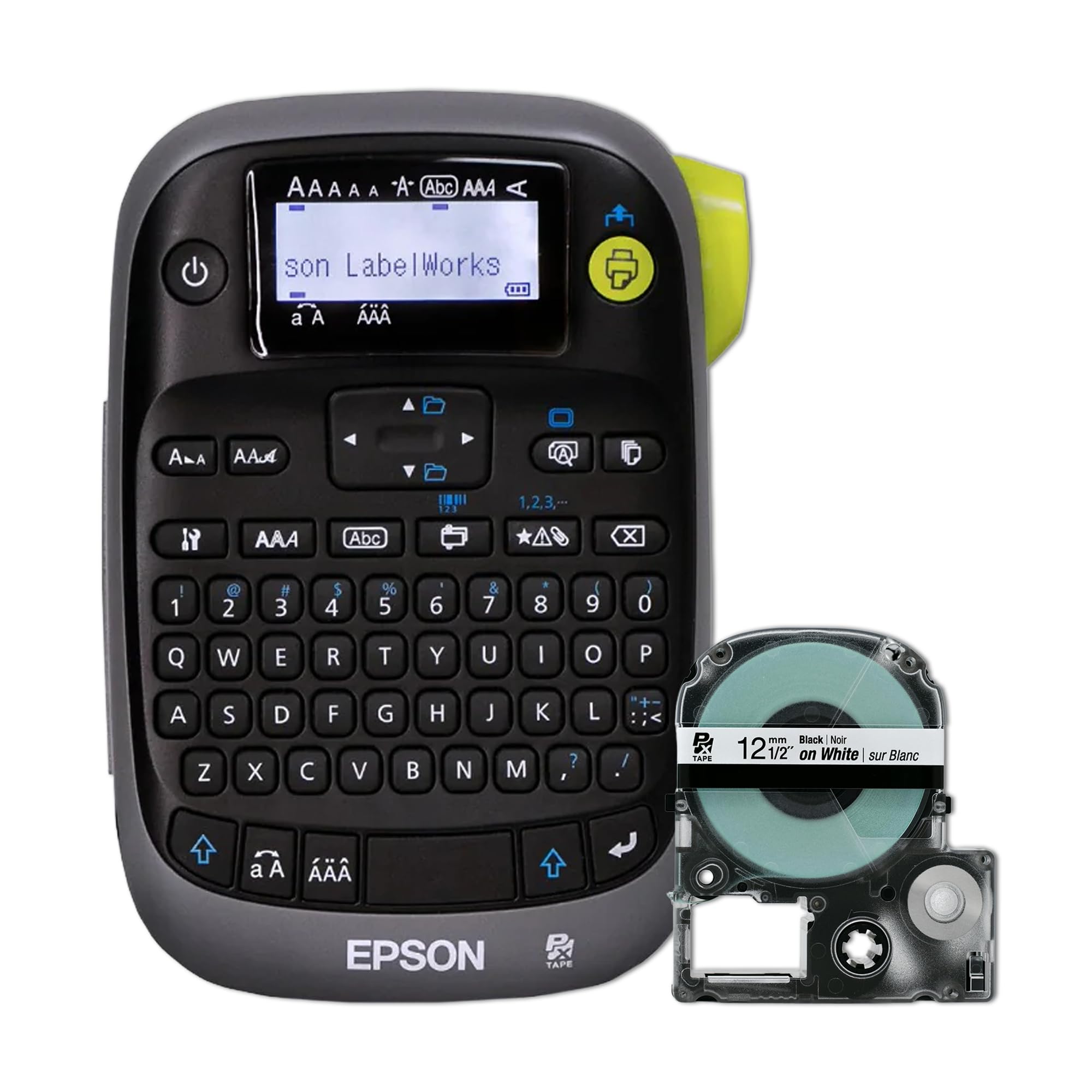
Slow on paper, but the print preview screen stops you burning tape on a wrong tag.
Ten pages per minute is the slowest print cadence here outside the industrial flags, and that is the honest headline — the Brother PT-D410 runs 20 against this machine’s 10. What you get in return is a large, clear print preview screen that shows the label before a single millimeter of tape feeds through. On a cable job where each tag carries a port number, a switch name and a direction arrow, catching a typo on screen beats peeling off and reprinting a mislabeled wrap.
The wire-marking use case is baked into how owners run it: print the numbers and letters on shrink tube and slide it over the conductor. Tape adhesion runs above average, with the split backing making the label easy to lift and place — though it can fall short on some surfaces. It takes the 212VTBWPX cartridge and a long list of tape colors and finishes, and it is compatible with older ribbons, which keeps consumable costs down over time. A built-in QWERTY keyboard with dedicated function buttons and an auto-cutter means you can run a whole labeling session offline.
The warranty is the other half of the pitch: LABELWORKS covers these with a full-service lifetime warranty in the United States and Canada — if the label maker breaks, they replace it. Two honest limits before you commit. It is bigger and heavier than its competitors because it carries 6 AA batteries, and the adapter is not included. And the interface has a learning curve; the device is more complicated than a single-line sticker maker, so budget a session with the manual or a video walkthrough.
What makes it trustworthy on a job
- Full-service lifetime warranty in the US and Canada — broken units get replaced
- Large print preview screen catches errors before tape is spent
- Auto-cutter, built-in QWERTY keyboard and dedicated function buttons
- Accepts older ribbons and a wide range of tape colors and finishes
- Above-average tape adhesion with a split backing for easy peel
The parts that cost you time
- 10 pages per minute — half the Brother PT-D410’s 20
- Runs on 6 AA batteries and the adapter is sold separately
- Heavier and larger than competitors because of the battery load
- Interface has a real learning curve
Suits: the tech who wants a machine that gets replaced if it dies on the job, and who values getting the label right the first time.
Not for: someone labeling hundreds of tags in one sitting — the print speed will make that session long.
4. Makeid P31 Industrial Label Maker

A 1-inch print head that fits 8 lines on a tag, driven entirely from your phone.
Resolution is the number that matters here: 300 dpi, printed through a 1-inch print head that carries up to 8 lines of text. That head width is the reason this machine can produce a wraparound cable label that holds a port number on one side and a switch identifier on the other, and it does it across up to 20 label sizes including self-laminating, nylon, PET all-weather and heat-shrink tubing. The MakeID Label Pro app brings 48 templates, 200+ icons, 20+ fonts, plus barcode and QR generation and bulk data import.
On a job site, the portability numbers are what sell it. It weighs 1.27 lb, carries a 2000 mAh battery rated for up to 90 days per charge, and prints up to 60 labels per minute. Thermal transfer means the label does not fade. The Bluetooth printing is what IT installers reach for first — design on your phone, print on the spot, no laptop or PC. The wraparound labels are the standout: owners specifically call out that they stay put on cables where plain tape slides off. Setup is quick enough that the app handles the work rather than the printer.
Two things you should weigh honestly. The app is good but not always intuitive — navigation is the recurring friction, and the split backing on the labels can be stubborn to start peeling, sometimes needing a fold and a blade to lift the edge. And several owners mention blurry prints, so the print quality is mixed rather than a given. Also know that Bluetooth printing is phone-only — on a Mac you connect by USB-C. If your workflow lives on a phone and you want QR codes and bulk import, the trade-off is app dependence.
The setup that matters: a 300 dpi print head at 1 inch wide plus heat-shrink and self-laminating media in one machine is what makes the wraparound labels work — and the wraparound is the format that survives a cable being moved.
The honest friction: an occasionally clumsy app and hard-to-start split backing sit alongside mixed reports on print sharpness, so budget a little patience for the first few labels.
Best for: IT installers and field technicians who design on a phone, need QR codes, and want a wraparound label the cable cannot shed.
Skip if: you work without a phone signal or you want to type on a physical keypad instead of an app.
5. Brady M210 Portable Label Printer Kit

Built for a drop onto concrete, with a backlit screen that works in a dark rack.
The kit arrives ready to work: one M210 printer, one M21 series nylon cloth patch panel and wire and cable label cartridge, a Li-ion rechargeable battery, an AC adapter, a power cord and a hard case. That cartridge type is the whole point — nylon cloth patch panel labels are made to sit on a faceplate and a cable jacket, not on a file folder. It handles multi-line labels for wires, panels and circuit boards, and works with 90 plus cartridges across 12 different material types, so the media library covers most industrial labeling jobs you will meet.
The backlit LCD graphics display is a genuine advantage in a low-lit rack, and the keypad carries letters A to Z and numbers 0 to 9 without a phone. Text prints in 6 sizes from 6 point to 40 point, so a small faceplate tag and a large panel banner come from the same machine. The body is drop-tested and reinforced with molded rubber impact bumpers. Owners who run this heavy for wire and instrument labels report the sturdy build surviving multiple drops, and the print quality and label options come up as the strongest parts of the experience. There is a reason quality is the first thing people mention.
Two practical notes. The battery must be removed to charge, which is an odd design choice, and the label stock has to sit between the plastic guides or it jams. Battery life is rated for several hours of use with auto shutoff when idle. The hard case holds two spare cartridges, which is fine until you want more colors and thicknesses on hand. And the consumables are proprietary — this model reads a chip and only takes brand-name cartridges, so plan your tape budget around that.
Why it earns the job site
- Backlit LCD makes the screen readable in a dark rack
- Drop-tested body with molded rubber impact bumpers
- 6 text sizes from 6 point to 40 point on one machine
- 90 plus cartridges across 12 material types, including nylon cloth patch panel labels
- Kit includes the printer, battery, charger, cartridge and hard case
What to plan around
- Battery must be removed to charge
- Label stock must sit between the plastic guides or it jams
- Hard case holds only two spare cartridges
- Cartridge chip locks you to brand-name media
Right machine for: an electrician or network tech who labels panels and wires in the field and needs a screen that reads in the dark.
Wrong machine for: a home organizer who wants to shop third-party tape — the cartridge chip rules that out.
6. DYMO Industrial Label Maker Rhino 5200

Built around hot keys that format a patch panel label in one press instead of twenty.
The defining feature is the row of one-touch hot keys that automatically size, space and format text for a specific job: patch panels, terminal and 110 blocks, wire and cable flags, horizontal and vertical wraps, and fixed-length applications. Instead of setting size and spacing by hand for every tag, you press the key for the format you want. DYMO’s own testing against the Panduit PanTher LS8, Brady BMP21 and Brother PT1650 counted keystrokes for patch panel, wire and faceplate labels, and DYMO claims up to 77% faster labeling. On a full 48-port build, that keystroke count is the thing that decides whether you finish before lunch.
It meets key ANSI and TIA/EIA-606-A labeling standards, which is the language a network closet needs — the label format is not just pretty, it maps to the standard your documentation is supposed to follow. It prints heat-shrink tubes and non-adhesive labels and uses DYMO Industrial labels with chemical-, heat- and UV-resistant materials. Owners running it on panels and wire flags report the menus make label type, text size and direction easy to set with minimal instruction, and that auto numbering plus patch panel printing speed the work. Control panels come out looking more professional than hand-set labels.
Now the honest side. Print quality is the most-dissected weak point on this machine — unclear text comes up more than anything else, and battery life drains quickly. Durability is a mixed picture too, with some units failing early after years of prior models running long lives. It is an older design that rewards proper expectations: treat the consumables as an ongoing cost, run it on the correct labels, and it will format your panel tags faster than anything else here.
The reason to pick it: ANSI and TIA/EIA-606-A compliance plus hot keys that auto-format patch panel, wire flag and wrap labels is a combination no other machine on this list offers — you are buying the standardized format, not just the printer.
The trade-off to accept: check the print quality on your own labels early, and plan to keep batteries stocked — those are the two recurring gripes that outweigh everything else people like about it.
Buy it when: you label patch panels and wire flags at volume and want the standard-compliant format one keypress away.
Pass if: you need a screen-first design workflow or you plan to nurse the battery through long sessions.
7. Brother PT-E560BT Industrial Label Printer

The half-cut strip is what makes a four-hundred-label panel job bearable.
The feature that changes your day is the dual auto-cutter: it prints a strip of half-cut labels, cutting the face but not the backing, so the labels stay on one continuous strip and you peel and apply one at a time. On a large labeling run that eliminates the scrap tape and the second alignment print older machines force on every label. The tape range is equally job-ready — laminated labels and heat-shrink tubes from 3.5mm to 24mm, which covers the small conductors and the fatter cable bundles on one machine.
For a network build, the quick application keys are built for exactly the formats you need: cable wrap, patch panel, punch block and faceplate. It prints QR codes and linear barcodes, and you can store your databases and templates so an existing job reprints quickly. The Pro Label Tool app on a phone handles design and sends the file over Bluetooth, and P-touch Editor on a PC does the heavier work. Laminated TZe tapes resist heat, water and abrasion, which matters in a rack and on a factory floor alike. The ambidextrous hand strap and utility ring add drop protection for site work.
What to know before you commit. There is no charger in the box — you get the printer and you supply the charging, which several buyers found surprising. Bluetooth is the mixed part of the experience; a subset of phones will not pair at all, and the app itself is not always intuitive. There is also no on-device queueing for multiple half-cut labels, so printing runs of ten or more blocks the screen for about ten seconds each, and the app lacks autosave, so a Bluetooth drop can lose a draft.
What it does better than the rest: the dual auto-cutter protects the tape backing across a whole strip, and on a huge job that is the difference between hours saved and hours spent peeling.
The cost of the convenience: pairing and app stability are the recurring drag, so if your phone is picky, plan to design on a PC through P-touch Editor instead.
Worth it for: a network or electrical team labeling in volume, where the half-cut strip and 3.5mm to 24mm heat-shrink range save more time than the printer costs in setup.
Not worth it for: a one-off labeling job, where the missing charger and app quirks will outweigh the speed.
Know the Specs
dpi and Print Head Width
dpi means dots per inch — how finely the machine places characters, and a rough proxy for whether a small cable tag stays legible. Head width is how much tape the print mechanism covers in one pass, so a wider head holds more lines. Together they set what you can fit on a wrap: the Makeid P31 pairs 300 dpi with a 1-inch head that prints up to 8 lines, which is why it can carry a port and switch name on one label. Check both before you assume a machine can make the tag you want.
Heat-Shrink Tubing vs. Tape
Heat-shrink is a sleeve that slides over the wire, then shrinks tight when heated, so the label becomes part of the jacket and cannot peel. Tape, by contrast, is a flat label you fold over the cable — easier to place, but it can slip off a moving cable. The SUPVAN G15M ships with a 4.8mm heat-shrink tube; the Brother PT-E560BT takes tubing from 3.5mm to 24mm. Match the tubing diameter to your wire gauge and the job gets faster. Check that your chosen printer actually lists tubing as supported.
Tape Waste and Margin
Most label makers feed tape to align each print and throw the excess away, so the margin you see per label is real money over a full panel. The SUPVAN G15M prints with a 0.19″ margin, which the maker calls half the size of others; the Brother PT-D410 loses roughly an inch per print for alignment. If you are labeling a 48-port panel, multiply that waste by the count. A half-cut cutter like the one on the Brother PT-E560BT saves label backing but not necessarily tape material, so check both figures before the big job.
Power and Portability
A cable job usually happens where power is awkward. The SUPVAN G15M uses a 1200 mAh rechargeable battery rated for up to 3 months per charge; the Makeid P31 uses a 2000 mAh battery rated for up to 90 days. The LABELWORKS Epson LW-PX300 runs on 6 AA batteries with the adapter sold separately. A rechargeable unit saves you buying batteries every few weeks, but a cold or dead one at the wrong moment stops the job — check the charge before a long session, and keep the cable in your bag.
Common Questions
What kind of label maker do I actually need for network cables?
Is heat-shrink tubing better than tape for cable labels?
Will a label maker for network cables work with my PC or only a phone?
How do I stop wasting tape on a large labeling job?
Can these label makers print on cables and shrink tube at the same time?
How many characters fit on a small cable wrap?
Do these printers need an app to make a basic cable label?
How long should a cable label last?
Can I use third-party tape or will it lock me in?
Which label maker is best if I need to print hundreds of tags quickly?
The Bottom Line
For most people who need a label maker for network cables, the Brother P-Touch PT-D410 is the right starting point — it prints on tape up to roughly 3/4 inch wide, fits five lines per label, and types without a phone or a network connection. The machine is not flashy, but it will label a patch panel today without depending on an app update.
If your cables need heat-shrink tags, reach for the SUPVAN G15M — it ships with the tubing and keeps the margin down to 0.19″. For a dark rack and a screen you can actually see, the Brady M210 is the one to grab. And if you are labeling panels in volume and want a standard-compliant format in one keypress, the DYMO Rhino 5200 fits that job.
How we choose
We do not accept paid placement. Every pick is matched to a real buyer and a real use-case; we do not hands-on test units.
Sources
Specifications: manufacturer listings and product documentation. Review insights: verified customer reviews, as of October 2026. Pricing: not shown on this page (it changes often); check the current price via the retailer link.
As an Amazon Associate, Aappliancez earns from qualifying purchases. This does not affect which products we feature.