Disclosure: Some links in this post are affiliate links. As an Amazon Associate I earn from qualifying purchases, at no extra cost to you. Learn more
Specs are compiled from manufacturer listings and verified buyer reviews and can change over time — please confirm the key details on the product page before buying.
If you run two computers on one desk, the real question is not which switch has the longest feature list. It is which one keeps your keyboard, mouse and screens awake every single time you press the button. Some KVMs (keyboard-video-mouse switches, the box that lets one keyboard, mouse and monitor set control several computers) hold up for years, and others lose a screen or a USB port months in. This guide is built around that gap.
This guide is built by comparing the manufacturers’ published specifications and the patterns across verified customer reviews, so you get each pick’s real strengths and trade-offs instead of marketing spin.
The picks below split into two clear jobs. Local boxes just move your desk between machines, while remote units let you reach a PC across the internet. Here is the breakdown of the best KVM for each setup.
Top Picks


How To Choose The Best KVM
The mistake most buyers make is counting computers before counting ports. A dual-monitor KVM only works if every computer feeding it can output to two screens at once. If your laptop only drives one display, the second monitor stays dark no matter which switch you buy.
Count your ports before you count your computers
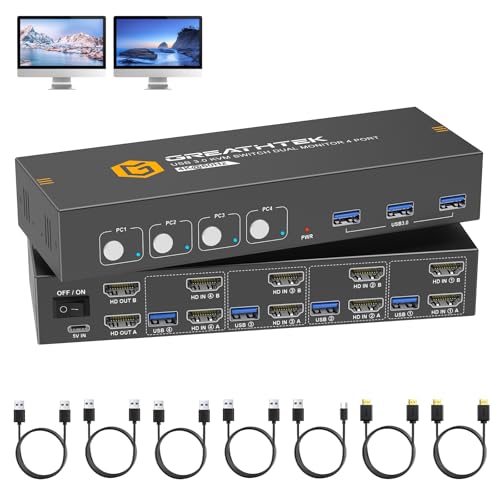
For a two-monitor, four-computer box, each computer needs two HDMI outputs and each monitor needs one HDMI input. The cable count climbs fast — a four-PC, two-monitor setup needs ten HDMI cables, and most switches ship with almost none of them. Budget for cables as part of the purchase, not an afterthought.
EDID is the feature you will feel every day
EDID (the handshake where a monitor tells a computer what resolutions it can display) sounds like a spec-sheet line. In practice it decides whether your app windows reopen in the same place after a switch. Adaptive EDID keeps the picture stable; a unit that loses EDID makes your desktop icons and windows jump to new spots on every toggle.
Switching speed and USB power draw matter more than resolution
Most modern boxes push 4K at 60Hz without strain. What separates them is how fast the switch happens and whether your keyboard and mouse stay connected. Power-hungry gaming keyboards and wireless receivers can drop out if the switch’s USB ports are underfed, which is why several units here ship with a power cable.
Side-by-Side Comparison
| Model | Best For | Computers / Monitors | Max Resolution | Switching | Amazon |
|---|---|---|---|---|---|
| GL.iNet Comet GL-RM1★ Best Overall | Remote access and BIOS work | 1 host, remote over IP | 3840×2160@30Hz | Browser and app | Amazon |
| ATLAHET 4 Port Dual MonitorMost Capable Local | Four PCs on two screens | 4 computers / 2 monitors | 4K@120Hz (per review) | Button and remote | Amazon |
| GREATHTEK 4 Computers 1 MonitorMetal Chassis Pick | Metal-bodied multi-PC desk | 4 computers / 1 monitor | — | Push button | Amazon |
| GREATHTEK S7232H2-A | Two-computer, two-screen basics | 2 computers / 2 monitors | — | Button and remote | Amazon |
| Hearvo S7232H | One-screen work-from-home | 2 computers / 1 monitor | 4K@60Hz | Button and wired remote | Amazon |
| MINIX K1 | USB-C laptop pair | 2 computers / 1 monitor | 4K@120Hz HDR | Button | Amazon |
| GREATHTEK USB3.0 4-Port | Four PCs on one screen | 4 computers / 1 monitor | 3840×2160@60Hz | Button and remote keypad | Amazon |
| GREATHTEK 8K Dual Monitor | High-refresh dual-screen desks | 2 computers / 2 monitors | 8K@60Hz | Button and wired keypad | Amazon |
| BDFFLY 4 Computers 2 Monitors | Four PCs across two screens | 4 computers / 2 monitors | 3840×2160@60Hz | Push button | Amazon |
| UGREEN 8K Triple Monitor | Three-screen creative setups | 2 computers / 3 monitors | 8K@60Hz | Button and desktop controller | Amazon |
| AV Access Dual Monitor | Hotkey switching and USB hub | 2 computers / 2 monitors | 4K@60Hz | Button and hotkey | Amazon |
Detailed Reviews
1. GL.iNet Comet GL-RM1 Remote KVM
Our pick — 4.0+★ from 850+ verified ratings; the strongest balance of quality and price.
The pocket-sized box that reaches a server from another city.
Most switches in this list sit on your desk and move your keyboard between machines. This one goes further: it lets you control a computer over the internet, at the BIOS level (the pre-boot setup screen you normally only see sitting in front of the machine). The whole unit weighs 85 g and measures 3.15 by 2.36 by 0.68 inches, so it disappears into a cable bag. It also carries a 4.0+ star average across 800+ ratings.
You get a sharp picture for server work: 3840×2160 at 30Hz, meaning 4K resolution refreshing 30 times a second. That is enough to manage a server, read a terminal and click through BIOS screens, so text stays crisp. It is not a gaming frame rate. Owners who drop the EDID (the monitor handshake) to 1080p report a smoother stream than the default 2560×1440 setting, which is the practical balance for remote work. Setup is genuinely quick — as buyers report: “Plugged everything, connected locally via a browser and was up in running in 5 minutes.”
Then there is the connectivity that makes it useful for real support work. You get H.264 hardware encoding (the chip compresses the video itself instead of leaning on the host PC), gigabit Ethernet at 1000 megabits per second, and Tailscale support for a private mesh network. It uses WireGuard VPN plus a web interface, and there are no subscription fees. The computer being controlled needs no extra software. One documented catch: USB-A-only hosts need an adapter or extra cable, and VGA, DVI or DisplayPort machines need adapters with EDID tweaks — with no audio over VGA or DVI.
What earns it first place
- Reaches any PC over the internet with BIOS-level access and no software on the host
- Gigabit Ethernet and H.264 hardware encoding keep the stream light
- 85 g plastic/aluminum body runs on low power and travels easily
- Tailscale and WireGuard support with no subscription fees
Where it asks more of you
- 4K tops out at 30Hz, so it is a management tool, not a gaming display path
- Older VGA, DVI and DisplayPort machines need adapters and EDID tweaks
- The app runs only on Windows and Mac
Reach for it if: you administer servers or a home lab and want to reboot, install an OS or fix a BIOS setting from anywhere.
Think twice if: you only need to hop between two desk PCs — a local switch does that job without the network setup.
2. ATLAHET 4 Port Dual Monitor HDMI KVM Switch
Four machines, two screens, one button and a remote you keep at hand.
This is the biggest local switcher in the guide: four computers sharing two monitors and four USB devices. The chassis runs 9.06 x 3.31 x 1.38 inches and sits flat on the desk. Compare it to the single-monitor GREATHTEK box at 9 x 6 x 2 inches and it takes up a slimmer strip of desk, though the ATLAHET’s wider footprint is the price of that extra monitor output.
The practical win is speed. Owners time switching at under a second between a work tower and a personal rig. HDMI compatibility holds up across Windows, Mac OS, Linux and Unix machines, and the control options cover a push button on the box plus a wired remote. That remote is the detail people keep coming back to, since it means the switch itself can live out of sight behind the monitors.
The honest catch: plan on buying cables. It needs ten HDMI cables to fill every port, and the included USB cables are short 3-4 ft runs, so long desks need longer ones. The documentation is thin too, so the first setup is guesswork unless you know the port layout.
Where it lands: most owners mention smooth operation after the first week. A rare early unit arrives dead and an occasional box loses its EDID memory over time, which sends windows back to the wrong monitor and forces a manual reposition.
Best fit: a multi-machine desk — gaming PC, work tower, maybe two laptops — feeding two monitors, where you want the switching to happen faster than you can notice.
Look elsewhere if: you want keyboard hotkeys to switch instead of reaching for a button or remote.
3. GREATHTEK 4 Computers 1 Monitor KVM
A dark-grey metal block that turns four machines into one keyboard and screen.
Build quality is the first thing you notice here. The enclosure is metal in a dark grey finish, sized at 9 x 6 x 2 inches, so it sits on a shelf or the back of a desk without flexing. It handles four computers on one monitor through HDMI, covers Windows 7 through XP, Linux and Mac, and plays nice with PS4 consoles that share the same screen. Control is a plain push button on the unit.
Owners running a stack of laptops and desktops side by side report it switching cleanly between them, and several pairs of high-resolution monitors are driven without complaint. The single-monitor design keeps the cable count low compared to the dual-screen ATLAHET above — you are not hunting for ten HDMI cables to make it work.
The trade-off worth knowing: some units lose the second display after a few months of use. The fix that actually works for affected owners is adding a 5V/3A power supply, which tells you the box can struggle to draw enough juice from the host USB alone. Mixing it across very different operating systems can also give an intermittent snow-screen on a Mac and unreliable dual output on some Windows mini PCs.
What it does well: the metal build and simple push-button control suit a tidy, fixed multi-PC desk where the machines rarely change.
Pick this one for: a four-machine, single-screen desk where a solid metal body and one-button switching are all you need.
skip it if: your computers are a mixed bag of Macs and mini PCs — the signal negotiation gets fussy on those blends.
4. GREATHTEK KVM Switch 2 Monitors (S7232H2-A)
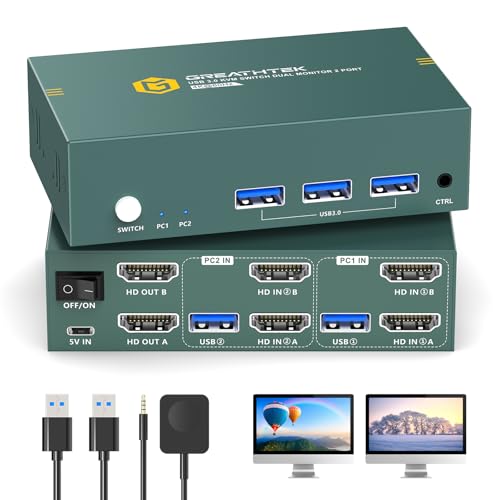
A matte-black two-way box for one desktop plus one laptop on two screens.
The job here is narrow and clear: two computers sharing two monitors with a keyboard and mouse. The case is metal in matte black, the control is a push button plus a wired remote, and the mounting type is rack mount if you want it off the desk. It handles computers and monitors through a plug-in connection using copper and brass contacts.
The switching itself is the highlight. Owners running a desktop and a laptop together describe clean handoffs with no flicker between machines, which is the whole point of a two-screen KVM. Video quality holds on both Windows and Mac without signal loss, and setup is straightforward enough that you do not need to be tech-savvy to get it running.
Choose it when: you have exactly two machines and two screens and want a no-fuss metal switch with a remote for hiding the box.
The caveat to weigh: a second laptop’s second screen sometimes needs extra USB-C to HDMI cables beyond the HDMI-to-HDMI pair, so budget for adapters if your laptops are port-light.
5. Hearvo USB 3.0 HDMI KVM Switch (S7232H)

Two computers, one monitor, and a one-button hop between work and play.
This is the classic remote-work setup: a work laptop and a personal desktop sharing one screen, one keyboard and one mouse. It outputs 4K at 60Hz, so 4K resolution refreshing 60 times a second, with HDCP 2.2 (the copy-protection handshake that lets streaming services play) and adaptive EDID to keep the picture stable. The body is compact at 5 x 2.4 x 0.8 inches and runs with no power supply or driver software — plug it in and go.
The USB side is generous for the class. You get four USB 3.0 ports — three USB-A and one USB-C — moving data up to 5Gbps (gigabits per second). That is fast enough to share a printer, a flash drive, a webcam and a headset between both machines. What wins people over is simply how often it works: functionality is the thing owners praise most, and easy setup runs a close second. Switching is a single button press on the wired remote, so the box itself can sit behind the monitor.
Two real limits show up. HDMI cables are not included, only two USB 3.0 cables, so you need to buy both display cables separately. And this is a video-and-USB switch, not an audio switcher — one owner needed a separate audio switch because the headset audio did not follow the switch. Switching speed also lands in the seconds, not instantly.
Why it fits a WFH desk
- 4K@60Hz with HDCP 2.2 and adaptive EDID for a steady picture
- Four USB 3.0 ports at up to 5Gbps for printer, webcam and drive sharing
- No power supply or drivers — plug-and-play setup
- Wired remote keeps the unit hidden
What to plan around
- HDMI cables are not in the box
- No audio in/out, so headsets need a separate audio switch
- Switching takes a few seconds rather than feeling instant
Suits you if: you want one monitor, two computers and your keyboard, mouse, printer and webcam all following the button press.
Not for you if: you need your headset audio to move with the switch, or you game at high frame rates on the same screen.
6. MINIX K1 USB-C KVM Switch
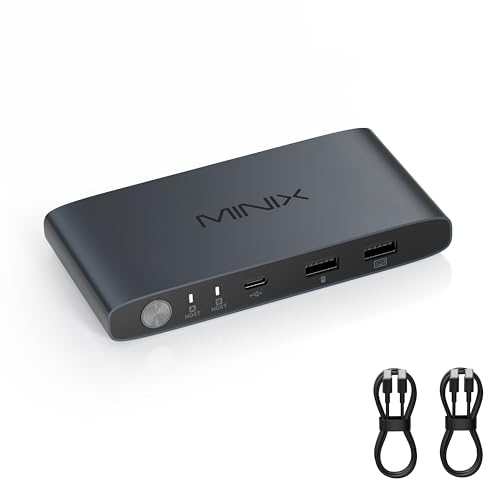
Built for two USB-C laptops and a single high-refresh monitor.
If both your machines are USB-C, this skips the adapters entirely. It takes two USB-C inputs and feeds one monitor, with 4K at 120Hz HDR output (4K resolution refreshing 120 times a second with high dynamic range colour) over an HDMI 2.1 connection. It also carries 100W USB-C PD 3.0 charging (power delivery, the standard that lets one cable charge a laptop) so your charger feeds whichever machine is active. The aluminum shell weighs 185 g.
Around front you get a USB-C and two USB-A ports for keyboard, mouse, flash drive or phone, so you are not unplugging accessories every time you swap machines. It runs on Windows 10 and 11, macOS, Linux, Android and Harmony OS. Set up right — both laptops USB-C, the monitor on an HDMI 2.1 cable, devices that actually support 4K@120Hz — owners with two MacBooks describe it as the first switch that stopped the daily hardware fight.
The honest limit is that the 120Hz claim depends heavily on your chain of cables and devices. Some run it fine at 4K 120Hz; others hit 60Hz, and one pairing with a large ultrawide showed distortion. It also cannot drive an Apple monitor, because those have no HDMI input. Expect a few seconds of display sync after each switch.
The trade-off: this is the fussiest unit in the group about cables. Use full-featured USB-C cables and a proper HDMI 2.1 cable, or you will not see the fast refresh you paid for.
Where it shines: a two-MacBook or two-USB-C-laptop desk where clean ports and built-in charging matter more than backwards compatibility.
Made for: the all-USB-C laptop desk with one high-refresh monitor and a willingness to buy the right cables.
Wrong pick if: you have an Apple display with no HDMI port, or you want the switch to just work regardless of cable quality.
7. GREATHTEK USB3.0 KVM Switch 4 Port
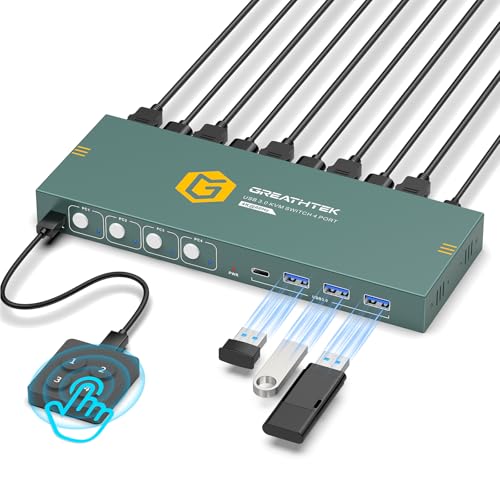
Four computers into one screen, with a numbered remote for one-touch jumps.
The top resolution is 3840×2160 at 60Hz, and it steps down cleanly to 30Hz and 1080p for older machines. Three USB 3.0 ports plus one USB-C port let four computers share a keyboard, mouse, flash drive or camera. Adaptive EDID identifies multiple display devices so the picture stays put. Control comes two ways: white buttons on the front panel, or a wired remote keypad labeled 1/2/3/4 so you jump straight to a specific computer. LED indicators show which one is live.
Switching is the part that sells it. You press a number and go, no hotkey combos to memorize (hotkey switching is not supported at all). Owners driving several computers off one keyboard, mouse and monitor describe the desk finally staying organized, with good image quality and a setup that goes in without fuss. This is the pick if you like pressing a numbered button rather than cycling through machines.
The catch: power is the recurring theme. Gaming keyboards and mice can freeze for a second or more when the switch underfeeds the USB ports, and adding a powered USB 3.0 hub fixes it for affected desks. Some units also draw power from the host USB even with the AC cable pulled, and all three USB ports sit on the front.
Worth it if: three or four computers on one monitor is your reality and you want a labeled remote instead of remembering keystrokes.
Yes for: a small lab or multi-PC desk where you want direct numbered switching and shared USB drives.
Hold off if: every peripheral you own is a high-draw wireless or gaming device and you would rather not add a powered hub.
8. GREATHTEK 8K HDMI KVM Switch 2 Monitors 2 Computers
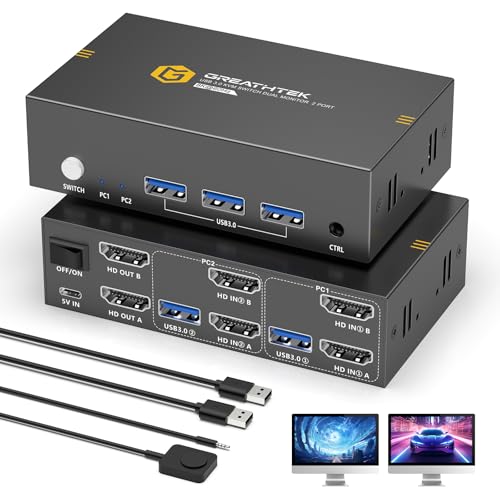
Two computers, two monitors, and headroom up to 8K at 60Hz.
The resolution ladder is the story here. It pushes 8K at 60Hz, and steps through 8K at 30Hz, 4K at 240Hz, 144Hz and 120Hz, down to 2K, 3D and 1080p. HDCP 2.3 keeps protected streaming content playing without interruption. Three USB 3.0 ports run at up to 5Gbps to share a mouse, keyboard, flash drive or camera between the two computers. It ships with two USB 3.0 cables, a wired desktop keypad and a USB-C power cable, and it lives in a 6.2 x 5.7 x 1.2 inch deep-blue shell.
Switching is a panel button or the wired keypad, so the box can hide behind the screens while the pad stays within reach. Adaptive EDID keeps the image stable and the setup needs no drivers. Owners running laptop-and-desktop setups share two monitors, keyboard, mouse, camera and speaker without swapping cables, and it works across Windows, macOS, dual-boot Linux and ChromeOS machines.
Two limits to plan for. It does not support Bluetooth or wireless dongle mice, so keep a wired or receiver-based set handy. And on some Mac configurations the keyboard and mouse were simply not recognized through the switch — that pairing is the one to test early, while the return window is open. You will also want high-quality HDMI 2.1 cables to actually reach 8K at 60Hz.
What it buys you: real fast-refresh headroom — 4K at 240Hz is on the ladder — for a two-screen desk that might grow into higher-refresh monitors later.
The honest caveat: the cables matter more than the box, and the wireless-peripheral gap means a dongle-only mouse will not follow the switch.
Best for: a two-screen gaming-and-work desk that wants 8K and 4K-at-240Hz headroom for future monitors.
Skip if: your peripherals are wireless dongles only, or your Mac setup is untested with switch boxes.
9. BDFFLY USB3.0 KVM Switch 4 Computers 2 Monitors
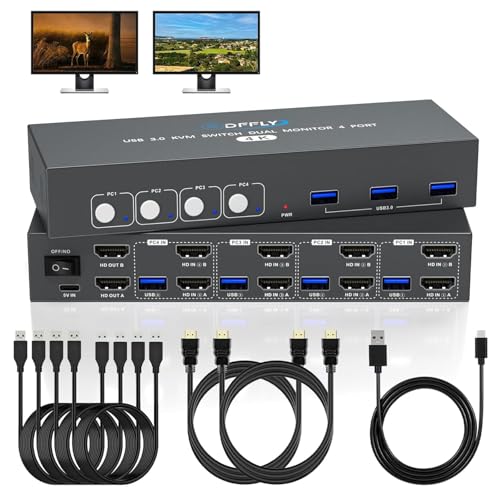
The rare four-computer box that also drives two screens at once.
Four PCs on two monitors is the big ask in this category, and this is the charcoal-black metal unit that does it. It outputs up to 3840×2160 at 60Hz through HDMI 2.0 with HDCP 2.2, backing down to 30Hz and 1080p for older gear. Three USB 3.0 ports share a keyboard, mouse, printer, scanner or USB drive across all four machines. Adaptive EDID keeps the image stable, and the package includes four USB-A to USB-A 3.0 cables (1.2m), two HDMI 2.0 cables and a power cable — more cables than most rivals here include.
Setup with what is in the box is the reason it climbs this high. The plug-and-play design goes together in minutes, the display stays sharp, and the USB ports carry peripherals without complaint. Do plug in the included USB power cable — the monitor input needs the USB connection live at the same time as the HDMI feed. One quirk to know: hotkey switching is not supported, and ultrawide monitors are not supported, so the button is your only way across machines.
There is one design limit that bites on Linux. Owners running Windows report no problems, but on Linux the keyboard and mouse can hang after you switch away and back, likely because there is no OS emulation to hold the input state. Switching speed is fine but not instant, and testing showed no flicker.
Grab it if: you have four Windows machines feeding two screens and want the cables included so setup is genuinely plug-and-play.
Think twice if: any of your machines run Linux, or you use an ultrawide monitor.
10. UGREEN 8K HDMI DisplayPort KVM Switch 3 Monitors 2 Computers
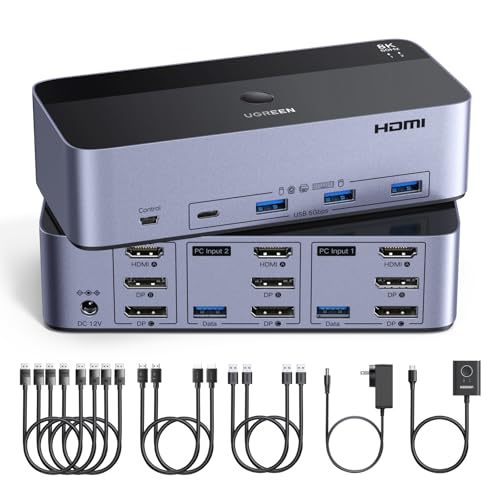
Two computers feeding three screens, one of them on HDMI and two on DisplayPort.
This is the triple-monitor specialist. It has two DisplayPort 1.4 ports plus one HDMI 2.1 port, each supporting up to 8K at 60Hz, with backward support to 8K at 30Hz, 4K at 240Hz, 144Hz, 120Hz and 60Hz. It carries HDR10+, HDCP 2.3/1.4, VRR, FreeSync and G-Sync, which is the anti-tearing stack gamers care about, across all three screens. Four USB 3.0 ports share keyboard, mouse, printer and webcam, and it switches with a button or a desktop controller you place outside the work area.
For creative and engineering desks this replaces the manual cable shuffle. Owners moving between a work dock and an editing PC describe one-button switching that takes a few seconds, with the perceived delay coming from the monitors detecting the new signal. The build quality is a repeated high point — sturdy aluminum, all cables included, and it handles a 1440p 240Hz gaming monitor alongside two 60Hz displays without a hitch when the cables are sound.
The requirement is strict: both computers need two DisplayPort ports plus one HDMI port, and each needs to support three screens. If either PC only drives one or two displays, the extra monitors stay dark. It also needs the included power adapter connected, does not support EDID emulation, and the included cables are a weak link — swapping to known-good cables cleared the flicker one owner saw on a high-refresh monitor.
The non-negotiable: count your computer’s video outputs first. No triple output, no triple screen — it is that simple with this one. Cables are also capped near 2 meters at 28AWG for 8K, so a distant tower needs a different plan.
What makes it worth it: a genuine 3-screen, 2-PC setup with 240Hz support is rare, and this one gets the switching and cable bundle right for the price bracket.
Right for you if: you have a multi-screen editing or engineering desk and both PCs can drive three displays.
Not right if: either computer tops out at two displays, or you use a docking station that converts signals — compatibility gets murky there.
11. AV Access KVM Switch 2 Monitors 2 Computers

Two PCs, two screens, and the only one here you switch by keyboard.
This is the pick that reads like it was designed by someone who hates buttons. It switches by front button or keyboard hotkey, with automatic PC wake-up and EDID emulation so both screens come back fast and in the right place. Video tops out at 4K at 60Hz in full 4:4:4 colour, and it steps down through 1080p at 240Hz, 165Hz, 144Hz and 120Hz, plus 2560×1440 at 144Hz and 120Hz. The built-in USB 3.0 hub shares three peripherals at up to 5Gbps, and there is a 3.5mm audio port.
Two modes make it flexible: a KVM Mode for straight control of both PCs, and a USB Mode that shows two different video sources on both monitors at once. The package includes all the cabling, and the locked power connector stops the cable pulling loose mid-session — a small detail that saves a lot of irritation. For a two-machine home office where you drive everything from the keyboard, this is the natural fit.
One honest caveat: in macOS it only supports mirror mode, so dual extended screens need a different model. The other thing to know is that a rare unit gets its display and USB switching tangled, so test the button and the hotkey both ways in the first week. It also handles HDMI with a single connector type, while the UGREEN above takes DisplayPort as well.
Go for it when: you want to keep both hands on the keyboard and flick between a pair of PCs without reaching for anything.
Keep looking if: you are on a MacBook that needs two extended monitors — mirror mode is your only option here.
Know the Specs
Computers and monitors supported
This is the first thing to check and the most common mistake. “4 computers, 2 monitors” means each computer needs two HDMI outputs and each monitor needs one HDMI input. A “2 computers, 3 monitors” box like the UGREEN needs two DisplayPort ports plus one HDMI on every computer. If a machine cannot drive that many screens at once, the extras simply will not light up.
EDID and adaptive EDID
EDID is the handshake where your monitor tells the computer which resolutions it can show. When a switch holds that handshake steady, your windows reopen where you left them and the picture stays stable. When it loses EDID, icons scatter and windows jump to the wrong screen on every switch. Adaptive EDID and EDID emulation are the features that keep it smooth, and a unit without them is the one to avoid for multi-screen work.
Resolution and refresh rate
4K at 60Hz is the everyday baseline and covers most office and content work. Higher numbers like 4K at 120Hz or 240Hz matter for gaming, and 8K at 60Hz is future-proofing. Remember the refresh rate is the “times per second” figure — 60Hz refreshes 60 times a second. You only see the fast-refresh benefit if every cable and display in the chain supports it too.
USB 3.0 sharing speed
USB 3.0 moves data at up to 5Gbps (gigabits per second), which is fast enough for a webcam, printer, flash drive or external SSD. Shared USB ports mean your accessories follow the active computer, so you are not unplugging a headset every time you switch. Power draw is the hidden issue — high-draw gaming gear can drop out if the ports are underfed, which is worth a powered hub on some desks.
Common Questions
How many HDMI ports do my computers need for a dual-monitor KVM?
What is the difference between a local KVM and a KVM over IP?
Will a KVM switch work with Bluetooth or wireless dongle mice?
Why does my KVM lose the second monitor when I switch?
Can I switch computers with my keyboard instead of a button?
Do I need to connect the power adapter on these switches?
What does 4K at 60Hz actually mean for everyday work?
Can a KVM switch handle audio as well as video and USB?
Will an ultrawide monitor work through a KVM switch?
Does a KVM switch work with Linux and macOS machines?
The Bottom Line
For most people, the kvm worth buying is the GL.iNet Comet GL-RM1 — it is the only pick that reaches a computer over the internet at the BIOS level from a box that weighs 85 g, and it holds the group’s highest rating at 4.0+ stars across 800+ ratings. If your machines sit within arm’s reach and you want four computers on two screens with sub-second switching, grab the ATLAHET 4 Port Dual Monitor. And for a single-monitor work-from-home desk where the keyboard, mouse, printer and webcam all follow one button, the Hearvo S7232H is the one to reach for.
One last nudge: settle your port count before you order anything. Count the video outputs on every computer and the inputs on every monitor, then match that to the switch’s computers-and-monitors figure. That five-minute port count is what keeps a second screen from staying dark.
How we choose
We do not accept paid placement. Every pick is matched to a real buyer and a real use-case; we do not hands-on test units.
Sources
Specifications: manufacturer listings and product documentation. Review insights: verified customer reviews, as of October 2026. Pricing: not shown on this page (it changes often); check the current price via the retailer link.
As an Amazon Associate, Aappliancez earns from qualifying purchases. This does not affect which products we feature.