Disclosure: Some links in this post are affiliate links. As an Amazon Associate I earn from qualifying purchases, at no extra cost to you. Learn more
Specs are compiled from manufacturer listings and verified buyer reviews and can change over time — please confirm the key details on the product page before buying.
The ROG Ally X is a brilliant handheld gaming PC with one awkward flaw: the moment you need to type, its on-screen keyboard covers half the screen and slows everything to a crawl. A real keyboard fixes that instantly — for chat, game launchers, login screens, and the Windows desktop itself. This guide breaks down which compact and portable keyboards actually pair well with the Ally X, what specs matter, and where each pick makes sense.
This guide is built by comparing the manufacturers’ published specifications and the patterns across verified customer reviews, so you get each pick’s real strengths and trade-offs instead of marketing spin.
You don’t need a full desk setup to type comfortably on your handheld. The right pick connects in seconds and folds away when you’re done, so here is what actually matters when shopping for the keyboard for rog ally x.
Top Picks


How To Choose The Best Keyboard for ROG Ally X
The ROG Ally X runs Windows, which means it accepts almost any Bluetooth or USB keyboard without special drivers. The trick is picking one that pairs quickly, holds a charge through a gaming session, and doesn’t take up half your bag.
Connection type and pairing speed
Bluetooth 5.0 and 5.1 pair faster and hold a steadier link than older Bluetooth versions. A 2.4GHz USB dongle connection can be even more stable in rooms crowded with wireless signals. Look for a keyboard that offers both so you have a fallback if one mode gets flaky.
Layout and key size
A 60% layout drops the number pad and function row to save space. A full-size 105-key layout keeps everything but takes up more room. For a handheld like the Ally X, most people want something in between — or a foldable that gives you full-size keys when unfolded.
Battery life and charging
Battery capacity ranges from 180mAh in the Kenkor mini to 4000mAh in the Redragon K519RGB-PRO. The Redragon K519RGB-PRO’s 4000mAh cell is rated for 50 hours with RGB on and 300 hours with lights off. USB-C charging means one cable for your handheld, your phone, and your keyboard.
Key feel and noise
Mechanical switches give tactile feedback and audible clicks. Scissor switches (the flat, low-profile kind found on laptops) are quieter and better for shared spaces. Pick scissor switches for shared spaces and mechanical switches for private setups.
Side-by-Side Comparison
| Model | Best For | Connection | Buttons | Battery/Charging | Amazon |
|---|---|---|---|---|---|
| Logitech G PRO X TKL Lightspeed★ Best Overall | Tournament-grade wireless | USB / RF / Bluetooth | 104 | Rechargeable | Amazon |
| Redragon K519RGB-PRO 60%Best Value | Budget compact gaming | Bluetooth 5.0 / 2.4GHz / USB-C | 78 | 4000mAh rechargeable | Amazon |
| Kenkor Universal Mini Keyboard | Ultra-portable travel | Bluetooth | 78 | 180mAh rechargeable | Amazon |
| Lenovo Multi-Device Keyboard | Quiet multi-device work | Bluetooth / USB-C | 75 | 60-hour rechargeable | Amazon |
| Samsers Foldable Keyboard & Mouse | Travel bundle with mouse | 2.4G / Bluetooth 5.0 | — | Type-C rechargeable | Amazon |
| ProtoArc XK01 Plus | Backlit full-size folding | Bluetooth 5.1 | 105 | USB-C, 150-day standby | Amazon |
| Redragon K710 Typewriter | Retro mechanical style | Bluetooth 3.0/5.0 / 2.4GHz / USB-C | 104 | 4000mAh rechargeable | Amazon |
Detailed Reviews
1. Logitech G PRO X TKL Lightspeed Keyboard
Our pick — 4.5+★ from 650+ verified ratings; the strongest balance of quality and price.
Tournament-grade wireless that plugs straight into your Ally X dock and never drops a keystroke.
The Logitech G PRO X TKL is the one keyboard on this list built for competitive play first and everything else second. It uses LIGHTSPEED wireless — Logitech’s low-latency connection protocol — and you can pair it to a compatible Logitech mouse through the same USB adapter, which means fewer dongles eating up ports on your dock. The GX Brown tactile switches give you a bump you can feel at the actuation point without the sharp click of a blue switch, so you know every press registered. Dual-shot PBT keycaps are the plastic caps themselves — this type resists the shiny wear marks that cheaper ABS caps develop after months of use.
With 104 buttons it’s a full tenkeyless layout — no number pad, but every other key is there in standard spacing. That’s significantly more keys than the 78 on the Redragon K519RGB-PRO below. And at 5.91″L x 13.86″W x 1.34″H it’s a wider, flatter footprint than the Redragon 60% design at 12″L x 1.3″W x 6.1″H. The included carrying case and USB-A to USB-C cable make it genuinely transportable despite the size.
What wins people over is the build quality — owners consistently describe it as hefty and well-made, with the kind of weight that keeps it planted on a desk. Battery life is another standout, with buyers reporting it lasts through extended sessions. The honest catch: the software side is where it falls short. Multiple long-term owners note that remapping is limited, the FN key is hardcoded, and the switches aren’t hot-swappable (meaning you can’t pull them out and swap in different ones). The sound profile also splits opinion — some love the thock, others find the larger keys high-pitched.
What Earns Its Keep
- LIGHTSPEED wireless pairs at tournament-grade latency
- GX Brown tactile switches with dual-shot PBT keycaps
- Triple connectivity: LIGHTSPEED, Bluetooth, and USB wired
- Included carrying case and charging cable
Where It Falls Short
- No hot-swap switch support — you can’t change the feel
- Software limits remapping and hardcodes the FN key
- Sound profile divides opinion — loud on larger keys
Grab this one if: you want a keyboard that handles competitive play on your docked Ally X with zero wireless lag.
Think twice if: you plan to swap switches or need deep software customization.
2. Redragon Wireless Gaming Keyboard 60%
A 60% frame the size of a paperback that runs for days on a single charge.
The Redragon K519RGB-PRO is the pick for anyone who wants a real gaming keyboard that disappears into a backpack. Its 60% tenkeyless layout drops the number pad entirely, shaving the footprint down to 12″L x 1.3″W x 6.1″H — narrow enough to slide beside your Ally X in the same bag. Three connection modes cover everything: Bluetooth 5.0 for wireless pairing, a 2.4GHz dongle for low-latency gaming, and USB-C wired for charging while you play.
The 4000mAh battery is the headline number here. Redragon rates it for up to 50 hours with RGB on and up to 300 hours with the lights off. An auto-sleep function kicks in after 2 minutes of inactivity to preserve charge, and pressing any key wakes it instantly. The built-in RGB covers 16.8 million colors across 8 dynamic effects, 6 DIY modes, and 7 solid color options, all adjustable across 5 brightness and speed levels.
Buyers report the build feels solid and heavier than the low price suggests, and the noisy keys land at a satisfying level rather than an annoying one. The honest caveat is Bluetooth: pairing isn’t flawless for everyone, and owners mention the keyboard sometimes works “when it wants to.” So treat Bluetooth as a backup and keep the 2.4GHz dongle (a small USB plug that gives a steadier wireless link) as your main connection for gaming. It’s also smaller than some buyers expect, so check the dimensions before ordering if you wanted a full-size deck.
Real-world take: At 78 keys in a 60% shell, this is the lightest-travel gaming keyboard here — the exact opposite of the 105-key ProtoArc’s desk-bound approach.
One caution worth noting: The 26-key anti-ghosting works well in games, but Bluetooth reliability is the weak link — most buyers have no issues, but a few hit dropouts.
Best matched to: budget gamers who want RGB and multi-device switching in a bag-friendly frame.
Less ideal for: anyone who needs bulletproof Bluetooth as their only connection.
3. Universal Wireless Keyboards Mini Keyboard

Wallet-sized, pocket-ready, and small enough to disappear next to your handheld.
The Kenkor mini keyboard is the true pocket option on this list. At 7.68″L x 3.34″W x 0.6″H and 193.4g it’s roughly the footprint of a phone — genuinely smaller than the Redragon 60% above, which is already compact. It runs on a 180mAh battery, charges in 2-3 hours via Type-C, and delivers more than 80 hours of typing per full charge. Bluetooth reaches up to 10m, and you can pair two devices at once and switch with FN+1 or FN+2.
What buyers rave about is the size — it matches the proportions of an iPad mini and fits in any bag or purse with room to spare. The integrated PU leather case doubles as an adjustable stand, tilting your device at any angle for comfortable viewing and typing. Real depressible keys mean the feel is closer to a laptop than a touchscreen, and one long-term owner reported roughly a year of trouble-free use, including surviving a drop.
The trade-off is hand size. Several users with larger hands find it too small for fast typing — great for occasional messages and menu navigation, less so for extended writing sessions. Connectivity is also a mixed bag: most pair easily with phones, but a few hit dropped Bluetooth connections or unresponsive keys. Treat it as the keyboard you toss in a jacket pocket for quick input, not the one you use to write a novel.
Why it earns a slot: It’s the only keyboard here you can actually pocket — versus the Samsers below at 21 ounces, this one is a fraction of the carry weight.
Ideal for: travelers and phone or tablet users who need occasional typing without carrying a full keyboard.
skip it if: you have large hands or need to type quickly for long stretches.
4. Lenovo Multi-Device Wireless Bluetooth Keyboard, Iron Grey

Weighs less than your phone and stays silent while you work through the Windows desktop.
At just 180g, the Lenovo Multi-Device is the lightest pick here — the Samsers bundle tips the scale at 0.83 kg by comparison — so it disappears into a bag. Its slim 10.1″L x 4.2″W x 0.22″H profile takes almost no room, and it connects to up to three devices (Android, iOS, Windows) and switches between them with one button, no re-pairing required. That saves real time when you’re bouncing between your Ally X and your phone.
Typing feels quick and light rather than deep and clicky, and the reason is the 1.3mm travel distance — that’s how far each key presses down, shorter than typical mechanical travel. You also get 12 customizable shortcut keys for common actions, and the rechargeable battery runs up to 60 hours of continuous typing per charge, so a single charge can cover weeks of desk sessions. If Bluetooth is unreliable in the room, USB-C gives you a wired fallback.
What wins people over is how the keyboard types — soft, comfortable keys that feel substantial despite the low profile. Multitaskers with tablets and phones praise the near-instant switching between devices and the lack of lag during rapid typing. The honest trade: this keyboard is smaller than a ThinkPad deck, which several buyers find surprising, and the keys are tightly packed. It also lacks native Apple shortcut support. Both issues are about fit, not defect — check the size expectations before you commit.
What Stands Out
- Connects to 3 devices with one-button switching
- 1.3mm low-travel keys feel soft and stay quiet
- 180g frame and slim profile travel easily
- 60-hour battery on a single charge
Where It Gives Ground
- Keys are tightly packed — expect a compact typing feel
- No native Apple shortcut support
- Lacks dedicated F-keys in some configurations
Right choice if: you need a quiet keyboard for gaming handheld, phone, and tablet all at once.
Not the one for: buyers who want full-size key spacing or a mechanical feel.
5. Samsers Full-Size Foldable Keyboard and Mouse
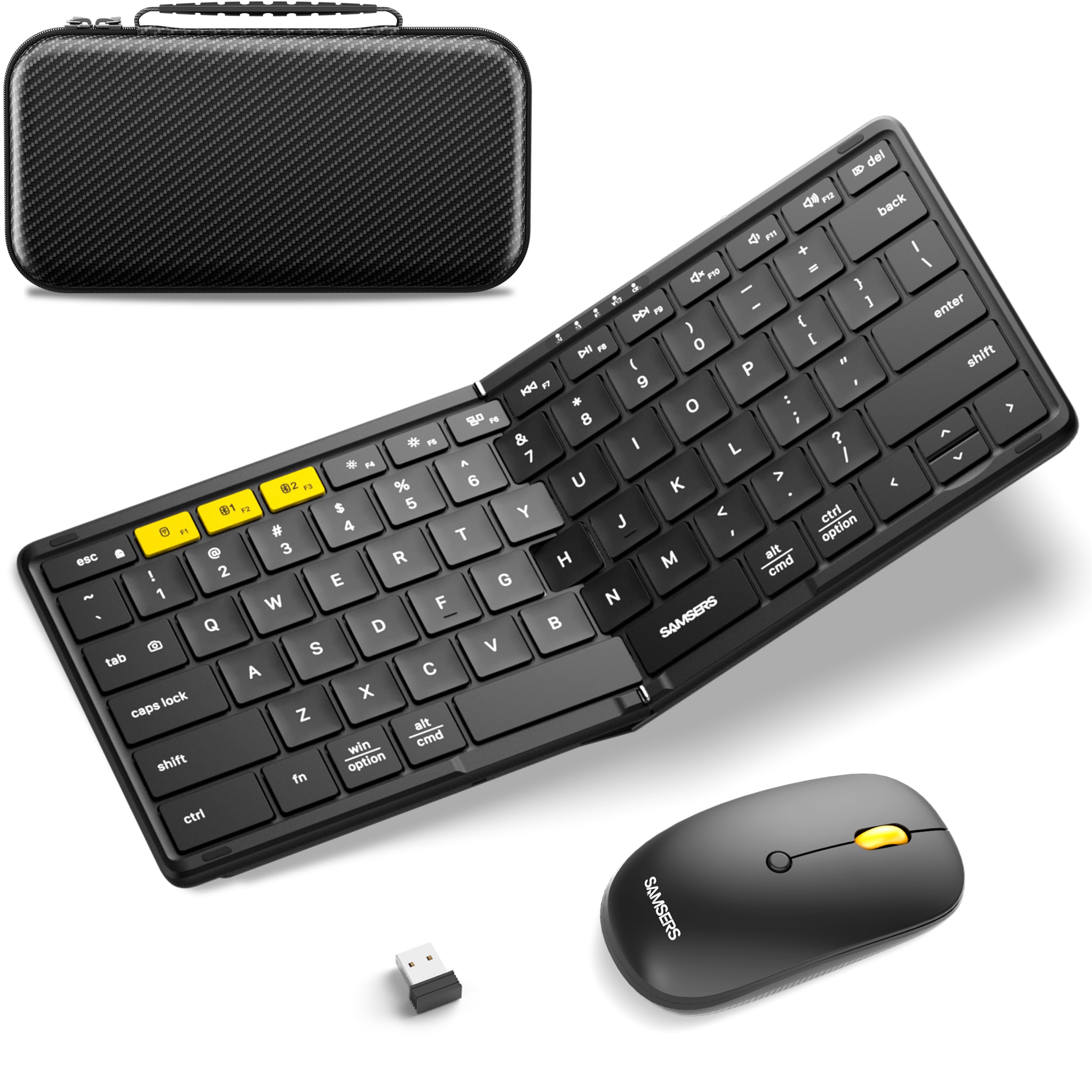
Full-size keys that fold in half, plus a wireless mouse, in one travel case.
Dock your Ally X, sit back at a desk, and use it like a proper computer — that’s what the Samsers bundle is built for. It ships with a folding 6-row keyboard with 0.65 inch laptop-style keycaps and a contoured wireless mouse, the only mouse in this lineup. Unfolded, the keyboard measures 11″ x 4.8″, giving you a real typing surface, and the metal smooth hinges keep every key the same size so there’s no layout adjustment period. The whole kit weighs 21 ounces.
Connectivity is generous: one 2.4G USB receiver plus two Bluetooth 5.0 channels, so three devices total. Range reaches 33 feet (a little over 10 meters), and customers note no lag on either the keyboard or the mouse. The back-mounted PU leather protects against dust and scratches, and the bundled hard case holds the keyboard, mouse, phone holder, and charging cable together. Type-C charging takes 2 hours and delivers up to 120+ days of standby time.
What wins owners over is how real the typing feels — one reported hitting 120wpm the first time they used it, which is a strong indicator the key spacing works. The mouse is smooth and precise, and the case is large enough to also carry an Android handheld. The genuine limitations: there are no skid pads on the back, so it can slide on smooth surfaces, and the tablet stand isn’t adjustable for thick cases. Neither is a dealbreaker, but both are worth knowing before you buy.
Fair warning: At 0.83 kg this bundle is the heaviest pick here — much heavier than the 180g Lenovo, so it’s a desk-in-the-bag solution rather than a pocket one.
Made for: buyers who want a matched keyboard-and-mouse kit in one protective case.
Look elsewhere if: you need the absolute lightest option or a stand that adjusts around a case.
6. ProtoArc XK01 Plus Foldable Keyboard

Folds in three, opens to a full 105 keys with a number pad — and it’s backlit.
You get a full-size 105-key layout with a numeric keypad and dedicated shortcut row, yet it folds down to 8.46 x 4.68 x 0.78 inches through a tri-fold hinge design — a rare combination if you need to punch in numbers or use function rows with your Ally X. Bluetooth 5.1 (a newer wireless standard with a steadier connection) links three devices at once — laptop, tablet, phone — across Windows, macOS, iPadOS, iOS, and Android, and you can switch between them instantly.
The backlight is the other defining feature — three adjustable white brightness levels so you can see your keys in a dark room, on a plane, or in a hotel. Quiet scissor-switch keys keep the noise down in shared spaces. USB-C charging is included, and auto-sleep standby stretches up to 150 days between charges. That’s a massive gap from the Kenkor mini’s 80 hours, though the two batteries and use cases are very different.
What buyers praise most is how quietly and solidly it types — the sound quality lands as a genuine plus, and the switching between three Bluetooth profiles is smooth. The sturdy metal chassis and firm hinges hold up to being folded multiple times a day. The trade-offs are real but small: reliability is a mixed bag for a few owners, and there’s no built-in typing angle, meaning it lies flat on the desk. Also worth noting: the Home, End, Page Up, and Page Down keys sit in unusual positions, so muscle memory takes a beat to adjust.
Why It Stands Out
- Full 105-key layout with number pad that folds tri-fold
- 3-level white backlight for night and dark-room typing
- Bluetooth 5.1 pairs to 3 devices with instant switching
- 150-day standby on USB-C charging
Where It Compromises
- No built-in typing angle — lies flat on the desk
- Unusual Home/End/PgUp/PgDn placement
- Reliability receives some mixed owner feedback
Worth choosing if: you need full-size keys with a numpad that still folds flat into a bag.
Not your pick if: you want an ergonomic typing angle or a compact desk footprint.
7. Redragon Typewriter Style Mechanical Keyboard

Typewriter round keycaps on a metal deck — the loudest, most tactile option here.
The Redragon K710 is the pick for anyone who wants their keyboard to feel like an event. It runs mechanical blue switches — medium resistance, audible click, strong tactile bump — under vintage steampunk round keycaps that mirror an old typewriter. The 104-key layout sits on a solid metal panel that keeps it planted and steady on the desk, and at 950g it’s a substantial piece of hardware. Tri-mode connection covers USB-C wired, Bluetooth 3.0/5.0, and 2.4GHz wireless; switch modes with FN+Q/W/E for Bluetooth or FN+R for 2.4G.
RGB lighting is a big part of the package: 16 preset modes are selectable on the keyboard or via software, with brightness and speed adjustable on board. Seven solid color options (Red, Green, Blue, Yellow, Purple, Cyan, White) let you set the mood, and each key can be customized individually. Battery life comes from a 4000mAh cell — reviewers point out the lights auto-off after inactivity and resume on the next keypress, stretching runtime to days with the backlight on.
The honest catch: the round keycaps sit spaced further apart than standard square keys, and that spacing causes a few typos until your fingers adjust. That’s the price of the aesthetic, and it’s small in practice. Also note the keys may not be removable, so you can’t swap them out. What people love about it is the sound — several describe it as genuinely typewriter-like — plus the tactile satisfaction of the blue switches and the extra replacement keycaps Redragon includes in the box.
Pattern to expect: Owners describe a strong, satisfying “old-time typewriter” sound, with the battery holding around half charge after long sessions with lights on.
The right fit for: buyers who want tactile click and retro looks over quiet or compact design.
Move on if: you type in quiet shared spaces or need short, close-packed keys.
Know the Specs
Bluetooth Version
Bluetooth 5.0 and 5.1 pair faster and hold a steadier connection than older versions. When you’re switching your keyboard between your Ally X, tablet, and phone, a newer Bluetooth version means less waiting and fewer dropped links. Bluetooth 3.0 in older hardware still works but is slower to pair.
Battery Capacity (mAh)
A 4000mAh cell (milliamp-hours, the measure of battery size) holds far more charge than a 180mAh one. In practice, the larger cell runs for days with lighting on, while the smaller one handles shorter sessions. Consider how you’ll use the keyboard — dock sessions versus quick on-the-go typing — before judging battery as good or bad.
Key Travel Distance
Key travel is how far a key presses down before it registers. A 1.3mm travel distance is short and snappy, which suits fast typing. Mechanical switches typically travel further for a deeper press. Choose 1.3mm travel for fast, light typing and mechanical switches for a deeper, more tactile press.
Layout and Button Count
A 60% layout strips out the number pad and function row. A 105-key version keeps everything including a numpad. On a handheld setup you probably don’t need a numpad, but if you also use the keyboard for spreadsheets or coding, a full-size layout avoids constant switching.
Common Questions
Will a Bluetooth keyboard work with the ROG Ally X from the start?
Do I need a 2.4GHz dongle or is Bluetooth fine for gaming?
How long does a keyboard battery actually last with RGB on?
Is a 60% keyboard better than a full-size one for a handheld setup?
Can I use a foldable keyboard on my lap?
Do these keyboards recharge over USB-C?
Will a compact keyboard fit alongside my Ally X in a carry case?
Are mechanical switches better than scissor switches for the Ally X?
Can I pair a keyboard to multiple devices at once and switch between them?
How do I download the driver software for a Redragon keyboard?
The Bottom Line
For most people pairing a real deck with their handheld, the keyboard for rog ally x winner is the Logitech G PRO X TKL Lightspeed because it holds the highest score on this list with LIGHTSPEED wireless that won’t drop during play. If you want a foldable that keeps the full 105 keys and a backlight for late-night sessions, grab the ProtoArc XK01 Plus. And for a keyboard-and-mouse bundle that packs into a single hard case, the Samsers Foldable Keyboard and Mouse is the one to reach for.
How we choose
We do not accept paid placement. Every pick is matched to a real buyer and a real use-case; we do not hands-on test units.
Sources
Specifications: manufacturer listings and product documentation. Review insights: verified customer reviews, as of October 2026. Pricing: not shown on this page (it changes often); check the current price via the retailer link.
As an Amazon Associate, Aappliancez earns from qualifying purchases. This does not affect which products we feature.