Disclosure: Some links in this post are affiliate links. As an Amazon Associate I earn from qualifying purchases, at no extra cost to you. Learn more
Specs are compiled from manufacturer listings and verified buyer reviews and can change over time — please confirm the key details on the product page before buying.
If you are tired of re-cutting keys every time a tenant, employee, or gym member walks off with one, a key card access system solves that problem at the source — you hand out a card or fob, and when it goes missing you delete it from the software instead of changing a lock. This guide covers nine systems across home front doors, small offices, and multi-door commercial buildings.
This guide is built by comparing the manufacturers’ published specifications and the patterns across verified customer reviews, so you get each pick’s real strengths and trade-offs instead of marketing spin.
You will see exactly which system fits a single front door versus a four-door building, what user capacity and lock force actually mean for your day-to-day, and how to avoid buying hardware that will not match your door frame. By the end, you will know which key card access system fits your building, whether that means one door or twenty.
Top Picks


How To Choose The Best Key Card Access Systems
The biggest mistake first-time buyers make is shopping on looks or brand name before counting the doors that need covering and checking whether the frame already has a lock cutout. Those two facts decide the panel size, the lock type, and whether a wireless home lock is even an option.
Start with door count, not features
Count the doors you need controlled. A single-door system keeps one entrance locked and logs every entry, which suits a home office, a small shop, or a gym with one main door. A four-door panel handles a whole floor or building at once, and it usually shares one power supply box and one piece of software across all four doors. Buying a four-door panel for one door wastes capacity and money, while buying a single-door kit for four entrances means you end up managing several separate systems.
Match the lock to your existing frame
Frame mismatch is where most returns happen. An electric strike lock replaces the piece inside your existing door frame, so it works with a knob or lever handle but only if the frame already has a cutout — otherwise you cut one yourself. A magnetic lock, often called a mag lock, mounts on the surface and holds the door shut with force measured in pounds or kilograms, and it does not need frame surgery. If your door has a push bar rather than a handle, strikes generally will not fit, so plan around a magnetic lock instead.
Decide how people get in and out
Entry is typically a card, fob, PIN code, or fingerprint. Exit is usually a push button, a motion sensor, or just turning the handle. A push-to-exit button is the most common and the simplest, but adding a motion sensor on the exit side is a common upgrade for fire-code compliance in commercial spaces. Think about whether your users will accept a PIN keypad, a card swipe, or want hands-free fingerprint entry, because the credential type drives which system you buy.
Check software, capacity, and support before you buy
The control board stores your user list and your entry history, so its capacity limits matter: most of the wired panels here handle 20,000 users and 100,000 records, far more than a typical small building needs. Software compatibility matters just as much — check that it runs on your version of Windows and that the vendor offers a phone app if remote open up is important to you. Finally, weigh vendor support heavily. Almost every commercial panel here gets installed by a first-timer, so how fast the vendor answers a wiring question often decides between a smooth setup and a nightmare.
Side-by-Side Comparison
| Model | Best For | Doors Controlled | User Capacity | Entry Method | Amazon |
|---|---|---|---|---|---|
| Veise VE017G-H★ Best Overall | Home front door | 1 | 20+ fingerprints | Fingerprint, code, card, app | Amazon |
| Philips 4200 SeriesNo-Hub Pick | Home with no hub | 1 | Multiple fingerprints | Fingerprint, PIN, app, key | Amazon |
| MENGQI 4-Door Core PanelBest Multi-Door | Multi-door buildings | 4 | 20,000 | Card swipe, exit button | Amazon |
| MENGQI Mag Lock Kit | Single-door gyms | 1 | 20,000 | Card, fob, app | Amazon |
| MENGQI Strike Lock Kit | Office frames | 1 | 20,000 | Card, fob, app | Amazon |
| Lockly Secure Plus | Airbnb & rentals | 1 | 99 fingerprints | Fingerprint, PIN, app, QR code | Amazon |
| MENGQI Code Panel Kit | Office with PIN entry | 1 | 20,000 | Card, fob, PIN | Amazon |
| MENGQI 2-Door Strike Kit | Two-door shops | 2 | 20,000 | Card, fob, app | Amazon |
| MENGQI 4-Door Mag Kit | Larger buildings | 4 | 20,000 | Card, fob, app | Amazon |
Detailed Reviews
1. Veise VE017G-H Wi-Fi Smart Door Lock Deadbolt
Our pick — 4.5+★ from 500+ verified ratings; the strongest balance of quality and price.
Eight ways in, one handle set, and a fingerprint reader for the person in the house who never remembers a code.
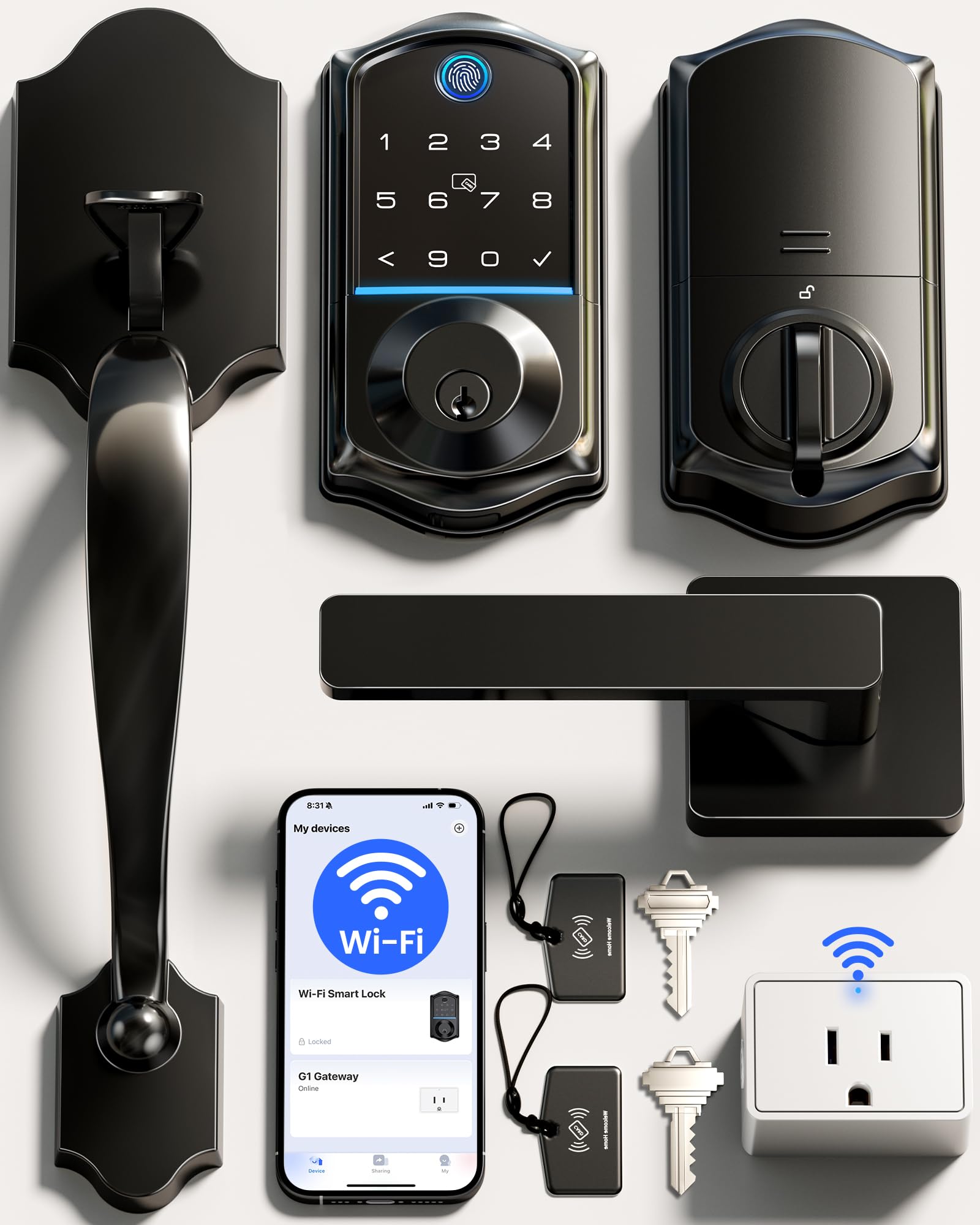
For a front door that has to serve a whole family, the Veise VE017G-H is the crowd favorite — 4.5+ stars across 500+ owners — and the reason is simple: it gives you eight separate ways to get inside. You can open it with a fingerprint, a code, one of the two included IC cards, the app, your voice through Alexa or Google, or the two physical backup keys. That flexibility matters most in a busy household, where a teenager, a grandparent, and a dog walker all need their own way in without sharing one code.
The fingerprint reader is the standout. Veise rates it at 0.2-second recognition, which makes the Philips 4200 Series at 0.3 seconds feel slower by comparison when you are standing on the porch with an armful of groceries. That speed comes from a self-learning AI chip, and the app stores 20+ fingerprints so everyone in the house gets their own. What wins people over, though, is installation — it fits most standard US left or right-handed doors from 1-3/8″ to 2″ thick, and owners consistently report getting it running with just a screwdriver, no locksmith.
The honest trade-offs are small and worth knowing up front. Batteries are not included, and the lock runs on 4 AA batteries for up to 300+ days — generous, but you supply them. Connectivity and auto-locking drew mixed reactions, and a few early units arrived with a chipped interior handle coating, though the seller is quick to replace. The 12.83 x 9.29 x 3.74-inch box is significantly larger than the Philips’s 6 x 2.2 x 1.5 inches, so measure your door edge if you have a tight frame. What the review pages sum up: “easy install (minor strike plate alignment fix), auto-lock (set 3 min), app control, fingerprint for elderly.”
The case for eight ways in
- Eight entry methods: fingerprint, app, code, card, voice, backup key, user authorization, and code sharing
- 0.2-second fingerprint recognition with a self-learning AI chip rated for 99.99% accuracy
- Runs up to 300+ days on 4 AA batteries with an emergency power-on port so you are never locked out
- ANSI Grade 3 and BHMA tested aluminum and zinc alloy body, IP55 weatherproof
Where it asks for patience
- Batteries not included, so budget for 4 AA cells before you install
- Connectivity and auto-locking split opinions rather than winning everyone over
- Strike plate often needs minor alignment before the deadbolt seats cleanly
Best for: a family front door where several people need their own credential and nobody wants to carry a key.
Think twice if: your door frame is unusually narrow — the handle set is a chunky one, so check the fit first.
2. Philips WiFi Keypad Deadbolt with Handle
No hub, no bridge, no extra box by the router — just your home Wi-Fi and a phone.
Most smart locks quietly expect you to buy a hub before remote features work. The Philips 4200 Series does not, which is the single spec that makes it worth a look if you want to lock and open up from work without adding another gadget to your shelf. It joins your 2.4GHz Wi-Fi network directly, and Philips asks you to keep it within 33 ft (10 m) of your router, so a front door on the far side of a big house may need a router in the front room.
Testing it against the Veise, the differences are real but modest: Philips open up in 0.3 seconds versus the Veise’s 0.2 seconds, and its body is dramatically smaller at 6 x 2.2 x 1.5 inches compared to the Veise’s 12.83 x 9.29 x 3.74 inches. That compact footprint is why owners say it “fits easily between main door and storm door, unlike most other locks,” which is a genuine problem-solver for older homes with double doors.
The 6-month battery life is the one spot to read carefully. Philips specifies standard 1.5V alkaline batteries only, and warns against rechargeable or lithium cells — a buyer who ignored that reported a low-battery signal in under two weeks on cheap cells before switching to the recommended type. Eight batteries is the reported count, and they are not included. Otherwise the picture is settled: PIN codes can be permanent, one-time, periodic, or recurring, the fingerprint reader stores multiple prints, and the app tracks access history in real time.
Where the money goes: you are paying for built-in Wi-Fi and a body small enough to slot into a storm-door gap, not for more entry methods.
The one habit to build: auto-lock is off by default, so turn it on in the app if you want the door to secure itself after 0–180 seconds.
Reach for this if: you want remote control without buying a hub and your door frame is tight.
Look elsewhere if: you want rechargeable batteries — this lock explicitly wants standard 1.5V alkaline cells only.
3. MENGQI-CONTROL 4 Doors Access Control System Power Supply Box
One board, four doors, and a metal cabinet that keeps the whole system’s power tidy.
When you are covering four entrances in a single building, you do not want four separate locks and four separate logins. This MENGQI core panel controls four doors from one board, supports four card readers, and stores 20,000 users and 100,000 entry records — enough that a small apartment block or a modest office building will never come close to the limit. Entry is by card swipe, exit is by button or a second swipe, and you can set any door to auto open or close at a pre-set time on any day.
What this system really sells is authorized access control: you decide who can enter which door at which hours, which is the feature that separates a real access system from a fancy lock. Reliability is what owners talk about most, and the power supply box does double duty as the cabinet for the control board, taking 110-240V input and putting out 5A while running the whole system. Wiegand 26 or Wiegand 34 reader input means it accepts compatible RFID, Mifare, and HID readers, so you are not locked into one brand of card.
This is the core only, and that is the honest catch. Locks, readers, and exit buttons are sold separately, so price your full build before committing — the panel is the brain, not the whole body. Software runs on Win7 through Win11 in both 32 and 64 bit, and it supports an Access and SQL Server database. Records survive a power failure, which owners of busy apartment buildings will appreciate during an outage.
Why installers like it: reliable hardware, responsive support, and the ability to run a whole building from one board instead of four separate kits.
Plan before you buy: this is components, not a complete kit — you add locks, readers, and buttons to finish the job.
Built for: property managers and DIY installers covering several doors who want one board and one list of users.
Not the pick if: you want a single box that includes everything — this needs matching locks and readers added separately.
4. MENGQI-CONTROL Door Access Control System 600lbs Magnetic Lock
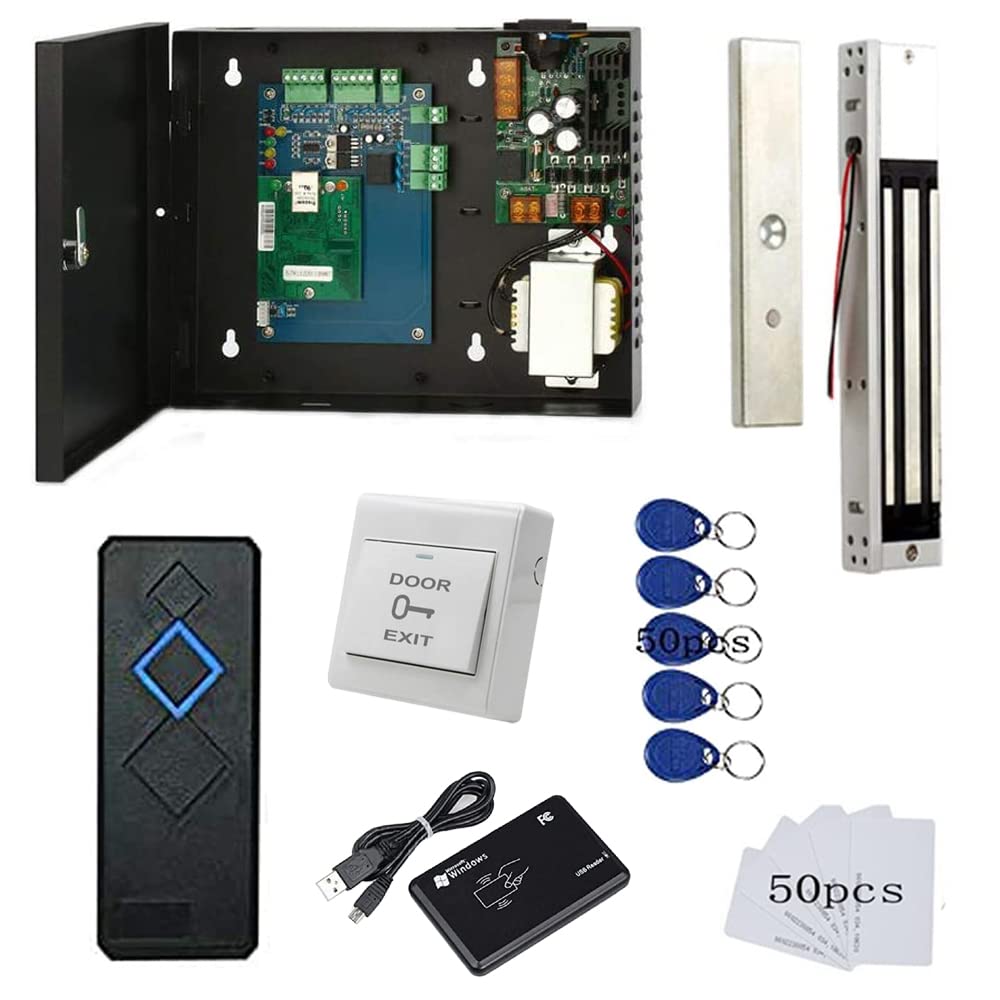
A complete single-door kit where the magnetic lock holds 600lbs and the gym members hold the fobs.
If you run a small club, gym, or studio where the front door just needs to lock and open up on a schedule, this kit removes the guesswork. It bundles the control panel, a 600lbs holding force electromagnetic lock, an RFID reader, an exit button, and the mounting hardware in one box. The 600lbs figure is the pull strength the magnet resists before the door gives, so a would-be intruder is fighting the hardware rather than the handle. The waterproof reader reads cards from 5-10cm away, close enough that you tap rather than aim.
Owners at smaller facilities favor it for member access. You grant a fob, you delete a fob, and the door logs everyone — which is exactly what a gym needs. The system holds up to 20,000 users and 100,000 logs, schedules auto open and close at pre-set times on any day, and includes a phone app for iOS and Android so a manager can remote-open for someone who forgot their card. The desktop USB reader pulls the card number straight into the software to register a new user, which saves the guesswork of typing codes by hand.
Set your expectations on scale here. At 11.81 x 9.85 x 7.87 inches, this is a wall-mount cabinet, not a door trim piece, so you need a plan for where it lives and where the wiring runs. The entry is by card or fob only — there is no keypad and no fingerprint option — so if you want PIN or biometric entry, look at the MENGQI code panel instead.
The smart budget move: everything needed for one door in a single purchase, with a magnetic lock rated at 600lbs holding force.
Size the project first: at 11.81 x 9.85 x 7.87 inches the power cabinet needs wall space and a wiring plan before installation day.
Perfect for: a single-door gym, studio, or club where staff hand out fobs and delete them when a member leaves.
Step up to the PIN version if: you need code or fingerprint entry rather than cards and fobs.
5. MENGQI-CONTROL Electric Strike Lock Single Door Access Control

A strike lock that hides inside the door frame and reads a card in under a fifth of a second.
An electric strike lock replaces the hardware already sitting inside your door frame, so the door looks completely unchanged from the hallway — no surface-mounted magnet, no visible box. That concealment is the whole point for offices and retail counters where a magnetic lock would be an eyesore. The strike holds with 1000kg of force, and it stays locked during a power failure by default, which is the failure-secure mode most buildings want so the door does not silently swing open during an outage.
The reader is quick. Entry responds in less than 0.2 seconds with a 5-10cm proximity range using EM-ID cards, so staff move through the door without a waiting beat between waving the card and hearing the latch release. Cards work for entry and a push button or turning the handle lets you out, and you get 20,000 users and up to 100,000 records on the board. Programming is done once through the software, and after that the system runs fully stand-alone — no computer needs to stay connected, which makes it a clean fit for a reception desk with no PC nearby.
Here is the catch, and it is a real one: this strike is not for push-bar doors. It wants a knob or mechanical lock with a handle, and the strike itself is 4.84 inches long, so measure the cutout area before you order. If your frame has no existing hole, you will cut one. Installation involves running wire and, for some setups, adding an outlet near the door.
The fit: an office or shop with a standard handle door who wants card entry and a lock nobody can see.
Wrong door if: you have a push bar, or a frame with no cutout and no appetite for cutting one.
6. Lockly Secure Plus Smart Door Lock Bluetooth with Handle

A keypad whose numbers scramble after every use, so nobody peeking over your shoulder learns your code.
If you rent a room or run a short-stay property, the code-sharing headache settles fast with a Lockly Secure Plus. The fingerprint sensor reads in 0.3 seconds and open up in 0.5 seconds, and the included Wi-Fi hub plus the free Lockly app lets you lock and open up from anywhere and see door status in real time.
The signature feature is the patented PIN Genie keypad: instead of fixed digits, it shows four virtual buttons and shuffles the numbers after each use, so a code captured by a bystander or a smudge on the glass is useless. Combine that with an Offline Access Code you can issue remotely and a guest gets in without ever downloading an app, and you have a genuine short-term-rental tool rather than a home lock wearing a rental costume. The kit ships with the Wi-Fi hub, a door sensor, 4 AA batteries, and two backup keys, and the lock carries an IPX4 rating against splashes.
Be honest about the split here. Quality and installation draw almost entirely positive feedback, but a slice of buyers report the lock dying unexpectedly or connectivity dropping, and the security features divide opinion on whether they feel fully securing. The 7.8 x 2.9 x 7.2-inch body weighs 6.6 pounds, so it is a substantial handle set. If your priority is a rock-steady commercial panel, a wired system will be steadier; if you need fingerprints, guest codes, and remote control on one door, this is a smart rental lock.
Why hosts gravitate to it
- PIN Genie keypad scrambles its four virtual buttons after every use, so codes cannot be learned by watching
- Stores up to 99 fingerprints and reads them in 0.3 seconds, open up in 0.5 seconds
- Offline Access Codes let guests in without installing the app
- Includes the Wi-Fi hub, door sensor, 4 AA batteries, and two physical backup keys
The honest side of the story
- Durability and connectivity draw mixed reports — some units give owners trouble
- At 6.6 pounds and 7.8 x 2.9 x 7.2 inches it is a heavy, sizable handle set
- Remote and voice features need the included Wi-Fi hub configured first
Choose this if: you hand out access to guests or renters and want remote control without chasing the same person for a code.
Weigh the risk if: you need a lock with a near-perfect reliability record — reports here are not unanimous.
7. MENGQI-CONTROL One Door Access Control Magnetic Lock Keypad Reader

A single door that takes a card, a fob, or a typed code — and remembers who came in when.
Offices where some people carry cards and others prefer a PIN find a middle ground with this MENGQI single-door system. It pairs a keypad reader with a magnetic lock, a metal exit button, and a 110V power supply in one kit, so a reception door can accept a swipe, a fob, or a typed code depending on how you set each user up. The keypad reader is the piece that separates this from the card-only kits, and it lives on the entry side with the exit button mounted on the inside with its own base for easy install.
Installing it is within reach of a handy, patient owner — the wiring is described clearly and the entry records are straightforward to pull. There is a true trade-off to accept, though: building one of these means connecting the board, the reader, the lock, and the power supply with real wiring, and the comments make clear some soldering is involved. That is not for everyone, but it is common to the wired panel category.
What you get on the software side is the same solid foundation as the rest of this line: iOS and Android app for remote open up, desktop USB reader for registering card numbers into the software, and Windows 7 through 11 support in 32 and 64 bit. Capacity runs to 20,000 users and 100,000 logs, schedules can auto open and close at set times, and the system supports authorized access control so different people get different doors and hours.
The deciding feature: a keypad reader that also takes cards and fobs, so one door can serve mixed credential preferences.
Read the manual: some soldering is required, and the support team is quick to walk a first-timer through it.
The right pick when: you want PIN codes and cards on the same office door and are comfortable running wire.
Keep looking if: you want a screwdriver-only install — this one expects basic soldering.
8. MENGQI-CONTROL 2 Door Access Control Board System Electric Strike Lock

Two doors, two concealed strike locks, and one board that runs them both with no monthly fee.
Two-door shops and small offices hit a wall with single-door kits and overspend on four-door panels. This MENGQI kit sits in that gap: one control board drives two ANSI electric strike locks, each holding with 1000kg of force and staying locked through a power failure by default. Cards and key fobs let people in, and a push button or turning the handle lets them out, with 20,000 users and up to 100,000 records to log the traffic.
The strike design is the same install-in-the-frame approach as the single-door version, so both doors look untouched from the outside and you get the same concealed look across a pair of entrances. Status is tracked through the software, which runs on Windows 7 through 11 in both 32 and 64 bit and can auto open and close each door at pre-set times — handy for a shop that wants the customer door open at nine and locked at six.
The same frame rules apply here as on any strike-based kit: not for push-bar doors, and it needs a cutout in the frame, which the strike measures 4.84 inches to fit. The system was built for existing bell and door setups, so it slots into a building that already has door hardware without ripping it out. Setup expects some wiring patience, and the support team stays reachable through email and remote sessions if a wire ends up crossed.
Best for: a shop or small office with two handle-style doors that wants card entry on both from one system.
Not the one for: push-bar fire exits — the strike lock needs a knob or lever handle door.
9. MENGQI-CONTROL 4 Door Access Control System 600lbs Magnetic Lock

Four doors, four mag locks at 600lbs apiece, and enough capacity for a whole building.
This is the kit for a building with several entrances that all need card control. Four doors are driven from one board, each protected by a 600lbs holding force magnetic lock, with an RFID reader and exit button per door. The system stores up to 20,000 users and 100,000 logs, supports scheduling that auto opens and closes doors at chosen times, and lets you set who can enter which door and when — the same authorized access control you get on the smaller kits, scaled up.
Owners put this to work in laundromats, labs, churches, and multi-entrance commercial spaces, where a single four-door build replaces what would otherwise be four separate locks. The reader is waterproof with a 5-10cm range, and the manual input comes from a USB reader that puts card numbers straight into the software. Network runs over TCP/IP, and the software covers Windows 7 through 11 in 32 and 64 bit with an Access or SQL Server database.
The size is the thing to plan around: 13.6 x 10.6 x 10.6 inches of cabinet that has to live on a wall with power run to it. And because it uses magnetic locks rather than strikes, the doors get a surface-mounted lock instead of a frame cutout — heavier-looking, but nothing has to be carved into the door frame. The phone app runs on iOS and Android, and owners note that pairing it with motion sensors on exits and a battery backup keeps things running through a power cut.
Where it earns its space: four doors on one board with flush magnetic locks and a waterproof reader, at a fraction of what multi-door commercial bids usually run.
One upgrade worth planning: a battery backup keeps the doors working during an outage, and owners treat it as a near-essential add-on.
Made for: laundromats, labs, or any multi-entrance building that needs card and fob control across four doors from one system.
Budget the wall and the power: the 13.6 x 10.6 x 10.6-inch cabinet needs real estate and an outlet before the locks ever go up.
Know the Specs
User Capacity and Record Storage
These two numbers tell you how many people the system can enroll and how much entry history it keeps before old records are pushed out. A home lock might store 20+ fingerprints, while the wired commercial panels here hold up to 20,000 users and 100,000 records. A small office rarely needs 20,000 slots, but the headroom means you never have to delete a tenant to add a new one. Record storage matters for anyone who needs to check who came in and when after an incident.
Lock Force: Pounds and Kilograms
Mag locks and strike locks advertise holding force in pounds or kilograms, which is how hard the lock resists being forced open. A 600lbs magnetic lock and a 1000kg strike both sit far above what a person can push through by hand. This number has nothing to do with how the lock reads a card — it is purely about physical resistance once the door is shut. Bigger numbers suit exterior or high-security doors; a light interior office door is safe with less.
Entry Credentials: Cards, Fobs, PINs, and Fingerprints
The credential is what a user presents to get in, and your choice drives the whole system design. Card readers and fobs use radio frequency, so a tap or wave gets you through; card types like EM-ID, Mifare, and HID are not interchangeable, and reader protocols like Wiegand 26 or Wiegand 34 decide which cards a panel accepts. PIN keypads suit users who will not carry a card, and fingerprint readers remove credentials entirely — though they only work on locks that include that sensor.
Fail-Safe, Fail-Secure, and Power
During a power failure, a lock has to pick a default. Fail-secure means it stays locked, which is the usual choice for exterior and storage doors. Fail-safe means it open up, which some fire codes prefer for controlled exit routes. Most of the wired kits here default to failure-secure but let a technician switch modes. Power supply boxes take a wide input, often 110-240V, and put out the current the locks and readers need, so check the output rating matches your locks.
Common Questions
Will a key card access system work if the power goes out?
Can I install a wired access control panel myself without a locksmith?
What is the difference between an electric strike lock and a magnetic lock?
Do I need to buy a hub for a Wi-Fi smart lock to work with my phone?
What is Wiegand and do I need to worry about it?
How many people can one access control system handle?
Will a strike lock fit my door frame?
Can I run a key card system in a building with no computer nearby?
How hard is it to add or delete users?
Do these systems work with the door hardware I already have?
The Bottom Line
For most homes, the key card access systems winner is the Veise VE017G-H, because it packs eight entry methods and a fingerprint reader into one handle set that runs all year on four AA batteries, and its app-plus-fob approach handles a family as easily as a card does. If you want the same idea with no hub to install, grab the Philips 4200 Series, whose built-in Wi-Fi and compact handle fit snug against a storm door. And for a building with several entrances, the MENGQI-CONTROL 4-Door Core Panel gives you one board, four doors, and 20,000 user slots to grow into. Whichever way you go, the right pick depends on door count first, then credential type, then if you need a single-door smart lock or a wired panel running a whole building.
How we choose
We do not accept paid placement. Every pick is matched to a real buyer and a real use-case; we do not hands-on test units.
Sources
Specifications: manufacturer listings and product documentation. Review insights: verified customer reviews, as of October 2026. Pricing: not shown on this page (it changes often); check the current price via the retailer link.
As an Amazon Associate, Aappliancez earns from qualifying purchases. This does not affect which products we feature.