Disclosure: Some links in this post are affiliate links. As an Amazon Associate I earn from qualifying purchases, at no extra cost to you. Learn more
Specs are compiled from manufacturer listings and verified buyer reviews and can change over time — please confirm the key details on the product page before buying.
If your Joy-Con has started walking your character into a wall, you can fix it by swapping the joystick instead of buying a new controller. The picks below all replace the worn stick inside your existing controller. They differ in three ways: whether the stick uses TMR or Hall effect sensing (both are magnetic designs that resist the wear that causes drift), which Switch generation it fits, and what tools come in the box.
This guide is built by comparing the manufacturers’ published specifications and the patterns across verified customer reviews, so you get each pick’s real strengths and trade-offs instead of marketing spin.
Stick drift is a wear problem, not a settings problem, and the repair kits worth your time are the ones that fit your exact console generation and include the tools to open it. Our roundup of the joycon replacements explains which kits fit the original Switch and which fit the newer Switch 2.
Top Picks
How To Choose The Best Joycon Replacements
Every kit on this list replaces the analog stick module inside your Joy-Con, and none of them require soldering. The stick connects to the main board through a ribbon cable (a flat, flexible strip of wiring that carries the signal), so in most cases you unclip the old one and clip in the new one. That is why the whole job is a screwdriver task rather than a soldering task.
Match the kit to your console generation first
This is the one mistake that ruins an order. Original Switch, Switch OLED, and Switch Lite Joy-Con use one stick design, and the newer Switch 2 Joy-Con 2 uses a different one. A kit built for Joy-Con 2 will not fit an original Switch, and the original-style kits will not fit Joy-Con 2. Check the compatibility line on the listing against the console sitting in your dock before anything else.
Understand what sensing technology you are buying
Carbon film sticks, the type that shipped in most original Joy-Con, rely on physical contact between a wiper and a resistive track. That contact wears down over time, and the worn track is what sends a false signal to your console, which you feel as drift. TMR (Tunneling Magnetoresistive) and standard Hall effect sticks both read a magnet moving over a sensor instead. Because nothing rubs together, there is no contact surface to wear out.
Count the tools before you commit
Opening a Joy-Con takes a tri-point Y screwdriver for the outer shell and a small Phillips for the internals. Some kits include both, some include spare screws, and some include only a pry tool. If a kit you are considering does not list screwdrivers, budget for buying them separately, because the shell screws will not come out with a normal household driver.
Side-by-Side Comparison
| Model | Best For | Console Fit | Stick Technology | Quantity | Amazon |
|---|---|---|---|---|---|
| TMR Hall Effect Joystick Replacement (4-Pack)★ Best Overall | Fixing several older Joy-Con at once | Switch, Switch OLED, Switch Lite | TMR Hall Effect | 4 sticks | Amazon |
| LONANDY Joycon 2 Repair Kit (2 Pack)Best for First-Timers | First-time repair with every tool included | Nintendo Switch 2 | Analog 3D thumbstick | 2 sticks | Amazon |
| eXtremeRate 3D Joystick for JoyCon 2 | Color-matching a custom shell swap | Nintendo Switch 2 | Analog 3D thumbstick | 2 sticks | Amazon |
| JAOYSTII Joycon Joystick Replacement (Blue/Red 4-Pack) | Replacing both Joy-Con on a Switch 2 | Nintendo Switch 2 | Analog 3D thumbstick | 4 sticks | Amazon |
| eXtremeRate DIY Replacement Shell for Joycon 2 | Rebuilding worn Joy-Con from the outside in | Nintendo Switch 2 | Housing only | 1 kit | Amazon |
Detailed Reviews
1. TMR Hall Effect Joystick Replacement for Switch JoyCon (4-Pack)
Our pick — 4.5+★ from 550+ verified ratings; the strongest balance of quality and price.
Four magnetic sticks, every screwdriver you need, and the strongest fix for a drawer full of drifting Joy-Con.
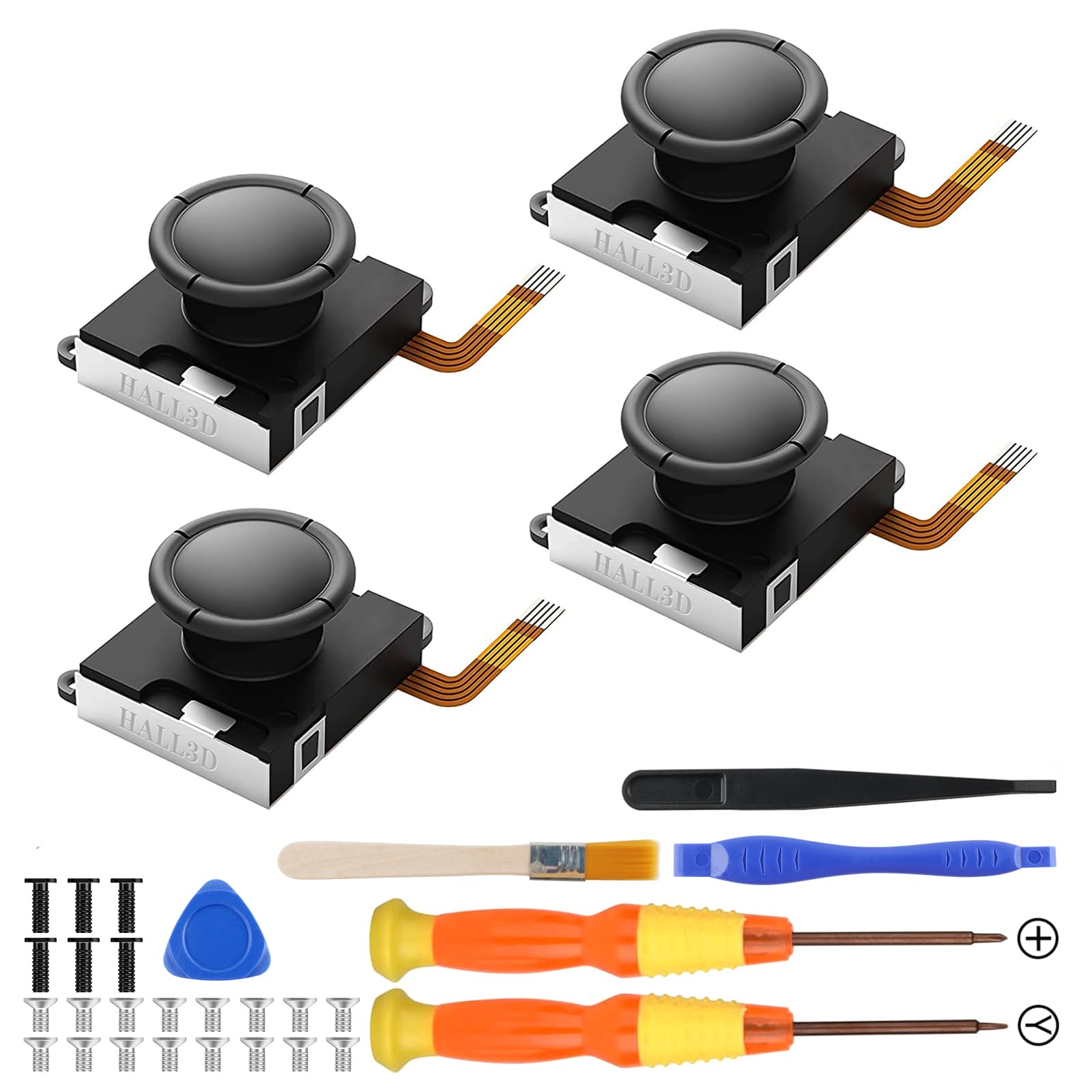
Buy this one if you own original Switch Joy-Con that have gone sloppy, and you would rather fix four of them than buy one new pair. The four sticks inside cover Left or Right positions on the original Switch, the Switch OLED, and the Switch Lite, so one box handles a household with mixed consoles. The BRONAL kit reads your stick position with TMR sensors, short for Tunneling Magnetoresistive, which is a magnetic sensing method that is more sensitive than a standard Hall effect stick. BRONAL also claims the TMR design draws 50% less power than an original carbon film stick. This is the kit to buy if you want the stick itself to be the upgraded part, not just a like-for-like swap.
The installation is genuinely undo-able at a kitchen table. No soldering is needed, and the box ships with a cleaning brush, a pry tool, a tweezer, two magnetic screwdrivers, and the four sticks. Expect to spend about half an hour per controller, though a first-timer should budget closer to an hour until the ribbon cables feel familiar. The detail that trips people up is calibration, not assembly. Fresh TMR sticks often read as over-sensitive straight from the start, which looks exactly like drift until you run the console’s calibration routine. Calibrate, and the false signal disappears.
The honest catch is that magnetic sticks are not a permanent guarantee. As buyers report, the replacement “works longer than the originals but one still drifted after a while,” so a single stick can still go out of true over time. Treated as a fix that buys years rather than forever, it holds up. The other thing to plan for is the ribbon cables, which are thin and unforgiving, so work slowly and do not force the connectors. Set against the alternative of buying a second pair of Joy-Con, four sticks and a full tool roll in one box is the better value for anyone with more than one controller to save. For a console-generation check, this is the pick for original Switch hardware; the LONANDY kit below is the one built for Switch 2.
What Sells This Kit
- Four sticks in one box, so you can save several Joy-Con instead of one
- TMR sensing in place of the carbon film that caused the drift in the first place
- No soldering, and two magnetic screwdrivers plus a pry tool are included
- Works across Switch, Switch OLED, and Switch Lite
What To Plan Around
- Calibration after install is mandatory or the new stick reads as drift
- Ribbon cables are fragile, so a full rebuild takes patience
- Magnetic sensing reduces drift, but it is not a lifetime guarantee
Buy it if: you have original Switch, OLED, or Lite Joy-Con with worn sticks and want the sensing technology upgraded, not just replaced.
Know this first: you will need to run the calibration routine right after installation, or the fresh stick will feel wrong.
2. LONANDY Joycon Joystick Replacement Joycon 2 Repair Kit for Switch 2 (2 Pack)
The Switch 2 kit that hands a nervous first-timer every tool, every spare screw, and a soft paw to cover the mess.
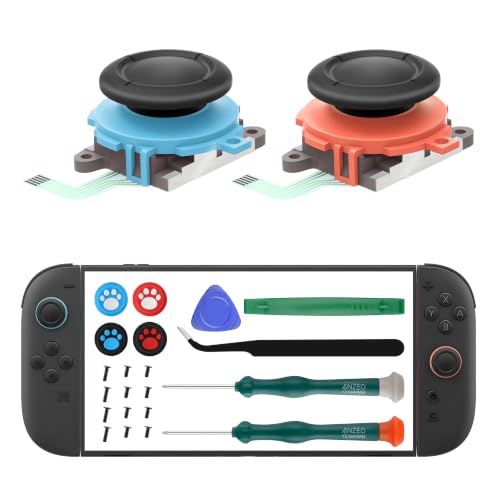
If you have a Switch 2 and have never opened a controller before, start here. The LONANDY set is built specifically for Joy-Con 2 (L) and (R), so it will not fit an original Switch — check that first. What you get in the box is the reason it wins this slot: two replacement sticks, two screwdrivers, four silicone thumb grips shaped like cat paws, a pry bar, a triangle paddle, twelve spare screws, and a tweezer. That is enough to open the shell, swap the stick, rebuild the controller, and cover the stick caps without stopping to order anything else. Kept in your drawer, this is the standalone repair station for a Switch 2 household.
Owners consistently praise the finished fit, and the standout tips are real. Watch the ZL/ZR ribbon cable, because it has to be flipped from its natural orientation when you reinstall it, and get that wrong and the shoulder buttons will not read. Before you screw the shell shut, run the console’s Test Controller Buttons feature to confirm every input works. Also budget for a better pry tool, since the green pry bar that ships in the box is flimsy. Watch a tutorial video first, and the whole job is a couple of hours of careful work. LONANDY’s own instructions tell you to calibrate the joysticks afterward under System Settings, and that step is worth following exactly.
The main thing to weigh is the quality of the tri-point driver (a screwdriver for the three-pronged screws). As owners mention, “the tri-head screwdriver, however, is the wrong size, too big for the screws,” so some units can stall on the very first step, and you cannot test the Phillips driver until the tri-point screws are out. A few kits also arrive missing a piece of the advertised accessory set. Those are the minority of experiences, and buying a separate tri-point driver solves the problem outright. For a Switch 2 owner who wants one box to cover their first repair, the completeness is still the winning argument.
The completeness pitch: two sticks, two screwdrivers, a pry bar, a triangle paddle, a tweezer, twelve spare screws, and four silicone paw grips — nothing else to order before you start.
The part nobody warns you about: the tri-point driver can arrive a size too big for the shell screws, so have a spare on hand before you begin.
Reach for this if you own a Switch 2 and want the least shopping and the most parts in a single box.
Look elsewhere if you are repairing an original Switch, OLED, or Lite — the sticks here are shaped for Joy-Con 2 only.
3. eXtremeRate Replacement 3D Joystick for Nintendo Switch 2 JoyCon
Black sticks that disappear into a custom shell, rated to survive more presses than you will ever deliver.
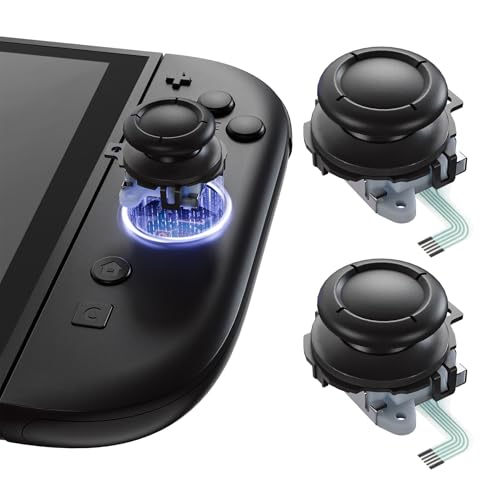
Here is the pick for anyone who has already swapped their Joy-Con shell and now needs sticks that match instead of standing out. eXtremeRate builds these for Switch 2 Joy-Con only, and the black finish is the point — several colors are offered so you can match whatever housing you have installed. eXtremeRate rates the sticks for more than 2 million cycles, with about 60gf to move and 180gf to click. Each stick weighs 10 g, and the pair arrives with two screwdrivers and a prying stick. This is the smallest of the Switch 2 kits on this list, and the dimensions show it.
Size is where this one separates from the LONANDY kit. The eXtremeRate sticks measure 0.39 x 0.79 x 1.18 inches, against 0.91 x 0.47 x 0.98 inches for the LONANDY set — a 2.3x gap in footprint, so the eXtremeRate pair takes up far less room in a drawer or a repair tray. The smaller footprint gives you a tidier stick, not a compromise in the swap itself. If you want a clean, matched set for a custom build rather than a box stuffed with spare screws, this is the one.
The straightforward caveat is that these are analog sticks, not magnetic ones. One buyer put the trade-off plainly: “It would be nice if these were TMR or Hall-effect, but they work well for standard replacement.” eXtremeRate also asks for moderate disassembly experience, and the install is easier during a full shell swap than as a stick-only job, where the ribbon work gets cramped. Owners who have run these sticks for six or seven months still describe them feeling like the originals. Read the listing one more time before you buy, because these fit Joy-Con 2 only and will not drop into a Switch, Switch Lite, or Switch OLED.
Why custom builders pick it: a black finish across a color range that matches a swapped shell, plus the small 0.39 x 0.79 x 1.18 inch body and 10 g weight of each stick.
Where it stops short: standard analog sensing, so if you specifically want the magnetic anti-drift design, the TMR pick is the better match.
Best fit: the shell-swap crowd who want the stick to match the housing rather than announce itself.
Think twice if: you are chasing magnetic sensing or you have an original Switch, since these are Joy-Con 2 parts only.
4. JAOYSTII for Joycon Joystick Replacement 4 Pack for Switch 2
Four blue and red sticks for a Switch 2 household that wants two full Joy-Con pairs fixed in one sitting.
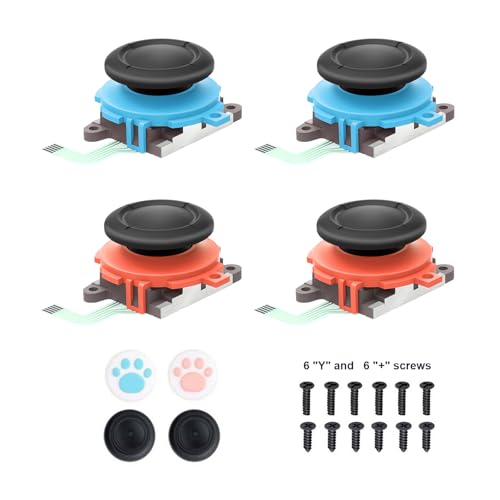
Two sticks fix one pair of Joy-Con. This kit ships four, in blue and red, so it covers both halves of two controllers or gives you two spares after the first repair. JAOYSTII builds these for Switch 2 Joy-Con 2 and designs each replacement for a left or right position, with a wear-resistant finish and a claim that every stick is tested before it ships. Alongside the four sticks you get four thumb stick caps, six “Y” screws, and six “+” screws. The extra screws matter more than they sound, because the tiny shell screws strip easily and the replacement pair saves a hunt. Four sticks and a stocked screw bag is the strongest argument for this one.
What the replacements feel like once installed is the selling point. Owners describe the tension as close to OEM and the response as accurate, with parts that match the photos and drop in snug against the originals. The blue and red caps also soften the look of the bare stick, and the paw-shaped grips that come in the box are a small touch that lands well with kids’ controllers. The job still wants patience — the ribbon connectors are sturdy but fiddly, and plenty of people lean on a YouTube walkthrough the first time through.
Where a kit like this can trip you up: the sticks arrive uncut to the blue and red colorway, so if you swapped your shells to something else, the caps will clash. For a House with two Switch 2 controllers to resurrect, though, four sticks and a screw surplus in one order makes the math easy.
The value read: four sticks, four caps, and a dozen spare screws turn one order into two full controller repairs.
The trade-off to accept: these are analog sticks and they only fit Switch 2 Joy-Con 2, so they are not a match for an original Switch or a custom shell in a different color.
Choose this if you are fixing two Switch 2 controllers and want spares left over.
skip it if you only need to repair one controller, or your sticks are on an original Switch.
5. eXtremeRate DIY Replacement Shell Buttons for Joycon 2
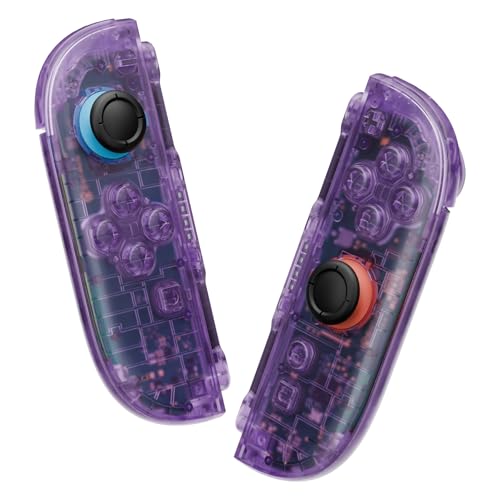
Not a stick — a whole new body, for anyone whose Joy-Con is scratched, cracked, or plain boring to look at.
This entry is different from the four above, and it is worth being clear about why. This is a replacement housing, not a joystick. If your Joy-Con’s problem is drift, the sticks above are what you need; if the problem is a scuffed or split shell and you want to change the look at the same time, this is the kit. eXtremeRate cuts the housing from polycarbonate (a hard, impact-resistant plastic) in Clear Atomic Purple, and the set includes the full replacement shells and buttons, screwdrivers, a prying tool, and spare screws and springs. eXtremeRate also states the housing is cut to stay compatible with Joy-Con 2 magnetic release and lock and Dock mode after the swap. This is the cosmetic rebuild for someone doing a themed controller.
What buyers keep coming back to is how much better the shell feels in hand than the stock plastic, and the same 10 g figure shows the material is not adding bulk. The Clear Atomic Purple finish is a quiet change rather than a loud one, and it pairs with matched eXtremeRate button sets if you want to push the look further. Where this kit earns its keep is on a controller that is already apart for a stick swap: if the shell is coming off anyway, swapping it becomes a small extra step rather than a separate project. Do both jobs together and the disassembly cost is paid once.
The install is the real cost, and eXtremeRate is upfront that it wants moderate disassembly experience. A first-time shell swap can run about 45 minutes per Joy-Con, and one rebuilding note from owners is worth heeding: the rumble cables are fragile and will snap under too much force, so ease them rather than pull them. The included magnets are on the weak side compared to the stock ones, so many people simply keep the originals. If you want a complete visual overhaul of a Switch 2 controller and are willing to take the time, this is the kit that gets you there.
Why It Earns A Slot
- Full polycarbonate housing and button set in Clear Atomic Purple
- Cut to stay compatible with Joy-Con 2 magnetic release and Dock mode
- Screwdrivers, prying tool, and spare screws and springs included
- Cheaper to do during a stick swap than as a separate teardown
Where The Work Is
- It is a shell, not a joystick, so it will not fix drift
- Around 45 minutes per Joy-Con for a first-timer
- Rumble cables are fragile and will break under force
- Included magnets are weaker than the originals
The one for: a Switch 2 owner retheming their controller with a see-through housing and matching buttons.
Do not buy it for: a drifting stick, because this kit has no joystick parts inside it at all.
Know the Specs
TMR vs Hall Effect vs Carbon Film
Carbon film sticks, the ones in most original Joy-Con, work by sliding a wiper across a resistive track. The sliding wears the track down, and the worn spot is what your console reads as a phantom signal, which you feel as drift. Hall effect sticks replace the wiper with a magnet and a magnetic sensor, so nothing rubs and there is no track to wear. TMR (Tunneling Magnetoresistive) is a magnetic sensing method that the maker describes as more sensitive and precise than standard Hall effect. In practice, both magnetic designs outlast a carbon film stick, and TMR is the finer of the two.
Which Switch Generation You Own
Compatibility is the first spec to check, and the two families are not interchangeable. Original Switch, Switch OLED, and Switch Lite Joy-Con take one stick shape. The newer Switch 2 Joy-Con 2 takes a different one, and eXtremeRate rates its Joy-Con 2 sticks at 2 million cycles. A kit built for one generation will not fit the other, so match the kit to the console you are repairing before you order anything else.
Common Questions
Will a Joy-Con 2 replacement stick fit my original Switch Joy-Con?
Do I need to solder anything to replace a Joy-Con joystick?
Why does my new stick feel like it is drifting right after I install it?
Will a TMR or Hall effect stick permanently fix my drift?
What tools do I actually need to open a Joy-Con?
Should I replace the shell at the same time as the joystick?
Why does a four-stick kit make sense over a two-stick kit?
Are magnetic sticks worth it over a standard analog replacement?
Can I replace the joystick on a Joy-Con that is still under warranty?
How long should a repaired Joy-Con stick last?
The Bottom Line
For most people, the joycon replacements winner is the TMR Hall Effect Joystick Replacement (4-Pack), because it upgrades the stick’s sensing to a magnetic design and packs four replacements plus the full tool set into one box. If you have a Switch 2 and want every part and tool in a single order, grab the LONANDY Joycon 2 Repair Kit. And if your Joy-Con’s real problem is a scuffed or cracked body rather than a worn stick, the eXtremeRate DIY Replacement Shell is the one to reach for. Whatever you pick, calibrate the new stick the moment it is installed — that one step decides whether the fix feels right.
How we choose
We do not accept paid placement. Every pick is matched to a real buyer and a real use-case; we do not hands-on test units.
Sources
Specifications: manufacturer listings and product documentation. Review insights: verified customer reviews, as of October 2026. Pricing: not shown on this page (it changes often); check the current price via the retailer link.
As an Amazon Associate, Aappliancez earns from qualifying purchases. This does not affect which products we feature.