Disclosure: Some links in this post are affiliate links. As an Amazon Associate I earn from qualifying purchases, at no extra cost to you. Learn more
Specs are compiled from manufacturer listings and verified buyer reviews and can change over time — please confirm the key details on the product page before buying.
If you have ever held a tablet up in bed for twenty minutes and felt your wrist start to complain, the fix is a case with a real hand strap — not a thin folio that slides out of your fingers. A good iPad handle case puts an adjustable strap across the back, so the tablet rides on your hand instead of being pinched between thumb and palm. That single change is what makes long reading sessions, recipe-following, and one-handed note-taking comfortable. Below you will find the picks worth your money, grouped by what each one actually does best.
This guide is built by comparing the manufacturers’ published specifications and the patterns across verified customer reviews, so you get each pick’s real strengths and trade-offs instead of marketing spin.
Read on for the ipad handle case that matches how you actually hold your tablet.
Top Picks
How To Choose The Best iPad Handle Case
Most people buy a handle case for one of three reasons: their wrist aches from holding the tablet, kids keep dropping it, or they want to hang it up somewhere hands-free. Decide which of those is you first, because the three answers pull toward very different shells. A soft leatherette folio with an interior strap suits an adult reading in bed. A foam bumper suits a toddler. A shoulder-strap rig suits a warehouse or job-site worker. The sections below walk through the specs that separate them.
Check your model number before anything else
Almost every case here is cut for one exact iPad generation, and the wrong one simply will not fit. Open Settings, tap General, then About, and tap the part number to reveal the four-character model code that starts with an A. A case built for the iPad 10th generation 10.9-inch will not stretch to fit an iPad Air 13-inch, and the reverse is just as true. Manufacturers print these codes in the compatibility line for exactly this reason. Spend the thirty seconds to confirm yours.
Strap placement: interior ring versus exterior grip
There are two ways a case gives you a handle. An interior hand strap is a band sewn inside the cover that your hand slides under, so the tablet rests against your palm. An exterior grip is a rigid ring or rotating bracket on the back that your fingers hook through. Interior straps feel softer and sit flatter when closed. Exterior rings rotate, which lets you swing the iPad between portrait and landscape without letting go. Pick interior if you mostly read; pick rotating exterior if you switch orientations constantly.
How much protection you actually need
A silicone bumper survives a fall from a couch. A triple-layer shell with a polycarbonate outer wall and a shock-absorbent liner survives a lot more. The trade is weight and bulk. Heavy-duty cases here run well over a pound, and that extra mass is exactly what makes some people stop using the strap. If your tablet lives on a desk, a lighter folio is the smarter buy. If it travels to job sites or gets handed to a five-year-old, the heavier shell earns its weight.
Side-by-Side Comparison
| Model | Best For | Strap Type | Shell Material | Screen Protector | Amazon |
|---|---|---|---|---|---|
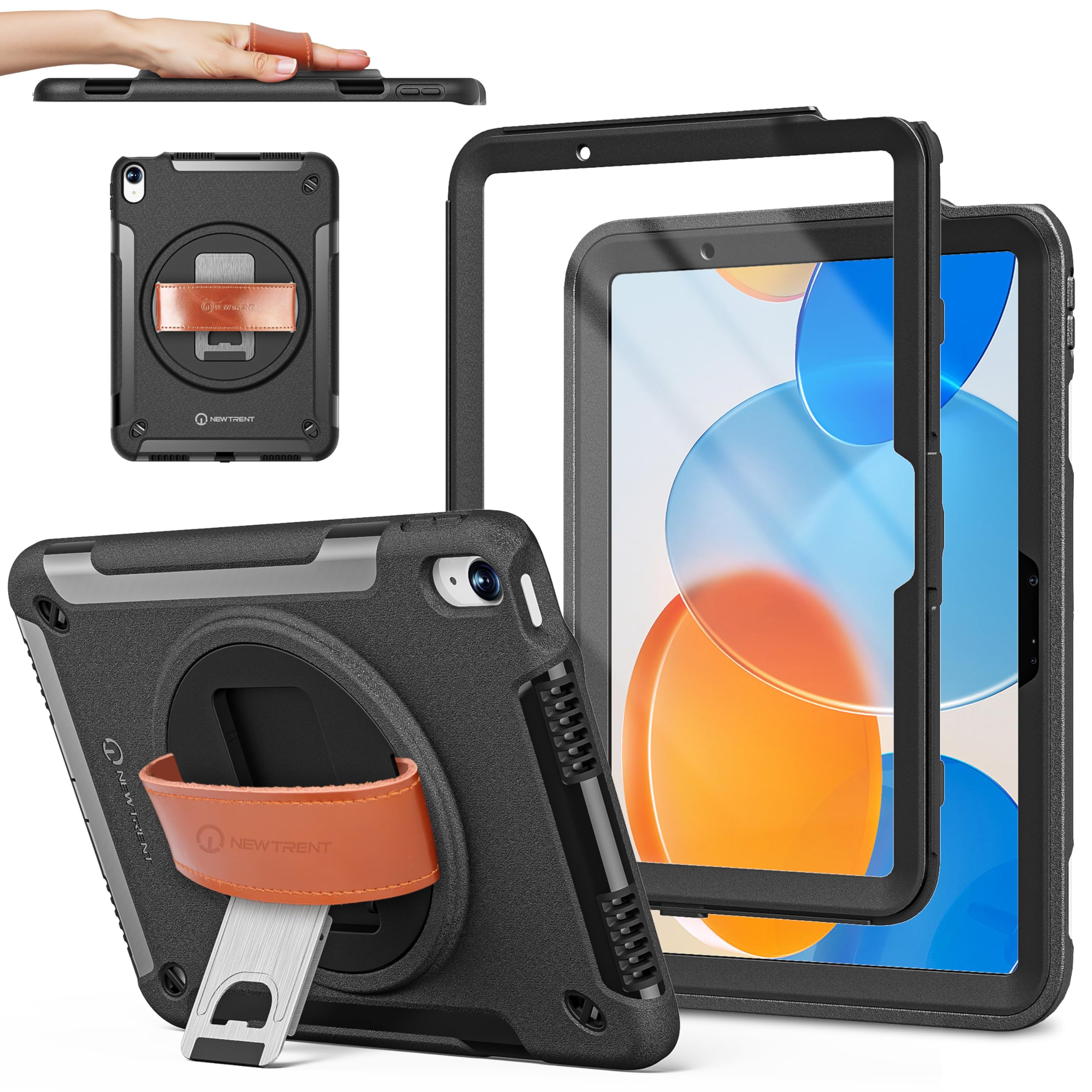
| New Trent Original Rugged Case★ Best Overall | All-round grip and drop protection | Rotating genuine leather hand strap | Polycarbonate, TPU, leather | Built-in | Amazon |
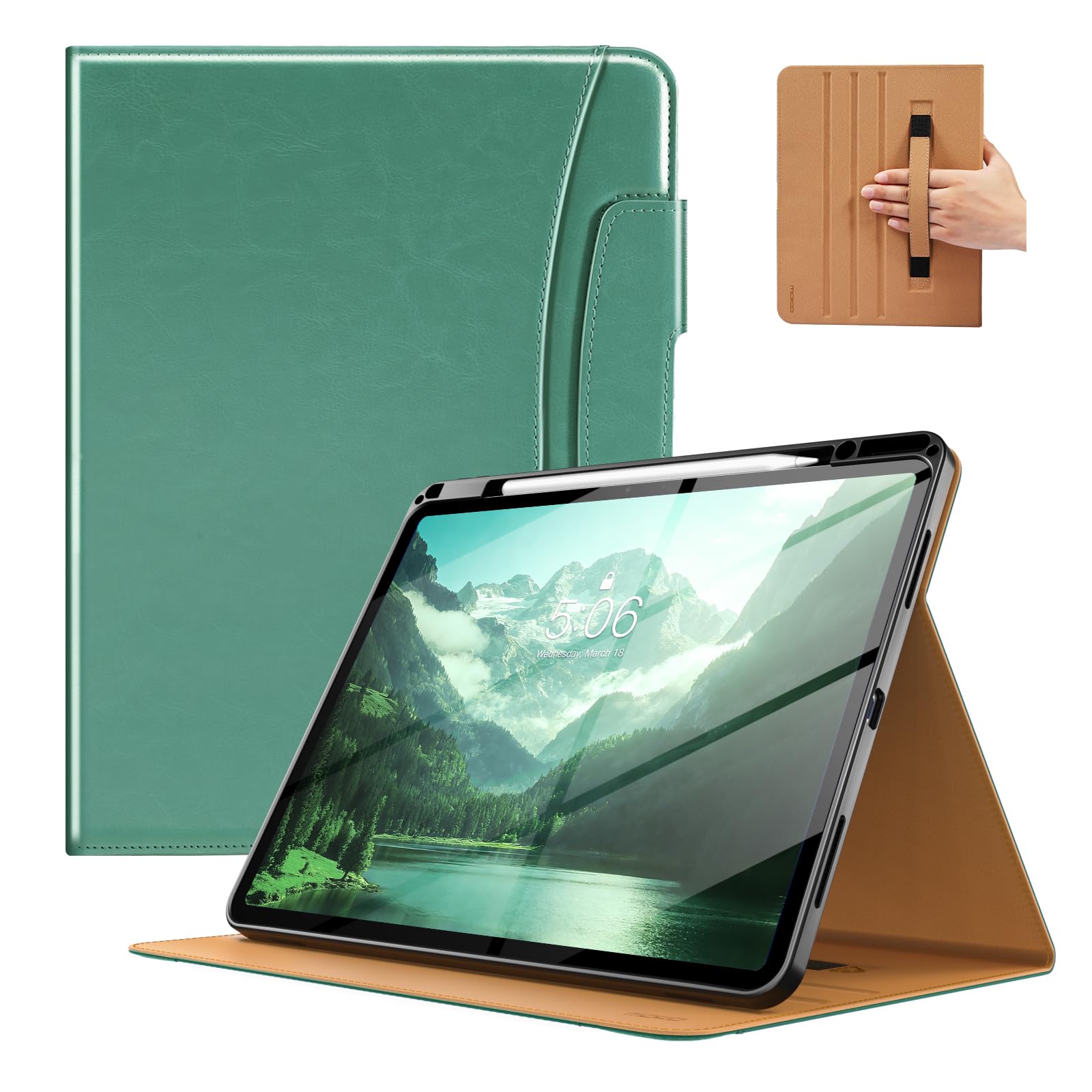
| MoKo PU Leather Case for iPad Air 13Best for Big Screens | Large-screen reading and lap use | Interior hand strap | PU leather, microfiber, TPU | None | Amazon |
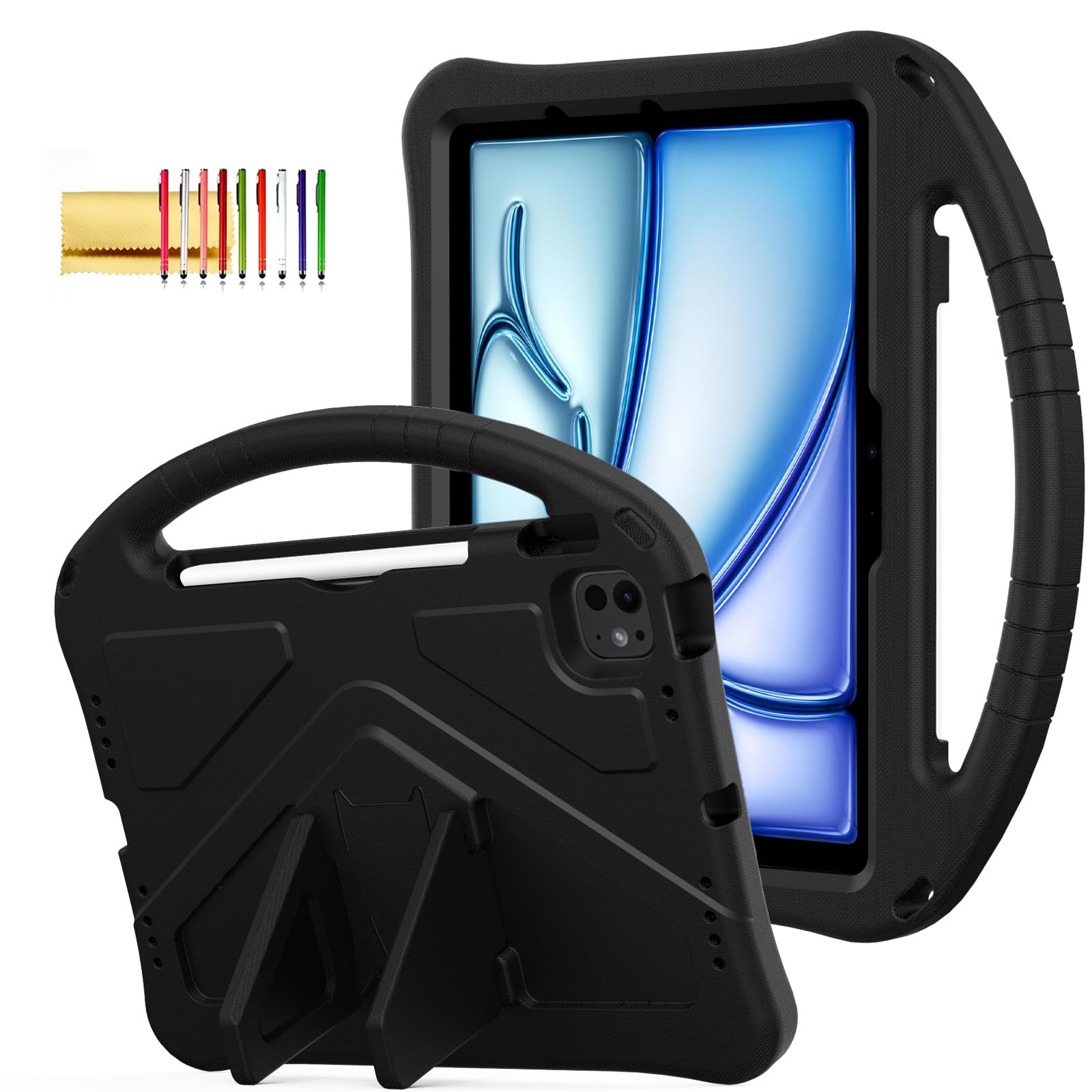
| Techcircle Kids Case | Toddlers and rough handling | Anti-slip exterior handle | EVA foam | None | Amazon |
| BRAECN Case for iPad A16 11th/10th | Hands-free hanging and travel | 360° rotating, 180° folding grip plus shoulder strap | Polycarbonate, silicone | Included | Amazon |
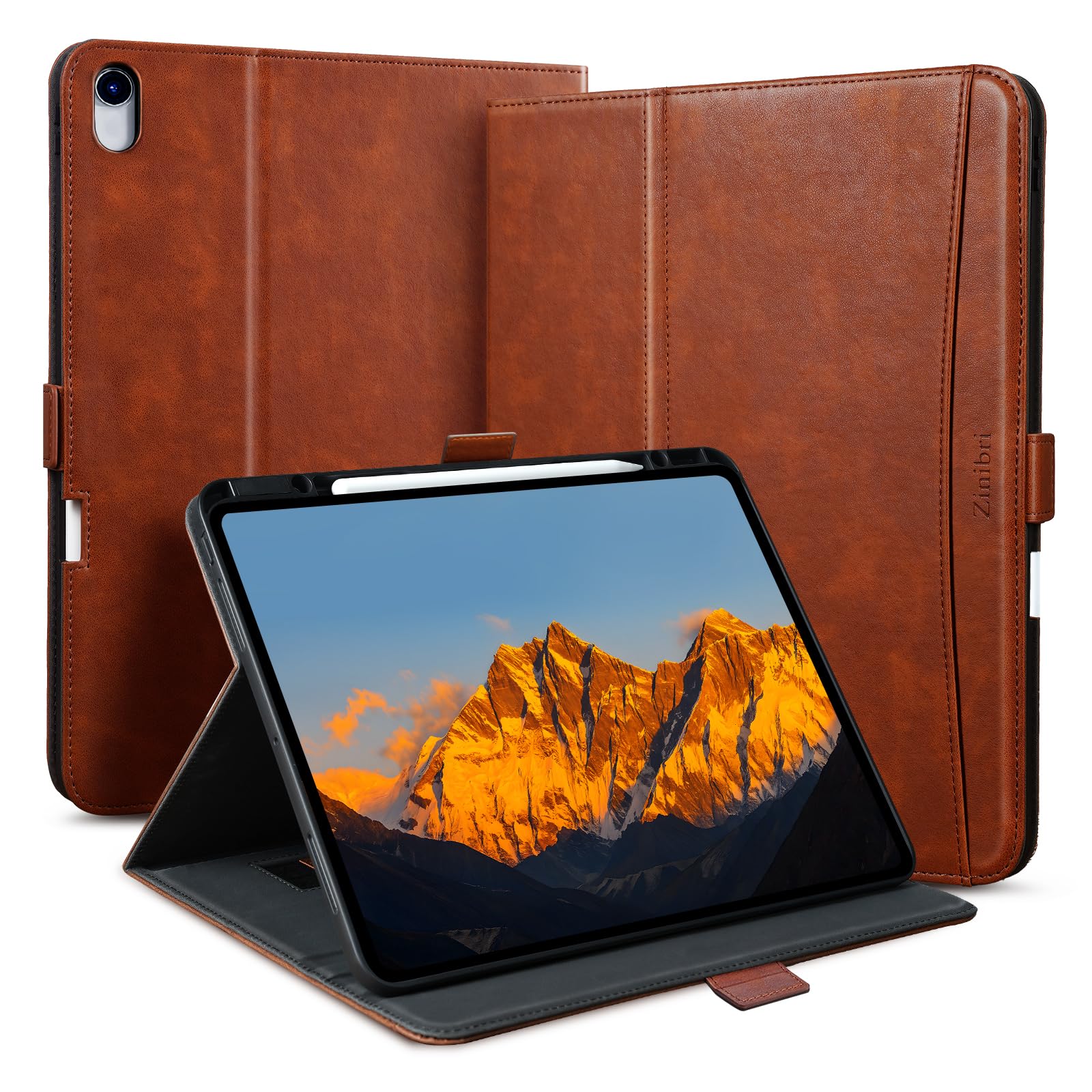
| Zinibri Case for iPad Air 13 | Desk-to-meeting professional look | Interior hand strap plus magnetic pocket | Vegan faux leather, TPU | None | Amazon |
| SEYMAC stock Case for iPad 9th/8th/7th | Students and heavy daily use | Rotating hand strap plus removable shoulder strap | Silicone, TPU | Built-in | Amazon |
| Dexnor Case for iPad 9th/8th/7th | Job sites and uneven surfaces | 360° rotating hand strap | Polycarbonate, TPU | Built-in | Amazon |
Detailed Reviews
1. New Trent Rugged Case for iPad 11
Our pick — 4.5+★ from 5,500+ verified ratings; the strongest balance of quality and price.
The leather strap rotates to lock in portrait, landscape, or any angle you tilt it to.
This is the case that made the whole category exist, and it still leads on the thing that matters: the grip. A genuine leather hand strap spans the back and pivots through a full circle, so you can hold the iPad in portrait one minute and landscape the next without loosening your hand. That rotation is what separates it from a fixed interior band. The shell underneath is a three-part build — a hard polycarbonate outer wall, a shock-absorbent TPU liner, and a clear screen protector bonded in — which is why it keeps coming out of drops without visible damage.
What wins people over is the build quality, and it is not a small margin. Buyers report these cases still holding an iPad 7th gen securely after four years, with the kickstand under the strap still working. The metal kickstand locks one-handed, the rubber seal covers the ports, and the whole thing is slim enough at roughly an eighth of an inch that it does not feel like armour. If you take the iPad outdoors, this is the shell that shrugs off rain and dust.
The honest catch is weight. This is a rugged case with a metal stand and a leather strap, and it puts real mass on the back of a tablet. If you have wrist or hand issues, or you plan to hold it up for long stretches, that weight will be noticeable. It suits an adult who wants one case to last and does not mind a few extra ounces.
What earns the top spot
- Full 360° rotating leather strap locks at any angle, so one-handed reading and typing both work.
- Triple-layer polycarbonate, TPU, and built-in screen protector survive hard drops and spills.
- Metal kickstand props the iPad up firmly on a desk or lap without slipping.
- Port covers seal out dust and moisture without blocking access to buttons or the camera.
Where it asks for patience
- The added weight is real and causes hand strain for some users over long sessions.
- Setup instructions cover the strap adjustment after the installation section, which is confusing.
- The back stand is stiff to open the first few times until it wears in.
Reach for this if: you want one rugged case that handles reading, video, outdoor use, and drops without compromise — it is the crowd favourite at 4.5+ stars.
Look elsewhere if: a light tablet matters more to you than maximum protection; the metal stand and leather strap add noticeable heft.
2. MoKo PU Leather Case for iPad Air 13 Inch
A 13-inch slab needs a hand, and this folio gives yours somewhere to sit.
Holding a 13-inch iPad one-handed is the exact problem this case solves. The strap lives on the inside of the front cover, so your hand slides in underneath and the tablet rests flat against your palm — no pinching, no balancing act. The outside is high-quality PU leather over a soft microfiber lining, with a flexible TPU back shell that absorbs knocks. A front pocket takes documents, cards, or notes, so it doubles as a slim portfolio.
Owners rate this case top of its class for the PU leather feel and the precise fit on the 13-inch Air. It is built for the 13-inch Air across three generations, so check your model code carefully. The magnetic clasp holds the cover shut and flips around to grip the back when open. Auto wake-and-sleep is built in, meaning the screen comes on when you lift the lid and goes dark when you close it, which saves battery. An Apple Pencil holder keeps the stylus secure inside the case.
One honest limit: the stand grooves are shallow, so on a soft lap the tablet can slide forward rather than lock.
The lap caveat: the easel grooves hold firm on a hard surface but let the tablet creep on soft fabric. If you mostly read in bed with it propped on a duvet, choose a case with deeper notches.
Built for: anyone with a 13-inch iPad Air who wants a slim, professional folio with a genuine one-hand grip and a pocket for cards.
Think twice if: you need a rock-solid stand on soft surfaces — the grooves here favour a desk.
3. Techcircle Lightweight EVA Foam Kids Case
Foam thick enough to survive a toddler, light enough for small hands to carry.
This is the case you buy when a two-year-old is going to be the primary user. The shell is EVA foam — a soft, rubbery material that absorbs impact and flexes rather than cracks — and it weighs 0.24 kg, so a small child can carry the tablet around without dragging it. The handle is built into the back with an anti-slip texture, and the corners are thickened for the spots that hit the floor first. It also comes with a stylus pen and a cleaning cloth in the box.
The design is the standout. Owners describe it as sturdy and easy to tote, with one noting it is “not bulky at all” and comfortable for little hands. Precise cutouts keep the buttons, ports, and front camera clear, so nothing gets blocked. A foldable kickstand props it up for video, and an opening for the Apple Pencil lets you store and charge the stylus without pulling the case off. It is rated water resistant, which matters for a device that will meet a juice cup.
The one thing to know is that this case is universal across several iPad sizes rather than moulded to a single model, so the fit is a touch looser than a dedicated shell. That is the price of covering more generations. If you want a snug, exact fit, choose a case built for one model only.
Why parents like it: the foam bumper takes the tumble, the anti-slip handle makes it carriable, and the price is gentle enough to buy without agonising over it.
The fit note: because it covers several iPad generations, it is not a precision-moulded shell — expect a little play rather than a vice grip.
Suits: families with toddlers, or anyone who wants a lightweight foam grip case that will not break the tablet or the bank.
Not for: you, if you want a tight, tailored fit for one exact iPad model.
4. BRAECN Case for iPad (A16) 11th/10th Generation

Hang it on a kitchen cabinet one minute, sling it over your shoulder the next.
This case combines three handle ideas into one. There is a 360° rotating, 180° folding grip on the back that doubles as a kickstand. Then there is an adjustable shoulder strap, so you can carry the iPad hands-free or hang it from a hook while you cook, clean, or work. The grip folds flat when you want it out of the way. For sheer flexibility in how you hold and carry the tablet, nothing else here comes close.
Owners rate the three-layer build and the drop protection highly, and one story sums it up: one owner’s case flew off a moving car, left the iPad undamaged, and the hard shell only slightly separated before snapping back together. The three-layer build of hard polycarbonate over shock-absorbing silicone gives you a shock-absorbent bumper plus a rigid back, and a screen protector is included to finish the coverage. Raised edges around the screen add a little extra standoff. It is easy to install, and the kickstand rotates freely for any viewing angle you want.
The one thing to plan for: the first installation takes some effort, because the silicone liner has to seat properly inside the hard shell. Follow the included manual and it goes on smoothly. After that it is simple.
Three cases in one: a rotating grip, a folding kickstand, and a shoulder strap give you more carry options than any folio here, backed by a shell that has taken a genuinely brutal drop.
The right buy for: commuters, parents, and anyone who wants to hang or sling the iPad rather than just hold it.
Be ready for: a fiddly first install while the silicone seats into the shell — it is a one-time job.
5. Zinibri Vegan Leather Case for iPad Air 13 Inch
Vegan leather, a magnetic pocket, and a strap that makes a 13-inch iPad one-handed.
If the iPad goes from a desk to a client meeting to a train seat in the same afternoon, this is the case that looks the part while doing the work. The shell is handcrafted vegan faux leather with a soft-touch finish that resists fingerprints and scratches, reinforced stitching, and a soft TPU inner case with a shockproof edge. A hand strap runs inside to cut fatigue during long holds, and a magnetic front pocket takes business cards or sticky notes. The N52SH magnet clasp holds the lid shut in a crowded backpack, and auto wake-and-sleep is built in.
Four standing positions — three viewing angles plus one dedicated typing angle — mean you can go from watching to sketching to typing email without fighting the cover. Anti-slip microfiber and deepened grooves keep the tablet steady at each angle. It is built specifically for the 13-inch iPad Air across M4, M3, and M2 generations, so confirm your model code. The Pencil slot supports wireless charging for Pencil Pro.
One practical note: at 550 g the case itself is substantial, and combined with a big tablet it is a two-handed carry. The magnetic clasp is the point of the design, but it is a magnet, so treat it as a secure hold rather than a lock.
The polished details
- Vegan faux leather with reinforced stitching holds up without showing fingerprints.
- Four standing angles give you a dedicated typing position as well as viewing ones.
- Magnetic front pocket keeps cards and notes with the tablet.
- Pencil slot supports wireless charging for Pencil Pro.
The trade-offs to weigh
- At 550 g the case adds meaningful weight to a 13-inch tablet.
- The closure is magnetic, so it holds firmly but is not a mechanical lock.
Pick this when: you want a professional-looking folio that handles cards, notes, and a Pencil, with a genuine one-hand strap for a 13-inch Air.
skip it if: you want the lightest possible cover — the leather and pocket add heft.
6. SEYMAC stock Case for iPad 9th/8th/7th Generation 10.2″

The case that has been through a year of college lecture halls and desk-height drops.
Built for the 10.2-inch iPad 9th, 8th, and 7th generation, this is a soft TPU and anti-skid silicone shell with a built-in screen protector and port covers. The soft strap and the removable shoulder strap let you hang the iPad anywhere or wear it around your neck while your hands are busy. The stand rotates through 360° for any viewing angle, so it works as a lectern for video, a drawing surface, or a reading prop. All buttons and ports stay reachable without removing the case.
What people say most is that it is simply well made. Owners mention a full year of use with no ripping or tearing, the stand and straps still working, and only minor scratches on the screen protector. Customers note it surviving drops from desk height. A built-in Pencil holder keeps the stylus with the tablet, and the silicone grips well in the hand.
The honest caveat is a learning curve during install. The silicone has to go on evenly, which takes a few minutes the first time, and the button covers blend into the grips so they take a moment to find. Once it is on, it is a fit-and-forget case.
Built for the semester: soft silicone grips, a rotating stand, two strap options, and a screen protector as standard make this the practical pick for a student hauling a 10.2-inch iPad around campus.
For you if: you want a durable, straps-everywhere case for a 10.2-inch iPad and you value a screen protector included in the price.
Minor friction: installation takes patience the first time, and the button caps sit flush with the grip so they are easy to miss.
7. Dexnor Rugged Case with Extra-Wide Stand
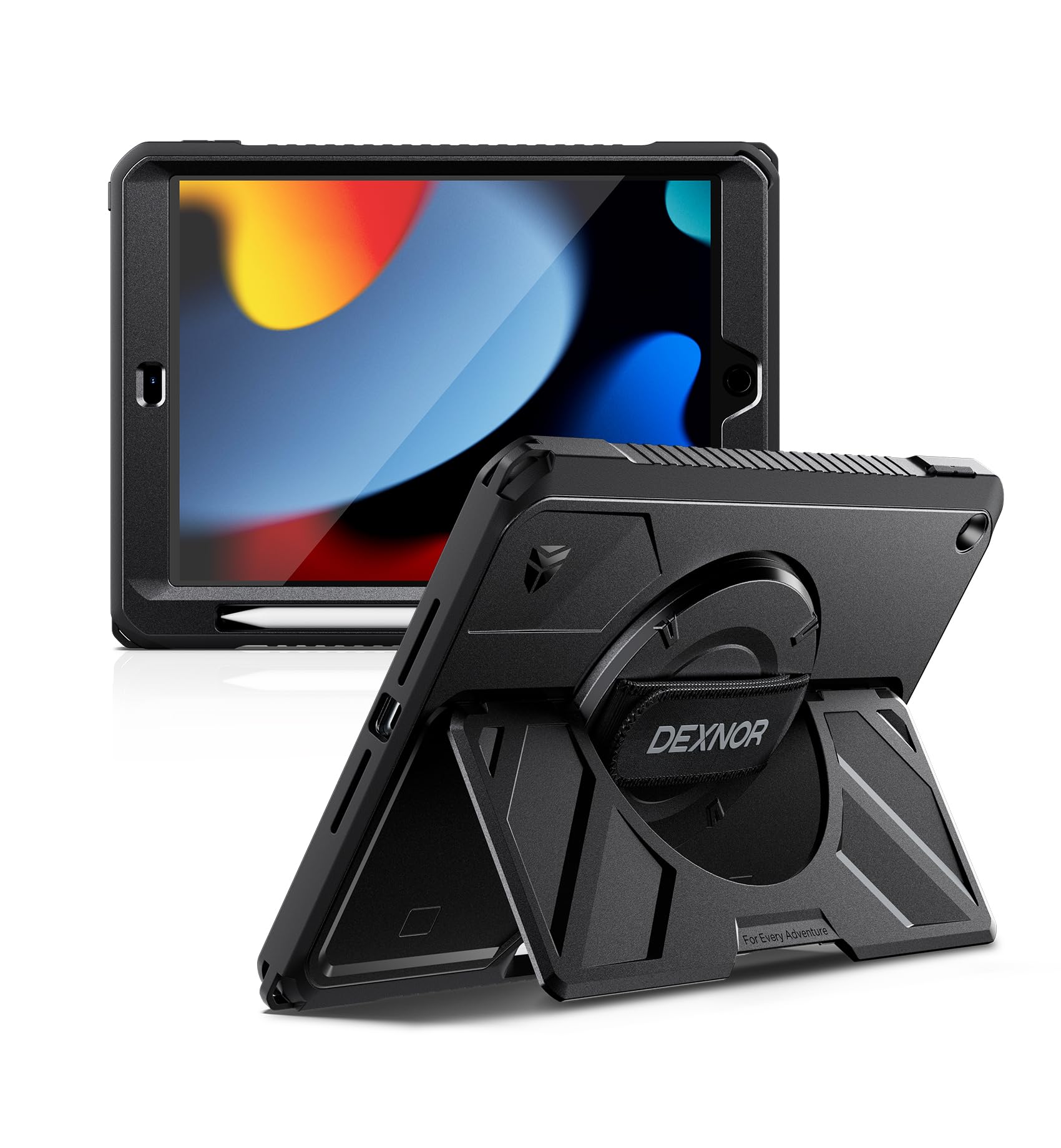
A kickstand wide enough to hold firm on a sofa cushion or uneven ground.
Most tablet stands are a narrow flap that wobbles on anything soft. This one is an upgraded extra-wide, large kickstand built for desks, laps, sofas, construction sites, and uneven outdoor terrain, and it carries multiple adjustable viewing angles. Backing it up is the handle: an adjustable 360° rotating hand strap that gives a secure one-handed grip and swings the iPad between portrait and landscape as you read, present, or review documents. The shell is a reinforced polycarbonate back with a shock-absorbing TPU bumper and a built-in sensitive screen protector for full-body coverage.
The grip is designed to reduce hand fatigue for all hand sizes, which matters if you hold the tablet up for long stretches. An Apple Pencil holder keeps the stylus in place and supports magnetic attachment and wireless charging for compatible Pencils — with the note that Apple Pencil (USB-C) supports magnetic attachment but not wireless charging. You also get a prying tool and a detailed install guide in the box. What people praise most is the stand itself; it props the iPad up on surfaces where other cases tip over, and older users find the weight manageable and the grip solid.
The trade to weigh is size. At 1.1 pounds this is the heaviest case here, and the wide stand adds bulk that you will notice in a slim bag. It also pairs badly with an aftermarket glass screen protector, since its own protector already covers the screen.
What it does better than a folio
- Extra-wide kickstand stays put on laps, sofas, and uneven outdoor ground where narrow stands tip.
- 360° rotating hand strap swings between portrait and landscape for one-handed use.
- Reinforced polycarbonate and TPU bumper plus built-in screen protector cover the whole body.
What you accept for that stability
- At 1.1 pounds the case is heavy and bulky compared with a slim folio.
- Its built-in screen protector means you cannot stack an aftermarket glass one on top.
- The Pencil slot holds magnetically but does not charge the Pencil without removing the iPad.
The one to reach for: if your iPad props up on sofas, laps, or job-site surfaces and you need a stand that will not tip.
The cost of that stability: 1.1 pounds of bulk you will feel in a slim bag.
Know the Specs
Hand strap: interior band versus rotating grip
An interior hand strap is a band sewn into the cover that your hand slides under; the tablet rests against your palm. It feels softer and sits flatter when closed. A rotating grip is a bracket on the back your fingers hook through, and it pivots so you can swing the iPad between portrait and landscape without letting go. Interior straps suit long reading. Rotating grips suit anyone who switches orientation constantly, like a presenter or a note-taker.
Shell material and drop protection
EVA foam is soft and rubbery and flexes on impact — great for kids and light enough for small hands. Polycarbonate is a hard plastic that resists punctures and holds its shape, which is why heavy-duty cases pair it with a shock-absorbing TPU or silicone liner. PU and vegan leather sit on top of a TPU back shell for looks plus ordinary protection. The heavier the shell, the more it protects and the more you feel it in your hand.
Built-in screen protector versus none
A bonded screen protector is a clear layer moulded into the front of the case, giving full coverage without a separate film. It is a real convenience for kids and job sites, letting you skip an aftermarket protector. It also means you cannot stack a glass protector on top. Folios without a built-in protector stay slimmer and let you choose your own screen film, but the screen itself is exposed when the cover is open.
Stand angles and what they enable
A viewing-only stand props the tablet for watching. Add a dedicated typing angle and you can work on a lap or desk without the screen tipping. Some cases use shallow grooves that hold firm on a hard table but let the tablet creep on soft fabric. Others use an extra-wide kickstand built for sofas and uneven ground. Match the stand to where you actually use the iPad, not to a spec sheet label.
Common Questions
How do I find my iPad model number to pick the right case?
Will a case with a built-in screen protector work with a glass protector I already own?
Is a rotating hand strap really better than a fixed one for reading in bed?
How much extra weight should I expect from a rugged handle case?
Does a shoulder strap case let my kid carry the iPad safely?
What is the difference between a PU leather folio and a foam kids case?
Will the Apple Pencil still charge with the case on?
Do handle cases interfere with buttons, ports, or the camera?
Is a wide kickstand better than a narrow one for use on a lap?
The Bottom Line
For most people, the ipad handle case winner is the New Trent Original Rugged Case, because it is the only pick that pairs a full 360° rotating leather strap with a triple-layer shell, a metal kickstand, and a built-in screen protector — and it does all of that while staying slim. It is the crowd favourite at 4.5+ stars, and the sheer volume of people who have stuck with it is a good sign. If you carry a 13-inch Air and want a slimmer folio with a genuine interior strap, the MoKo PU Leather Case is the easy call. And if the tablet belongs to a toddler, the Techcircle EVA Foam Case is the one built to take the tumble.
How we choose
We do not accept paid placement. Every pick is matched to a real buyer and a real use-case; we do not hands-on test units.
Sources
Specifications: manufacturer listings and product documentation. Review insights: verified customer reviews, as of October 2026. Pricing: not shown on this page (it changes often); check the current price via the retailer link.
As an Amazon Associate, Aappliancez earns from qualifying purchases. This does not affect which products we feature.