Disclosure: Some links in this post are affiliate links. As an Amazon Associate I earn from qualifying purchases, at no extra cost to you. Learn more
Specs are compiled from manufacturer listings and verified buyer reviews and can change over time — please confirm the key details on the product page before buying.
If your iPad keeps flopping flat the moment you tilt it, the fix is a case with a stand that actually locks where you put it. The seven picks below cover every body size — the 11-inch A16 models, the iPad mini, and the older 10.2-inch generations — and each one solves the tipping problem in a different way. Some use metal hinges you can tighten an angle into, some swivel a full 360 degrees, and some bolt on a trackpad so the tablet behaves like a small laptop. Start by confirming your model number in Settings, then match the case to it.
This guide is built by comparing the manufacturers’ published specifications and the patterns across verified customer reviews, so you get each pick’s real strengths and trade-offs instead of marketing spin.
The differences that matter most are hinge stiffness, adjustable range, and how much weight you agree to carry in your bag. Below you’ll find the angles each stand offers, the weight each case adds, and the keyboard battery life where one is included. My full breakdown of the ipad case and stand picks starts with the sturdiest hinge in the group.
Top Picks
How To Choose The Best iPad Case and Stand
The single most common mistake is buying for the screen size and ignoring the model code. An 11-inch iPad from one year can have different magnet points than an 11-inch iPad from another year, and a stand that relies on magnets will feel weak if those points don’t line up. Open Settings, tap General, then About, and note the model number that starts with “A”. Every pick below lists exactly which codes it supports.
Match the model code before anything else
The TORRAS case, for example, supports the A3354, A3355 and A3356 codes on the 2025 11-inch model, and the A2588, A2591 and A2592 codes on the 2022 10.9-inch model. The keyboard cases below cover a different spread of codes, and the Dexnor is built for the 10.2-inch 7th, 8th and 9th generation iPads. Buying the wrong one means a loose fit at best and a stand that won’t hold at worst.
Decide if you want a stand or a keyboard
A pure stand case is lighter and thinner. You lift the iPad to type on the glass screen, and the stand holds the angle for watching, sketching or reading. A keyboard case adds keys and usually a trackpad, which turns the iPad into a pocket laptop, but the whole assembly gets heavier and you now have a second battery to charge. If most of your work is typing, a keyboard case earns its bulk. If you mostly read, draw or watch, a stand-only folio is the lighter answer.
Check how the hinge holds an angle
The stand is the part that fails first on cheap cases. Look for hinge damping — the built-in resistance that lets you park a screen at a specific angle without it creeping down. Metal hinges with damping hold better than folded-leather props, but they can add bulk and, on some designs, metal feet can scuff a table. A stand with a wide adjustment range gives you more usable positions, from a low drafting angle for drawing to a near-upright angle for video calls.
Side-by-Side Comparison
| Model | Best For | Stand Range | Weight | Keyboard | Amazon |
|---|---|---|---|---|---|
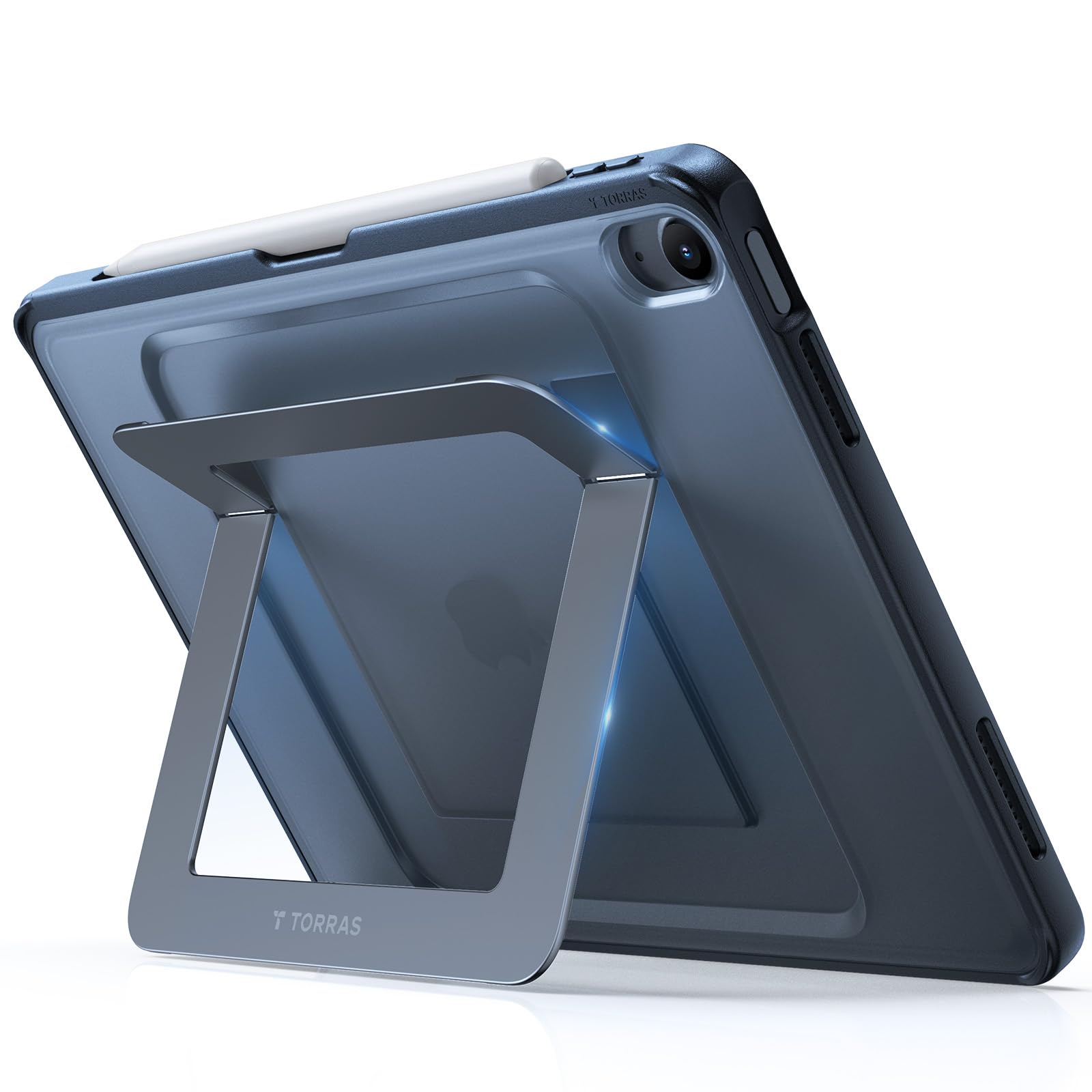
| TORRAS Ostand for iPad (A16) 11th / 10th Gen★ Best Overall | Sturdiest stand | Dual stand, 0°–105° and 30°–105°, 75° portrait | 8.24 ounces | None | Amazon |
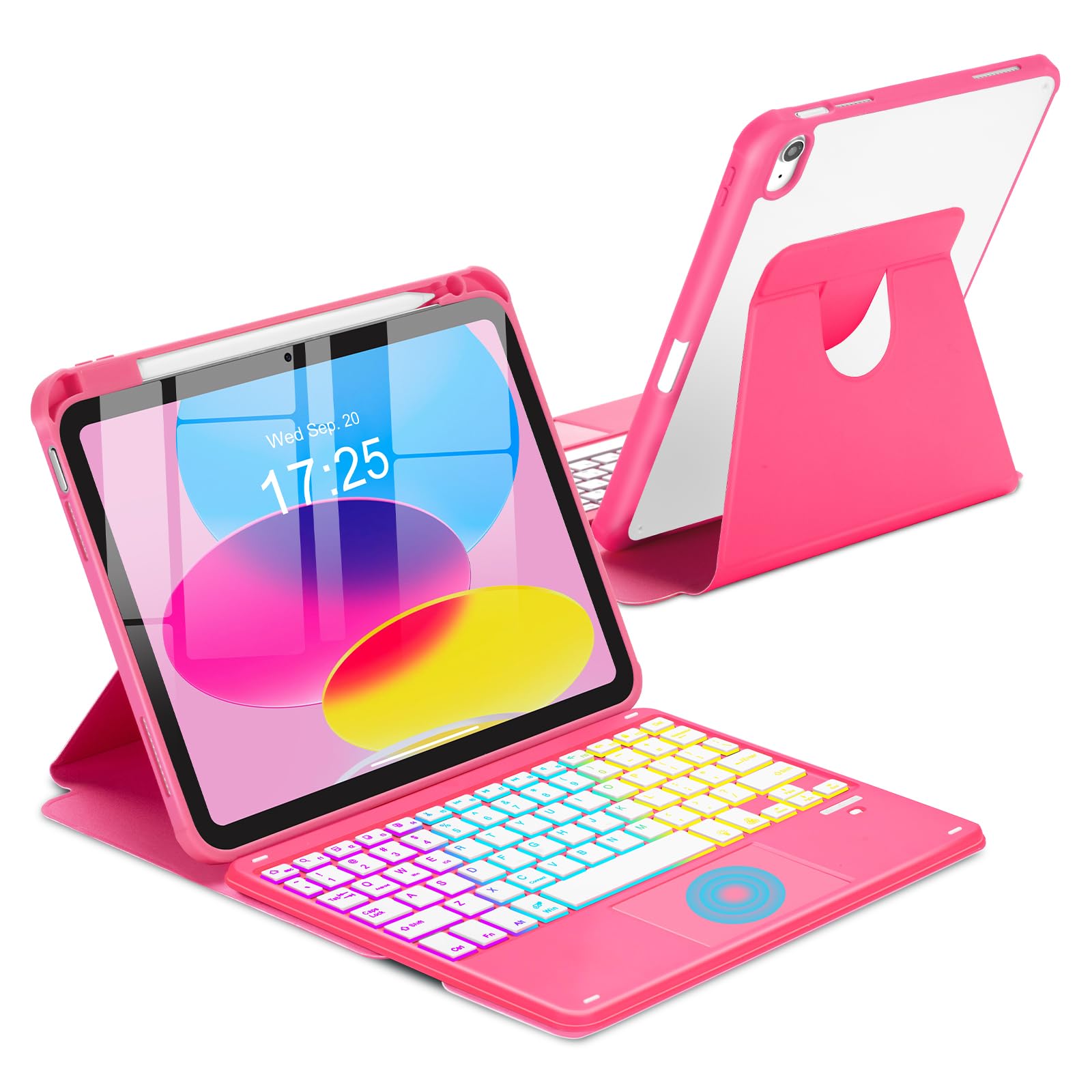
| MePadKey Trackpad Keyboard CaseBest Value | Budget laptop mode | 360° rotation, 2 anti-slip grooves | — | Backlit, detachable, 450 mAh | Amazon |
| MOFT Dynamic Folio for iPad mini 7th / 6th | Smallest iPad, lightest carry | 20+ angles, 30°–60° shift | 172 g | None | Amazon |
| MOFT Dynamic Folio for iPad Air 11″ | iPad Air viewing range | 20+ angles, 30°–60° shift | 292.6 g | None | Amazon |
| ESR Ultra-Light Keyboard Case | Big trackpad, no backlight | 65° and 20° fixed | 530 g | Detachable, Bluetooth | Amazon |
| GreenLaw Keyboard Case | Backlit typing comfort | Floating cantilever | — | 7-color backlit, Bluetooth 5.2 | Amazon |
| Dexnor for iPad 9th / 8th / 7th Gen | Older 10.2″ iPads | Aluminum hinge cantilever | — | 7-color backlit, 650 mAh | Amazon |
Detailed Reviews
1. TORRAS iPad (A16) 11th Case
Our pick — 4.5+★ from 850+ verified ratings; the strongest balance of quality and price.
Two aluminum stands that lock into drafting angles and refuse to sag under a stylus.
If you draw or take notes standing at a counter, the stand is the whole product, and this is the one that treats it that way. TORRAS builds both stands from aviation aluminum and adds hinge damping through its Tora-Hold system — damping meaning the hinge grips an angle and stays there instead of creeping. The short stand covers a cozy low range from 0° to 105° for writing, typing or drawing. The long stand handles 30° to 105° in landscape for watching and creating. A 75° portrait position gives you a video-call or reading angle without holding the tablet.
Protection is not an afterthought here. The shell is polycarbonate with a rubber bumper, and TORRAS says it clears the MIL-STD-810H military drop standard, with 360° airbags in the corners and a third-generation X-SHOCK anti-collision design. There’s a built-in pencil holder that supports magnetic attachment and wireless charging for the Apple Pencil Pro. The back is a translucent matte finish that resists peeling, and the front-cover-free design means you carry it like a phone rather than a binder. It fits the 2025 11-inch A16 (A3354, A3355, A3356) and the 2022 10.9-inch model (A2588, A2591, A2592) — check that second digit group before you order, because nothing else fits.
Owners say the damped hinge holds firm under moderate stylus pressure without buckling. The trade-offs are small and honest. The metal feet have no rubber grip, so on a smooth table the stand can slide and, on some surfaces, scuff. Every now and then a buyer finds the pencil slot tight to pull from the front. At 8.24 ounces, it is the lightest stand-first pick in this group. Value is a mixed point: some owners feel a quality case like this should ask less. If budget is your hard line, the MePadKey below delivers a keyboard for less outlay.
Where it earns its keep
- Aviation aluminum dual stands with damped hinges, so a writing angle holds instead of collapsing
- Wide range across three modes: 0°–105° low, 30°–105° landscape, 75° portrait
- MIL-STD-810H drop rating with 360° corner airbags for daily commuting knocks
- Built-in Apple Pencil holder that supports magnetic attachment and wireless charging
- Front-cover-free build keeps it pocketable alongside the iPad
What you give up
- Metal stand feet have no rubber grip, so the case can slide on smooth tables and scuff some finishes
- Pencil can be fiddly to pull out from the front of the holder
- Value is the one mixed note among owners — expect a quality-case price
- No keyboard, so typing happens on the glass screen
Built for: anyone who sketches, annotates or writes by hand and needs the screen to sit still at a shallow angle.
Think twice: if you routinely work on a glass-topped desk — the bare metal feet will slide.
2. MePadKey Trackpad Keyboard Case
A 360-degree swivel hinge and a detachable 78-key keyboard for people who type on the road.
Here’s the trick this case pulls off: the hinge rotates a full 360 degrees, so you can stand the iPad upright for reading and short videos, then lay it flat for browsing and typing. Two anti-slip grooves let you set the tilt in either orientation. The keyboard slides off when you don’t need it, so the same case doubles as a plain folio on a plane. It carries 14 magnets that hold the keyboard firmly in place, and the leather cover wraps a silicone inner shell with thickened corners for full-body protection.
The keyboard is the part you’d normally pay extra for. It has 78 keys, a multi-touch trackpad that reads one-finger swipes for the cursor, two-finger scrolls and zooms, three-finger app switching, and four-finger screenshots. The backlight cycles through seven rainbow colors plus a breathing mode for night typing. Battery life is split, as owners describe it: the 450 mAh cell charges over USB-C in 2-3 hours and runs roughly 5 hours with the backlight on, or about 80 hours with it off. That split is the number to remember — leave the light off and it lasts a work week.
Owners single out the value: once snapped together it feels like a much pricier keyboard folio. Backlighting defaults to rainbow on startup rather than white, which is a one-keystroke fix. In portrait mode the charging port sits blocked while the iPad is propped, so top-ups mean laying it back down. Compared with the ESR keyboard case below, you get the 360-degree swivel that the ESR’s fixed 65° and 20° stand positions can’t do, but the ESR opens with a notably larger trackpad. Weight, honestly, is modest and owners call it acceptable.
Rotate and go: the 360-degree hinge is the standout here — reading upright, typing flat, no second stand required.
Plan your charging: portrait mode blocks the port, so charge it in landscape or overnight.
Reach for this if: you want a rotating keyboard folio on a tight budget and mostly type with the backlight off.
Look elsewhere if: you need a lit keyboard every night — 5 hours of backlight time is a short week.
3. MOFT Dynamic Folio Case iPad mini 7th
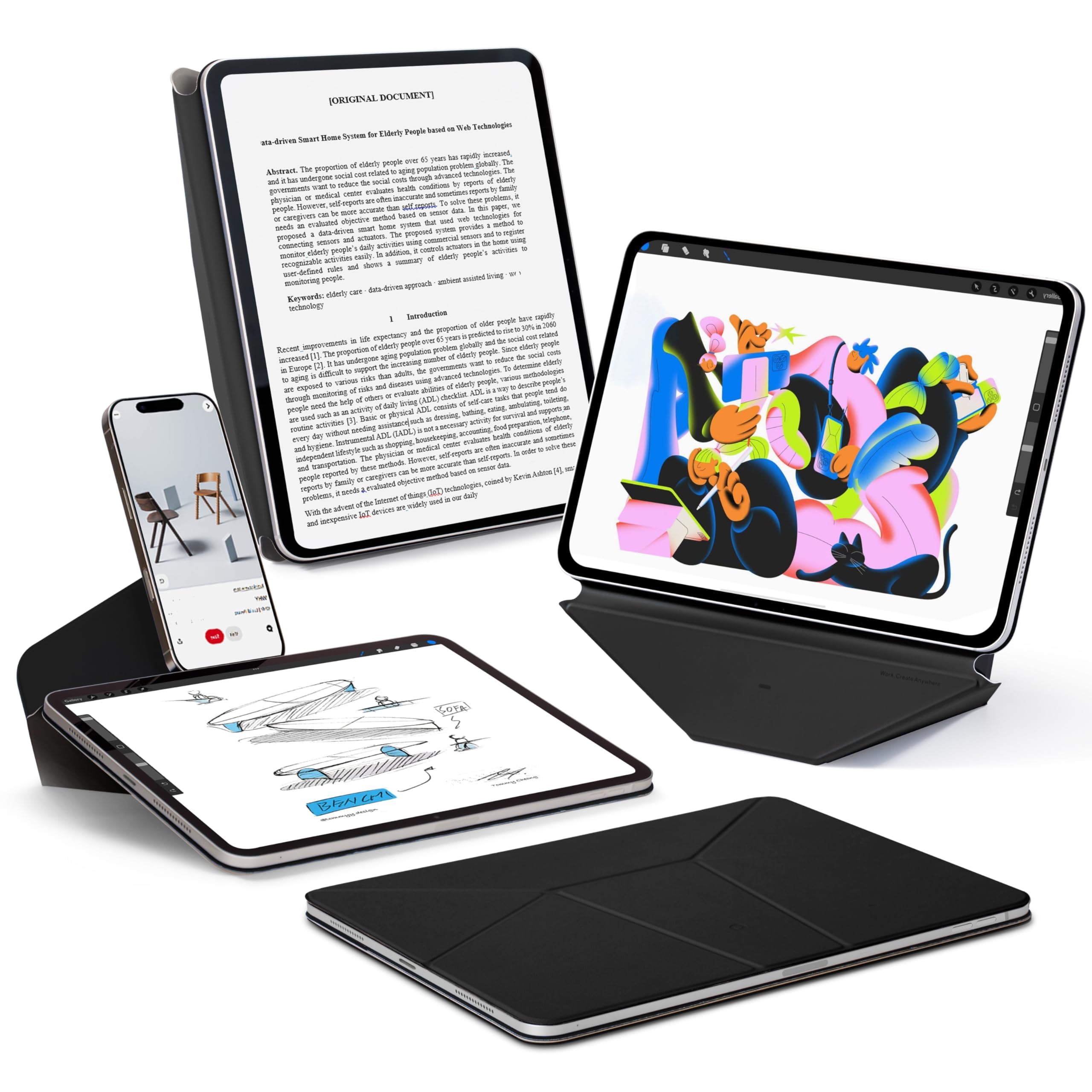
A 172-gram origami folio that folds your iPad mini into a floating workstation.
For the mini crowd, weight is the whole argument, and this folio answers it at 172 g. It’s built from MOVAS vegan leather over fiberglass and metal sheets, and the single-piece structure folds into more than 20 adjustable angles. There’s a frictionless shift between 30° and 60° for the main viewing range, and the fold can lift the mini up two inches to meet your eyes rather than your neck. N52 magnets — a strong grade of neodymium magnet — hold the whole thing together while you adjust.
Owners rate its versatility highest, and it shows in odd spots — hooked over a knee, propped on a tray table. The stand will hook over a knee on a cramped flight, sit upright on a tray table for takeoff and landing, and lift the screen when you’ve got a separate keyboard in front of it. Auto wake/sleep works as expected. The dual black-and-white finish keeps it looking sharp on a desk. It’s small enough to tuck into a bag and slim enough that the mini still feels like a mini.
The fit and grip are the honest trade-off. The mini sets down onto the magnets rather than snapping into a hard shell, so tipping it from the folio too quickly can let it slip free. A few owners find the folding sequence takes a first-time learning curve. The modular pen holder is a separate add-on, so plan for that if the Apple Pencil is part of your kit. Versus the TORRAS above, this is a canvas-and-magnet folio rather than a damped metal hinge, so the TORRAS holds harder angles while this one is far lighter. Reviewers back that up, calling it as good as its reputation suggests.
Pick it for: an iPad mini that lives in a bag and needs to stand up in strange places — plane trays, coffee counters, a knee.
skip it if: your mini gets hauled around with a hard case underneath — the magnets go soft through a thick shell.
4. MOFT Dynamic Folio Case iPad Air 11″
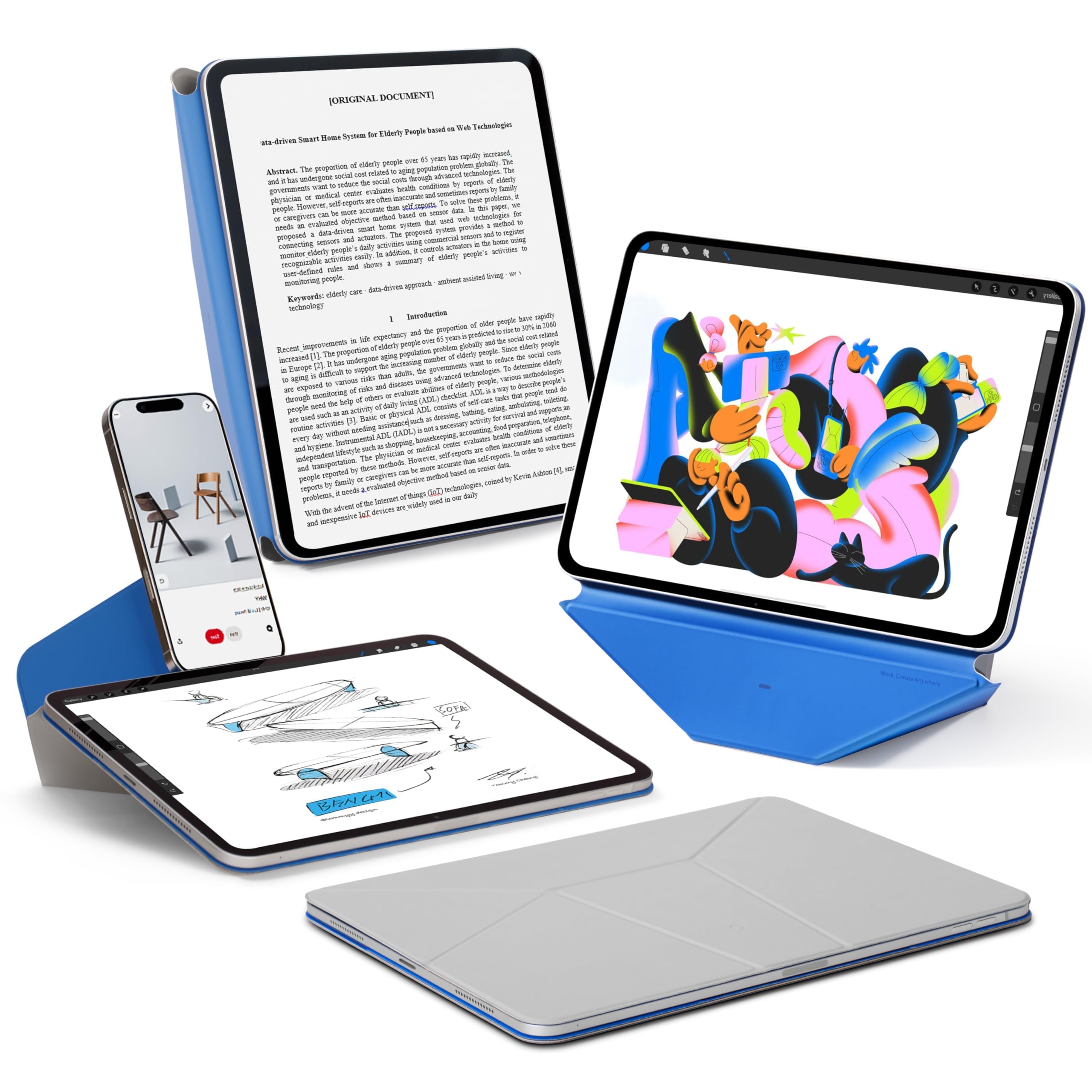
The same fold-and-lift folio, sized for the wider 11-inch iPad Air.
Take the mini-sized MOFT above and stretch it to fit the iPad Air 11-inch — the M4, M3, M2 and 4th-to-5th generation models. The angle maths are identical: more than 20 positions, a frictionless 30° to 60° shift, and a single-piece fold that props the Air up by the same two inches. Auto wake and sleep work here too, and the N52 magnets hold the cover against the back. The only number that shifts is weight. This one runs 292.6 g, since the wider tablet needs a wider folio.
Owners prize the modular cover on the Air, folding it from a low drawing board into an eye-level stand. It folds from a low board for drawing into an upright stand that puts the Air at eye level beside an external monitor and keyboard. That gives you a floating viewing angle for less than a dedicated dock. The MOVAS vegan leather resists dirt, and the two-tone look reads better than the price-free canvas cases at the low end. It also works over an existing hard case: the magnetic back holds through a slim hardshell, so you keep the Air’s own protection and still gain this stand.
The catch is attachment. Because the Air snaps onto the magnets rather than clamping the edges, flipping it open with a wrist-flick can peel the tablet loose and drop it. A hard shell underneath helps. The modular pen holder is an add-on here too, so if the Apple Pencil lives on your Air, budget for the extra piece. If you need a keyboard, look at the ESR or GreenLaw below — this folio is best as a pure stand in front of your existing setup. The 20+ angles are the real draw, because you can shift from drafting to reading without hunting a second stand.
Angle variety is the draw: 20+ positions with a 30°-to-60° flow shift give you a drafting board and a video screen in one fold.
Watch the attachment: it’s magnet-on-magnet, so keep a hardshell underneath and it’ll hold through most bumps.
Reach for this if: you want a floating stand for an 11-inch iPad Air and already travel with a slim hard shell.
Look elsewhere if: you skip the hardshell — an unguarded edge can let the Air detach and fall.
5. ESR iPad (A16) 11th/10th Gen Case Keyboard
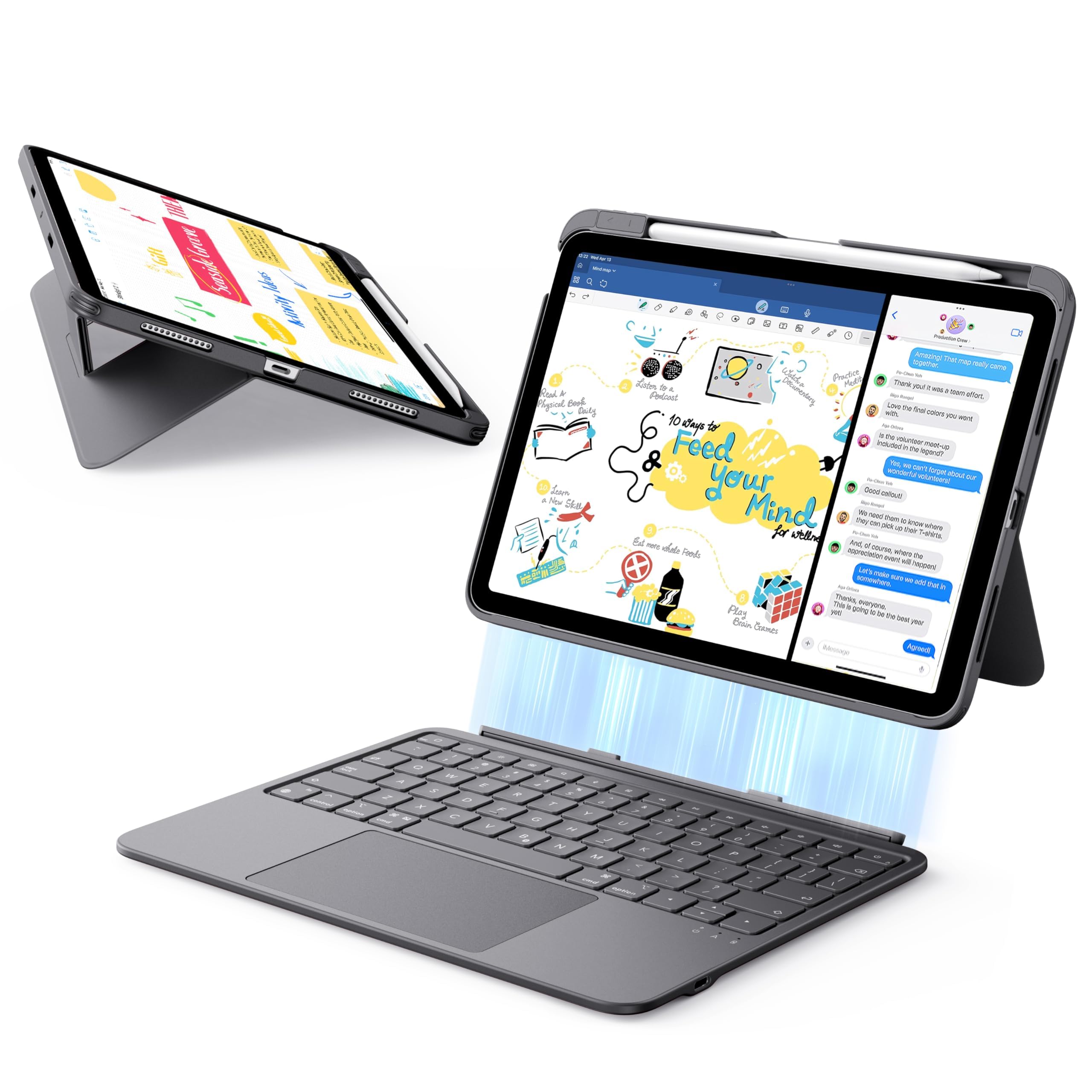
A 6.9 mm keyboard with a trackpad that’s 65% larger than typical — and no backlight.
The headline here is the trackpad. ESR sizes it 65% larger than the pads on regular keyboards, so one-finger drags and three-finger scrolls work with room to spare. The keyboard itself is only 6.9 mm thick and detaches on strong magnets — type close to the iPad, then pull the keys off and treat it as a plain tablet case. Two fixed angles hold the screen: 65° for working, watching and reading, and 20° for sketching and writing. A triangular support keeps it steady rather than wobbling.
Protection rides along too: reinforced Air Guard corners, magnetic strips and precise cutouts for the buttons, ports and speakers. The case fits both the 11-inch A16 2025 and the 10th-gen 2022, covering the A2696, A2757, A2777, A3354, A3355, A3162 and A3356 model codes. Weighing 530 g, this is a heavier carry than the folios above, but you’re carrying a keyboard and a trackpad, so that’s the trade. Owners say the whole rig turns the iPad into a small laptop in a few seconds.
Two honest limits, both from the spec sheet. There is no backlight, so typing in a dark cabin means relying on the keys themselves. The stand runs to two fixed angles rather than a sliding range — one owner liked the rigidity but wished for a middle setting for longer sessions. The trackpad works well but clicks mainly on its lower portion. Against the MePadKey above, this one leads on trackpad size by a clear margin, though it costs you the 360-degree swivel. Battery life is a common bright spot, with the keyboard pairing by Bluetooth and showing its level right in the iPad battery widget.
Reasons owners keep it
- Trackpad is 65% larger than on regular keyboards, so gestures feel roomy
- 6.9 mm keyboard detaches and reattaches on strong magnets
- 65° and 20° stand angles cover typing and sketching
- Reinforced Air Guard corners and precise cutouts for ports and speakers
- Bluetooth pair shows keyboard battery in the iPad widget
Where it asks you to compromise
- No backlight — dark-room typing relies on muscle memory
- Two fixed stand angles, no continuous adjustment
- 530 g is the heaviest keyboard carry in this lineup
- Trackpad clicking is concentrated on the lower section rather than the whole pad
Built for: the buyer who wants a laptop-like trackpad without a backlight and can live with two stand settings.
Think twice: if you type in the dark regularly — the missing backlight is a real gap on red-eye flights.
6. GreenLaw iPad 11th (A16, 2025) Case Keyboard

A floating cantilever keyboard that lights up in seven colors and swallows late-night glare.
This case is for the person who types past sunset. The keyboard carries seven backlight colors, each at three brightness levels, so you can drop it to a warm hue and low glow when the room is dark. The keybed is scissor-switch, with 1 mm of key travel — the short distance each key sinks before it registers — which is why the keys spring back fast and type quiet. A magnetic matrix of 31 strong magnets does the holding down, with the maker listing an adsorption force of up to 2600 GS. The cantilever stand lifts the screen to a typing-friendly height.
Bluetooth 5.2 handles the connection, and the automatic reconnect means it picks up the iPad without a fresh pairing each morning. The surface is SemiSi-tech over PU leather to wipe away stains, and the soft suede lining protects the glass when closed. Smart sleep mode and one-touch wake-up sort out the battery, charging over USB-C. It fits the 2025 11-inch A16 (A3354, A3355, A3356) and the 2022 10th-gen 10.9-inch (A2696, A2777, A2757) — check the code in Settings before ordering.
Magnetic strength is the mixed note. Owners split between those who find the back holds firmly and those who see the iPad slide down when they lean on the screen. Weight gets mixed feedback too — this is a heavier rig, and one buyer describes it as heavy but thin. If you want a fixed, stiffer stand without the risk of slide for half-hour typing sessions, the Dexnor below has a fully metal hinge. If backlight flexibility is the priority, this is the one that delivers it across seven colors and three brightness levels. The pairing is fast, and the keys read like a proper laptop board rather than a rubber-mat overlay.
Light up the night: seven backlight colors and three brightness levels are the reason people pick this over a plain keyboard case.
Lean carefully: the magnet back holds for most, but leaning hard can nudge the iPad down — treat the stand as support, not a clamp.
Pick it for: night-shift typists and students who want an adjustable glow and quiet 1 mm key travel.
pass on it if: you need a stiff hinge that never shifts — reach for the Dexnor’s aluminum setup instead.
7. Dexnor iPad 9th/8th/7th Generation Case Keyboard

A metal-hinged cantilever for the 10.2-inch iPads that most keyboard cases have moved on from.
If your iPad is the 9th generation from 2021, the 8th from 2020, or the 7th from 2019, the case you need fits a 10.2-inch screen — and that’s a shrinking slice of the market. Dexnor builds for it, covering the A2602, A2603, A2604, A2605, A2270, A2428, A2429, A2430, A2197, A2198 and A2200 model codes. The stand is a floating cantilever on a durable aluminum alloy hinge, so you can set an angle and let go without wobble. It swivels to portrait as well, and the detachable back case includes a hidden pencil holder.
The keyboard carries seven solid-color backlights over three brightness levels and scissor-switch keys that register halfway down, which is why typing stays quiet. Shortcut keys line the top row for media and volume. The 650 mAh battery is rated up to 200 hours of working time and 1200 hours of standby on a charge, refilling in 3.5 hours over USB-C. Auto wake and sleep handle the quiet time. A lifetime technical support line backs up a one-year manufacturer warranty on top.
The weight is the honest catch. Owners call it bulky: the pencil slot adds depth and the aluminum hinge carries real heft. Occasional 1-2 second typing lag shows up in a few accounts. Key layout has a quirk too — no Escape key, which matters only if you run remote desktop. Against the GreenLaw above, this one trades magnet-hold for a metal hinge but skips a trackpad entirely, so plan for finger navigation. For the older 10.2-inch iPads, this is among the few keyboard cases that fits at all.
Stiffness where it counts: the aluminum alloy hinge is the reason to choose this — it sets an angle and sticks there, unlike a magnet-only back.
Weigh your build: bulky is the recurring word, so carry it as a desk companion rather than a pocket folio.
Reach for this if: you’re keeping a 10.2-inch 7th, 8th or 9th generation iPad alive as a typing machine.
Look elsewhere if: you’ve moved to a newer iPad — this fits none of the A16 or Air models above.
Know the Specs
Hinge damping and stand range
Damping is the resistance inside a hinge that keeps it at the angle you set instead of drooping under the iPad’s weight. A damped metal hinge holds better than a folded leather prop, and you pay for it in bulk. The TORRAS case uses damping across a 0°-to-105° low range and a 30°-to-105° landscape range, so a shallow drawing angle really is possible. The MOFT folios take the other route, reaching 20+ angles through folding and magnets rather than a metal hinge. Neither approach is wrong — it’s stiff-and-heavier versus light-and-flexible. If you type with the iPad nearly vertical, go metal. If you want the thinnest carry, go fold.
Keyboard battery, measured two ways
Keyboard cases publish two run-time figures because the backlight is the biggest drain. The MePadKey lists roughly 5 hours with the backlight on and about 80 hours with it off on its 450 mAh battery, charging in 2-3 hours. The Dexnor lists up to 200 hours of working time and 1200 hours of standby on its 650 mAh battery, refilling in 3.5 hours. Treat these as the honest range: leave the light off and it lasts days; run the glow all evening and expect it to need a USB-C top-up by the end of a couple of sessions. That single split tells you how a case will perform on a week-long trip far better than a single “long battery life” claim ever could.
Common Questions
How do I find my iPad model number before buying a case?
Will a keyboard case still fit if I already use a screen protector?
Is a keyboard case heavier than a stand-only folio?
Why does my keyboard case list two different battery times?
Can I charge the iPad while it’s standing in the case?
Is a metal-hinge stand better than a magnetic fold for drawing?
What does MIL-STD-810H mean on the TORRAS case?
Does the trackpad work with multi-finger gestures on iPadOS?
Will an Apple Pencil charge through the case’s pencil holder?
What’s the difference between a 10.2-inch case and an 11-inch case?
The Bottom Line
The TORRAS Ostand earns the top spot as the stand-hardest pick. It pairs dual damped aluminum stands with a MIL-STD-810H drop rating and a wireless-charging Apple Pencil holder. All of that comes without a keyboard’s weight. If you want a rotating keyboard folio without spending much, the MePadKey gives you 360-degree swiveling and a detachable board. And if your iPad is the older 10.2-inch generation, the Dexnor is one of the few metal-hinged cases that fits at all. Whatever you pick, match the model code in Settings first. That step prevents a stand that won’t hold because the magnets never lined up.
How we choose
We do not accept paid placement. Every pick is matched to a real buyer and a real use-case; we do not hands-on test units.
Sources
Specifications: manufacturer listings and product documentation. Review insights: verified customer reviews, as of October 2026. Pricing: not shown on this page (it changes often); check the current price via the retailer link.
As an Amazon Associate, Aappliancez earns from qualifying purchases. This does not affect which products we feature.