Disclosure: Some links in this post are affiliate links. As an Amazon Associate I earn from qualifying purchases, at no extra cost to you. Learn more
Specs are compiled from manufacturer listings and verified buyer reviews and can change over time — please confirm the key details on the product page before buying.
If your internet drops during a client call, a card payment, or the last minute of a match, you have already felt the exact problem a load balancer solves. A load balancer is a box that sits between your two (or more) internet lines and your network, spreads the traffic across them, and switches over automatically the moment one line dies. This guide sorts the real options by what each one actually does for you: how many lines it takes, how fast it routes, and whether it also runs your Wi-Fi.
This guide is built by comparing the manufacturers’ published specifications and the patterns across verified customer reviews, so you get each pick’s real strengths and trade-offs instead of marketing spin.
The short version: most people overbuy here. You do not need a quad-band gaming monster to keep two fiber lines from fighting each other — you need the right number of WAN ports and a failover setting that works. Below, every pick is ranked by how it handles multiple lines, and the top-rated pick is the best internet load balancer device for a typical home or small office.
Top Picks

How To Choose The Best Internet Load Balancer Device
A load balancer only earns its place if it can physically accept the lines you pay for. Before you compare speeds and features, count your internet connections and match that number to the ports on the box. Everything else — Wi-Fi, VPN support, cloud apps — is a bonus layered on top of that one job.
Count your WAN ports before anything else
A WAN port is the socket where an internet line plugs in; LAN ports are where your own devices connect. If you have two internet providers and the box has one WAN port, you cannot run both lines through it. Look for a device that lists multiple WAN or WAN/LAN ports, because on many models a port can be reassigned from LAN duty to WAN duty in the settings. The ER707-M2 and the ER7206 both let you convert ports this way, which is how a box with a modest port count still accepts several lines.
Match throughput to the speed you actually pay for
Throughput is how much data the box can push per second, measured in megabits or gigabits per second. If your internet plan is faster than the router’s routing speed, the router becomes the bottleneck and the extra speed you bought never reaches your devices. A 1 Gbps routing figure is plenty for a typical fiber line, while a 2.5G or 10G port only pays off if your ISP and your internal hardware both support those speeds end to end.
Decide wired-only or all-in-one
A wired-only gateway has no Wi-Fi radios, so it depends on a separate access point to broadcast signal. That sounds like a downside, but it means the box can sit near your modem and run cool and quiet while your access point goes wherever coverage is weakest. All-in-one units bundle the radios in, which suits a small home where one box in one spot covers everything.
Side-by-Side Comparison
| Model | Best For | Data Transfer Rate | WAN/Multi-WAN Ports | Wireless | Amazon |
|---|---|---|---|---|---|
| UbiQuiti UDR7★ Best Overall | All-in-one home or SME network | 5700 Mbps | 1x 2.5G WAN + 1x 10G SFP+ WAN | Tri-Band Wi-Fi 7 | Amazon |
| UCG Ultra Cloud Gateway (Ultra)Low-Profile Pick | Compact rack or shelf gateway | 1000 Mbps | Multi-WAN load balancing | None (wired only) | Amazon |
| Ubiquiti Networks Edgerouter Lite 3-Port RouterBest Budget Failover | Cheap dual-ISP failover | 1 Mbps | 3x Gigabit routing ports (dual-WAN capable) | None (wired only) | Amazon |
| Omada ER707-M2, Multi-Gigabit VPN Route | Multi-gig fiber with whole-home VPN | 2500 Mbps | 2x 2.5G + 4x Gigabit + 1x SFP | None (wired only) | Amazon |
| GL.iNet GL-MT5000 Brume 3 | Travel and obfuscated VPN | 1100 Mbps | Three 2.5G ports, dual-ISP Multi-WAN | None (wired only) | Amazon |
| TP-Link ER7206 | Up to four WAN lines in one box | 1 Gbps | 2x Gigabit WAN + 2x Gigabit WAN/LAN | None (wired only) | Amazon |
| Synology RT6600ax | Mesh home with segmented networks | 1 Gbps | 2.5GbE port (WAN or LAN) | Tri-Band Wi-Fi 6 | Amazon |
| GL.iNet GL-X3000 (Spitz AX) | Cellular primary line for RV or rural | 3000 Mbps | Ethernet, Repeater, Cellular, Tethering | Dual-Band Wi-Fi 6 | Amazon |
| ASUS ROG Rapture GT-AXE16000 | Congested gaming households | 16000 Mbps | 2x 10G WAN/LAN + 2.5G WAN | Quad-Band Wi-Fi 6E | Amazon |
Detailed Reviews
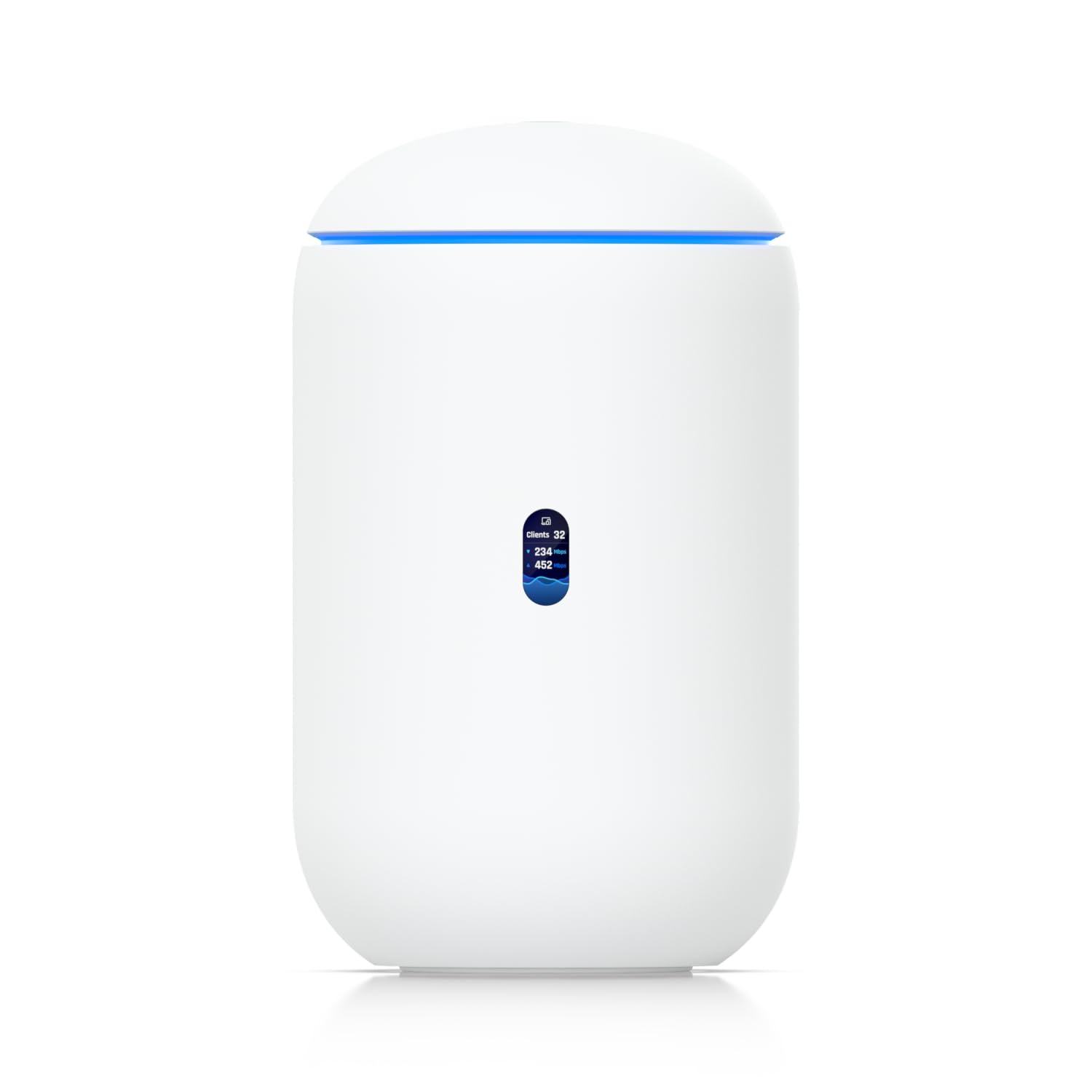
1. UbiQuiti UDR7
Our pick — 4.5+★ from 250+ verified ratings; the strongest balance of quality and price.
One box that runs the lines, the switch, and the Wi-Fi without breaking a sweat.
For a house or small business that wants the whole network in one appliance, this is the pick the review pages keep circling back to. Its data transfer rate is 5700 megabits per second, which dwarfs the 1 megabit-per-second figure on the Edgerouter Lite further down this list. Put plainly: the UDR7 has roughly six thousand times the raw transfer rating of that older box, so it will not be the thing slowing your fiber down.
Two WAN sockets mean you can bring in two separate internet lines here — a 2.5G RJ45 WAN port for a normal cable or fiber feed, plus a 10G SFP+ fiber WAN port for a faster line. That is the core of a load-balancing setup: two lines in, traffic spread across both, and if one goes dark the other carries the whole network. You also get three 2.5G RJ45 LAN ports and a PoE port that supplies 15.4W to a connected device, which is enough to power a single access point or camera over the same cable that carries its data.
The wireless side is tri-band Wi-Fi 7 across 2.4, 5, and 6 GHz, covering roughly 1750 square feet, with a 0.96-inch LCM screen on the front showing live device status. What wins people over is the performance and the setup — the phone app walks you through configuration, and the management software lets you view client-by-client bandwidth in real time. Buyers report it suits small and home networks well and is “easily expandable,” and one owner switched off a long run of DD-WRT and Tomato firmware for it and does not plan to go back.
What it handles well
- 5700 Mbps transfer rating and a 10G SFP+ WAN port, so a fast fiber line never bottlenecks here
- Two independent WAN sockets for genuinely separate internet lines
- PoE port delivers 15.4W, enough to run an access point or camera without a separate power brick
- Preinstalled 64GB microSD card supports NVR duty for up to 5 HD cameras, 2 x 2K cameras, or 1 x 4K camera
Where it asks for patience
- Managing 300+ clients through the UniFi app is deep software — a first-time buyer will spend an evening learning it
- Not cheap, and the cameras it can record are sold separately
Buy this one if: you want one desktop appliance to handle two internet lines, your switching, and your Wi-Fi, and you are happy to learn a management app.
Think twice if: you only need failover between two lines and no wireless at all — a wired-only gateway lower on this list does that for far less.
2. UCG Ultra Cloud Gateway (Ultra)
A tiny fanless gateway that quietly takes over two internet lines and never asks for attention.
If your load-balancing box is going on a shelf next to the modem and you never want to think about it again, this is the shape to look for. It handles multi-WAN load balancing — spreading traffic across more than one internet line — at a 1 Gbps routing figure with IDS/IPS, which is a security scan that inspects traffic as it passes through. For most fiber plans that 1 Gbps number is the line speed itself, so the gateway keeps up without capping you.
It manages 30+ network devices and 300+ clients, runs on Linux, and has four ports with a managed switch built in. Power comes over USB-C with the adapter included, and a 0.96-inch LCM display shows status at a glance. Durability is a genuine talking point here — the box has earned a reputation for simply not dying, with one owner reports it as one of the only electronics to survive a house fire, and another replaced a unit that had run for nine years.
Compare it to the UDR7 above and the trade-off is plain: you give up the Wi-Fi radios and the 5700 Mbps transfer rating, and in return you get a smaller, simpler box for a network where coverage is already handled by separate access points.
Where it earns its keep: multi-WAN load balancing with IDS/IPS at a 1 Gbps routing figure, in a USB-C powered unit small enough to tuck behind a modem.
The catch worth knowing: setting up a VPN or SD-WAN link between two of these needs a static IP from your carrier on one side, which is a call to your ISP before it will work.
Reach for this if you already run separate access points and want a dependable wired brain for two lines.
Look elsewhere if you want the Wi-Fi handled in the same box — the UDR7 does that job.
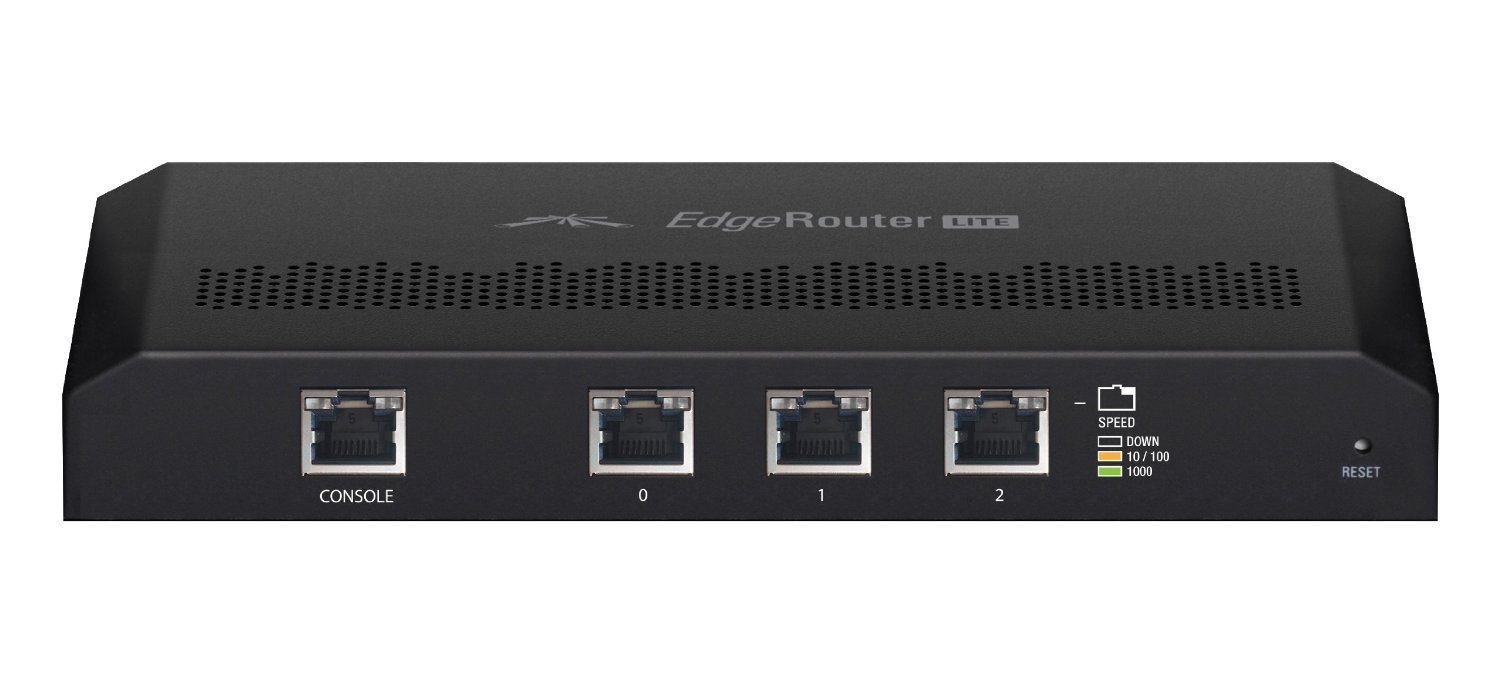
3. Ubiquiti Networks Edgerouter Lite 3-Port Router
The cheapest honest path to two ISPs that back each other up.
Here is the number that matters for a load-balancer buyer: with two internet lines plugged in, this fanless box routes 160Mbps while its processor sits under 20% load. Three Gigabit routing ports mean two internet lines in and one out to your switch. What owners rave about is the performance for the money — it routes at line speed and carries features you normally pay business prices for, and the fanless metal case means zero noise on a desk or shelf.
Setup is the split personality here. The dual-WAN wizard takes about 10 to 20 minutes per line, and the interface gets called out for being genuinely good, but advanced routing sends you into a configuration tree that assumes you understand networking terms. Treat it as pro-grade gear that expects you to read the manual — buyers with that background call it easy, and buyers without it call it a project.
The honest limitation is that there is no built-in switch, so you will need a separate switch and access point for Wi-Fi. That is the trade for its size and price. Its 1 megabit-per-second transfer rating also looks tiny beside the 5700 Mbps on the UDR7 — but read that figure as a listing artifact rather than a real ceiling, since owners are routing a 160Mbps connection through it comfortably.
What you are really buying: dependable dual-WAN load balancing, silent fanless operation, and a compact metal case, in the most affordable package on this list.
Plan around this: no Wi-Fi and no built-in switch, so budget for an access point and a switch as well — and be ready for a networking-minded setup session.
Best for: tinkerers and small offices who want two-line failover on a tight budget and already own a switch and access point.
Not for: anyone who wants to plug in and be done — the configuration genuinely expects networking knowledge.
4. Omada ER707-M2, Multi-Gigabit VPN Route

Multi-gig internet and whole-home VPN in one very configurable black box.
This is the pick for a household on a fast fiber plan that also wants every device routed through a VPN. Ports are the story: one 2.5Gigabit WAN port, a second 2.5Gigabit WAN/LAN port, four Gigabit WAN/LAN ports, a Gigabit SFP WAN/LAN slot, and a USB 2.0 port that can take storage or an LTE dongle. That is more line capacity than almost anyone needs, which is exactly the point — you can dedicate one fast line and keep the rest as backup paths.
Its 2500 Mbps data transfer rate sits well above the 1 Gbps figure on the ER7206 further down. Owners mention hitting 1,400Mbps through it on a 1,200Mbps cable plan, and note that seeing that requires an ISP-approved router above 1 gig and 2.5-gig hardware end to end. The concurrent session ceiling is 500,000 and client support runs to 1000+, so a busy household with cameras and smart devices will not exhaust it.
VPN capacity is generous — up to 100 LAN-to-LAN IPsec tunnels, 66 OpenVPN, 60 L2TP, and 60 PPTP connections — and the box has a 5-year warranty with free technical support. The recurring gripe is the setup: it is more complex than a consumer router, and some units have arrived in an unknown port state that needed a reset and a configuration pass. Owners who pushed through describe the support as genuinely expert.
The reasons to pick it
- Two 2.5G ports plus four Gigabit and an SFP slot — the most flexible port layout on this list
- 2500 Mbps transfer rating and support for 1000+ clients
- Huge VPN tunnel capacity for remote workers and site-to-site links
- Backed by a 5-year warranty and weekday technical support
The honest trade-offs
- Setup is a project, not a plug-in — expect to configure it properly
- Reaching the full 2.5G speed needs matching hardware on both ends of your network
Suits: a multi-gig home or small office that wants VPN routing and backup internet lines from the same box.
Skip if: you want a consumer-simple setup and only run one standard fiber line.
5. GL.iNet GL-MT5000 Brume 3 Gateway

A pocket gateway that hides your VPN traffic as ordinary web browsing.
At 148 grams, this is the one you drop in a laptop bag. Its headline figure is hardware-accelerated VPN throughput up to 1100 Mbps — over 3× the Brume 2 per the maker — delivered by dedicated hardware handling WireGuard and OpenVPN-DCO encryption instead of the main processor. That matters because VPN work is exactly what makes cheaper devices crawl.
Three 2.5GbE ports with flexible WAN/LAN configuration let you run dual-ISP Multi-WAN with failover, so one line can back up the other. The feature that stands out for travelers is VPN obfuscation, which disguises VPN traffic as regular HTTPS so it survives networks that block VPNs. Deep Packet Inspection with visual dashboards blocks adult, gambling, and malicious sites, while SQM and QoS prioritize gaming, calls, and video when bandwidth is tight. There is 1GB DDR4 memory and 8GB eMMC storage, with OpenWrt for plugins and a USB 3.0 Type-C port for storage or a 4G/5G dongle.
Reliability and functionality are what owners bring up first, along with how straightforward the interface is for managing WireGuard and other options. Unlike the all-in-one units here, there are no Wi-Fi radios at all, so you pair it with your own access point or laptop tether. That is a deliberate design, not a gap.
Standout spec: 1100 Mbps hardware-accelerated VPN throughput in a 148-gram box — fast enough that encryption stops being the slow part of your connection.
Know before you buy: wired only, with no Wi-Fi built in, so it needs an access point or a tethered device to reach wireless clients.
Who it beats the field for: remote workers and travelers who need a fast, disguised VPN and dual-ISP failover in something that fits a coat pocket.
Who should pass: anyone who wants Wi-Fi from the same box — this one deliberately ships without radios.
6. TP-Link ER7206 Router

Four internet lines into a single box that was built to spread the load.
If your problem is not one flaky line but several connections you want working together, this is the most direct answer on the list. Its port layout is one Gigabit SFP WAN port, one Gigabit WAN port, two Gigabit WAN/LAN ports, and one Gigabit LAN port — up to four WAN ports in one device. That is how a load balancer earns its name: four lines feeding one network, with traffic distributed across all of them. It supports up to 700 clients and, per the maker’s figures, a maximum number of associated client devices of 150,000.
Security is stacked in — firewall policies, DoS defense, IP/MAC/URL filtering, and a speed test — plus VPN support for up to 100 LAN-to-LAN IPsec, 50 OpenVPN, 50 L2TP, and 50 PPTP connections. Quality is the thing that gets praised most.
The recurring friction is the Omada interface. Simple tasks like setting a static DHCP reservation can run across roughly twenty screens, and online help does not always match what is on screen. Reliability gets discussed both ways — a long-running unit can be flawless for years, while others describe a rockier curve — so read it as a device that rewards a careful, unhurried setup.
Why it stands out: four WAN ports and up to 700 clients, which is a rare combination at this size — and the Omada SDN platform ties it into a whole network of controllers, access points, and switches.
The one to weigh: the management interface is not friendly, and a straightforward change can take many more screens than it should.
Pick it when you genuinely have three or four internet lines to combine and want every client covered.
Pass if two lines and a clean setup are all you need — the ER707-M2 above is far less fussy.
7. Synology RT6600ax

Five separate networks from one elegant box, with no subscription in sight.
Here the load-balancing angle takes a different shape — this is a Wi-Fi router that also segments your network relentlessly. You can create and define up to 5 separate networks to segregate and contain vulnerable devices, which is exactly what you want for a house full of cameras, smart plugs, and work laptops. Parental controls, web filtering, traffic control, and threat prevention are all built in, and the VPN suite covers remote desktop and site-to-site tunneling for flexible remote connectivity.
The wired side is what matters for line handling: a 2.5GbE port that can serve the fastest ISPs and can optionally be configured as a LAN port, plus expanded 5.9 GHz spectrum support for additional high-speed 80 and 160 MHz channels. Owners running two of these in a mesh report a steady 987Mbps on a 1Gbps plan with 30+ devices connected. The quality and the setup both come up as strong points, especially for anyone moving off a system that charged a subscription for parental controls.
There is a split personality worth naming. Reliability, compatibility, and Wi-Fi signal strength all get discussed both ways, with a minority of owners hitting system issues or finding the signal less than expected. And the setup can be fussy about the route: skip the mobile app and do it on a browser, and in access-point mode use the WAN port rather than the LAN port despite what the software implies. Get past that and the unit runs quietly for years.
What buyers keep praising: the combination of a 2.5GbE port, up to five separate networks, and free parental controls — you avoid the recurring fee other mesh systems charge.
What to plan for: setup has undocumented gotchas around access-point mode, and the Wi-Fi range divides opinion among owners.
Go here for: a mesh home where separating IoT, guests, and work traffic matters more than raw speed figures.
Keep looking for: a no-app, pure-wired failover box — this one makes you set up radios and segments you may not want.
8. GL.iNet GL-X3000 (Spitz AX) Cellular Gateway 5G Router

When the cable line is the backup and cellular is your main connection.
This is the pick for a house off the beaten path, an RV, or anyone who wants to add a cellular line alongside their wired one. Its Wi-Fi 6 radios push up to 574Mbps on 2.4GHz and 2402Mbps on 5GHz with MU-MIMO, which is a technology that talks to several devices at once. The real headline is the multi-WAN technology: it can draw internet from Ethernet, Repeater, Cellular, and Tethering at the same time, distribute bandwidth among them by custom proportion, and fail over by priority when one drops. Dual SIM card slots with single standby let you pick whichever carrier is stronger and switch automatically.
Owners running this in a car report a stable 5G connection averaging 150 Mbps in the cargo area, beating the dedicated hotspots they had tried. Full-time RVers report over 300 Mbps and never below 90 Mbps even on a busy network, crediting the six detachable antennas and SMA connections for making external antennas possible. VPN support is built in with OpenVPN and WireGuard across 30+ services, and the firmware is based on OpenWrt v21.02 with more than 5,000 ready-made plug-ins.
The caution is real and worth stating plainly: reliability is raised as a concern, with some devices reported to slow down or fail after months of uptime, and a heavy user switching away after seeing latency climb past 100ms and speeds drop. It is also described as a superb 5G modem and a only-adequate router for smart-home gear, since the radios are separate 2.4 and 5GHz bands only.
Why it earns a spot here
- Load balancing and priority-based failover across Ethernet, Cellular, Repeater, and Tethering
- Dual-SIM slots for switching carriers, with 5G, 4G LTE, and 3G support
- Six detachable antennas with SMA connections for external antenna upgrades
- OpenWrt v21.02 with over 5,000 plug-ins and built-in OpenVPN and WireGuard
What to watch for
- Long-term reliability is the biggest reported concern, with some units slowing after months of uptime
- The Wi-Fi is split into 2.4 and 5GHz only, which is tougher on older smart-home devices
- Pricey, and some consider it expensive for the lifespan reported
Right for you if your internet needs to travel with you or reach a place cable will not.
Wrong for you if you need a set-and-forget gateway that runs for years untouched — that is a different pick on this list.
9. ASUS ROG Rapture WiFi 6E Gaming Router (GT-AXE16000)

The router that takes whatever you throw at it and keeps the ping flat.
This is the ceiling of the list — a quad-band Wi-Fi 6E router rated to 16000 Mbps, with dual 10G WAN/LAN ports and a 2.5G WAN port that prioritizes all network traffic. The new 6 GHz band gives you wider channels and higher capacity, which translates to lower latency and less interference from neighbors, and ASUS RangeBoost Plus is the company’s signal-range technology for covering a bigger footprint.
In a house where dozens of devices compete for airtime, this is how people report it behaving: an IT professional running over a hundred 2.4GHz devices and around fifty on 5GHz says two AiMesh hubs transformed coverage, holding the 5GHz band near 900Mbps with no drops. Gaming sessions feel the difference most, because the triple-level acceleration and the 6 GHz band cut the interference that causes spikes.
The honest counterpoint is worth saying out loud: reliability and the 6 GHz band both draw mixed feedback, with some owners finding that band unhelpful in their layout. There is also a pairing caveat — one owner had no trouble running it entirely on its own, but could not get it to recognize another ASUS router as a wired backhaul node and returned it. Plan to run it as your main router and it delivers.
The spec that defines it: a 16000 Mbps rating, two 10G ports, and a 2.5G WAN port, so it has more raw capacity than any other router on this list.
Worth knowing before you buy: it is the most expensive pick here, the 6 GHz band divides opinion, and it does not play nicely as a mesh node with some other ASUS routers.
Choose it for: a congested home full of gamers and heavy streamers who need the widest possible channels and the most ports.
Choose something else for: straightforward dual-ISP failover on a budget — the Edgerouter Lite does that job for a fraction of the complexity.
Know the Specs
Data Transfer Rate
This is the speed rating for how much data the box can push per second, measured in megabits per second. It is the number that decides whether the device becomes your bottleneck: if your internet plan is faster than this rating, the extra speed never reaches your devices. Match the figure to your actual line speed, and remember that manufacturers rate these under ideal conditions, so real-world throughput is usually a little lower.
WAN Ports and Multi-WAN
A WAN port is the socket an internet line plugs into, and multi-WAN means the device can accept more than one line at once. Some models do this with a dedicated second WAN socket, while others let you reassign a LAN port to WAN duty in the settings. Two lines are enough for most homes; four ports suit a small office where several connections, including a cellular backup, need to work together. Failover is the setting that decides which line takes over when another drops.
Common Questions
What does a load balancer actually do for my internet?
Do I need a load balancer with a single internet provider?
Can a load balancer combine two slower lines into one fast line?
Is a wired-only gateway better than an all-in-one router for load balancing?
How many WAN ports do I need for two internet lines?
Will a load balancer work with my fiber and cable lines at the same time?
What is failover and how is it different from load balancing?
Do I need an access point if my gateway has no Wi-Fi?
Does a load balancer slow down my connection?
Can I use one internet line for work and another for streaming?
The Bottom Line
For most people hunting for the best internet load balancer device, the UbiQuiti UDR7 is the smartest single purchase — it accepts two independent internet lines over both a 2.5G RJ45 port and a 10G SFP+ port, spreads traffic across them, and still handles your Wi-Fi and switching in one box rated at 5700 Mbps. If you want the multi-gig fiber speed and the biggest VPN capacity instead, grab the Omada ER707-M2. And for a wired-only failover box that just keeps running without a fan, the always-popular UCG Ultra is the one to reach for — and remember, whether you pay for the top model or the budget one, the only way to stop a single line from taking you down is to give your network a second path.
How we choose
We do not accept paid placement. Every pick is matched to a real buyer and a real use-case; we do not hands-on test units.
Sources
Specifications: manufacturer listings and product documentation. Review insights: verified customer reviews, as of October 2026. Pricing: not shown on this page (it changes often); check the current price via the retailer link.
As an Amazon Associate, Aappliancez earns from qualifying purchases. This does not affect which products we feature.