Disclosure: Some links in this post are affiliate links. As an Amazon Associate I earn from qualifying purchases, at no extra cost to you. Learn more
Specs are compiled from manufacturer listings and verified buyer reviews and can change over time — please confirm the key details on the product page before buying.
If you want the one that suits the most living rooms, get the Nintendo Switch 2 — it plays on your TV, in your hands, and on a tabletop, and it is the pick most families end up keeping. But “interactive game console” now covers two very different things: consoles you hold, and consoles that watch your body move. This guide separates them so you buy the right type once, instead of discovering the mismatch after the box is open.
This guide is built by comparing the manufacturers’ published specifications and the patterns across verified customer reviews, so you get each pick’s real strengths and trade-offs instead of marketing spin.
Two categories dominate this shelf: handhelds and TVs that need a controller, and camera-based systems where your arms and legs are the input. The list below splits them clearly, so you can find the best interactive game console for your room, your family, and your idea of fun.
Top Picks

How To Choose The Best Interactive Game Console
Your first decision is not brand or budget — it is if you want a controller in your hand or your whole body in the game. Settle that one question and the rest of the spec sheet falls into place.
Controller-free versus controller-in-hand
A camera-based console reads your arms and legs and turns them into input, so nobody has to learn a button layout. That is the appeal for kids and for mixed-age groups. The trade-off is space: the camera needs to see you, which usually means clearing a patch of floor and keeping the room reasonably lit.
A conventional console with a gamepad works in a smaller room and gives you precise control, but everyone playing needs to know the buttons. If your group spans a five-year-old and a grandparent, that learning curve is the real cost.
Screen specs you will actually notice
Resolution (the number of pixels on screen) decides how sharp text and edges look. Refresh rate, measured in hertz, is how many times per second the picture updates — 120Hz looks noticeably smoother in fast motion than 60Hz. On a handheld these two numbers decide whether a game feels crisp or slightly smeary in your hands.
Storage, memory cards, and subscriptions
Internal storage caps how many games sit ready to play without redownloading. Look for a microSD or microSD Express slot if you plan to build a library. Separately, check whether the games you want are included or locked behind a monthly pass — that recurring cost matters more than the box price over a couple of years.
Side-by-Side Comparison
| Model | Best For | Display | Storage | Control Style | Amazon |
|---|---|---|---|---|---|
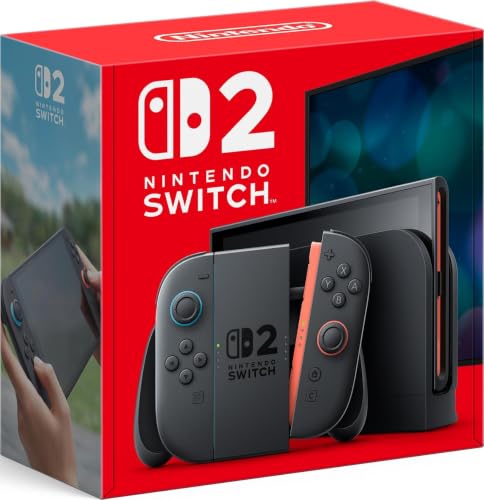
| Nintendo Switch 2 System★ Best Overall | All-round family console | 7.9” LCD, up to 120 fps | 256GB, microSD Express | Joy-Con 2 gamepad | Amazon |
| Oculus Quest 2 Advanced VR Headset 128GBBudget VR Entry | Budget VR entry | 1832 x 1920 per eye, 90Hz | 128GB | Touch controllers | Amazon |
| Nex PlaygroundNo Controllers Needed | Kids’ active play | — | — | Body motion, up to 4 players | Amazon |
| Meta Quest 3S 256GB | Serious VR gaming | 3664 x 3840, 120Hz | 256GB | Touch controllers | Amazon |
| Nintendo Switch (Neon Blue/Red) | Classic handheld value | 6.2” LCD | 32GB, microSDXC | Detachable Joy-Con | Amazon |
Detailed Reviews
1. Nintendo Switch 2 System
Our pick — 4.5+★ from 5,500+ verified ratings; the strongest balance of quality and price.
One console that swaps between your TV, your hands, and the kitchen table.
Fast games stay smooth in your hands thanks to a larger 7.9-inch LCD touch screen — it supports HDR (a wider brightness range that keeps dark scenes from turning grey) and refresh rates up to 120 fps (frames per second, or how many images the screen draws each second). Drop it into the dock and it outputs 4K (a high-resolution picture with about 4,000 pixels across) to a compatible TV. That 7.9-inch panel is why handheld mode finally feels like a first-class way to play rather than a compromise.
Reviews keep repeating the same point: this is the console families actually keep using. Kids pick it up without a tutorial, and adults stay for the deeper titles. The magnetic Joy-Con 2 controllers latch on and also offer mouse controls, which is a genuinely new way to point at things. storage lands at 256gb internal, expandable with microSD Express cards — enough that you are not deleting a game to install the next one.
Set expectations on battery: as buyers report, “Battery lasts a few hours.” That is the honest trade-off for the bigger, brighter screen. The other thing worth knowing is that GameChat — voice chat, screen sharing, and video chat while you play — needs the online service, and streaming apps were not there at launch according to the review pages.
What pushes it to the top
- Three play modes (TV, tabletop, handheld) from one system — one purchase covers the living room and the car ride.
- 7.9-inch LCD with HDR and up to 120 fps makes handheld play feel premium.
- 256GB internal storage, expandable via microSD Express cards.
- Magnetic Joy-Con 2 attachment fixes the wobbly-rail annoyance of the original.
Where it asks you to compromise
- Battery runs a few hours per charge, so long trips need a plan.
- Full voice and video chat rides on the paid online service.
- The controllers are small for large hands — a full-size gamepad is a sensible add-on.
Reach for this if: you want one machine that does family game night and solo handheld sessions without buying twice.
Think twice if: you need all-day untethered play — the battery is a few hours, and that is the number to plan around.
2. Oculus Quest 2 128GB
The cheapest honest way to find out whether your family actually likes VR.
Resolution is the headline: 1832 x 1920 pixels per eye on an LCD panel running at 90Hz, with a 95-degree field of view. In plain terms, each eye gets its own dense picture, and the 90Hz refresh keeps head turns from feeling choppy. The whole thing is self-contained — no PC, no cable — so a first VR session is unbox, charge, put it on.
The bundle is more generous than most: the headset, two Touch controllers, two AA batteries, a silicone cover, a glasses spacer, a charging cable, and a power adapter. The silicone grip covers are there to stop sweat and dust from making the controllers slippery, and the adjustable knuckle straps let you open your hands without dropping them. For a household where a ten-year-old is going to grab it, that padding matters.
It survives daily family use — one parent reports a year of use with no issues. A parent of a 12-year-old reports “12 y/o son loves this, has used it for a year with no issues whatsoever.” The recurring caveat is the controller batteries: charging can stop working properly over time, so budget for rechargeables. There is also a comfort question — some players get dizzy with too much movement, which is a VR (virtual reality, where a headset shows you a 3D world) reality rather than a flaw in this headset.
Value read: 128GB holds a solid starter library, and the included accessories mean you are not buying a cover and a spacer separately.
Before you buy: the age guidance lists adult, and the headset is older-generation hardware next to the Quest 3S. It is the right pick for testing the water, not for chasing the sharpest picture.
The smart first step: a low-risk way into VR for a family that has never tried it.
Look elsewhere if: you already know VR is your thing and want the newest tracking and the sharpest display.
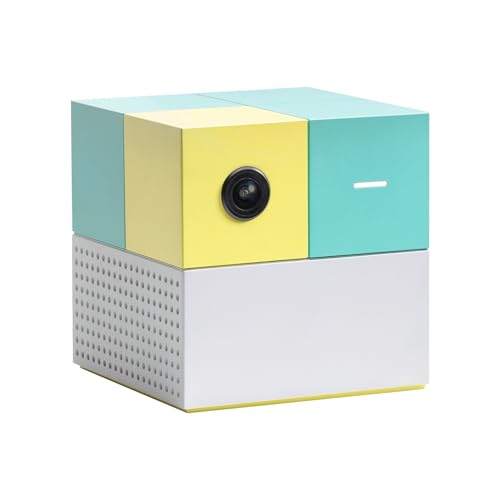
3. Nex Playground – The Active Play System for Kids & Families
A small cube that turns your living room into a playground, no controllers in sight.
Up to four people can play at once using nothing but their bodies. The built-in wide-angle camera tracks movement with AI, so a five-year-old and a grandparent both know exactly what to do within seconds. Five games come in the box — Fruit Ninja, Starri, Whac-a-Mole, Go Keeper, and Party Fowl — and the unit connects to your TV or projector over HDMI. It weighs 13.76 ounces and is small enough to fit in a backpack for playdates.
Owners say it becomes the default for family time within days. Kids play standing up instead of sitting, and nobody needs a controller tutorial to join. Starri in particular gets used as a real workout: it tracks calories and offers three difficulty levels with no wearables. The content is safe for all ages, with no ads and no in-app purchases, and motion tracking data is not stored in the cloud.
The honest catch is the library. The five starter games are included, but the full catalog — Barbie, Teenage Mutant Ninja Turtles, Peppa Pig and the rest — needs a separate Play Pass purchase, either a 3-month or 12-month plan. A few owners also note you cannot loop a single game on repeat, which matters with very young kids who want the same thing twenty times. And the camera needs floor distance, so a tight room is a real constraint.
Where the money goes: the hardware is small and simple; the value sits in the game catalog, which is a subscription.
Room check first: measure your open floor space before you buy — the camera has to see the players.
Best for: households with kids aged five and up who want screen time that involves standing up.
skip it if: your TV area is cramped or you want a one-time purchase with no recurring catalog fee.
4. Meta Quest 3S 256GB | VR Headset

The VR headset that finally makes mixed reality feel like more than a demo.
Two RGB color cameras bring your real room into the game in full color, which means you can check your phone or find a drink without taking the headset off. The display runs 3664 x 3840 pixels at 120Hz, and the Snapdragon XR2 Gen 2 processor keeps load times short. Compare that to the Quest 2’s 90Hz panel and 1832 x 1920 per eye — the newer headset is in a different class on both smoothness and pixel density.
Hand tracking is the feature that converts skeptics. It is accurate enough that losing it mid-game is rare, and the bundled Batman: Arkham Shadow runs at a smooth frame rate with detailed graphics. Battery life is rated at 2.5 hours from a 4324 milliampere-hour cell (a milliamp-hour is a measure of charge capacity — bigger means longer between plugs). There is 8GB of RAM and 256GB of storage, plus a 3-month trial open up 40+ games.
The fair warning is the weight over long sessions and the setup curve — a first-time headset owner has to learn boundary setting and account linking before the fun starts. A few players also find heavy movement causes dizziness, so short sessions are the smart start. Controllers have been known to act up in rare cases, which is worth knowing if you are buying for rough handling.
Why it earns the VR crown
- Full-color passthrough lets you see your room while wearing it.
- 120Hz refresh and 3664 x 3840 resolution kill the screen-door effect.
- 256GB storage plus a 3-month trial with 40+ games.
- Hand tracking works well enough that controllers are often optional.
Set your expectations here
- 2.5 hours of battery per charge — long sessions need a top-up.
- Initial setup takes patience for a first-time VR owner.
- Some players get motion sickness, so start with short bursts.
Pick this one: if VR is the point and you want the sharpest, smoothest picture at a mid-range position.
Not for you if: you want plug-and-play simplicity — this rewards a little setup effort first.
5. Nintendo Switch

The 6.2-inch original that still wins on price and pure game catalog.
Three play modes — TV, tabletop, and handheld — come from a 6.2-inch LCD screen and detachable Joy-Con controllers that slide onto the sides. Local co-op, online, and local wireless multiplayer are all built in, so two people can play on one system without a second console. It is the machine with Mario and friends, and that catalog is the reason it stays relevant.
The straightforward truth about this one: it plays everything you expect, and the reviews are full of grandparents and parents buying it as a gift. “My kiddo was excited to have it even though it’s not the newest version,” reads one, and that is the whole pitch — it is not the newest, and the price reflects that. Internal storage is 32GB, expandable via microSDXC cards, so plan on a card if you buy games digitally.
Two honest caveats. Battery life and connectivity are the split opinions — some owners say the charge lasts a good amount of time and it connects to TVs, others report charging issues and connection problems. And durability has its share of negatives, so treat the Joy-Con rails kindly. Buy new rather than refurbished if you can; the review pages are clear that refurbished units have caused returns.
The case for it: the cheapest road into the Switch game library, with a proven multiplayer setup.
The trade-off: 32GB fills fast, the 6.2-inch screen is smaller than the Switch 2’s 7.9-inch panel, and the battery is the most-split topic in the reviews.
Good for: a first console for a kid, or a second one for a household that already shares games.
Step up if: you want the bigger screen and the new magnetic Joy-Con — that is the Switch 2’s job.
Know the Specs
Refresh Rate and Resolution
Refresh rate in hertz is how many times per second the screen redraws. A 120Hz display redraws twice as often as a 60Hz one, which makes fast motion look smooth instead of smeared. Resolution is the pixel count — higher means sharper edges and readable small text. On a handheld, a 7.9-inch panel with 120Hz support gives you both a large picture and smooth motion, while a smaller 6.2-inch LCD trades size for a lower price.
Storage and Expansion
Internal storage is the shelf space for installed games. When you see 256GB next to a 32GB or 1TB figure, that is the difference between a few big titles and a full library. Expansion matters just as much: microSD Express cards, microSDXC cards, and NVMe SSD storage are different standards, and the console you pick decides which one you can use. Check the slot before you buy a card.
Camera-Based Motion Tracking
A controller-free console uses a camera to read where your arms and legs are, then maps that to the game. It removes the controller learning curve but adds a room requirement: the camera needs to see your whole body, which usually means open floor space and decent lighting. Some systems struggle in a dark room, so an evening play session may need the lights on.
Battery Life and Charge
Battery figures are quoted in hours of play, and they vary with the game. A console rated at 2.5 hours will run out in a long session; one rated at 3-12 hours depending on content gives you far more flexibility. A milliamp-hour rating tells you the charge capacity on paper, but the hours figure is what you actually feel. Plan charging around your longest session, not your average one.
Common Questions
Will a controller-free console work in a small living room?
Do I need a subscription to play games on a motion console?
Is the Quest 3S a big enough upgrade over the Quest 2 to justify it?
How long does a handheld console actually last on a charge?
Can more than one person play at the same time?
Can I add storage later, or am I stuck with what I buy?
Is an arcade cabinet worth it compared to a console?
How much room does an arcade cabinet need?
What does 4K or 120 fps actually mean for how a game looks?
Do these consoles work with games I already own?
The Bottom Line
For most households, the interactive game console winner is the Nintendo Switch 2 System because it covers TV, tabletop, and handheld play in one box, with a 7.9-inch HDR screen and 256GB of expandable storage. If movement is what you are after, grab the Nex Playground — it gets four players off the couch with no controllers and no learning curve. And for someone who wants a sharp screen in their hands on a long flight, the Valve Steam Deck OLED with its 1TB drive and 3-12 hours of play is the one to reach for. The Switch 2 also carries the highest rating on this list: 4.5+ stars across 5,000+ owners.
How we choose
We do not accept paid placement. Every pick is matched to a real buyer and a real use-case; we do not hands-on test units.
Sources
Specifications: manufacturer listings and product documentation. Review insights: verified customer reviews, as of October 2026. Pricing: not shown on this page (it changes often); check the current price via the retailer link.
As an Amazon Associate, Aappliancez earns from qualifying purchases. This does not affect which products we feature.