Disclosure: Some links in this post are affiliate links. As an Amazon Associate I earn from qualifying purchases, at no extra cost to you. Learn more
Specs are compiled from manufacturer listings and verified buyer reviews and can change over time — please confirm the key details on the product page before buying.
If you want the short answer: the Roku Premiere is the one to buy. It turns almost any television into a smart TV, it is the most reliable pick here by a wide margin, and it comes with the HDMI cable you need in the box. The rest of this list covers the mirroring dongles and Android sticks that make sense for very specific jobs — casting your phone screen, or getting 4K on a budget.
This guide is built by comparing the manufacturers’ published specifications and the patterns across verified customer reviews, so you get each pick’s real strengths and trade-offs instead of marketing spin.
Most people assume a cheap streaming device will feel slow and cheap. In practice, the thing that decides whether you love it or return it is how it handles your internet connection and whether it plays the apps you actually pay for. Here is how the real options shake out for the inexpensive streaming device.
Top Picks


How To Choose The Best Inexpensive Streaming Device
Before you buy anything, answer one question: what does your TV actually lack? Two very different products get sold as “streaming devices,” and picking the wrong type is the number one reason people end up disappointed.
Streaming stick vs mirroring dongle
A streaming stick or box (like the Roku or the ONN picks) has its own operating system. You log into Netflix, YouTube, and Disney+ inside the device itself, and it plays them on its own — your phone stays in your pocket. That is the right choice for everyday TV watching.
A mirroring dongle (like the lulaven or JUCONU adapters) does something narrower. It takes whatever is on your phone screen and copies it onto the TV. That is genuinely useful for showing photos, presentations, and TikTok clips to a room — but it is not the same as having a smart TV.
Check your TV’s HDMI port first
Every product here plugs into an HDMI port, the rectangular socket on the back or side of your TV that carries picture and sound. If your TV is older, count how many ports it has free — because one of them will be permanently occupied once you plug in a streaming device.
Watch for DRM limits before you buy
DRM stands for digital rights management — copy protection that streaming services wrap around their movies. On phone mirroring adapters, this is why Netflix and Disney+ often refuse to appear on the TV from a mirrored screen. If watching those apps is your main goal, buy a streaming stick instead of a mirroring dongle.
Side-by-Side Comparison
| Model | Best For | Max Resolution | Device Type | Weight | Amazon |
|---|---|---|---|---|---|
| Roku Premiere★ Best Overall | Everyday streaming on any TV | 4K / HDR | Streaming stick | 1.28 ounces | Amazon |
| lulaven Wireless HDMI AdapteriPhone Pick | iOS phone-to-TV mirroring | 1080P | Mirroring dongle | 2 ounces | Amazon |
| JUCONU Wireless HDMI Adapter | Mixed Android and Apple households | 4K x 2K at 30Hz | Mirroring dongle | — | Amazon |
| ONN Android TV 2K FHD Stick | A cheap second TV | 2K FHD | Streaming stick | — | Amazon |
| ONN Android TV 4K UHD Device | 4K streaming with voice control | 4K Ultra HD | Streaming box | 12 ounces | Amazon |
Detailed Reviews
1. Roku Premiere | HD/4K/HDR Streaming Media Player
Our pick — 4.5+★ from 95,000+ verified ratings; the strongest balance of quality and price.
The 4K HDR streamer that revives aging TVs — and it ships with the HDMI cable you need.
If your TV still works but the smart features are missing or maddeningly slow, this is the fix. The Premiere streams in HD, 4K, and HDR — that last one being high dynamic range, which means brighter highlights and deeper blacks on TVs that support it. It measures 3.3 inches long by 1.4 inches wide by 0.7 inches high, a credit-card-sized box that hides behind the TV.
Setup is the part owners rave about most, and rightly so. You plug in the included Premium High Speed HDMI Cable, connect to Wi-Fi, and start streaming. There are 200+ free live TV channels on The Roku Channel, plus the usual paid apps — Netflix, HBO Max, Disney+, and Prime Video. Shortcut buttons on the remote jump straight to popular channels. It weighs just 1.28 ounces, so a strip of the included removable adhesive holds it in place.
The trade-off is the remote. It is an IR remote, meaning you have to point it at the TV, and it has no volume or power buttons. One buyer who revived a 15-year-old TV put it plainly: the live content “might stutter due to ram limitations if you watching im hd,” but it “works well for the price.” That is the honest picture — this is a superb value that behaves like a budget device, not a flagship one.
What earns it the top spot
- Streams in 4K and HDR, so it still looks sharp on modern TVs
- Runs Siri, Alexa, and Google Assistant for voice control
- Apple AirPlay support lets you throw video from an iPhone to the TV
- Everything needed is in the box, including the HDMI cable and batteries
Where it shows its budget roots
- The IR remote needs a clear line of sight and has no volume or power buttons
- Heavy 4K live content can stutter on older internet connections
- It is a wired-to-the-wall device, so you need a free outlet nearby
Buy it if: you want one box that handles every streaming app and works on almost any TV, new or old.
Look elsewhere if: you refuse to point a remote at the screen, or you only ever want to mirror your phone.
2. lulaven Wireless HDMI Adapter for iPhone iPad
A 1080P mirroring dongle that puts an iPhone or iPad screen on any HDMI display.
This is a mirroring dongle, not a streaming stick, and the distinction matters more than any spec on the page. It copies your iPhone or iPad screen — YouTube, TikTok, Safari, photos, games, PowerPoint — onto any HDMI TV, monitor, or projector in 1080P. There is no app to download, no Bluetooth pairing, and no Wi-Fi required. Three steps: plug it into the TV, power it with a 5A/1A adapter, and select the HDMI input.
Owners say it is genuinely simple once the right iPhone or iPad is in hand. It handles every Lightning and USB-C iPhone and iPad model.
Now the part that catches people out: it cannot mirror DRM-protected apps. Netflix and Disney+ are off the table, and the listing is upfront that this limitation applies to every wireless HDMI adapter, not just this one. Buyers report instances where the mirroring failed outright — video and audio flashing on and off over HDMI and USB-C power, even with updated iOS devices. That is the risk you accept for the plug-and-play convenience.
Best for presentations: if you demo on a screen — inspection walkthroughs, slides, group shows — this is the frictionless option.
Not a smart TV replacement: your phone has to stay on and in range, which is a very different deal from a stick that runs apps by itself.
Reach for this if: everyone in the house uses an iPhone or iPad and you mainly want to show photos and videos on the big screen.
Pass if: your house is mixed Apple and Android, or Netflix casting is the whole point.
3. JUCONU 4K 1080P Wireless HDMI Display Adapter

A mirroring dongle that covers AirPlay, Miracast, and DLNA — but blocks HDCP apps on Apple devices.
Where the lulaven refuses to talk to Android, this adapter tries to cover everyone. It supports AirPlay, Miracast, and DLNA, which together cover iPhone, iPad, MacBook, Android, and Windows devices. It is a compact 1 inch by 2 inches by 3 inches, and it is the only pick here that lists four resolutions: 4K x 2K at 30Hz, 1080P at 60Hz, 1080P at 30Hz, and 720P. You connect it to the TV, power it up, and find the mirror function on your device — no apps, no Bluetooth.
There is a genuinely useful extra: an extend mode that lets you cast video to the TV while still using your phone. For Android and Windows owners, it is the more capable of the two dongles, since it can handle protected streaming apps that the iOS-side cannot. That breadth of compatibility is the whole reason this earns a spot.
The fine print is where it gets softer. Apple devices are blocked from HDCP-protected apps like Netflix, Hulu, and Amazon Video on this adapter, same as the lulaven. Setup is consistently called easy, but functionality splits down the middle — the adapter works great for some feeds and simply will not play others. Picture quality is the recurring gripe, with some owners finding it does not deliver the 1080p clarity the label implies.
The wide-net choice: if the phones in your house are a mixed bag, this beats the iOS-only lulaven on compatibility alone — but it is a little less predictable.
Worth it if: you have Android or Windows devices in the mix and want one adapter to handle them all.
Think twice if: crisp guaranteed 1080P on every source matters more to you than broad device support.
4. ONN Android TV 2K FHD Streaming Stick
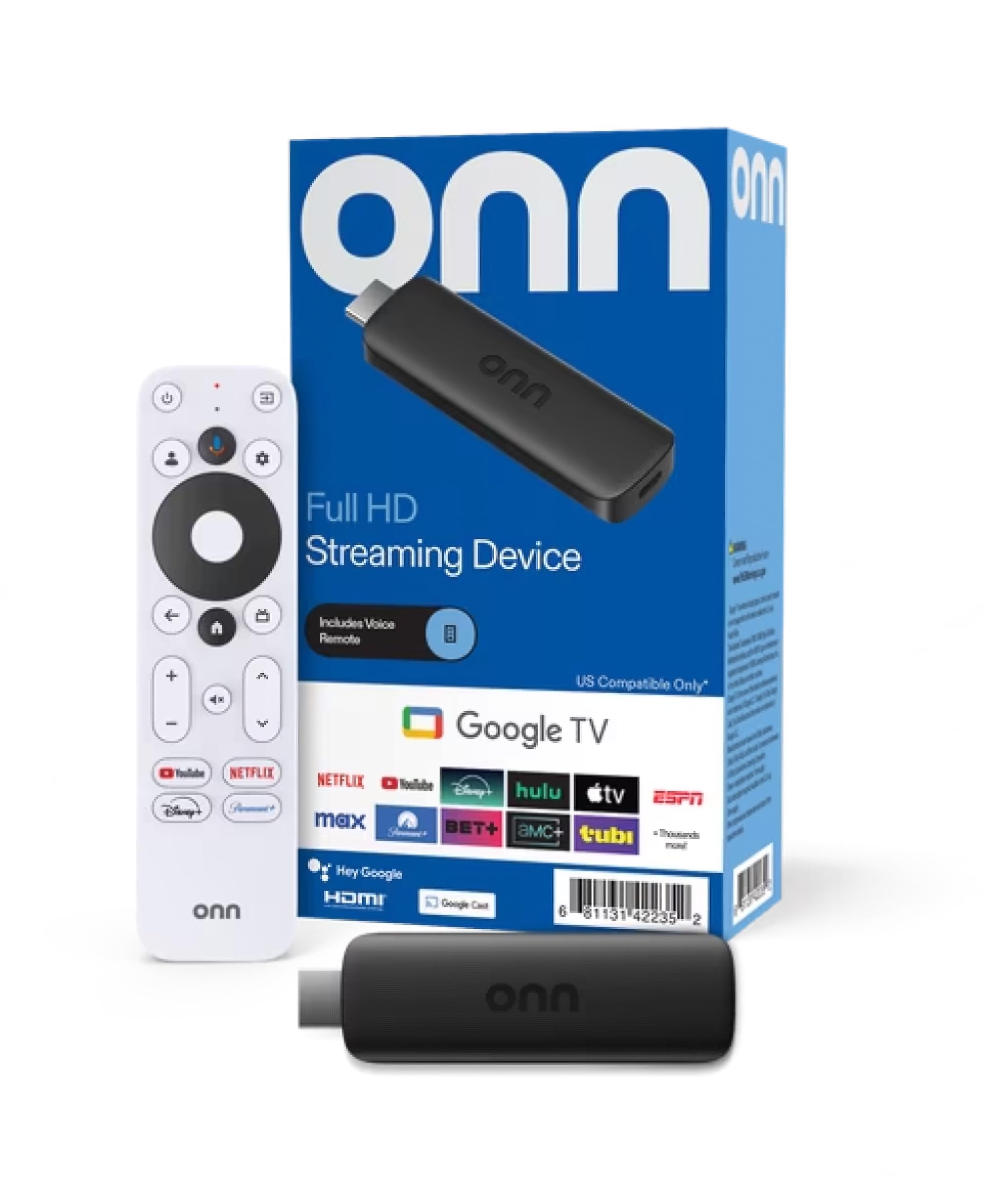
A 2K Android TV stick with a voice remote and Chromecast built in, priced for a spare-room TV.
The pitch here is simple: a full streaming stick with a voice remote for less than most of the mirroring dongles above. It runs Android TV, so you get the Play Store’s app library, YouTube, and Play Movies & TV built in. It streams at 2K FHD — sharper than standard HD but a step below the 4K that both the Roku and the ONN 4K box handle.
The included kit is more generous than the price suggests. You get the stick, an 11.8-inch HDMI cable, a power adapter, and a remote that runs on two included AAA batteries. Press the mic button to ask for content, or cast photos, videos, and music from your phone, tablet, or PC using Chromecast built in. Owners consistently call setup the easiest part.
Here is the honest limitation you need to plan around. The regional lock means it is built for US use, and buyers flag compatibility trouble when it travels. If this is going overseas with you, or you stream from a service that is not US-based, it is not the pick. For a second TV in a US home, though, it is a very tidy budget answer.
Where it fits: the guest room, the garage TV, the spare set you do not want to spend real money on.
Where it falls short: the 2K ceiling and US-only design mean this is a supporting player, not the main event.
Good fit for: a cheap secondary TV in a US household where 2K is plenty.
skip it if: you are outside the US or you want 4K on your main screen.
5. ONN Android TV 4K UHD Streaming Device

A 12-ounce 4K Android TV box with a Google Assistant voice remote and 8 GB of storage.
Pick this up and you feel all 12 ounces of it. That is far heavier than the 1.28-ounce Roku, and it is because this is a streaming box that sits on a shelf with its own power supply, not a stick that dangles from the HDMI port. In return, you get 4K Ultra HD — four times the resolution of Full HD — plus 8 GB of internal storage for your apps.
Android TV runs the show, which means the Google Play Store’s full app library is available. The voice remote is the highlight: press the Google Assistant button and ask it to find, play, or control content, or cast from an Android or iOS phone with Chromecast built in. The audio side is handled well too, with Dolby audio output that sharpens dialogue. It lists compatibility with ONN, Samsung, Sony, RCA, Vizio, Hisense, TCL, Philips, and Magnavox TVs.
What holds it back from the top spot is consistency. Owners praise the 4K picture, the fast performance, and the value against pricier streamers. But there are two recurring grumbles: the remote occasionally stops responding for no clear reason, and the device sometimes struggles to connect to the internet. Neither is universal, but they are the reasons the Roku sits above it. It also has no USB or Ethernet port, so it is Wi-Fi only.
The 4K value play: if you have a 4K TV and want to spend little, this is the strongest spec-per-dollar on the list.
Know before you buy: Wi-Fi-only means a weak signal in the room will hurt you — no wired fallback exists here.
Choose this if: you have a 4K TV, want voice search, and accept Wi-Fi as your only connection.
Reward the safer bet if: rock-solid reliability matters more than saving a little, in which case the Roku wins.
Know the Specs
Resolution (HD, 2K, 4K, HDR)
Resolution is how many pixels make up the picture. HD is the baseline, 2K FHD sits a step above it, and 4K Ultra HD carries four times the resolution of Full HD for more detail. HDR (high dynamic range) is a separate boost that brightens highlights and deepens dark scenes. Here is the catch: none of it shows up unless your TV supports the same standard. A 4K streamer on a 1080p TV still delivers a 1080p picture.
Connection Type and Speed
Streaming sticks and boxes pull content over Wi-Fi, and a weak signal is the usual cause of buffering. A mirroring dongle works differently — it relays your phone screen to the TV, then uses the TV’s HDMI input, which is why it needs a power source of its own. Match the device to your setup: Wi-Fi reliability for a stick or box, a clear line of sight and a nearby outlet for a dongle.
Common Questions
What is the difference between a streaming stick and a wireless HDMI adapter?
Why can’t I mirror Netflix onto my TV with a dongle?
Do I need a 4K streaming device if my TV is only 1080p?
Will the lulaven adapter work with an Android phone?
What causes a streaming stick to stutter or buffer?
Does the ONN 2K FHD stick work outside the United States?
How much internal storage do these devices have?
Can I use voice control with a cheap streaming device?
Do these devices come with the HDMI cable I need?
Is a heavier streaming device better than a light stick?
The Bottom Line
For most people, the inexpensive streaming device worth buying is the Roku Premiere — it plays 4K and HDR, ships with the HDMI cable, and has the deepest track record of any pick here. If 4K on a tight budget is your goal, the ONN Android TV 4K UHD device is the one to reach for, with the caveat that it is Wi-Fi only. And if showing your phone screen on the TV is really the goal, the lulaven adapter is the cleanest iPhone-only answer — just remember it cannot mirror Netflix. The Roku is the safest place to start if you are only buying one.
How we choose
We do not accept paid placement. Every pick is matched to a real buyer and a real use-case; we do not hands-on test units.
Sources
Specifications: manufacturer listings and product documentation. Review insights: verified customer reviews, as of October 2026. Pricing: not shown on this page (it changes often); check the current price via the retailer link.
As an Amazon Associate, Aappliancez earns from qualifying purchases. This does not affect which products we feature.