Disclosure: Some links in this post are affiliate links. As an Amazon Associate I earn from qualifying purchases, at no extra cost to you. Learn more
Specs are compiled from manufacturer listings and verified buyer reviews and can change over time — please confirm the key details on the product page before buying.
You need a tag that survives rain, sun, and a full season in the bed — and a printer whose tape actually sticks to a plastic stake instead of curling off by July. That is the whole job here. The picks below split into two clear camps: industrial handheld units that print laminated, heat-shrink, and weather-resistant tape for plant tags and cable runs, and desktop thermal machines that churn out wide adhesive labels fast for nursery and shipping work. Match the machine to the tape you need and the choice gets simple.
This guide is built by comparing the manufacturers’ published specifications and the patterns across verified customer reviews, so you get each pick’s real strengths and trade-offs instead of marketing spin.
Weather kills plant tags, so every pick here is judged on how its tape handles moisture, sun, and rough surfaces. Here is how each machine earns its place among the best horticulture label printer options for living collections and working nurseries.
Top Picks

How To Choose The Best Horticulture Label Printer
Pick the tape first, then the machine. A printer only survives a season outdoors if its tape does, and the two main routes are laminated tape (a clear layer seals the print) and thermal-transfer ribbon printing (ink fused into the label). Plain thermal paper — the kind that darkens with heat — fades in sunlight and smears when it gets wet, which is the wrong tool for a plant tag.
Laminated tape versus thermal transfer
Laminated tape seals the printed text under a clear film, so rain runs off and abrasion does not rub the cultivar name away. Thermal-transfer machines instead use a ribbon to lay down ink that the maker describes as lasting years without fading. Both beat bare thermal labels for anything that lives outside. If your tags sit in direct sun for months, favor the laminated route; if you are labeling pots, trays, and shelves indoors, thermal transfer is fast and clean.
Print width and label size
Width decides what the label can hold. A machine with a print head up to around 1 inch handles stake tags and cable wraps comfortably, while a 2-inch head opens up wider pot labels and multi-line plant records. Check the supported media width range before you buy — a printer that tops out below your stake’s face will force you to cut and stack labels, which wastes tape and time.
Resolution, battery, and editing
Higher DPI packs more dots into each inch, which is what keeps a small Latin name readable. Models here run from 203 DPI up to 300 DPI. On the power side, a rechargeable battery frees you to walk the beds tagging as you go, while a desktop unit stays plugged in. Editing matters too: PC software suits batch lists and barcodes, an app suits quick one-off tags in the field, and a built-in keyboard suits gloved hands in a cold shed.
Side-by-Side Comparison
| Model | Best For | Resolution | Media / Tape Width | Power | Amazon |
|---|---|---|---|---|---|
| Brady M210 Kit★ Best Overall | Field tagging with a hard case | — | 90+ cartridge types | Li-ion rechargeable battery | Amazon |
| Makeid D50Top Performer | High-volume desktop batches | 300 dpi | Up to 1.97 inches | 2600mAh Li-ion battery | Amazon |
| Makeid P31SMost Versatile | Mixed tape types, one device | 300 dpi | 1-inch print head | 2600mAh rechargeable battery | Amazon |
| NIIMBOT M2 | Lab and pot tags that last | 300 dpi | 20mm–50mm width | Not specified | Amazon |
| HP Shipping Label Printer | Nursery shipping and inventory | 203 DPI | Up to 4 inches | AC adapter | Amazon |
| Brother PT-D460BTVP | Office and retail front desk | — | TZe tapes up to ~3/4 inch | Battery and USB | Amazon |
| Brady M211 | Mobile cable and equipment marking | — | Brady cartridges | USB-C battery | Amazon |
| Westinghouse WHTP203e | Fast 4×6 shipping runs | 203 x 203 DPI | 0.78″–4.6″ | AC adapter | Amazon |
| Brother PT-E560BT | Industrial heat-shrink work | — | 3.5mm–24mm | Rechargeable lithium ion | Amazon |
Detailed Reviews
1. Brady M210 Label Printer Kit
Our pick — 4.5+★ from 400+ verified ratings; the strongest balance of quality and price.
The tags-in-the-mud workhorse — a keypad, a backlight, and a hard case that shrugs off a drop.
If your labeling happens standing in a wet greenhouse row with gloves on, this is the machine to own. It runs on a built-in lettered keypad with a backlit LCD screen (a display that glows so you can read it in a dim tool shed), so you type the plant name on the spot instead of fumbling with a phone. The print covers six text sizes from 6 point to 40 point in a single color, which means a tiny accession code and a fat pot number both come out the same run. That 6-point floor is what lets you squeeze a full botanical name onto a narrow stake tag.
What wins people over is sheer build quality — it is the most-discussed positive by a wide margin. The body is drop-tested and wrapped in molded rubber impact bumpers, and the kit ships with a hard case plus a rechargeable Li-ion battery, an AC adapter, a nylon cloth patch-panel label cartridge, and a replacement power cord. Tradespeople who label electrical panels and control cabinets for a living keep coming back to this line, and the long-running verdict is that it takes years of job-site abuse and asks for nothing.
The catch is tape lock-in. The machine reads a chip in each cartridge, so it only accepts Brady’s own tapes rather than generic rolls — as buyers report, “The tapes are pricey though — and this model reads a chip to make sure you only buy the brand name products…” Figure the cartridge cost into the running budget, not just the kit. Print speed lands at 0.39 pages per minute, which sounds slow as a spec but simply reflects a handheld that prints one tag at a time. It is a pocket-sized 2.5″D x 4.5″W x 9.5″H, so it lives in the case until you need it.
Why growers reach for it
- Six text sizes from 6 point to 40 point on one cartridge
- Backlit LCD and full A–Z / 0–9 keypad for gloved on-site entry
- Molded rubber bumpers survive table-height drops
- Kit includes hard case, battery, AC adapter, and a starter label cartridge
Where it stings
- Chip-locked cartridges — no third-party tapes
- 0.39 pages per minute means one tag at a time
- Supplies cost is the real long-run expense
- Battery on a small share of units has arrived dead, needing the adapter
Made for: anyone tagging plants, wire runs, or equipment in messy outdoor conditions who wants one rugged machine to last.
Think twice if: you print in serious volume, where a desktop thermal machine will outrun it handily.
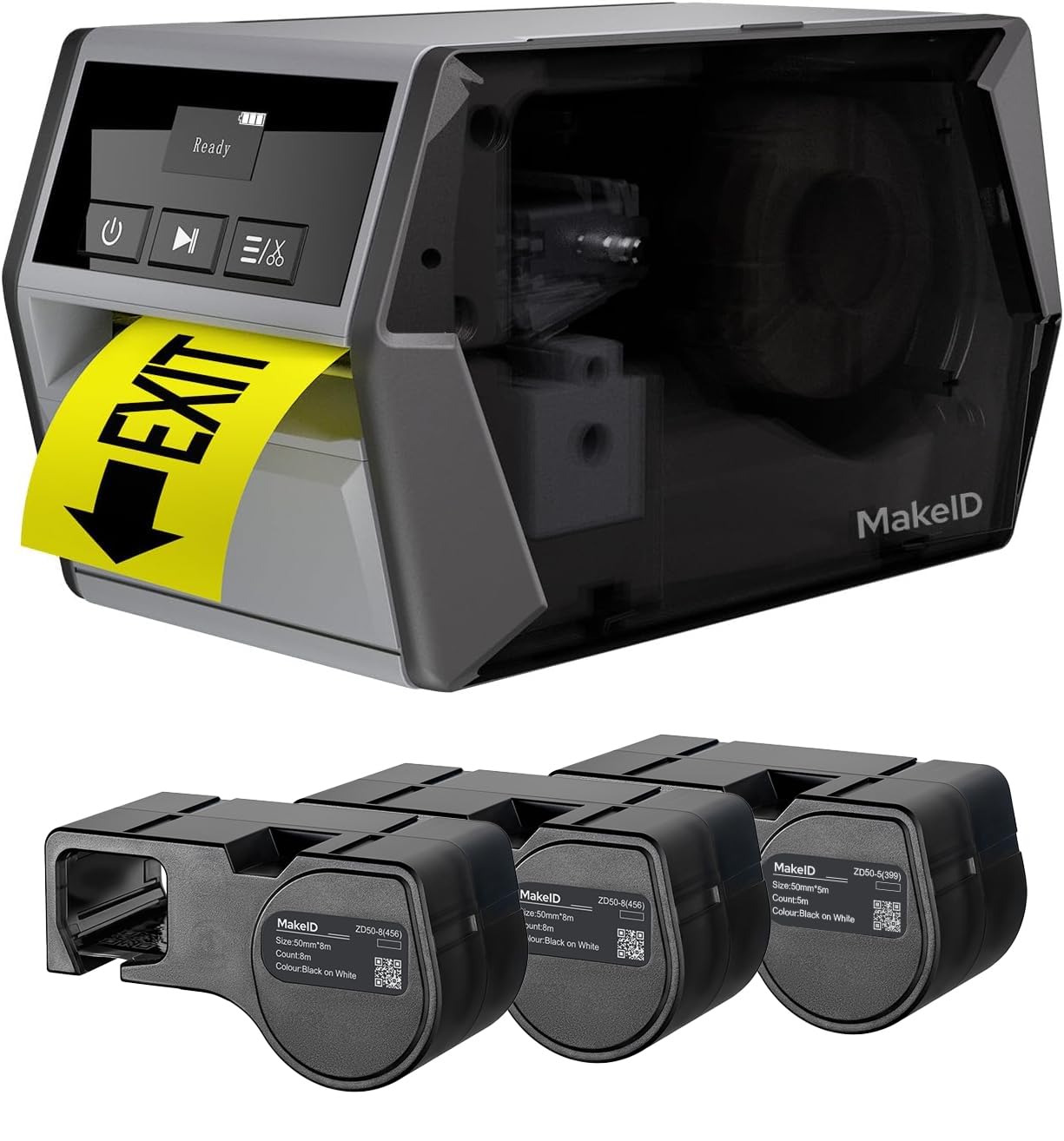
2. Makeid D50 Label Printer
A desktop tagging station that fires out 70 labels a minute and cuts them for you.
For a nursery producing hundreds of pot tags at once, throughput is the whole argument, and this machine wins it. It prints at 70 pages per minute against the Brady M210’s 0.39 pages per minute — a gap so wide the M210 is not remotely in the same league. The 2-inch print head opens up wider pot labels and multi-line plant records, and the 300 DPI resolution keeps a small cultivar name legible with minimal margins, so you waste less tape per label.
The automatic cutter is what makes batch work bearable — it slices the tape for you instead of leaving you peeling each label off a strip. The tape-and-ribbon cartridge swaps in five seconds, and the maker rates thermal-transfer print clarity for up to 5 years without fading. Its acrylic adhesive is tested to grip rough surfaces and resist oil, low temperatures, and harsh outdoor conditions — what a tag on a wooden or plastic stake needs. A 2600mAh battery gives it up to 90 days of standby, and it also edits from PC software for bulk data work.
Where it falls short is the desktop footprint: at 6.81″D x 3.77″W x 3.77″H it is a bench machine to set up and leave, and the Brady M210 above is far easier to carry into the beds. Tape refills are the other honest note — this category rarely gets cheap. If your labeling is a seasonal push rather than a daily walk-around job, this is the one that clears the pile fastest.
Best for: nurseries, seed operations, and anyone printing pot tags and shelf labels in bulk from a workbench.
The trade-off: it stays on the bench — this is not a carried-into-the-field labeler.
Pick this when: volume and cutting speed beat portability for you.
Look elsewhere if: you need to tag plants as you walk the rows with no bench nearby.
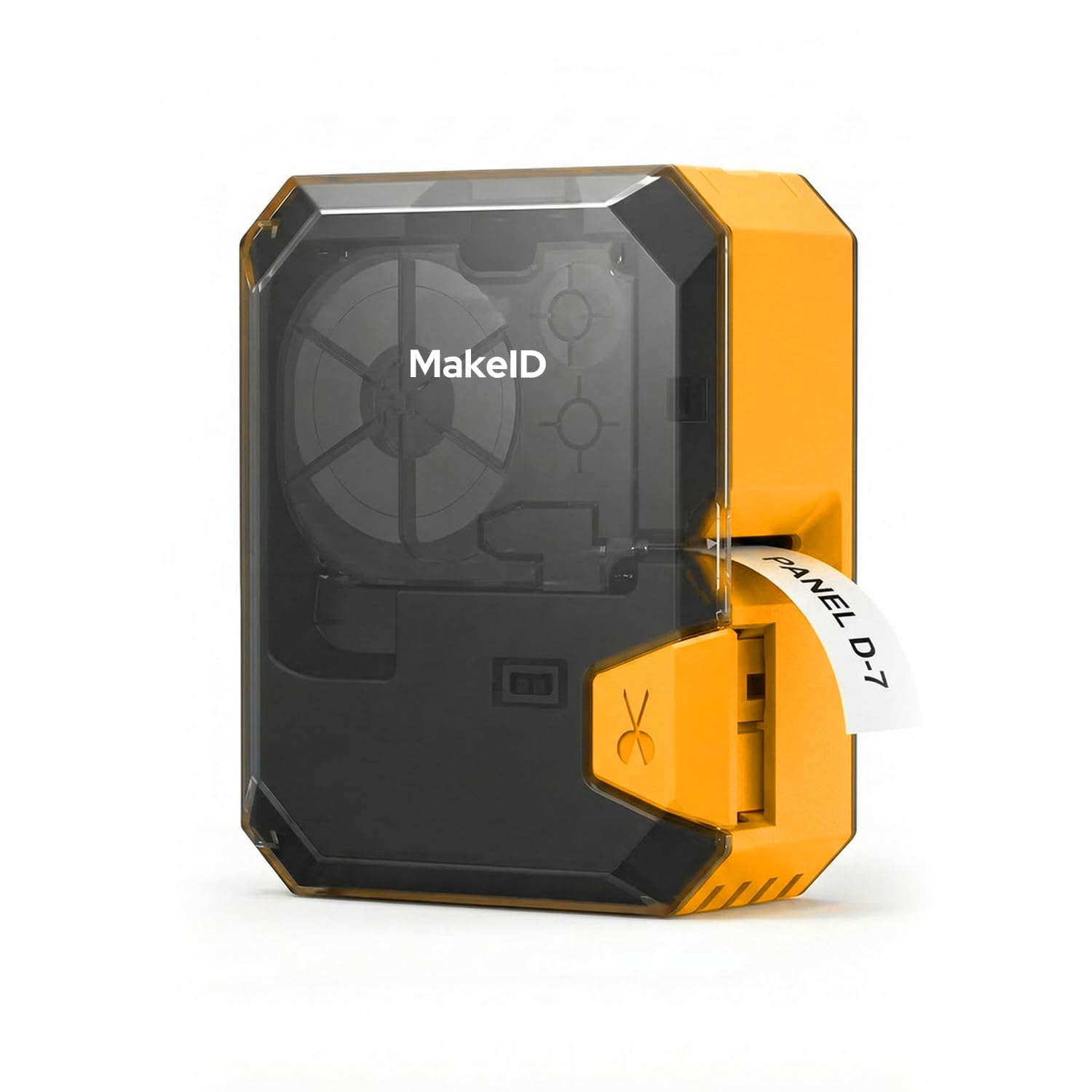
3. Makeid P31S Label Maker
Thirty-plus tape sizes in a palm-sized shell — vinyl, heat-shrink, and cloth all in one.
Here is the pick for a grower who tags plants one day and labels irrigation wire runs the next. It supports 30+ label sizes across vinyl, self-laminating wraps, PET, nylon cloth, and heat-shrink tubing, so the same handheld covers a wooden stake tag and a wrapped supply line. Its thermal-transfer labels are maker-rated 10-year weather-resistant, oil-proof, and waterproof — the durability a humid greenhouse demands.
The 2600 mAh rechargeable battery is rated for up to 90 days of standby, so it sits in a drawer ready for a tagging session without charging every trip. Printing runs at 300 DPI and up to 100 labels per minute, with a 1-inch wide print head that fits up to 8 lines for plant records and asset tags. Bluetooth (a short-range wireless link) pairs it to a phone, and PC software adds barcodes, QR codes, and bulk data import. What owners praise most is print quality above all — clean, smudge-proof text that stays sharp.
Two honest limits. First, Bluetooth works through a phone rather than a computer for the app route, so if you plan to design on a desktop you are on the PC-software path instead. Second, the tape it ships with is not generous — owners mention that “most order extra paper the one it comes with does not last long.” Order spare cartridges with the machine and neither issue slows you down.
One-machine solution: mixed tape types — vinyl, heat-shrink, cloth — from a single handheld that lives in a drawer ready to go.
Small caution: stock up on tape up front, because the included roll runs out fast.
Suits you if: your labeling jumps between plant stakes, cables, and equipment and you want one device to cover all of it.
Not the one if: you need desktop batch throughput more than a variety of tape types.
4. NIIMBOT M2 Thermal Transfer Label Maker
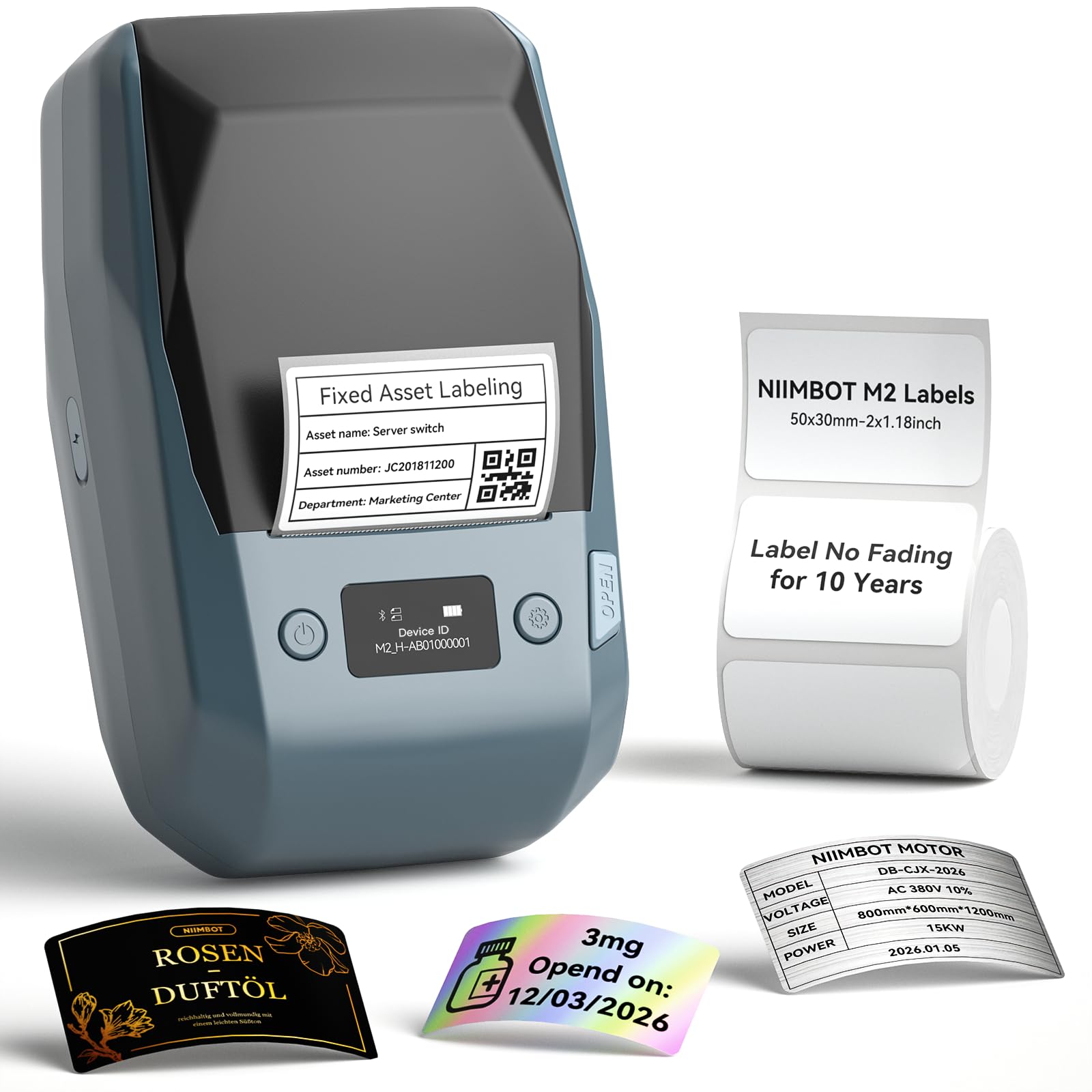
Eight to ten years of readable text on a tag that shrugs off oil, water, and a freezer.
For accession tags and specimen labels meant to sit outdoors for years, longevity is the deciding spec — and this one leads on it. Its thermal-transfer labels are rated waterproof, oil-proof, scratch-resistant, and chemical-resistant from −4°F to 248°F, with a maker-stated 8–10 year storage life. That temperature span covers a freezer bench and a hot summer shelf with room to spare.
The 300 DPI resolution puts clearer words and images on a small tag, and the label width range of 20mm–50mm (1–2 inch) with an effective printable width of 48mm gives you room for a full plant name. It ships with one roll of 2×1.18 inch label tape at 230pcs per roll. Auto label recognition sets the print density for you rather than making you dial it in, and it connects over Bluetooth to iOS and Android phones (up to 10 at once) as well as to a PC over a USB cable. Ease of use is what people rave about most, helped by an app packed with text, icon, table, barcode, QR, and voice-input templates.
The one rule to respect: the M2 only takes its own thermal-transfer labels, never the standard thermal rolls used on other NIIMBOT models. Buy the wrong tape and it simply will not print correctly, so order M2-series cartridges. The app also locks some templates behind a subscription, though a 6-month member service trial comes included and plenty of free templates remain.
Where this one pulls ahead
- Labels rated to hold up 8–10 years and survive −4°F to 248°F
- 300 DPI on 20mm–50mm tape with a 48mm printable width
- Auto label recognition and adaptive print density
- Phone and PC editing, with 10 phones paired at once
Keep in mind
- M2-series thermal-transfer tape only, no standard thermal rolls
- Some app templates sit behind a subscription
- Barcode and logo templates reward a little app time to learn
Reach for it if: your tags must stay readable for years in sun, water, and cold.
skip it if: you want to reuse cheap standard thermal rolls you already own.
5. HP Shipping Label Printer

A plug-in box that puts a live shipping label in your hand in about a second.
If your nursery sells mail-order plants, this is a shipping desk machine rather than a plant-tag tool — and that is its point. It prints at 7 ips (inches per second, roughly the label emerging before your finger leaves the button) at 203 DPI, and direct thermal printing needs no ink or toner cartridges at all. Load a roll, plug in power and USB, and Windows auto-installs it. Runs are driven by a PC with adjustable media holders that take labels up to 4 inches wide, and it works with Amazon, UPS, Shopify, ShipStation, and more.
Owners describe the setup as the easiest they have ever done — genuinely plug-and-play with no driver hunting. The print comes out sharp and near-instant with no jams, and it includes a starter roll plus two large rolls to get going. Reliability is the mixed note: most units hum along for years, but some arrive and stop working, so it is worth testing your unit thoroughly in the early weeks. Setup trips up a small share of buyers, too.
Two practical limits to know. It only holds small 250-label rolls, which is fine for a business shipping a few boxes a day but tight for high volume. And it defaults to 8.5×11 inches — you must set the page size to 4×6 or you waste a label each time. There is no Bluetooth here, just USB, so it stays tethered to the desk.
For the shipping bench: ecommerce sellers and nurseries who want a label in hand fast with zero ink cost.
The honest rub: the 250-label roll capacity keeps it a small-batch machine, and some units need a return.
Best matched to: a seller who ships a few boxes a day and wants dead-simple USB setup.
Not built for: high-volume runs or wireless printing across a room.
6. Brother P-Touch PT-D460BTVP Label Maker
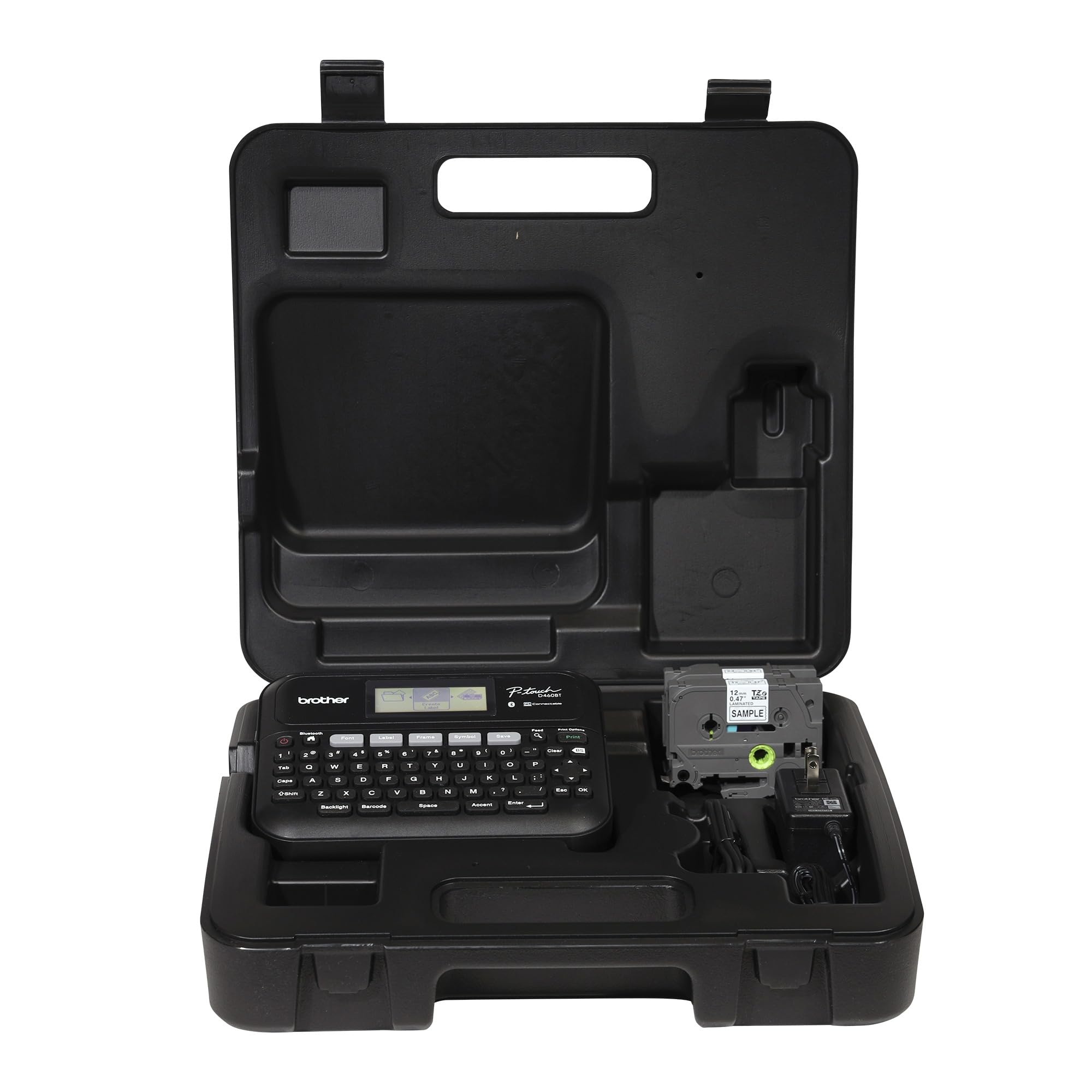
Sets up a garden-center back office with 700 symbols and a keyboard that types on its own.
This is the label maker for the desk at the garden center — price tags, shelf markers, and stock labels that need to look tidy. It takes TZe laminated tapes up to roughly 3/4 inch, and the built-in QWERTY keyboard means you can type a plant name without opening an app. Design depth is its draw: 16 fonts, 15 font styles, 140 designer frames, and 700 symbols, plus storage for 70 frequently used label layouts so your best-selling tags reprint in one tap. Forty preloaded templates cover asset management and cable labeling.
What people praise most is the print quality, and it holds up on laminated tape — text comes out clean and stays put. You can connect by USB or Bluetooth from a computer or phone and print from templates, and multiple users can share the same machine over Bluetooth for a small office team. The VP model adds a carry case that keeps the machine and cartridges together, which owners of the previous model consider an upgrade.
It has one clear weak spot for anyone designing on a screen: the display is dim and hard to read in bright office light, so plan to lean on the app or PC for anything complex. Bluetooth can also drop between jobs on some units, and the tape-feed routine adds a little wasted tape per print. Nothing here stops the machine doing its job — it is a strong labeler that rewards a little patience with the software side.
Built for: a shop or office that wants a self-contained labeler with its own keyboard, fonts, and template memory.
The snag: the on-screen display is hard to read without good light, so heavy design work lands in the app.
7. Brady M211 Label Printer

A phone-driven tagger that pairs fast, survives drops, and cuts its own tape in the field.
Carry this one, not the bench units. It pairs over Bluetooth to iOS and Android phones with a fast, intuitive app, so you design a plant label on your phone screen and hit print on the spot. Customers note it survives falls from table height, and it rides all day on a USB-C rechargeable battery — a genuine full-shift field tool. The auto-cutter trims each label cleanly, so you peel and stick without scissors in your pocket. It works well for cable and equipment marking as much as plant tags.
The app takes a little learning if you are used to a keypad machine, and the cartridges are priced like professional supplies. A magnetic mount that lets you clamp it to a bench or steel surface is sold separately, so factor that in if mounting matters. Print speed sits at 0.6 pages per minute — clearly one label at a time, meant for accuracy in the field rather than speed. Self-laminating tape options make it well suited to datacom and irrigation labeling where the tape wraps around a stem or line.
Route your printing from your phone and it makes sense as a compact, rugged companion for tagging plants and wires as you move through the site. This is the more portable sibling of the M210 above, and if pairing to a phone free of a bulky hard case appeals, it earns its spot.
Field companion: fast Bluetooth pairing, a battery that lasts a full shift, and drops that do not end the day.
Cost the extras: cartridges run professional-price, and the magnetic mount is a separate buy.
The right call if: you tag plants, cables, and equipment while on your feet, phone in hand.
Not the pick for: high-volume desk runs or anyone who prefers typing on a physical keyboard.
8. Westinghouse WHTP203e Thermal Shipping Label Printer, 4×6

A wide-mouth thermal printer that takes rolls or fanfold stacks and never asks for ink.
For a small nursery shipping plants and supplies, this is the more flexible counterpart to the HP above. It handles both roll and fanfold labels, with supported media widths from 0.78″ to 4.6″ and a max printing width of 4.25″, plus a label roll outer diameter of 4.75″ and a core of 1″ to 3″. It prints at 6 inches per second at 203 x 203 DPI, and direct thermal printing removes the ink and toner cost entirely. It works with Windows, macOS, and Linux and can run on ZPL software, which suits an existing shipping setup.
Performance is what earns it fans — quality and ease of use lead the praise, followed by speed. Setup takes around 10–15 minutes with the included USB drive, and the test-print function confirms alignment before you commit a roll. The included label holder and starter labels get you running from the start. US-based tech support resolves calibration snags quickly, and it shares cleanly across multiple computers when networked. Ethernet plus USB gives it a wired option the HP lacks.
The mixed note is networking: some units connect to a computer without fuss while others run into setup trouble, and the printed instructions turn out thinner than ideal for that path. There are no Bluetooth either — it is Ethernet and USB only. And the label roll can arrive taped in a way that confuses first loading, costing one wasted label. Get past setup and it prints crisp, aligned labels for single or batch orders day after day.
Worth the money for: sellers who want fanfold flexibility, wired networking, and no ink bill.
Plan around: a fiddly first load and a wired-only connection.
Choose it if: you ship steadily and want a sturdy thermal printer that shares across office computers.
Pass if: you need wireless printing or a genuinely plug-in-and-forget first setup.
9. Brother PT-E560BT Industrial Label Printer Bluetooth Cutter

The heavy-duty bench machine for laminated tape and heat-shrink tube from 3.5mm to 24mm.
This is the serious industrial labeler of the group — the one for a big horticulture or maintenance operation labeling heat-shrink tube, patch panels, and faceplates as well as plant records. It handles laminated label tape and heat-shrink tubes from 3.5mm to 24mm, and dedicated application keys for cable wrap, patch panel, punch block, and faceplate speed up repetitive work. Add QR and linear barcodes inline, and store whole databases or templates so you can print from a saved job instead of retyping.
The dual auto-cutter prints a strip of half-cut labels so you peel and apply one after another without stopping to cut, which saves real time on a few hundred tags. You design on a phone in the Pro Label Tool app and print over Bluetooth, or connect to a PC and design in P-touch Editor for batch work. An ambidextrous hand strap and utility ring add drop protection and make it easy to carry. Reviewers point out laminated TZe tape resists heat, water, and abrasion, which suits labels that live outdoors.
Be honest about the connectivity and speed: Bluetooth can be flaky on some units, and the app does not autosave, so a dropped connection can cost a draft. There is also no queueing of multiple half-cut labels, which slows long runs. No charger is included in some bundles, and the QR generator can balk at long strings. Set your workflow around the PC editor for volume and the hardware keeps up — it is a tank-like machine built to take a workday’s knocks.
Where it earns its keep
- Heat-shrink support from 3.5mm to 24mm for wiring and cables
- Dual auto-cutter with peel-and-apply strips
- Stored databases and templates for repeat batch jobs
- Pro-grade build with hand strap and utility ring
Watch the software side
- Bluetooth drops on some units, and the app does not autosave
- No queueing of multiple half-cut labels
- QR generator can reject long strings
- Charger not always included
For big tagging projects: laminated tape plus heat-shrink across a full working site.
Know before buying: plan on the PC editor for volume, since the app’s Bluetooth can be temperamental.
Know the Specs
DPI and legibility
DPI (dots per inch) is how finely the print head lays down text. A 300 DPI head packs more dots into each inch than a 203 DPI head, so a small Latin plant name stays crisp instead of blurring into a smudge. If your tags carry accession numbers and cultivar names at small size, a higher DPI pays off in readability at arm’s length. Wider label printers for shipping sit at 203 DPI, which is fine for big address text.
Tape type and weather resistance
Laminated tape seals the print under a clear film; thermal-transfer printing fuses ink into the label with a ribbon. Both hold up far better than plain thermal paper in sun and rain. Check what the maker claims for each tape — some describe years of clarity, others cite an 8–10 year storage window and a broad temperature range. Always match a printer to its own cartridge family, since chip-locked and model-specific tapes will not cross over.
Print width and label size
Width is the ceiling on what a label holds. A 1-inch head suits stake tags and cable wraps; a 2-inch head opens up wider pot labels and multi-line records. Check the supported media width range and the maximum printable width before buying, so a single label covers your stake face without cutting and stacking. Shipping printers go wider still, up to 4 inches and beyond, for address labels.
Battery versus plugged in
A rechargeable battery lets you walk the beds and tag as you go, with runtimes ranging from an all-day shift to weeks of standby. A desktop thermal printer instead stays on AC and prints in quantity without a battery worry. Choose by where the work happens: mobile field tagging wants a battery and a rugged body, while batch potting-bench work wants a plugged-in machine and a cutter.
Common Questions
What kind of tape survives months on an outdoor plant tag?
Will a label printer handle heat-shrink tubing for wiring?
What DPI do I need to read a small cultivar name on a tag?
Can I print plant labels from a computer instead of a phone?
Why do some label printers cost more to run than others?
Is a battery label printer worth it over a plug-in one?
How wide should my labels be for a stake tag?
Do these printers need ink or toner?
Can a thermal shipping printer also do plant tags?
What should I check before buying cartridges for a label printer?
The Bottom Line
For most growers, the horticulture label printer that wins is the Brady M210 Kit, because it puts a hard case, a rechargeable battery, and six text sizes down to 6 point in one drop-tested tool — and 400+ owners back it with 4.5+ stars. If your priority is lasting tags that stay readable for years, the NIIMBOT M2 carries the highest satisfaction in this group. For a bench that prints pot tags in bulk and cuts them for you, reach for the Makeid D50 and set it up where you work. Whichever you choose, buy spare cartridges with the machine — the tape is where your money keeps going.
How we choose
We do not accept paid placement. Every pick is matched to a real buyer and a real use-case; we do not hands-on test units.
Sources
Specifications: manufacturer listings and product documentation. Review insights: verified customer reviews, as of October 2026. Pricing: not shown on this page (it changes often); check the current price via the retailer link.
As an Amazon Associate, Aappliancez earns from qualifying purchases. This does not affect which products we feature.