Disclosure: Some links in this post are affiliate links. As an Amazon Associate I earn from qualifying purchases, at no extra cost to you. Learn more
Specs are compiled from manufacturer listings and verified buyer reviews and can change over time — please confirm the key details on the product page before buying.
The nine picks below are all cartridge-and-toner machines you buy once and own outright, with no subscription tied to your printing. The HP LaserJet Pro 3101sdw takes the top spot because a 40-page-per-minute laser engine means the pages fly out before you have time to get annoyed at a home printer.
This guide is built by comparing the manufacturers’ published specifications and the patterns across verified customer reviews, so you get each pick’s real strengths and trade-offs instead of marketing spin.
Laser models here run toner that lasts months, while the EcoTank refills from bottles instead of chips — so pick your side and start with the home printer no subscription list below.
Top Picks


How To Choose A Printer With No Subscription Attached
The simplest way to avoid a recurring ink charge is to buy a machine whose cost stops at the hardware. That means shopping laser models with toner you replace yourself, or refillable-tank inkjets you top up from a bottle. Both let you print as much or as little as you want, with no page allowance quietly working against you.
Start with the print technology, not the brand
A laser printer melts toner powder onto the page. That powder sits in a cartridge that keeps for months without drying out, so an occasional printer never wastes a paid fill. An inkjet sprays liquid ink, which is brilliant for photos but can clog if the machine sits idle. A thermal printer like the Phomemo uses heat on special paper and needs no ink at all, which is why it sidesteps the ink question entirely.
Then weigh pages per minute against first-page time
Pages per minute (ppm) tells you how fast the machine churns through a big job. First-page time tells you how long you stand there waiting for one sheet. Both matter at home — a 40 ppm laser is useless if it wakes slowly, and a 7 ppm thermal unit is fine for one boarding pass but painful for a school packet.
Decide if you need scanning and copying too
An all-in-one adds a scanner bed and often an auto document feeder (ADF) — the tray that pulls a stack of pages through the scanner on its own. If you only ever print, a print-only model is smaller, cheaper to run, and one less thing to break. If you sign forms or copy receipts, the ADF is worth having.
Side-by-Side Comparison
| Model | Best For | Print Technology | B&W / Color ppm | Duplex | Amazon |
|---|---|---|---|---|---|
| HP LaserJet Pro 3101sdw★ Best Overall | Everyday documents at speed | Monochrome laser | 40 / — | Automatic | Amazon |
| Epson Workforce Pro WF-3823Color Speed Pick | Color documents and cardstock | Inkjet | 21 / 11 | Automatic | Amazon |
| Canon PIXMA TR7120Best Everyday Value | Budget all-in-one with ADF | Inkjet | 14 / 9 | Automatic | Amazon |
| Canon PIXMA TS7720 | Compact home photo printing | Inkjet | 15 / 10 | Automatic | Amazon |
| Phomemo M08D | Printing on the move | Thermal (inkless) | 7 / — | Simplex | Amazon |
| HP LaserJet Pro 3001dw | Shared home office | Monochrome laser | 35 / — | Automatic | Amazon |
| Brother HL-L3220CDW | Color laser on a budget | Color laser | 19 / 19 | Automatic | Amazon |
| Brother HL-6210DW | High-volume black and white | Monochrome laser | 50 / — | Automatic | Amazon |
| Epson EcoTank ET-4950 | Endless color without cartridges | Tank inkjet | 18 / 9 | Automatic | Amazon |
Detailed Reviews
1. HP LaserJet Pro 3101sdw
Our pick — 4.5+★ from 600+ verified ratings; the strongest balance of quality and price.
The laser that turns a five-page form into a job you barely notice happening.
This is the pick for the household that prints something almost every day — school letters, tax forms, return labels — and wants it done before the kettle boils. At 40 pages per minute black and white, it is the fastest black-and-white engine on this list. The first page arrives in about 7 seconds, which is what actually matters when you are standing at the machine with one sheet to go.
It is a full all-in-one, so you also get scanning and copying. Automatic two-sided printing flips the sheet for you, and the 250-sheet input tray plus 50-sheet auto document feeder mean you are not refilling or hand-loading page by page. The toner in the box is rated for roughly 1,000 pages, so you have a real buffer before buying a replacement.
The honest catch: it is black-and-white only, so anything with a photograph or a color logo needs one of the inkjets below. HP also builds this machine to accept only cartridges with HP chips, and firmware updates keep it that way — third-party toner refills are blocked by design. The connectivity is the other wrinkle. Buyers report rock-solid Ethernet and generally dependable Wi-Fi, though the HP Smart app does sometimes drop the printer to offline and needs a reset. Wire it with Ethernet if you want it bulletproof.
Where the speed pays off
- 40 pages per minute black and white clears a stack of forms in under a minute.
- First page out in about 7 seconds — no standing and waiting.
- 250-sheet tray and 50-sheet ADF handle big jobs without babysitting.
- Automatic two-sided printing cuts your paper use in half.
What to plan around
- Black and white only — no color documents or photos.
- HP-chip cartridges only; third-party toner is blocked.
- The HP Smart app occasionally reports the printer offline until reset.
Reach for this if: your printing is text-heavy and you want it finished fast and in black and white.
Think twice if: you need color pages or want to run cheap third-party toner.
2. Epson Workforce Pro WF-3823
The color inkjet that undercuts a laser on black-and-white output speed.
Where most cheap inkjets crawl, this Epson pushes 21 pages per minute in black and white and 11 in color — measured the same ISO way a laser is. That makes it bluntly faster than the Canon TR7120 at 14 black-and-white and 9 color ppm. If you want one machine that handles both a color invoice and a chatty black-and-white report without gagging, this is the speed-to-wait trade you are looking for.
The paper handling is generous for the class. There is a 250-sheet capacity, automatic two-sided printing, and a 35-page single-sided auto document feeder. A 2.7-inch color touchscreen handles the day-to-day, and setup can run from your phone using Bluetooth Low Energy — the low-power radio that lets the printer find your phone without a cable. It also takes Ethernet if you would rather hardwire it.
Two things to know before you commit. It uses Epson’s own T822 cartridges, and the manufacturer states non-genuine ink can cause damage the warranty will not cover — so budget for genuine refills, which owners describe as expensive. Reliability is genuinely split: plenty of owners run it happily for daily classroom or cardstock work, while a smaller group hits a paper feeder that grabs multiple sheets at once or Wi-Fi that needs a power cycle. Treat the document feeder as a light-use tool and feed small stacks.
The color-printing case: a 2.7-inch touchscreen, 250-sheet tray, and an ADF give you a real all-in-one workhorse that prints color without a subscription, and a disc in the box for quick driver installation.
The feeder caveat: multi-page feeds and Wi-Fi drops surface often enough to matter, so keep ADF stacks short and check the network once in a while.
Best fit for: a home office that needs color documents and fast black-and-white output in one box.
Look elsewhere if: you plan to scan thick stacks all day — the feeder is the weak link.
3. Canon PIXMA TR7120
Three jobs in one small footprint — print, copy, and scan without spending much.
For the household that prints a few pages a week and scans a school form now and then, this Canon is a sensible entry point. It is a compact all-in-one covering print, copy, and scan, with automatic two-sided printing and an auto document feeder so multi-page documents do not become a one-sheet-at-a-time chore. Speeds are 14 black-and-white and 9 color ppm — slower than the Epson above, but plenty for occasional work.
The print quality is the standout. Text comes out crisp and photos look genuinely vivid from its two-cartridge hybrid ink system, which uses a separate pigment black for sharp text plus a color cartridge. It connects on dual-band Wi-Fi, so it can sit on either the 2.4 GHz or 5 GHz band in your home, and it works with the Canon PRINT app, Apple AirPrint, and Mopria. A small 1.42-inch monochrome OLED screen displays ink levels and status without an app.
The real-world verdict most owners land on is simple: lovely output, costly ink. Genuine XL cartridges cost about as much as the printer itself, so heavy printing turns this machine into an expensive habit. It is built for light use. A few buyers also hit ARM-based Windows laptops with no Canon driver support, so check your machine’s processor before buying. Functionality and connectivity draw mixed results — some owners sail through setup, others fight Wi-Fi. For a light-duty home printer, the value holds.
Pick this when: your printing is light, your photos matter, and you want scan and copy in the same compact box.
Steer away if: you print hundreds of pages a month — genuine ink will cost you more than the hardware.
4. Canon PIXMA TS7720

A photo-friendly all-in-one that fits on a shelf and asks only two cartridges.
If most of what you print is a school photo or a recipe page rather than a 200-page report, this is the machine that fits your desk and your habits. It prints, copies, and scans, runs 15 pages per minute in black and white and 10 in color, and handles auto two-sided printing. Two cartridges — a PG-285 pigment black and a CL-286 color — keep the refills simple with nothing to mix or spill.
Its 2.7-inch LCD touchscreen is easy to navigate, and setup is quick. Owners mention crisp black-and-white text and decent borderless photos. The scanner is a flatbed only, so it copies one page at a time — no auto document feeder here. If you mostly scan single documents or photos, that is fine.
This one comes with a real caveat to size honestly. It prints beautifully for the price, but it is the thirstiest machine on this list. Owners call the ink a genuine hog, with one burning through a cartridge in three days of photo printing. Wireless setup is not plug-and-play; you may need to connect manually through the tiny touchscreen. A few units also turned up firmware or print-head issues, though the bulk of buyers get along fine. Keep it printing weekly so the print head does not dry out, and it will serve a light home well.
What it does best: two-cartridge simplicity, a bright 2.7-inch touchscreen, and photos that come out vivid from a compact machine.
The trade to accept: no document feeder, and ink that runs dry fast if you print often.
Worth it for: light home printing where photos and the odd color page are the point.
Pass if: you scan multi-page documents or print daily — the ink burn will hurt.
5. Phomemo M08D Portable Printer
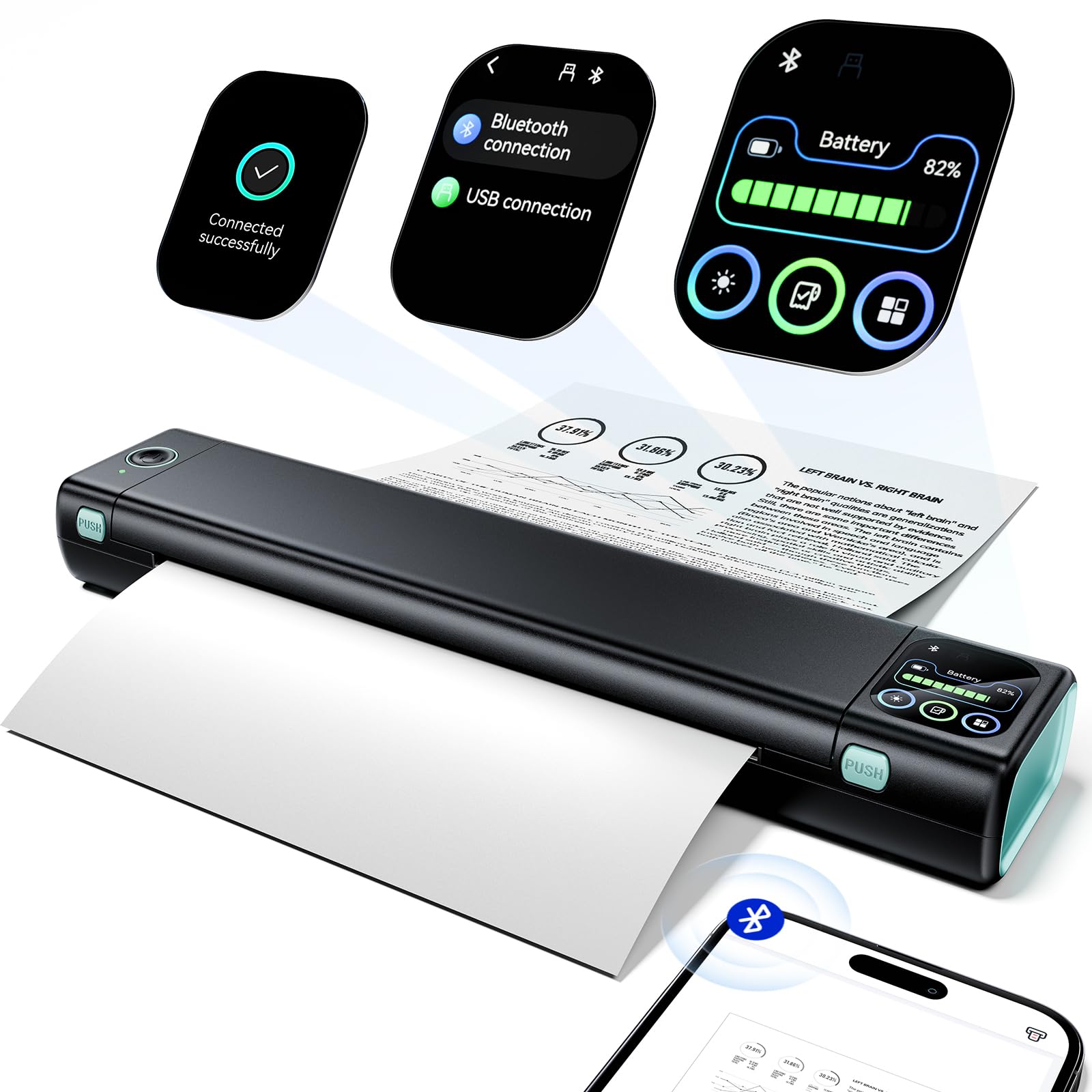
A 1.5-pound printer that fits in a backpack and never asks for ink.
This is not a home office workhorse — and that is the whole point. It builds on Phomemo’s M08F design and adds a smart display that shows status and battery at a glance, so you can plan a print run without guessing. It prints one page a minute at 7 ppm, which is slow. But it is inkless thermal printing: heat darkens special paper instead of spraying ink, so there is no ink, toner, or ribbon, and no subscription to sign up for. That makes black-and-white documents genuinely free of refill costs.
Portability is its defining spec. At 1.5 lb it slides into a bag, and a built-in battery carries up to 150 continuous pages on a charge. It handles US Letter paper and connects by Bluetooth to a phone app, or by USB-C cable to a computer with a driver. Business travelers printing boarding passes, invoices, or permits get a self-contained printing station that fits in a pocket of the carry-on.
The catch is the medium. Thermal paper is B&W only, it requires special stock, and it fades faster than ink over time — scan anything you need to keep for years. Setup in the app is simple for most, but a beginner may need to work out how to print at first. The machine is a travel companion, not a replacement for a desk printer.
Suits you if: you print on the road — travel documents, invoices, or permits from a bag.
Not for: color printing or anything you need to archive for years.
6. HP LaserJet Pro 3001dw
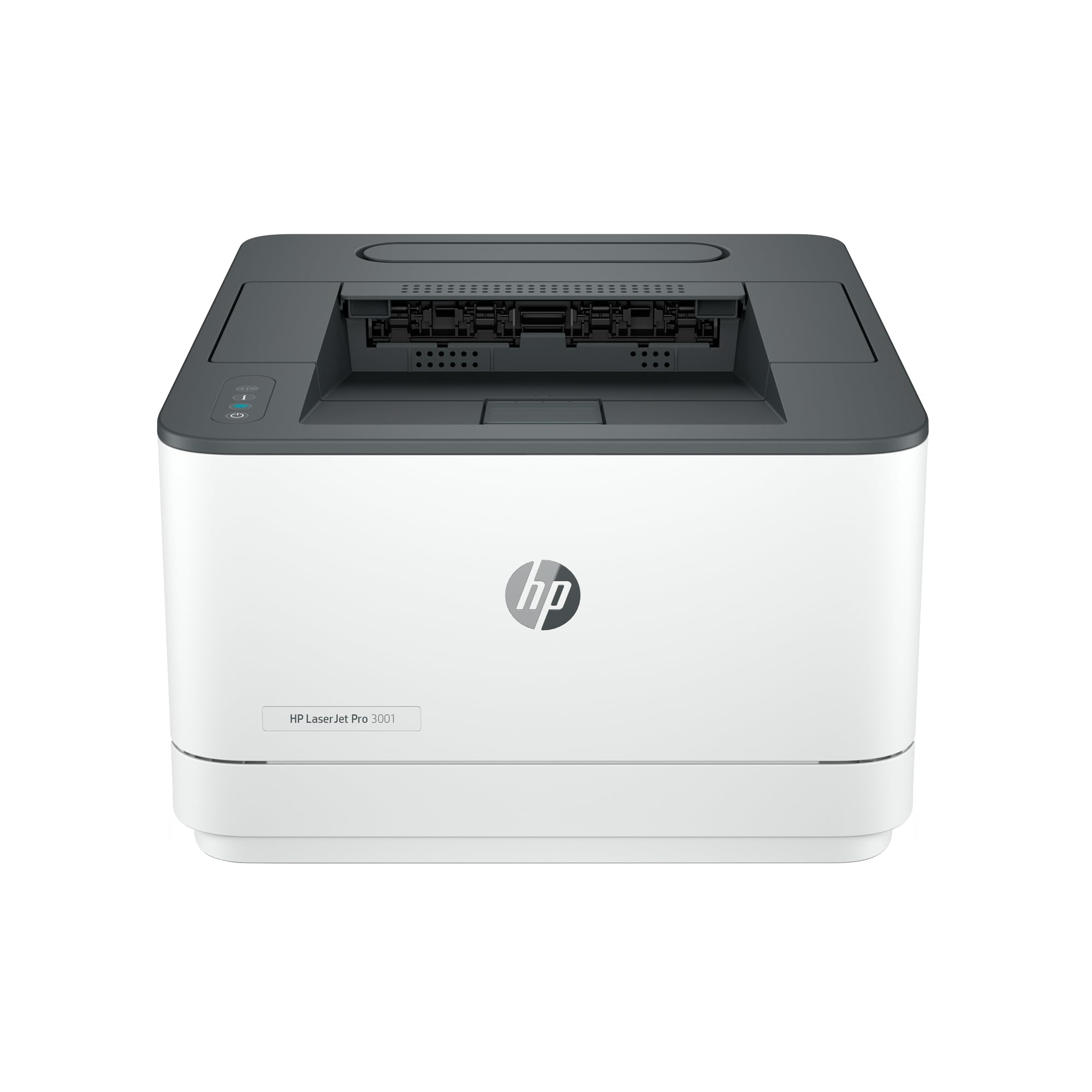
One laser, up to seven people, no ink to babysit.
Built for small teams — HP pitches it for up to seven people — this monochrome laser prints up to 35 black-and-white pages per minute and spits out the first page in about 6.6 seconds. It handles scanning and copying too, with automatic two-sided printing to keep paper costs down. It connects over Ethernet or Wi-Fi, and a Bluetooth radio handles simple setup.
The toner story is the reason it belongs on a no-subscription list. The black-and-white laser toner runs cheap per page and keeps for months, so a shared office that prints a few hundred pages a month is not buying ink all the time. Owners printing text at moderate volume report the toner just keeps going, and the 6.6-second first page makes it feel immediate. HP adds Wolf Pro Security with configurable settings, which is a nice touch for a machine sitting on a family network.
The recurring grumble is the networking. Owners describe Wi-Fi that can be fussy, with some finding the non-wireless setup cleaner when everything sits on the same network. There is the same HP cartridge rule as the 3101sdw — original HP chips only. The build is workmanlike, not premium. But for text-heavy shared printing, it is a solid, low-fuss machine.
Why a home office likes it
- 35 ppm black and white for a busy shared desk.
- First page in about 6.6 seconds.
- Automatic two-sided printing and scanning built in.
- Wolf Pro Security settings for a connected home.
Where it frustrates
- Wi-Fi setup is the frequent gripe — hardwiring is smoother.
- Original HP cartridges only.
- Monochrome only, so no color pages.
Go here if: several people print black-and-white text and you want speed without a fleet of cartridges.
Think about the inkjets if: color pages are part of your week.
7. Brother HL-L3220CDW

Color laser output without the inkjet refill habit — a print-only workhorse.
Here is the machine for someone who prints color reports and photos but is done buying inkjet cartridges that dry out. It is a color laser printing 19 pages per minute in both black and white and color, with automatic two-sided printing and a 250-sheet paper tray that reduces refills. It is print-only, so there is no scanner or copier — a deliberate trade that keeps it simple and small.
The toner economics are the draw. Brother’s four-color laser toner runs far cheaper per page than ink, and it does not clog from sitting idle. It works with AirPrint direct from an iPhone or Mac without any app, so a mixed-device household can print from anything. Setup is quick once you strip the shipping tape, and it is built to take the odd heavy volume without complaint.
Be honest about the weight: it is around 40 lb in the box, so have a second pair of hands for the stairs. Setup is also the split point — a fair number of buyers find the Mac setup or the initial Wi-Fi entry genuinely fiddly, and a few got stuck on firmware passwords afterward. If you are comfortable with computers and use AirPrint, it is largely painless. Check your OS: it works with Windows 10/11, Mac OS, and Linux, not Windows 7. Also note there is no bank-check MICR support.
Color at a lower cost per page: this is the pick that gets you laser color and 250-sheet capacity without the monthly ink problem, at 19 ppm.
Who should ease off: non-technical Mac users and anyone who moves it alone — setup and the 40 lb box are the honest hurdles.
Right for: a home office that needs color documents and stable long-term toner.
Not for: anyone who needs built-in scanning or copying.
8. Brother HL-6210DW

Fifty pages a minute, a 520-sheet tray, and toner that lasts the year.
If you measure a printer in reams, this is the one. It prints 50 black-and-white pages per minute and holds 520 sheets in the main tray plus 100 more in a multipurpose tray, expandable up to 1,660 sheets with optional trays. It has automatic two-sided printing and both Gigabit Ethernet and dual-band Wi-Fi for sharing across a busy network. The spec sheet alone makes it the most throughput you can get from a single small printer.
The toner math is the real story. Brother’s ultra high-yield toner is rated for up to 18,000 pages, so a heavy-printing household buys toner a couple times a year instead of monthly. It also carries Triple Layer Security to protect the network and documents — useful if it shares a home machine with work data. This is a no-nonsense, hardworking machine.
Two things to expect. Photos show banding, so this is not a photo printer — text and math symbols come out clean, but images are not the point. And the setup is the split again: easy for most, but a few units hit firmware password locks and network discovery issues after a reset. It is also not the quietest machine in the room. For pure black-and-white volume, though, the toner savings add up quickly.
Choose it for: a home or small office churning through black-and-white pages that wants to buy toner rarely.
Think again if: you need color, photos, or built-in scanning.
9. Epson EcoTank ET-4950

Fill it from a bottle and print for months — the subscription avoided entirely.
This is the answer for anyone who wants color all-in-one printing and never wants to shop for a cartridge again. It is an ink tank printer: you top up four ink tanks from bottles instead of swapping cartridges, and the included ink is rated for up to 6,600 pages black and 5,500 color. Each replacement bottle set equals about 80 cartridges, so the recurring cost drops dramatically. That keeps money in your pocket without a subscription at all.
It is a genuine all-in-one. You get print, copy, scan, and fax, plus an auto document feeder for multi-page scans, a 250-sheet paper tray, automatic two-sided printing, and a 2.4-inch color display. Print speeds are 18 black-and-white and 9 color ppm with no warmup. Refilling from the keyed EcoFit bottles is genuinely mess-free — each bottle only fits one tank, so you cannot mix them up.
The honest trade-offs are setup and connectivity. Setup involves a roughly 15-minute ink charging step, and firmware setup can be fiddly for the non-technical — the phone app helps. The scanner is adequate rather than excellent, and a few units lost their network connection outright. The trays feel a bit light, too. But once it is running, the ink seems to last many months, which is what turns a home printer into a low-cost one.
Where the low running cost lives
- Up to 6,600 black / 5,500 color pages of ink in the box.
- Each refill bottle set equals about 80 cartridges.
- Print, copy, scan, and fax with an auto document feeder.
- Keyed bottles make refills mess-free.
Plan around these
- Setup includes a roughly 15-minute ink charge step.
- The scanner is adequate, not sharp.
- Wi-Fi connection can drop for some users.
This is your pick if: you print color all-in-one pages and want refills to stop being a chore or a bill.
Hold off if: you want plug-and-play setup with no ink-charging wait.
Know the Specs
Pages per minute (ppm) and first-page time
Ppm is how many pages the machine prints in one continuous minute. First-page time is how long it takes to produce that very first sheet from a cold or sleeping state. For home use, the first-page time often matters more than the top speed, because you rarely print dozens of pages at once. A laser like the HP 3101sdw shows about 7 seconds to first page — quick enough that you do not stand and wait. High ppm numbers like 40 or 50 only pay off when you are pushing real volume.
Toner vs ink vs thermal
Toner is fine powder fused onto the page with heat, so it keeps for months and does not dry out — the reason laser cartridges suit occasional printing. Ink is liquid, brilliant for photos but prone to drying and clogging if idle, so an inkjet wants regular use. Thermal prints by heating special paper, needing no ink at all, but the letters fade over time. Choosing a toner or tank machine is the surest way to avoid a subscription and avoid cartridge waste.
Duplex and the auto document feeder
Automatic duplex means the printer flips each sheet to print both sides without you re-inserting paper, which halves the paper you buy. An auto document feeder (ADF) is the scanner tray that pulls a stack of pages through one by one, so you can scan or copy a ten-page form in one go. ADF capacity differs — this list ranges from a 35-page feeder up to a 50-page one — and thin or mixed paper feeds more reliably in small stacks.
Yield, capacity, and running cost
Yield is how many pages a cartridge or ink tank is rated to print. The EcoTank’s included ink is rated up to 6,600 black / 5,500 color pages, while a laser cartridge like the Brother TN920UXXL is rated up to 18,000 pages. Paper capacity — 250 sheets on most models here, 520 plus 100 on the HL-6210DW — controls how often you refill the tray. Higher yield and larger capacity together mean fewer interruptions, which is the whole reason a no-subscription machine pays off over time.
Common Questions
Do these printers need an ink subscription plan to work?
Why is a black-and-white laser cheaper to run than an inkjet?
Can I use third-party toner or ink in these printers?
How long does the EcoTank ink actually last?
Does the Canon TS7720 have an auto document feeder?
Will a portable thermal printer like the Phomemo print color?
Which of these printers has the highest paper capacity?
Do I need to connect these printers to Wi-Fi or can I use a cable?
Which printer is best for a mixed Windows and Mac household?
How heavy are these printers to move?
The Bottom Line
You want a printer that just prints, with no monthly plan to sign. For most homes, the HP LaserJet Pro 3101sdw is the one to buy: it prints 40 pages per minute (ppm, how many sheets it spits out in a minute) in black and white, and the first page lands in about 7 seconds. It runs on toner (the powder ink lasers use), which keeps for months without drying out. If color matters more than raw speed, the Epson WF-3823 gives you fast black-and-white output plus color at 11 ppm, all behind a 2.7-inch touchscreen you tap instead of hunting buttons. And if you would rather pour ink from a bottle and forget cartridges, the Epson EcoTank ET-4950 ships with up to 6,600 pages of ink and no plan to sign. Match the pages-per-minute and ink strategy to how you actually print, and the printer stops being something you dread.
How we choose
We do not accept paid placement. Every pick is matched to a real buyer and a real use-case; we do not hands-on test units.
Sources
Specifications: manufacturer listings and product documentation. Review insights: verified customer reviews, as of October 2026. Pricing: not shown on this page (it changes often); check the current price via the retailer link.
As an Amazon Associate, Aappliancez earns from qualifying purchases. This does not affect which products we feature.