Disclosure: Some links in this post are affiliate links. As an Amazon Associate I earn from qualifying purchases, at no extra cost to you. Learn more
Specs are compiled from manufacturer listings and verified buyer reviews and can change over time — please confirm the key details on the product page before buying.
If you scan boxes of paper for a living — or you’re finally clearing out that filing cabinet — the spec that decides everything is pages per minute, not megapixels. A machine that feeds a full stack and flips both sides in one pass turns a weekend of scanning into a coffee break. This guide covers ten scanners built for exactly that, and tells you which one to pick for your desk, your paper sizes, and your patience.
This guide is built by comparing the manufacturers’ published specifications and the patterns across verified customer reviews, so you get each pick’s real strengths and trade-offs instead of marketing spin.
A sheet-fed design beats a flatbed for stacks, but feeder capacity, duty rating and driver support change the answer. Below you’ll find the machines that keep feeding when the stack gets tall, so you can pick a high volume document scanner that clears the whole pile without babysitting.
Top Picks


How To Choose The Best High Volume Document Scanner
Buying for volume is a different job from buying a home scanner. You are paying for the feeder, the rollers and the software layer — the part that decides whether 500 pages go through in one sitting or in twelve frustrated attempts. Start with what you feed it every day, then work backwards.
Speed is two numbers, and both count
Pages per minute (ppm) counts sheets. Images per minute (ipm) counts sides, so a duplex scanner rated 40 ppm / 80 ipm flips both sides of 40 sheets in one minute. Always compare the ipm figure when your jobs are two-sided, because that is the number that matches your real workload.
The feeder is the whole machine
A 50-sheet automatic document feeder (ADF — the tray that pulls pages in by itself) means reloading every 50 pages. A 100-sheet feeder doubles that run before you touch anything. Look for paper-skew and staple protection too, since one staple can cost you a whole page and a jam.
Duty cycle tells you how hard you can push
A daily duty rating is the page count the maker expects the rollers to survive, day after day. Machines rated for thousands of pages a day are built for a mailroom; a light-duty unit asked to do the same will wear its feed rollers early. Match the rating to your heaviest week, not your average one.
Where the scans need to land
Scan-to destinations matter as much as speed. Some machines push straight to email, a network folder or a USB stick with no computer attached; others require a PC tethered by cable. If you scan to a document archive or a shared drive, check for SMB or FTP support and a TWAIN driver before you commit.
Receipts, books and wide paper are their own problem
A standard feeder handles letter and legal paper beautifully and chokes on a bound book or an A3 drawing. If your backlog includes ledgers, blueprints or spines, you need either a wide-format sheet feeder or an overhead book camera instead. Decide that first — it narrows the list faster than any speed figure.
Side-by-Side Comparison
| Model | Best For | Scan Speed | Feeder Capacity | Connection | Amazon |
|---|---|---|---|---|---|
| Brother ADS-2200★ Best Overall | Fast everyday office stacks | 35 ppm | 50 sheets | USB | Amazon |
| RICOH fi-8170Pro Workhorse | Heavy daily business workloads | 70 ipm duplex | — | Ethernet, USB | Amazon |
| Epson RapidReceipt RR-600WReceipt Organizer | Receipts and computer-free archiving | 35 ppm | 100 sheets | Wi-Fi | Amazon |
| ScanSnap iX2500 Premium | Wireless desk scanning with a touchscreen | 45 ppm duplex | 100 sheets | USB, Wi-Fi | Amazon |
| HP ScanJet Pro 3000 s4 | Small-business desks on USB | 40 ppm / 80 ipm | 50 sheets | USB | Amazon |
| CZUR ET24 Pro | Books and bound documents | 24MP camera | — | USB, HDMI | Amazon |
| Brother ADS-4900W | Workgroups needing network scans | 60 ppm | 100 sheets | Ethernet, USB, Wi-Fi | Amazon |
| Plustek S30 | Wide ledger and A3 paper | — | 100 sheets | USB | Amazon |
| CZUR ET MAX | Archiving thick books at speed | 38MP camera | — | USB, HDMI | Amazon |
| Epson Workforce ES-865 | Mailroom-grade daily volume | 65 ppm / 130 ipm | 100 sheets | USB | Amazon |
Detailed Reviews
1. Brother High-Speed Desktop Document Scanner, ADS-2200
Our pick — 4.5+★ from 600+ verified ratings; the strongest balance of quality and price.
The workhorse that turns a 70-page folder into a two-minute job.
What wins here is raw throughput against a small footprint. The ADS-2200 is a sheet-fed duplex scanner (it pulls pages in and reads both sides in one pass) rated at 35 ppm, and owners describe scanning a 70-document folder in about two minutes. The same machine sits easily on a desk corner, and its output tray folds up when the job is done.
The feeder holds 50 sheets and includes multi-feed detection, background removal and blank page removal — so a stack fed upside down with no images still gets scanned and the empty backs get dropped automatically. You get 1200 dpi of optical resolution, which is twice the Epson RR-600W’s 600 dpi — useful when you need real detail from photographs, and slower when you push that high. For plain documents, 300 DPI is where the speed lives.
Drivers are the unglamorous reason this pick holds together: Windows, Mac and Linux are all covered, plus TWAIN, WIA, ICA and SANE. It is USB only, so there is no wireless option, and a notary scanning 300+ pages of loan docs called the wired connection the one thing they wished was different. Brother’s software is also the weak link — the Remote Setup utility is where you set your defaults, and the Mac experience leans on system preferences rather than a polished app.
What earns its place
- Both sides in a single pass at 35 ppm — a 70-document folder clears in about two minutes
- 1200 dpi optical resolution, the highest on this list
- Blank page removal and multi-feed detection cut a re-scan to zero
- Small enough to travel with; tray folds down flat
Where it asks patience
- USB only — no wireless scanning without a cable to your laptop
- Brother’s setup software is the fiddly part, not the hardware
- Advertised 1200 dpi is where scans slow down noticeably
Reach for this if: you want the fastest plain-paper duplex scans per desk inch, and you are happy living on a USB cable.
Step up if: network scanning without a PC matters — the Brother ADS-4900W adds Ethernet and Wi-Fi for that job.
2. RICOH fi-8170 Document Scanner
Built to survive years of daily business scanning, not a weekend hobby.
This is the machine you buy when scanning is a job, not a chore. It reads 70 double-sided pages per minute with a feeder that swallows everything from thin carbonless copies to passports and plastic cards. The Clear Image Capture processor is Ricoh’s own colour-matching chip, aimed at accurate reproduction rather than fast-and-wrong. There is a compactness angle too: at 6.4″D x 11.8″W x 6.7″H it takes up far less desk than the Epson RR-600W at 14.25″D x 10.25″W x 12.38″H, despite the heavier workload.
That extra heft — 8.8 pounds, against the Brother ADS-2200’s 5.5 pounds — is the giveaway that this unit is built differently. It is also network-ready through Ethernet as well as USB, and it works with TWAIN drivers plus PaperStream Capture and ClickScan software that sends a scan to email, print or a folder at the push of a button. Buyers report it auto-detects paper size and duplex with no fuss, and survives years of daily business use without maintenance issues.
The honest catch is the software layer, which is where the mixed reports cluster: installers can fight older operating systems, and a workflow that should be one step sometimes takes three. One frustrated buyer found it unreliable with trading cards, jamming and marking them — so treat this as a paper-and-plastic-card machine, not a collectible handler. If your daily job is 100 two-sided documents plus IDs, none of that shows up.
Where the money goes: 70 ipm duplex and a duty-built chassis — the answer for a paper-heavy back office that scans every single day.
What to expect: enterprise-grade output, occasional software friction, and a machine that would rather eat a passport than jam.
Choose this when: your scanning is a daily business routine and you can live with fiddly software installs.
Think twice if: you handle trading cards or slick stock — the feed path has marked them.
3. Epson RapidReceipt RR-600W Scanner
Scans receipts straight to your network drive with no computer attached.
The story here is the 4.3-inch colour touchscreen and the ability to push a scan directly to a NAS folder, a cloud service or a USB stick while standing alone on your desk. The 100-page feeder uses Epson’s TrueFeed design with paper-skew and staple protection, and it captures both sides in a single pass at up to 35 pages per minute. Setup to a QNAP NAS over SMB took one owner about 30 minutes, plus another 30 for the custom icons.
ScanSmart AI PRO is the headline software, and it does a specific job: pulling key fields out of receipts and invoices into categorised digital data that exports into financial apps like QuickBooks and TurboTax. On that narrow task the reviews are warm — one small-business owner estimated the auto-categorising cut manual expense entry by around 80%. Just do not read “AI” as anything more than field extraction and export; several buyers expected a chatty assistant and got an accounting tool.
The paperwork says 600 dpi, which is the lowest on this list and fine for receipts and tax documents but not for archival photos. Multi-page jobs must be loaded face-down, upside down, which trips people up on the first attempt, and very faded originals can trigger an “image is blank” popup. At 8.2 pounds it is a desk fixture rather than a travel scanner, and some scans come out slightly tilted when the exit tray backs up.
The real use case: a small business or home office where receipts pile up by the shoebox and the accountant wants them categorised — this does that faster than any folder sorting.
Set expectations on AI: the “AI” is field extraction, not a virtual accountant, and the touchscreen is what you are really paying for.
Worth it for: anyone who wants receipts and invoices to land in a shared folder or financial app without a PC in the loop.
Not the pick if: you need high-resolution photo archiving — 600 dpi will feel limiting.
4. ScanSnap iX2500 Document Scanner

The one that finally makes wireless scanning feel like it was designed this decade.
ScanSnap’s pitch is that the scanner should disappear into your workflow, and the iX2500 comes close. It scans 45 pages per minute double-sided, holds 100 sheets in the feeder, and connects over Wi-Fi 6 (the newest wireless standard, which keeps a stable link at longer range) or USB-C. Profiles live on the touchscreen, so you pick “receipts” or “photos” and drag the result straight into an app through the Quick Menu.
What buyers can’t stop talking about is how fast and how reliable the thing is — it rarely jams, and when it does a forgotten staple is usually the reason. ScanSnap’s software gets similar treatment: auto-names, sorts and optimises files with no fiddling.
Two things to weigh. There is no TWAIN driver in the box, which matters if you rely on document management software — you will need a workaround. And the honest recurring gripe is cost: this is not an inexpensive machine, and a few owners mention the app install needs a hand the first time. The bundled four-year protection plan is the offset here — the maker is underwriting the reliability claim.
Why it feels easy
- 45 ppm single-pass duplex with a 100-sheet feeder
- Wi-Fi 6 plus USB-C, so it works computer-free or tethered
- Touchscreen profiles and auto naming make filing automatic
- Bundled four-year protection plan
What to plan around
- No TWAIN driver — document software may need a workaround
- Not the least expensive option in this class
- Some report the first app install needs support
Best fit for: a home office or small studio where documents and photos both flow through and you want them filed without thinking.
Skip the shortcut if: your document management system lives on TWAIN drivers — check the workaround first.
5. HP ScanJet Pro 3000 s4 Document Scanner
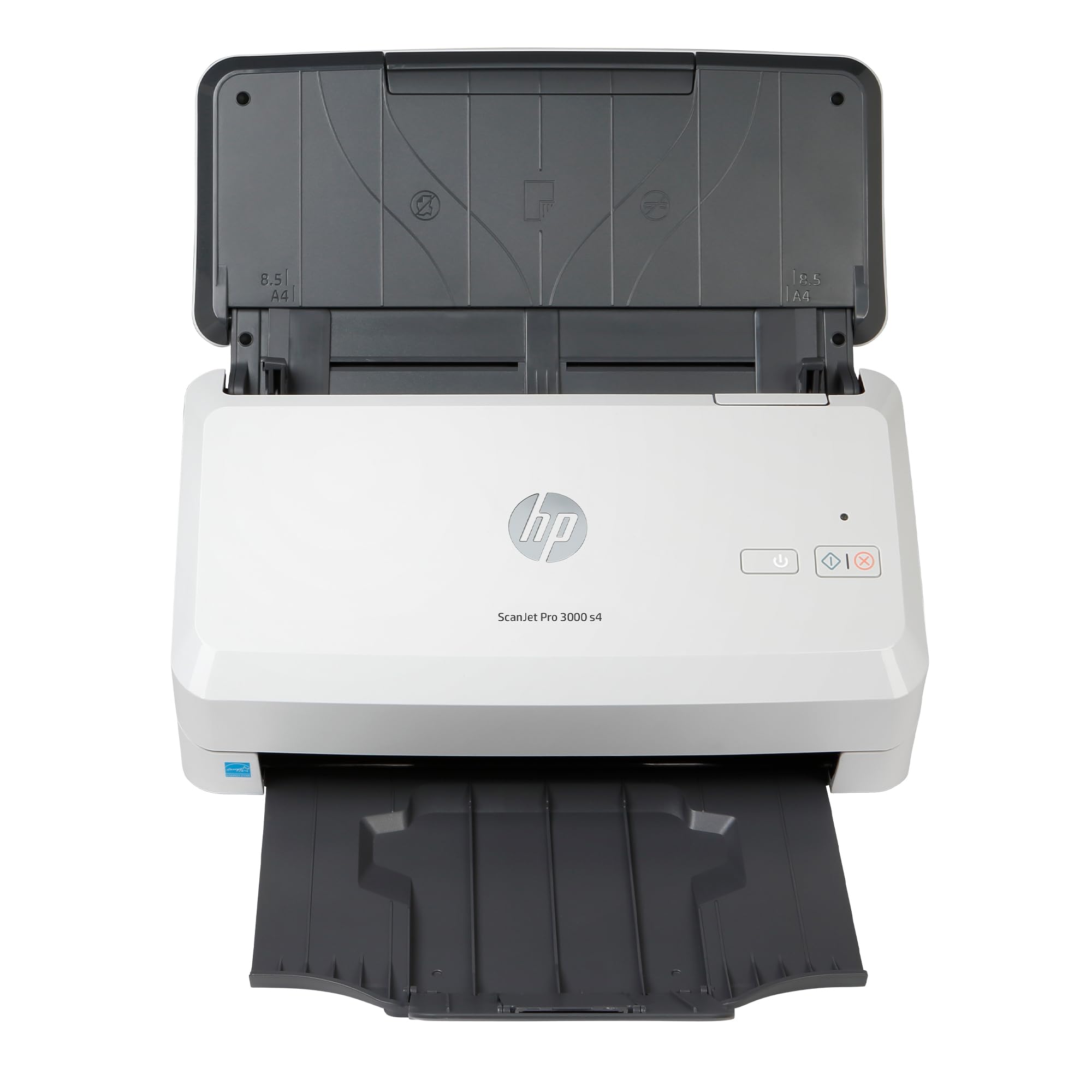
A 4,000-page daily duty rating in a six-pound box — if your drivers cooperate.
HP is aiming this at the front desk of a small business, and the specs back that up: 40 ppm single-pass duplex (up to 80 ipm, the count of sides), a 50-sheet feeder and a stated daily duty cycle of 4,000 pages. It weighs 6 pounds and comes with TWAIN and ISIS drivers plus built-in optical character recognition (OCR — the software that turns a picture of text into text you can edit and search).
The good days are good. Owners who got the software settled describe it as fast, efficient and compact, with the hands-free auto-feed making short work of office paperwork, and set-up genuinely easy once the download finished. A4 documents and business cards both go through, so it covers the mixed paper a small office actually generates.
The other side of the story is drivers. Windows 11 23H2 has been a sore point — one buyer had to install drivers, disable the non-USB entry in Device Manager and reconnect through HP’s software, and had to repeat that after every reboot. If your machine is on the newest Windows build, plan an afternoon for the first configuration and check HP’s current driver release before you buy. On older systems the reports are far calmer.
The trade: a high daily duty rating and a small desk footprint at a mid-range position — the volume capability is the pitch.
The homework: confirm your operating system is on HP’s supported driver list before ordering; this is the one piece buyers trip over.
Good match for: a small business scanning a few hundred sheets a day on a stable, older Windows build.
Not ideal if: you run the newest Windows 11 release and want a same-afternoon setup.
6. CZUR ET24 Pro Professional Book Scanner

The overhead camera that flattens a curved spine into a straight page.
Different machine, different problem. The ET24 Pro photographs a page from above with a 24MP HD camera (5696*4272 resolution, 320 DPI) and its software flattens the 3D curve of a bound book after pixel transformation, so the words near the spine straighten out. It handles anything up to A3 size, which covers books, magazines, receipts and paintings without breaking a binding.
The practical result is speed on material a sheet feeder cannot touch. A 300-page book scans in under 15 minutes, and a schoolteacher swapping in from a flatbed describes pages captured almost instantly with the software auto-cropping, straightening and flattening as it goes. Two side lights plus a head light illuminate from three angles — kill the head light and use only the sides for glossy paper. A 2-inch preview screen on the head tells you what you are capturing in real time.
Expect a learning curve, not a plug-and-play experience, and expect to keep very glare-heavy paper away from it entirely. The book-holder occasionally leaves a slight yellowish distortion where it presses, which the maker’s frequent updates keep improving. Software looks dated but does the job, and you’ll want a USB-C connection to get the most from it. At 4.5 kg it stays on the desk.
Pick this for: scanned book collections, academic research and archives where unbinding a volume is not an option.
Know the ceiling: glossy or highly reflective pages are not what the camera does best.
7. Brother ADS-4900W Professional Desktop Scanner

Sixty pages a minute, with a touchscreen that does the filing without a PC.
For a busy workgroup, the ADS-4900W is the natural step up from the ADS-2200: 60 ppm in colour and black-and-white, single-pass duplex, and a 100-page feeder with continuous scanning mode so you can add sheets mid-job. The 4.3-inch colour touchscreen holds up to 56 custom shortcuts, and it scans straight to SharePoint, an SFTP server, a USB stick or a cloud app with no computer in the loop.
Customers note scanning 115 scale tickets in under a minute at excellent quality, and the image clean-up engine is the underrated piece — auto colour dropout, rotation and blank-page removal mean crisp text at low DPI, which speeds up OCR later. Setup runs about 15 minutes. A trucking business running it weekly said it was worth double the price, and a two-unit household replaced only a worn roller on the first machine after hundreds of daily scans.
Connectivity is generous — dual-band 2.4GHz / 5GHz Wi-Fi, Ethernet and USB 3.0 — but it is also where the mixed feedback sits: dual-page scanning and network connections occasionally need attention. Slick cover stock misfeeds, and the output stack stops being useful over roughly 20 pages. The filename you want is set in the PC app, not on the device, and the smaller touchscreen makes password entry a chore.
Speed that shows up in the numbers: 60 ppm and 100 sheets of feeder means 115 pages in under a minute for real-world jobs like scale tickets and loan files.
The friction points: slick stock and oversized pages fight the feeder, and connection setup rewards a little patience.
Built for: a workgroup that needs scans landing in shared folders and cloud apps without a PC tethered to the machine.
Look elsewhere if: your paper is glossy, thicker than normal stock, or larger than letter size.
8. Plustek Large Format Document Scanner S30

Twelve-inch-wide paper without paying for a second scanner.
The S30 solves a specific, expensive problem: needing to scan the occasional ledger, blueprint or 11×17 document without buying a separate wide-format machine. It takes paper up to 12 inches wide and handles standard letter and A4 in the same run, with automatic paper-size detection so you do not set it per sheet. It stands upright when idle so it doesn’t eat desk space, and it is only about 4 inches wider than a standard unit.
For the right buyer it earns its keep quickly. One engineering office moved from a Xerox flatbed ADF capped at 8.5 inches to this and gained 11×17 capability with a smaller footprint than the cabinet space it replaced. A three-day burst of around 3,000 scans ran fast and stayed accurate. The 100-sheet feeder handles thin purchase orders and delivery notes, and a carrier sheet takes fragile documents or fold-out pages wider than Tabloid.
Be clear-eyed on the weak spots. Reliability is the most-discussed issue and it is genuinely mixed: a couple of units stopped with no error message and the DocAction II driver has needed deleting and reinstalling to recover. Stapled pages must be separated first or they feed through together. Treat it as a wide-paper specialist backed by responsive phone support rather than a machine you can set and walk away from.
Choose it for: engineering drawings, blueprints and ledger sheets that a normal 8.5-inch feeder simply cannot take.
The caveat: driver stability has been uneven for some owners, so keep your support contact handy and staple-free paper in the tray.
9. CZUR ET MAX Professional Book & Document Scanner

Thirty-eight megapixels and a page every second and a half.
Where the ET24 Pro is the all-rounder, the ET MAX is the volume camera for people digitising whole shelves. Its 38MP CMOS sensor delivers a 7168 × 5376 native resolution with 410 DPI, and CZUR’s patented curve-flattening software straightens bound pages without unbinding them. A practised operator can capture a page in 1.5 seconds, and the HDMI port mirrors the live view to a bigger screen for demonstration or group work.
The numbers translate directly into real projects: one owner scanned 44 journals — 1,935 pages — in a single day at consistent quality. The auto-scan feature waits until the page stops moving and chimes when it captures, the software corrects angle automatically, and a mid-level light setting keeps glare down. OCR (optical character recognition, the step that makes a scan searchable) handles 180+ languages and exports to Word, Excel and searchable PDF.
The trade-offs are real and specific. The flattening reduces page bulge but does not erase it near a tight spine, and pages captured at an angle stay angled. In two-page mode, correcting one bad page can delete its partner — work in single-page mode when a spread looks risky. Support answers from outside the US on a longer response cycle, and at around a kilogram it is portable but wants a stable desk.
The headline spec: a 38MP sensor and 1.5-second captures make a 500-page book a morning’s work, not a fortnight’s.
Workflow warning: two-page correction mode has cost owners the facing page — single-page mode is the safer habit.
Right for: anyone scanning shelves of books, journals or bound archives who can work fast and check each spread.
Wrong for: glossy books and highly reflective covers, which the maker says up front are not recommended.
10. Epson Workforce ES-865 Document Scanner

A 7,000-sheet daily duty rating in a machine that fits under a monitor.
If your scanning volume is genuinely industrial, this is the number that matters: a peak daily duty cycle of up to 7,000 sheets per day. The ES-865 scans both sides in one pass at up to 65 ppm / 130 ipm into a 100-page automatic document feeder, and the software side is covered by TWAIN drivers plus built-in Nuance OCR for searchable PDFs and editable Word and Excel files.
Owners scanning loan packages describe a whole file cleared in about two minutes, and one owner feeding 150 to 250 pages at a time reported under 4 minutes for the whole batch. It’s fast in the way a floor-standing copier is fast, and it saves desk space while doing it. A colour LCD with dedicated buttons handles settings, modes and maintenance, and a Slow Speed Mode looks after delicate sheets while double-feed detection and skew correction catch misfeeds before they ruin a run.
The caution is support rather than speed. One unit failed at six weeks with a “needs cleaning” error that cleaning did not cure, and the replacement process ran long. The paper path is also strict about size — 12 x 9 sheets are outside what it accepts — so check the dimensions of anything unusual before a big job.
The volume case: 65 ppm / 130 ipm and a 7,000-sheet daily rating is mailroom territory, and a 250-page stack goes through in under four minutes.
The fine print: odd paper sizes fall outside the feed path, and the support experience has not been everyone’s favourite.
Pick this if: you push hundreds of two-sided pages a day and speed is the whole reason for buying.
Double-check first: that your paper is letter, legal or A4 — oversized sheets are not accepted.
Know the Specs
ppm vs ipm — sheets against sides
Pages per minute (ppm) counts the sheets that go through; images per minute (ipm) counts the sides it captured. A duplex machine rated 40 ppm / 80 ipm reads both sides of 40 sheets in one minute, so the ipm figure is the one to compare when your jobs are two-sided. Once you read both numbers side by side, a slower-looking scanner can turn out to be the faster one for your actual paperwork.
ADF capacity — how long you can walk away
The automatic document feeder (ADF) is the tray that pulls pages in by itself. Its capacity in sheets sets the length of an uninterrupted run: a 50-sheet feeder means reloading halfway through a 100-page file, while a 100-sheet feeder clears the whole thing. A feeder with paper-skew and staple protection also reduces the chances of one bad page jamming the run.
Daily duty cycle — the rollers’ working life
The duty cycle is the page count a maker expects the machine to handle per day without wearing out early. A model rated for thousands of pages daily is built for that grind; a light-duty unit pushed to the same volume will wear its feed rollers sooner. Buy for your busiest week, and remember that rollers are a replaceable part.
Resolution — detail against speed
Resolution in dpi (dots per inch) is how finely the scanner samples the page. A 1200 dpi scanner captures more detail than a 600 dpi one, but the high setting slows every scan down, which is why documents default to 300 DPI. Push the resolution up for photos and small print; leave it low for stacks of ordinary text you intend to OCR.
Common Questions
How many pages per minute should a high volume document scanner handle?
What is the difference between ppm and ipm on a document scanner?
Can a document scanner scan a bound book without damaging it?
Do I need a computer connected to use a network document scanner?
What daily duty cycle do I need for heavy office scanning?
Will a document scanner handle receipts as well as plain paper?
What width of paper can a wide format document scanner take?
What does OCR actually do on a document scanner?
Is a TWAIN driver important when choosing a document scanner?
Why do scanners jam on stapled or slick paper?
The Bottom Line
For most buyers, the winner is the Brother ADS-2200 because it delivers 35 ppm single-pass duplex scanning with a 50-sheet feeder and the highest resolution on this list, all in a compact, USB-simple box. If your scans need to land on a shared network drive without a computer attached, the Epson RapidReceipt RR-600W and its 4.3-inch touchscreen are the ones to reach for. And if bound books fill your shelves, the CZUR ET24 Pro flattens spines that no sheet feeder can touch.
One last nudge: the ADS-2200 earns its spot because it holds the highest rating among the high-volume machines here while pairing that with the deepest duplex feeder run for its size. Check the connection type you need before you order — it is the one spec that decides whether a scanner fits your desk or fights it.
How we choose
We do not accept paid placement. Every pick is matched to a real buyer and a real use-case; we do not hands-on test units.
Sources
Specifications: manufacturer listings and product documentation. Review insights: verified customer reviews, as of October 2026. Pricing: not shown on this page (it changes often); check the current price via the retailer link.
As an Amazon Associate, Aappliancez earns from qualifying purchases. This does not affect which products we feature.