Disclosure: Some links in this post are affiliate links. As an Amazon Associate I earn from qualifying purchases, at no extra cost to you. Learn more
Specs are compiled from manufacturer listings and verified buyer reviews and can change over time — please confirm the key details on the product page before buying.
You want a high-end laptop that still feels quick three years from now. The picks below all clear that bar, but in very different ways. Some pour everything into raw gaming horsepower. Some pour it into battery life you can trust on a plane. Some pour it into memory and storage headroom. Read the trade-off in each one before you commit, because the wrong pick here is an expensive mistake.
This guide is built by comparing the manufacturers’ published specifications and the patterns across verified customer reviews, so you get each pick’s real strengths and trade-offs instead of marketing spin.
Each machine puts its money somewhere specific — the panel, the silicon (the main processor chip), the memory, or the cooling — and cuts corners somewhere else. That split is the difference between a laptop that impresses you in week one and one still earning its place in year three. Use this breakdown of high end laptops to pick the model that lasts.
Top Picks



How To Choose The Best High End Laptops
A high-end laptop is really a set of compromises you get to choose. The chassis has a fixed amount of space and a fixed amount of heat it can shed, so every machine leans one way: thin and light, hot and fast, or big and cool. Decide which of those three you actually need before you look at a single spec sheet.
Start with the chip, not the sticker
The processor (the main brain of the laptop) sets your ceiling. A model with an Intel Core Ultra 9 275HX running up to 5.4 GHz will chew through video exports and game engines that would leave a low-wattage office chip gasping. But that same horsepower pulls battery down fast, so a chip this big pairs best with a machine you mostly keep plugged in.
Apple’s approach is different. The M5 Pro pairs its CPU with unified memory — one shared pool that the graphics and processor both draw from, rather than separate sticks. That is why a 24GB Mac can feel roomier than the number suggests, and why the memory figure on a Mac and a Windows laptop are not a straight apples-to-apples comparison.
The panel decides how much you enjoy it daily
You stare at the screen more than any other part, so treat brightness and contrast as headline specs. An OLED panel switches individual pixels off for true black, which is why dark scenes in games and films look so deep. A 240Hz refresh rate (the screen redraws 240 times a second) makes fast motion feel fluid, while a 60Hz office panel can feel sluggish beside it.
Brightness in nits tells you whether you can work near a window. A 1600-nit peak panel punches through daylight, while a 250-nit panel can wash out in a bright room. Check that number if you travel or work in cafés.
Cooling and battery are the hidden costs
A vapor chamber spreads heat across a wide sealed plate so the fans have more surface to work with. Big gaming chassis use them to hold high clock speeds without sounding like a hairdryer. Slimmer machines trade that headroom for portability, which is why some run warm on your lap during long renders.
Battery capacity is measured in watt-hours (Wh), and many premium laptops top out near 99.9Wh — roughly the ceiling airlines allow in carry-on. Anything above that and you are looking at a machine that expects a wall socket.
Side-by-Side Comparison
| Model | Best For | Processor | Memory | Display | Amazon |
|---|---|---|---|---|---|
| Apple MacBook Pro 14 (M5 Pro)★ Best Overall | Creative work and all-day battery | Apple M5 Pro, 15-core CPU | 24GB unified | 14.2″ Liquid Retina XDR | Amazon |
| Lenovo Legion Pro 7iTop Performer | Serious gaming and heavy creation | Intel Core Ultra 9 275HX | 32GB | 16″ 2.5K OLED, 240Hz | Amazon |
| MSI Stealth 18 HX AIBig Screen Pick | Big-screen desktop replacement | Intel Ultra 9-275HX | 32GB DDR5 | 18″ QHD+, 240Hz | Amazon |
| HP 255 G10 | Budget workhorse for office tasks | AMD Ryzen 7 7730U | 32GB | 15.6″ FHD IPS | Amazon |
| Dell Inspiron 15.6 | Home and student everyday use | Intel Core i7-1255U | 32GB | 15.6″ FHD IPS, 120Hz | Amazon |
| HP Essential 17t | Big-screen multitasking | Intel Core i7-1355U | 64GB | 17.3″ HD+ Touch | Amazon |
| Acer Nitro V 16S AI | First serious gaming laptop | AMD Ryzen 7 260 | 32GB DDR5 | 16″ WUXGA IPS, 180Hz | Amazon |
| Lenovo ThinkPad E16 Gen 3 | Business and Linux users | Intel Core Ultra 5 225H | 4GB DDR5 | 16″ WUXGA IPS | Amazon |
| Microsoft Surface Laptop 15 | Portable Copilot+ productivity | Snapdragon X Elite, 12 core | 32GB | 15″ Touchscreen | Amazon |
| ASUS ROG Strix G16 | High-refresh competitive gaming | Intel Core Ultra 9 275HX | 32GB DDR5 | 16″ 2.5K Nebula, 240Hz | Amazon |
| LG gram Pro 17 | Travel with a 17-inch screen | Intel Core Ultra 9 285H | 32GB | 17″ display | Amazon |
| Alienware 16 Area-51 | Desktop-class gaming at a desk | Intel Core Ultra 9 275HX | 32GB | 16″ panel | Amazon |
| Razer Blade 16 | Premium metal build and portability | Intel Core i9-13950HX | 16GB | 16″ QHD+, 240Hz | Amazon |
Detailed Reviews
1. Apple MacBook Pro 14-inch with M5 Pro
Our pick — 4.5+★ from 200+ verified ratings; the strongest balance of quality and price.
The do-everything machine that makes a 90-minute video export feel like a coffee break.
This is the pick for someone who wants one laptop for everything — editing, coding, and a plane ride — without hunting for a socket. The M5 Pro chip runs a 15-core CPU and a 16-core GPU, which is the layered silicon that handles heavy creative work in the background so your app never stutters. Its 24GB of unified memory is a single shared pool the processor and graphics draw from together, so a 4K timeline and thirty browser tabs can both live in memory at once.
You will notice the screen every single day. That 14.2-inch Liquid Retina XDR panel hits 1600 nits of peak brightness (a nit is a unit of screen brightness), so it stays readable near a sunny window. It holds 1000 nits sustained and a 1,000,000:1 contrast ratio, so dark scenes in films stay genuinely black instead of washed-out grey. Storage lands at 1TB of SSD (solid-state drive), enough to hold a working video project and its footage without a second drive.
Battery is the quiet headline. A buyer reports the machine goes from 4% to 100% in 45-60 minutes on the charger, and the shared silicon sips power under load, so a full workday away from a wall is realistic. Unlike the gaming laptops further down this list, this one is 3.52 pounds and intended to travel. The catch is the ecosystem: macOS only runs Mac-native apps, so check your specialist software first — a few older Windows-only tools need a substitute.
Where it simply leads
- 24GB unified memory feels roomier than the number implies for big creative files
- 1600-nit peak brightness with a 1,000,000:1 contrast ratio keeps dark scenes deep
- Three Thunderbolt 5 ports, an SDXC slot, and HDMI cover most docks without an adapter
- Runs demanding AI and video work with the fans barely waking
The honest limits
- 3.52 pounds starts to feel like a brick in a thin backpack after a full day
- macOS only — check Windows-only specialist apps before you commit
Made for this buyer: creators, developers, and anyone who wants one machine to handle everything for years.
Think first if: you rely on Windows-only software or a discrete gaming GPU for your daily work.
2. Lenovo Legion Pro 7i Gaming Laptop
A 240Hz OLED gaming rig that treats a 24-core chip and an RTX 5070 Ti as baseline equipment.
If gaming frame rate is the whole point, start here. The Intel Core Ultra 9 275HX processor throws 24 cores and up to 5.4 GHz (a measure of clock speed) at whatever you load. The GeForce RTX 5070 Ti graphics chip handles ray tracing (the lighting technique that makes modern games look physically real) along with DLSS 4 (an upscaling feature that boosts frame rate). Raw performance is the single thing this machine is built around, and the numbers back it: 32GB of memory versus the 24GB in the MacBook Pro above.
The 16-inch 2.5K OLED panel runs at 240Hz. OLED lights each pixel individually so black is truly off, and 240Hz means fast camera pans stay smooth instead of smearing. Cooling comes from a 250W vapor chamber — a sealed plate that spreads heat wide so the fans can run quieter for longer. It holds up in a warm room without dropping clocks, which is the practical payoff of the 250W vapor chamber.
The catch is portability, and it is baked into the design. Battery life is listed at 7 hours, and the heat under a full gaming load makes a lap a bad idea. Do not expect the all-day freedom of the MacBook above; this is a machine you plug in and park on a desk when the action starts. It also weighs like a gaming laptop should.
What you gain: 24 cores, a 250W vapor chamber, and a 240Hz OLED make this the purest gaming engine on the list for the money.
What you give up: 7 hours of quoted battery and a warm chassis mean it lives near a socket, not in a backpack all day.
Pick it for: competitive gamers and creators who want maximum frames and a screen to match, at a desk.
Pass if: you need true all-day battery or a bag-light machine for travel.
3. MSI Stealth 18 HX AI Gaming Laptop
An 18-inch panel that turns a laptop into a desktop you can fold shut.
Some people want a laptop screen that replaces a monitor, and this is that machine. The 18-inch QHD+ display runs at 240Hz, so you get a wide canvas for editing a timeline or watching a game fill your field of view. An RTX 5080 with 32GB of DDR5 and a 2TB SSD means you are not juggling drives or RAM upgrades on day one. The keyboard is per-key RGB, so you can light it for late sessions without turning the whole deck into a light show.
Cooling pairs a vapor chamber with dual fans and four exhausts — four separate vents, so hot air has more exits and the fans do not have to scream. That is what keeps an 18-inch chassis from cooking itself during long sessions. The battery sits at 99.9Whr, roughly the carry-on ceiling, so it can survive a flight without a socket.
The realism check is honest: an 18-inch machine is heavy, and it runs warm under a GPU load. The screen is QHD+, not 4K, so pixel-counters should know that going in. This is a desktop replacement that happens to fold, not a commuter laptop.
Why it earns a spot: 32GB DDR5, a 2TB SSD, and an 18-inch 240Hz panel make this the widest, most spacious performer here.
The trade-off: size and heat come with the territory — you will not want to carry this one far.
Right for: gamers and creators who want a big panel and a real GPU, and rarely move the machine.
Look elsewhere if: you need something you can slip into a shoulder bag daily.
4. HP 255 G10 Business Laptop

A no-frills workhorse that puts its money into memory and storage instead of flash.
The smart shopping here is the memory and the drive. You get 32GB of high-bandwidth RAM and a 1TB PCIe M.2 SSD — the fast slot-based storage type — which means a dozen browser tabs and a spreadsheet with 40,000 rows open without the fans even noticing. The AMD Ryzen 7 7730U runs 8 cores and 16 threads up to 4.50 GHz, which is plenty for office, spreadsheet, and light creative work. The 15.6-inch FHD IPS anti-glare screen at 250 nits is fine indoors; near a bright window it is the weak point. Windows 11 Pro adds the enterprise security and remote desktop tools that matter if this is a work machine.
The honest trade-off is that this is a general-use machine, not a powerhouse. It handles VMs and everyday work well, but sustained heavy loads will remind you it is not a gaming laptop. Reviews split on performance and battery — some find it quick and portable, others see the battery drain faster under video and games. That is expected for the tier, and if you keep it plugged in for desk work it never surfaces.
Built for: work-from-home and office setups that want RAM and storage headroom without paying for a gaming GPU.
Go in knowing: the 250-nit anti-glare panel is quiet and comfortable indoors but not a bright-room display.
A strong fit for: office and remote workers who value memory, storage, and Pro tools.
skip it if: you need serious graphics horsepower or a display that fights glare on the move.
5. Dell Inspiron 15.6 Laptop

A sensible daily driver that pairs a 120Hz screen with a name you can trust.
This is a straightforward machine for bills, browsing, spreadsheets, and schoolwork. The Intel Core i7-1255U runs 10 cores up to 4.70 GHz, which keeps everyday multitasking snappy, and the 15.6-inch FHD IPS panel at 120Hz makes scrolling and cursor movement feel smoother than a standard 60Hz office screen. You get 32GB of RAM and a 1TB PCIe SSD, so opening a dozen tabs is no drama. Windows 11 Pro and a lifetime Microsoft Office license round it out for productivity work.
A numeric keypad is the under-appreciated win here if you punch numbers into spreadsheets all day. It sits in a 15.6-inch body with a fairly slim border, so the display gets most of the footprint. Port selection is generous, with three USB-A ports, HDMI, and an SD card reader for offloading a camera card without a dongle.
The caveat is that this is a general-use laptop, so sustained heavy work will expose its limits. One check before you buy: read the listing carefully if you want touch, because the description has tripped people up. Everything else lines up with what a home or student machine needs.
Best suited to: home users, students, and anyone who wants a dependable daily laptop with Office included.
Double-check before buying: confirm the exact configuration you want, since the screen’s touch support depends on the specific listing.
6. HP Essential 17t Business Laptop

A 64GB laptop for people who open all the apps and never want to close one.
Memory is the whole story. This machine carries 64GB of high-bandwidth DDR4 — double the 32GB you see on most of this list — plus a 2TB PCIe NVMe M.2 SSD. For photo and video editors juggling giant raw files, or anyone running several heavy apps at once, that is the spec that prevents the stutter. The 13th Gen Intel Core i7-1355U runs 10 cores up to 5.0 GHz with Iris Xe graphics, which is comfortably fast for creative and productivity work.
The 17.3-inch HD+ touchscreen gives you a big canvas, and the fingerprint reader in the power area makes logging in feel instant. Wi-Fi 6 and Bluetooth 5 keep connectivity current. This is a machine that rewards people who do a lot at once rather than one demanding task.
The trade-off is display sharpness and size. The 17.3-inch panel is HD+, not full high-definition, so ultra-fine text work will show its limits. And a laptop this large plus 64GB of memory is a desk machine first, portable second. Verify the exact processor and upgrade warranty when you order, since third-party upgraded units can vary.
The real draw: 64GB of RAM and a 2TB SSD make heavy multitasking feel weightless.
The honest limit: an HD+ panel and a 17.3-inch body keep this on the desk more than in a bag.
Great for: power multitaskers and editors who need serious memory headroom in a big-screen machine.
Think twice if: you want pixel-crisp fine text or a laptop you carry everywhere.
7. Acer Nitro V 16S AI Gaming Laptop

The first-gaming-laptop pick that punches well above what its badge suggests.
This is the machine for someone stepping into serious PC gaming without overspending. It pairs an AMD Ryzen 7 260 with a GeForce RTX 5060 rated at 572 AI TOPS — a real GPU, not a built-in graphics chip — and 32GB of DDR5 memory. That combination runs modern titles at high settings and also handles AI and dev work, since the RTX silicon accelerates both. The 16-inch WUXGA panel at 1920×1200 covers 100% sRGB, which means colors stay accurate for editing as well as games. The 180Hz refresh rate keeps fast motion fluid.
Gaming is where owners rave. Owners say it blows past a console on shooters and grand strategy alike, and the display is bright enough to be useful. Fans stay tolerable during play, and long sessions do not overheat it, though a cooling pad helps under GPU load. The second SSD slot is open, so you can add storage later without replacing the drive that is there.
The catches are small but worth knowing. It gets warm under GPU load — a cooling pad helps. It ships with some bloatware you will want to remove, and a handful of units arrive needing tweaks to feel right. Treat it as a great value machine that asks for an hour of setup time.
What makes it worth it: a 32GB DDR5 (the current generation of memory) gaming setup with an RTX 5060 graphics chip and a 180Hz display (it refreshes 180 times a second) hits the balance for value.
Plan for this: a cooling pad and a little bloatware cleanup make it even better.
Pick the Nitro for: first-time and budget-conscious gamers who want real frames and room to grow storage.
Look elsewhere if: you need something cool and quiet from the start with zero setup fiddling.
8. Lenovo ThinkPad E16 Gen 3
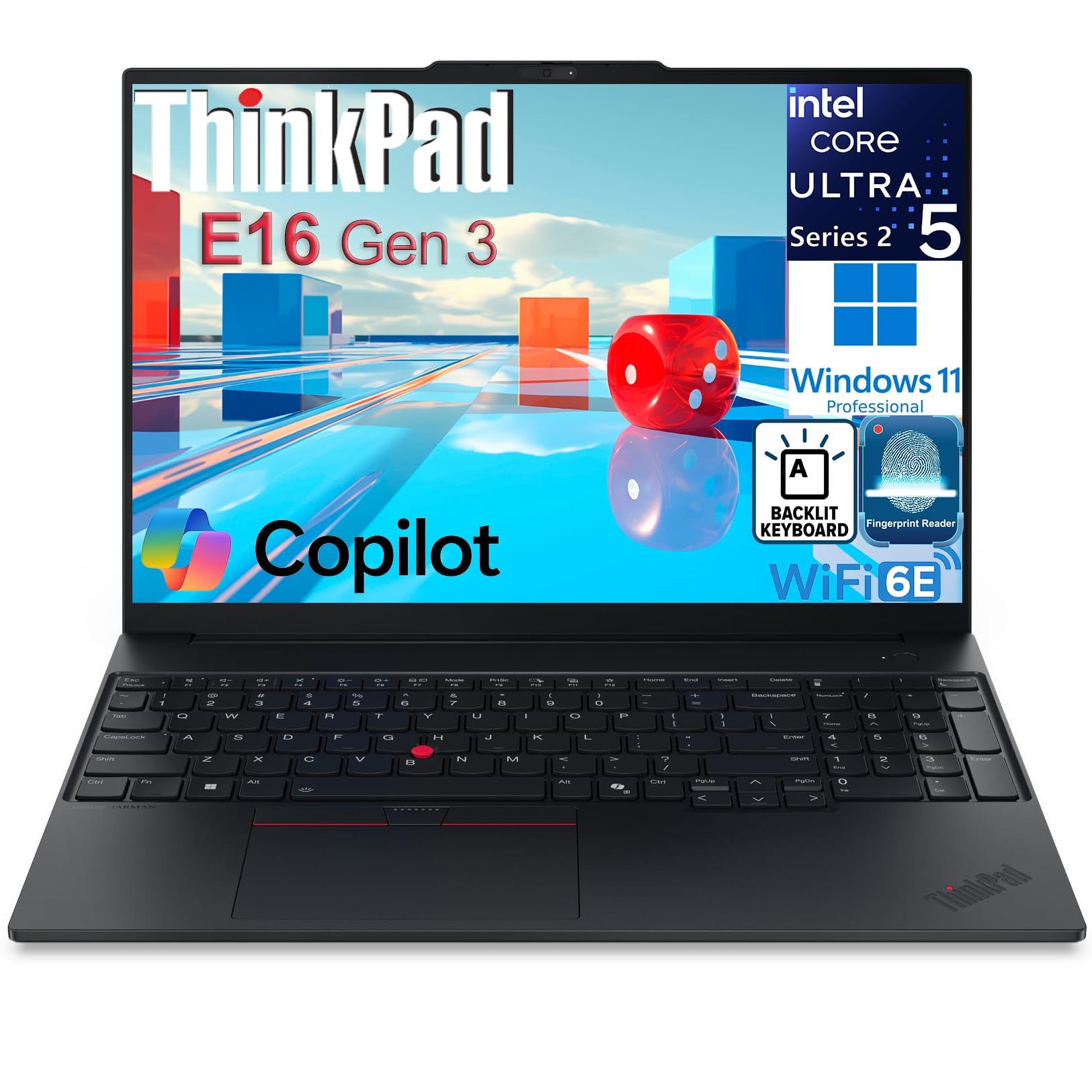
The enterprise workhorse that boots in about 15 seconds and survives a workday.
For corporate and remote work, what matters is a machine that starts fast and does not flake. The Intel Core Ultra 5 225H runs 14 cores with an integrated AI Boost NPU (a small dedicated AI chip rated 13 TOPS) up to 4.9 GHz, so multitasking and data analysis feel easy. The 16-inch WUXGA IPS anti-glare panel at 300 nits keeps text crisp in a bright office. Security is built in, with a fingerprint reader in the power button, a TPM 2.0 chip, and a privacy shutter over the camera.
Connectivity covers the business essentials: Thunderbolt 4, USB-C power delivery, HDMI 2.1, Wi-Fi 6E, and a wired Ethernet port — the last one a rarity on modern laptops and a real help in offices that still run cables. The backlit keyboard keeps a numeric keypad, which number-heavy jobs will appreciate. It runs cool and quiet enough for a meeting room. Linux users have installed Kubuntu over Windows 11 without issue, which is worth knowing if you prefer a non-Windows workflow.
The trade-off is that this is a business machine, not a creative or gaming one. The graphics are integrated Intel Arc, so heavy editing and gaming are off the table. Sound quality is modest, so bring headphones. And the memory on this listing is 4GB — confirm the exact configuration you want before ordering, since business lineups often ship in many variants.
Made for meetings: Thunderbolt 4, Ethernet, a privacy shutter, and a fingerprint reader cover office needs neatly.
Know its lane: integrated graphics and modest speakers mean it is a work tool, not a play machine.
Best for: business users, executives, and Linux adopters who want durability and real ports.
Pair with care: verify the exact RAM and storage configuration you receive before relying on it.
9. Microsoft Surface Laptop 15 (Copilot+ PC)

A 20-hour battery and a Snapdragon brain for people who work far from a socket.
If you fly, commute, or work from cafés, this is the pick for the hours you get. The Snapdragon X Elite runs 12 cores and pairs with 32GB of memory and a 1TB SSD, and the quoted battery life is 20 hours — the longest figure on this list by a clear margin. The 15-inch touchscreen gives you a big canvas without the bulk. It is a Copilot+ PC, meaning the AI features run locally on the chip rather than waiting on the cloud.
Owners love the build and the portability. It has a true laptop feel — solid on a lap, a keyboard that rivals the best — and it stays cool under light loads while handling productivity work fast. The multi-day battery is the real story: leave the charger at home and still finish your week.
The catch is the architecture. ARM-based Windows — the chip family the Snapdragon uses — runs many apps well but not every older one, and the compatibility list keeps improving. Some specialist tools and virtualization software simply will not launch. Check your must-have apps first, because the wrong one will be a hard blocker.
The winning case: 20 hours of quoted battery plus 32GB of memory and a 15-inch touchscreen make it the traveler’s productivity machine.
The one real risk: ARM architecture can block older Windows apps, so confirm your software runs before you commit.
The traveler’s pick: anyone who prioritizes battery life, a premium build, and a big touchscreen over raw gaming power.
Check first if: your software includes older or specialist Windows apps that may not support ARM.
10. ASUS ROG Strix G16

A competitive-gaming rig with a Nebula panel that stays fast and readable under pressure.
The screen is the star. The 16-inch ROG Nebula panel runs 2.5K at 240Hz with a 3ms response time — the delay between an input and the pixel change — and an anti-reflective film that boosts contrast and cuts glare. Behind it, an Intel Core Ultra 9 275HX up to 5.4 GHz and a GeForce RTX 5070 Ti with 32GB of DDR5 memory and a 1TB SSD keep frames high in AAA titles and 1440p work alike.
Cooling uses an end-to-end vapor chamber, tri-fan setup, and liquid metal on the chipset. Liquid metal is a thermal interface material that conducts heat better than normal paste, and the practical payoff is a machine that runs cooler and more quietly under load. A full-surround RGB light bar can be switched fully off in a professional setting. It has two Thunderbolt USB-C ports, which keeps docks and external drives simple.
Portability and battery are the honest partner spec. It is heavy and bulky, runs hot, and the battery lasts a few hours — normal for hardware this powerful. One software quirk: the Asus utility does not always let you push the fans to maximum. And the front-center numeric keypad layout is not to everyone’s taste.
Frame chaser’s case: a 240Hz/3ms Nebula screen and a 250W-class vapor chamber make it a top-flight gaming display and cooler.
Accept this: weight, heat, and short battery are the price of that frame rate, along with a quirky fan-control app.
For competitive gamers: anyone who wants a fast, anti-glare 240Hz screen and doesn’t need all-day portability.
Consider elsewhere if: you want a light laptop, maximum battery, or a friction-free software setup.
11. LG gram Pro 17

A 17-inch screen in a 3.3-pound frame that people do a double-take picking up.
Buyers keep coming back to the weight. One reviewer wrote: “I just love people’s surprised reactions when I hand it to them and they feel how light it is!” That is the whole pitch here. A 17-inch display and an Intel Core Ultra 9 285H processor up to 5.4 GHz fit into 3.3 pounds and a 0.6-inch-thin body. The chassis has passed seven military-grade resilience standards, so the 3.3-pound body does not feel fragile. Memory is 32GB DDR5 and storage is 2TB.
Battery is the second headline. A 90Wh battery gives up to 25 hours of video playback, and an AI assistant learns your patterns to stretch it further. Add an NVIDIA RTX 5050 for light gaming and rendering plus a Variable Refresh Rate screen that adapts from 31Hz to 144Hz, and you have a laptop that covers travel and play. It opens with one hand and keeps a full numeric keypad.
The honest caveat is the trade-off of going thin and light. It has no Ethernet port, so you plug into a dock for wired networking. There is no dedicated GPU of the RTX 5070 class found above, so it is a light-gaming machine rather than a gaming rig. And setup can involve a few pre-installed apps you will want to remove. For travel-focused buyers, those are reasonable terms.
The core win: 3.3 pounds, a 17-inch screen, and a 90Wh battery that runs up to 25 hours of video.
The trade-off: no Ethernet and no high-end gaming GPU — this is a light-gaming travel machine.
Perfect for: road warriors who want a big screen without the usual big-screen weight.
Skip if: you need a wired network port or serious gaming frames.
12. Alienware 16 Area-51 Gaming Laptop

A gaming laptop with a visible cooling window and a look that refuses to whisper.
The design is the hook. The Cryo-Chamber props the laptop up on a stand to create a much larger air intake, and a clear Gorilla Glass panel gives you a view of the AlienFX fans underneath. Ambient AlienFX lighting shifts color like the aurora borealis, so the machine is meant to be seen. Underneath it runs an RTX 5070 Ti with Intel Core Ultra HX processing and up to 5.4 GHz, 32GB of RAM matches a maxed desktop for 3D modeling and video editing, according to owners.
Performance is the thing people keep coming back to. Buyers report MOBA titles at 300+ fps and Forza 5 smooth at high settings. Dell backs it with a 1-year onsite service plan, which is a practical extra if the hardware acts up. RAM and storage are easy to upgrade yourself, so it can grow with you.
The trade-off is screen character and reliability luck. The panel has great frame rate and color but weak contrast and a glow around black areas — an OLED it is not. Like any high-power machine, a few units arrive with issues, so be ready to use that onsite service if one does. And this is a desktop-replacement machine in spirit, best kept at a desk rather than in a backpack.
The draw: a visible Cryo-Chamber and RTX 5070 Ti performance that can replace a desktop for creation and gaming.
The honest note: the panel’s contrast is modest despite its speed, and handling issues is what the onsite coverage is for.
For the desk builder: gamers and creators who want easy upgrades, bold looks, and desktop-class power.
Not for you if: you want deep blacks in a movie and zero maintenance risk.
13. Razer Blade 16

A CNC-milled aluminum slab that makes a gaming laptop feel like a luxury object.
The chassis is the point here. It is milled from a single block of aluminum, anodized with a matte finish, and there is zero flex when you type on it. That rigidity is why it feels closer to a premium ultrabook than a typical plastic gaming deck. The 16-inch QHD+ panel (a sharp 2560×1600-class resolution) runs at 240Hz and supports NVIDIA G-SYNC, which syncs the screen to the graphics chip to kill tearing in fast games. Inside, a 13th Gen Intel Core i9-13950HX runs 24 cores with an RTX 4070 graphics chip rated at up to 140W TGP (total graphics power, the wattage the card can draw). It ships with an ultra-compact GaN charger (gallium nitride, a more efficient charger material) up to 280W that the maker describes as up to 60% smaller than standard adapters.
What makes it stand out is the fit of a 16-inch screen into a body close to a 15-inch laptop, so you get more screen without a bigger bag. A four-speaker array with THX Spatial Audio and two Smart Amps gives the audio some real presence. The CNC build also resists scratches in daily handling, which is the kind of thing that keeps a premium machine looking premium.
The catch is that this is the highest-premium machine on the list, and the trade-offs are the usual ones for this tier. Fan noise under load is noticeable, it runs warm, and battery life is modest — one owner reports roughly an hour of gaming off the charger. A few units arrive damaged or with quality issues, so inspect on delivery. For buyers who value the metal build and the screen above all, that is a fair trade.
Build quality: CNC-milled aluminum with zero flex is the reason this machine feels premium.
Real-world note: expect fan noise and short gaming battery — normal for the power under the hood.
Best suited to: buyers who want a gaming laptop that feels like a luxury object and don’t mind the premium.
Look elsewhere if: you need quiet fans, long battery, or the lowest per-spec cost.
Know the Specs
Refresh rate in Hz
Refresh rate is how many times per second the screen redraws. A 60Hz panel redraws 60 times; a 240Hz panel redraws 240. Higher numbers make fast motion look fluid, which matters in games and fast video. For spreadsheets and browsing, the difference is far less noticeable. Match the rate to what you actually do.
Memory and unified architecture
RAM is the fast workspace where your open apps live. Windows laptops list separate memory; Apple and some ARM machines use a shared pool that the processor and graphics draw from together. That is why a 24GB Mac and a 32GB Windows laptop are not quite the same comparison. More memory means more apps open without slowdown.
Nits and OLED contrast
Nits measure brightness. Higher nits mean the screen stays readable in a bright room. OLED contrast is different from brightness: OLED switches individual pixels off for true black, which is why dark scenes look deep. A high-nit OLED panel gives you both readability and depth.
Watt-hours and TGP
Watt-hours (Wh) measure battery capacity; many premium laptops top out near 99.9Wh, roughly the airline carry-on limit. TGP is the power a graphics chip can pull — higher TGP usually means more performance and more heat. Both numbers tell you how a laptop balances speed against battery and cooling.
Common Questions
Do I really need 32GB of memory in a high-end laptop?
Will a MacBook run my Windows-only software?
Is a 240Hz screen worth it over 60Hz?
How long does a gaming laptop battery actually last?
Can I upgrade the memory or storage myself?
Does a larger laptop screen make it harder to carry?
Are OLED screens better for gaming?
What does a vapor chamber actually do?
Is a Snapdragon laptop a good choice for gaming?
Should I buy a laptop with a discrete GPU if I mostly work?
The Bottom Line
For most people, the best high end laptops come down to which single trade-off you can live with. Want one machine that does everything — heavy creative work, all-day battery, and a screen you love looking at? The Apple MacBook Pro 14-inch with M5 Pro is the pick. Its M5 Pro silicon and 24GB of unified memory (one pool shared by the processor and graphics) handle demanding tasks while the battery keeps a workday going. If frame rate is your priority, the Lenovo Legion Pro 7i leads with a 240Hz OLED and a 24-core chip. For travel, the LG gram Pro 17 gives you a 17-inch screen at 3.3 pounds with up to 25 hours of video playback. Match the pick to your heaviest task, and the upgrade will feel justified for years.
How we choose
We do not accept paid placement. Every pick is matched to a real buyer and a real use-case; we do not hands-on test units.
Sources
Specifications: manufacturer listings and product documentation. Review insights: verified customer reviews, as of October 2026. Pricing: not shown on this page (it changes often); check the current price via the retailer link.
As an Amazon Associate, Aappliancez earns from qualifying purchases. This does not affect which products we feature.