Disclosure: Some links in this post are affiliate links. As an Amazon Associate I earn from qualifying purchases, at no extra cost to you. Learn more
Specs are compiled from manufacturer listings and verified buyer reviews and can change over time — please confirm the key details on the product page before buying.
Your voice should come through clearly, not the fan humming behind you. A boom mic (a microphone on an adjustable arm that sits near your mouth) decides whether callers, viewers, or teammates hear you or your room. The picks below range from studio-grade broadcast gear to a budget gaming headset that simply works, and each one earns its spot for a different reason.
This guide is built by comparing the manufacturers’ published specifications and the patterns across verified customer reviews, so you get each pick’s real strengths and trade-offs instead of marketing spin.
Some mics here plug straight into a laptop, others demand a mixer, and one is built for broadcast booths rather than bedrooms. This guide covers what separates a clear voice from a muffled one so you can pick the headset with boom mic that fits how you actually talk.
Top Picks

How To Choose The Best Headset With Boom Mic
The single biggest mistake buyers make is shopping by sound quality alone. The boom mic is the reason you’re buying this category at all, so treat the microphone as the main event and the ear cups as the support act. A headset with glorious audio and a mic that picks up your keyboard will ruin every call you take.
Match the connection to your setup before anything else
A USB headset plugs into a laptop and just works — no software, no adapter, no battery worries. A 3.5mm jack headset goes almost anywhere, from a PlayStation to a phone, but your mic quality rides on whatever sound chip your device has. Bluetooth and wireless dongle headsets free you from the cable but add charging to your routine. If your headset uses an XLR connector (the round three-pin plug used on pro audio gear), it will not plug into a computer directly — it needs a mixer or an audio interface in between.
Understand what the mic pattern does for you
A cardioid pickup pattern (a mic that’s most sensitive to sound arriving from directly in front of it) lets a broadcast headset ignore off-axis noise — the hum of a fridge, the clatter of a keyboard, a colleague two desks over. Environmental Noise Cancellation, usually shortened to ENC, works differently: it filters background sound on the mic path so the person on the other end hears less of your room. Neither one makes you sound like a recording studio, but both cut the noise that forces people to ask you to repeat yourself.
Think about the hours, not the minutes
Weight and clamping force matter more the longer you wear the headset. A 113-gram headset barely registers after a morning of calls, while a heavier over-ear design can start to press after a few hours. If you’re on back-to-back meetings, look at padded headbands and pressure-distributing ear cushions rather than the lightest possible number. If you game for four-hour stretches, breathable fabric cushions beat vinyl ones that trap heat.
Side-by-Side Comparison
| Model | Best For | Connection | Mic Setup | Build | Amazon |
|---|---|---|---|---|---|
| Audio-Technica BPHS1★ Best Overall | Broadcast and live streaming | Wired, XLR mic + 1/4 inch headphone | Boom-mounted dynamic cardioid, left or right | Closed-back circumaural | Amazon |
| Mopchnic DH18Best for Work Calls | All-day work calls | Bluetooth 5.3 plus USB dongle | ENC retractable boom | Lightweight on-ear | Amazon |
| JBL Quantum 100M2 | Budget gaming anywhere | Wired 3.5mm jack | Detachable directional, mute option | Over-ear memory foam | Amazon |
| Logitech H570e | Teams-certified desk work | Wired USB-A | 2 noise-canceling mics, flip boom | 113 grams, leatherette pads | Amazon |
| JLab Go Work Gen 3 | Multi-device meeting hoppers | Bluetooth multipoint, dongle, USB-C | Flip-up boom with ENC | Cloud foam on-ear | Amazon |
| Poly Blackwire 5220 | Voice-first office calls | USB-C tether to USB-A, plus 3.5mm | Noise-canceling boom with passive isolation | Ergonomic over-ear | Amazon |
| Logitech G522 Lightspeed | Wireless gaming and streaming | LIGHTSPEED, Bluetooth 5, wired USB | Full bandwidth 48 kHz/16 bit, detachable | 280 grams, washable suspension band | Amazon |
Detailed Reviews
1. Audio-Technica BPHS1 Broadcast Stereo Headset
Our pick — 4.0+★ from 850+ verified ratings; the strongest balance of quality and price.
Built like a studio tool, tuned for voices that need to cut through a loud room
If your job is talking — sportscasting, live streaming, internet radio, audiobook narration — the BPHS1 is the pick where the microphone, not the headphones, was the engineering brief. Its dynamic cardioid element rejects off-axis sound, which is the technical way of saying it hears the voice in front of it and largely ignores the air conditioner behind it. That’s why it holds up in an untreated apartment with a window unit running. The mic boom swings to whichever side of your face you prefer, left or right.
What wins people over here is how little room noise reaches the recording. The closed-back circumaural ear cups (they fully surround the ear and seal against the head) block crowd noise while you monitor, and the neodymium magnets (strong magnets that help produce clear, loud audio) in both the mic and the headphones keep the output level high without pushing your interface into a hiss. Owners describe the headphone sound as comparable to Audio-Technica’s own dedicated monitoring headphones, and the mic output as competitive with standalone condenser microphones (high-quality mics often used in studios) costing considerably more. That’s a serious claim for a headset, and it’s why broadcasters keep this model in service for years.
The honest friction is the connector, not the audio. The cable terminates in a 3-pin XLRM-type connector for the mic and a 6.3 mm (1/4 inch) TRS plug for the headphones — the round plug and the chunky jack you see on stereo gear. Neither plugs into a laptop’s headphone socket. You need a mixer or an audio interface with an XLR input, which adds cost and desk space if you have neither. The cable itself is long and heavy at 3.3 m (10.8 feet) and has a reputation for snagging; taping it down fixes that. Owners also note the stock ear pads run small, and swapping to larger pads made multi-hour sessions comfortable. It holds 4.0+ out of 5 across 800+ ratings despite the XLR and 1/4 inch plugs that rule out a laptop jack.
What Earns The Broadcast Reputation
- Cardioid dynamic mic shuts out off-axis room noise so your voice arrives clean
- Closed-back ear cups seal the room out while you monitor your own levels
- Boom swings to the left or right side to match how you work
- Neodymium magnets in mic and headphones hold a high output level
- Rated 4.0+ out of 5 across 800+ ratings, with a following in streaming and radio
What To Sort Before Buying
- XLR mic plug and 1/4 inch headphone plug need a mixer or interface — not a laptop jack
- The 3.3 m (10.8 feet) cable is long and heavy and tends to snag on desk edges
- Stock ear pads run small; many swap them out for larger ones
- The cord near the ear cup is sensitive to vibration, which can introduce rumble unless you secure it
Built for: anyone whose voice is the product — podcasters, sportscasters, streamers, and narration readers who already own an interface.
Plan around: the XLR requirement. Without a mixer or audio interface, this headset will not make a single sound.
2. Mopchnic Wireless Headset
The one that gets through a full work week on a single charge
Picture a Tuesday afternoon with a Teams call, a phone call, and a Zoom meeting still ahead of you. This headset is built for exactly that day — the 500 mAh battery is rated for up to 80 hours of music playback and 50 hours of talk time at half volume. Even if real-world numbers land below the spec sheet, a work week between charges is a practical reality here, and you stop thinking about the charging cable entirely. When it does need power, a fast charging dock on the desk makes it a habit rather than a chore.
Two connection paths is the other reason it fits a hybrid week. Bluetooth 5.3 handles phone calls and pairs to two devices at once, while the USB dongle delivers a plug-and-play link to a PC that skips the pairing dance altogether. The dongle is also what makes the latency low enough for calls without that half-second lag. What wins people over is the mic: the ENC boom filters ambient sound on the call path, and the quality of the resulting voice is the thing buyers mention most, with sound quality close behind. The retractable boom mutes when you rotate it up, and the retractable headband adjusts to different head sizes.
Here’s the fair caveat. If you plan to listen to music between calls, the stereo drivers push bass forward and voices can sound slightly muffled on tracks where the mix is dense — this is a call-first headset, not a listening headset. The other recurring note is the fit: the on-ear design relies on the headband to hold position, so buyers with larger heads sometimes want a firmer clamp. It holds 4.0+ out of 5 across 300+ ratings, with call voice quality the most-praised feature. For the price tier, the combination of 80 hours of claimed battery, a USB dongle, and a boom mic that actually cancels background is hard to argue with.
The week-long charge claim: A 500 mAh battery (a measure of battery capacity) powers up to 80 hours of playback and 50 hours of talk at 50% volume, so you can get through several days of calls without hunting for a cable, according to owners.
The trade you accept: music takes a back seat to voice. Drivers tuned for call clarity push bass and leave detail behind on music playback.
Reach for this if: you live in Teams, Webex, and Zoom and want one headset covering PC, iPhone, and desktop on a single charge cycle.
Look elsewhere if: music quality between calls is your priority — the drivers favor voice over the low-end detail music needs.
3. JBL Quantum 100M2 Wired Gaming Headset, Detachable Mic

A budget wired headset that plugs into nearly every platform you own
One 3.5mm jack, and you’re in — PC, PlayStation, Xbox, Nintendo Switch, mobile, Mac, and VR. That single cable is the reason this headset is worth considering as a first gaming set or a spare for the living room console. There’s no battery to charge, no dongle to lose, no pairing screen to fight with. You plug it in and the console or PC sees it.
The 40 mm dynamic drivers handle the JBL QuantumSound tuning, which the company pitches as a soundstage that keeps you aware of where footsteps and explosions land. On Windows 10 PCs and Xbox One, the headset is fully compatible with Windows Sonic spatial sound (software that places game audio around your head rather than left-and-right), which adds positional cues for free. The over-ear design uses memory foam padding and breathable fabric cushions, so long sessions don’t turn into a sweaty affair the way vinyl pads can.
Be clear-eyed about what the money buys. The mic is directional and detaches when you’re playing solo, with a mute option on the detachable arm. Across the review base, sound quality and mic performance both split — some owners find the audio great, others describe it as very quiet, and a portion report the mic giving out after a few months of use. That split lands at 4.0+ out of 5 across 1,000+ ratings: most buyers are content, but at this price the headset is a replaceable item, not a lifetime purchase. A windshield foam for the microphone ships in the box, which is a thoughtful touch at this tier.
Where The Budget Money Goes
- One 3.5mm jack covers PC, PlayStation, Xbox, Switch, mobile, Mac, and VR
- 40 mm drivers with JBL QuantumSound tuning for positional game audio
- Memory foam padding and fabric cushions stay cooler than vinyl over long sessions
- Directional mic detaches for solo play and includes a mute option
- Windows Sonic spatial sound compatibility on Windows 10 PCs and Xbox One
The Realistic Expectations
- Volume and mic performance split reviewers — some find it quiet, some find the mic fades after a few months
- Wired only, so there’s no wireless freedom and no multi-device switching
- No inline volume dial is listed on the headset itself
The story this headset tells: it’s a low-risk entry into over-ear gaming audio that works on whatever console you plug it into.
Walk past it if: you need a mic you can rely on for eight-hour work calls — this one is a gaming companion, not a work tool.
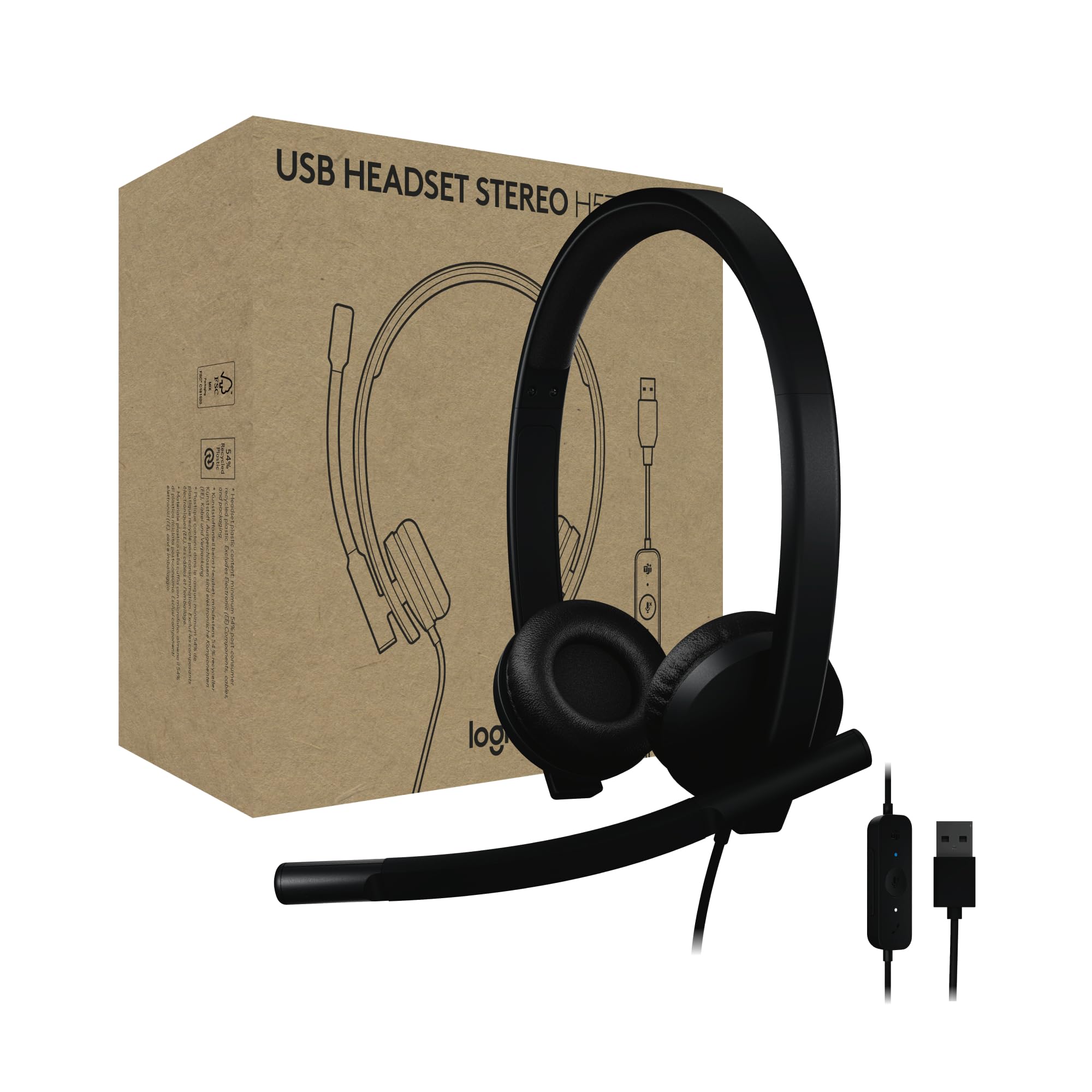
4. Logitech H570e USB-A Wired Headset
The IT department’s default pick — plug in, get to work, forget the battery
Two noise-canceling microphones and a 30 mm driver sit behind a Microsoft Teams certification, which means the mute button, the call button, and the on-screen status all talk to each other without you configuring anything. The inline controller handles volume and mute, and LED lights on the controller show call and mute status at a glance — useful when you’ve lost track of whether you’re broadcasting or not. Setup is USB-A into a PC or Mac and nothing else. No software, no dongle, no charging routine.
The weight is the quiet achievement here: 113 grams, with leatherette ear pads and a padded headband. That combination is why the headset holds up across a full day of Teams calls without pressing on the crown of your head. Buyers who use it for language lessons report the mic picking up pronunciation more clearly than a laptop’s built-in array. The plastic parts are made with a minimum of 54% post-consumer recycled plastic, and the earpads are replaceable, which extends the useful life — a detail buyers replacing other brands’ sealed headsets tend to appreciate. Logitech Sync gives IT admins a path to manage and update units remotely, and Logi Tune open up sidetone adjustment, mic level, and anti-startle protection.
The honest trade-off is fit, and it’s a fit question rather than a fault. The earpieces are small, round on-ear cups rather than a full over-ear seal, so buyers with larger ears or a love of deep isolation may find the clamp tight. That same design is why the headset is comfortable for long hours for most people — it just distributes pressure differently. Noise cancellation and durability both split in the review base, with a small share reporting the headset failing within a few months and a larger share reporting it lasting for years of daily use; the 4.0+ out of 5 rating across 1,000+ ratings tips toward the buyers reporting years of daily use.
The plain-English case: certified Teams controls plus 113 grams of weight plus USB plug-and-play make this the safest desk headset you can hand to a new remote hire.
Consider the shape: round on-ear cups, not full over-ear ones. Buyers who want their ears fully enclosed should look at the Poly Blackwire 5220 below.
If you sit in Teams all day: this is the headset that disappears on your head and lets the software handle the rest.
If your ears need full coverage: the round on-ear cups won’t seal like a circumaural design, so look at an over-ear alternative.
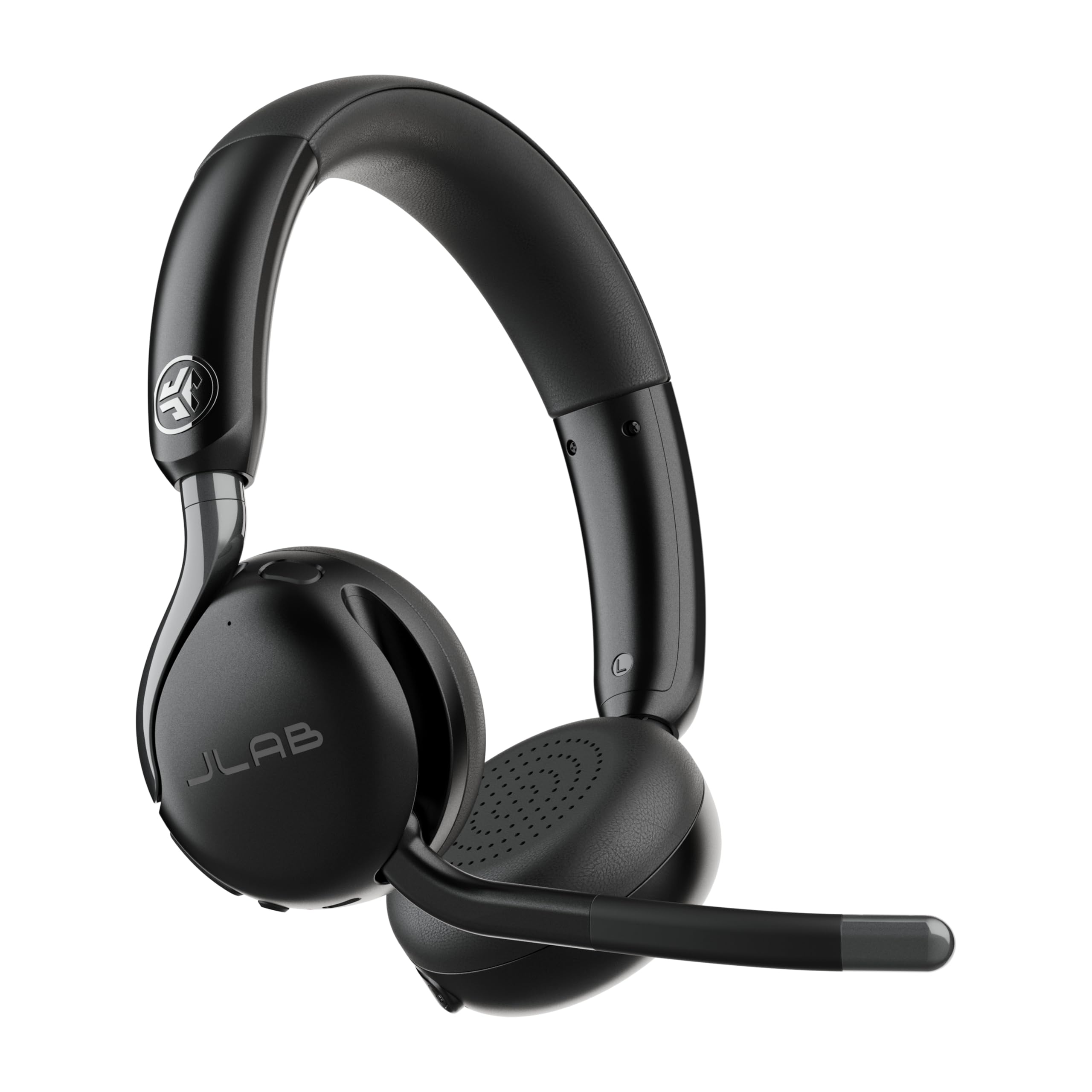
5. JLab Go Work Gen 3 Wireless Headset

Three devices, one headset, and a battery that lasts a full work week
If your day is a laptop for work, a phone for calls, and a tablet for the video meeting you forgot about, this headset is built for exactly that mess. Bluetooth multipoint connects to three devices at once, and you can also go wired through USB-C or use the USB-C dongle for a clean PC link. Switching between your laptop and your phone is one press of a button — no unpairing, no reconnecting through a menu.
The 55-hour battery rating is the other reason it holds up on a busy calendar. Buyers using it for dozens of calls a day describe going several days between charges, and fast charging tops it up quickly when you’ve forgotten. The boom mic flips up to mute and the ENC algorithm filters ambient sound on the call path, with voice and music EQ modes selectable so the same headset can handle calls and listening. Wider cloud foam on the headband and ear cups spread pressure across the skull rather than concentrating it, which is what keeps them tolerable through back-to-back meetings.
Here’s the part buyers need to walk in knowing. The review base is split, and the split is real — a 3.0+ out of 5 rating across 300+ ratings splits between buyers praising sound and battery and buyers whose mic failed within weeks. Owners who love it point to the sound, battery, and easy dongle connection. Owners who hit trouble most often cite the microphone giving out — in one case within a week, in another after a couple of months — and a fit that slips when you move your head. The flip-to-mute function also doesn’t work on every unit in the same way, so it’s worth testing yours on day one before relying on it mid-call. The JLab desktop app for Windows and macOS lets you remap the controls and tune the EQ, and the headset carries a 2-year JLab warranty.
For the juggler: three-device multipoint, 55-hour battery, and a flip-up boom make this an appealing pick if you’re constantly hopping between laptop, tablet, and phone.
Test it early: the mic and the flip-to-mute are the two spots the less happy buyers run into, so confirm both work in week one while the warranty is fresh.
6. Poly Blackwire 5220 Wired Headset

Three connection types in one headset and a boom mic tuned for voice, not music
This is the headset you pick when you want one unit that works on a locked-down work laptop, a personal Mac, and a mobile phone without buying adapters. A tethered USB-A adapter splits off the USB-C cord for older ports, and a 3.5mm jack covers phones and tablets. Certified for Microsoft Teams and Zoom, plug-and-play on both. Passive noise isolation works through conforming ear cushions that sit over the ear and physically reduce what reaches you, while a noise-canceling boom mic handles the noise on your outgoing voice. Dynamic EQ recalibrates between voice and multimedia automatically.
Buyers who switch from other desk headsets because of connection reliability report the same story again and again: audio calls stop stuttering, dictation software like Wispr Flow stops dropping words, and the platform’s own desktop client stays connected. The sound quality on calls is clear and loud, which is what earns the headset its following. A retractable cable and a carrying case round out the office-ready package. The carrying case is plastic, the color is black, and the whole thing is built for a road warrior or a work-from-home desk that sees a lot of voice traffic.
Now the honest line. Earpiece audio on the 5220 is tuned for voice transmission, not for music — bass is limited and complex media can sound flat. The noise cancellation is passive, which means it reduces noise through physical sealing and audio processing rather than active anti-noise; in a very loud open office this is a muffling effect rather than silence, and buyers expecting ANC-level quiet will be disappointed. Fit also splits: some owners find the ear pieces snug and comfortable, others feel the band is tight across the head. Durability numbers trend negative in the wider review picture, mostly from cord wear over years of desk use — buy the replacement cord if you intend to keep it long-term. It holds 4.0+ out of 5 across 600+ ratings, with call clarity the strongest signal.
Why Offices Standardize On It
- USB-C, tethered USB-A, and 3.5mm in one headset — covers nearly any device you’ll be issued
- Certified for Microsoft Teams and Zoom with plug-and-play setup
- Passive noise isolation plus a noise-canceling boom mic handle both directions
- Dynamic EQ adjusts between voice and multimedia without you changing anything
- Conforming ear cushions and a carrying case make it a genuinely portable desk kit
- 4.0+ out of 5 across 600+ ratings, with call clarity the strongest signal
Where It Stops Short
- Audio is tuned for voice — music and media come across flat with limited bass
- Noise cancellation is passive, not active; very loud rooms get muffled rather than silenced
- The headband can feel tight for buyers with larger heads
- Cable wear over years of use is the durability note in the review base
For the reliability-first buyer: if a dropped call costs you, the wired connection and three built-in connector types remove every variable.
Not for music-first listeners: the ear pieces are dialed for voice comms, so bring another headset when the video call turns into a listening session.
7. Logitech G522 Lightspeed Wireless Gaming Headset

Gaming audio at 48 kHz with a mic serious streamers can broadcast with
The G522’s mic runs at full bandwidth 48 kHz/16 bit — the same resolution broadcast audio uses — which is why it holds up better than typical gaming mics for streaming. It’s detachable, so it comes off for solo laps, and Blue VO!CE processing (software that tailors your voice) works through G HUB if you want more polish than the raw signal. Logitech G claims top-tier voice clarity, and owners back that up: buyers who normally fight with headset mics describe this one as one of the better ones available without stepping up to a dedicated microphone, and background noise rejection is strong enough to keep a gaming space clean on the call.
Sound arrives through PRO-G drivers pushing synchronized 48 kHz/24 bit audio, which is the technical reason bass stays controlled rather than muddy on explosions and music alike. Three listening paths give you flexibility the Blackwire and the H570e don’t have: LIGHTSPEED wireless for low-latency PC gaming, Bluetooth 5 for phones and tablets, and wired USB-A to USB-C when you want to plug in. Wireless range reaches up to 30 meters, and the battery is rated for up to 60 hours with lighting off. RGB side lighting runs through 16.8 million colors via LIGHTSYNC, so you can actually make the headset match your setup. At 280 grams with a washable suspension band and rounded ear cups, it’s built for long sessions.
The caveat is the battery spec. Some buyers report the headset falling far short of the 60-hour rating in mixed use, and a small share describe needing a charge after a few hours of heavy gaming with lighting on. Logitech’s 60-hour figure assumes lighting is off, and the RGB (colored lighting) almost certainly eats into that dramatically. The mic is also very sensitive — some users report it picking up nearby voices regardless of settings. And the app’s auto-shutoff behavior, meant to save battery during idle, has been reported as kicking in even when sleep is disabled. Everything about the audio, comfort, and wireless, however, lands firmly in the praise column, and 4.0+ out of 5 across 300+ ratings reflects a happy majority with a small, vocal group disputing the 60-hour battery claim.
The headliner: a full bandwidth 48 kHz/16 bit detachable mic is why streamers can plug straight into this and skip a separate microphone.
The trade: 60 hours assumes the RGB is off. Run the side lighting and the real-world runtime drops considerably.
Made for the streaming setup: PC players who want one wireless headset for game audio, chat, and broadcast-quality voice.
Worth pondering first: if you’ll run the LIGHTSYNC RGB at full brightness every session, expect the 60-hour figure to be a fair-weather claim.
Know the Specs
Connection Type — USB, 3.5mm, Bluetooth, Dongle, or XLR
This is the spec that decides whether the headset fits your setup at all. A USB headset plugs into a laptop with no software, while a 3.5mm jack headset rides on whatever sound hardware your console or phone has. Bluetooth and USB dongles cut the cord but add charging to your routine. An XLR connection (a professional audio connector) sits at the opposite extreme — it’s the professional audio standard on the Audio-Technica BPHS1 and it requires a mixer or interface to work at all, so if your budget or desk cannot accommodate one, that headset is off the table. Decide the connector first and let everything else follow.
Mic Pickup Pattern and Noise Handling
A cardioid pattern is the most common choice for a headset boom mic — it’s most sensitive to sound arriving from straight ahead, which is why it rejects the keyboard clatter and background conversation behind you. ENC, or Environmental Noise Cancellation, is a separate processing layer that filters ambient sound on the mic signal before it reaches your listener. Passive noise isolation is different again: it works by physically sealing the ear cushion against your head, so it reduces what you hear rather than what you say. The three can be combined, and the best work headsets often layer a cardioid boom mic on top of conforming ear cushions.
Battery Life and Charging Style
Only wireless boom mic headsets have a battery spec to check. The Mopchnic rates its 500 mAh cell at up to 80 hours of music playback and 50 hours of talk time at 50% volume. The JLab Go Work Gen 3 lists a 55-hour average life. The Logitech G522 claims up to 60 hours with lighting off. Every one of those numbers is measured under specific conditions — usually half volume, no RGB, and light use — so treat the manufacturer’s figure as a ceiling rather than a workday promise. A charging dock, like the Mopchnic ships, removes the mental load entirely because you set the headset down and it tops up.
Weight and Comfort for Long Sessions
Once you’re wearing a headset for four or eight hours, weight and clamping force start to matter more than either audio or mic quality. A lightweight design like the Logitech H570e at 113 grams spreads very little pressure across the head. The G522 sits at 280 grams and uses a suspension band to distribute it. Ear cushion material matters too — breathable fabric and cloud foam stay cooler than vinyl, which is a real difference during a summer of back-to-back meetings. If you wear glasses, round on-ear cups tend to press harder against the arms of the frames, which is worth checking before you commit.
Common Questions
Will a boom mic headset with an XLR connector plug into my computer?
Is a wireless boom mic headset better than a wired one for calls?
How long should a wireless boom mic headset battery actually last?
What is the difference between ENC and active noise cancellation?
Can I use a gaming headset boom mic for work calls?
Do I need software installed to use a headset with a boom mic?
How do I mute the boom mic without taking the headset off?
Will a boom mic headset pick up keyboard clicks and background noise?
Which is better for streaming, a headset boom mic or a standalone microphone?
How much should I spend on a headset with a boom mic?
Can I pair a wireless headset to a PC and a phone at the same time?
The Bottom Line
The headset with boom mic worth building around is the Audio-Technica BPHS1, because it treats the microphone as the main instrument — the cardioid dynamic element rejects room noise and the closed-back ear cups seal you into your own monitoring, which is what serious broadcasters actually need. If your days are Teams meetings and you want a headset that disappears on your head, grab the Logitech H570e. And for juggling a laptop, phone, and tablet across a work week on a single charge, the Mopchnic is the one to reach for. Buy for the way you talk, not the spec sheet.
How we choose
We do not accept paid placement. Every pick is matched to a real buyer and a real use-case; we do not hands-on test units.
Sources
Specifications: manufacturer listings and product documentation. Review insights: verified customer reviews, as of October 2026. Pricing: not shown on this page (it changes often); check the current price via the retailer link.
As an Amazon Associate, Aappliancez earns from qualifying purchases. This does not affect which products we feature.