Disclosure: Some links in this post are affiliate links. As an Amazon Associate I earn from qualifying purchases, at no extra cost to you. Learn more
Specs are compiled from manufacturer listings and verified buyer reviews and can change over time — please confirm the key details on the product page before buying.
If you take calls on a MacBook, the headset decision is simpler than the listings make it look. You need a microphone that keeps your voice clear, a fit you can wear through a third back-to-back meeting, and a connection method that works with the ports you actually have. The catch most buyers hit late: a USB dongle built for Windows may not be your Mac’s best friend, so the connection type matters as much as the sound.
This guide is built by comparing the manufacturers’ published specifications and the patterns across verified customer reviews, so you get each pick’s real strengths and trade-offs instead of marketing spin.
Below you’ll find picks sorted by fit and job, from featherweight wired workhorses to a Microsoft Teams-certified Bluetooth set that skips the dongle entirely. Every entry explains what it is like to live with on a MacBook day, so you can spot the best headset for MacBook calls before you commit.
Top Picks


How To Choose The Best Headset for MacBook
Start with the port, not the spec sheet. A MacBook with only USB-C ports needs either a USB-C adapter, a 3.5 mm jack, or Bluetooth — and picking the wrong one is the single most common reason a headset gets returned. Work backwards from there and everything else sorts itself out.
Wired, dongle, or Bluetooth
A wired USB-A headset gives you the most predictable connection, because there is no pairing and no charging. A dongle-based wireless set is next in stability, but check the dongle’s system support — several of the wireless picks here list a Windows-only dongle, while others pair straight over Bluetooth to macOS.
The microphone is the real product
On a MacBook call, your voice is the thing people judge. A noise-cancelling boom mic (a mic on an arm that sits near your mouth and filters room hum) is what separates a work headset from music headphones. Flip-up or one-touch mute matters too, because fumbling for a mute button mid-sentence is how meetings go sideways.
Single ear versus two ears
A single-ear headset leaves one ear open so you can hear a doorbell, a colleague, or traffic. A dual-ear set blocks more of the room and suits focused work. Neither is better — pick the one that matches how much of the room you need to stay in touch with.
Side-by-Side Comparison
| Model | Best For | Connection | Rated Talk/Battery Life | Mic Type | Amazon |
|---|---|---|---|---|---|
| KVIDIO Bluetooth Over-Ear 65H★ Best Overall | Long listening and light calls | Bluetooth 5.0 or 3.5 mm cable | 65 hours | Built-in mic | Amazon |
| Soothielec (Upgraded) Wireless HeadsetBest for Calls | All-day dual-ear office calls | Bluetooth 5.1 plus USB dongle | 40 hours | Noise-cancelling boom mic | Amazon |
| Logitech H111Budget Champion | Cheapest wired backup | 3.5 mm audio jack | — | Noise-cancelling boom mic | Amazon |
| Logitech H390 | Plug-and-play MacBook desk calls | USB-A | — | Rotating noise-cancelling boom mic | Amazon |
| Sarevile Single-Ear Bluetooth | Staying aware while on calls | Bluetooth 5.2 plus USB dongle | 50 hours talk time | ENC boom mic, 270° rotatable | Amazon |
| Poly Blackwire 3220 | Durable wired desk work | USB cable | — | Noise-cancelling boom mic | Amazon |
| COMEXION G10 Bluetooth | Pocketable travel headset | Bluetooth 5.3 plus dongle | 300 hours standby | Dual noise-cancelling mics | Amazon |
| LEVN Wireless Headset | Long-shift heavy call volume | Bluetooth 5.3 plus USB dongle | 65 hours | AI noise-cancelling boom mic | Amazon |
| Poly Blackwire C5220 | Two-ear wired conferencing | USB-A or 3.5 mm | — | Noise-cancelling boom mic | Amazon |
| Yealink BH70 Mono | Microsoft Teams on a MacBook | Bluetooth 5.2 native or BT51 dongle | 35 hours talk time | 3-MEMS-mic AI noise isolation | Amazon |
| Poly Voyager Legend 50 UC | Windy outdoor and travel calls | Bluetooth 5 | 10 hours, up to 30 with case | 4 noise-cancelling mics with WindSmart | Amazon |
Detailed Reviews
1. KVIDIO Bluetooth Headphones
Our pick — 4.5+★ from 34,500+ verified ratings; the strongest balance of quality and price.
The over-ear bargain that keeps playing long after cheaper sets go quiet.
This is the pick for the MacBook owner who wants one headset for the whole week — calls in the morning, music and lectures in the afternoon. The headline is a claimed 65 hours of playtime, which means you are plugging in roughly once a week rather than every night. It holds 4.5+ stars across 34,000+ owner ratings, a record built on doing the basics reliably.
What makes it flexible on a MacBook is the double life. Bluetooth gets you paired and moving around, and the included 3.5 mm backup cable turns it into a wired headset when you forget to charge. The foldable frame and soft memory-protein foam cushions are built for long sits, and the adjustable headband fits different head shapes. A 500 mAh battery refills in 2.5 hours, and the Bluetooth range is listed at 10 meters, plenty for pacing a room mid-call.
Two caveats worth knowing. There is no active noise cancellation here — the thick cushions simply muffle the room a little, so a genuinely loud café will still leak in. And the volume buttons use a hold-to-adjust motion that takes a few days to get used to. Neither is a deal-breaker at this tier; they are just the honest shape of the product.
Where it quietly wins
- 65 hours of playback off one 2.5-hour charge, so charging is a weekend chore, not a nightly one.
- Works two ways — Bluetooth 5.0 for mobility, 3.5 mm cable for zero-latency wired use.
- Folds down flat, which makes it the easiest of the over-ear picks to toss in a bag.
- Dual 40 mm drivers deliver the deep bass the listing promises, and it holds up at moderate volume.
What you give up
- No active noise cancellation — only passive muffling from the cushions.
- Bass gets muddy at high volume, so it plays best dialled back.
- Defaults to a loud volume the moment it connects.
- You cannot charge and listen at the same time.
Grab these if: you want one headset for the whole work week without battery math — the 65-hour playtime means you charge it on Sunday and forget it.
Think twice if: your workspace is genuinely loud, because the passive muffle will not cancel a busy café the way active noise cancelling would.
2. Wireless Headset
Built for the person whose job is actually the phone call, not the music.
Meet the Soothielec, the dual-ear workhorse for the MacBook user who lives in Zoom and Teams and wants the room shut out. The microphone is the star here: ENC (Environmental Noise Cancellation, which filters steady background sound before it reaches your caller) does the heavy lifting, and the boom flips up to mute. Callers on the other end notice — the recurring theme in feedback is that voices arrive clean even with a highway running outside.
Battery math is generous at a claimed 40 hours of use after a 2-hour charge, and a charging stand keeps it topped up between meetings. Multipoint pairing lets you hop between your MacBook and your phone without re-pairing, which is the feature that saves you mid-call when the mobile rings. Here the comparison gets interesting: the listing’s battery figure does not match the spec sheet’s 3000-hour line, so treat the 40-hour talk-time claim as the realistic one to plan around. If stamina is your top priority, the KVIDIO above quotes fewer moving parts and a simpler 65-hour figure.
Three things a buyer should map to their own setup. First, the included USB dongle is listed as Windows-only, so on a MacBook you are relying on Bluetooth — which works, but skip this if you specifically need a dongle-based Mac connection. Second, some long-session feedback mentions ear pressure after an hour or two, so it is not the pick for marathon wearing. Third, the headband is a sliding fit rather than a big adjuster, so a very large head may run out of travel.
Call quality first: this is the headset you buy when the other person’s experience of your voice matters more than yours of them. The ENC mic and flip-up mute are the reasons it sits high on the list.
MacBook caveat: the dongle is aimed at Windows machines, so you are a Bluetooth user on a Mac — fine for daily use, but not the pick for someone who needs a dongle for stability.
Reach for it if: your calendar is mostly video calls and you want the mic to do the work for you.
Look elsewhere if: you need a dongle plugged into a Mac for rock-solid connection — this one’s adapter is built for Windows.
3. Logitech H111 Stereo Headset with 3.5 mm Audio Jack – Black
The spare you keep in the drawer for the day the wireless one dies.
If you want the absolute simplest path into a MacBook call, this is it. A standard 3.5 mm jack plugs straight into a Mac’s headphone port with no pairing, no charging, and no dongle to lose. The rotating mic boom swings to whichever ear you favour, which matters if you share a desk or take calls from the same side every time. It is the cheapest wire in this list, and it behaves like it: no active noise cancelling, no in-line controls.
The microphone is more sensitive than you would expect at this level, and that cuts both ways. It picks up your voice clearly, but the flip side is that it picks up the room too. The foam pads are thin and comfortable for a short meeting, not for a six-hour shift — long-haul wearing tends to turn into ear soreness. Sound is fine rather than impressive; it will not distort, but it is not going to wow you on a music track.
Where this headset earns its keep is as a backup or a second set for a spare laptop. Keep one in a bag and you never get caught out by a dead battery before a 10 a.m. call. Just accept that the “noise cancelling” label on the box is marketing shorthand for a directional mic, not true cancellation — at this tier there is none, and the box copy overstates it.
Best in class for simplicity: a 3.5 mm plug means it works the instant you push it in, on any Mac with a headphone jack and no setup screen at all.
Worth it for: a cheap always-in-the-bag standby that never needs a charge and always connects.
The shortcoming: the foam pads are built for short calls, and multi-hour sessions will make your ears complain.
4. Logitech H390 Wired Headset

The USB headset with a cable long enough to stand up and stretch mid-call.
Here is the pick that answers the most common MacBook question directly: does it just work when you plug it in? Yes. The USB-A connector plugs into a Mac (USB-C hub required on newer MacBooks), the system recognises it without any driver install, and you are talking within seconds. The 6.23 ft cable is the real luxury — long enough to stand up and reach for a notebook without yanking the plug. The rotating boom mic tucks out of the way when the call ends, and the in-line controls give you volume and mute at your fingertips instead of in software.
The numbers back the popularity. It is the most-reviewed wired headset here, holding 4.0+ stars across 69,000+ ratings. The 30 mm drivers are tuned for voice, which is exactly what you want for calls and slightly less than ideal for music. Its spec sheet lists 30 ms audio latency, which keeps lip-sync tight on video calls.
The honest trade-offs: the in-line control brick is bulky and, if left unclipped, drags the cable down. The leatherette cushions are firm, and after a few hours a snug fit starts to feel it. And the headband adjustment can slip over months of aggressive pushing. None of these stop it being the safest recommendation for a desk-bound MacBook office setup.
Reliability you can lean on: a USB-A plug means no Bluetooth interference, no charging, and no pairing screen — the headset is ready the second macOS switches to it.
Where it stumbles: the pads firm up after a few hours, so for all-day wear the plastic band and cushions want a break every now and then.
Go with this if: you sit at a desk and want a headset that is ready before your meeting starts every time.
Worth knowing: it ends in USB-A, so a USB-C MacBook needs an adapter in the path.
5. Sarevile Bluetooth Headset

One ear free for the room, one ear entirely on the meeting.
For the MacBook user working from a home office with a kid or a delivery bell in the next room, single-ear makes real sense. This Sarevile keeps one ear open so you stay half in the physical world while still holding a full conversation. The 400 mAh battery is rated for up to 50 hours of talk time and 200 hours on standby, which is enough for a full week of shifts between charges. A 270° rotatable boom mic means you can wear it on either side, and one-touch mute gives instant privacy.
The comfort story is a big part of what wins people over. A memory-foam ear cushion and an adjustable headband are designed for long stints, and the lightweight build does not clamp. The ENC mic earns its credit too — the noise cancellation reads as effective in busy offices, and the dongle is plug-and-play for computers without Bluetooth. On a MacBook you can go either route: Bluetooth 5.2 straight from macOS, or the dongle if you prefer a wired-style connection.
The catch is the dongle’s default naming. You need to set the headset as the audio input and output on your computer manually, and if you want Bluetooth you must unplug the dongle first — it will not mix both. That setup step is the one bit of friction in an otherwise neat package. Also worth sizing: the mic boom is long, which is good for voice pickup but takes a beat to learn to live with.
Why call centres like it
- 50 hours of talk time and 200 hours standby on a 2-hour charge — a workweek per fill.
- Single-ear open design keeps you aware of the room while you talk.
- 270° boom rotates for either ear, with one-touch mute for privacy.
- Dongle plus Bluetooth 5.2 gives you two ways into your MacBook.
Details to plan for
- You have to set the headset as the audio device manually after plugging in the dongle.
- Dongle and Bluetooth do not run together — unplug one to use the other.
- The long boom mic takes some adjustment before it sits naturally.
The pick for: a home office where you need to hear the door while holding a full call.
The trade-off: one ear means you hear the room — which is the point, but not what you want in an open-plan noise war.
6. Plantronics PLNC3220 Blackwire 3220

The dual-ear work headset that treats three years as a minimum, not a milestone.
Poly’s Blackwire 3220 is the choice for someone who wants a wired dual-ear headset and expects to keep it. The build is the whole story: a foldable over-the-head frame, leatherette ear cushions, and a general USB cable rated at 5 feet. It plugs into a MacBook’s USB port (or a hub on USB-C machines) and works without software. The ear cushion material cleans easily, which matters if you wear it daily.
The mic handling is the standout detail. Voice noise cancellation here reads as better than most at this tier, though there is an occasional clip on the first syllable you speak. The boom sits close enough to catch your voice clearly for calls, and the stereo drivers deliver adequate sound for music between meetings. Long-wear comfort is the other strength — the lightweight frame and soft cushions get through a full day without the ear clamp you feel on cheaper sets.
The nitpicks are real but small. The 5-foot cord is shorter than some users want at a big desk, though it reaches fine from a laptop. The volume and mute buttons sit fairly high on the cable, so reaching them takes a moment, and the mic boom can bump the ear cup when you swing it aside. There is also a button beep with no off switch, which is the sort of tiny annoyance that nags after months. Still, this is a wired headset built to outlast its price point.
Durability read: the foldable frame and leatherette cushions are engineered for daily office wear, and long-term feedback suggests the hinges and pads hold up where cheaper builds start to crack.
For you if: you want a wired dual-ear desk headset and intend to keep it for years.
Pass if: you need a long cable run across a wide desk — the 5 ft cord is on the short side.
7. COMEXION Bluetooth Headset V5.3
A headset that lives in your bag and charges itself on the way to the meeting.
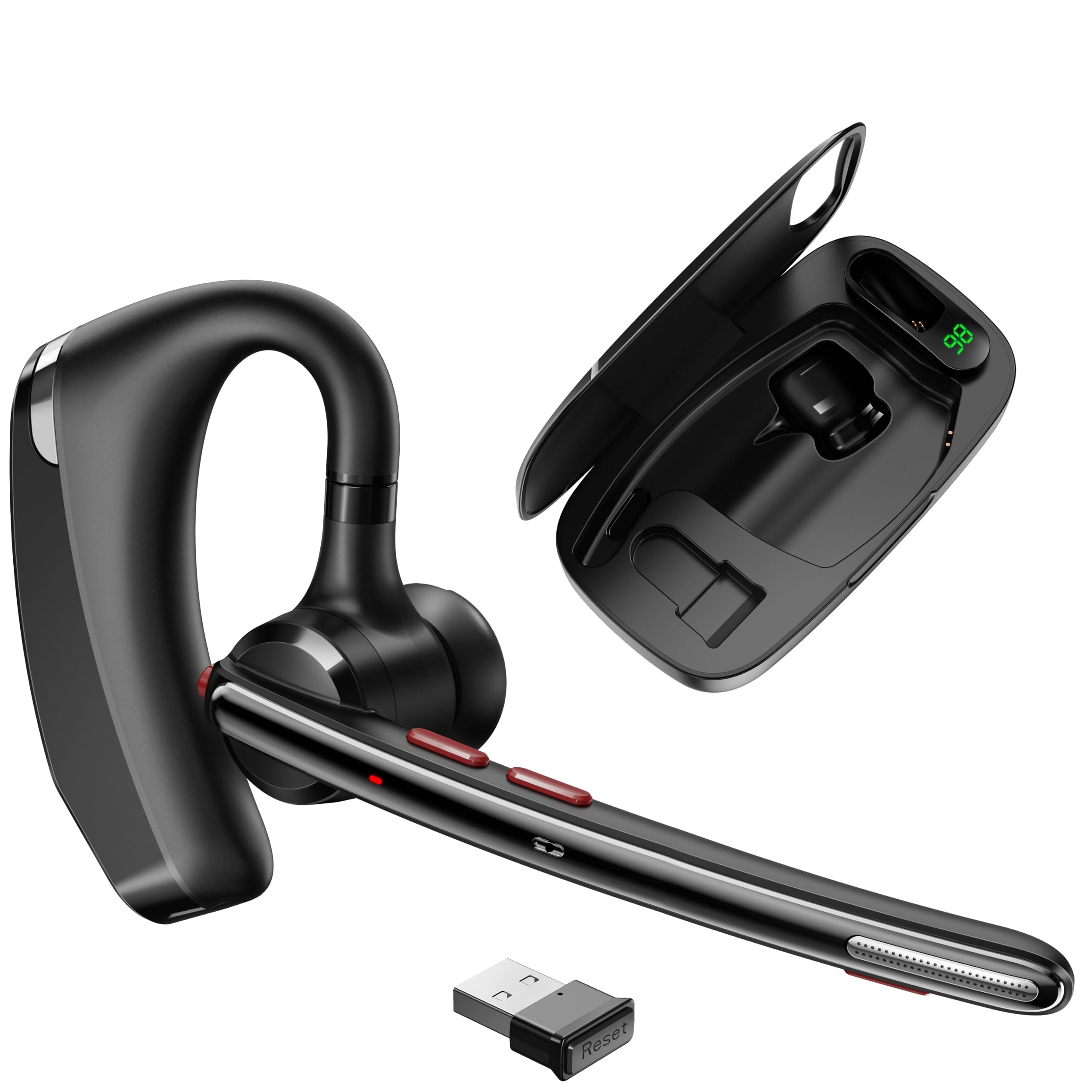
This COMEXION is the one to slip into a commute bag. The 500 mAh charging case is genuinely pocket-sized, holds the headset between calls, and has a space inside for the USB dongle so you do not lose the small bits. A digital display on the case shows exactly how much charge is left, which is the kind of thing you appreciate after being caught out by a dead single-ear set one time too many.
Around the ears, the fit is tunable — different earplug sizes ship in the box, and the headset flips between left and right ear wear. Dual microphones and an upgraded noise-cancelling chip handle the mic side, filtering steady sounds like typing and train rumble. Bluetooth 5.3 with the included one-to-one dongle takes care of connectivity on a MacBook without built-in Bluetooth, and multipoint pairing via a long-press lets you hop to a second device mid-shift.
The bite point is the fit for some ears. Feedback splits between owners who find it stays snug and those who find it needs adjusting. If you know your ear canal is picky with earbuds, this carries more risk than an over-ear design. Battery life is rated around 300 hours on standby, but plan around the case — you will be docking the headset rather than charging it directly for most of the week.
Travel perks that matter
- The case doubles as a charger and a dongle holder — one small object in the bag, not three.
- Dual noise-cancelling mics filter steady sound like keyboards and train noise.
- Bluetooth 5.3 with a one-to-one dongle covers laptops without built-in wireless.
- Swappable earplugs and left/right wear let you tune the fit to your ear.
Where it can pinch
- In-ear fit is the recurring quibble — it works for some ears and needs adjusting for others.
- The 300-hour figure is standby time, not talk time, so plan the case into your week.
- Dongle pairing is one-to-one, so it will not roam between multiple computers without re-pairing.
On your shortlist if: you travel between desks and want one small case that carries everything.
Not for: you if your ears reject in-ear headsets — the over-ear picks in this list are the safer fit.
8. LEVN Wireless Headset

A full workweek of talk time in a headset that docks between shifts.
If your MacBook is your shift and your shift is long, this LEVN is built around that. The 65-hour battery rating is the number that sells it — enough for a full week of meetings before you think about a charger. A plug-and-play charging base means the headset docks and refills in between, and a 1.5-hour charge time means it is ready again fast. Bluetooth 5.3 with a 49-foot range and a dual-ear design round out the work-call package.
The microphone is the other reason to look here. The AI noise-cancelling claim sits in strong company on this list, and in loud environments the headset does its job of keeping your voice front and centre while filtering the diesel and traffic behind you. Binaural (two-ear) cups block a good chunk of the room, and the 270° boom rotates to wear on either side. On a MacBook you can go Bluetooth 5.3 straight from the system, or use the included USB adapter for a wired dongle path.
Being straight about the downsides: the mic cancelling is uneven. It handles steady noise well, but shared spaces with human chatter around you can leak through to callers. Durability is the bigger question — a few long-term buyers report the rigid plastic cracking where the headband meets the ear cup under outward pressure. The listed rating here is below the wired picks for that reason. It suits heavy call volume and a docking routine, not a headset you throw in a backpack.
Battery math that matters: 65 hours of talk time and a 1.5-hour charge means you can stop thinking about battery entirely and just dock the headset at the end of each shift.
Straight talk on durability: the plastic headband is the weak joint, and it does not respond well to being yanked open when you take it off.
Best fit: a high-call-volume desk job where the headset docks at the end of every shift.
Worth noting: the plastic headband calls for gentle handling, and human chatter nearby can still reach your callers.
9. Plantronics Blackwire C5220

The two-ear conference headset that gives you both connection options in one box.
For a MacBook user who wants a dual-ear wired headset and the safety net of two connection methods, the C5220 is the pick. A detachable USB adapter gives you USB-A on a desk, and the headset itself accepts a 3.5 mm jack when you want to plug into a phone or a Mac’s headphone port. The noise-cancelling boom mic keeps your voice clear, and SoundGuard DIGITAL caps sound spikes above a stated 118 dBA, which protects your ears from sudden loud alerts.
Comfort is well considered: ultra-soft leatherette cushions over memory foam and a lightweight cushioned metal headband made for all-day use. The audio automatically switches between a wideband mode for calls and hi-fi stereo for music, so you are not stuck with a voice-only tuning. This is the upgrade for anyone who wants the Blackwire 3220’s reliability with a more refined build and more ways to connect. Poly backs it with a stated 2-year global warranty.
The honest limit: the mic performance is not universally perfect. Some callers still find the output quiet without a bit of mic technique, and the ear pads are stiff enough that long meetings can get uncomfortable. There is also a set of loud voice prompts for mute on and off that you cannot turn down, which can be disruptive in a quiet room. If you need a mic that never needs positioning help, the dual-ear wireless picks here are kinder.
The one for: a heavy conferencing desk where you want two connection options and a metal headband that lasts.
The honest limit: the mic can run quiet for some callers and the ear pads stiffen over long meetings.
10. Yealink BH70 Mono Bluetooth Teams Headset with AI Mic
The single-ear professional that treats Microsoft Teams as a physical button, not an app.
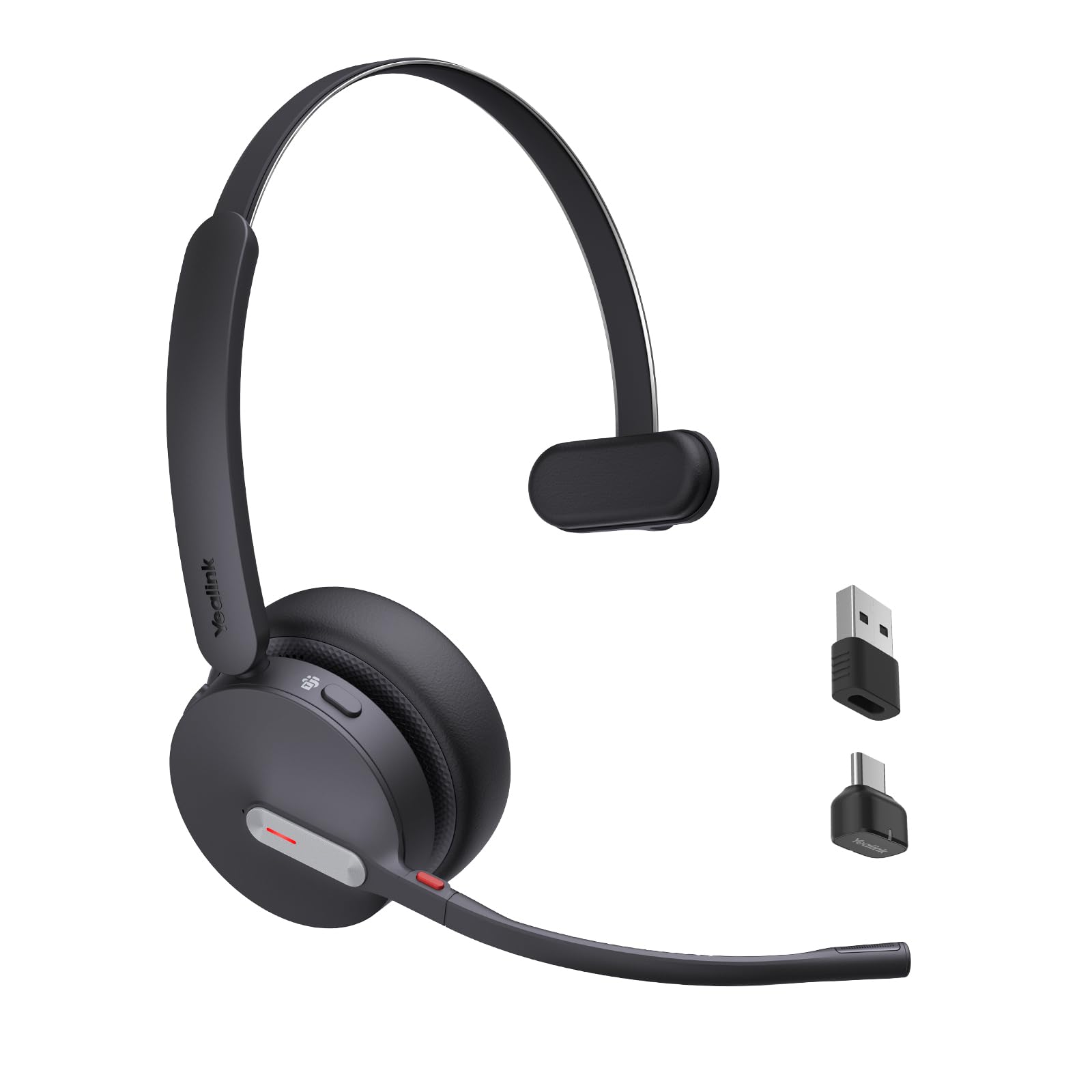
Here is the headset built around a specific platform, and it makes a real difference on a MacBook. It is certified for Microsoft Teams via Native Bluetooth, which means you do not need the dongle at all — just pair over Bluetooth and join a meeting with a single press. The Teams button can raise your hand, and the mute state syncs with Teams itself so the button and the app always agree on whether you are live.
The microphone setup is the most advanced on the list. A 3-MEMS-mic system (three tiny microphones working together) with Acoustic Shielding Technology handles background noise when you are speaking. In practice the mic filters typing and dog barks effectively — the recurring note from users is that their voice comes through naturally while the room disappears. A single ear keeps you half in touch with the room. A 35-hour talk-time rating and 90-minute charge cover a full workday with room to spare.
The trade-offs are real but narrow. It is a single-ear set, so if you want full immersion in music between meetings it is not the pick. Reliability is mostly strong, but there is a durability thread — a small number of users have lost the micro-USB charging port after about a year. And one function button caused trouble for a buyer dependent on it to leave the desk. Those are the small risks, not the headline. If your MacBook life runs through Teams, this is the smoothest path.
Built for you if: your whole working day runs through Microsoft Teams and you want the button on your head to match the button on your screen.
Your call to make: it is single-ear and Teams-focused — if you want a dual-ear music headset, look at the wired picks instead.
11. Poly Voyager Legend 50 UC

Four mics and a wind filter for the person taking calls outdoors.
If your calls happen on the move — in a car park, on a walk, on a windy rooftop — this is the pick built for it. The Poly Voyager Legend 50 UC carries four noise-cancelling mics with NoiseBlockAI and WindSmart tech, aimed squarely at gust noise and crowd chatter. It pairs over Bluetooth 5 and connects to a MacBook without any dongle. The headset itself runs a rated 10 hours of talk time, and the pocket charging case pushes that to up to 30 hours with its vertical dock.
Comfort and call quality are where it is meant to shine, and the feedback supports that. The mic is the standout: the person on the other end hears you clearly, even in heavy equipment or outdoor settings, and simultaneous PC plus phone pairing lets you field a mobile call mid-meeting. An 89-minute fast charge refills it, and the case doubles as a stand between calls. Poly rates the build to survive sweat, rain, and the odd wash.
The weak spot is the wireless link, not the microphone. A handful of owners mention dropouts on Teams calls on certain machines, needing re-pairing or a dongle (a small USB plug that gives a steadier connection) to hold firm. The fit is only fair for genuinely active use — it needs adjusting if you move about a lot. On a modern MacBook it generally behaves, but this headset rewards a stable wireless environment. Buy it for the outdoor call quality; check your Bluetooth surroundings first if you work in a radio-noisy office.
The outdoor edge: WindSmart and four-mic noise cancellation are tuned for wind and street noise, which is exactly where most headsets fall apart.
Plan for: a settled Bluetooth environment — dropouts are the occasional complaint when multiple wireless devices crowd the room.
Choose it when: you take calls outdoors or on the move and need the mic to win the wind fight.
The fine print: it is a single-ear set with a fair fit for active use, so adjust it before you walk away from the desk.
Know the Specs
Connection type
A 3.5 mm jack is the universal fit — it plugs into any Mac with a headphone port and needs no setup. USB-A is the plug-and-play desk standard, but a USB-C MacBook will need an adapter in the path. Bluetooth is the most flexible but the least predictable in a busy wireless environment. A USB dongle is a middle ground for stability, but check its system support before trusting it on a Mac. In general, the simpler the connection, the fewer surprises on call day.
Talk time and standby time
These two numbers are easy to confuse. Talk time is how long you can actually be on a call; standby is how long the headset can sit waiting before the battery drains. A high standby number like 300 hours does not mean 300 hours of talking. Match the number to your day: a long-shift job wants a big talk-time rating, while a headset that docks between meetings can use a smaller battery and a reliable charging base.
Noise-cancelling mic versus noise-cancelling headphones
An ENC or noise-cancelling boom mic works on your outgoing voice — it filters background noise so the person on the other end hears you, not the room. Noise-cancelling headphones work on what you hear. They are different jobs, and a headset can have one without the other. For call quality, the mic is the part that matters most, which is why it gets the closest look in this list.
Single-ear versus two-ear
Single-ear leaves one side open to the room, so you hear the door or your name being called — useful for home offices and driving-adjacent work. Two-ear blocks more of the room and sums to better focus for deep meetings. Neither is a quality signal; they are different tools. Choose the one that matches how much of your surroundings you need to stay in touch with.
Common Questions
Will a USB-A headset work with a MacBook that only has USB-C ports?
Do I need to install software to use a headset with my MacBook?
Why does my Bluetooth headset drop out during MacBook calls?
Is a single-ear headset good enough for work calls on a MacBook?
What is the difference between an ENC microphone and active noise cancellation?
How long should a headset battery last for a full workday?
Can I wear a headset on either ear on a MacBook?
Will a noise-cancelling boom mic filter out a dog barking or a keyboard?
Do I need a dongle on a MacBook if the headset already has Bluetooth?
Is a wired headset better than wireless for MacBook meetings?
The Bottom Line
For most people, the headset for macbook to beat is the KVIDIO Bluetooth Over-Ear. It gives you 65 hours of playtime, so you can go days without charging. A 3.5 mm backup cable (the standard round headphone plug) lets you switch to zero-latency wired use when wireless lags. And a foldable frame makes it the easiest pick to live with daily. If your day is calls first and music second, the Soothielec (Upgraded) Wireless Headset puts a noise-cancelling boom mic (a mic on an arm that cuts background sound) and dual-device pairing (two devices connected at once) in front of everything else. For a desk where a cable is no burden and reliability is everything, the Logitech H390 plugs straight in and never asks for a charge. And if Teams is your whole workday, the Yealink BH70 Mono puts the meeting controls on your head. One honest nudge before you choose: the wired picks here carry some of the deepest, steadiest review histories on this list, so do not overlook them just because they lack a battery.
How we choose
We do not accept paid placement. Every pick is matched to a real buyer and a real use-case; we do not hands-on test units.
Sources
Specifications: manufacturer listings and product documentation. Review insights: verified customer reviews, as of October 2026. Pricing: not shown on this page (it changes often); check the current price via the retailer link.
As an Amazon Associate, Aappliancez earns from qualifying purchases. This does not affect which products we feature.