Disclosure: Some links in this post are affiliate links. As an Amazon Associate I earn from qualifying purchases, at no extra cost to you. Learn more
Specs are compiled from manufacturer listings and verified buyer reviews and can change over time — please confirm the key details on the product page before buying.
Your headphones probably aren’t the problem. Most laptops, phones and game controllers simply can’t push enough power into a full-size pair, so you end up with flat bass, squeezed dynamics and a volume dial that hits its ceiling far too early. The headphone amps below genuinely add clean power, not just a volume knob. Each pick lists the exact output figures, gain settings and connection types that decide whether your headphones sound alive or strained.
This guide is built by comparing the manufacturers’ published specifications and the patterns across verified customer reviews, so you get each pick’s real strengths and trade-offs instead of marketing spin.
Every pick below is judged on measured output, gain range and the headphones it actually suits, so you can match an amp to your own pair instead of guessing. Read on for the best headphone amp matches for desk, tube and portable setups.
Top Picks

How To Choose The Best Headphone Amp
The first thing to settle is what sits between your music source and your ears. Some headphone amps are pure analogue amplifiers — they take a signal that’s already been converted to analogue and simply make it louder and stronger. Others are DAC/amp combos, which means they convert the digital file to analogue and then amplify it, all in one box. If your laptop’s headphone jack is noisy or weak, a combo does both jobs in one purchase.
Match the power figure to your headphones, not the price
An amp’s output is quoted in milliwatts at a stated impedance, and those two numbers travel together. A figure like 280mW x2 at 32Ω tells you how much current the amp can push into easy-to-drive headphones. High-impedance models in the 250Ω to 300Ω range need a very different measurement, because power drops sharply as impedance climbs. Check that the spec sheet lists output at both 32Ω and 300Ω if you own demanding cans, and treat any single headline wattage with caution.
Balanced outputs explained in plain words
A balanced connection (a 4.4mm plug or a four-pin XLR) sends your audio across separate positive and negative signal paths plus a ground. That design tends to reject the electrical hum and interference that creeps in with unbalanced cables, and it often brings extra output power with it. If your headphones ship with a balanced cable or you can buy one, a balanced output is worth prioritizing. If they’re wired single-ended only, a strong single-ended jack matters more.
Gain switches and volume knobs
Gain is the base level of amplification before your volume knob does its work. A low gain setting keeps sensitive in-ear monitors from hissing and gives you fine control down low. High gain is what lets a 300Ω headphone reach real listening volume. Look for an amp with at least two gain levels, or a three-level switch, so it can serve both a delicate pair of IEMs and a big open-back set without strain.
Pure analogue amps versus combo units
A pure analogue headphone amp gives you nothing but amplification, which is ideal if you already own a DAC you trust. A combo unit adds digital inputs — USB, optical, coaxial — plus Bluetooth on some models, and usually a screen and remote. Combo units cut cable clutter on a desk, while a pure analogue amp tends to be simpler and lets you spend the whole budget on the amplification stage itself.
Side-by-Side Comparison
| Model | Best For | Output Power | Outputs | Inputs | Amazon |
|---|---|---|---|---|---|
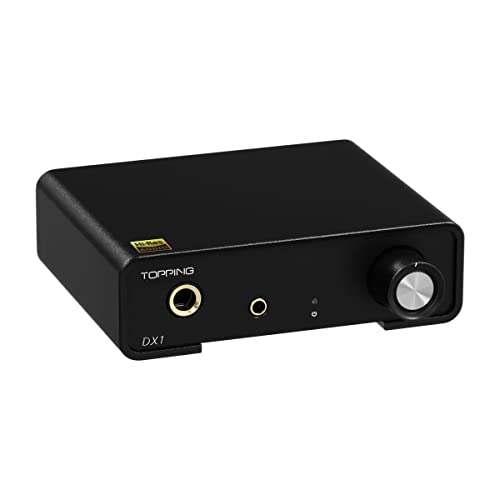
| Topping DX1★ Best Overall | First desk amp on a tight budget | 280mW x2 @32Ω / 51mW x2 @300Ω | 6.35mm, 3.5mm, fixed line out | USB | Amazon |
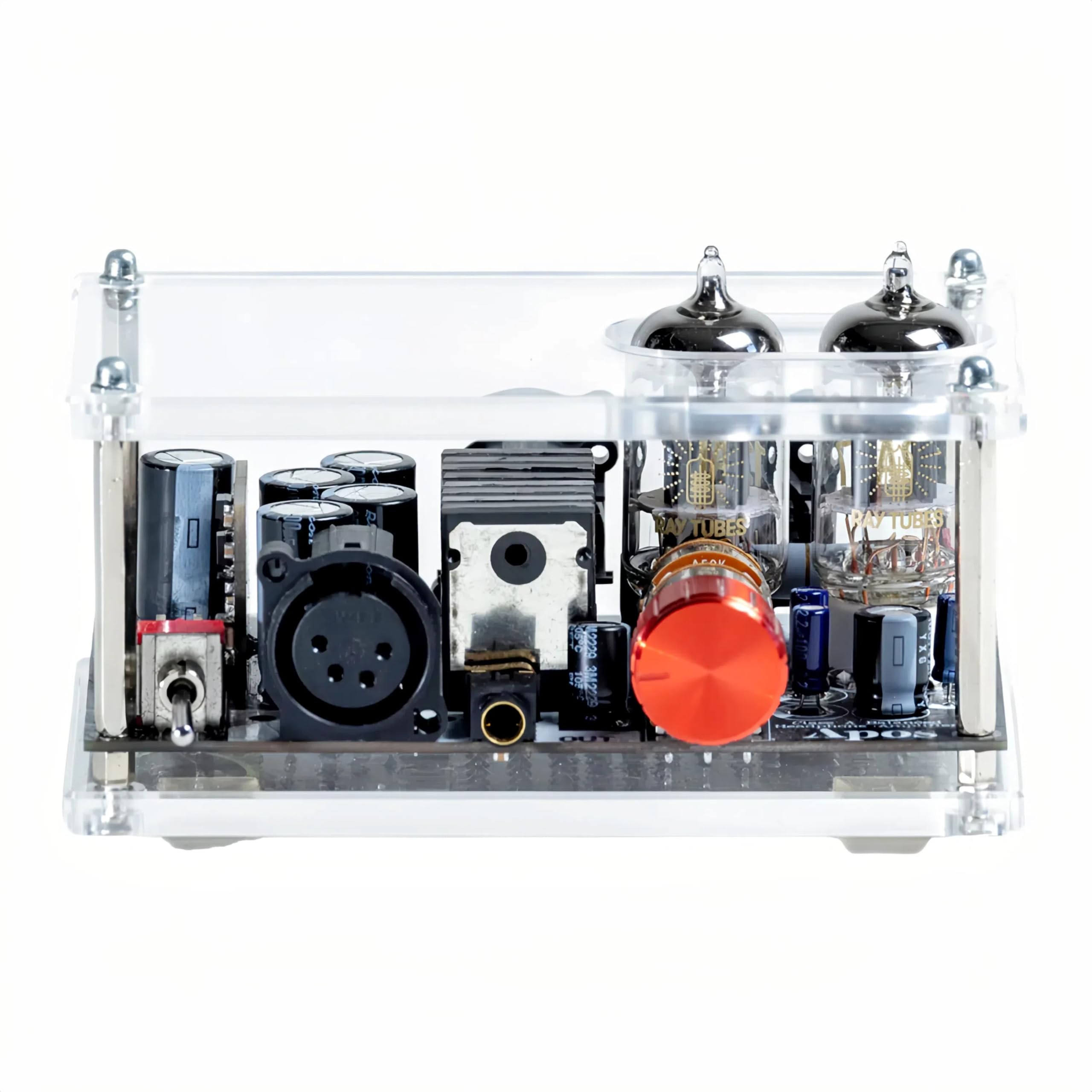
| Apos GremlinBest Tube Entry | Tube warmth without spending big | 1250mW | 4-pin XLR balanced, 4.4mm balanced | XLR balanced | Amazon |
| Fosi Audio ZH3Most Versatile | One box for headphones and speakers | 640mW @32Ω SE / 2570mW @32Ω balanced | 6.35mm, 4.4mm, RCA, XLR | USB, optical, coaxial, RCA | Amazon |
| Mackie HM-400 | Several listeners on one source | — | 12 headphone outputs (3 per channel) | L/R stereo main, aux per channel | Amazon |
| FiiO K7 | Balanced desktop power on a mid budget | 2000mW balanced | 4.4mm balanced, 6.35mm, 3.5mm | USB, optical, coaxial, RCA | Amazon |
| iFi Zen CAN 3 | Vinyl and analogue desk stacks | 2000mW | 4.4mm balanced, 6.35mm single-ended | 4.4mm balanced, RCA | Amazon |
| Topping DX5 II | Deep EQ tuning and wireless streaming | 7600mW x2 | 4.4mm balanced, 6.35mm | USB, Bluetooth, coaxial, optical | Amazon |
| FiiO K13 R2R | Warm R2R tone with full EQ control | 2400mW | 4.4mm balanced, 6.35mm, XLR line, RCA line | USB, Bluetooth 5.4 | Amazon |
| HIFIMAN EF400 | Planar headphones that need muscle | 4.4W per channel balanced | 6.35mm, 3.5mm, 4.4mm balanced, 4-pin XLR | USB-C, USB-B | Amazon |
Detailed Reviews
1. Topping DX1 Mini Stereo DAC Headphone Amplifier Combo
Our pick — 4.5+★ from 300+ verified ratings; the strongest balance of quality and price.
A USB-powered black box that gives your desk headphones 280mW x2 at 32Ω and 51mW x2 at 300Ω.
You plug it into a USB port and nothing else. There is no power brick, no driver disc, no on/off switch to hunt for — the DX1 draws its power straight over USB and works on Windows 10, Windows 11, Mac, Linux, iOS and Android without installing anything. Two headphone jacks sit on the front, one at 6.35mm for full-size pairs and one at 3.5mm for in-ears and earbuds, and both perform the same. Inside, the AK4493S chip decodes up to 32-bit/384kHz PCM, which is the high-resolution file format your streaming service or download library may use.
Where this earns its place is the power delivery at the hard end of the impedance scale. It outputs up to 280mW x2 into 32Ω headphones and 51mW x2 into 300Ω models, and it has high and low gain settings to split easy and demanding loads. That combination is why it drives a broad spread of gear, from sensitive IEMs that would hiss on a noisy amp to a 250Ω or 300Ω open-back set that a laptop jack simply cannot move.
Quiet is the other half of the story. The Discrete LNRD circuit — a filter that cleans up the dirty 5v USB power before it reaches the audio chips — keeps the noise floor on the DAC side below 2.0uV and the amp side below 1.0uV. In practice, that means a pair of high-sensitivity in-ears stays silent between tracks instead of picking up a USB buzz. There is also a fixed-volume line out on the back, so the DX1 can serve as a pure DAC feeding a bigger amplifier later.
What wins people over
- Clean, neutral delivery that never runs out of composure at high volume
- Two gain levels plus both 6.35mm and 3.5mm jacks in one tiny case
- Genuine plug-and-play across every major operating system
- A fixed line out that lets it grow into a bigger desktop stack
Where it asks for patience
- A 250Ω or 300Ω headphone will need high gain and a lot of the dial
- Some Windows apps need their sample rate set manually before they see the device
- The line out volume is locked at maximum, so it can’t act as a preamp
Reach for this if: you want your first real desktop amp and own a mix of IEMs and mid-impedance headphones.
Look elsewhere if: your headphones sit above 300Ω and you expect to run them comfortably on low gain.
2. Apos Gremlin Headphone Tube Amplifier
A compact tube hybrid that adds harmonic warmth to bright, clinical headphones for budget money.
If your current setup leaves acoustic guitar sounding thin and brittle, this hybrid’s tube preamp stage is the fix. The Gremlin is a hybrid headphone amp, which means vacuum tubes handle the preamp stage while transistors handle the heavy lifting. That arrangement puts rich harmonics and a fuller midrange on top of the tight control that solid-state amps deliver. It ships with a matched pair of CORE 12AU7 tubes from Ray Tubes, matched meaning both tubes are tested to output the same response, which keeps your stereo image centered instead of drifting.
The balanced side is what separates it from other budget tube amps. Balanced XLR inputs feed balanced four-pin XLR and 4.4mm outputs, a design that cancels the hum and buzz that creeps in on unbalanced cables. That matters most with sensitive headphones that pick up every stray signal. Output is rated at 1250mW, enough muscle for plenty of planar and dynamic pairs. The tube sockets accept any 12AU7 or 6922 tube, new or old stock, so you can swing the sound toward lush or linear whenever the mood changes.
Here is the honest limit, and it comes straight from owners pushing the amp hard. Buyers report it “can barely drive 470 ohms (ATH-R70X) at max gain.” So if your headphones sit somewhere north of 300Ω, this is not the amp that will open up them — a stronger balanced solid-state unit will. It also runs warm and needs 15 to 30 minutes to settle into its best sound, which is normal tube behaviour but worth knowing before you judge it on the first track.
The warmth question: Owners mention “Sound quality is incredible with the included tubes,” and the recurring note is that it sweetens a bright DAC or a lean pair of headphones without smearing detail. Across the review pages, owners consistently praise the sound with the stock tubes.
The swap habit: The tube sockets are the real long-term value. Rolling in a different pair changes the character of the amp more than any EQ slider would, and that is why this one keeps earning its keep after the honeymoon.
The short version: a proper introduction to tubes for anyone curious about that warm, harmonic sound.
One thing to weigh: high-impedance headphones above roughly 300Ω will run out of headroom at max gain.
3. Fosi Audio ZH3 Fully Balanced Desktop DAC Preamp
Three jobs in one chassis — headphones, speakers and a DAC — with the numbers to back it up.
If your desk has grown a tangle of separate boxes, the ZH3 is the consolidation play. It handles headphone amplification, digital-to-analogue conversion and preamp duties in one unit, and it offers both a 6.35mm single-ended output at 640mW at 32Ω and a 4.4mm balanced output at 2570mW at 32Ω. A three-level gain switch covers headphones from 16Ω up to 300Ω, so it can serve a pair of sensitive in-ears and a demanding over-ear without swapping gear. On the decode side, the AKM4493SEQ chip and XMOS XU316 processor handle up to PCM 768kHz/32bit and DSD512 — formats well beyond what most streaming libraries currently serve.
The parts that separate it from a basic combo are on the back and in the menu. It accepts coaxial, optical, USB and RCA inputs and outputs to 4.4mm, 6.35mm, RCA and XLR, so it can sit in the middle of a speaker rig and a headphone setup at once. The balanced output is where the two units differ most: the ZH3’s 2570mW at 32Ω balanced output is above what the Topping DX1 offers from its USB-powered stage. You also get bass and treble EQ adjustments, six filter types including a bypass mode, and two swappable op-amps for shaping the tone.
The one thing to read carefully is the preamp label. Owners have returned it believing the XLR outputs could drive power amps, and the maker’s own note says the RCA and XLR output levels differ significantly and must be matched to the gear behind them. There is also a mixed feeling about the remote in the review pages — a convenience, not a reason to buy. Everything else lands where you’d hope: the EQ functions only on the headphone output, which the maker states plainly to avoid confusion.
Why the desk crowd likes it: One box replaces a DAC, an amp and a switcher. Owners consistently describe the sound as clear and detailed, and note they reach for the volume knob less often than they did with separates.
Fit check: Not for the audiophile chasing the last word in linearity, and not a true preamp for a power amplifier. If you want one box that does three honest jobs well, this is the value play.
Pick it when: your headphones and your speakers should share one DAC and one remote.
Think twice if: you need a variable-level preamp out to drive a power amplifier and expect the XLR outs to do it.
4. Mackie HM-400 Headphone Amplifier Rackmount

Four people, four separate mixes, twelve headphone jacks — the studio’s quiet workhorse.
This one is not for a single listener at a desk. The HM-400 is a rackmount distribution amp built for a band tracking a session, a podcast crew, or a production room where several people need to hear the same source at once. It starts with L/R main stereo inputs plus L/R stereo outputs, then splits into channels, each carrying three headphone outputs. That adds up to twelve headphone jacks in total. Each channel also carries its own aux input with a balance control, so a performer can blend the main mix with their own click or reference track to taste.
Per-channel controls make it usable in a session. A mute switch and a stereo/2-channel mode switch sit on every channel, so you can silence one player without touching anyone else’s feed. It weighs 8 pounds and lives in a rack, not on a bedside table. Buyers running it as a band IEM rig report feeding the mixer’s main or sub into the stereo input and panning each output channel independently, with up to three input channels feeding each output channel — the routing flexibility a live setup needs.
On sound, the recurring theme is headroom. It’s loud, clean and quiet in the noise department, which is what you want when several pairs of in-ears are pulling from one box. The caveat comes from the secondhand market rather than the design: one buyer received a used unit sold as very good condition whose third channel board was dead and confirmed that way by a repair shop. Buy new or buy from a seller you can return to. That’s a shopping note, not a knock on the amp itself, which the working units deliver without fuss.
The honest read: This is a professional routing tool, not a desktop upgrade. It’s the right answer when the question is “how do five people hear the same take with their own volume?” and the wrong answer when you’re plugging in one pair of headphones.
Built for: bands, studios and content crews who need multiple headphone feeds with separate mixes.
Skip the used gamble: buy new or from a seller with a return window, since a dead channel on a used unit is the main way this purchase goes wrong.
5. FiiO K7 Full Balanced HiFi DAC Headphone Amplifier

A balanced desktop amp with dual AK4493SEQ DACs and 2000mW on its 4.4mm jack for mid-range money.
The spec sheet reads like a more expensive machine. Two AK4493SEQ DAC chips, two THX AAA 788+ amplifier stages, and a six-stage audio circuit borrowed from FiiO’s flagship models. The payoff is 2000mW of stable output on the balanced 4.4mm jack, which is enough to drive most full-size headphones to real volume with room left over. Behind that sits a set of inputs spanning USB, optical, coaxial and AUX, plus outputs at 4.4mm balanced, 6.35mm and 3.5mm single-ended. Two gain levels and three output levels let you dial the amp toward sensitive IEMs or hungry planars.
Compared with the Topping DX1, the K7 is the bigger, more capable desktop rig. The DX1 handles up to 384kHz/32bit over USB only; the K7 adds optical and coaxial inputs plus a balanced output, which gives you a cleaner noise-free path for sensitive headphones. Owners describe a smooth, weighted volume knob, a heavy stable chassis and a sound that stays neutral rather than colored. The RGB ring on the front doubles as a sample-rate indicator, showing different colors for standard, high-resolution and DSD playback so you can see at a glance what the file is actually doing.
The recurring gripe is the volume knob’s taper — it moves in stepped increments rather than a smooth sweep, so fine adjustments in the lower range take a little fiddling. A few units have dropped out after sleep and needed a power cycle before the computer saw them again. Neither is unusual for a desktop DAC/amp, and both leave the core sound untouched. For a mid-range budget, the K7 is the point where balanced output stops being a premium extra.
What earns the price
- 2000mW balanced output drives full-size headphones with headroom to spare
- Every major input covered — USB, optical, coaxial and RCA
- Three output options for a mix of IEMs and over-ears
- RGB indicator shows the active sample rate at a glance
Loose ends to know
- The stepped volume taper makes small changes finicky
- Occasional wake-from-sleep hiccups need a power cycle
The fit: a first balanced desktop setup for someone with a full-size pair and a mid-range budget.
The compromise: the notch-style volume knob asks you to get used to its clicks.
6. iFi Zen CAN 3 High-Resolution Analogue Headphone Amplifier
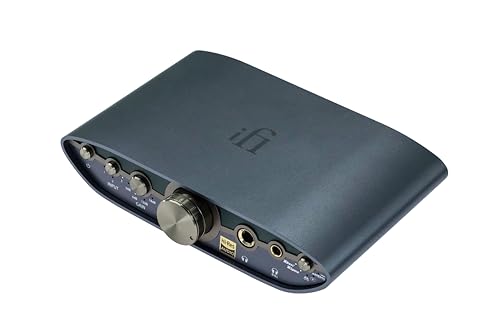
No DAC, no screen — just a pure analogue amp that stacks onto your turntable chain.
The Zen CAN 3 makes a deliberate choice: it does one job and skips the digital circuitry. There is no DAC chip, no screen and no streaming inside. It takes an analogue signal and amplifies it, up to 2000mW, out of a 4.4mm balanced jack or a 6.35mm single-ended jack. If you already own a DAC or a phono stage, that means every part of your budget goes into the amplification stage rather than into conversion you didn’t need. Owners stack it above a Zen Phono 3 for vinyl headphone listening, and it fits that role naturally.
The EQ modes are where it earns its keep for everyday listening. XBass+ restores low-end weight, XSpace opens the stereo field, Game mode lifts low-level effects for gaming, and you can combine XBass+ with XSpace. Gain settings are useful if you switch between sources — 0dB is the default and +6dB suits quieter records, so you can keep the volume dial in a comfortable range instead of cranking it to the top. Inputs are 4.4mm balanced and RCA, and outputs run to 4.4mm balanced and 6.35mm single-ended.
Two honest notes. First, the balanced input cable is sold separately, so budget for an interconnect if your DAC only offers a 4.4mm output. Second, XSpace is the divisive one — a listener who owns other iFi gear and tested it across several genres found it did nothing audible, while others describe a wider stage. Treat the spatial effect as a bonus, not the reason to buy. The build and the clean power are the reliable parts, and the compact size means it can move from desk to shelf without drama.
Where it shines: The analog XBass (a bass boost circuit that works without digital processing) separates it from digital amps — it’s the feature most owners talk about when they describe why their records feel fuller.
What to check first: Confirm what output your DAC feeds it from. Without the right cable, a balanced source will land on RCA and you’ll leave half the amp’s capability unused.
Suits you if: you run a turntable or a separate DAC and need an amp with real analogue tone controls.
Bear in mind: XSpace’s effect is inconsistent from one set of ears to the next.
7. TOPPING DX5 II Hi-Res DAC & Headphone Amp Combo
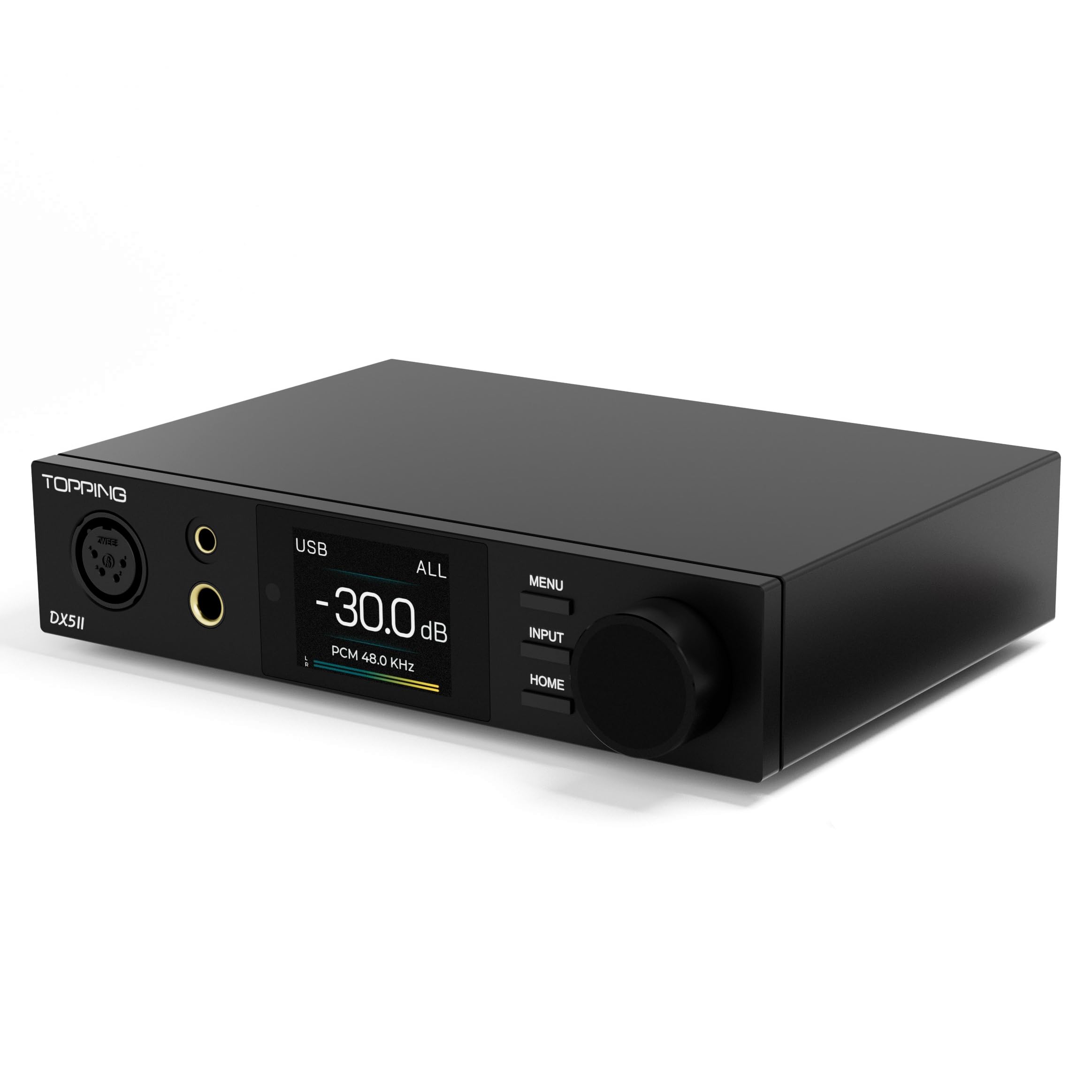
A full-colour screen, a 10-band EQ and enough balanced power to move anything on your shelf.
The spec stack here is what pulls people in. Two ESS9039Q2M DAC chips decode up to PCM 768kHz/32bit and DSD512. The X-Hybrid amplifier is a fully balanced quad-channel design rated at a striking 7600mW x2, which is many times the balanced power of the FiiO K7’s 2000mW and puts it in a different weight class entirely. Bluetooth 5.1 with LDAC, aptX Adaptive, aptX HD, AAC and SBC lets you stream wirelessly at above-CD quality from a phone. A 2.0-inch Aurora UI screen with nine themes and a pressable knob handles source switching, preamp mode and headphone mode without hunting through menus.
The 10-band PEQ is the sleeper feature. Parametric equalization lets you target specific frequency bands rather than shaving off broad shelves, so you can tame a peaky treble spike in your headphones or lift a dip in the low mids. Owners who push the 10-band PEQ describe the result as transparent and explosive, with tight channel matching from the DAC’s direct volume control. The optical and USB noise floor is quiet enough that sensitive IEMs don’t pick up hiss, and you can feed it from a game console or a TV over optical to sidestep USB noise from a graphics card.
The real caution is reliability, and it’s the most-discussed point in its own review pages. Some units have stopped working after a few months, and reported issues cluster around unprotected headphone jacks that don’t survive a hot-swap. That’s the trade for the power and feature set: extreme numbers from a compact chassis demand careful handling. If you treat the jacks gently, keep it on a stable shelf and avoid plugging headphones in while music plays, you’re getting a desktop box whose balanced output exceeds amps costing considerably more.
The case for it: No other pick here combines wireless LDAC streaming, a full-color display and this level of balanced power. It’s the most capable single box on the list.
Handling matters: Plug headphones in before playback, not during. The hot-swap risk is well documented and easy to avoid with a small habit change.
Choose it for: streaming from a phone over LDAC and carving out detail with the 10-band EQ.
Weigh carefully if: you want plug-in-and-forget simplicity — this one rewards careful treatment.
8. FiiO K13 R2R Desktop DAC & Headphone Amp
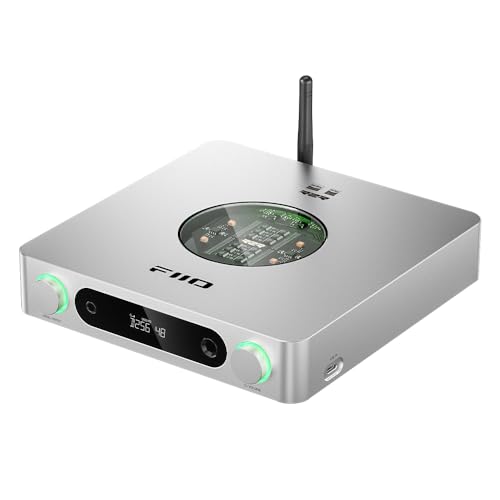
An R2R ladder DAC for anyone who finds delta-sigma chips too clinical and wants the warmth back.
The K13 R2R is built around a very different conversion approach to the chip-based amps on this list. Instead of delta-sigma chips, it uses a proprietary four-channel fully differential 24Bit R2R ladder, assembled from 192 ultra-precise 0.1% thin-film resistors with low temperature drift of 30ppm. In plain terms, a ladder DAC converts each bit through a resistor network rather than a single chip, and the result is characterized by softened transients and a continuous, analogue-like flow. That’s why owners describe the sound as vinyl-like rather than surgical, and why it suits classic rock, electronic and acoustic music that benefits from a relaxed top end.
You get to choose between two conversion modes. NOS (Non-Oversampling) mode preserves the original sampling rate for a purer, unfiltered sound. OS (Oversampling) mode upsamples to 384kHz for finer detail and cleaner measurements. Most owners settle on OS for everyday listening and switch to NOS for a specific mood. Output is quoted at 2400mW, comfortably above the FiiO K7’s 2000mW, and the jack selection covers a 4.4mm balanced headphone output, a 6.35mm single-ended output, XLR balanced line out and dual RCA line out. Bluetooth 5.4 with LDAC, AAC and SBC handles wireless streaming.
The 10-band PEQ is where the K13 separates itself from the pack. You can control it via a phone app or a web interface, load presets like vintage curves, simulate or correct a headphone’s response, and share EQ profiles with other owners. A few practical warnings surface in the reviews. Firmware updates for the unit are split across three separate components, which is more fiddly than it should be. USB and power hygiene matters — some users notice static blips on certain laptops. And one owner flagged the LO button, which jumps straight to full line output with a single press, as a genuine risk if you route it into speakers.
Why the tone chasers pick it
- R2R sound that softens glare and fatigue on long listening sessions
- NOS and OS modes give you two distinct characters from one box
- 10-band PEQ app and web control with shareable profiles
- Balanced XLR outputs for a speaker rig plus 4.4mm headphone out
Setup quirks to expect
- A single-press LO button can jump straight to full line level — handle with care
- Firmware updates are split across three components
- Occasional USB static on certain laptops
The right buyer: someone chasing a warm, non-fatiguing sound and willing to spend fifteen minutes learning the EQ app.
Not the right buyer: if you want reference-flat accuracy above all else — this amp is about musicality, not measurement.
9. HIFIMAN EF400 Desktop Balanced Headphone DAC & Amplifier

A desktop brick built to move planar headphones that laugh at lesser amps.
Planar magnetic headphones are notoriously hungry, and this amp is designed around that appetite. It delivers 4.4W per channel of balanced output, a four-channel fully differential structure with a maximum output of 10.7 Vrms on a 36Ω equivalent load. The amplification is Class AB, and the DAC on board is HIFIMAN’s own HIMALAYA R2R module. That module is built on an FPGA algorithm and is a discrete R2R design, with a maximum resolution of 24Bit. The combination gives the EF400 the warm, natural signature the R2R approach is known for, and the muscle to drive headphones that would leave lighter amps gasping.
Connections are unusually generous for a box this focused. The front panel carries a 6.35mm single-ended jack, a 3.5mm single-ended jack, a 4.4mm balanced output and a four-pin XLR balanced output. The rear adds balanced cannon line out and RCA single-ended line out. Inputs are USB Type-C and USB-B. A four-position switch selects high gain NOS, high gain OS, low gain OS or low gain NOS, so you can pick the character and the power level independently. Owners running it with hard-to-drive planars report it drives past a quarter of the volume dial and never sounds strained.
The honest caveat is documented thoroughly. NOS mode produces crackling on some CD-quality sources — an issue the maker has not issued a firmware fix for, and the unit isn’t firmware-updatable. Switching to OS mode resolves it for most users. Separately, a handful of units have had USB recognition or power issues, and one buyer found the volume knob’s machining rough. The sound itself, when working, earns serious praise: owners describe the bass as muscular and the tone as natural, and several rate it well above its price bracket. Buy from a seller with a solid return window and verify the OS mode behaviour in your system within the first week.
The sound you get: Warm, full-bodied bass and a natural timbre that suits jazz, pop and vocal music. Planar owners in particular describe it as open up fullness they didn’t hear from lighter amps.
The known wrinkle: NOS mode’s crackling on some sources is the documented hiccup, and OS mode is the workaround. Confirm you’re comfortable with that before you commit.
Made for: planar and power-hungry headphones that need 4.4W per channel of balanced grunt.
Check first: whether you can live with OS mode as the default, since NOS crackling can appear on some sources.
Know the Specs
Output power at a stated impedance
A power figure only means something when the impedance is attached to it. You’ll see numbers like 280mW x2 at 32Ω or 51mW x2 at 300Ω — the first tells you what the amp can do with easy headphones, the second tells you what survives when a demanding pair shows up. Always check both numbers if your headphones are high-impedance. An amp that looks strong at 32Ω can be modest at 300Ω.
Balanced versus single-ended
A balanced output sends your audio across separate positive and negative paths, which helps reject hum and interference. The 4.4mm jack and the four-pin XLR are both balanced formats. Single-ended outputs like 3.5mm and 6.35mm carry the signal on one path and a shared ground. Balanced usually adds power on top of the cleaner noise floor, which is why owners reach for balanced cables when their headphones support them.
Gain switches and headroom
Gain sets the base amplification level. Low gain keeps sensitive in-ears quiet between tracks without hiss; high gain lets a high-impedance headphone reach listening volume. An amp with two or three gain levels can serve both kinds of headphone without strain. Headroom is the gap between the loudest you’d ever listen and the amp’s ceiling — more headroom means less distortion when you push the volume up.
DAC chips and file support
A DAC chip converts digital files to analogue. The format numbers that follow it, like 32-bit/384kHz PCM or DSD256, tell you the ceiling of what the chip can decode. Most streaming services and downloads sit well below those limits, so any chip that handles them gracefully is more than enough. The chip name matters less than how the surrounding circuit handles noise, which is why the power supply design and gain stage matter as much as the conversion spec.
Common Questions
Will a headphone amp make my headphones sound better?
What impedance headphones can a desktop headphone amp drive?
Do I need a DAC if I already have an amp?
Is a balanced headphone output really better?
What does a tube headphone amp do differently?
Can I use a headphone amp with in-ear monitors or sensitive earbuds?
What is NOS mode on a headphone amp and should I use it?
How many headphone outputs do I need if several people are listening?
Will a headphone amp work with a gaming console or TV?
Does a headphone amp need a separate power supply?
Can I swap the tubes in a tube headphone amp?
The Bottom Line
For most people, the best headphone amp starting point is the Topping DX1, because it packs a genuine AK4493S DAC, two gain levels and a clean sub-2.0uV noise floor into a USB-powered box that needs no drivers. If balanced output and more power are what you’re after, the FiiO K7 delivers 2000mW on its 4.4mm jack with every major input covered. And if warm, analogue-leaning tone is the goal, the FiiO K13 R2R is the one to reach for, with its R2R ladder DAC and shareable 10-band PEQ.
One last note before you decide: spending more does have a ceiling. Owners of flagship headphones report that stepping from a mid-range amp to a premium one yields only marginal gains. So buy the amp that matches your headphones’ impedance and your preferred tone, not the one with the biggest number on the box.
How we choose
We do not accept paid placement. Every pick is matched to a real buyer and a real use-case; we do not hands-on test units.
Sources
Specifications: manufacturer listings and product documentation. Review insights: verified customer reviews, as of October 2026. Pricing: not shown on this page (it changes often); check the current price via the retailer link.
As an Amazon Associate, Aappliancez earns from qualifying purchases. This does not affect which products we feature.