Disclosure: Some links in this post are affiliate links. As an Amazon Associate I earn from qualifying purchases, at no extra cost to you. Learn more
Specs are compiled from manufacturer listings and verified buyer reviews and can change over time — please confirm the key details on the product page before buying.
You want one small block that charges your laptop, your phone, and your earbuds at the same time — without the plastic cube getting so hot you can smell it. That is the whole job of a GaN charger, and it is worth knowing one thing before you buy: the wattage printed on the box is a shared total, not a promise to every port. The picks below are the ones where that shared total actually does the work you paid for.
This guide is built by comparing the manufacturers’ published specifications and the patterns across verified customer reviews, so you get each pick’s real strengths and trade-offs instead of marketing spin.
You will see what each block weighs, how many ports it really feeds, and where the power drops. Below are the seven worth your desk, sorted so you can spot the right one in a minute — everything you need for the best GaN Charger is here.
Top Picks

How To Choose The Best GaN Charger
Almost every disappointed charger buyer made the same mistake: they read the big number on the front and assumed every port gets it. It does not. A charger rated 65W shares that 65W across whatever is plugged in, and a 200W station spreads its total across eight ports. Read the port breakdown before you read the headline.
Start with your biggest device, not your phone
Your laptop sets the ceiling. A 65W block will run a MacBook Air at full speed; a big 16-inch laptop wants a 100W port to keep pace. Charge the laptop and the phone together and the laptop usually gets the larger share first. Pick a charger whose single-port maximum matches your heaviest device, then let the smaller gadgets take what is left.
Count the ports you will actually fill
For a bag charger, two USB-C ports and one USB-A hit the balance — you can charge a laptop, a phone, and a legacy cable at once. A desk station with six or eight ports is a different purchase entirely: it is a permanent home for the family’s tablets, watches, and handhelds. Be honest about how many things sit on your desk at once.
Check the shape, not just the size
A block that sticks far out of a wall socket can sag or block the second outlet on a duplex plate. Foldable prongs protect your bag’s lining and let the block sit flatter in a pouch. For a desk unit, a vertical port layout and a compact footprint keep your cable runs tidy and your mouse space clear.
Decide what “fast” means for your phone
Many phones cap their own intake well below the charger’s rating — a handset that tops out near 20W will not use a 100W port. Support for PPS and PD (the handshake rules that let a phone request its preferred voltage) matters more than extra headroom. Buy for your phone’s ceiling and for the laptop, not for the biggest number on the shelf.
Side-by-Side Comparison
| Model | Best For | Total Output | Ports | Form Factor | Amazon |
|---|---|---|---|---|---|
| UGREEN Nexode 65W★ Best Overall | One-bag travel | 65W | 3 (2 USB-C + 1 USB-A) | Wall block, foldable prongs | Amazon |
| Kruidvat 3-Pack 65WBest Coverage | Covering every room | 65W | 6 per unit (3 USB-C + 3 USB-A) | Wall block, three-pack | Amazon |
| Baseus 2-Pack 65W | Power users and DeX | 65W | 3 (2 USB-C + 1 USB-A) | Wall block, foldable prongs | Amazon |
| UGREEN 100W Station | Shared desks and living rooms | 100W | 6 (4 USB-C + 2 USB-A) | Desktop, AC cord | Amazon |
| Belkin 112W | Laptop plus three gadgets | 112W | 4 (3 USB-C + 1 USB-A) | Wall block, foldable pins | Amazon |
| Anker 100W Smart Display | Knowing what is happening | 100W max per USB-C | 3 (2 USB-C + 1 USB-A) | Wall block, foldable plug | Amazon |
| UGREEN Nexode 200W | Whole-desk charging | 200W | 8 (6 USB-C + 2 USB-A) | Desktop, 6 ft cord | Amazon |
Detailed Reviews
1. UGREEN Nexode 65W Charger Block
Our pick — 4.5+★ from 13,500+ verified ratings; the strongest balance of quality and price.
The travel block that gets the most done with the least in your bag.
You get 65W of power through three ports, and the maker claims the body is 50% smaller than the original 61W USB-C charger. That size claim matters in practice: it slips into a jacket pocket or the front pouch of a laptop sleeve without a bulge. The chip inside is GaN (gallium nitride — a semiconductor that runs cooler and packs the same power into less space than the old silicon cubes), so a full-load charge does not turn the block into a hand warmer. The prongs fold down, which is the small detail that keeps your bag lining intact.
What wins people over is the build quality and the speed. Plug in a single laptop and the full 65W flows; plug in a phone on its own and it hits its own ceiling cleanly. UGREEN’s spec sheet puts a MacBook Air M3 at 51% in 30 minutes on a single port. Owners charging an iPhone Max report going from roughly 20% to 80% inside an hour — a real morning-forgotten-to-charge rescue. One concrete bonus is the width: at a narrow profile the block will not swallow both halves of a duplex outlet, so the lamp next to it stays plugged in.
A 65W shared across three ports means speeds drop the moment you add a second and third device — that is how shared budgets work, not a defect. The block also sits 2.59 inches out from the outlet, which can feel comme un long nose if the socket is behind furniture. For the money, the compromise is small and the everyday payoff is large. This is the crowd favorite of the group, comfortably ahead of every budget block here on overall owner sentiment.
Where it earns its place
- Full 65W to a single device — enough for a MacBook Air at speed
- Foldable prongs and a narrow body that leaves the second outlet free
- Three ports (2 USB-C + 1 USB-A) cover laptop, phone, and a legacy cable at once
- GaN chip keeps a heavy charge from turning into a heat problem
The honest trade-off
- 65W is split across all three ports, so multi-device charges slow down
- Sits 2.59 inches out of the wall — awkward behind furniture
- Cables are not included, so budget for a long USB-C lead
Buy this if: you carry one charger for a laptop, a phone, and earbuds and want it to live in a small pocket.
Think twice if: you regularly power three hungry devices at full tilt — that is a job for a bigger total budget.
2. Kruidvat 3-Pack 65W GaN Charger Block
Three blocks, six ports each — one for every room you keep forgetting to charge in.
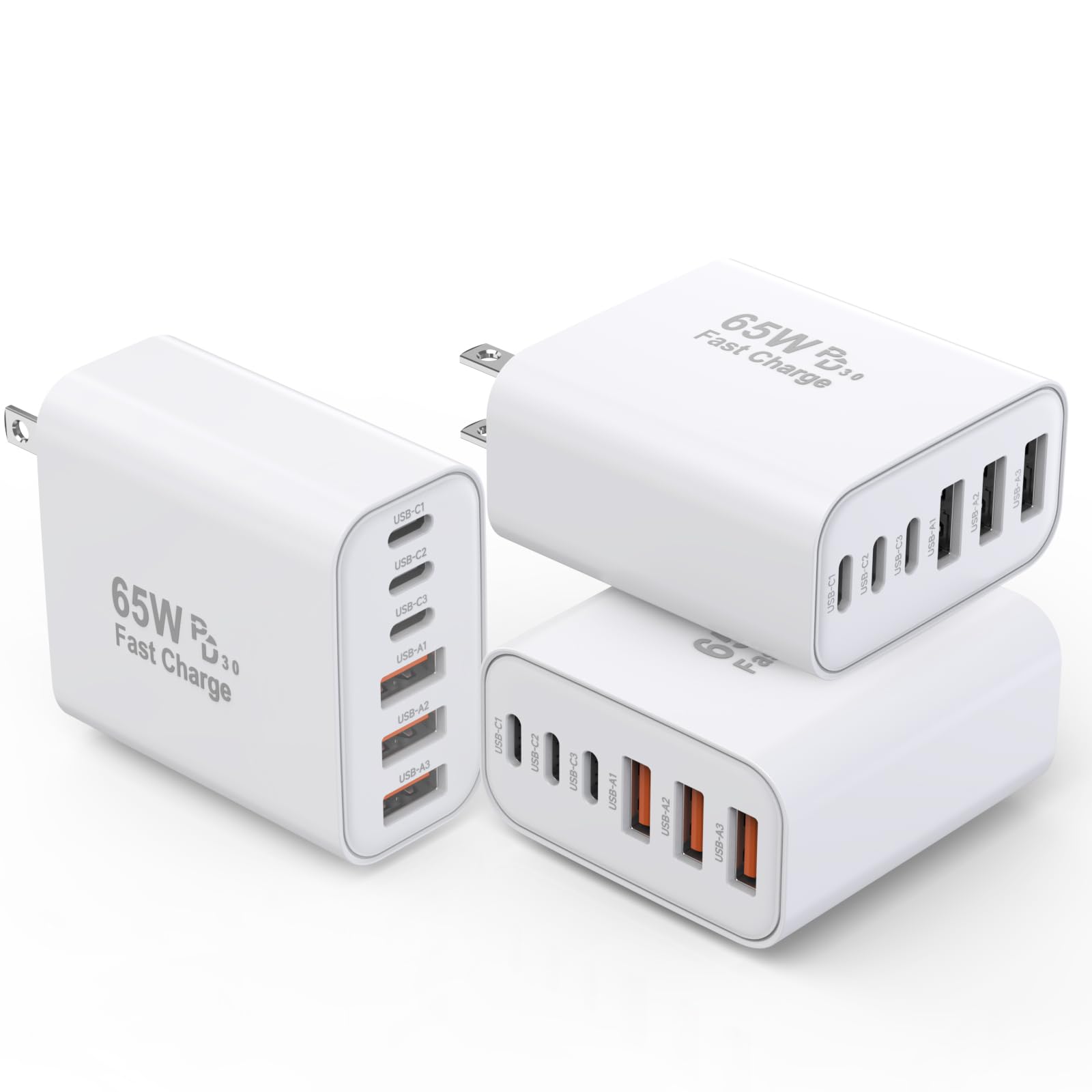
The head count is the story here: six ports per block, split as three USB-C and three USB-A, and three blocks in the box. That is a charger for the kitchen, one for the bedroom, and one for the travel bag, without unplugging anything. Kruidvat claims an iPhone 15 goes from 0% to 80% in 30 minutes, drawing on the block’s 65W total. Compare that port count with the UGREEN 3-port above — 6 vs 3, a 2.0x gap — and you see why this one suits a family rather than a single laptop bag.
Charging speed is what reviewers keep praising, and it holds up in use: a dead phone reached roughly 70% in 20 minutes while the screen was on and in use, and the blocks happily run tablets and small USB accessories. They will not charge a laptop, and the listing is upfront about that. The slim, space-saving shell is genuinely small for a six-port brick, so it disappears into a drawer instead of claiming a shelf.
The recurring gripe is the plug’s grip in the socket — the prongs do not bite as firmly as a heavier brick, so an old, loose wall plate can let it sag. That is a fit problem, not a failure; a snug outlet solves it. Fast charging also depends heavily on the cable you pair it with, and cables are not in the box. If you have a house full of Apple devices and one or two cables per room, this pack is the calmest way to end the outlet argument.
The value math: three six-port blocks at this price undercuts buying even a single premium desktop hub, and the thin shell keeps each one easy to store.
Skip the laptop test: this is a phone-and-tablet charger. Expect it to top up smaller devices fast and leave the notebook to a dedicated 100W port.
Spread them out: the right buy if you want one block per room and a spare in the bag.
Not for laptops: if your daily driver is a notebook that needs a real fast charge, look elsewhere.
3. Baseus 2 Pack 65W Charger Block
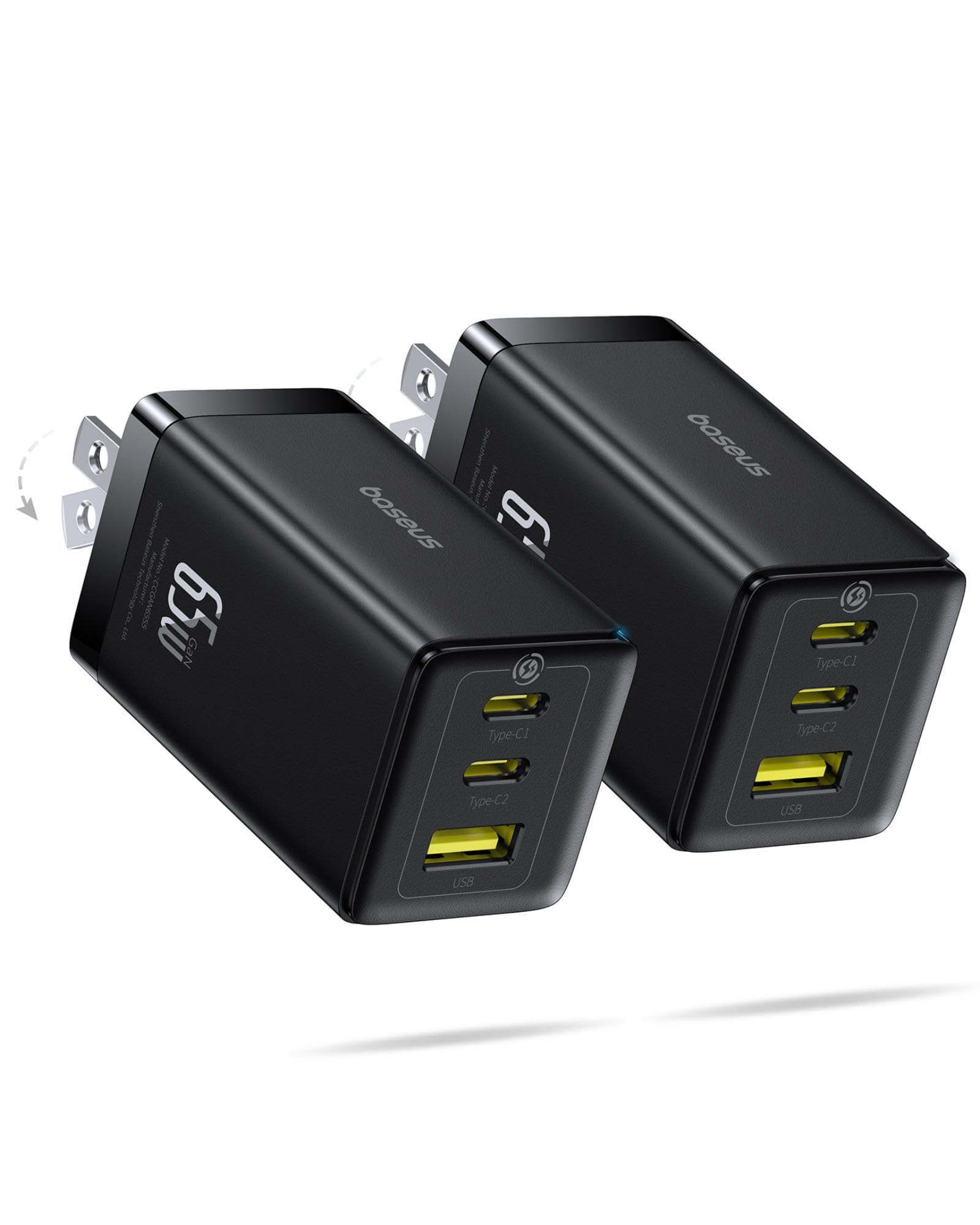
A GaN brick that promises 92% energy conversion — and enough of it to survive Samsung DeX.
Baseus rates the block at 92% energy conversion, meaning less of the 65W is lost as heat instead of reaching your device. The other number that matters is size — 41% smaller than the original 65W charger, with folding prongs and a lightweight shell that packs flat. In one port you get the full 65W, enough to fast-charge a MacBook Air at full speed. Add a second and third device and the chip reallocates power across the two USB-C ports and one USB-A without dropping the connection mid-charge.
The protocol list is older-phone friendly: PD3.0, PPS, QC3.0, FCP, SCP, and AFC. PPS (Programmable Power Supply — a variable-voltage mode that lets a phone request exactly the voltage it wants) is why Samsung handsets and DeX users get sustained power instead of a slow bleed under heavy screen load. A two-pack is the quiet win: one stays home, one rides in a bag. The build feels solid rather than plasticky, and the foldable plug stores flat for travel.
The catch is a familiar one. Squeeze all three ports into service and the per-device speeds drop from the 65W single-port peak. There is also a small indicator light that a few owners find bright in a dark bedroom — a strip of tape is the fix. One block in a two-pack can occasionally arrive faulty, and the maker’s replacement response is quick when it happens. For DeX users, power users, and anyone who works a phone hard, this is the smarter pairing of the group.
Why power users reach for it
- Holds a charge under Samsung DeX load where stock bricks drain
- 92% energy conversion keeps it cooler and smaller
- PPS, PD3.0, QC3.0 and more cover a wide device mix
- Two-pack stretches the value across home and bag
Small niggles, worth knowing
- Speeds fall when all three ports are in use
- The indicator LED is bright at night
- Slightly larger and heavier than a stock laptop charger
Built for heavy use: a strong match for DeX users and anyone who keeps a phone pinned on a desk all day.
Pass on it if: you only ever charge one device and want the smallest block possible.
4. UGREEN 100W Charging Station

Four USB-C ports and two USB-A, built to live on a desk and stay cool doing it.
One hundred watts total, with a single USB-C port reaching 65W — enough for a MacBook Pro or a Dell XPS at full tilt. The smart distribution splits that budget deliberately: USB-C1 and C2 up to 65W, USB-C3 and C4 up to 35W, and the USB-A up to 22.5W. The upright port layout keeps the footprint small, and the included AC extension cord means the block can sit back where you want it rather than dangling from a wall plate.
Owners keep coming back to how little drama it brings: the metal-ish body stays cool under a full desk load, it frees a wall outlet, and it has no problem holding a laptop while a tablet, a phone, a hotspot, and headphones are also plugged in. The rubber feet give it a firm grip on a smooth desk so it does not skate when you unplug a cable one-handed.
The honest limit is the 100W ceiling. A couple of users running two laptops at once wish for more headroom, and older phones can warm up slightly compared with a gentler brick. For a desk with many USB gadgets, those are small costs against the tidiness you gain. If your household treats the living room side table as a charging hub, this is the one that ends the outlet hunt.
The desk-tidying win: six ports and an AC cord turn a tangle of wall warts into a single cable run.
What it will not do: 100W total means a pair of laptops will not both charge at full speed at once — plan which device gets priority.
Made for the shared desk: ideal if a laptop plus a handful of smaller gadgets sit in the same spot each day.
Look further if: you want a compact wall block for a bag — this one wants a surface to stand on.
5. Belkin 112W GaN Charger Block
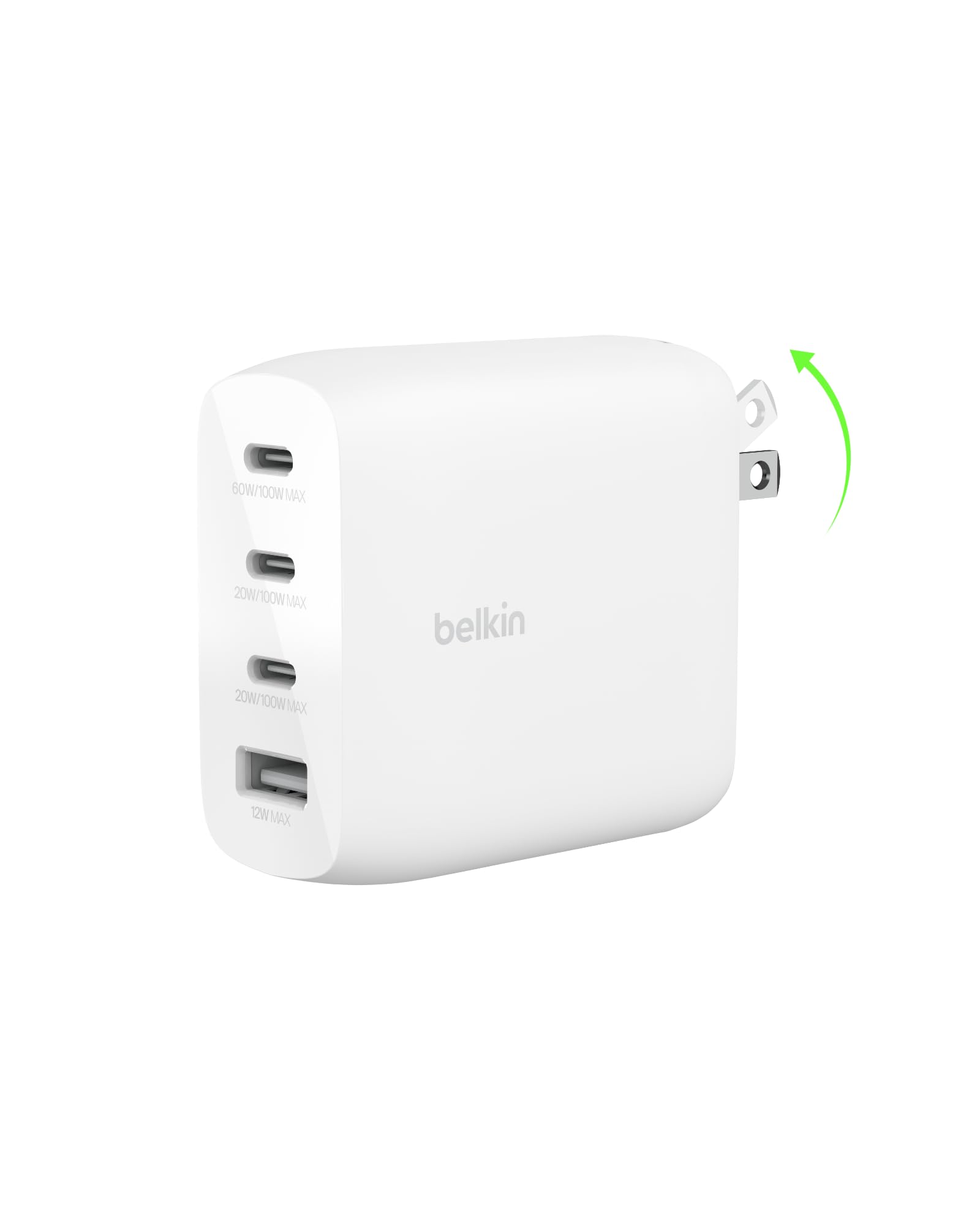
The four-port block that hands a single laptop up to 100W and shares the rest sensibly.
Belkin spells out exactly how the power splits, which is rare and refreshing: 100W from a single port, 70W plus 30W with two in use, 60W/20W/20W across three, and 60W/20W/20W/12W filling all four with the USB-A. That means a MacBook Pro can charge at a serious rate while a watch and a phone top up alongside it. Foldable pins hold tight to the outlet, and the travel-ready body is compact enough to justify the bag space.
The safety layer is the other reason people pay up for this maker: Belkin’s Smart Protect adds overvoltage protection, more than 150 tests per the maker, and a two-year coverage term. It is built from recycled materials in recycled packaging, which matters to some buyers. In daily use it charges a MacBook Pro 16-inch, a phone, a tablet, and whatever else you have a cable for, all at once.
Be fair about the weight: this is a substantial brick, and if portability is your first priority the heft is noticeable. It also runs warm when pushed, which is normal for a transformer this size. A short run of units had a port that dropped and re-connected; that is the outlier, not the pattern. The 4-port reach is the point — that extra USB-A is why this beats the 3-port UGREEN on sheer device coverage.
What the extra spend buys
- Up to 100W on one port for full-speed laptop charging
- A clear, published power split across all four ports
- Foldable pins that grip the socket firmly
- Smart Protect safety testing and a two-year coverage term
Where it asks for patience
- Heavier and pricier than the plastic rivals
- Runs warm under a full multi-device load
- No MagSafe — USB-C only, so older Apple cables need adapting
Worth it if: your laptop is the power hog and you want three more gadgets fed from one reputable block.
Weigh it up: the extra ports and safety testing add mass — a bag-only buyer may prefer something lighter.
6. Anker 100W Max USB C Charger
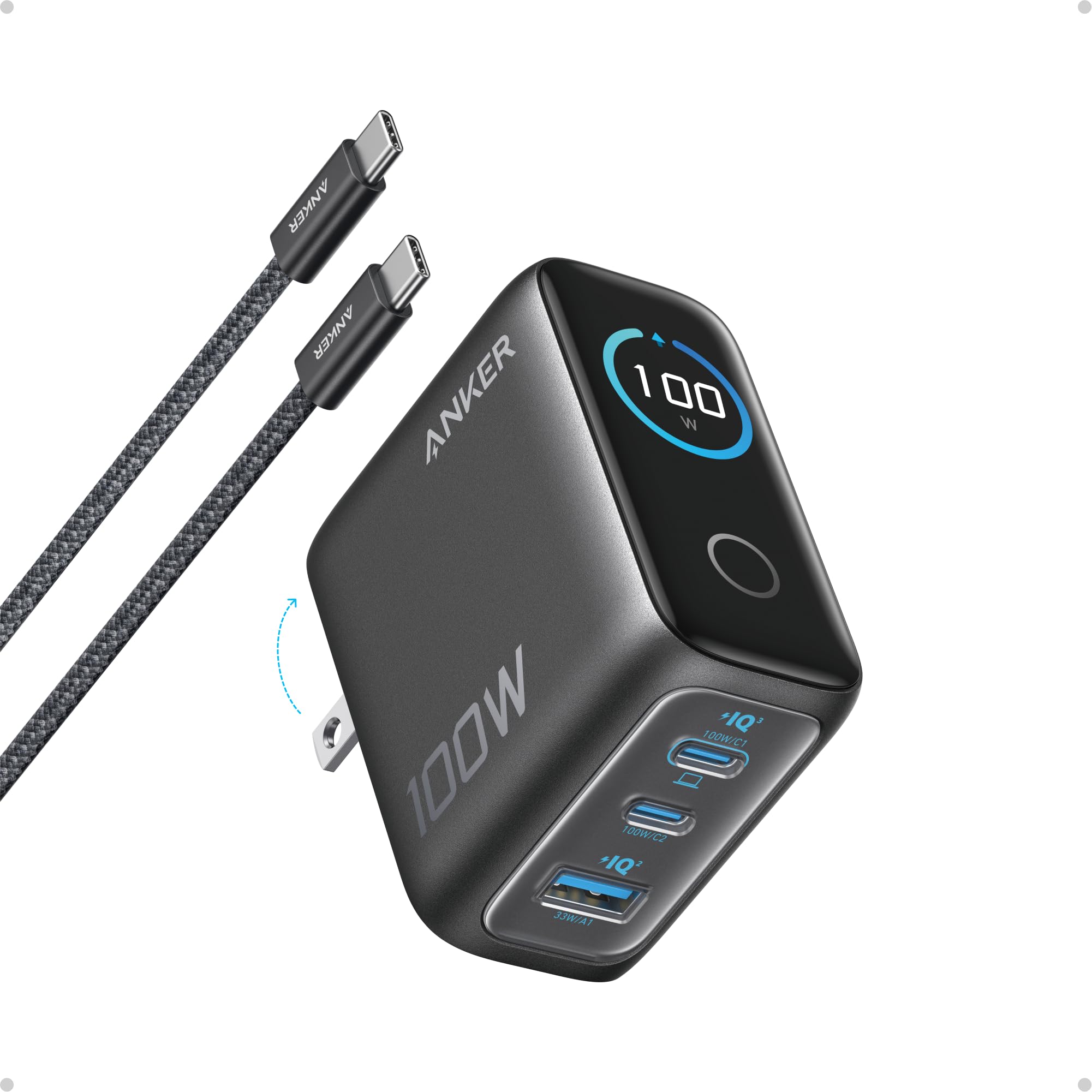
A charger with a screen that tells you the temperature and wattage before you have to guess.
The display is the differentiator. It shows charging status, temperature, and per-port performance in real time, so you can see exactly how much a device is pulling instead of assuming. Anker rates any USB-C port at a steady 100W and claims it holds peak output up to twice as long as the average 100W charger. At 2.72 x 2.17 x 1.34 inches with a foldable plug, it fits in a coat pocket and slides into a bag without a bump.
Owners praise quality most, and it shows in daily use: iPhone, Galaxy S25 Ultra, tablet, Steam Deck, and ROG Ally X all charged quickly with no overheating. The 100W output handles a 14.5-inch laptop at the same rate as its own charger, while the smart display shows “Smart charger in use.” A low-current mode drops USB-C2 or the USB-A to 95W plus 5W when a device pulls 5W or less for a minute, so earbuds charge safely rather than slowly.
The follow-up question is fair: do you need the screen? The display is genuinely useful for troubleshooting a slow cable or a device that refuses to draw. It is the heavier, pricier choice in this lineup, and the included 4.9 ft USB-C cable softens that. Buy it for the visibility, not just the watts.
The readout earns its keep: real-time wattage and temperature turn a guessing game into a diagnosis — you can spot a bad cable in seconds.
The overkill check: if every device you own tops out well below 100W, the screen is luxury rather than necessity.
Best for the curious: a smart choice if you want to know exactly what your charger is doing at any moment.
Skip the splurge if: your devices all cap low and you would never glance at a display.
7. UGREEN Nexode 200W Charging Station

Six USB-C and two USB-A ports, 200W total — the charging hub for an entire household.
The usable power here is the draw: Metered tests recorded 199W across a Lenovo, a Dell, a power bank, a tablet, and phones, settling near 165-170W after ten minutes. That is close enough to the 200W headline to trust it. Six USB-C and two USB-A ports mean the family’s laptops, tablets, controllers, and headsets all charge in one place. The top three USB-C ports each reach up to 100W, though not all at the same time — filling all eight drops them to 65W or 45W. A 6-foot extension cord frees it from the wall.
Silence and heat control are what owners notice: it runs without the hum some desktop bricks make, and a peak exterior reading of 142.4°F after an hour reflects a heavy build with metal housing that spreads the warmth. A Europe trip with a family’s worth of USB devices became one brick instead of a bag of adapters and converters. Set up at home, and every device on the desk charged noticeably faster within a day.
Does it earn its place against the 100W station above? If you have a house of devices, yes — the port count and total headroom are the difference between one cable run and three. The 200W is shared, so plan which three devices get top speed. And note the plug type: the listing shows a Type G configuration, so check your outlet before you commit.
Why the whole house loves it
- Metered 199W draw, well above smaller hubs
- Eight ports replace a nest of wall adapters
- Runs quiet and stays thermally controlled under load
- 6-foot cord places it where you want it, not where the outlet is
Plan around these
- The 200W is shared — filling all eight ports caps the top ports
- Heavier than a wall block and needs a desk surface
- Cable ratings can limit output, so use capable leads
For the full household: the right hub if eight devices compete for sockets every evening.
Not a travel block: it lives on a desk — pack a smaller brick for the road.
Know the Specs
Total wattage vs. single-port wattage
A “65W charger” means 65W is the most the whole block can put out, shared across whatever is plugged in. The single-port figure is what one port can deliver on its own — often the same number on a 3-port block, but not on an 8-port hub, where a 200W total leaves each top port at 100W. Match the single-port number to your heaviest device, and treat the total as a budget for everything else.
GaN vs. old silicon bricks
GaN (gallium nitride) is a chip material that switches power more efficiently than silicon, so the charger generates less waste heat and can be built smaller for the same output. That is why a 65W block can be 50% smaller than an old 61W brick and still run cooler. It does not add wattage; it just lets the maker cram the same wattage into less plastic.
PD and PPS explained
PD (Power Delivery) is the handshake rule USB-C devices use to agree on a safe voltage and current. PPS (Programmable Power Supply) is a finer version that lets a phone step the voltage up and down smoothly, which some handsets prefer for sustained fast charging. A charger that lists PPS and PD will play nicer with a wider range of phones than one that only offers a fixed voltage.
Port count and folding prongs
Count the ports you will fill each day, not the most you could. Three ports suit a bag; six or eight suit a permanent desk. Folding prongs matter for portability — they keep the plug from snagging your bag — while a narrow body lets the block share a duplex outlet instead of blocking it. Neither changes the wattage, but both change how much you enjoy using it.
Common Questions
Will a 65W GaN charger charge my laptop or just my phone?
Does the wattage get split when I plug in more than one device?
What does GaN actually mean and why does it matter?
Do foldable prongs really make a difference for travel?
Will a 3-pack of 6-port chargers charge a MacBook?
Do these chargers work safely with earbuds and watches?
Does a higher-wattage charger damage my phone?
What cables do I need to get full speed?
Is a desktop charging station better than several wall blocks?
Do these chargers get hot and is that normal?
The Bottom Line
For most people, the GaN charger worth grabbing is the UGREEN Nexode 65W — it covers a laptop, a phone, and earbuds from a block that folds flat and lives in a pocket. If your desk is the hub of the house, the UGREEN Nexode 200W gives you eight ports and a verified 200W budget so the whole family stops hunting for outlets. And if you want to see exactly what your charger is doing, the Anker 100W with the smart display turns a guess into a readout. One nudge: the 65W Nexode is the one most people end up keeping — its foldable body and 65W port make it the easiest of the bunch to recommend.
How we choose
We do not accept paid placement. Every pick is matched to a real buyer and a real use-case; we do not hands-on test units.
Sources
Specifications: manufacturer listings and product documentation. Review insights: verified customer reviews, as of October 2026. Pricing: not shown on this page (it changes often); check the current price via the retailer link.
As an Amazon Associate, Aappliancez earns from qualifying purchases. This does not affect which products we feature.