Disclosure: Some links in this post are affiliate links. As an Amazon Associate I earn from qualifying purchases, at no extra cost to you. Learn more
Specs are compiled from manufacturer listings and verified buyer reviews and can change over time — please confirm the key details on the product page before buying.
A keyboard that drops the first keystroke after waking can cost you the opening duel of a round. That single annoyance — the sleep delay, the stuck key, the mouse that lags a half-second behind your flick — is what separates a wireless combo you love from one you quietly swap back to a cable. This guide ranks the options by connection latency, battery life, and whether both pieces share one receiver or need two.
This guide is built by comparing the manufacturers’ published specifications and the patterns across verified customer reviews, so you get each pick’s real strengths and trade-offs instead of marketing spin.
You will see which combos use a single shared dongle, which mouse sensors reach 12,000 or even 32,000 DPI, and where the honest trade-offs sit. Here are the best gaming wireless mouse and keyboard setups, sorted by shared dongle, polling rate, and battery life.
Top Picks

How To Choose The Best Gaming Wireless Mouse and Keyboard
Most buyers judge a wireless combo on the same specs as a wired one, and that is where they go wrong. A wired set never sleeps, never needs charging, and never competes with your Wi-Fi for 2.4GHz airspace. A wireless set does all three, so wake delay, battery drain, and 2.4GHz interference belong on your checklist.
Start with how the two pieces talk to your PC
You get three ways to connect with tri-mode: a 2.4GHz USB receiver (a tiny dongle that plugs into your PC for a fast, stable link), Bluetooth for laptops and tablets, and a wired USB-C cable for charging or zero-latency play. A shared dongle that runs both the keyboard and mouse from one receiver saves you a USB port and one more thing to lose. If a combo ships with two separate receivers, plan for both to occupy ports.
Then look at the numbers that touch your aim
Polling rate is how many times per second the device reports to your computer, measured in Hz. A mouse at 1000Hz reports a thousand times a second; some premium mice push to 8,000Hz. DPI (dots per inch) sets sensitivity — 4,800 DPI is plenty for most players, and 12,000 or 32,000 mainly matters if you like very high sensitivity or a large monitor. Neither number fixes bad aim, but a laggy 2.4GHz link will cost you more than a low DPI or polling rate.
Do the battery math honestly
Battery figures are quoted with RGB lighting off for a reason: the backlight is a major power draw. A keyboard rated for 300 hours with the backlight dark can drop sharply once you light it up. Decide if you want a rechargeable internal battery or a swappable AA cell, and check whether the mouse charges over USB-C so one cable can top up both.
Side-by-Side Comparison
| Model | Best For | Max DPI | Connectivity | Battery / Power | Amazon |
|---|---|---|---|---|---|
| Redragon S101M-KS★ Best Overall | All-round value combo | 4,800 DPI | 2.4G / Bluetooth / Wired | Up to 300 Hrs (RGB OFF) | Amazon |
| Redragon S163 (K689 PRO + M693)Gasket Feel | Gasket typing feel | 8,000 DPI | 2.4GHz / BT / USB-C | 1 nonstandard battery (included) | Amazon |
| Logitech G305 + G213 Prodigy | Long mouse battery | 12,000 DPI | USB / Wired / Wireless | 250 hrs on one AA (mouse) | Amazon |
| ATTACK SHARK X68HE + R1 | Competitive speed | 18,000 DPI | USB-C / 2.4GHz / BT | Wired keyboard | Amazon |
| Razer BlackWidow V4 TKL | Hot-swap tinkerers | — | 2.4 GHz / Bluetooth | Up to 980 hr | Amazon |
| GravaStar Mercury X Pro | Ultralight FPS mouse | 32,000 DPI | Bluetooth / 2.4G / Wired | 113 hrs average | Amazon |
| Logitech G PRO X TKL Lightspeed | Tournament-grade build | — | LIGHTSPEED / Bluetooth / USB | Rechargeable | Amazon |
Detailed Reviews
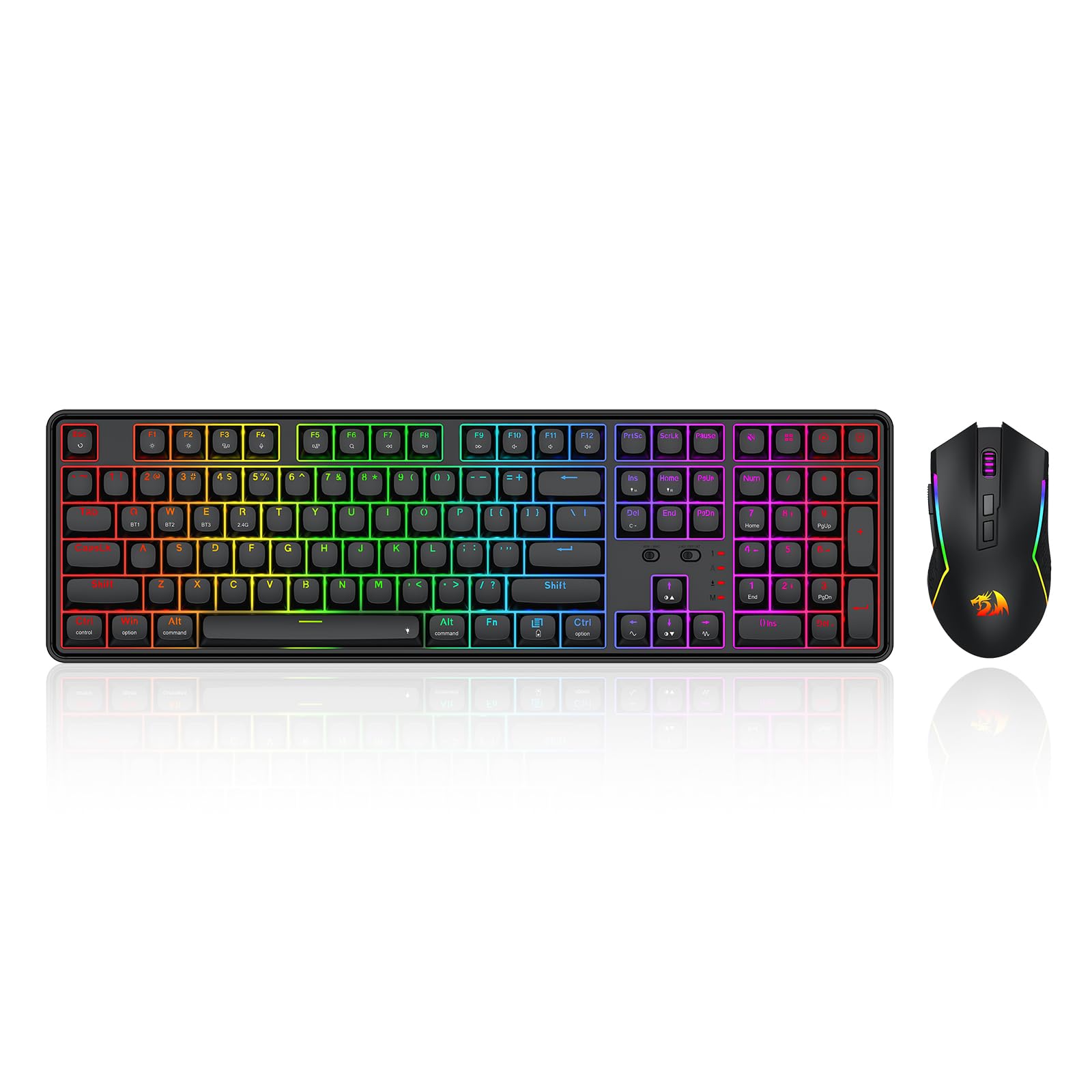
1. Redragon S101M-KS Gaming Keyboard and Mouse
Our pick — 4.5+★ from 51,500+ verified ratings; the strongest balance of quality and price.
One dongle runs both halves of this set, so your desk stays clear and your aim stays fast.
The Redragon S101M-KS earns the top spot by solving the thing that quietly ruins wireless combos: two receivers fighting for one USB port. This set ships with a single 2-in-1 2.4G receiver that drives the keyboard and mouse together. It also offers Bluetooth and a wired USB-C connection, so you can drop to Bluetooth on a laptop or charge while you play. For the fastest response, the 2.4G receiver is the mode to leave it in.
The keyboard brings 8 RGB backlight patterns, 10 independent multimedia keys, and 12 combination multimedia keys for quick volume and control. It runs up to 300 Hrs with RGB off, and a battery indicator shows where you stand before a match. The mouse carries 5 DPI levels from 800 up to 4,800 — adjust on the fly with the dip button or fine-tune through the software. You can also remap the 7 mouse buttons and set a polling rate between 125 and 1000Hz. Splash resistance and a WIN lock button round out the practical side for anyone who snacks or sweats at the desk.
The reputation here is real: 4.5+ stars from a crowd of owners, and the looks-and-color side is what wins people over most, with the tactile feel close behind. Buyers report full switching between dongle, Bluetooth, and USB works smoothly, and the 4800 DPI sensor is plenty for casual-to-mid play. The honest catch is reliability on the margins — a few sets arrive with a sticky key or a connection that needs toggling awake, and the keyboard can take several seconds to reconnect after it sleeps. Treat a faulty unit as a return rather than a pattern, and you get a lot of combo for the money.
Where it earns its keep
- One shared 2.4G dongle runs keyboard and mouse from a single USB port.
- Up to 300 Hrs battery with RGB off, plus a battery status indicator.
- 7 programmable mouse buttons and 125–1000Hz polling adjustability.
Where to set expectations
- A few units arrive with a sticky key or a slow wake-from-sleep reconnect.
- The mouse needs charging more often than the keyboard.
Best for: Players who want a full-size wireless keyboard and mouse on one receiver without spending premium money.
Think twice if: You need instant wake on every keystroke and cannot tolerate a multi-second reconnect after the board sleeps.
2. Redragon S163 Combo
A soft, cushioned typing bounce that you can hear in the room and feel in every keypress.
If the click-clack of a hard-mounted board grates on you or your coworkers, the S163 is built around the opposite idea. Its K689 PRO uses a gasket-mounted design with 3-layer noise dampening, so the deck flexes softly under each keystroke instead of ringing against the frame. The upgraded socket accepts almost any switch, so you can swap to the feel you like later. That makes this the pick for the person who wants a custom-keyboard sensation without buying a custom keyboard.
The full-size 108-key layout keeps the numpad and adds 4 extra hotkeys defaulting to mute, calculator, screen lock, and desktop. Anti-ghosting means all 104 keys register during rapid multi-key combos, which matters more than DPI when you are mashing abilities. The M693 mouse brings 8000 DPI, 5 on-board DPI levels, and 7 programmable buttons with 2 side macros for quick swaps between precise aim and fast sweeps. Both devices connect from a single 2.4GHz receiver, and the software sets lighting and macros for the pair together.
The build is ambitious, but the track record here is young — this is a newer combo with only a thin slice of feedback, so lean on the specs rather than a long history. What does land well is comfort: the quiet keystroke sound and long-session comfort are the standout notes. The genuine risk to weigh is a dongle that goes missing in transit, and one unit in the data had a delayed mouse, so buy where returns are simple and test the receiver the day it arrives.
The gasket difference: A soft, silky bounce with 3-layer noise dampening and swap-ready sockets is the reason to choose this over the S101M-KS above.
The calculated risk: A short review history and one report of a missing dongle mean you should verify the shared receiver works before the return window closes.
Reach for this if: Quiet, cushioned typing and switch-swapping matter more to you than a deep review history.
Look elsewhere if: You want a proven long-run record before you commit — the older Redragon combo has years of it.
3. Logitech G305 Lightspeed Wireless Mouse + G213 Prodigy Gaming Keyboard

A mouse that runs 250 hours on one AA, paired with a spill-resistant RGB keyboard.
The standout number here is the HERO sensor’s reach: 12,000 DPI with 400 IPS (inches per second, a measure of how fast you can whip the mouse before tracking blurs). That is 2.5x the 4,800 DPI ceiling of the Redragon S101M-KS, and it is the kind of headroom high-sensitivity players and large monitors reward. The LIGHTSPEED wireless link reports at a 1ms rate, so clicks and tracking arrive without perceptible delay.
The G305 is the star of the pair, and its 250-hour battery on a single AA is the reason many people buy this bundle. Set the mouse once and forget it for weeks. The keyboard side is the G213 Prodigy, a wired board with customizable RGB that syncs with other Logitech gear, and both parts share a spill-resistant design — a real comfort for long sessions with a drink nearby. At 99 g the mouse is deliberately weighty rather than ultralight, which some players prefer for stability.
Where this bundle asks for patience is the logistics, not the hardware. The set is bought as two pieces, and one buyer waited almost two weeks just for the mouse to arrive. The mouse is wired in the G213 keyboard but wireless in the G305, so remember that only one half frees you from the cable. If you want the sharpest sensor and the longest mouse battery in this group, this is the combo — just buy from a seller with a clean shipping record.
Why it stands out: The 12,000 DPI HERO sensor and 250-hour AA battery are the two specs that keep this bundle on shortlists.
What surprised buyers: The two pieces can ship as separate deliveries, and that split schedule is the recurring frustration.
Best for: Precision-focused players who want a sharp sensor and rarely want to charge a mouse.
Bear in mind: The G213 keyboard is a wired board, so only the mouse saves you from the cable.
4. ATTACK SHARK X68HE 60% Wired RT 8K Keyboard

Hall effect switches, 8K polling, and a 59g mouse built for players who count milliseconds.
The X68HE is a different animal from the full-size boards here: a compact 66-key layout with separate arrow keys and a curved wrist rest. Its headline tech is the hall effect magnetic switches — a design that registers how far a key travels instead of just whether it pressed. That feeds an 8K polling rate (8,000 reports a second), 0.01mm rapid-trigger accuracy, and an ultra-low 0.125ms latency. For a competitive shooter, that translates to keypresses that fire the instant they cross your set point.
The paired R1 mouse weighs just 59g — for contrast, the Logitech G305 bundle mouse sits at 99 g. That is a meaningful weight difference for quick flicks and long sessions. The R1 uses a PAW3311 sensor with up to 18,000 DPI, 400 IPS precision, 40G acceleration, and 1000Hz polling, with three connection modes and grip tape to tune glide. Both keyboard and mouse are fully programmable through a web driver at qmk.top, where you can remap keys, build macros, and set actuation points.
The finish is genuinely premium for a compact deck — an aluminum alloy anodized plate and double-layer PORON add a stable, satisfying thock. The catch is that the keyboard is wired, so the X68HE half sits tethered to your PC while only the mouse roams free. It is also a 60%-class layout, which means no numpad and an adjustment period. For the speed-focused player, though, that trade is the point.
The speed case
- Hall effect switches with 0.01mm rapid-trigger accuracy and 0.125ms latency.
- 8K polling on the keyboard and a lightweight 59g R1 mouse.
The reality check
- The keyboard itself is wired — only the mouse runs untethered.
- Compact 66-key layout means no numpad and a learning curve.
Best for: Competitive players who value rapid actuation and a featherweight mouse over a full key count.
Worth knowing: You are trading a tether and a numpad for faster keystrokes — a fair deal if speed is your priority.
5. Razer BlackWidow V4 TKL Wireless Gaming Keyboard

Swap your switches, save your macros, and forget the charger for a very long time.
The BlackWidow V4 TKL is the tinkerer’s keyboard. Its hot-swappable printed circuit board accepts 3 or 5-pin switches, so you can pull the pre-loaded Orange tactile switches and drop in your own without soldering. That is the single feature that drives its reputation — the customizability is what a lot of experienced builders keep coming back to. The build adds a top-mounted stainless-steel plate, a tape-enhanced PCB, lubricated stabilizers, and two layers of sound-dampening foam for a cleaner sound.
On top of the feel, it delivers practical range: a multi-function roller with dedicated audio, media, and battery buttons — all remappable — plus Chroma RGB with over 16.8 million colors per key. Razer quotes up to 980 hr battery in HyperSpeed or Bluetooth mode, which is the number that makes this a genuine desktop companion. It connects over 2.4GHz wireless and Bluetooth and pairs with a compatible Razer mouse through the same dongle. It comes in a tenkeyless layout at 87 buttons.
Balance matters here: the typing experience is praised as immaculate, and quality is the thing owners rave about, with customizability right behind it. The catch is that real-world heavy use can fall short of the quoted battery — some reports put it around 30-40 hours with the noise and lighting dragging the total down. Connectivity and functionality have drawn mixed notes too, so update the firmware and seat the dongle firmly to keep the 2.4GHz clean. Treat this as a keyboard for the tinkerer who wants to tune every key.
The custom case: Hot-swappable sockets plus a tape-modded plate, foam dampening, and lubricated stabilizers make this feel like a kit keyboard that is already built.
The honest caveat: Quoted battery life is generous, but heavy RGB use brings it back down toward the short end of the range.
Worth noting: The 2.4GHz link benefits from firm dongle seating and current firmware, so budget a few minutes on setup.
Best for: Players who like swapping switches and remapping controls to their exact taste.
skip it if: You want the longest real-world battery life per charge and hate fiddling with firmware.
6. GravaStar Mercury X Pro Wireless Gaming Mouse, 32,000 DPI

A holey magnesium-alloy shell that weighs about as much as an empty phone case.
The Mercury X Pro is a mouse-only pick, which is the key thing to know — it is the sensor-first option for a player who already loves their keyboard. It runs the PAW 3950 sensor (a high-end optical sensor for accurate tracking) up to 32,000 DPI, and ships with an included 8K dongle for an 8,000Hz polling rate. Five programmable buttons and RGB are set through the software, and it connects three ways: Bluetooth, 2.4G wireless, or wired. At a quoted 113-hour average battery life, you can go days between charges on lighter settings.
What makes it distinct is the shell. A hollow-skeleton magnesium alloy frame keeps it to just 49g while aiming airflow at your palm, so your hand stays cooler over long sessions. That is a full third lighter than the 99 g Logitech G305 and even lighter than the 59g R1 that ships with the ATTACK SHARK. A 49g mouse does not tire your wrist on sweeps, and the rigid metal frame avoids the hollow feel some light mice have. It is a right-handed design measuring 4.9″ long by 2.5″ wide, so it suits medium hands.
Responsiveness and weight are the two things that keep it in steady favor, and owners describe it as their favorite mouse for fast shooters. The trade-offs are real but sized: one main-click button failed after about three months in a single account, which is the kind of outlier you accept as a risk on any ultralight, and the open slits in the sides can poke at your thumb and ring finger. The scroll wheel also feels softer than the click. For a dedicated FPS player who values a few grams above all else, it is a worthy splurge.
The performance read: The 32,000 DPI PAW 3950 sensor and 8K dongle put this in elite tracking territory, and the 49g frame keeps the wrist fresh.
The tactile trade-off: Slotted sides can be uncomfortable for some grips, and the scroll wheel offers a soft, squishy click.
Best for: FPS players who want elite sensor specs and a genuinely ultralight mouse.
Look elsewhere if: You have large hands or grip the mouse tightly on the sides — the open slits are best kept to a lighter grip.
7. Logitech G PRO X TKL Lightspeed Wireless Gaming Keyboard

Pro-inspired, tournament-grade build with double-shot PBT keycaps and GX Brown tactile switches.
The G PRO X TKL is the keyboard for someone who wants one device done well rather than a bundle. It is built around GX Brown tactile switches and dual-shot PBT keycaps, which are a denser plastic that resists the shine and wear typical keyboards develop. The tenkeyless layout packs 104 buttons, a volume roller, and media controls. It connects over LIGHTSPEED wireless — Logitech’s low-latency 2.4GHz link — plus Bluetooth and USB, and the included LIGHTSPEED adapter can also drive a compatible Logitech mouse.
The package is unusually complete: a carrying case, the LIGHTSPEED adapter, and a USB-A to USB-C charging cable all ship in the box. A receiver guide worth noting: on wireless mice and combos the tiny USB receiver is often tucked inside the mouse under the battery cover or secured in the packaging. If your receiver seems missing, check there before assuming it did not arrive. The RGB lighting is driven by LIGHTSYNC, and Game Mode control keeps Windows-key mishaps off the board.
Owners praise the build first — the quality and sturdy, hefty feel are what the reputation rests on, with the tactile typing feel right behind it. The honest catch is the sound: the larger keys can run loud and high-pitched, and nearly every owner agrees the software is the weak link, with some remapping limited to what Logitech allows. The switches are soldered, so this is not a board for hot-swap tinkerers. If you want a solid, PBT-heavy wireless board and trust the Logitech ecosystem, this is the mature choice.
Why pros pick it
- Dual-shot PBT keycaps and GX Brown tactile switches in a hefty, well-damped build.
- LIGHTSPEED, Bluetooth, and wired options with a complete kit including a carrying case.
The fine print
- Larger keys can sound loud and high-pitched, and the software draws gripes.
- Switches are soldered, so there is no hot-swapping.
Best for: Buyers who want proven build quality and PBT keycaps in a single wireless board.
Second thought if: You want a swappable keyboard or need many custom remaps — this one favors stability over tinkering.
Know the Specs
Polling Rate (Hz)
Polling rate is how often the device reports to your PC, measured in hertz (Hz). A 1000Hz mouse sends a thousand updates a second; an 8,000Hz board sends eight thousand. Higher rates shrink the gap between your input and the screen, which can sharpen fast flicks and rapid keypresses. It only helps with a fast monitor and a stable 2.4GHz link — a laggy connection costs you more than a low poll rate ever will.
DPI and Sensor Type
DPI (dots per inch) sets how far the cursor moves per inch of physical mouse travel. The combos here range from 4,800 DPI up to 32,000 DPI. Higher is not automatically better: most players settle comfortably well below the ceiling, and the sensor itself — a HERO, a PAW 3950, a PAW3311 — is what determines smooth, accurate tracking under speed. Match the DPI to your screen size and grip rather than chasing the biggest number.
Battery Figures and RGB Cost
Battery ratings are usually quoted with lighting off for a reason: the backlight is a major power draw. A board rated for hundreds of hours with RGB dark can drop noticeably once it glows. Decide up front if you want a rechargeable internal cell (charge by USB-C) or a swappable AA, and check whether both halves charge. A 250-hour AA mouse can free you from cables for weeks, while an RGB-heavy board needs a more regular routine.
Shared Dongle vs Two Receivers
A shared dongle runs both the keyboard and mouse from one USB receiver, saving a port and reducing clutter. Two-receiver setups work just as well but occupy two ports and can wipe out a slim laptop’s available slots. Tri-mode means you can also drop to Bluetooth or go wired for charging. If a combo ships with one 2-in-1 receiver, keep track of it — a missing dongle is the most common setup snag.
Common Questions
Do I need one dongle or two for a wireless keyboard and mouse combo?
Is 4,800 DPI enough for gaming, or do I need 12,000 or more?
Does a higher polling rate like 8K actually help in a shooter?
Why does my wireless keyboard miss the first keystroke after it wakes?
Will the quoted battery life hold up if I leave the RGB on?
Can I hot-swap the switches on these keyboards?
How much does mouse weight really affect long gaming sessions?
Do these wireless combos work on a Mac or a console?
What do I do if the dongle is missing from the box?
Are mechanical switches better than a soft gasket design for gaming?
The Bottom Line
For most players, the gaming wireless mouse and keyboard winner is the Redragon S101M-KS because one shared 2.4G dongle runs both pieces, the 4,800 DPI mouse covers everyday aiming, and the battery can stretch to 300 hours with the lights off. If you want the sharpest sensor and a mouse that lasts weeks on one AA, grab the Logitech G305 bundle for its 12,000 DPI HERO and 250-hour battery. And for competitive speed with a featherweight feel, the ATTACK SHARK X68HE is the one to reach for, with 8K polling and a 59g mouse in tow. Whichever you pick, confirm the shared receiver and its battery routine on arrival — those two habits keep a wireless combo reliable run after run.
How we choose
We do not accept paid placement. Every pick is matched to a real buyer and a real use-case; we do not hands-on test units.
Sources
Specifications: manufacturer listings and product documentation. Review insights: verified customer reviews, as of October 2026. Pricing: not shown on this page (it changes often); check the current price via the retailer link.
As an Amazon Associate, Aappliancez earns from qualifying purchases. This does not affect which products we feature.