Disclosure: Some links in this post are affiliate links. As an Amazon Associate I earn from qualifying purchases, at no extra cost to you. Learn more
Specs are compiled from manufacturer listings and verified buyer reviews and can change over time — please confirm the key details on the product page before buying.
Fortnite is the easiest game in the world to run badly. A machine that boots fine can still choke the moment a dozen players land at Tilted, and that is exactly the trap in this budget. The short answer up front: buy a tower with a dedicated graphics card and 16GB of RAM, and be ready to accept an older processor as the price of staying in this bracket. Everything below explains which of these eight towers actually clears that bar.
This guide is built by comparing the manufacturers’ published specifications and the patterns across verified customer reviews, so you get each pick’s real strengths and trade-offs instead of marketing spin.
Fortnite is a light game by modern standards, but a prebuilt only stays smooth when the graphics card, the memory and the CPU are balanced. That single idea is the whole spine of this gaming pc for fortnite under $500.
Top Picks



How To Choose The Best Gaming PC for Fortnite Under $500
You can run Fortnite well at low and medium settings without flagship parts. So your real job under $500 is dodging two traps: a tower with no graphics card at all, and a processor so old it chokes the newer builds of the game.
Dedicated graphics is the first thing you check
A dedicated graphics card (a separate chip with its own video memory, called VRAM) does the game rendering on its own instead of leaning on the processor. For Fortnite, look for VRAM measured in gigabytes — 4GB or more. If the listing simply says “integrated graphics” with no card named, walk away.
16GB of RAM and a solid state drive, not a hard disk
16GB of memory lets the game hold its textures alongside the browser tab and the voice chat you have open. A solid state drive (SSD, which stores data with no spinning platters) loads Fortnite’s world far faster than an old hard disk, which means less time staring at the lobby.
The CPU generation nobody warns you about
Many budget towers reuse office processors from years ago. They play Fortnite fine, but some are too old to officially support Windows 11. Read the listing for the exact processor name and check it is supported before you buy.
Renewed vs new, and what the warranty really covers
A refurbished or “Renewed” tower is a former office machine that has been cleaned, tested and repackaged. It can be excellent value, but the warranty terms matter — 90 days is a common minimum, and some sellers add a full year of parts and labor.
Side-by-Side Comparison
| Model | Best For | Graphics Card | Processor | Memory / Storage | Amazon |
|---|---|---|---|---|---|
| Prebuilt Gaming PC Desktop (abytespark)★ Best Overall | Cleanest new-buy for Windows 11 | AMD Radeon RX 550 4G GDDR4 | Intel Core i5 up to 3.2GHz | 16GB / 512GB SSD | Amazon |
| HP RGB Gaming Desktop (Renewed)Best Value | Quiet tower with a keyboard and mouse included | NVIDIA GeForce GTX 750 Ti 4G GDDR5 | Intel Core i5-6500 up to 3.6GHz | 16GB DDR4 / 512GB SSD | Amazon |
| Dell Gaming OptiPlex Desktop (Renewed)Complete Setup | A full setup with a 24-inch monitor included | NVIDIA GeForce GT 1030 2GB GDDR5 | Intel Core i7 4770 up to 3.9GHz | 16GB / 512GB SSD | Amazon |
| STGAubron Gaming PC Desktop (Core i5) | Plug-and-play starter with Wi-Fi 6 | AMD Radeon RX 550 4G GDDR5 | Intel Core i5 up to 3.7GHz | 16GB / 512GB SSD | Amazon |
| OKAMUS Gaming PC Desktop (i7 + RX 590) | Bigger graphics card on a mid-range budget | AMD Radeon RX 590 8GB GDDR5 | Intel Core i7-6700 up to 4.0GHz | 16GB / 512GB M.2 SSD | Amazon |
| STGAubron Gaming PC Desktop (Ryzen 3) | Four fans and a Ryzen platform for upgrades | AMD Radeon RX 590 8G GDDR5 | AMD Ryzen 3 3200G 3.6GHz | 16GB DDR4 / 512GB SSD | Amazon |
| ZER-LON Gaming PC Desktop | Teen-friendly starter with dual-monitor HDMI | NVIDIA GeForce GTX 1050 Ti 4GB GDDR5 | Intel Core i7-4770 up to 3.9GHz | 16GB / 512GB SSD | Amazon |
| STGAubron Gaming PC Desktop (Core i7) | The top-spec pick with 16GB of graphics memory | AMD Radeon RX 580 16G GDDR5 | Intel Core i7 up to 3.9GHz | 16GB / 512GB SSD | Amazon |
Detailed Reviews
1. Prebuilt Gaming PC Desktop
The one tower here that ships new with a clean Windows 11 license and a graphics card already inside.
The most useful fact about this tower is that it does not disguise its age. It runs an Intel Core i5 at up to 3.2GHz alongside 16GB of RAM and a 512GB high-speed SSD, and that pairing is enough to keep Fortnite loading in seconds rather than minutes. The dedicated AMD Radeon RX 550 4G GDDR4 graphics card handles the rendering on its own, so the game does not borrow system memory to draw its world. For a Fortnite player on a strict budget, that is the combination that matters most.
Straightforward performance is what wins people over here. Buyers report a machine that simply plays their games, and the maker lists Fortnite, GTA V, Valorant and Minecraft among titles it runs at over 50 FPS (frames per second — how many images the screen draws each second, so 50 FPS keeps motion smooth). The bundle is genuinely complete too: RGB case lighting, five RGB fans, a gaming keyboard, a mouse and a mouse pad all arrive in the box, so you spend nothing extra on peripherals the week you set it up.
The trade-off is honesty about the processor’s age. A minority of buyers hit a listing that was not what they expected, and the recurring theme is a chip old enough that Windows 11 support is a question rather than a guarantee. Treat the processor name as the thing to verify before you buy, and confirm the seller’s return window covers you. At 3.5+ stars across 50+ ratings, it is a solid value pick as long as you verify the processor before buying.
What earns it the top spot
- Genuine Windows 11 Home 64-bit, so no workaround install to worry about
- 512GB high-speed SSD keeps Fortnite’s loading screens short
- Keyboard, mouse and mouse pad included, so the setup is complete on day one
Where it asks you to check first
- The i5 is an older-generation chip, so confirm Windows 11 support before you commit
- A few units arrive dead on arrival, so keep the return window open
Best fit: a Fortnite player who wants a new tower with a real Windows 11 license and a complete peripheral bundle in one order.
Think twice: if you plan to upgrade the processor later, since the older i5 leaves you little room to grow.
2. HP RGB Gaming Desktop Computer
A quiet, compact refurb that handles Fortnite at low settings without breaking a sweat.
The spec that defines this pick is the NVIDIA GeForce GTX 750 Ti 4G GDDR5 card, and it is a sensible match for Fortnite’s lighter graphics profiles. Around it sits an Intel Core i5-6500 running up to 3.6GHz, 16GB of DDR4 memory and a 512GB solid state drive, all running on Genuine Windows 11 Professional. Refurbished means this was a working machine that has been cleaned and tested, which is how a tower this capable lands in the budget bracket.
The everyday experience matches the spec sheet. Fortnite and Valorant play well at low settings, the tower is quiet through a session, and the compact case keeps the desk tidy. The 600M Wi-Fi and Bluetooth 5.0 make the wireless connection easy, and owners routinely say it boots fast. An RGB case, keyboard and mouse come bundled, so the lighting and the input gear are covered from the start. Across 130+ ratings, buyers consistently report it boots fast and plays Fortnite and Valorant smoothly at low settings.
The honest catch is fit, not defect. This is a low and mid settings machine — heavy newer titles will not run at high detail, and a few long-term owners have had a graphics card fail well into ownership. The refurbished keyboard is dated too, and most people upgrade it. If you want a cheap, quiet Fortnite tower and you accept that ceiling, the value here is real.
What you are buying: a refurbished HP tower with a GTX 750 Ti, 16GB of RAM and a 512GB SSD, priced as a budget entry rather than a mid-range build.
Settings reality: Fortnite and Valorant run well at low settings; newer AAA titles at high detail are outside this tower’s reach.
Reach for this if: you want a quiet, cheap tower that plays Fortnite smoothly and you are happy to sit at low settings.
Look elsewhere if: you plan to run the newest games at high detail — the GTX 750 Ti caps you well below that.
3. Dell Gaming OptiPlex Desktop RGB Computer PC (Renewed)
The only pick here that hands you a screen, keyboard, mouse and headset in a single box.
Start with the part that changes the maths: this is a full setup, not just a tower. The bundle includes a 24-inch HDMI monitor, a keyboard, a mouse and a headset, so the furniture problem of sourcing a screen is solved in one order. Inside sits an Intel Core i7 4770 running up to 3.9GHz, 16GB of RAM, a 512GB SSD and an NVIDIA GeForce GT 1030 2GB GDDR5 card. Its 3.9GHz i7 4770 is the fastest chip at this tier, which shows up as snappier app switching rather than higher Fortnite frame rates.
Owners mostly use it for exactly one job: getting a kid into gaming. Fortnite, Roblox, Steam and the Xbox app all run, Sims 4 runs with no lag, and the tower stays quiet and cool. The RGB front panel is a nice touch, controllable from a small remote that adjusts the speed and the color pattern. The machine is a former office PC with a graphics card fitted, and that is what makes the bundle land at a budget figure. Reviewers most often praise how little setup it takes to get a kid playing Fortnite, Roblox and Sims 4.
The GT 1030 is the bottleneck you need to understand before you buy. It has 2GB of VRAM — the smallest card on this list — and Fortnite will want low settings on a busy screen. A few owners also note the machine is a repurposed business PC rather than a purpose-built gaming rig, and one reported having to pay to reinstall a clean version of Windows. The 60W power supply in particular leaves no room for a bigger card later, so buy it for what it is today.
Why it earns a place
- Monitor, keyboard, mouse and headset included — the whole desk solved at once
- 3.9GHz i7 4770 is a brisk chip for everyday tasks and quick booting
- Easy interior to work in, with room for an extra drive
The part to weigh up
- GT 1030 2GB card means Fortnite at low settings, especially in busy scenes
- A 60W power supply leaves little headroom for a later graphics upgrade
Best for: parents kitting out a first Fortnite setup who want the screen and peripherals handled in the same purchase.
Keep in mind: the 2GB GT 1030 sets the ceiling — treat this as an entry rig, not a future-proofing buy.
4. STGAubron Gaming PC Desktop, Core i5, RX 550 4G

The starter tower that gets you from unboxing to the Fortnite lobby in minutes.
There is one number to fix in your head with this one: 3.7GHz. That is the top speed of the Intel Core i5 inside, paired with 16GB of memory, a 512GB SSD and a Radeon RX 550 4G GDDR5 card. Compare that to the abytespark tower above at 3.2GHz and this processor pulls ahead by a visible margin. The connectivity is the other strong point — Wi-Fi 6 (the newer, faster wireless standard) and Bluetooth 5.0 are both built in, and the RGB mouse and keyboard ship in the box.
Easy setup is the story here, and it is not a small one for a first-time builder. The tower runs Fortnite, and the most-discussed strength in the feedback is how little fuss the whole thing causes. Netflix looks excellent on a decent monitor, the RGB fans and keyboard carry a bit of desk appeal, and the ARGB lighting adds a gaming look without custom work. For a teen’s first PC or a second machine for schoolwork and light gaming, it fits comfortably.
Know one thing going in: this is a starter machine, not a mid-range one. Game load is where the RX 550 starts to feel its limits, and Fortnite wants lowered settings in busy scenes. The maker claims 60+ FPS across a long list of titles, but bundle contents vary by listing, so check whether a monitor, speakers and keyboard are actually included. An occasional unit runs into a boot problem, which the maker’s support will walk you through via video.
The easy-setup win: plug in, sign in, and you are gaming — Wi-Fi 6 and Bluetooth 5.0 are built in, so no dongles or drivers to hunt down.
The realistic ceiling: the RX 550 is the budget end of dedicated graphics, so Fortnite runs at lower settings and heavier titles are out of reach.
Who it suits: a first-time Fortnite player who wants a working setup with no build and no adapter shopping.
Who should think again: anyone expecting to run the newest games at high settings — the RX 550 caps you well below that.
5. OKAMUS Gaming PC Desktop, i7-6700, RX 590 8GB
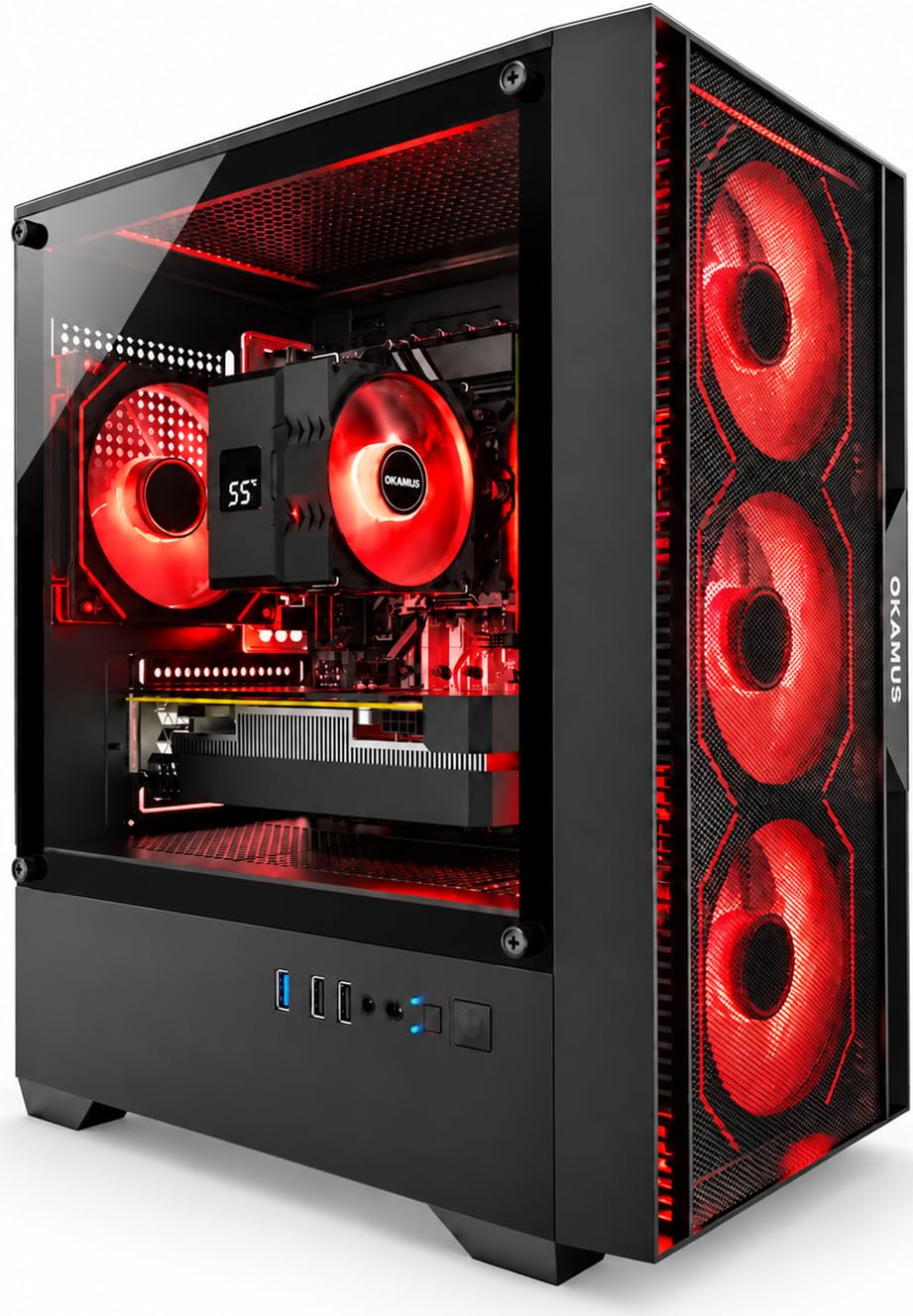
Eight gigabytes of graphics memory on a card that handles a full Fortnite match at higher detail.
This is the tower for the player who wants to push the graphics slider up. The AMD Radeon RX 590 with 8GB of GDDR5 video memory is a serious step beyond the 4GB cards elsewhere in this list, and it drives Fortnite at 1080p with comfort. Behind it sits an Intel Core i7-6700 running up to 4.0GHz, 16GB of memory, a 512GB M.2 SSD (the newer, faster shape of solid state drive) and a 400W power supply to feed the whole thing. Four ARGB fans keep the airflow moving when a match runs long.
The M.2 drive is the quiet quality-of-life upgrade here. System boot and game loading both feel quicker than a traditional drive, and 16GB of memory keeps browser tabs and voice chat alive during a match. Cooling holds up through longer sessions, and the case lighting gets mentioned a lot by owners who care about the look of their desk. If detail and frame consistency matter more to you than price, this is where the extra budget goes.
Read the install note carefully before you buy. The RX 590 graphics card ships separately for transport safety and has to be fitted after delivery following the included manual. That is a fifteen-minute job for most people, but it is not a plug-in-and-play machine. Reliability is the bigger caveat: at 3.0+ stars it is the lowest-rated pick here, and a few owners mention a tower that never powered on.
Pick this when: you want 8GB of graphics memory and a 4.0GHz processor for the best Fortnite detail in the mid-range.
The caveat: the graphics card needs installing yourself on arrival — set aside time and read the manual before you boot.
6. STGAubron Gaming PC Desktop, Ryzen 3 3200G, RX 590 8G

The AMD-based starter that gives you four fans and a clear path to a faster chip later.
The choice of processor here is deliberate: an AMD Ryzen 3 3200G at 3.6GHz, sitting next to a Radeon RX 590 8G GDDR5 card, 16GB of DDR4 memory and a 512GB SSD. That AMD platform is the reason buyers eye this tower for upgrades — the AM4 socket takes a wide range of newer Ryzen chips, so the machine can grow with you rather than stall. Four RGB fans, a bundled RGB keyboard and mouse, and Genuine Windows 11 Home round out a complete plug-and-play package.
Fortnite plays comfortably, and owners describe games running smoothly on medium to high settings with a short setup and good looks from the start. The tower arrives well packed and easy to get running. For a younger gamer stepping up from a console, or a household that wants one machine for schoolwork and gaming, the value is solid and the case is genuinely pleasant to look at.
The catch is the Wi-Fi. The wireless setup lives on a weak USB antenna, and a handful of owners have had connection drops severe enough to swap it for a better one. If you can run an Ethernet cable to the router, this problem disappears entirely. The other note is that this is an entry-level platform — Fortnite is comfortable, but demanding titles with ray tracing will need settings dialled back.
The case for this one
- AMD AM4 socket takes newer Ryzen chips, so the tower has room to grow
- Four RGB fans and a complete keyboard and mouse bundle
- Windows 11 Home preloaded and a fast 512GB SSD
The caveats worth knowing
- Wi-Fi runs through a weak USB antenna — Ethernet is the surer path
- Entry-level AMD chip keeps you to medium-high settings, not ray tracing
Worth it for: a gamer who wants a Ryzen tower with an upgrade path and will plug in a network cable.
Worth passing on: if you depend on built-in Wi-Fi and cannot run a cable to the router.
7. ZER-LON Gaming PC Desktop
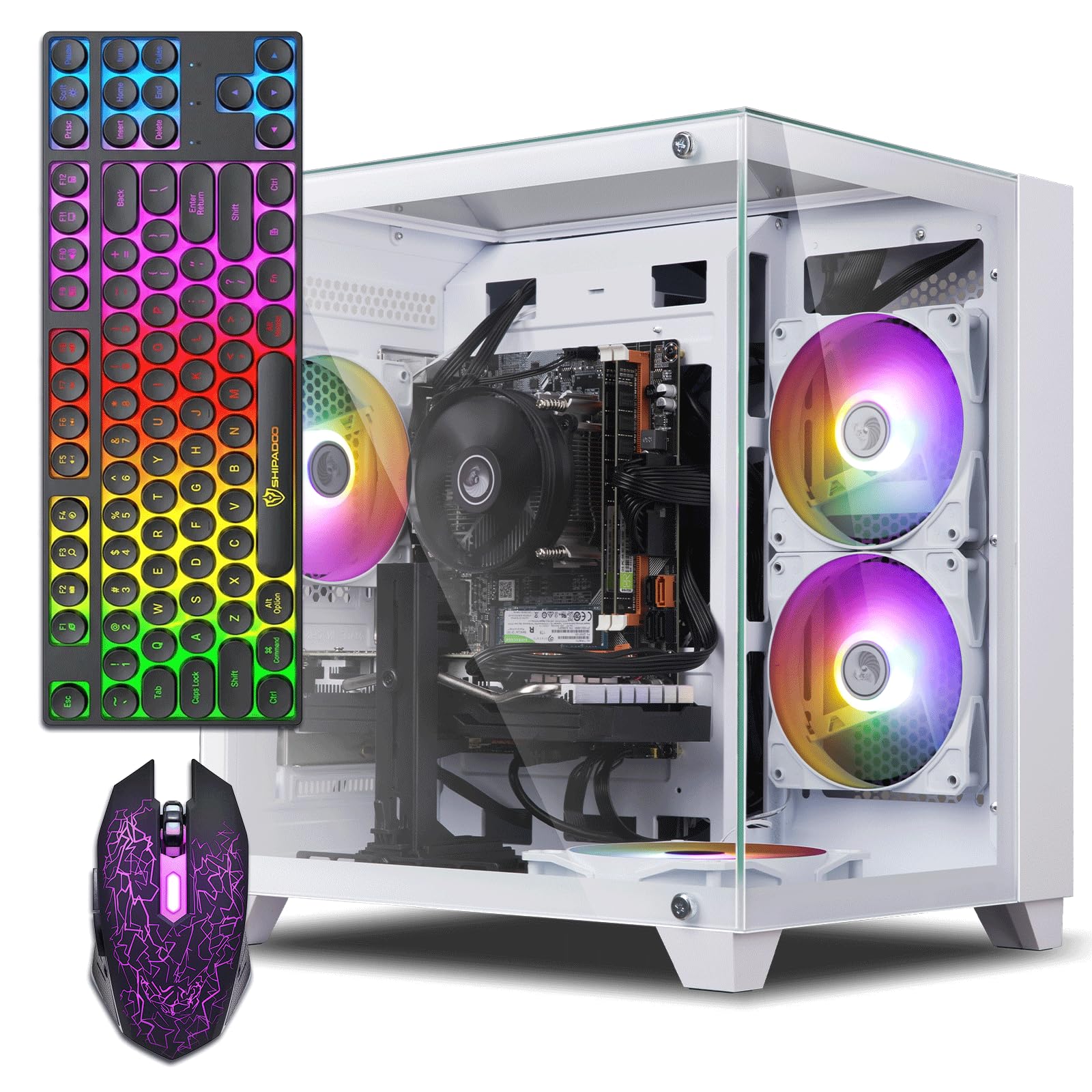
The tower that parents buy for a teen and then quietly keep using themselves.
The graphics card is the part that counts: an NVIDIA GeForce GTX 1050 Ti with 4GB of GDDR5 memory, matched to an Intel Core i7-4770 running up to 3.9GHz. Add 16GB of memory and a 512GB SSD and you have a machine that boots very quickly and runs Fortnite, Roblox, Minecraft and Counter Strike without drama. Owners praise its steady frame rates in Fortnite and Minecraft, with temperatures staying normal through longer sessions.
Support is the surprise here. When a fan or a detail goes wrong, the maker answers through Amazon and gets it sorted, and that is worth a lot on a budget machine. The case is compact with glass on two sides showing the RGB fans inside, and dual monitors work over HDMI, which matters if you build a two-screen setup for school and gaming. A keyboard, mouse, and a graphics card holder are all in the box.
There is a limit on the processor, and it is the one to think about. The i7-4770 is an older chip, so the installed Windows 11 came via a workaround and the motherboard does not take a newer processor. Fortnite plays well today; a demanding future line-up will ask for reduced settings. If you want an easy gift for a teen that runs the games they actually play, this fits.
the balance: a 3.9GHz i7 processor (Intel’s chip family, clocked at 3.9GHz — how many cycles it runs per second) with a GTX 1050 Ti graphics card and 16GB of RAM (memory for running games) makes a smooth Fortnite and Minecraft machine for the kind of games a teenager actually plays.
The honest limit: the i7-4770 is old and the motherboard cannot take a newer chip, so there is no upgrade path for the processor.
Reach for this if: you are buying for a teen who plays Fortnite, Minecraft and Roblox and wants a good-looking tower with dual-monitor support.
Hold off if: you want a processor you can upgrade down the road — the older chip and its motherboard lock that door.
8. STGAubron Gaming PC Desktop, Core i7, RX 580 16G

The top of the range here, with more graphics memory than anything else on this list.
Sixteen gigabytes of GDDR5 video memory is the headline, sitting on an AMD Radeon RX 580 16G card. That is four times the VRAM of the 4GB towers above, and it means textures have room to breathe even on a crowded Fortnite map. An Intel Core i7 up to 3.9GHz, 16GB of memory and a 512GB SSD back it up, running on Genuine Windows 11 Home 64-bit. Three RGB fans, Wi-Fi 6 and Bluetooth 5.0 complete a machine aimed at the upper end of the budget.
Fortnite runs smoothly on this build, and 1080p is its comfortable home. The bundled RGB keyboard and mouse make it a complete setup, and the Wi-Fi 6 radio stays connected well. Teens take to it quickly — the machine runs the games younger players tend to live in, and the casing looks the part on a desk. If frame smoothness on Fortnite is your single goal and you want the most graphics headroom available here, this is the tower for that job.
The caution is honest and worth reading. This pick draws the most negative reliability notes of the group — a handful of customers note a tower that stopped working within months, and some hit USB or display connection trouble. The support experience has been uneven when things go wrong. At 3.5+ stars, buy it early enough to test it thoroughly inside the return window.
Where it leads the pack
- 16GB of graphics memory on the RX 580 is the largest on this list
- 3.9GHz i7 with 16GB of RAM and a 512GB SSD
- Wi-Fi 6 and Bluetooth 5.0 built in
The reason to be careful
- Reliability reports are the weakest of the group — buy with the return window in mind
- It sits at the very top of the budget, so it is the heaviest spend here
Best for: a Fortnite player who wants maximum graphics memory and will buy early enough to test it inside the return window.
skip it if: proven reliability matters more to you than 16GB of VRAM — a lower-spec, higher-rated tower is the safer call.
Know the Specs
Dedicated VS Integrated Graphics
A dedicated card is a separate chip with its own video memory (VRAM), so Fortnite draws its world without borrowing system RAM. Look for a named card like an RX 550, GTX 1050 Ti or RX 590 and a VRAM figure in gigabytes. Integrated graphics shares system memory and will struggle with a busy Fortnite match.
Processor Speed and Age
The GHz figure tells you how fast a single core runs, but the age of the chip matters just as much. An older 3.9GHz chip can play Fortnite well yet still be too dated to officially support Windows 11. Check the exact processor model and confirm support before you buy.
RAM and SSD
16GB of RAM lets Fortnite hold its textures while you keep a browser and voice chat open. A solid state drive (SSD) stores data with no moving parts, so the game and Windows both load far faster than on an old hard disk. 512GB is a comfortable starting size for a handful of games.
Renewed and Warranty
Renewed means a previously owned machine that was inspected, cleaned and repackaged. A 90-day minimum is common on refurbished towers, and some sellers add a year of parts and labor. Treat the return window as part of the value — it is your safety net if a unit arrives dead.
Common Questions
Can a budget prebuilt really run Fortnite at a playable frame rate?
Will these PCs run the newest Fortnite chapters and updates?
Does a refurbished tower still get Windows 11 updates?
Is 16GB of RAM enough for Fortnite and a browser open?
Do I need to install anything on arrival?
Will these towers work with my existing monitor and peripherals?
Can I upgrade the graphics card later?
Which pick is best for a younger Fortnite player?
Is Wi-Fi reliable on these budget towers?
What should I do if the tower arrives dead on arrival?
The Bottom Line
For most players, the gaming pc for fortnite under $500 winner is the Prebuilt Gaming PC Desktop from abytespark. It ships new with a genuine Windows 11 license, an RX 550 4G card (a budget graphics card with 4GB of video memory) and a full peripheral bundle in one order, so you unbox and play. Want a roomier processor and a quiet tower at a lower entry? Grab the HP RGB Gaming Desktop. And if you want a full desk with the screen included, the Dell Gaming OptiPlex bundle is the one to reach for.
How we choose
We do not accept paid placement. Every pick is matched to a real buyer and a real use-case; we do not hands-on test units.
Sources
Specifications: manufacturer listings and product documentation. Review insights: verified customer reviews, as of October 2026. Pricing: not shown on this page (it changes often); check the current price via the retailer link.
As an Amazon Associate, Aappliancez earns from qualifying purchases. This does not affect which products we feature.