Disclosure: Some links in this post are affiliate links. As an Amazon Associate I earn from qualifying purchases, at no extra cost to you. Learn more
Specs are compiled from manufacturer listings and verified buyer reviews and can change over time — please confirm the key details on the product page before buying.
Your iPad’s charging port can sit a fraction too deep for some gamepads, and a clamp can refuse to open wide enough for your tablet. So before you read a single spec, decide two things: which iPad you own, and if you want a clamp that grips the tablet or a standalone pad that sits in your hands. The picks below cover both, and each one is flagged with the screen size it actually swallows.
This guide is built by comparing the manufacturers’ published specifications and the patterns across verified customer reviews, so you get each pick’s real strengths and trade-offs instead of marketing spin.
Some controllers clamp onto the tablet like a shell, others pair over Bluetooth and leave the screen free, and the wrong pick for your iPad wastes both money and desk space. Here is how to land on the right gaming controller for ipad the first time around.
Top Picks

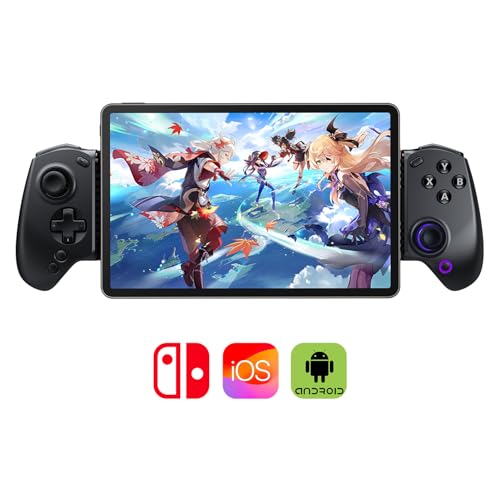
How To Choose The Best Gaming Controller for iPad
The first thing that decides your purchase is the size of the tablet you are clamping the thing onto. A clamp-style controller has a maximum opening — measured in millimetres — and a tablet a few millimetres wider than that number simply will not seat. Buy the clamp first, the features second.
Measure your iPad before you measure anything else
A clamp controller grips your tablet by pressing two halves against its edges, and the bridge between them only extends so far. The abxylute S8 tops out at tablets up to 216mm (about 8.5 inches), the Razer Kishi V3 Pro handles iPad mini and Android tablets up to 8 inches, and the Kishi V3 Pro XL is the one built for iPads up to 13 inches. If your iPad is an iPad Pro 13-inch, only a clamp rated for that width will hold it. Check the number, not the photo.
Know whether your iPad has USB-C or a Lightning port
Every clamp controller in this list plugs into the tablet’s charging port rather than pairing over Bluetooth, which is why they feel instant when you dock. That also means the plug has to match your iPad’s port, and the plug has to clear your case. Some grips are shaped to accept a slim case; others expect a bare tablet. If your iPad lives in a chunky folio, plan to take it out.
Hall Effect sticks versus standard sticks
Hall Effect joysticks use magnets to sense movement instead of physical contact, so the sensor does not wear a track into itself over time. In plain terms, the stick is far less likely to develop drift — the annoying creep where your character walks on its own. Standard analog sticks can develop exactly that creep after heavy use. The trade-off is that Hall Effect sticks are a spec on a page; they still have to feel comfortable under your thumbs in a long session.
Battery or no battery
A clamp controller that draws power from your iPad has nothing to charge and nothing to remember. A Bluetooth controller has its own rechargeable cell and a play-hour rating to plan around — the 8Bitdo SN30 Pro lists 18 play hours from a 480mAh battery, and the XBOX Wireless Controller runs up to 40 hours on standard AA batteries. Neither approach is wrong. It depends on whether you would rather plug into the tablet or carry a separate pad.
Extra buttons you will actually press
Back paddles and claw-grip bumpers let you trigger a jump or reload without moving your thumb off the right stick. They matter most in shooters where your aim is live and your thumb is committed. If you mostly play slower or story-driven games, the extra buttons stay under your fingers doing nothing, and you can weigh whether they justify a higher-tier purchase.
Side-by-Side Comparison
| Model | Best For | Connection | Tablet Fit | Stick Type | Amazon |
|---|---|---|---|---|---|
| 8Bitdo SN30 Pro★ Best Overall | Retro looks, iPad and Mac pairing | Bluetooth / USB-C | Standalone pad, no clamp | Hall Effect joysticks | Amazon |
| abxylute S8Most Versatile | Vertical and horizontal iPad play | Bluetooth | Tablets up to 216mm | Hall Effect joysticks and triggers | Amazon |
| XBOX Wireless Controller + USB-C Cable | Streaming and PC remote play | Bluetooth / USB-C | Standalone pad, no clamp | Analog sticks | Amazon |
| abxylute S9 | Full-size grips around a tablet or phone | Bluetooth / USB-C | Extends to 216mm | Hall Effect joysticks and triggers | Amazon |
| Razer Kishi Ultra | Phone and iPad mini AAA gaming | USB-C | Devices up to 8 inches | TPSiV analog sticks, Hall Effect triggers | Amazon |
| Razer Kishi V3 Pro | iPad mini with extra back buttons | USB-C | iPad mini and tablets up to 8 inches | Full-size TMR thumbsticks | Amazon |
| Razer Kishi V3 Pro XL | Full-size iPad Pro and Air gaming | USB-C | iPads and tablets up to 13 inches | Full-size TMR thumbsticks | Amazon |
Detailed Reviews
1. 8Bitdo SN30 Pro Gamepad
Our pick — 4.5+★ from 400+ verified ratings; the strongest balance of quality and price.
The no-clamp route: a pocketable retro pad that pairs to your iPad and costs the least of every pick here.
The case for this one starts with the sticks. It runs Hall Effect joysticks — magnetic sensors that resist the slow drift that ruins aim over months of use — and it does that while staying small enough to drop in a bag. It measures 144 x 63.5 x 32.5mm and weighs 0.25 kg, so it slides into a pocket or a slim case and goes where the iPad goes. Because it is a standalone pad rather than a clamp, it never fights your tablet’s width: you prop the iPad on a stand or a case, pair over Bluetooth, and play.
What wins people over is the raw controller quality. Fifty-plus owners single it out by name, and it leads every other aspect in the review pages. The d-pad has a proper, snappy click — the kind of directional pad retro and fighting-game players care about more than anything else. It also carries 16 buttons, a full set including clickable joysticks, rumble vibration, motion controls with a 6-axis gyro, a home button, a screenshot button and a USB-C connector. Battery is rated at 18 play hours from a 480mAh rechargeable cell, with a 1-2 hour charge time.
The honest limit is hand size. Buyers with larger hands say the small shell leaves their fingers cramped, and the triggers are clicky non-analog buttons — maximum input on one push — rather than pressure-sensitive triggers. So it suits players who want a tight, tidy retro pad and not players who want full-size grips. And when you compare it to the XBOX Wireless Controller, it runs shorter on battery: 18 hours versus up to 40. It also holds a 4.5+ star average, the highest of any pick here.
What earns the top spot
- Hall Effect joysticks that resist drift while keeping the pad pocket-sized
- 18 play hours from a 480mAh battery, with a 1-2 hour charge time
- A proper, genuinely clicky d-pad with 16 buttons in total
- Pairs with iPad, iPhone, macOS and Apple TV alongside Switch and PC
Where it asks you to compromise
- Small shell — players with large hands feel the squeeze
- Clicky non-analog triggers, not pressure-sensitive ones
- No clamp, so your iPad needs a stand or case of its own
Reach for this if: you want a controller you can carry in a jacket pocket and pair to the tablet you already own.
Look past it if: your hands run large or you want analog triggers for racing games.
2. abxylute S8 Bluetooth Mobile Gaming Controller
Two controllers in one shell: clip it to the tablet for handheld play, or prop it free and pair it like a normal pad.
This is the pick for a small iPad you want to hold like a console. It clamps tablets up to 216mm across, and its side charging port plus cable let you run a mini iPad vertically or horizontally while it tops up. In standalone mode it works the same way a dedicated pad does. It carries Hall Effect joysticks and triggers — magnetic-sensor sticks and pressure triggers that resist wear — plus customizable back buttons for quick combos and a one-tap screenshot button. It holds a 4.0+ star average across 200+ ratings.
The ergonomics are the reason it lands this high. The handles are thicker than you would expect from a travel controller, with an anti-slip texture, and the grip design lets a long session go by without the hand ache that slim clamps cause. It is also light and compact with a foldable form, so it disappears into a bag. One-tap config on the pad itself covers vibration, stick/d-pad swap, gyro mapping and macros without opening an app, and the abxy app handles touch mapping for games that do not natively support a controller.
Now the piece every iPad buyer needs to know: this controller is sized for small tablets and phones, not big slabs. As one buyer put it, “Bought it for my ipad as it specifically says for ipads in the description. Turns out my ipad didnt fit so now its useless for me.” That is a fit mismatch, not a fault — the clamp simply tops out at 216mm. If your iPad is an iPad Pro or a large Air, step up to the Razer Kishi V3 Pro XL. And the power button is a touch finicky to turn off, so most people just kill Bluetooth on the tablet instead.
The multi-mode advantage: clip-and-play for handheld iPad sessions, then unclip and use it free-standing for emulators or remote play — the same pad does both.
What it asks in return: it is built for phones and tablets up to 216mm, so a full-size iPad is outside its range no matter what the listing title implies.
Best match: an iPad mini or a large phone owner who wants one controller for clamp mode and free mode alike.
Not the one for: a full-size iPad — you need the XL clamp for that.
3. XBOX Wireless Gaming Controller + USB-C Cable | Carbon Black
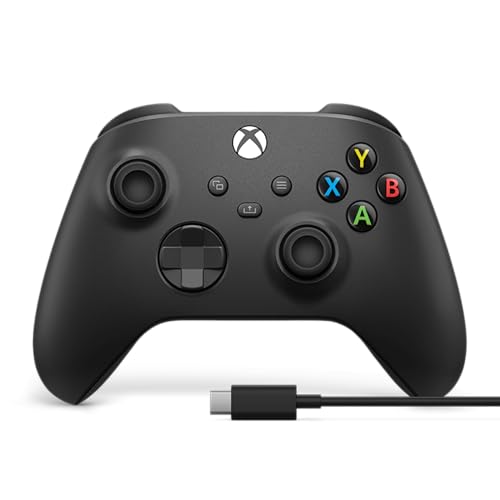
The streaming companion: an instantly familiar pad that pairs to iPad over Bluetooth or plugs into the PC for cloud gaming.
If your iPad gaming is mostly Xbox Cloud Gaming or remote play, start here. This is the Xbox layout you already know how to hold — sculpted surfaces, a hybrid d-pad (a directional pad that works as both a cross and a disc), and textured grip on the triggers, bumpers and back case — and it pairs over Bluetooth with an iPad or plugs into a Windows PC with the included 9-foot USB-C cable. Nothing extra is needed on a PC: no adapters, no pairing, no separate purchase. It also carries a 3.5mm audio jack for headset voice chat and a Share button for grabbing a clip mid-session.
Run time is the standout. Up to 40 hours of wireless play from standard AA batteries, versus the 18 hours of the 8Bitdo SN30 Pro above — more than double. When the cells run low you plug the cable straight in and keep playing. The quality of the build is what people notice first; the count of buyers calling out quality leads every other aspect in its review pages, and a 4.0+ star average backs it up. It is also listed among the controllers known to pair well with an iPad, and it works across console, PC, mobile, handheld and supported smart TVs.
Two things to price in. First, it does not ship with rechargeable batteries — it runs on AAs, so the 40-hour figure assumes fresh cells and you plan to supply them or use the cable. Second, some owners hit Bluetooth dropouts on a PC, so if you sit down to a desk setup, the cable is the safer route. Those are the trade-offs of an otherwise rock-solid pad; for tablet streaming over Bluetooth, it does the job with no fuss and no battery anxiety to manage.
Why it earns its place: up to 40 hours on AA power and a 9-foot cable in the box mean you can play wirelessly or wired without buying another thing.
The catch to know about: it relies on AA batteries rather than a built-in rechargeable cell, so plan for that or keep the cable close.
The right call for: cloud gaming and remote play on an iPad or a PC where the Xbox button layout already feels like home.
Weigh the alternative when: you want a rechargeable cell built in rather than AA batteries to buy.
4. abxylute S9 Full-Size Gaming Phone Controller

Grips the width of a real console pad, and it can top up the tablet while you play.
Most telescopic controllers shrink the grips to save space. This one does the opposite — it uses a full-size gamepad shape, so the tablet sits between two genuine handles rather than two thin slivers. It extends to 216mm and fits tablets up to 8.8 inches, which covers the iPad mini 6 and 7, and it can run in USB-C mode with the phone or tablet’s own power passing through. It carries Hall Effect joysticks and triggers, dual rotor vibration motors, a 6-axis gyroscope and programmable back buttons, plus three different d-pads and two interchangeable joystick heights in the box.
Weight is the number that makes this liveable. At 250g it still sits comfortably in the hand even with a phone case on, and the textured rear grips keep it there through hours of play. The face buttons click harder than an Xbox Elite pad according to deeper looks at the internals, and the Hall Effect sticks keep aim steady without the drift that plagues worn analog sticks. It is also the easiest of these clamps to hold for a genuinely long session, which is the whole point of a full-size body.
The trade-off is that it has no battery — it draws power from your iPad rather than carrying its own, which is why the passthrough charging matters. A long session will nibble at your tablet’s charge. The triggers also travel a little more than some players like, and the iOS version of the companion app skips virtual touch mapping because of Apple’s rules, so games that only respond to touch need a different workaround. If you want a controller that never needs plugging in and never presses against the volume buttons, note the S9 ships silicone spacers for exactly that.
The reasons it works
- Full-size grips that turn an iPad mini into a handheld console shape
- Hall Effect joysticks and triggers keep drift away over time
- Three d-pads and two joystick heights swapped in the box
- 5V 1A passthrough charging keeps play going while the tablet tops up
What to plan around
- No built-in cell — it runs off the tablet’s power
- Triggers travel slightly more than some players prefer
- A 216mm limit, so big iPads stay out of reach
For the tablet-as-console player: an iPad mini 6 or 7 owner who wants full-size grips and does not mind drawing power from the tablet.
One to weigh: if you would rather not see your iPad charge drop mid-session, a controller with its own cell may suit better.
5. Razer Kishi Ultra Controller

The premium grip that turns an iPad mini into a handheld console, with rumble that has real depth.
This is the pick for an iPad mini owner who wants the whole thing to feel like a proper handheld. It grips devices up to 8 inches and fits an iPad Mini 6 or the A17 Pro model, and it brings console-pad ergonomics to a slab you can hold in two hands. The build quality is what lands first: it is the most-praised aspect by a wide margin, and the tactile feel comes second, with buyers describing it as a device that does not feel like a phone accessory.
Where it goes past the basics is feedback. Razer Sensa HD haptics (a vibration system that fires stronger and more detailed than standard console rumble) and Chroma RGB lighting make the pad part of the setup. That haptics layer needs Android 12 or Windows 11 and is not currently supported on iOS, so on an iPad you feel the standard vibration rather than the full effect — worth knowing before you buy for the rumble. On the plus side, passthrough charging keeps the tablet topped up as you play, and a 3.5mm jack is there for headset audio. The Mecha-tactile 8-way d-pad and action buttons are clicky and precise, and the programmable buttons can be mapped to whatever the game needs.
The friction is fit and price. Owners with larger hands love the wide default position, but some report cases that do not seat properly — it is tightest with a slim case on, and a chunky one often has to come off. The USB-C plug is fixed (there is no Bluetooth), so it is purely a clamp for compatible tablets and phones, not a free pad. Over many months, some have reported the USB-C connection going intermittent or the sticks showing drift — treat that as a known long-term risk rather than a certainty, since most owners are still playing happily on a 4.0+ star average.
What makes it feel premium: Mecha-tactile 8-way d-pad, action buttons, Hall Effect triggers and TPSiV analog sticks packed into a full-size grip for a tablet up to 8 inches.
The two frictions: no Bluetooth at all, and the Sensa HD haptics that headline the product do not run on iOS.
Pick it for: an iPad mini and a taste for AAA games where grip comfort and clicky controls lead the list.
Skip it when: you want a wireless pad, or you rarely use the clamp and mostly game on the bigger iPads.
6. Razer Kishi V3 Pro Controller

Four extra buttons and anti-drift sticks in a clamp sized for the iPad mini.
The defining piece here is the thumbsticks. They use full-size TMR sensors (a magnetic-sensing design Razer rates for precision and anti-drift performance over Hall Effect) and come with two swappable caps so you can trade speed for fine aim. Around them sits a full-size controller shape with larger ergonomic handles than a standard mobile clamp, a telescopic bridge that fits an iPad mini and Android tablets up to 8 inches, and iPhone 15, 16 and 17 series models in a compatible case. It plugs in over USB-C, so there is no battery to charge and no pairing to fumble.
The extra controls are the reason to pay the premium over the S9. You get two mouse-click back buttons in the handles plus two claw-grip bumpers above them, for four additional inputs in total — double what many rivals offer. The d-pad is widely called the best in its class by players who have run the competition, and the Nexus app is free with no subscription on iOS, with a dedicated button to launch it. Passthrough charging powers the tablet while you play, and a 3.5mm jack handles headset audio. It is built for medium-to-large hands and long sessions comfort-wise.
The honest limits are twofold. Razer Sensa HD haptics need Android 12 or Windows 11, so on an iPad you get standard vibration, not the headline effect. And fit is a mixed story — excellent on iPads and phones with a reasonable case, poor on folding phones where the bridge bends the connector. A 4.0+ star average reflects a strong product with a few units arriving with a dead button. Buy it as a dedicated iPad mini and phone clamp, not a universal grip.
Where it beats the S9: four extra buttons against two, plus TMR sticks with swappable caps and instant USB-C play with no battery to remember.
The fair warning: Sensa HD haptics do not run on iOS, and folding phones are a poor fit.
Built for: an iPad mini owner who plays shooters and wants back paddles and a mouse-click feel.
Think twice if: the haptics are the main draw — iOS will not give you them.
7. Razer Kishi V3 Pro XL Controller
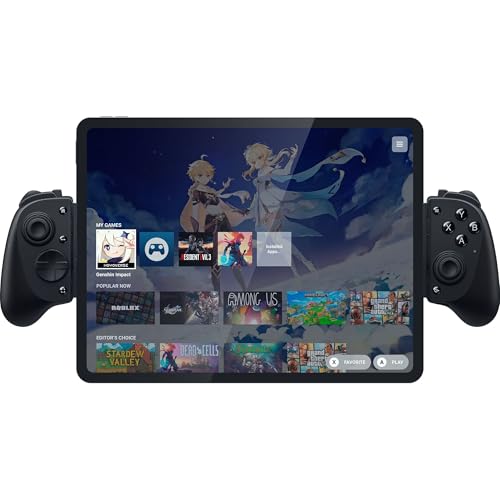
The only clamp on this list that swallows a 13-inch iPad Pro — no Bluetooth, no battery, no stand needed.
If your tablet is an iPad Pro 13-inch, an iPad Air 13-inch or an iPad 10.9-inch with USB-C, this is the clamp built for it. Its telescopic bridge extends to fit iPads and Android tablets up to 13 inches, with a USB-C island design meant to clear many popular cases and adaptors for different devices. Like the V3 Pro it plugs straight in over USB-C — instant play, no pairing, no battery to charge — and the passthrough charging keeps the tablet fed during a session, with a 3.5mm jack for headset audio. It uses the same full-size TMR thumbsticks with two swappable caps, plus the two mouse-click back buttons and two claw-grip bumpers.
The payoff is the screen. Sliding a 12.9-inch iPad Pro into this bridge turns it into a genuine handheld with a huge view — big enough that some players reach for it over a phone even when the phone is handy. Streaming through Moonlight, PS Remote Play, Steam Link or GeForce Now works cleanly, and the buttons feel solid and responsive while the pad stays light enough to hold comfortably. For anyone who already owns a large iPad and wants console-style play without buying a whole handheld, this is the route.
The caveats sit on durability and cost. Reports of a single button failing after a week exist, and Razer’s warranty process adds hassle, so treat it as a device to keep an eye on rather than indestructible. It is also on the heavy side once a 13-inch tablet is in it, so long sessions without a rest will tire your arms. And it is a clamp only — no Bluetooth, a fixed USB-C plug, and no way to detach and use it free-standing. It holds a 4.0+ star average; most owners are in it for exactly the large-screen setup it delivers.
The big-iPad solution
- Fits iPads and Android tablets up to 13 inches — the widest clamp here
- USB-C plug-and-play with passthrough charging while you play
- Full-size TMR sticks with two swappable caps
- Two back buttons and two claw-grip bumpers for extra inputs
The costs of going big
- Heavy once a 13-inch tablet is seated — long sessions need a break
- No Bluetooth and a fixed plug, so it is clamp-only
- Durability reports on individual buttons make a careful owner worthwhile
The one to grab: if you game on a 12.9 or 13-inch iPad and want it held like a console.
Pass it over when: you own an iPad mini — the Kishi V3 Pro fits that far better.
Know the Specs
Clamp width and tablet fit
Clamp controllers advertise a maximum opening in millimetres or inches, and that number is a hard ceiling, not a suggestion. A bridge rated to 216mm will grip a small tablet and nothing wider. One rated to 13 inches will hold a full-size iPad Pro but feels oversized around an iPad mini. Always match the number to the tablet you actually own, then check case clearance separately — the plug depth matters as much as the width.
Hall Effect and TMR sticks
Hall Effect sticks sense movement with magnets instead of a rubbing sensor, so the mechanism does not wear a groove into itself. TMR sticks are a related magnetic design that Razer rates for precision and anti-drift performance. In everyday terms, both are built to keep your aim steady over months of play, where standard analog sticks can slowly develop drift. Neither design guarantees a perfect unit, so treat durability reports as part of the picture.
USB-C clamps versus Bluetooth pads
A USB-C clamp takes its power from the tablet, which means no charging routine and no pairing screens — you dock it and play. A Bluetooth pad carries its own battery and can be used free-standing, so it works with a tablet propped on a stand. Bluetooth adds a tiny amount of latency and needs a charge plan. USB-C binds you to a compatible port. Both are valid; your setup decides which you want.
Passthrough charging
Passthrough charging lets the tablet draw power through the controller while you play, so a long session does not drain the battery to zero. The rating to watch is the charging support — the abxylute S8, S9 and both Kishi Pro models all offer some form of passthrough. It is the difference between a two-hour limit and an open-ended one if you keep a charger nearby.
Common Questions
Will the Razer Kishi V3 Pro XL fit my iPad Pro 13-inch?
Do I need Bluetooth to use a controller with an iPad?
What is Hall Effect and why does it matter for an iPad controller?
Does the Razer Kishi haptics work on an iPad?
Can a clamp controller work with a tablet case on?
What battery life does the XBOX Wireless Controller give on an iPad?
Do USB-C clamp controllers need their own battery?
Which controller works for Xbox Cloud Gaming on an iPad?
Is a full-size controller better than a clamp for long iPad sessions?
Will the 8bitdo SN30 Pro pair with my iPad and Apple TV?
The Bottom Line
If you want one controller that does the most for an iPad without overthinking it, the 8Bitdo SN30 Pro is the winner — Hall Effect sticks (magnetic sensors designed to resist drift) in a 144g pad that pairs to iPad and Apple TV alike, and the strongest score of any pick here. For an iPad mini that you want to hold like a console, grab the Razer Kishi V3 Pro, whose four extra buttons and TMR thumbsticks lead the mini-sized clamps. And if your tablet is an iPad Pro or Air 13-inch, there is only one real answer: the Razer Kishi V3 Pro XL, because it is the clamp that actually reaches 13 inches. Whichever you pick, measure your tablet and check the case clearance before you order — that fit decision matters more than any spec on the box.
How we choose
We do not accept paid placement. Every pick is matched to a real buyer and a real use-case; we do not hands-on test units.
Sources
Specifications: manufacturer listings and product documentation. Review insights: verified customer reviews, as of October 2026. Pricing: not shown on this page (it changes often); check the current price via the retailer link.
As an Amazon Associate, Aappliancez earns from qualifying purchases. This does not affect which products we feature.