Disclosure: Some links in this post are affiliate links. As an Amazon Associate I earn from qualifying purchases, at no extra cost to you. Learn more
Specs are compiled from manufacturer listings and verified buyer reviews and can change over time — please confirm the key details on the product page before buying.
If you want the shortest possible answer: the Nintendo Switch with Neon Blue and Neon Red Joy-Con is the safest family buy on this list, because it plays in the living room, on the sofa, and in the car, and it has the deepest library of kid-friendly games in the world. But there is a real fork in the road here. Some families want a box that keeps everyone sitting together on the couch, and others want a box that gets the kids up and jumping in the living room. This guide sorts out both, plus the newer hardware that runs faster, looks sharper, and handles online play better.
This guide is built by comparing the manufacturers’ published specifications and the patterns across verified customer reviews, so you get each pick’s real strengths and trade-offs instead of marketing spin.
A console that suits a family of five with a projector and a big wall may not suit an apartment with one small television. Below you’ll find the practical differences between a handheld-and-dock hybrid, a body-tracking motion system, and a retro cabinet, plus what each one really costs you in setup, storage, and long-term upkeep. This breakdown of the family game console market keeps the focus on which machine fits your actual living room and your actual kids, not which one has the loudest box art.
Top Picks

How To Choose The Best Family Game Console
The first question is not which console is the most powerful. It is how your family actually plays. A household where two kids share one television and want to battle each other on the same screen needs something completely different from a household where the parents want a quiet solo game after bedtime.
Play modes decide who gets to use it
A console with three play modes — TV, tabletop, and handheld — can be docked to your television, propped on a table for two players, or picked up and played anywhere. That flexibility matters in a family, because the TV is the most contested screen in the house. A handheld mode means one child can keep playing while the adults watch something else. A console that only plugs into a TV is limited to whoever holds the remote.
Motion play versus controller play
Controller-free systems read your body with a camera, so anyone can walk up and start playing with no instruction. That is a real advantage for younger children and mixed-age groups. The catch is that they demand physical space — the camera needs to see your whole body, which usually means moving the coffee table. Controller-based systems need a little teaching, but they work in a tighter room and let a player sit down.
Storage and how you buy games
Internal storage sets how many games you can keep installed at once. A digital-only console with a large drive holds more games, but there is no disc to trade or borrow. A console that accepts game cards or discs can be shared between siblings. Think about whether your family wants to own physical games or download everything.
Side-by-Side Comparison
| Model | Best For | Play Style | Storage | Players | Amazon |
|---|---|---|---|---|---|
| Nintendo Switch with Neon Blue and Neon Red Joy-Con★ Best Overall | All-round family console | TV, tabletop, handheld | 32 GB | Local & online multiplayer | Amazon |
| KINHANK MotionX AI Family Motion Play SystemActive Play Pick | Indoor active play | Controller-free motion | — | 1–4 players | Amazon |
| Nex Playground Active Play SystemBest for Moving | Getting kids moving | Controller-free motion | — | Up to 4 players | Amazon |
| Arcade Classics Pac Man Jr Series | Retro game room | Standing cabinet, joystick | — | Single or alternating | Amazon |
| Nex Playground Complete Family Gaming Bundle | Families who travel | Controller-free motion | — | Up to 4 players | Amazon |
| Nintendo Switch 2 System | Best picture and speed | TV, tabletop, handheld | 256 GB | Local & online multiplayer | Amazon |
| Xbox Series S | 1TB SSD | Digital game library | TV only | 1 TB SSD | Local & online multiplayer | Amazon |
| Meta Quest 3 512GB | VR and mixed reality | Wireless headset | 512 GB | Multiplayer with headset per player | Amazon |
| Xbox Series S Starter Bundle | Instant game library | TV only | 512 GB SSD | Local & online multiplayer | Amazon |
Detailed Reviews
1. Nintendo Switch with Neon Blue and Neon Red Joy-Con
Our pick — 4.5+★ from 10,500+ verified ratings; the strongest balance of quality and price.
The 6.2-inch hybrid that turns one television into three different game rooms.
If your family shares one television and everyone wants a turn, this is the console to start with. It runs in three play modes — docked to the TV, propped up on its own kickstand for tabletop play, or held in your hands — so a game night does not end just because someone else wants the remote. The 6.2” LCD screen (measured diagonally across the display) is small enough to disappear into a backpack and bright enough to read clearly on a car ride.
The two Joy-Con controllers slide off the sides and become two separate pads, which is the single biggest reason this console works so well with siblings. Two kids can play a local co-op game on the sofa without you buying a second controller, then hand one Joy-Con to a friend for local wireless play. Nintendo is also the home of Mario and friends, so the game library skews heavily toward characters your kids already know. Games install to 32 GB of built-in storage, and you can expand that with a microSDXC card (the newer, faster memory card format used in this console) when the drive fills up.
What wins families over is the gameplay itself, and the value holds up because the games get played for years rather than weeks. On the honest side, battery life and connectivity are the two areas where feedback splits; some find the charge lasts a good while and it links to a TV without drama, and others bump into charging quirks. Durability also comes up as the weakest point, so a case and a screen protector are worth adding on day one.
Why it earns the top spot
- Play modes: TV, tabletop, and handheld in one machine
- Two Joy-Con controllers included, so two players start immediately
- Local co-op, online, and local wireless multiplayer all supported
- microSDXC expansion when 32 GB of storage runs out
The fair caveats
- Battery life and TV connection are the two most-mixed areas in owner feedback
- Durability draws the most criticism of any trait
- Marked as the older generation next to the Switch 2
Buy this if: you want one console the whole family can share without buying extra pads, and you value a huge kid-friendly game library over raw power.
Look past it if: you already own a Switch and want the newer screen and speed, or you need a machine that survives being carted around without a case.
2. KINHANK MotionX AI Family Motion Play System
At 10.88 ounces, the smallest way to turn a rainy afternoon into a workout.
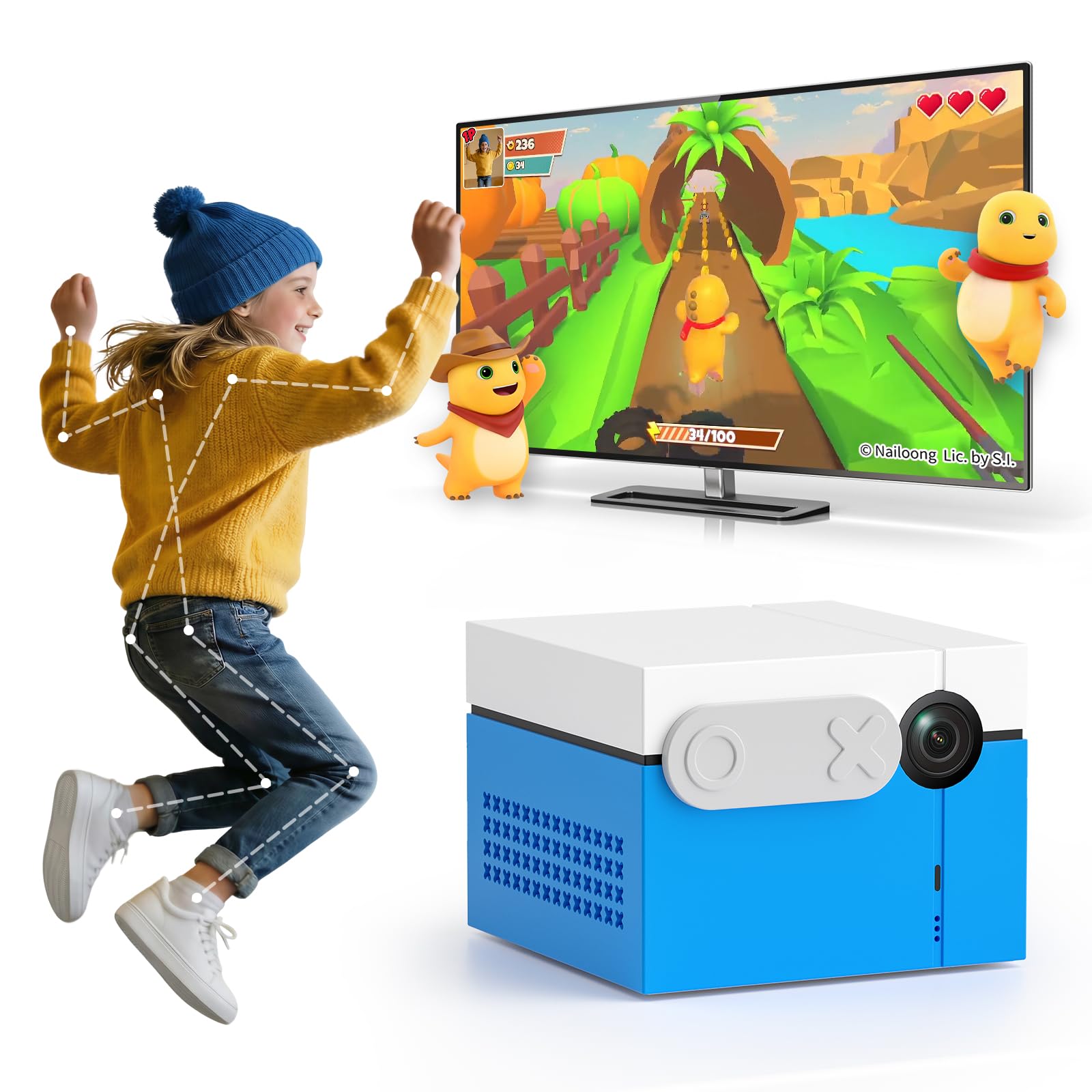
Here is the number that defines this machine: 10.88 ounces (about the weight of a thick paperback) for the whole console unit. That is a 26% lighter package than the Nex Playground at 13.76 ounces, and it means there is no lugging a box around — it sits on a TV stand or slips into a bag. The footprint is 3.15 x 3.15 x 2.36 inches, roughly five per cent larger than the Nex cube at 3 x 3 x 3 inches, which in practice is the difference between a spot on the mantle and a spot on the shelf.
The 50+ game catalog covers adventure, casual, rhythm, sports, puzzle, and fitness titles, so a family game night can turn into a workout without anyone announcing it. Nothing is held in your hands. A built-in AI wide-angle camera tracks full-body movement (it watches how your arms and legs move and turns that into on-screen input), so players wave, jump, and gesture to control what happens. The manufacturer lists support for 1–4 players, which is the whole family on the rug at once.
Setup is short: connect over HDMI (the standard cable that carries video and audio to a television), finish the on-screen steps, and you are playing inside a few minutes. The camera cover is a physical slider that closes over the lens when the machine is off, and motion tracking runs on the device itself rather than being uploaded. One limit to plan around — the manufacturer lists the recommended age as three years and up, and the listing notes that more premium content will arrive as separate paid releases, so the free library is your starting point rather than the finish line.
Where it fits the room: the camera needs a clear sightline, so a living room with the furniture pushed back is ideal, and the compact 3.15-inch-wide body leaves the coffee table free.
What to weigh honestly: this is a newer, quieter model with a small review base, so you are early on the curve — the hardware shows up in a lighter, more portable shell but the game catalog may thin out once you exhaust the included titles.
Reach for this if: the house has one hallway of open floor and kids who need to burn off the last hour of energy before dinner.
Look elsewhere if: you want a deep single-player campaign, or your television sits in a corner where nobody can step back far enough to be seen by the camera.
3. Nex Playground – The Active Play System
A small cube that turns the living room into an arcade for four people at once.
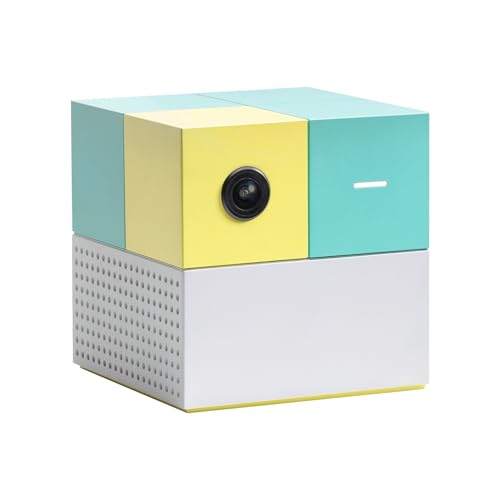
This is the one that quietly changed how a lot of families spend a rainy Saturday. It comes with five starter games — Fruit Ninja, Starri, Whac-a-Mole, Go Keeper, and Party Fowl — and the built-in wide-angle camera tracks natural body movement, so up to four people can play together with nothing in their hands. No controllers, no trackers, no teaching a four-year-old which button to press.
Sizing is note because it decides where it lives. The cube measures 3 x 3 x 3 inches, slightly smaller than the KINHANK unit at 3.15 x 3.15 x 2.36 inches, which means it sits neatly on a console or a mantle. At 13.76 ounces it is heavier than the KINHANK at 10.88 ounces, a 26% gap, though in a device that stays put that weight difference rarely matters. Content is designed for ages five and up, with no ads, no in-app purchases, and no mature content, and the motion tracking data is not stored in the cloud. It carries kidSAFE+ COPPA certification.
The thing that keeps people using it is that everyone in the family can actually play. It gets grandparents on their feet and toddlers into a game alongside their older siblings. The recurring gripe is the game rotation — on a couple of the kids’ titles the same round plays over and over with no way to repeat a specific game, which is a small annoyance when a three-year-old demands Peppa Pig again. Note the structure too: the full library of characters like Barbie, Teenage Mutant Ninja Turtles, Peppa Pig, and Elmo sits behind a Play Pass, so budget for that separately if you want the deep catalog.
The setup reality: it pairs over a single HDMI cable and the camera needs a clear view of the floor, so plan to move the coffee table back a couple of feet before the first session.
The honest trade-off: the starter five are yours forever, but every game after that depends on the subscription — treat the machine and the membership as one purchase decision.
Best for: mixed-age families where a teenager and a five-year-old need to play the same game without a handicap.
Think twice if: you want to own a permanent library outright — the best characters are tied to a subscription rather than included.
4. Arcade Classics Pac Man Jr Series Free Standing Machine
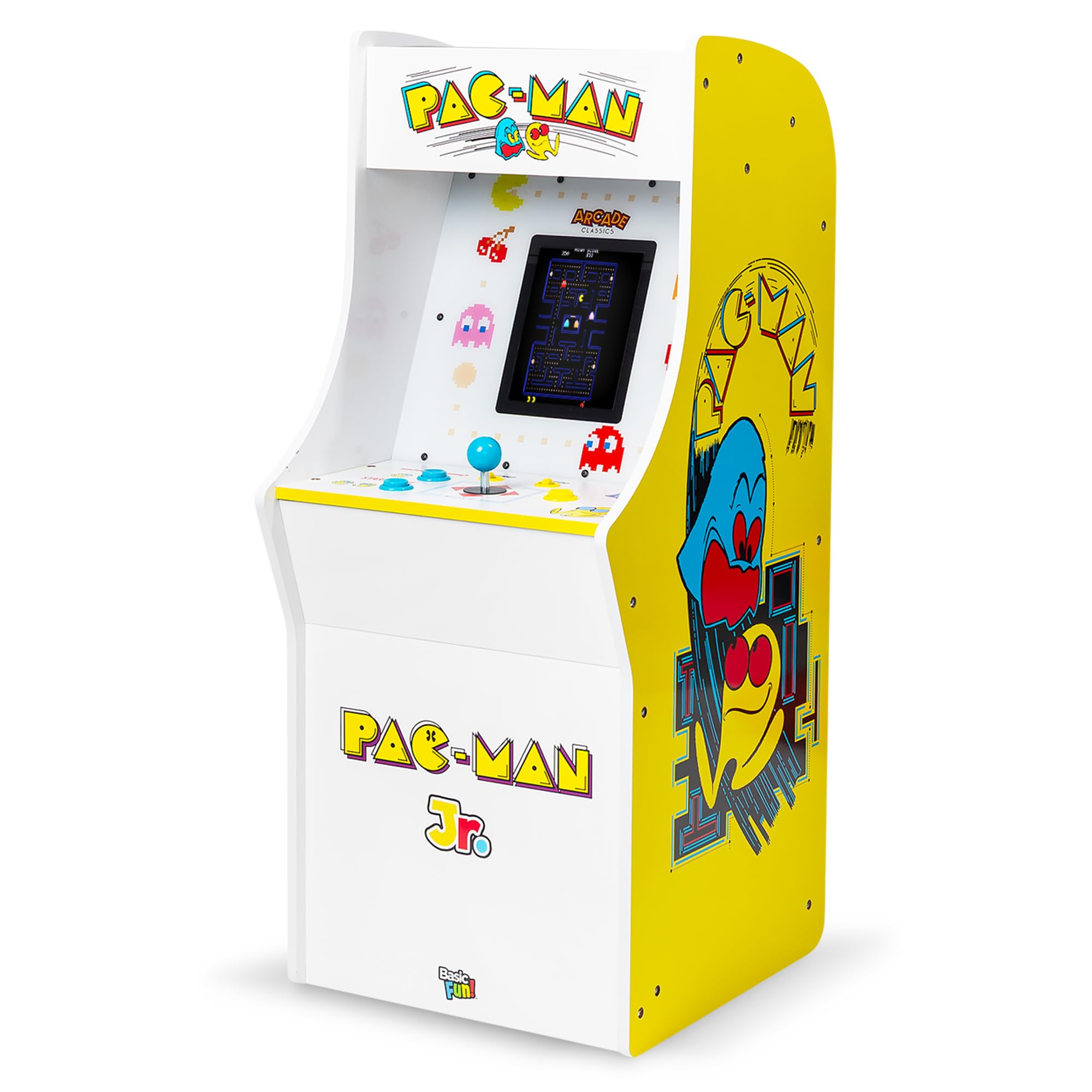
Three arcade legends, cabinet-sized, with a joystick a four-year-old can actually reach.
Not every family wants a screen-based console. Some want the arcade machine at the end of the rec room, and this junior cabinet delivers Pac-Man, Galaga, and Dig Dug in one build with authentic graphics, original-style sounds, and a classic joystick. The 8-inch liquid crystal display is far smaller than a television, but it is bright and clear, with zero input lag between the stick and the screen — which matters more than resolution on a game like Pac-Man.
What makes it work for young players is the difficulty ladder: Super Easy, Easy, and Normal. On the easiest settings a small child effectively cannot lose, which is the difference between a four-year-old cheering and a four-year-old walking away frustrated. Assembly is required, and it does take two people — the panels are heavy, the instructions are picture-heavy, and a manual screwdriver works better than a power driver. Everything after that is plug-and-play with the included AC adapter, and there are no batteries to replace.
Kids take to it immediately, and adults who grew up in the arcade era tend to get pulled in by the nostalgia. It is worth knowing going in that this is a kid-scaled machine rather than a full arcade cabinet — a seven-year-old manages fine, while an adult needs a stool or plays seated. A cosmetic crack on the controller panel edge has shown up here and there, so it is worth inspecting the panels before you assemble.
What stands out
- Three games in one cabinet: Pac-Man, Galaga, and Dig Dug
- Three difficulty modes including a no-death setting for beginners
- Joystick and buttons with zero lag on an 8-inch screen
What to plan for
- Two-person assembly required, with heavy panels
- Kid-scaled height — most adults need a stool or play seated
- Occasional cosmetic cracks on the controller panel edge from the start
Made for: the family with a spare corner in a basement, garage, or game room who wants a permanent thing the kids grow up around.
Pass on it if: your space is tight, you are not up for an assembly afternoon, or you want more than three games from the same machine.
5. Nex Playground Complete Family Gaming Bundle

The same living-room arcade, boxed with a case and a full year of games.
This is the Nex Playground with the two add-ons most families end up buying anyway. You get the console with its five starter games, an official travel case, and a 12-month Play Pass that open up a catalog of 30+ games featuring characters like Barbie, Teenage Mutant Ninja Turtles, and Peppa Pig. If a portable machine is the goal, this bundle is the version to buy, because the standalone console needs that pass bought separately.
The case is the part that changes how the machine gets used. It has a soft lining, a foam frame, and secure straps, so the cube survives a car trip to a grandparent’s house or a sleepover. It fits easily in a backpack. The console itself still plays through an HDMI cable and still tracks up to four players by camera, so game night works the same in a hotel room or a cousin’s living room as it does at home. There are no ads and no in-app purchases, and it carries kidSAFE+ COPPA certification for ages five and up.
Families lean on the portability more than they expect. It gets hauled between houses and it gets the kids off the couch while the adults cook or clean. Two practical notes: the Play Pass arrives as a digital redemption code you can activate whenever you like, and the pass itself is non-returnable and non-refundable, so redeem it deliberately. If you want that growing library, this is the version where the year is already bundled in rather than a separate line item.
The case earns its keep: the soft lining and foam frame mean you can genuinely toss it in a backpack for a playdate instead of wrapping it in a towel.
One detail to note: the membership is a redeem-anytime digital code, and it cannot be returned once purchased — so confirm the family is on board before you cash it in.
Choose this version if: your kids split time between two houses, or you want the full year of games included rather than added on later.
Step down to the standalone console if: it is going to live on one shelf forever and you would rather add the pass month by month.
6. Nintendo Switch 2 System

The bigger screen, the faster chip, and the eightfold storage leap over the original.
If you are deciding between the two Nintendo machines, this is the answer in one line: 256 GB of internal storage versus 32 GB on the original — the same eightfold jump in how much you can keep installed, and the single strongest reason to pay more. That means the household is not deleting games to make room every few weeks, and a microSD Express card (the faster memory card format this console uses) can expand it further when it fills.
The screen grows to a 7.9” LCD touch panel with HDR support (high dynamic range, which widens the contrast between dark and bright parts of the picture) and up to 120 fps in supported games — the frame rate is how many times per second the image refreshes, so movement looks smoother and more fluid. The dock outputs 4K when hooked to a compatible television, so the picture sharpens when it lands on the big screen. It still runs in three modes — TV, tabletop, and handheld — and the Joy-Con 2 controllers now attach magnetically and add mouse-style controls.
The whole family tends to get pulled in here, and the upgrade carries real headroom: games start quickly, demanding titles stutter less, and the dock connects with a single cable so re-docking is trivial. A pro controller is a smart addition for longer sessions because the included pads are small in adult hands. Keep the delivery in mind too — a high-value system can end up left somewhere careless if the carrier is sloppy.
Where it leads the field: against the original Switch, the storage, screen size, and frame rate together are the upgrade that families actually feel every session rather than once a year.
The trade-off to accept: it also plays physical and digital Nintendo Switch games, but it costs meaningfully more than the outgoing model, so the question is whether 256 GB and the bigger screen are worth the step up for your household.
Worth it if: this is the family’s primary console and you want the smoothest picture and the most storage headroom for the next few years.
Hold off if: the original Switch is still getting heavy use — its library runs here too, so the upgrade buys speed and screen, not access.
7. Xbox Series S | Digital Gaming Console | 1TB SSD
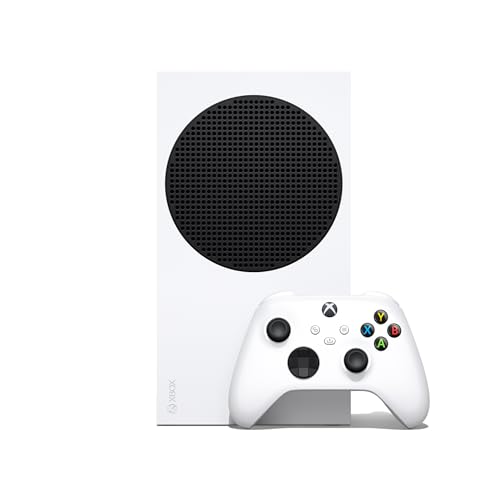
The smallest Xbox ever, with a full terabyte to feed four generations of games.
For a family that has already collected digital games across several consoles, this machine makes the most sense — it plays titles from Xbox Series X|S, Xbox One, Xbox 360, and the original Xbox, so an older library does not go to waste. The 1 TB custom NVMe SSD (a solid-state drive, meaning no spinning parts and much faster loading) covers that history with room to spare, and load times drop dramatically thanks to the Xbox Velocity Architecture.
Games run at up to 120 FPS with 1440p resolution, and the visuals receive DirectX Raytracing, which simulates realistic light and reflection for a more lifelike look. Quick Resume lets you jump between several games and land exactly where you left off, which is quietly the best feature for a shared console — nobody has to replay a level because someone else took a turn. The included Xbox Wireless Controller comes with textured grips, a hybrid D-pad, and a dedicated Share button. It weighs 6.8 pounds, light enough to move between rooms.
What owners come back to is how dependable it feels, day after day, with a compact shape that hides behind a TV. The catch the reviews are honest about is storage: the 1 TB fills faster than you would think once several large games are installed, and because there is no disc drive, you cannot borrow a physical copy from a friend. Game Pass is optional and sold separately, and it is where Xbox’s value really shows.
What the numbers give you
- 1 TB custom NVMe SSD with Velocity Architecture for fast streaming
- Up to 120 FPS and 1440p resolution with DirectX Raytracing
- Backward compatibility across four generations of Xbox games
- Quick Resume jumps between multiple games with no reload
What to expect going in
- All-digital — no disc drive, so no physical game swapping
- 1 TB can fill up quickly with several large titles installed
- Game Pass is a separate purchase and the online multiplayer sits behind it
Reach for this if: you have bought digital games over the years and want them all playable on one modern, small console.
Look elsewhere if: you want to buy and share discs, or you need the extra headroom a 4K-capable machine offers — this one tops out at 1440p.
8. Meta Quest 3 512GB
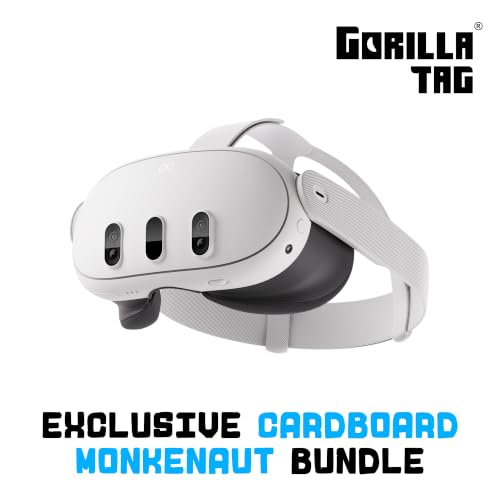
A wireless headset that puts the whole arcade on your face, no console or TV needed.
Some families want a shared screen. This one is the opposite: everything happens inside the headset, and the machine is small enough to put on anywhere. It runs on the Snapdragon XR2 Gen 2 processor (the chip that handles graphics and motion tracking) with 8GB of RAM and a display that hits 4128×2208 pixels across both eyes, so text is legible and images carry real depth. The panel refreshes at 120 Hz, which keeps fast movement fluid rather than smeary.
Memory is the headline spec here — 512 GB of storage holds a large VR library, and the package includes a 3-month trial of Meta Horizon+ to sample what’s out there. Dual RGB color cameras feed full-color Passthrough, which blends virtual objects into your actual room so you can walk to the kitchen without taking the headset off. The bundle throws in Gorilla Tag extras like the Gorilla Space Program Suit and Helmet plus 2,000 SHINY ROCKS. There are no wires and no base stations to mount, so setup is placing the headset on your head and drawing a play area.
The experience itself is what converts people. Gaming, fitness, and even productivity live in the same headset, and the sibling-multiplayer angle is real — several owners play together while apart. Two things to plan for honestly. The listed battery average life is 2.2 hours, and the more intense games chew through that quickly; a charging cable while you play solves it. Comfort also splits opinion, so an aftermarket headstrap is a common purchase — the included one is basic. The age rating is 10+, worth knowing if you have younger kids who want a turn.
what separates it: the 120 Hz refresh and 4128×2208 resolution together are the reason motion feels natural and text stays sharp, which is what separates the people who keep using it from the people who shelve it.
Where it falls short of expectations: the 2.2-hour average battery and the basic included strap are the real-world snags, and both have fixes you should price in before you commit.
For the household that wants the newest thing: if someone in the family is a gamer who wants the widest range of experiences and does not need a shared screen, this opens a door nothing else on this list does.
Skip it for now if: the kids are under ten, if two people need to share the same screen at once, or if a fully tethered, cheaper setup is on the table.
9. Xbox Series S Starter Bundle
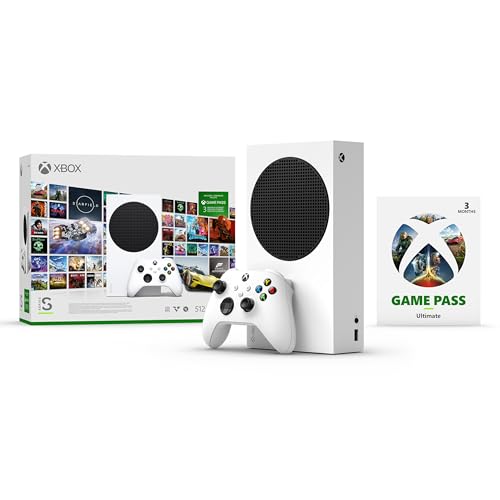
A console with hundreds of games already waiting on day one, no extra purchase needed.
This is the pick for the family who wants the kids playing immediately and does not want to build a library from scratch. You get the Xbox Series S with its 512 GB custom SSD, one wireless controller, a high-speed HDMI cable, a power cable, and two AA batteries — plus three months of Game Pass Ultimate, which open up hundreds of high-quality games. That last part is the whole reason this bundle exists: instead of buying one game on day one, you have a rotating selection to explore.
The console plays at up to 120 FPS with 1440p resolution, backed by Xbox Velocity Architecture, Quick Resume, and lightning-fast load times. Game Pass Ultimate also brings online multiplayer and an EA Play membership, so families with several players can play together without a separate subscription to sort out. It weighs 4.2 pounds, so moving it between rooms is a one-hand job. Games like Minecraft Legends, Halo Infinite, and Forza Horizon 5 are ready to jump straight into on arrival.
Value is what makes this bundle work — owners consistently describe it as a strong gift because everything needed is in the box. The smaller 512 GB drive is the main limiting factor; those games eat space quickly, so plan on managing what stays installed. There is no disc drive either, so this is a downloads-only console, and the Game Pass membership itself is a three-month window rather than a permanent library. Setup is a short job, and kids take to it with almost no help.
The case for it: the bundled Game Pass turns an empty console into a full games shelf the moment you power it on, which is what makes this the strongest gift version of the Series S.
Worth knowing: the 512 GB drive is smaller than the full-size Series S’s 1 TB, and the membership runs out after three months, so the game budget continues past the initial purchase.
Buy this if: it is a gift and you want the kids playing the same evening without hunting for individual titles.
Look past it if: you would rather own games outright than rotate through a subscription, or you already have a large library you want to install on 1 TB.
Know the Specs
Frame rate (FPS) and resolution
Frames per second is how many times the console redraws the image each second — the higher it goes, the smoother the movement looks. Resolution is the number of pixels the picture is drawn from, which decides how much fine detail you see. A console that hits 120 FPS and 1440p keeps fast games clean, and 4K only matters if your television actually supports it. For a family room where kids sit close, the frame rate tends to show up more than the resolution.
Storage and how you buy games
Internal storage decides how many games stay installed at once. A system with 32 GB of built-in space fills quickly and generally wants a memory card; one with 256 GB or 1 TB has real breathing room. The second half of the question is format — a machine with a disc drive lets you share games between siblings or trade them in later, while an all-digital console keeps everything on the drive and cannot use a borrowed disc.
Controllers versus camera tracking
A controller-based console hands each player a physical pad, and the biggest advantage is that anyone can play in a tight room while seated. Camera-tracking systems read the movement of your body directly, with no pad or tracker in hand — which means a younger child can join without any practice, but also that the room needs enough open floor for the camera to see legs and arms. The correct choice depends on how much space you actually have.
Subscriptions and included content
Several of these systems come with a starter set of games and a paid pass that open up the wider library. The pass is where the depth lives — new titles arrive over time rather than staying static — so it is worth treating the console and the membership as one ongoing cost. Bundles that include a pass up front get you more for the first stretch, while a standalone console lets you decide later whether the library is worth it.
Common Questions
Do I need a subscription to play games on a Nex Playground or KINHANK?
How much open floor space does a body-tracking console need?
Is the original Switch or the Switch 2 better for a family?
Can two kids use one Switch without buying a second controller?
What is the difference between the two Xbox Series S options here?
Is 512 GB or 1 TB enough for a family that installs several large games?
Is the Meta Quest 3 safe and suitable for children?
How long does the Meta Quest 3 battery last per session?
Is a Pac Man Jr arcade cabinet easy to move and set up?
Do these consoles need Wi-Fi or can they run offline?
The Bottom Line
For most households the call is straightforward: the Nintendo Switch with Neon Blue and Neon Red Joy-Con still holds up as the most flexible family console on this list, because it moves between the TV, a tabletop, and your hands without missing a beat. If what you want is a machine that gets everyone off the couch, the Nex Playground Active Play System is the one — its wide-angle camera tracks up to four players with nothing in their hands, and the starter five games make it playable within minutes. If storage and speed matter most, step up to the Nintendo Switch 2 System for its 256 GB drive and 7.9” screen. And for a game library that arrives fully stocked on day one, the Xbox Series S Starter Bundle pairs a 512 GB SSD with three months of Game Pass Ultimate. Match the machine to your room: a handheld for shared screens, a motion system for open floor, a retro cabinet for an unused corner. If you want the pick with the longest track record across the widest range of families, start with the Nintendo Switch. It holds a 4.5+ star rating across 10,000+ reviews, the highest of any console here.
How we choose
We do not accept paid placement. Every pick is matched to a real buyer and a real use-case; we do not hands-on test units.
Sources
Specifications: manufacturer listings and product documentation. Review insights: verified customer reviews, as of October 2026. Pricing: not shown on this page (it changes often); check the current price via the retailer link.
As an Amazon Associate, Aappliancez earns from qualifying purchases. This does not affect which products we feature.