Disclosure: Some links in this post are affiliate links. As an Amazon Associate I earn from qualifying purchases, at no extra cost to you. Learn more
Specs are compiled from manufacturer listings and verified buyer reviews and can change over time — please confirm the key details on the product page before buying.
Laptop speakers are the weakest part of almost every laptop, and a pair of small external speakers fixes that in about ten seconds of plugging. If you want the shortest possible answer: the Creative Pebble V2 is the safest buy for a desk setup, and the OHAYO 60W is the one to pick if you want real bass and Bluetooth without a subwoofer taking up floor space. This guide walks through seven sets that genuinely fit a laptop desk, sorted by what each one is actually good at, so you can match a set to your desk in one pass.
This guide is built by comparing the manufacturers’ published specifications and the patterns across verified customer reviews, so you get each pick’s real strengths and trade-offs instead of marketing spin.
Most laptop users only need to know three things: how it connects, how loud it gets without distorting, and whether the bass is real or imaginary. The rest is desk space — and these seven all fit on a normal monitor stand. Here is the honest read on the external speakers for laptop worth putting next to your machine.
Top Picks


How To Choose The Best External Speakers for Laptop
You are not buying a hi-fi system. You are buying a way to hear a Zoom call, a YouTube video, and a music playlist clearly without headphones clamped on all day. Judge every option by those three jobs and the shortlist narrows to two or three sets.
Cable count is the first thing you will actually notice
Some sets need two cables — one for power, one for audio. Others run everything down a single USB-C cable. The Creative Pebble V3 does audio and power over one USB-C run and includes a USB-A adapter for older laptops, so your desk stays close to cable-free. The Bluedee set also skips the 3.5 mm port entirely and plugs in over USB or Type-C.
Bass is where the small sets separate
A plastic satellite the size of a coffee cup physically cannot move much air. That is why the Pebble lineup leans on rear passive radiators (a flat diaphragm that pushes air without its own motor) to fake low end. The OHAYO set takes a different route with a dedicated 3-inch carbon fiber full-range driver and a rear bass port, which is the closest thing here to real low-end without a separate sub box.
Do you need a headphone jack on the speaker
This is the most underrated feature on the list. If you take calls all day, having a 3.5 mm out on the front of the speaker means you can swap to a headset without unplugging anything from your laptop. The Bluedee SK800 and the X9 Performance both carry that jack; the Pebble V2 and V3 do not.
Bluetooth is for off-desk moments, not for everything
Wireless is genuinely handy when you want music from your phone across the room. It is less handy for video calls, where a wired USB connection gives you zero pairing risk. Several of these sets give you both, and that redundancy is worth more than any single spec on the box.
Side-by-Side Comparison
| Model | Best For | Connection | Driver Size | Power / Output | Amazon |
|---|---|---|---|---|---|
| Creative Pebble V2★ Best Overall | Clean minimalist desks | USB-C power + 3.5 mm AUX | 5.1 cm | Up to 8W RMS / 16W peak | Amazon |
| Creative Pebble V3Most Versatile | Single-cable desks with wireless | USB-C, Bluetooth 5.0, 3.5 mm | 5.71 cm | 8W RMS / 16W peak | Amazon |
| Logitech Z313 (Renewed) | Small rooms that want a sub | 3.5 mm audio input | Listed 6 in | 50W | Amazon |
| Bluedee SK800 | Headphone swapping and RGB | USB / Type-C | Dual driver | 10W (2×5W) peak | Amazon |
| X9 Performance White | Matching a white laptop setup | Bluetooth 5.4, USB, AUX | Dual 2.25 in | — | Amazon |
| OHAYO 60W | Real bass without a sub box | Bluetooth 5.3, RCA, AUX, USB | 3 in + 0.75 in tweeter | 30W × 2 | Amazon |
| Dell Speakerphone SP3022 | Meeting rooms and Teams calls | USB-A / USB-C | Dynamic driver | — | Amazon |
Detailed Reviews
1. Creative Pebble V2
Our pick — 4.5+★ from 12,000+ verified ratings; the strongest balance of quality and price.
Two tiny spheres that turn a thin laptop into something you can actually listen to all day.
If your desk is small and your patience for cable clutter is gone, this is the pair to start with. The two satellites are built around 5.1 cm full-range drivers that sit angled at 45 degrees so the sound points up at your ears instead of into your kneecaps. You power the set from a USB-C port and feed it audio through the 3.5 mm jack, and Creative throws in a USB-C to USB-A converter so an older laptop still works. Total output runs up to 8W RMS with 16W peak when you feed it a 10W port, which is the kind of headroom that keeps a video call clean at normal desk volume.
What wins people over is the sound itself — the clarity of voices and the way music stays clean rather than turning harsh when you push the volume. The set handles podcasts, YouTube, and background office music without complaint, and the front volume knob makes adjustment a one-hand job. Bass is the honest limit. These will not shake a room, and busy, layered tracks can get a little congested. If thumping low end is the whole point for you, look at the OHAYO lower down instead.
One practical note buyers raise: the cables between the two speakers and the laptop are hardwired and not replaceable, and the set runs off 5V 2A USB power rather than USB-PD. That is fine on a desk, but plan your cable routing once. As one buyer put it, it is “USB-powered 5V 2A (no USB-PD); hardwired cables not replaceable; solid volume knob, non-skid pads, dim blue LED.” The dim blue light is genuinely unobtrusive on a dark desk.
What it brings to the desk
- 5.1 cm angled drivers push clear voice and music straight at your ears
- USB-C power with a USB-A converter included, so old and new laptops both work
- Up to 8W RMS and 16W peak when plugged into a 10W port
- Front-facing volume knob and non-skid pads that hold position
Where it stops short
- No real low end — busy tracks sound thin without a sub
- Hardwired cables cannot be swapped if one is damaged
- No Bluetooth, so it stays tethered to the laptop
Go for it if: you want the smallest reliable upgrade for a laptop desk that mostly plays calls, videos, and background music.
Look past it if: you expect club-level bass from a driver you can hold in one hand.
2. Creative Pebble V3
One cable for sound and power, plus Bluetooth for when you walk away from the desk.
The V3 is the newer sibling of the V2 above, and the step up is measurable: its drivers measure 5.71 centimeters against the V2’s 5.1 centimeters. That extra size comes with a claim of 50% more volume from the larger full-range driver, and Creative pairs it with Clear Dialog processing that lifts spoken dialogue in YouTube videos and TV episodes without drowning out the background sound. It runs on a single USB-C cable for both audio and power, which means no 3.5 mm lead snaking across your desk at all. A USB-A adapter is in the box for older machines.
Where this set pulls ahead of the V2 is flexibility. Bluetooth 5.0 with a 10-meter range lets you stream from a phone or tablet without re-cabling, and there is also a 3.5 mm AUX input for anything analog — the AUX cable is not included, so add one if you need it. The 8W RMS and 16W peak output requires a 10W USB-C or USB-A port to hit full gain. On a modern laptop that is a given; on a low-power hub, expect less.
The trade-off buyers keep running into is Bluetooth stability. The wireless side connects fine at first and then some owners hit dropouts, so treat Bluetooth as the convenience mode and USB-C as the daily driver. Bass is also modest by design — the set is tuned for clarity, not punch. A compact footprint helps here: as a buyer describes it, it is “small (slightly larger than coffee cup), saves space,” which leaves room for a 13-inch laptop and a mouse pad.
The honest read: the V3 is the more capable Pebble. You get the larger 5.71 cm driver, wireless streaming, and a cleaner one-cable desk, and the Clear Dialog tuning is a real benefit for meetings and video.
Set your expectation: no deep bass, and the Bluetooth side earns its keep for music rather than as your main call connection.
Reach for this one if: your laptop has USB-C and you want one cable plus the option of wireless playback.
Think twice if: you need rock-solid wireless for calls — the wired route is the dependable one here.
3. Logitech Z313 Speaker System (Renewed)

The only set here with a separate sub box, and that changes the whole character.
If the tiny satellites leave you cold because nothing moves air, this is the group that does. The system runs 50W total and splits the work: two small satellites for voice and mids, and a down-firing sub that carries the low end. Sound stays clear for a small room or a desk in a corner, and setup is a plain 3.5 mm audio input from your laptop — no drivers, no pairing. This is a renewed unit, so you are buying a factory-refurbished system, not a new box.
The renewed angle is the thing to weigh honestly. Durability feedback is mixed: some units arrive looking and working like new, while others show damage or arrive dead. That is not a reason to avoid the model — Amazon’s exchange route handles dead units — but it is a reason to set it up and test it the day it lands rather than three months later. The sound itself leans bass-forward, and the sub’s crossover runs high with no adjustment, so the low end can get boomy on bass-heavy tracks.
Power is the argument for it. A modern buyer described the impact plainly: 50W “gives spectacular, clear sound without cluttering desk,” which is what a 2.1 set buys you over a 2.0 pair. If you watch movies on a laptop and want the desk to feel like a small cinema, the subwoofer is what delivers that, and no 2.0 pair on this list can match it for weight. Expect plastic enclosures and a modest finish — the money goes into the sub, not the cabinet trim.
The sub is the story: 50W with a real down-firing subwoofer gives you low end that no satellite-only pair here can produce, and the 3.5 mm input works with any laptop headphone jack.
Factor in the renewed badge: test it immediately, and know the bass can run boomy with a fixed crossover you cannot dial back.
Built for: a desk or small bedroom where movie nights and bass-heavy music matter more than a matching cosmetic look.
Not the pick if: you want a single compact pair with no floor or shelf space given over to a sub box.
4. Bluedee Computer Speakers

A front headphone jack and touch-controlled RGB, in a set that plugs in and just works.
For anyone who bounces between speakers and a headset all day, this is the most practical design on the list. The front knob gives you 0-100% volume in one turn, and a 3.5 mm jack on the speaker takes your headphones so you never unplug from the laptop itself. Power and audio both arrive over a single USB or Type-C cable — no drivers, no Bluetooth, no 3.5 mm port needed on the computer. Two 5W drivers make up the 10W peak output, and Bluedee rates the set to fill up to 12㎡ of space.
RGB lighting is either a feature or a distraction depending on your taste. Here it is touch-sensitive and turns off with a single click, which is the part that matters — you can keep the fun mode on for gaming and kill the glow for a focused work session. The lighting can pulse with music if you want it to. The cabinets sit on non-slip pads that cut vibration, so the set stays put instead of walking across the desk at volume.
The honest catch is volume. A clear picture from owners is that the sound is detailed and the highs are crisp, but plenty of buyers find the loudness modest for the size of the box. One review frames the fix neatly: “The volume is quite low considering how they look, but the sound is very clear and the range is quite good; the low volume issue can be fixed with an equalizer or something similar.” There is also no bass or treble dial on the unit, so tone shaping happens in your laptop’s audio settings.
Reasons it earns desk space
- 3.5 mm headphone jack on the speaker for instant headset swaps
- One USB or Type-C cable handles power and audio together
- Touch RGB that switches off in a single click
- Front 0-100% knob and non-slip pads that kill vibration
Things to plan around
- Modest loudness for the cabinet size unless you EQ it
- No onboard bass or treble adjustment
- Rear bass port means you want a little space behind the speakers
Pick this if: you take calls on a headset and want a clean single-cable speaker pair with a lighting option.
Pass if: you like to crank action movies — this set prioritizes clarity over loudness.
5. X9 Performance White Computer Speakers
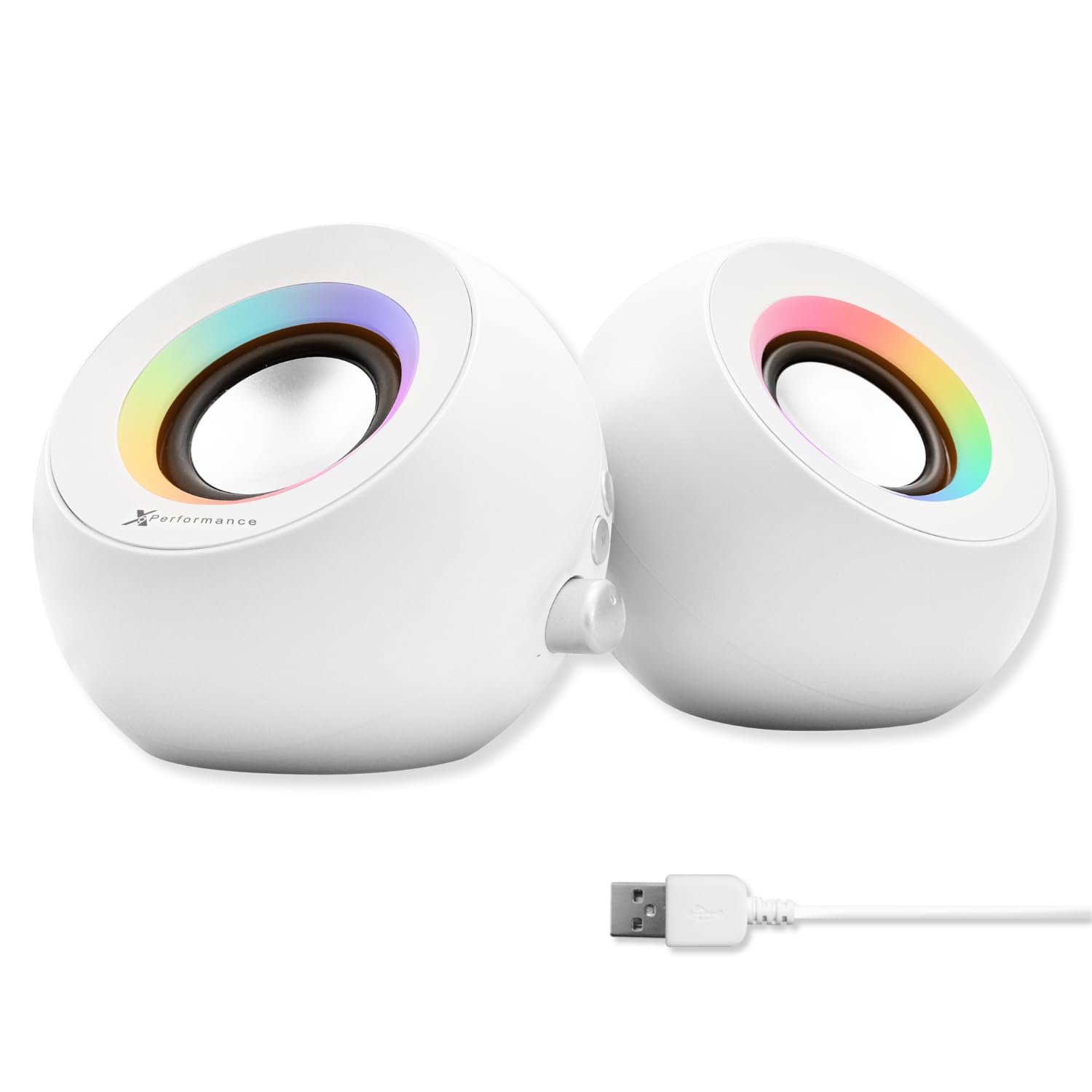
Built to sit beside a white laptop, with three ways in and ten colors to choose from.
Most speakers only come in black, which is a small annoyance until you have a white desk and it becomes the thing you notice every day. This pair is white with dual 2.25-inch drivers and passive radiators, and the connection options are the widest here: Bluetooth 5.4, wired USB, or AUX in. There are also two AUX ports — one for input from another device and one for headphones out — so you can play from a phone and listen privately without touching the laptop.
The lighting is unusually adjustable for the category: ten LED color options you cycle through on the buttons, or switch off entirely for a calm workspace. Controls sit on the speaker itself, so volume, color, and mode switching all happen with a tap rather than a laptop setting. Compact enough for a cramped desk is the practical upside — one owner notes it stays “small size fits cramped desks,” which is why a compact pair beats a bookshelf set on a cramped desk.
The genuine caution is build consistency. The design and the look land well, and volume is comfortably loud, but sound quality splits opinions — some find it full and clean, others hear it as thin for the money. There is also a reliability risk with a small number of units failing early, and static in AUX mode that clears when the lighting is switched off. Buy it for the white finish, the triple connection, and the headphone out; expect it to sound good rather than exceptional.
Where it wins: three connection routes plus dual AUX ports give you more wiring flexibility than anything else here, and the white cabinet with 10-color RGB is a genuinely different look.
What to accept: sound quality is the split vote on this model, and AUX mode can carry static until the lighting is off.
Made for: the white-desk setup where the speakers need to match the laptop and switch between phone, USB, and AUX.
Skip if: audio quality is your only criterion and the cosmetic match does not matter to you.
6. OHAYO 60W Computer Speakers

The desk pair that finally gives you low end without a subwoofer sitting on the floor.
Here is the head-to-head that matters: 30W × 2 of power and a 3-inch carbon fiber full-range driver paired with a 0.75-inch carbon fiber silk dome tweeter, all in an MDF wooden enclosure. Wood is the underrated part — it damps the cabinet so the box stops vibrating along with the music, which is what makes cheap plastic speakers sound muddy. A rear bass port adds depth, and the built-in independent sound card handles playback so you are not relying on the laptop’s audio chip.
Connectivity is the most complete of any set here: Bluetooth 5.3, RCA, AUX, and USB all in one unit, plus rear treble, bass, and balance dials for shaping the sound. The internal power supply means no external brick taking up a socket and no extra clutter behind the desk. A front volume knob and power button keep daily use simple, and multiple inputs switch over cleanly rather than fighting each other.
The recurring gripe is the volume knob, which has a short delay when you turn it, and Bluetooth can get choppy if you pair several devices at once — connect one at a time and it stays solid. Bass arrives strong by default, so plan to back the knob down to cut boxiness on the first day. It is also a wired-power set with no battery, so it belongs on a desk rather than in a bag. In return you get real weight and depth that the coffee-cup-sized pairs simply cannot produce.
Why this one stands out
- 30W × 2 with a 3-inch carbon fiber driver and rear bass port for genuine low end
- Wooden MDF cabinet cuts resonance so the sound stays clean
- Bluetooth 5.3 plus RCA, AUX, and USB on one set
- Rear treble, bass, and balance dials, plus a built-in power supply
Trade-offs worth knowing
- Volume knob has a short lag when adjusting
- Bluetooth gets choppy with several devices paired at once
- Bass is heavy from the start and needs dialing back
Best fit for: anyone who wants full-bodied sound and Bluetooth from a pair of desk speakers without adding a sub box.
Rule it out if: you need something portable or you want bass that is neutral from the first second.
7. Dell Speakerphone SP3022

A soundbar for your calls, with a microphone and noise filtering built in.
This one is a different animal from everything above: it is a speakerphone with a microphone, designed to sit on a monitor base or beside a laptop and make conference calls work. Full duplex audio with AI noise cancellation lets several people talk at once and still be heard, and the cancellation filters keyboard clatter, HVAC hum, and background chatter while keeping the voice in front. It carries both Microsoft Teams and Zoom certification, and there is a dedicated Teams button for quick meeting access.
Setup is a single USB-A or USB-C cable, and it works without a driver or an app — plug it in and select it in your meeting software. LED indicators show call, hang-up, volume, and mic mute status, and the touch controls handle volume and muting right on the unit. The compact, low-profile shape slides onto a monitor stand and stays out of the way, which keeps your monitor stand clear during calls.
Two things to weigh. The touch controls are sensitive enough that some buyers find them too easy to trigger by accident. And while it works on a Mac, control is the weak spot there — one Mac owner put it bluntly: “The speaker is fine but because I have a Mac it really cannot be controlled well.” On Windows it is the cleaner experience. This is a calling tool first; for music, the OHAYO or the Pebble V3 gives you more listening quality for the same desk.
What it does well: certified Teams and Zoom support, full duplex audio with AI noise cancellation, and true plug-and-play over USB-A or USB-C with no drivers.
The honest limit: sensitive touch buttons and weaker control support on Mac make it a better fit for a Windows meeting desk.
Choose it when: your laptop desk is really a meeting desk and clear conference calls matter more than music.
Leave it when: you want speakers for entertainment or you run a Mac and need fine control.
Know the Specs
Driver size and why centimeters matter
The driver is the cone that actually makes the sound, and its diameter in centimeters tells you how much air it can move. A 5.71 cm driver moves more air than a 5.1 cm one, which is why the Pebble V3 can go louder than the V2. Bigger is not automatically better on a desk, though — a larger cone in a small cabinet can sound boxy. The OHAYO pairs a 3-inch driver with a dedicated 0.75-inch tweeter so each size handles the range it does best.
RMS versus peak power
RMS is the power a speaker can handle continuously; peak is the short burst it survives. The Pebble V2 and V3 both list 8W RMS with 16W peak, while the OHAYO runs 30W × 2 and the Logitech system runs 50W total. Higher RMS generally means more headroom before distortion, but it also needs a strong power source. That is why Creative notes the gain switch needs a 10W USB-C or USB-A port to reach full output.
Passive radiators and rear ports
A passive radiator is a flat diaphragm with no motor — the driver’s air pressure pushes it, and it adds low end without a powered sub. A rear bass port does similar work by letting air escape out the back. Both need a little clearance behind the speaker to breathe. Put either one flush against a wall and the bass gets muddier, which is why placement matters as much as the spec sheet.
Bluetooth versions in plain terms
Bluetooth 5.3 and 5.4 are newer wireless standards than 5.0, and the newer versions generally hold a connection better and use less power. Range is stated in meters — Creative lists 10 meters for the Pebble V3. None of these is a substitute for a wired USB connection during a call, because wireless can drop or lag. Use Bluetooth for music across the room and a cable when the audio has to be reliable.
Common Questions
Will these speakers work with a laptop that only has USB-C ports?
Do I need a subwoofer for laptop speakers to have bass?
Can I use these speakers for Zoom and Teams calls?
Why do my speakers sound quiet even at full volume?
Is Bluetooth good enough for watching video on a laptop?
What does the headphone jack on a speaker actually do?
How much desk space do these speakers take up?
Is a renewed speaker system a safe buy?
Do these speakers need a driver or app installed?
Can I connect these speakers to a phone or tablet as well as a laptop?
The Bottom Line
For most laptop desks, the winner is the Creative Pebble V2 — it covers calls, videos, and background music cleanly, takes up almost no space, and the front volume knob is the kind of small detail you appreciate every day. If you want one cable and wireless as well, step up to the Creative Pebble V3 for its larger 5.71 cm drivers and Bluetooth 5.0. And when real low end is the whole reason you are shopping, the OHAYO 60W is the set that delivers it without a sub box on the floor.
One last nudge: the Pebble V3 now matches the V2 on owner ratings, and given how close the two sit on a desk, it is worth a look before you settle. Either way, pick the one that matches how you actually use the laptop — calls, music, or movies — and the upgrade pays off daily.
How we choose
We do not accept paid placement. Every pick is matched to a real buyer and a real use-case; we do not hands-on test units.
Sources
Specifications: manufacturer listings and product documentation. Review insights: verified customer reviews, as of October 2026. Pricing: not shown on this page (it changes often); check the current price via the retailer link.
As an Amazon Associate, Aappliancez earns from qualifying purchases. This does not affect which products we feature.