Disclosure: Some links in this post are affiliate links. As an Amazon Associate I earn from qualifying purchases, at no extra cost to you. Learn more
Specs are compiled from manufacturer listings and verified buyer reviews and can change over time — please confirm the key details on the product page before buying.
If your laptop keyboard bottoms out flat and leaves your wrists aching by lunchtime, an external keyboard is the cheapest fix that actually changes your day. The right one gives you real key travel, a deck that stays put, and a number pad if you do spreadsheets. The wrong one drops keystrokes, lags on wake, or dies mid-sentence. This guide separates the seven picks worth your desk space — starting with the crowd favorite, a Logitech combo that holds 4.5+ stars across 111,000+ ratings.
This guide is built by comparing the manufacturers’ published specifications and the patterns across verified customer reviews, so you get each pick’s real strengths and trade-offs instead of marketing spin.
Below you will find what actually matters: connection type, battery life, layout, and key feel. Every pick here is a real product backed by owner reviews, so you can match one to your desk, your hands, and your budget.
Top Picks


How To Choose The Best External Keyboard
An external keyboard fixes one problem: your laptop’s built-in keys are flat, cramped, and fixed to the screen. Picking well means matching three things to your real day — how you connect, how much desk room you have, and how the keys feel under your fingers.
Connection: 2.4GHz dongle versus Bluetooth versus USB-C
A 2.4GHz connection uses a small USB receiver (a dongle) to talk to your computer on a dedicated radio band. It is the most plug-and-play option and tends to hold a stable link. Bluetooth pairs without any dongle at all and lets one keyboard hop between devices — useful if you type on a laptop and a tablet. USB-C wired is the fallback: no charging, no dropouts, no pairing. If you want the freedom of wireless plus a guaranteed connection, look for a keyboard that does all three.
Layout size and the number pad question
A full-size layout gives you the number pad, arrow cluster, and function row. A 96% layout (sometimes called 98-key) keeps the number pad but squeezes out the gaps. A 75% layout drops the number pad entirely and saves desktop space. If you enter figures all day, keep the pad. If you mostly type prose or game, the smaller deck frees room for your mouse hand.
Key feel: membrane versus mechanical
Membrane keys use a rubber dome under each cap — quiet, low-profile, and cheap. Mechanical keys use a physical switch per key, which gives you a defined actuation point and, on clicky models, an audible click. Mechanical boards often add a gasket mount (a soft layer between the plate and case that absorbs vibration) for a softer, deeper sound. Neither is better; membrane suits quiet offices, mechanical suits people who want feedback and customization.
Battery life and charging
Battery ratings vary wildly. Some boards claim 36 months on a set of AA batteries; others run a rechargeable cell rated for 200 hours. Read the number against how you work — a rechargeable board that charges over USB-C can run while plugged in, so a low battery is an inconvenience, not a stoppage. Look for a power switch and a low-battery indicator so you are never caught mid-document.
Side-by-Side Comparison
| Model | Best For | Connection | Layout | Key Type | Amazon |
|---|---|---|---|---|---|
| Logitech MK270 Combo★ Best Overall | Everyday plug-and-play desk setup | 2.4GHz USB receiver | Full-size with number pad | Membrane | Amazon |
| Logitech K345Quiet Typist | Quiet typing with a palm rest | 2.4GHz USB receiver | Full-size with palm rest | Membrane | Amazon |
| TECKNET Ergonomic | Wrist comfort on long sessions | 2.4GHz + Bluetooth 5.0 | Split ergonomic with number pad | Membrane | Amazon |
| Redragon K710 | Typewriter looks and clicky sound | 2.4GHz + Bluetooth 3.0/5.0 + USB-C | Full-size 104-key | Mechanical blue switches | Amazon |
| RK Royal Kludge R98 Pro | Buttery typing with a number pad | USB-C wired | 96% 98-key with volume knob | Mechanical pre-lubed linear | Amazon |
| SOLAKAKA KI99 Pro | Multi-device wireless with huge battery | 2.4GHz + Bluetooth 5.0 + USB-C | 96% with multifunctional knob | Mechanical pre-lubed | Amazon |
| nuphy Air75 V3 | Portable low-profile travel board | USB-C + 2.4GHz + Bluetooth | 75% low-profile with knob | Mechanical nano switches | Amazon |
Detailed Reviews
1. Logitech MK270 Wireless Keyboard and Mouse Combo
Our pick — 4.5+★ from 111,000+ verified ratings; the strongest balance of quality and price.
A combo that goes from box to typing in about a minute and then stays out of your way.
This is the pick for anyone who wants keyboard and mouse handled in one box and never thinks about it again. The USB receiver gives you a reliable wireless link up to 33 ft, so you can lean back from the screen or move the setup to a second desk. The full-size layout carries F-keys, a number pad, and arrow keys — the familiar arrangement your hands already know — with low-profile quiet keys. 8 multimedia hotkeys jump straight to the internet, email, play/pause, and volume.
What makes it the top pick is the battery math: a 36-month keyboard battery and a 12-month mouse battery, with on/off switches so you can stretch both further. The spill-resistant design and sturdy tilt legs with adjustable height handle real desks where coffee happens. Plastic parts include certified post-consumer recycled material — 54% for the keyboard, 49% for the mouse.
The honest catch is the keys themselves. They are low-profile and quiet, and that means a soft, slightly mushy press rather than crisp mechanical feedback. The bundled mouse is also compact — comfortable enough for both left- and right-handed use, but noticeably smaller than a full desktop mouse if you have wider hands. Set it on a firm surface and it types quietly for years.
Where it quietly wins
- 36-month keyboard and 12-month mouse battery life, with on/off switches to stretch both further
- Single USB receiver means one port covers keyboard and mouse
- Spill-resistant deck and sturdy adjustable tilt legs
- 8 multimedia hotkeys for web, mail, media, and volume
What to expect going in
- Low-profile keys feel soft rather than crisp
- Included mouse is compact — comfortable but small for wide hands
- Some units need a different USB port before they type reliably
Buy this one: if you want a full-size wireless keyboard and mouse with battery life measured in years and setup measured in seconds.
Think again: if you need crisp mechanical feedback or a full-size desktop mouse in the same box — this combo trades feel for quiet simplicity.
2. Logitech K345 Wireless Keyboard
Soft-touch keys and a palm rest for people whose wrists want a lean-to while they type.
Where the MK270 asks you to accept flat typing, the K345 hands you a palm rest that lifts your wrists to a supported angle. It runs on 2.4GHz wireless with a range up to 10 meters (33 feet), and Logitech rates the battery at up to 3 years, batteries included. Layout is full-size QWERTY with media keys for mute, volume, and play. It works with Windows, macOS, and ChromeOS, and the spill-resistant deck is a nice buffer for the desk-coffee crowd.
The key feel is the reason it earns its slot. Buyers describe keys that are “not too light, not too hard” with the palm rest landing exactly right. It is also the cheaper Logitech board to give you a proper wrist shelf rather than a flat slab. At 1.3 pounds it stays put on a desk without feeling like a brick.
Two things to know before you commit. The receiver is not compatible with Logitech’s Unifying receivers, so it claims its own USB port — fine on a desktop, tighter on a laptop with two ports. And the plastic is hollow-sounding when you tap it, so this is quiet typing rather than silent. A handful of units have needed a fresh battery or a new port to wake up properly, which is worth testing in your first week.
What the palm rest buys you: a supported wrist angle for long documents, plus a 3-year battery rating that makes charging a non-event.
The port trade-off: no Unifying receiver support means one dedicated USB-A slot goes to this keyboard, so budget a port on smaller laptops.
Worth it for: anyone whose wrists want a rest and who types in an open office where a quiet press matters.
Look elsewhere: if you are short on USB ports and need the receiver to share a Logitech Unifying dongle.
3. TECKNET Wireless Ergonomic Keyboard

A split deck that pulls your hands to shoulder width and puts memory foam under your wrists.
If your hands end up angled inward all day, this is the board built to stop that. The split layout and curved key arrangement place your hands at shoulder-width distance, following the natural arc of your fingers instead of forcing a straight line across the desk. A dual-density wrist rest layers high-density foam for support under slow-rebound memory foam that conforms to your hands. The base offers 4-stage feet at 0°, 1.2°, 3°, and 6.2° of tilt.
Connection is where it gets flexible. Bluetooth 5.0 remembers up to 3 devices, and the included USB dongle adds a 2.4GHz path — up to 4 devices total, switched with a single shortcut key. The 500mAh rechargeable battery charges fully in 4 hours and is rated for up to 200 hours of continuous use, which works out to roughly a month at 8 hours a day. USB-C charging runs while you type.
The caveats are real but narrow. The number pad is cramped, so heavy ten-key work feels tight. Mac users will notice an extra key between Command and Control and arrow keys placed awkwardly near Shift and Enter. It is also easy to love the look — the appearance is what draws buyers first, and the smooth, quiet key travel keeps them happy. Some units do lose their link over time, which is the one reliability thread worth testing early.
The comfort math: a 500mAh battery rated for up to 200 hours and 4-stage tilt let you set the board where your body wants it, not where the desk forces it.
Who this fights: cramped number pad and Apple-layout mismatches mean spreadsheet jockeys and Mac users should test feel before committing.
Reach for this if: long typing sessions leave your wrists and shoulders complaining and you want a split, padded deck that switches across devices.
Not your board: if your day is number pad heavy or you type on a Mac and need the standard Apple key layout.
4. Redragon K710 Mechanical Gaming Keyboard
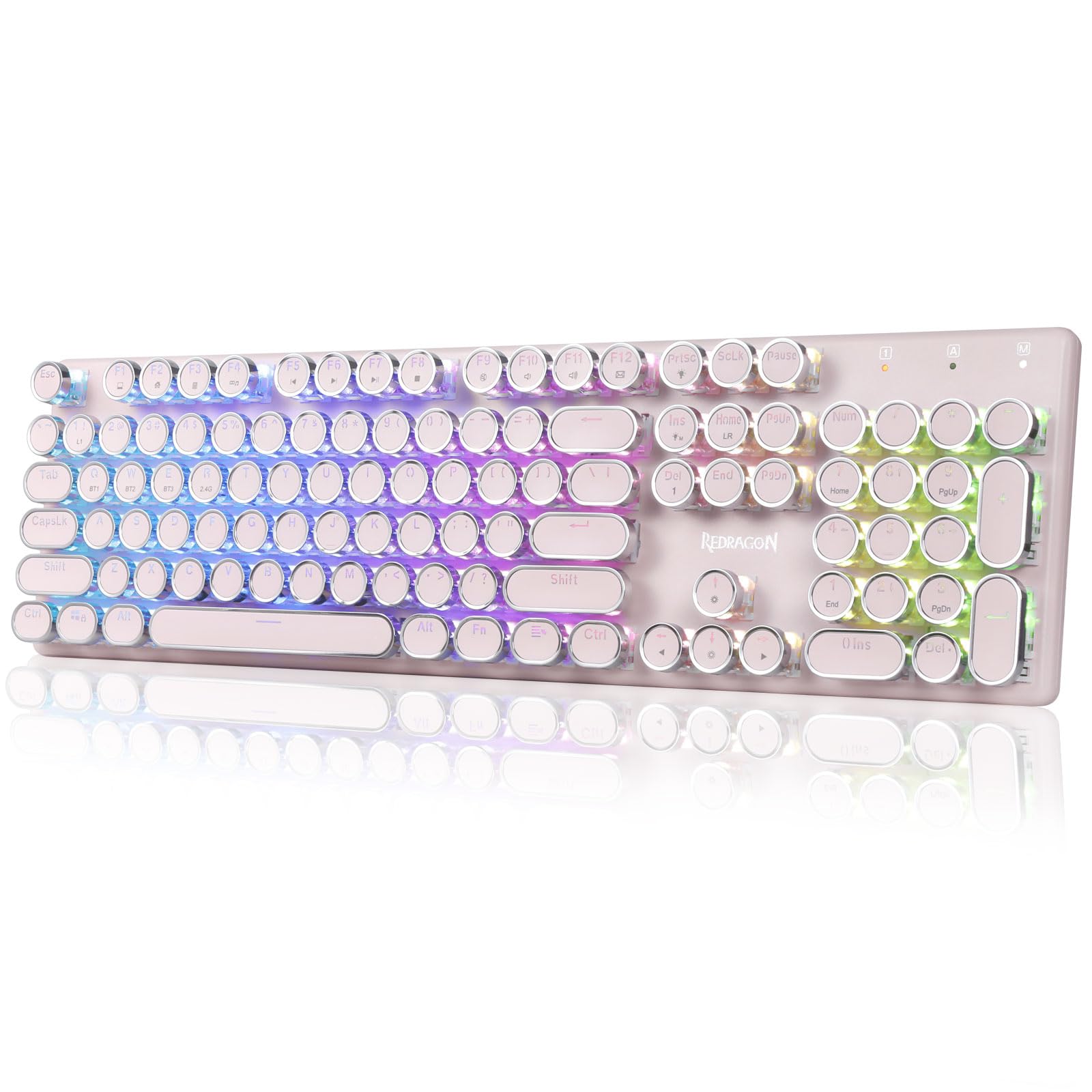
Round keycaps, blue switches, and a thunk that sounds like typing on a 1950s machine.
This is the one you buy when you want your desk to have a personality. The vintage steampunk styling uses round keycaps and a tank-solid metal panel that keeps the deck steady. Blue mechanical switches give medium resistance, an audible click, and tactile feedback — a real actuation bump rather than a flat press. The 4000mAh rechargeable cell survived multi-day use with the lights on by buyers’ account, and the lights auto-off after inactivity to save power.
Flexibility is genuinely good. Redragon’s tri-mode connection covers USB-C wired, Bluetooth 3.0/5.0, and 2.4GHz wireless — press FN+Q/W/E to reach Bluetooth, FN+R for 2.4G. Up to 16 presets of RGB backlighting, adjustable for brightness and flow speed, run alongside 7 solid colors including red, green, blue, yellow, purple, cyan, and white. The 104-key anti-ghosting setup lets you press multiple keys at once without dropping inputs. At 950 g it sits planted and stays there.
Two things will decide whether it suits you. The round keycaps sit with wider spacing, so touch typists report a learning curve of typos before muscle memory adjusts. And the audible click is the whole point — it is not a library keyboard. The pink finish and typewriter silhouette are why people pick it, and the click is why they keep it.
Why it earns the desk
- Three connection modes — USB-C wired, Bluetooth 3.0/5.0, and 2.4GHz wireless
- 4000mAh battery rated for several days of use with RGB on
- 16 RGB presets and 7 solid colors, adjustable on board
- 104-key anti-ghosting and a solid metal panel
Who it will fight
- Wider key spacing throws off touch typists at first
- Clicky blue switches are loud enough to carry across an open office
Perfect match: someone who wants a showpiece keyboard with real mechanical click, three ways to connect, and RGB to match a pink desk theme.
Choose something else: if you type in a shared quiet space or need standard key spacing from the first keystroke.
5. RK ROYAL KLUDGE R98 Pro Mechanical Keyboard

Five foam layers and pre-lubed switches turn every keystroke into a low thock instead of a clack.
The first thing a mechanical keyboard fan notices here is the sound. Five layers of sound-absorbing foam sit inside a gasket mount, which is a soft layer between the plate and case that soaks up vibration for a deep, creamy tone rather than a hollow ping. Pre-lubed linear cream switches give a smooth straight-down press, and since the board is hot-swappable for 3-pin and 5-pin switches, you can change the feel without soldering. Spare cream switches come in the box.
The layout is the smart compromise. 98 keys keep the number pad and arrow cluster while trimming the gaps, so you get a near-full-size deck in less desk space. Four indicator lights show Num Lock, Caps Lock, Win Lock, and Mac Mode. The detachable aluminum volume knob turns quickly for volume, and a spare End key lets you swap it out if you rarely touch volume. MDA-profile double-shot PBT keycaps have a matte, non-fading surface built to outlast shine. Over 20 RGB modes and a programmable online driver cover remaps and macros on Windows and Mac.
Two honest notes. It is wired only via USB-C — no Bluetooth, no wireless — so the cable stays put. And the volume knob sits close to PgDn and lacks grip grooves, so turning it takes a firm pinch. If you want a pure typing feel and a number pad on a slim footprint, this is the strongest wired pick in the group.
The feel is the argument: gasket mount plus five foam layers plus pre-lubed linear switches equals a quiet, smooth, low-pitched typing experience you would normally expect to pay more for.
The knob gripe: the detachable aluminum volume knob works but sits tight against PgDn with no grip grooves, and the cable is non-negotiable.
Pick it if: you want a workspace keyboard with number pad, a satisfying thock, and the freedom to swap switches later.
Pass if: you need a cable-free desk or want a knob that turns with one finger.
6. SOLAKAKA KI99 Pro Wireless Mechanical Keyboard

The 10,000mAh battery is the headline: weeks pass between charges.
Most wireless mechanical keyboards need charging every week. This one carries a 10,000mAh battery, and that changes the whole relationship — plug it in rarely and forget about it otherwise. Connection covers Bluetooth 5.0, 2.4GHz wireless, and Type-C wired, with a stable signal up to 10M and Windows and macOS compatibility. The 96% layout folds in most of a full-size keyboard’s keys while leaving space on the desk, and the multifunctional knob handles volume, media playback, and brightness.
Inside, a gasket structure pairs with five layers of noise-reducing material to cut key vibration. The result is a solid, creamy sensation rather than a rattly one. A 1.2mm flex-cut hot-swappable PCB supports both 3-pin and 5-pin switches with no soldering, so you can personalize the feel. Double-shot PBT keycaps resist wear and fading, and the full-key RGB with side light bars offers up to 16.8 million colors, adjustable for mode, color, brightness, and speed via driver or shortcut keys.
The catch is the light touch. Several buyers describe misclicks from barely grazing a key — the non-silent version here is sensitive. Front-facing key legends (the letters sit on the front of the cap, not the top) are another adjustment for anyone used to top-printed caps. If your fingers tend to hover, allow a week of adjusting your resting lightness.
Battery dominance: a 10,000mAh cell and triple-mode connection make this the pick that truly leaves the cable in a drawer.
The sensitivity note: the non-silent switches misclick on the lightest touch, and legends sit on the front of each keycap rather than the top.
Made for you: a multi-device worker who wants one keyboard that hops between laptop, tablet, and console and almost never needs charging.
Less ideal: if you rest your fingers heavily on the keys or need top-printed legends to type accurately.
7. nuphy Air75 V3 Mechanical Keyboard
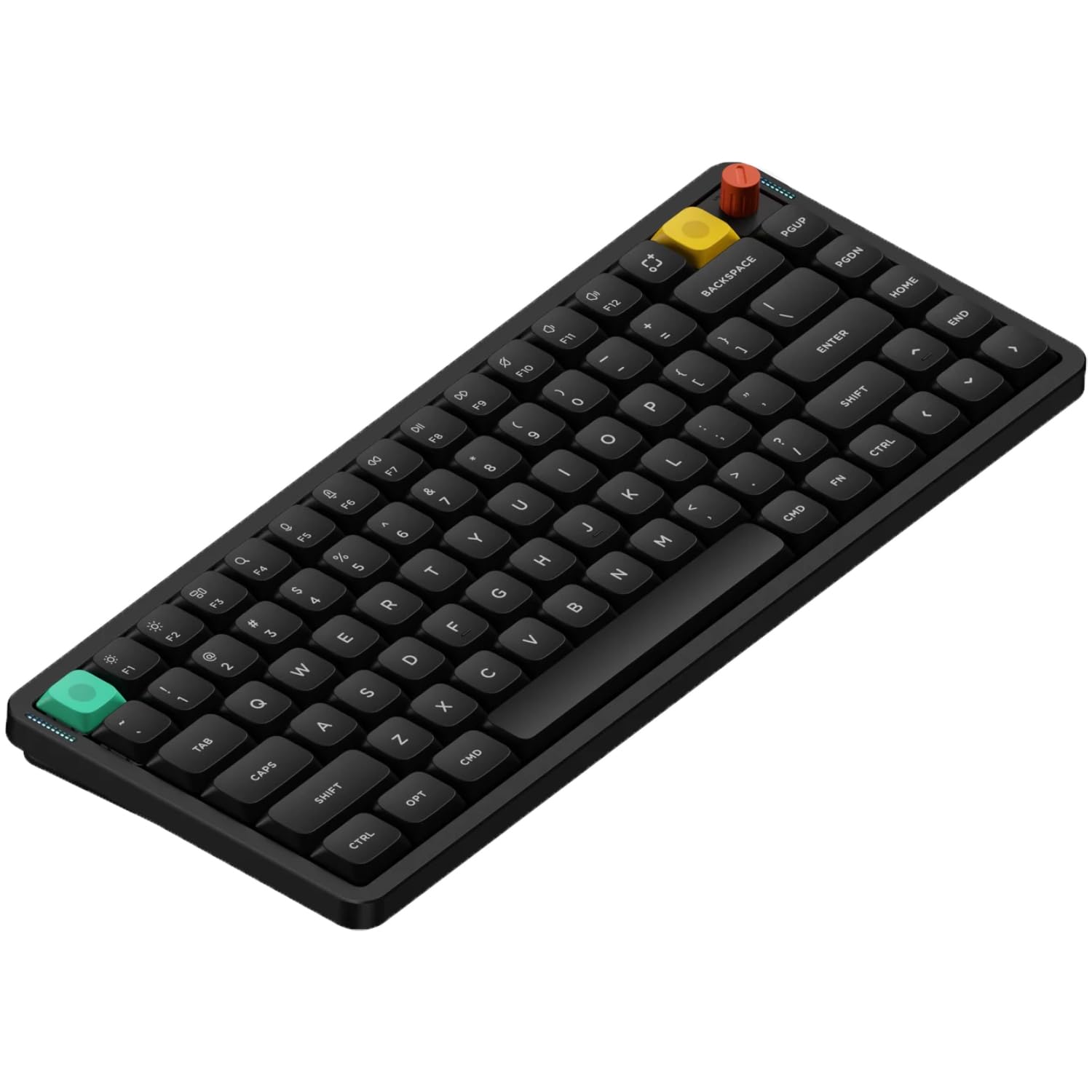
A 13.2mm deck that slips into a bag and still types like a mechanical board at home.
Portability is the reason this one exists in a mechanical world. At 13.2mm thin and 724 g, it slides into a laptop bag without the heft of a full-size board. The 75% layout keeps the keys you use most while saving desk space, and the 4000mAh battery carries the wireless mode through long stretches. Connection is triple-mode — Bluetooth, 2.4GHz, and USB-C — and you can pair up to five devices and swap between them without re-pairing. A removable control knob defaults to volume but can be reprogrammed for scrolling or zooming.
Fans of quiet mechanical feel will like the gasket mount here. Silicone gaskets absorb keystrokes, dampen vibration, and remove the hollow echo. The low-profile layout is designed to keep your wrist in a straight posture, and the Brown nano switches hit a middle ground — a deeper, quieter press than a clicky switch, good for private offices and WFH rooms. Doubleshot PBT keycaps keep their letters, and the NuPhyIO browser tool remaps keys, programs macros, and adjusts RGB with no driver install. Polling reaches 1000Hz in wired and 2.4GHz modes. Extra keycaps for macOS and iOS come in the box.
The honest part: this board scores lower than the others on long-term reliability reports. Some units develop duplicate keystrokes after a couple of months, and there are threads of intermittent Bluetooth and 2.4GHz dropouts. Others run perfectly, and the switches themselves are pleasant. The brand’s support has reportedly sent free replacement parts and dongles to buyers who needed them. If you want the most portable mechanical board in this lineup and are willing to keep the original box handy, it is a pleasure to type on.
Best if: your keyboard rides in a bag every week and you want quiet Brown nano switches, five-device switching, and a slim frame.
Think twice: if you need proven long-haul reliability from day one or want per-key backlight customization — neither is this board’s strength.
Know the Specs
Connection Type (2.4GHz, Bluetooth, USB-C)
A 2.4GHz connection uses a small USB dongle to hold a dedicated wireless link — it is the most reliable plug-and-play option and rarely drops. Bluetooth pairs without a dongle and lets one board switch between devices, though it can lag in a room with heavy wireless traffic. USB-C wired is the zero-risk option that also charges. Boards that offer all three give you a working fallback if one mode misbehaves.
Battery Life Ratings
Battery ratings are listed as either months (36 months for the MK270 keyboard, 12 for its mouse) or hours (200 hours for the TECKNET on a 500mAh cell). Read the figure against how you work. A board that charges over USB-C and runs while plugged in makes a low battery a minor annoyance, not a work stoppage. A power switch and a low-battery indicator are the two features that keep you from being surprised.
Key Switch Type and Gasket Mount
Membrane keys use a rubber dome — quiet and low-profile. Mechanical keys use a physical switch per key, giving defined actuation and, on clicky models, an audible click. A gasket mount is a soft layer between the plate and case that absorbs vibration; it turns a hollow ping into a deeper thock. Pre-lubed switches arrive already greased for a smoother press, and hot-swappable boards let you change switches without soldering.
Layout and Number Pad
Full-size layouts keep the number pad, arrow cluster, and function row — best if you enter figures all day. A 96% or 98-key layout keeps the number pad while trimming gaps to save desk space. A 75% layout drops the number pad entirely, freeing room for your mouse. The trade-off is real: smaller boards look tidier but make ten-key work slower.
Common Questions
Will a wireless external keyboard work with my laptop without any setup software?
How long does an external keyboard battery really last?
Is a mechanical keyboard better than a membrane keyboard for typing?
What does hot-swappable mean on a mechanical keyboard?
Can I use a 75% keyboard for spreadsheet work without a number pad?
Will a compact keyboard’s smaller mouse or key spacing cause typos?
Do I need a wrist rest with an external keyboard?
Which keyboards here work with both Windows and Mac?
Should I keep the USB receiver in the box when I switch keyboards?
Is a wireless keyboard more lag-prone than a wired one?
The Bottom Line
If you want the simplest full-size setup that will last years on its original batteries, the Logitech MK270 combo remains the safest buy for most desks, with keyboard and mouse handled in one box. For someone who types long hours and wants a supported wrist, the TECKNET Ergonomic is the more comfortable choice. If you want a creamy, thocky deck with a number pad for a wired desk, the RK Royal Kludge R98 Pro delivers the best typing feel of the group. And if your keyboard lives in a bag, the nuphy Air75 V3 is the portable pick worth carrying — just keep the original box and expect to test the switches in your first week.
How we choose
We do not accept paid placement. Every pick is matched to a real buyer and a real use-case; we do not hands-on test units.
Sources
Specifications: manufacturer listings and product documentation. Review insights: verified customer reviews, as of October 2026. Pricing: not shown on this page (it changes often); check the current price via the retailer link.
As an Amazon Associate, Aappliancez earns from qualifying purchases. This does not affect which products we feature.