Disclosure: Some links in this post are affiliate links. As an Amazon Associate I earn from qualifying purchases, at no extra cost to you. Learn more
Specs are compiled from manufacturer listings and verified buyer reviews and can change over time — please confirm the key details on the product page before buying.
Long-term storage is not about buying the biggest box on the shelf. It is about picking a drive that will still spin up in five years and hand your photos, tax files, and game saves back without drama. The seven drives below each solve a different version of that problem — some are built tough for travel, some are built big for archive piles, and one runs quieter and cooler than the rest. This guide sorts them by the things that actually break long-term storage: reliability, capacity, and whether the drive plays nicely with the computer you already own.
This guide is built by comparing the manufacturers’ published specifications and the patterns across verified customer reviews, so you get each pick’s real strengths and trade-offs instead of marketing spin.
Start with the drive whose owner reviews show the fewest failure reports. The Western Digital 2TB Elements is the safest first choice for most people who need an external hard drive for long term storage.
Top Picks


How To Choose The Best External Hard Drive for Long Term Storage
Long-term storage punishes the wrong choices harder than any other use. A drive you only carry to a meeting can fail and you buy another one. A drive holding ten years of family photos that fails quietly is a different kind of loss. So the rules here are different from a speed review.
Capacity you will not outgrow in two years
Photos and video grow faster than you expect. A 2TB drive holds a large photo and document library with room to spare, while a 5TB drive lets you stop deleting old projects for a while. The smart move is to buy one size above what you think you need, then keep a second copy elsewhere.
Reformatted, not raw — check the file system
Most drives arrive ready for Windows and need one reformatting step to work fully on a Mac. That is a one-time job in Disk Utility and takes about a minute. Buy a drive whose listing tells you this up front instead of finding out after the box is open.
Shock and water protection if it leaves the desk
A drive that lives in a drawer does not need armor. A drive that rides in a backpack or a camera bag should have a shock rating and a water rating. An IP68 rating means it is sealed against dust and survives being submerged, and MIL-STD-810G is a military drop-test standard — both worth having when the drive travels.
Side-by-Side Comparison
| Model | Best For | Capacity | Transfer Rate | Form Factor | Amazon |
|---|---|---|---|---|---|
| WD 2TB Elements★ Best Overall | Most people archiving photos and documents | 2 TB | 5 Gbps | 3.5-inch | Amazon |
| Seagate 2TB PortableEasiest Setup | First-time buyers who want zero setup | 2 TB | 1 Gbps | Portable | Amazon |
| ADATA HD710 Pro | Travel, field work, and rough handling | 2 TB | 90 Mbps | Portable | Amazon |
| Seagate Portable 4TB | Piling up years of video and game data | 4 TB | 120 Mbps | Portable | Amazon |
| WD 5TB Elements | Archive piles and PS5 game libraries | 5 TB | 1 Mbps | 2.5-inch | Amazon |
| Toshiba Canvio Basics 2TB | Photographers and office backups | 2 TB | 5 Gbps | Portable | Amazon |
| WD 5TB My Passport | Encrypted backups of private files | 5 TB | 1 Mbps | 2.5-inch | Amazon |
Detailed Reviews
1. WD 2TB Elements Portable External Hard Drive
Our pick — 4.5+★ from 165,500+ verified ratings; the strongest balance of quality and price.
The 2TB drive buyers report still working years after they stopped thinking about it.
The number worth starting with is 5Gbps — the drive’s SuperSpeed USB 3.2 Gen 1 connection, which is how fast data moves from your laptop to the drive. That is real, useful speed for big photo folders and multi-gigabyte video files. By comparison, the Seagate 2TB Portable below lists a 1Gbps transfer rate. You feel the difference most when you are dragging a 50GB camera card across.
It comes formatted for Windows with no software to install. Plug it in, it appears, and it works. The one catch for Mac owners is a one-time reformat in Disk Utility, which takes about a minute, and the drive then behaves normally. The palm-sized black shell is the other thing people notice — it disappears into a bag or a drawer, which is exactly what you want from a drive you rarely think about.
What earns this drive its spot for long-term storage is simple: owner reviews rarely mention a failure. Owners mention backing up two laptops to the same drive with separate accounts and no software at all. One buyer sums it up: the drive gives “plenty of room for files, photos, and other important data.” Inside sits a 3.5-inch mechanical disk (a spinning hard disk, not a flash chip), so treat it gently and keep a second copy of anything irreplaceable — that advice applies to every drive on this list.
What it gets right
- 5Gbps USB 3.2 Gen 1 transfer rate, five times the figure listed for the Seagate 2TB Portable
- 2TB of space with no software install and no account setup
- Palm-sized aluminum-shell body that stores easily
- Works with desktops, laptops, and gaming consoles
Where it asks something of you
- Macs need a one-time reformat before the drive is fully usable
- Mechanical disk inside, so it is not a drive to knock around
Go with this if: you want a plain 2TB archive drive that works the moment you plug it in, and you are on Windows or willing to reformat once.
Consider otherwise if: you need something that survives being dropped in a bag — the ADATA below is built for that.
2. Seagate 2TB Portable Hard Drive | USB 3.0 (STGX2000400)
Buy this when you want to plug in one cable and start copying files, with no software to learn.
If you are setting up your first external drive and you would rather not read a manual, this is the one to grab. Plug in the included 18 inch USB 3.0 cable, and the drive shows up as a second letter on your computer. There is no driver, no download, and no account. It comes formatted for Windows and needs a reformat on a Mac, same as everything else here.
What buyers mention most is exactly that ease of use, and the second most-praised thing is the storage. One buyer describes the drive as “simple to use—just plug it in and go.” Another user, in their seventies and new to external drives, reported the drive appeared instantly and they were copy-pasting files within minutes. That is the right audience for this pick.
The honest note is on the reliability side. This is a mechanical disk, so the long-term story is real but not magic, and the smart defense is a second backup. At a 1Gbps listed transfer rate it also moves slower than the WD 2TB Elements above, so it is a drive for backup and storage, not for editing video off the disk. Keep the drive somewhere stable and out of the way, and it does its job quietly.
The 2TB reality: 2TB of stated capacity is a lot of space for documents and photos, and a reasonable ceiling for home video. The drive is portable and light enough to sit on a shelf or slide into a laptop bag between backups.
One thing to know: the mechanical disk is slower than an SSD (solid-state drive, which has no moving parts), so load times on big video files are noticeable. That is fine for storage; it is frustrating for editing.
Reach for this if: you want the drive that takes the least explaining, and your plan is copy files and put it away.
Look elsewhere if: you expect to move large projects back and forth often — the faster WD Elements will suit you better.
3. ADATA HD710 Pro 2TB External Hard Drive
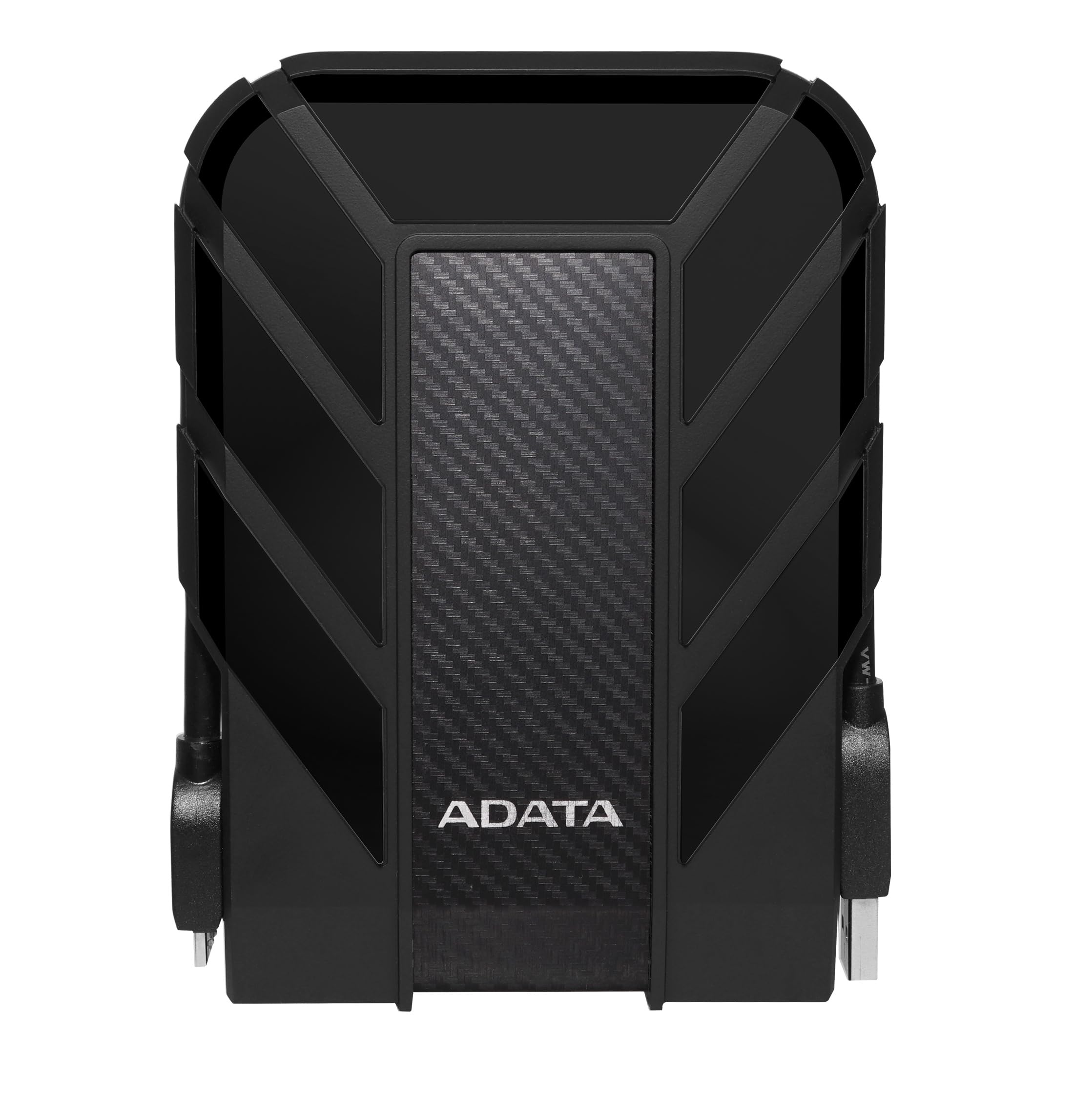
A rubber-armored 2TB drive rated IP68 for water and dust, built for camera bags and job sites.
The ADATA HD710 Pro is the only drive here that publishes a weather rating. It carries an IP68 rating for water and dust, plus an IP6X dust rating and MIL-STD-810G 516.6 shock resistance — meaning the maker built it to survive drops and a soaking, not just a desk. A triple-layered case sits around the disk, and there is a groove for winding the cable so it does not dangle loose in a bag.
Speed is where it sits behind the pack. The listed transfer rate is 90Mbps, so it is not the drive for fast editing off the disk. Set against that, one buyer moved 606 GB in minutes and said it was “far faster than Silicon Power drives,” so real-world transfers are more usable than the number suggests.
The durability gets the most praise from people who actually take it out of the house. What is less loved is the connector — the older-style USB port is stiff to insert, and at least one buyer found the port worked loose over time. Treat the port gently, keep the cable with the drive, and this is the one to buy if the drive rides in a camera bag or a job site kit.
Where it shines: IP68 water and dust sealing plus MIL-STD-810G shock testing, which no other drive here publishes. It works with Windows, Mac, and Linux, and with a long list of game consoles including the PlayStation 5 and Xbox Series X.
Where it expects care: the 90Mbps listed transfer rate is the slowest here, and the older connector style demands a steady hand and a spare cable on your gear list.
Best for the road: photographers, students, and field workers who need data that survives rain, dust, and a real drop.
Not for speed chasers: if you plan to edit 4K video straight off the drive, the slower listed transfer rate will hold you back.
4. Seagate Portable 4TB External Hard Drive HDD
Twice the room of the 2TB drives here, with a rescue service on top.
The reason to pick this over the Seagate 2TB is just the size: 4TB doubles your space. For long-term storage that matters a lot, because it lets you keep years of video, project files, and discarded photos without the delete decisions. The listed transfer rate is 120Mbps, which is higher than the 1Gbps figure the smaller Seagate shows — in practice both are mechanical-disk speeds, and both are fast enough for backup and slow for editing.
Setup stays on the easy side. Plug in the 18 inch USB 3.0 cable, and the drive shows up without any software. Windows users are running immediately; Mac owners reformat once in Disk Utility. Buyers describe storing hundreds of media files within the first few days, and a music producer reported the drive keeps up with plugins and audio files loaded straight off it.
The extra capacity also buys the 1-Year Rescue data recovery service — included, not an add-on. That is a real safety net for a drive you plan to keep. As with every mechanical drive here, the disk is one moving part away from trouble, so keep a second copy of the important stuff and treat the drive gently.
What earns its place
- 4TB of space, double the 2TB Seagate above
- 1-Year Rescue data recovery service included
- 120Mbps listed transfer rate, fine for backups
- Plug-and-play on Windows, one reformat on Mac
What to accept going in
- Mechanical disk, so it is neither fast nor drop-proof
- Mac owners need a reformat before the drive acts normally
The right buy if: your library already outgrew a 2TB drive, and you want the safety net of the included rescue service.
Instead consider: the 2TB Seagate if you honestly have under half a terabyte of data — you save the capacity you will not use.
5. WD 5TB Elements Portable External Hard Drive

The 5TB drive for anyone who would rather buy space than delete old files.
A 5TB drive gives you an archive pile, not a folder. One of the smartest things owners do is buy two and sync them, so a failure on one still leaves a clean copy. That is the real long-term storage play here, and the 2.5-inch body means the drive stays pocket-sized for 5TB — owners describe it as wallet-sized, which is generous but close.
Customers note it runs quiet and stays compatible with desktops, laptops, and tablets. It also works as a PS5 extended storage drive for PS4 games — one buyer loaded a game library straight off it with no setup at all. It arrives formatted for Windows, ready to plug in.
The catch worth planning around: this drive needs a proper USB port. Owners found it would not wake up on an unpowered USB hub and worked fine when plugged directly into the computer or a powered dock. The stock cable drew some grumbles too, so a spare USB-A cable is cheap insurance. Set the drive up on a direct port, and it behaves.
The capacity math: 5TB holds an enormous amount of video and photo work, and a 2.5-inch drive makes that portable. It is the right pick for an archive drive that sits in a drawer and takes every old file you hand it.
The honest limit: the hardware itself has no encryption or bundled backup software. For protected files, the WD My Passport below is the better call.
Choose this if: your goal is maximum room for the money, and you will plug it straight into the computer.
skip it if: you rely on a hub or dock — get a powered dock first, or pick a drive that tolerates low power.
6. Toshiba Canvio Basics 2TB Portable External Hard Drive

A card-deck-sized 2TB drive that runs quietly and handles routine backups without fuss.
Toshiba’s Canvio Basics gets one thing exactly right for long-term storage: it stays out of the way. It is card-deck-sized, smudge-resistant on top, and the 2TB capacity gives you a whole library of documents and photos with room left. The listed 5Gbps transfer rate matches the WD Elements above, so speed is not the compromise here.
Compatibility is where you should read before buying. It needs a reformat for Mac OS v10.12 and older versions, so Mac users do that step once in Disk Utility. It also works with USB 3.0 and USB 2.0 ports, which matters when you are backing up an older machine — the drive will still connect even on the slower port.
Owners praise the compact size especially, and several report it working as a second drive for daily files with no fuss. One honest note: a former system administrator recommends swapping the included cable for a dual-USB Y-cable on older machines that struggle to supply power on one port. That is a fix, not a reason to skip the drive.
What it is good at: 2TB of capacity in a matte, smudge-resistant body, with a 5Gbps listed transfer rate. Silent operation makes it easy to leave sitting on a desk during a long backup.
The compatibility note: Macs need a one-time reformat, and older laptops may need a dual-USB cable for stable power. Plan for both and the drive behaves.
Fit for: photographers and office users who want a silent 2TB drive they can leave plugged in all day.
Less ideal if: you are on an older machine with weak USB ports — budget for a Y-cable before you rely on it.
7. WD 5TB My Passport Portable External Hard Drive

A 5TB drive with hardware encryption and a password lock built into the drive itself.
This is the only drive here with hardware encryption built in. That means the drive chips scramble your files, and a password protects the drive itself — so a stolen drive does not hand over your tax returns or client files. It also ships with device management and backup software that includes defense against ransomware, plus a 3-year limited warranty. If your worry is privacy, start here.
Capacity is the second draw, with one owner noting it can hold roughly 800 high-def movies. That is a lot of media to keep in one slim body. The 2.5-inch format and slim shell mean it takes almost no shelf space despite the size of the pile it holds.
Here is the honest part. This drive is reliable enough for ordinary use, but the long-term record is mixed — some reviewers point out working perfectly for years, and some report a failure within the first year. That is why a second copy of anything you cannot lose is non-negotiable. The bundled software has also caused install headaches for at least a few people, so if you only want file storage, skip the software and use the drive plainly. The 1Mbps listed transfer rate (megabits per second, a measure of how fast data moves) also points to slow writes once the drive fills, so it works best as a vault, not a workspace.
Why it earns the top-security spot
- Hardware encryption with password protection on the drive
- 5TB capacity, enough for roughly 800 high-def movies
- Backup software with ransomware defense included
- 3-year limited warranty
The trade-off you accept
- Reliability record is mixed, so a second backup is essential
- The bundled management software has tripped up some installs
- Slower than the WD Elements above once the drive fills
Ideal for: anyone storing private documents, work files, or client data who wants a password lock built into the drive.
Worth knowing: if you want speed over security, the 5TB Elements is the same capacity with a lighter footprint.
Know the Specs
Transfer rate (Gbps vs Mbps)
Transfer rate is how fast data moves between your computer and the drive. The unit matters: Gbps means gigabits per second, and Mbps means megabits per second — the smaller figure. A drive listed at 5Gbps moves more data per second than one listed at 90Mbps. For long-term storage this affects one thing: how long your first big backup takes. After that, the drive sits quietly holding files.
Capacity vs usable space
A 2TB drive never shows 2TB free in File Explorer. The drive needs formatting space and some of the listed capacity is used by the file system. Expect somewhat less usable space than the number on the box. This is normal, not a defect. Buy one size above your current needs so you have headroom without needing to delete old archives.
IP and MIL-STD ratings explained
IP68 is a seal rating: the 6 means dust cannot get in and the 8 means the drive survives being submerged in water. MIL-STD-810G is a military drop-test standard, and 516.6 names the shock test the drive passed. If your drive stays at home, these ratings add cost you do not need. If your drive travels in a bag, they are the reason to pay more.
Hardware encryption vs software encryption
Hardware encryption lives on the drive’s own chip, so the scramble happens inside the drive and works even without the software installed. Software encryption depends on the program on your computer. For a drive that will sit in a drawer for years, hardware encryption is the more reliable long-term home for private files.
Common Questions
How long does a portable external hard drive actually last in storage?
Will this drive work with my Mac without extra software?
Is a 2TB drive enough for ten years of family photos?
Can I use one of these drives for a PlayStation or Xbox?
Do I need to plug the drive into a powered USB hub?
What is the difference between the WD Elements and the WD My Passport?
How do I safely remove one of these drives?
Should I buy one big drive or two smaller ones?
Why does the drive show less space than the box claims?
Is a shockproof drive worth the extra for home use?
The Bottom Line
For most people building an external hard drive for long term storage, the winner is the WD 2TB Elements. It pairs a 5Gbps listed transfer rate (gigabits per second, so large backups move quickly) with years-steady reliability and a plug-and-play setup that needs no software. If you travel with your data, grab the ADATA HD710 Pro for its IP68 sealing (dust-tight and protected against water immersion) and MIL-STD-810G shock resistance (a military durability standard for drops and bumps). And for private files that need a password lock, reach for the WD 5TB My Passport — a 5TB vault with hardware encryption (scrambling built into the drive itself) so your files stay locked even if the drive is lost.
How we choose
We do not accept paid placement. Every pick is matched to a real buyer and a real use-case; we do not hands-on test units.
Sources
Specifications: manufacturer listings and product documentation. Review insights: verified customer reviews, as of October 2026. Pricing: not shown on this page (it changes often); check the current price via the retailer link.
As an Amazon Associate, Aappliancez earns from qualifying purchases. This does not affect which products we feature.