Disclosure: Some links in this post are affiliate links. As an Amazon Associate I earn from qualifying purchases, at no extra cost to you. Learn more
Specs are compiled from manufacturer listings and verified buyer reviews and can change over time — please confirm the key details on the product page before buying.
Your laptop has no disc tray, and that shoebox of CDs and DVDs is sitting there unread. The fix is a slim external DVD drive that draws power from a single USB cable. Picking the right one matters, because a drive your laptop won’t recognize or that won’t play your movie is worse than no drive at all. Below are seven external drives that solve that problem, sorted so you can match one to your laptop’s ports and your disc collection in a few minutes.
This guide is built by comparing the manufacturers’ published specifications and the patterns across verified customer reviews, so you get each pick’s real strengths and trade-offs instead of marketing spin.
You’ll see which drives burn discs as well as read them, which ones add USB and card ports, and which ones handle Blu-ray. If you only want the short answer, the Dell Slim DW316 is the safest place to start for most people shopping for the best external DVD player.
Top Picks


How To Choose The Best External DVD Player
An external DVD drive is a small box with a disc tray and one cable. It plugs into a USB port and lets a modern laptop or desktop read, play, burn, or rip CDs and DVDs again. The choices look identical in photos, so the differences come down to four things: the USB generation, the included cable and connectors, whether it needs extra power, and what it physically cannot play.
Match the connector to your laptop
Most USB-C-only laptops need either a Type-A to Type-C adapter or a drive with both connectors built in. A drive with a stored 2-in-1 cable and both USB-A and USB-C ends removes the adapter hunt entirely. This is the single most common reason a drive gets returned — not because it failed, but because the plug didn’t match.
USB 3.0 versus USB 2.0
USB 3.0 is the newer, faster version of the USB connection standard. It moves data much quicker than USB 2.0, so a big video file or a full album rip finishes in less time. If you plan to rip CDs to digital files or back up a stack of DVDs, favor USB 3.0. If you only need occasional playback, USB 2.0 still works.
Power draw and the extra cable
Some laptops don’t push enough power through one port to spin a disc reliably. Several drives here include a second USB cable just for power. If your drive is recognized but won’t read, plugging that cable into a powered USB port or a wall adapter is usually the first fix to try.
Know what these drives cannot do
These are computer drives. They connect to laptops, desktops, and all-in-one PCs, and they do not connect to TVs, cars, tablets, phones, or game consoles. DVD models also do not play Blu-ray discs. Blu-ray needs its own drive and its own playback software, so check that before you commit.
Side-by-Side Comparison
| Model | Best For | Connection | Published Transfer Rate | Disc Formats | Amazon |
|---|---|---|---|---|---|
| Dell Slim DW316★ Best Overall | Most people | USB 2.0 | 60 megabits_per_second | DVD±RW, DVD-RAM | Amazon |
| ROOFULL ECD829-YMost Versatile | Mac and Windows daily use | USB 3.0 Type-A and Type-C | 8 megabits_per_second | CD and DVD, not Blu-ray | Amazon |
| BPAKDU External CD/DVD Drive | Extra ports on the desk | USB 3.0 Type-A and Type-C | 5 gigabits_per_second | CD and DVD | Amazon |
| ASUS SDRW-08D2S-U | Burning with encryption | USB | 1 megabits_per_second | DVD±RW | Amazon |
| LG GP65NG60 | Heavy CD ripping | USB 2.0, USB 3.0 compatible | 1 gigabits_per_second | DVD±RW, DVD-RAM, M-Disc | Amazon |
| ORIGBELIE External CD DVD Drive | Travel with a hub built in | USB 3.0 Type-A and Type-C | 5 gigabits_per_second | CD and DVD | Amazon |
| aelrsoch External Blu-ray Drive | Blu-ray playback and writing | USB 3.0 and Type-C | 100 gigabits_per_second | BD, DVD, CD | Amazon |
Detailed Reviews
1. Dell Slim DW316 External DVD±RW Drive
Our pick — 4.5+★ from 3,000+ verified ratings; the strongest balance of quality and price.
The quiet default: a slim Dell tray that just works, with software in the box.
If you want the least drama possible, this is the drive to buy. It’s a slim external DVD±RW unit — meaning it reads and writes standard recordable DVDs, dual-layer DVDs, and DVD-RAM discs — and it connects over USB 2.0. The published transfer rate for this drive is 60 megabits per second. In plain terms, that’s plenty for watching a movie or pulling files off a data disc without stutter.
The strongest signal is how rarely it frustrates people. Functionality is what buyers praise most here — roughly fifteen separate mentions in the review data — and the quality of the build draws the next-biggest share. Reviewers keep repeating the same verdict: it works, and it works the same way every time. One buyer put it simply: “Worked great. And the software was included. Very nice.” That bundled software is a real convenience, because it saves you hunting for a player app before your first disc.
The honest limit is speed ceiling, not reliability. It’s a USB 2.0 drive, so it will feel slower on a huge rip than a USB 3.0 model — if you’re digitizing an entire shelf, look at the LG or a USB 3.0 pick instead. For playback, software installs, and the occasional backup, that ceiling rarely comes up. And note the format line: this is a DVD drive, so Blu-ray discs are out.
Where it earns its keep
- Bundled software means you can play or burn a disc without shopping for an app first
- Handles DVD±RW, dual-layer DVD, and DVD-RAM, so most home disc collections read fine
- Plug-and-play setup over USB keeps the first session short
Worth knowing before you buy
- USB 2.0 connection means slower rips than the USB 3.0 models here
- DVD only — Blu-ray discs will not play in this drive
Reach for this one: if you want a dependable everyday tray for movies, installs, and backups on a Windows laptop or desktop.
Look elsewhere: if Blu-ray or heavy batch ripping is on your list — the format and the USB generation both fall short there.
2. ROOFULL External CD DVD Drive with Case, USB 3.0 Type-C
A drive that already speaks both USB languages, plus a sleeve to carry it in.
The headline here is the cable. A 2-in-1 cord tucks into the bottom of the drive with both a USB-A end and a USB-C end, so a MacBook Air and a desktop tower can both use it without an adapter. That’s the detail that makes it the easiest pick for a mixed-device household. It reads and burns CD and DVD formats and explicitly does not handle Blu-ray.
Buyers report the first five minutes are low-maintenance. Setup finishes in seconds, files copy promptly, and a 700MB data CD extracts in around five minutes. A 280MB audio CD rips to WAV (an uncompressed audio file format) in about the same window. Mac users with M-series chips (Apple’s own laptop chips) report getting it working through an Apple USB-A to USB-C adapter. The padded zippered case earns real affection — with a pocket for the spare cable and paperwork, it’s a drive you can throw in a bag without worrying.
The recurring gripes are small and consistent. The body is light enough to shift slightly when you close the tray, the power cable runs short, and the disc spinning can produce a high-pitched whine during a rip. None of these stop the drive working. And a heads-up for Mac owners: the tray button won’t eject after playback due to a macOS restriction, so you eject by right-clicking the disc icon instead.
What the numbers say: the published cache is 2 units against the Dell’s 0.75 — a real difference in how much the drive buffers while it reads. The trade-off cuts the other way on transfer rate, where the Dell’s published 60 megabits per second towers over this drive’s 8. For disc playback and CD ripping, that gap is harder to feel than it looks on paper.
The trade-off to plan for: playback on macOS needs you to learn the software eject step. It takes ten seconds once you know it, but it surprises people on night one.
Best fit: a household running both a Mac and a Windows PC, or anyone who wants the drive to live in a bag with its own case.
Check first: if Blu-ray or a TV hookup is part of the plan, this drive does neither.
3. BPAKDU External CD/DVD Drive with 4 USB Ports and SD Slots

A disc tray that moonlights as a port hub, so one USB slot does two jobs.
Laptops that dropped the disc tray often dropped half their ports too. This drive answers both losses at once. Alongside the CD/DVD reader and burner, you get four USB-A ports, one Type-C port, and two TF/SD card slots — so camera cards and flash drives have somewhere to go. It weighs 9 ounces, which is light enough to live in a laptop bag without complaint.
Speed is where it pulls ahead of the older drives in this list. It uses USB 3.0 with a published transfer rate of 5 gigabits per second, and it reads DVDs at up to 8x and writes and reads CDs at up to 24x. In everyday terms, a DVD loads quickly and a CD burn finishes before you’ve queued up the next disc. It plays discs quietly and hooks up to a laptop without fuss — the plug-and-play reputation here is well earned.
The catch is the cable. It’s hardwired and short, so a desktop tower that sits under the desk forces you to think about placement. There’s a workaround — the drive has its own USB port for a user-supplied cable — but the built-in cord is what most people will use. And like every DVD drive here, it handles CD and DVD only, not Blu-ray.
Why it stands out: the port count is the whole pitch. Four USB-A ports plus a Type-C and two card slots means this single box replaces a separate hub for a lot of desks.
Small print: short, non-removable cable. Measure the distance from your tower’s USB port to where you want the drive before it arrives.
Pick this if: your laptop is short on ports and you’d rather add one box than two.
Skip the hub feature if: you’re on a desktop with the tower on the floor — the short built-in cord will fight you.
4. ASUS SDRW-08D2S-U Slim DVD±RW Drive
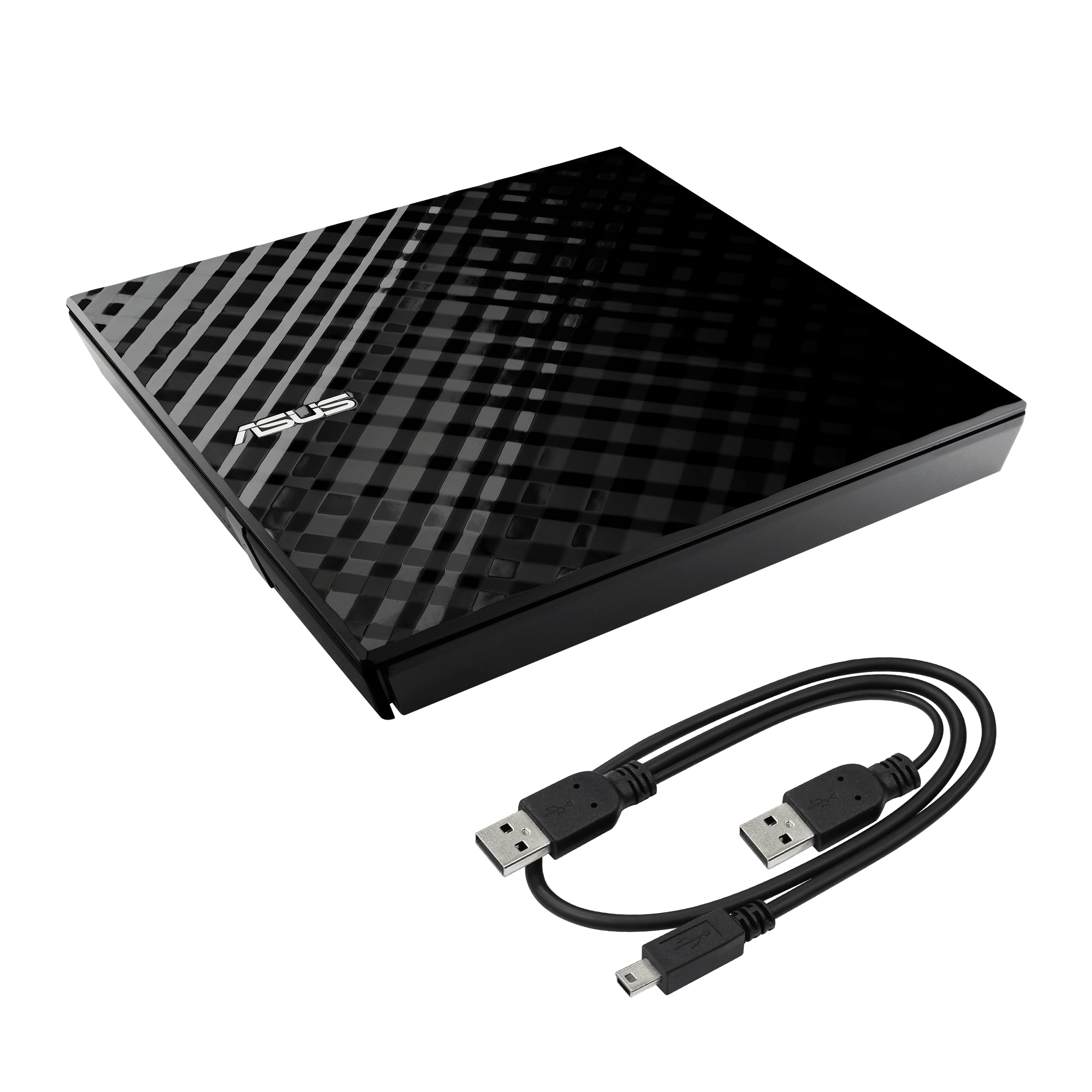
Burn speed with a lock on it — password protection baked into the disc.
Most drives here burn discs. This one lets you lock them. ASUS builds in disc encryption with password-controlled access and hidden-file functionality, so a burned backup can stay private even if the disc leaves your desk. It writes DVDs at up to 8x and pairs that with a Drag-and-Burn interface that claims a burn in three steps. If you’re archiving documents or family photos, that combination is genuinely useful.
Day to day it behaves like a good slim drive. It’s plug-and-play with no driver install, and it plays nicely with a Microsoft Surface and with Macs. The diamond-cut finish looks more deliberate than the plain black boxes around it, which is a small thing until it’s sitting on your desk in view. The published transfer rate, though, is 1 megabit per second — slow on paper, and a reminder that this is an older USB 2.0-era design built for burning, not for bulk ripping speed.
The real quirk is power. Reading works from a single USB port, but burning may need two, and the cable is barely over a foot long. On a slim laptop with two ports side by side, that’s fine. On a machine where those ports are spread out, you’ll notice. It doesn’t include a case either, so plan your own storage.
The case for the ASUS
- Password-protected, hidden-file disc encryption separates it from every other DVD pick here
- Drag-and-Burn makes a disc burn a three-step job for non-technical users
- Diamond-cut shell looks sharper than the plain black drives on this list
Where it asks for patience
- Burning may require two USB ports, which tightens up on port-light laptops
- Short cable and no included case
The right buyer: anyone burning private backups who wants the disc itself locked down, not just the drive.
The wrong buyer: someone chasing fast rips — a USB 3.0 model beats it clearly there.
5. LG GP65NG60 External DVD Writer with M-Disc Support

For the person with a shelf of CDs to digitize and no patience for failures.
This is the drive you buy when the job is a hundred discs, not one movie. It writes DVDs at up to 8x and CDs at up to 24x, it supports M-Disc media, and it ships with CyberLink software. The physical build is a 14mm-tall slim drive in ABS plastic, so it slides into a drawer or a bag slot without bulk. It handles Windows and Mac machines and plays back DVD-RAM discs as well.
The endurance stories are what sell it. It replaces dead internal SuperDrives in iMacs and keeps running: one long ownership run reached 3+ years and roughly 350 burned discs with only a couple of failures that traced back to bad media. Another has taken well over a thousand uses and still reads fine. When you’re ripping an archive, that’s the quality that matters most.
Two honest flags. On a Mac, some owners mention compatibility trouble, so confirm your macOS version before you commit. And the bundled software disc is largely redundant — most people ended up downloading a free player before their first DVD would open. A few report slower-than-internal speeds and a drive that’s slightly louder than the one it replaced, which is normal for USB-bus-powered slims.
The long-haul read: functionality and build quality dominate the feedback here, in the thousands of mentions each. That’s the profile of a DVD writer people keep using for years instead of replacing.
The fair warning: Mac compatibility is the mixed signal in this drive’s record. If your machine is a MacBook, the ROOFULL is the safer pairing.
Made for: Windows users with a big CD or DVD archive to rip, or anyone replacing a dead internal optical drive.
Think twice if: your machine is a Mac — this is the drive with the most compatibility noise on that platform.
6. ORIGBELIE External CD DVD Drive with 6-in-1 Hub

A full travel kit: drive, storage bag, carrying case, and a hub to boot.
Very few drives arrive with this much in the box. You get the drive, a drive storage bag, a carrying case, a USB-A to DC power cable, and a manual. Inside the shell sits a 6-in-1 USB 3.0 hub with one USB A 3.0 port, one USB A 2.0 port, two USB C ports, plus TF and SD card slots. For a photographer pulling files off an SD card on the road, that’s the difference between packing one accessory and four.
It handles the actual disc work well. The USB 3.0 connection reaches up to 5 gigabits per second, DVDs read and write at up to 8x, and CDs at up to 24x. It also has the look — an RGB LED gradient light cycles through colors, which is a decorative touch you either enjoy or ignore. The drive supports Windows 11 down through XP, plus Mac OS 10.6 and above and Linux.
The gripes worth hearing: the built-in cable is short and non-replaceable, and one long-term report describes a unit that failed to read discs after roughly twenty DVDs and four months of use. That’s a single account against a large body of positive feedback, but it’s the reason the power cable in the box matters — use it when your port is weak. Also note the SD and TF slots cannot work at the same time.
Travel math: the included case and bags mean nothing extra to buy. The 2-in-1 USB-A/USB-C cable means no adapter to lose.
One rule to remember: plug in the supplied power cable if a disc won’t spin up. It’s a common fix for underpowered laptop ports.
Good match for: travelers and photographers who want disc access, card slots, and USB ports in one pouch.
Not the pick for: Chromebook, Surface, or Blu-ray users — none of those are supported here.
7. aelrsoch External Blu-ray Drive, USB 3.0 / Type-C
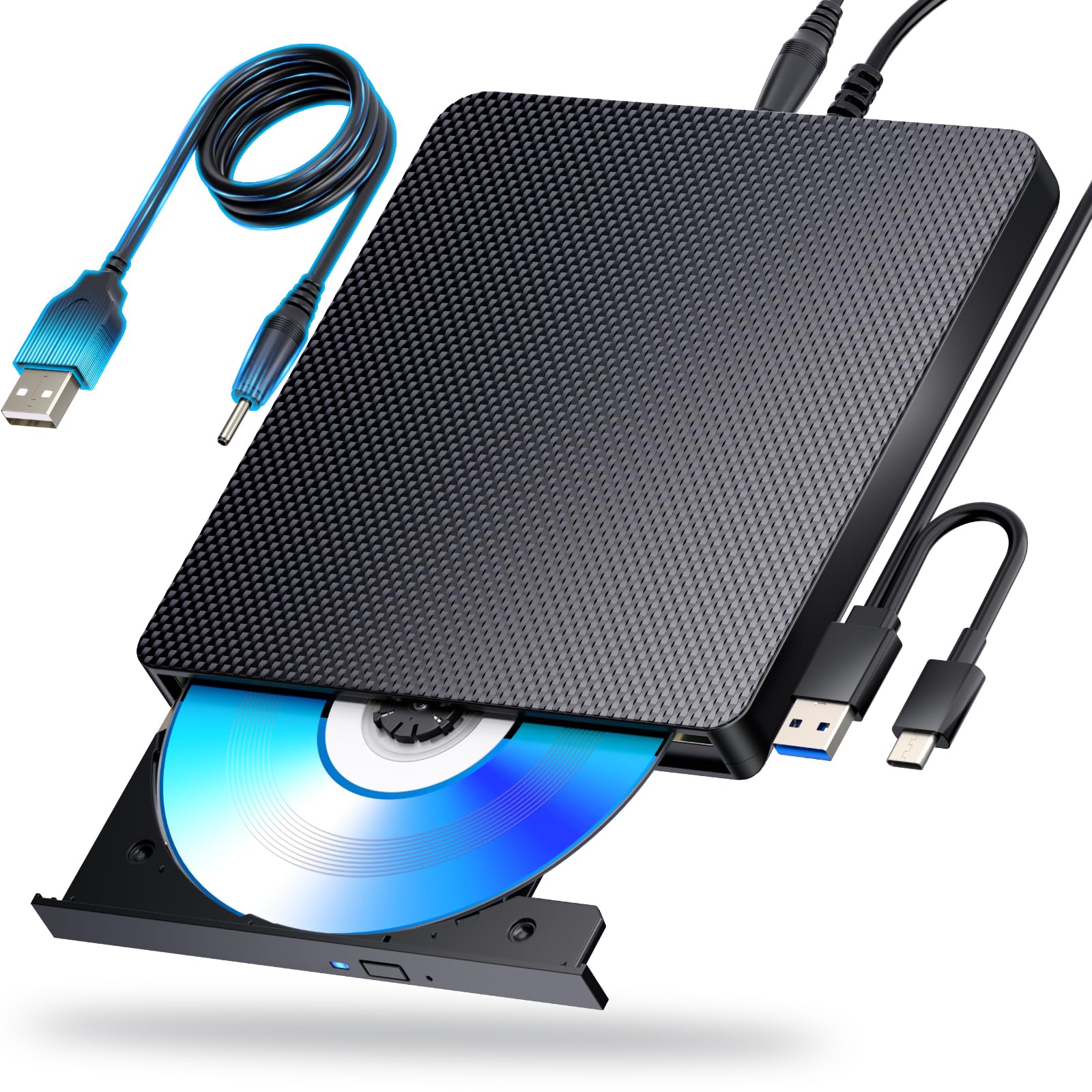
The only drive here that reads and writes Blu-ray — with software you supply.
Every other pick on this list stops at DVD. This one doesn’t. It reads and writes BD discs up to 100GB, DVDs at 4.7GB and dual-layer at 8.5GB, and CDs at 700MB, all over a USB 3.0 connection. It bundles both USB 3.0 and Type-C interfaces into a single stored cable and adds an extra USB power cable for drives that need a steadier supply. If your collection includes Blu-ray movies, this is the only door in.
Set your expectations correctly before you buy, because the software is not included. Blu-ray playback and writing require a player like PowerDVD, Leawo Blu-ray Player, AnyDVD, or VLC. Some users report that Blu-rays needed formatting software that ran about 30 minutes per disc. That setup step is the price of entry, not a flaw in the drive.
The record here is genuinely mixed, and that’s worth naming plainly. Playback is the most-discussed topic in the feedback, and opinions split — some report it working well for DVDs and CDs through VLC while Blu-ray took extra work. There’s also a hard limit to know: this drive does not play 4K Ultra HD Blu-rays. If 4K discs are your collection, this isn’t it. For standard Blu-ray and DVD, it does the job with a bit of software patience.
The Blu-ray answer: 100GB BD capacity is the number that matters — no DVD drive on this list comes close, because none of them read Blu-ray at all.
Set-up reality: budget time for software. The drive is hardware; the player is on you.
Choose this if: you own Blu-ray movies or need to burn BD discs and you’re comfortable installing a player app.
Pass if: 4K Ultra HD Blu-ray is what you’re after, or you want a drive that plays a movie the moment it’s plugged in.
Know the Specs
USB generation and transfer rate
USB 3.0 is the faster generation of the USB connection standard, and USB 2.0 is the older, slower one. A USB 3.0 drive can move data more quickly, which shortens the wait when you rip a CD or copy a big video file. The drives here list different published transfer rates, from 1 megabit per second up to 5 gigabits per second — the bigger the number, the faster the connection is rated. For occasional playback, the difference is hard to notice. For batch ripping, it’s the spec to compare first.
Read, write, and rip
These three words describe what a drive does with a disc. Reading means playing or opening a disc — a movie, a music album, a software installer. Writing (also called burning) means putting your files onto a blank disc so it can be stored or handed to someone. Ripping means copying a disc’s contents into a digital file on your computer, like turning a CD into MP3s. Most drives here do all three, but the speeds differ: DVD writes top out at 8x and CD writes and reads at 24x on several models.
Power and the extra cable
A slim drive pulls its power from your computer’s USB port. Some laptops don’t supply enough, especially through a hub or a front-panel port, and the disc won’t spin or the drive won’t be recognized. Several picks include a second cable used only for power. If a disc refuses to read, plugging that cable into a powered USB port or a wall adapter is the usual first fix. On a desktop, a rear port on the motherboard is the sturdier option.
Disc formats and Blu-ray
DVD drives read and write CD and DVD formats, including dual-layer DVDs and, on some models, DVD-RAM. Blu-ray is a separate, higher-capacity format that needs a Blu-ray drive and, on most computers, a separate playback app. One drive here supports BD discs up to 100GB. The rest stop at DVD. None of these drives connect to a TV, a car, a tablet, or a game console — they are computer accessories only.
Common Questions
Can an external DVD drive play a movie on my TV?
Will an external DVD drive work with my MacBook?
Do I need to install a driver for these drives?
Why does my external DVD drive not show up on my laptop?
Can these drives burn CDs and DVDs or only read them?
Is an external Blu-ray drive worth it over a DVD drive?
Will it play 4K Ultra HD Blu-ray discs?
How fast does it rip a CD to my computer?
Can I use these drives with a Chromebook or a Surface tablet?
Do I need a separate power adapter for an external DVD drive?
The Bottom Line
For most people, the best external dvd player is the Dell Slim DW316. It’s the drive that just works with software included — no setup drama, no format surprises, a proven daily tray for movies, installs, and backups. That’s the safest starting point for a Windows laptop or desktop owner. One honest note on the crowd: the ROOFULL has a far larger review pool, but the Dell holds the steadier satisfaction record, so pick on your setup rather than raw review volume.
If your house runs a Mac alongside a PC, or you want a drive that travels in its own case, reach for the ROOFULL ECD829-Y. Its USB-A and USB-C cable ends the adapter hunt, and the Mac-friendly reports are the strongest here. Need extra ports? The BPAKDU turns one slot into four USB-A plus card readers. And if Blu-ray is your collection, the aelrsoch Blu-ray drive is the only pick that reads those discs — just budget for a player app. Whichever you choose, match the USB connector to your laptop and confirm your disc format before you order, and you’ll pick the right drive on the first try.
How we choose
We do not accept paid placement. Every pick is matched to a real buyer and a real use-case; we do not hands-on test units.
Sources
Specifications: manufacturer listings and product documentation. Review insights: verified customer reviews, as of October 2026. Pricing: not shown on this page (it changes often); check the current price via the retailer link.
As an Amazon Associate, Aappliancez earns from qualifying purchases. This does not affect which products we feature.