Disclosure: Some links in this post are affiliate links. As an Amazon Associate I earn from qualifying purchases, at no extra cost to you. Learn more
Specs are compiled from manufacturer listings and verified buyer reviews and can change over time — please confirm the key details on the product page before buying.
Most new laptops ship without a disc slot, so that stack of CDs and DVDs you still own has nowhere to go. An external CD drive fixes that in about a minute — you plug it into a USB port and your computer treats it like the optical drive it never had. The catch is that these drives vary wildly on two things that actually matter: whether your computer recognizes it on the first try, and how many media types it can read. This guide sorts the proven performers from the fussy ones so you can buy once and stop thinking about it.
This guide is built by comparing the manufacturers’ published specifications and the patterns across verified customer reviews, so you get each pick’s real strengths and trade-offs instead of marketing spin.
The short version: a drive that reads, burns, and plugs in without a driver download is what you’re after, and the picks below cover that ground from budget to premium. Every option here handles everyday disc reading, but they split sharply on hub ports, burn speeds, and computer compatibility — which is exactly where a cheap external CD drive earns or loses its place on your desk.
Top Picks

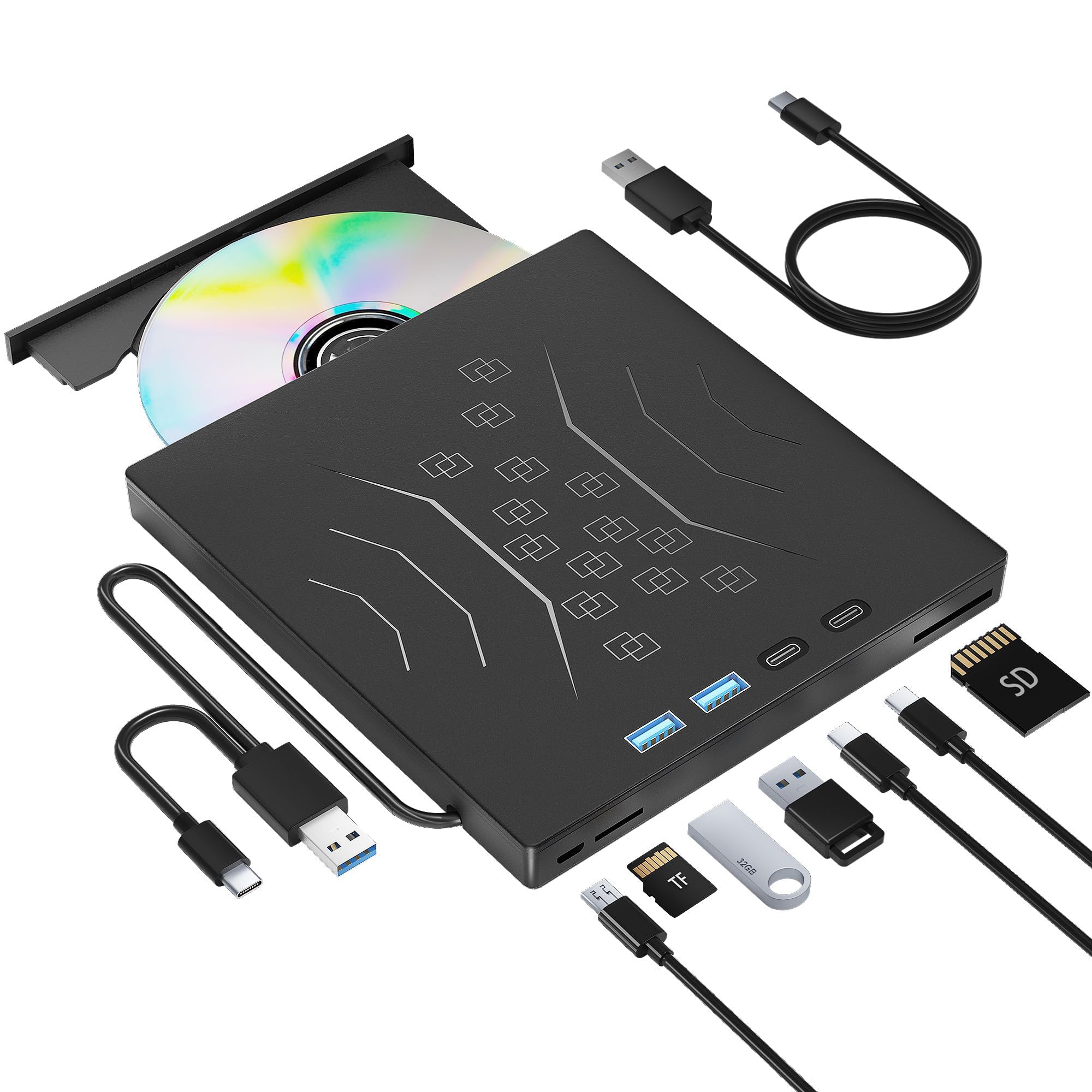
How To Choose The Best External CD Drive
To pick the right external CD drive, match three things to your setup: your computer’s operating system, the ports you have free, and whether you mainly want to read discs or write them. Get those three right and almost any drive on this list will serve you for years.
Plug-and-play versus driver installs
Plug-and-play means the drive works the moment you connect it, with no setup disc or download. That matters because most modern laptops have no way to run a driver CD anyway. Some drives still need a media player app to actually watch a DVD — the drive reads the disc, but the software decodes the video. Budget a couple of minutes to install a free player if Windows doesn’t offer one.
USB 3.0 speed and what the numbers mean
A USB 3.0 connection (a fast data port standard) moves data at up to 5 Gigabits per second, which is the same as 625 megabytes per second — fast enough that a full movie disc transfers in minutes rather than the long waits older USB 2.0 drives caused. Read and write speeds work separately: drives here read DVDs at up to 8x and handle CDs at up to 24x, and those figures tell you how quickly a disc loads or finishes burning.
Power: the hidden reason a drive won’t connect
Some laptops don’t push enough power through a single USB port for a disc drive to spin up. That’s why certain models ship with a separate power cable you plug into a second port. If your computer keeps saying it doesn’t recognize the drive, that extra cable is usually the fix — it’s a power supply problem, not a broken drive.
Side-by-Side Comparison
| Model | Best For | Disc Speeds | Ports & Slots | Compatibility | Amazon |
|---|---|---|---|---|---|
| Dell External USB Slim DVD RW Drive DW316★ Best Overall | Reliable everyday reading and burning | DVD RW, CD write and read | USB only | Windows laptops and desktops | Amazon |
| Wbacon 7 in 1 External CD/DVD DriveBest Value | Hub ports plus a slim carry-around drive | 8x DVDR read, 24x CD read/write | 1 USB 3.0, 1 USB 2.0, 2 Type-C, 1 TF, 1 SD | Windows, Mac, Linux | Amazon |
| BPAKDU External CD/DVD Drive with Carrying Case | Space-hungry laptops and desktop towers | 8x DVDR read, 24x CD read/write | 4 USB-A, 1 Type-C, 2 TF/SD | Windows, Mac (M1 and M2), Linux | Amazon |
| HP External Portable Slim CD/DVD RW Drive F2B56AA | Name-brand buyers ripping large collections | DVD-RW 6X, CD-RW 24X max | USB only | Windows and Mac OS X | Amazon |
| ORIGBELIE External CD DVD Drive | Portable use with bags and cases included | 8x DVD read/write, 24x CD read/write | 1 USB 3.0, 1 USB 2.0, 2 USB-C, 1 TF, 1 SD | Windows, Mac OS, Linux | Amazon |
Detailed Reviews
1. Dell DW316 External USB Slim DVD RW Drive
Our pick — 4.5★ from 16,000+ verified ratings; the strongest balance of quality and price.
The proven workhorse: reads and burns CDs and DVDs over USB with no driver install.
If you want the drive you can hand to your dad and walk away from, this is it. The Dell DW316 is a low-profile tray that measures just 14mm thick and weighs 200g, so it rides in a laptop bag without bulging. It’s powered straight off your notebook’s USB port — no batteries, no power cord to lose. That’s the whole pitch, and it’s a good one.
It holds the top spot because it plays DVDs, burns CDs, and installs disc-based software without fuss. Playing a DVD, burning a CD, installing disc-based software — the DW316 handles all three, and it’s the crowd favorite by a wide margin, holding 4.5 stars across 16,000+ owners. Its 4.5-star rating across 16,000+ owners comes from that same no-fuss reliability. You plug it in, and it works. One buyer summed up the experience, reporting they ripped roughly 30 CDs in hours through plug-and-play with Windows Media Player and never needed the software disc at all.
There’s a real trade-off, and it’s worth knowing before you buy. The drive itself needs no driver, but the bundled CyberLink Media Suite software sometimes gets blocked by Windows administrator restrictions, which means a bit of fiddling through the command prompt for some users. Compatibility is also the most-discussed mixed point — it shines with Dell laptops and Windows machines generally, but a few buyers found it simply wasn’t recognized by certain computers. The fix, when it happens, is usually connecting the drive to a powered USB port rather than a low-power hub.
What earns its keep
- Genuine plug-and-play — no driver disc needed, unlike older optical drives
- 14mm slim and 200g light, so it disappears into a laptop sleeve
- USB-powered only, with no batteries or separate power brick
- 1-Year Limited Hardware Warranty from Dell
What to keep in mind
- Bundled CyberLink software can trip Windows admin restrictions
- Compatibility is the one mixed spot — some computers need a powered port to see it
- No extra hub ports, so it’s a disc drive and nothing more
Reach for this if: you want a no-drama optical drive for a Windows laptop or desktop and value the trusted Dell name.
Look elsewhere if: you need the drive to double as a USB hub or card reader — the DW316 keeps things simple.
2. Wbacon 7 in 1 External CD/DVD Drive
A disc drive that also adds 1 USB 3.0, 1 USB 2.0, 2 Type-C, and TF/SD slots to your laptop.
This is the pick for anyone whose laptop has two USB ports and needs both of them. The Wbacon is a disc drive first and a 7-in-1 hub second, packing 1 USB 3.0 port, 1 USB 2.0 port, 2 Type-C ports, 1 TF slot, and 1 SD card slot into the same slim body. It connects over USB 3.0 and is backward compatible with USB 2.0 and 1.1, so older machines aren’t shut out.
Its headline numbers are solid for the tier: data moves at up to 5 Gigabits per second (625MB/s), the drive reads DVDR at up to 8x, and CDs handle up to 24x read and write speeds. That’s meaningfully more headroom than a plain USB 2.0 disc drive offers, and it shows when you’re pulling files off a data disc. It’s a plug-and-play unit with no driver download required, works across Windows, Mac, and Linux, and the whole thing is built light enough to slide into a laptop bag. The SD and TF slots can’t be used at the same time, which is worth remembering if you’re juggling a camera card and a microSD.
Where it earns its spot: the hub ports are the draw here, and they deliver for anyone stacking a wireless mouse, a flash drive, and an SD card onto one connection. CD ripping to iTunes, commercial DVD playback, and DVDR playback all worked flawlessly for buyers, and the run of owner feedback centers on the same note — it does what it promises, straight from the start.
One thing to weigh: Mac support is the soft spot. The drive lists broad compatibility, but enough Mac owners found it wouldn’t play nice with their machines that it’s worth checking your specific setup before committing.
Best for: laptop users who want a disc drive and a port multiplier in one small package without paying a premium.
Think twice if: you’re on a Mac that can’t afford a compatibility gamble — a Windows machine is the safer fit here.
3. BPAKDU External CD/DVD Drive for Laptop with Carrying Case

The full toolkit — 4 USB-A ports, 1 Type-C port, 2 TF/SD slots, and a carrying case.
If you’re the household tech person who ends up transferring everyone’s photos and burning the occasional music disc, this drive covers more ground than anything else on the list. It’s a reader, burner, writer, rewriter, ripper, and hub in one box: 4 USB-A ports, 1 Type-C port, and 2 TF/SD card slots. It ships with a carrying case so the drive and its cable stay together, and it weighs 9 ounces — light enough to live in a laptop bag.
Compatibility is where this one throws a wide net. It handles Windows 11 down through XP, Linux, and all versions of Apple’s Mac line including M1 and M2 machines. Data moves at up to 5 Gigabits per second (625MB/s), with DVDR reads up to 8x and CD read/write up to 24x. The extra power cable matters here too — if a laptop doesn’t feed enough juice to spin the drive up, that second connector is often what makes a “not recognized” computer suddenly spot it. Its appeal is reliability across Windows, Linux, and Mac M1/M2 machines, plus the included power cable that fixes most “not recognized” errors.
Strong points
- Broadest compatibility of the bunch — Windows, Linux, and Mac including M1 and M2
- 4 USB-A ports, 1 Type-C port, and 2 TF/SD slots for camera and file transfers
- Carrying case and 1-year warranty included
Watch out for
- The hardwired USB cable is short — on a tower PC you’ll want an extension
- SD and TF slots can’t run at the same time
- Watch function is left untested by some, so burn reliability is worth checking early
Who it’s for: the person who needs disc reading, burning, card transfers, and extra USB ports from one desktop accessory.
Who should pass: anyone plugging into a rear-mounted tower port — that short built-in cable will frustrate you until you add an extension.
4. HP External Portable Slim CD/DVD RW Drive

Built for ripping a whole CD shelf, with M-DISC and DVD-RAM support most budget drives skip.
Ripping a few hundred CDs is a marathon, and this is the pick for people who actually intend to run it. The HP F2B56AA handles an unusually broad spread of disc formats — DVD-RAM, DVD-R DL, DVD+R DL, M-DISC, CD-DA, Super Audio CD, and more. That M-DISC support is the standout line here: it reads the archival discs meant for long-term storage, which most budget drives skip entirely.
What sells it for the task is real-world stamina. The drive ran one owner through a 400-to-500 disc collection on a Mac, ripping straight to WAV files over an extended stretch without quitting. Write and read speeds sit at DVD-RW 6X and CD-RW 24X maximum, so a standard audio disc finishes burning in a reasonable window. Setup follows the same plug-and-play path as the others, and compatibility is the strongest single point in its feedback — buyers on both Windows and Mac report it working as expected, right from the start.
The honest caveat: this one draws split opinions on build quality. Some buyers love it, and a few found the plastic tray shallow enough that a disc seated carelessly could catch. Treat the loading tray gently and it holds up fine.
The value read: you’re paying for the HP name and the wider disc-format list, not for hub ports. There are none — this is a single-purpose optical drive, and that’s the trade for its broad format support.
Pick it if: you have a big physical disc collection to archive and want the format coverage to handle oddball discs without surprises.
Leave it if: you want built-in USB ports or a card reader — the F2B56AA does disc work and nothing else.
5. ORIGBELIE External CD DVD Drive

The go-bag disc drive, with a built-in USB-A/USB-C cable and an RGB glow you’ll either love or ignore.
Everything about this one is built to travel. The 2-in-1 USB 3.0 data cable has both a Type-A and a Type-C connector (the two common USB plug shapes), so you plug into an old laptop or a new one without hunting for an adapter — and there’s no separate cable to lose because it’s built into the drive. It ships with a storage bag and a carrying case, plus a USB-A-to-DC power supply cable for computers that don’t push enough power through one port.
Specs follow the familiar template: up to 5 Gigabits per second (625MB/s) over USB 3.0, max 8x DVD read and write, max 24x CD read and write. The extras set it apart — a 6-in-1 hub with 1 USB 3.0 port, 1 USB 2.0 port, 2 USB-C ports, a TF slot, and an SD slot, plus an RGB LED that cycles through colors. The SD and TF slots can’t run simultaneously. As always, remember this is a data drive with no battery or screen — it needs a laptop or desktop to do anything at all.
Why it travels well
- Built-in USB cable with both Type-A and Type-C ends, so no adapter hunting
- Storage bag, carrying case, and a separate power cable all included
- 6-in-1 hub plus RGB lighting for a little personality
Where it can stumble
- The recurring gripe is reliability — a small number of drives stop midway through reading a disc
- Built-in cable is short, so plan for how you’ll position it near a tower
- Won’t work with cars, TVs, tablets, or consoles — it needs a computer
Grab this if: you want a compact disc drive that lives in your bag and works with whichever laptop you pick up, plus the case to keep it safe.
Consider another if: you need rock-solid reliability for heavy, repeated burning — a mid-disc stop can cost you a blank and a headache.
Know the Specs
USB 3.0 transfer speed
The connection speed decides how fast a disc’s contents land on your hard drive. USB 3.0 moves data at up to 5 Gigabits per second, which equals 625 megabytes per second. For everyday use that means a data DVD transfers in minutes, not the long crawl older USB 2.0 drives created. It’s also backward compatible, so an older USB 2.0 port still works, just more slowly.
DVD and CD read and write speeds
Drive speeds are stamped as multipliers — 8x for DVDs, 24x for CDs — and the two formats run on separate tracks. A drive’s DVD read speed tells you how quickly a movie or data disc loads, while the CD write speed tells you how fast a music mix finishes burning. Higher multipliers mean shorter waits, so it’s worth checking that both numbers are respectable before you buy.
Plug-and-play and power supply
Plug-and-play means the drive is recognized the moment you plug it in, with no driver disc or download needed. The one snag is power: a single USB port on some laptops doesn’t supply enough current to spin a disc. That’s why certain drives include a second power cable. If your computer won’t recognize the drive, plugging that extra cable in is usually the whole fix.
Hub ports and card slots
Some drives double as a USB hub (a port splitter), adding A and C ports plus SD and TF card slots (memory card readers) so you can move camera photos onto your computer and free up a port at the same time. Two things to know: SD and TF slots typically can’t be used at the same time, and these ports add bulk, so a pure disc drive is often lighter. Choose based on if you want a hub or a single-purpose drive.
Common Questions
Will an external CD drive work with my Mac laptop?
Why won’t my computer recognize the external CD drive?
Can I burn CDs and DVDs with an external drive?
Do I need to install a driver or software disc?
What’s the difference between a USB 3.0 and USB 2.0 external drive?
Can I use the external drive with a desktop tower PC?
Will an external CD drive play Blu-ray discs?
How long does an external CD drive last?
Can I run an external drive off a second port as a hub?
Is a higher burn speed always better on an external CD drive?
The Bottom Line
For most people, the external cd drive to buy is the Dell DW316 — it’s the crowd favorite with 4.5 stars, it’s genuinely plug-and-play, and it’s slim enough to live in a laptop bag without complaint. If you want a disc drive that also clears up your port clutter, grab the Wbacon 7-in-1. And for archiving a whole shelf of discs, the HP F2B56AA is the one to reach for. Whichever you pick, check that your computer’s port can supply enough power — that single detail prevents most setup headaches.
How we choose
We do not accept paid placement. Every pick is matched to a real buyer and a real use-case; we do not hands-on test units.
Sources
Specifications: manufacturer listings and product documentation. Review insights: verified customer reviews, as of October 2026. Pricing: not shown on this page (it changes often); check the current price via the retailer link.
As an Amazon Associate, Aappliancez earns from qualifying purchases. This does not affect which products we feature.