Disclosure: Some links in this post are affiliate links. As an Amazon Associate I earn from qualifying purchases, at no extra cost to you. Learn more
Specs are compiled from manufacturer listings and verified buyer reviews and can change over time — please confirm the key details on the product page before buying.
If your wrist aches by 3 p.m., the mouse on your desk is the likely culprit — and the fix is not a wrist brace but a different shape. A tilted or vertical mouse puts your hand in the handshake position your forearm was built for, instead of forcing it flat. Below are the picks that get that shape right, plus the ones that add extra buttons, trackballs, or left-hand layouts for people who need something more specific.
This guide is built by comparing the manufacturers’ published specifications and the patterns across verified customer reviews, so you get each pick’s real strengths and trade-offs instead of marketing spin.
The picks ahead split into three groups — value, mid-range, and premium — and each entry shows where the shape, button count, and connection type actually pay off. Here is what separates a genuinely comfortable ergonomic mouse from one that just looks the part.
Top Picks

How To Choose The Best Ergonomic Mouse
The single biggest mistake buyers make is picking a mouse by how it looks in the product photo. Hand size and tilt angle decide whether a mouse feels natural after six hours — not the brand name or the lighting effects.
Match the housing to your hand length
A mouse built for large hands will crowd a smaller one, and a compact shell leaves big palms hanging off the edge. Measure from your fingertip to your wrist crease and compare it against the sizing window the maker publishes. The DELUX M618PLUS, for instance, publishes a fit window of 6.7″–7.5″ hand length and 3.1″–3.9″ width for its large-hand build.
Decide how vertical you want to go
A mild tilt, like the raked shell on the Razer Basilisk V3, keeps a familiar flat-ish grip while easing the wrist. A true vertical mouse, such as the 57-degree Logitech Lift, rotates your hand closer to a handshake and shifts load up the forearm. Neither is automatically better — the right angle is the one you can hold for a full workday without gripping hard.
Count the buttons you will actually use
More buttons only help if you assign them. A model with 11 programmable buttons, like the Basilisk V3, shines for push-to-talk, macros, and app shortcuts. A simpler 3-button shell suits someone who mostly browses and types. Decide your shortcuts before you buy, not after.
Check the connection that fits your desk
Wired means no battery and no pairing dropouts — good for a fixed desk setup. 2.4 GHz wireless gives you a clean cable-free desk with a small USB receiver. Bluetooth frees a port entirely but can be fussier on locked-down work laptops, so confirm the connection type your machine accepts.
Side-by-Side Comparison
| Model | Best For | Shape | Buttons | Connection | Amazon |
|---|---|---|---|---|---|
| Razer Basilisk V3★ Best Overall | Gaming and heavy shortcut use | Right-hand sculpted, thumb rest | 11 | USB wired | Amazon |
| ProtoArc EM25Best for Scrolling | Spreadsheet and document scrolling | Right-hand tilt, dual scroll wheels | 6 | 2.4G + Bluetooth | Amazon |
| Microsoft Bluetooth Ergonomic MouseBest Battery Life | Multi-device Bluetooth setup | Right-hand with soft thumb rest | 6 | Bluetooth | Amazon |
| DELUX M618PLUS RGB | Large hands, fixed desk | Vertical, removable wrist rest | 6 | USB wired | Amazon |
| Lekvey Left-Handed Mouse | Lefties wanting a vertical grip | Vertical, left-hand build | 6 | 2.4 GHz wireless | Amazon |
| ULSOU Wave Combo | Full desk refresh in one box | Contoured right-hand mouse plus wave keyboard | — | 2.4 GHz shared receiver | Amazon |
| Logitech Ergo M575S | Tiny desks and quiet rooms | Thumb trackball | 2 | Bluetooth + USB | Amazon |
| ELECOM EX-G Left-Handed Trackball | Lefties on a small desk | Left-hand thumb trackball | 6 | 2.4 GHz wireless | Amazon |
| Logitech Lift | Small to medium right hands | Vertical, 57-degree tilt | 6 | Bluetooth + Logi Bolt | Amazon |
| Evoluent VM4R | Medium to large right hands | Upright vertical, finger support | 6 | USB wired | Amazon |
| Evoluent VM4SW | Small right hands, wireless | Upright vertical, small build | 6 | USB wireless | Amazon |
Detailed Reviews
1. Razer Basilisk V3 Gaming Mouse
Our pick — 4.5+★ from 10,500+ verified ratings; the strongest balance of quality and price.
Eleven buttons, a free-spinning wheel, and a thumb rest — the fully loaded one.
For the buyer who wants one mouse to run everything — gaming macros, browser shortcuts, spreadsheet rows — the Basilisk V3 makes the strongest case. That gap is where push-to-talk, ping, and app shortcuts live, and it is why this one works as a productivity tool as much as a gaming mouse.
The wheel is the showpiece. HyperScroll spins freely until you stop it, or clicks into a tactile notch mode when you want control, so you can blaze through a long page or step through weapon slots with the same wheel. The side thumb rest keeps your grip steady during long sessions. Owners repeatedly call it “easy to hold” and comfortable through hours of use, with the thumb rest steadying the grip over a long day.
Two honest notes. It is a wired USB mouse, so expect a cable across the desk — no battery, no pairing. And the scroll wheel is the recurring weak spot: some long-term buyers report it giving out after months of heavy use, so treat it as the part to watch. At 11 buttons and full RGB, it is the most feature-dense pick here, and for a fixed desk setup that is a lot of capability in one shell.
What earns it top spot
- 11 programmable buttons — the highest count on this list, versus 6 on the ProtoArc EM25
- HyperScroll wheel switches between free-spin and tactile notch scrolling
- Sculpted right-hand shell with a thumb rest for steadier long sessions
- Wired USB means zero battery or pairing worries
Where it asks you to compromise
- Corded — not the pick if you want a clean wireless desk
- Scroll wheel durability is the most commonly flagged long-term issue
- Heavier, feature-dense build compared to a simple 3-button mouse
Made for: gamers and shortcut-heavy desk workers who want maximum buttons and a tunable wheel in one wired mouse.
Think twice if: you need a cable-free desktop or you baby your scroll wheels — this is a wired mouse and the wheel is the part most likely to wear.
2. ProtoArc EM25 Wireless Mouse
Two scroll wheels, three devices, and a flywheel rated for 1,000 lines per second.
If your day is long documents, wide spreadsheets, and video timelines, the EM25 is built around one idea: scroll less with your arm, more with your fingers. The fast vertical flywheel is rated to glide through 1,000 lines per second and stop pixel-precise, and a second side wheel handles left-and-right scrolling without dragging a scrollbar. For anyone who lives in Excel or a wide design file, that horizontal wheel is the reason to pick it over the Basilisk V3’s single wheel.
The rest of the package is solid mid-range. You get 6 buttons with 5 of them customizable through a web-based tool — no software download — plus 2.4 GHz and dual Bluetooth so you can hop between laptop, tablet, and phone with one press. Sensitivity reaches 8000 DPI, and the 500mAh battery recharges over the included Type-C cable.
The catch is responsiveness, which is the most-discussed mixed point on this mouse. A lag complaint exists in the reviews, with one buyer having to switch because it delayed their work, so keep a return window open if you depend on split-second cursor response. The side wheel also cannot be remapped, and the customization needs the USB connection — worth knowing before you commit.
The clever bit: that horizontal side wheel turns a 40-column spreadsheet into a single-hand job — no grabbing the scrollbar at the bottom and dragging.
Trading smoothness for features: the feature list is rich, but if you are sensitive to any cursor lag, test it early against your heaviest task.
Reach for this if: you scroll wide sheets and long PDFs all day and want two wheels plus three-device switching.
Look elsewhere if: you need flawless real-time responsiveness for fast precision work.
3. Microsoft Bluetooth Ergonomic Mouse — Matte Black
Fifteen months between battery swaps — a set of AAAs you can almost forget about.
The number that jumps off the Microsoft spec sheet is battery life: up to 15 months on the included AAA alkaline batteries. For a shared front-desk mouse or a laptop that leaves the house, that means no charging cable to remember. It pairs over Bluetooth to three computers, and a button flips between them, so one mouse can run your desktop, laptop, and travel tablet.
The shape is a mild ergonomic rake with a soft, easy-to-grip thumb rest that nudges your hand into a natural position without the full vertical leap. Machine-aluminum scroll wheel, Teflon base, and 3 customizable buttons round it out. What wins people over is how comfortably it settles into a long workday, and buyers describe ditching cheap mice that failed inside a year for this one’s durability.
Two things to weigh. Connectivity and scrolling are the mixed spots — most pair fine, but a Bluetooth dropout and a scroll hiccup show up in the wider reviews, so keep the pairing simple. And the thumb rest is a strong fit-or-not feature: it suits many hands, but some grips find it presses under the thumb. It is a Bluetooth-only mouse, so a locked-down desk without Bluetooth support will need an adapter.
A 15-month forget-it factor: the longest stated battery life on this list, which matters most for a mouse that travels or sits on a shared desk.
The thumb-rest question: the soft rest is the defining comfort feature — and the one to test against your own grip before you commit.
Best fit: laptop and multi-device users who want a Bluetooth mouse with near-zero battery management.
Skip if: your computer has no Bluetooth, or your grip tends to press hard into a thumb rest.
4. DELUX M618PLUS RGB Vertical Mouse
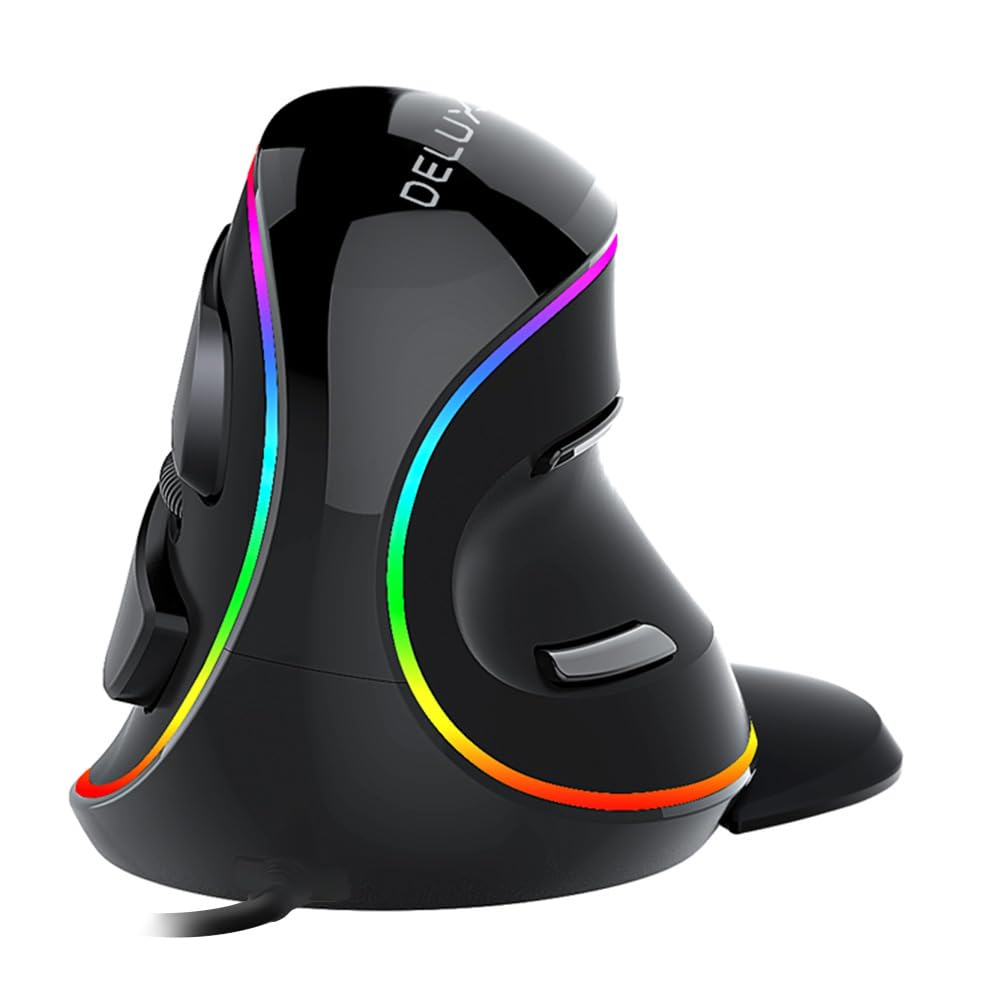
A true vertical shell with a published fit window for genuinely big hands.
The DELUX M618PLUS is the pick that actually states its sizing. It is recommended for hand lengths of 6.7″–7.5″ (170–190mm) and widths of 3.1″–3.9″ (80–100mm), which makes it rare among vertical mice — most make you guess. If your palm spills over a standard mouse, this is the one built to swallow it. The full vertical volute shape tips your hand toward a handshake, and the removable palm rest lifts your wrist off the desk to cut friction.
The wired USB connection removes lag and battery worry, and the 1.6-meter PVC cable gives you room to place it. Six DPI levels run from 400 to 4000, selectable with a bottom button, so you can dial speed to the task. Silent clicks cut sound by more than 90%, and six programmable buttons cover left, right, middle, forward, back, and DPI. Clicks are quiet enough for a shared office.
The adjustment period is real and is the most-discussed point. Vertical mice take days before they feel normal, and some owners mention cursor aim that stays clumsy for weeks. Movement is also the weak spot in the reviews, with aim precision the main knock for fast work. Too much heat under the palm shows up too. It is wired, so a cable-drag setup is out — but for a fixed, large-handed desk it earns its keep.
Reasons big hands will like it
- Published fit window of 6.7″–7.5″ hand length and 3.1″–3.9″ width
- Removable wrist rest improve the wrist off the desk
- Silent clicks cut sound by more than 90%
- 6 DPI levels from 400 to 4000, switchable on the mouse
What to expect going in
- Vertical grip takes days to feel natural, and aim precision is the usual gripe
- Wired only, so expect a cable on the desk
- Some palms run warmer against the vertical surface
Best for: large-handed desk users who want a wired vertical mouse with a wrist rest and a stated size.
Look elsewhere if: you need pin-sharp cursor aim for fast gaming, or a wireless desk.
5. Lekvey Left Handed Vertical Mouse

A left-handed vertical shell that lets your handshake grip work the way it should.
Left-handers get squeezed in this category, so the Lekvey earns its place for one reason: it is built left-handed from the start. The vertical shape encourages a neutral handshake angle for your left hand, and the 6 buttons include back and forward for page hopping. Three DPI levels — 800, 1200, and 1600 — cover both everyday work and light gaming, and it runs on 2.4 GHz wireless with a nano receiver that stores inside the mouse for travel.
Plug-and-play keeps setup short: pop in the receiver, add the 2 AAA batteries, and go. There is an on/off switch and an 8-minute auto-sleep to stretch battery life, and clicks are silent enough for a shared room. Ergonomics is where this mouse does its best work: left-handed buyers describe a hand that stops aching after a long day.
One point needs honesty: it does not work with Mac OS, so confirm your system first. The scroll wheel is also the recurring gripe, with reports of it turning jumpy or scrolling the wrong way after heavy use. A few buyers also find the clicks need more force than they like. It is a budget lefty vertical — for the price, a solid daily driver if you keep the wheel’s limits in mind.
The lefty advantage: a genuine mirror-image vertical shape means your dominant hand gets the same natural wrist angle righties take for free.
The wheel caveat: the scroll wheel is the most commonly flagged weak point — fine for browsing, less reliable under heavy all-day use.
Suits: left-handed buyers who want a vertical grip, wireless freedom, and a plug-and-play setup on Windows.
Not for: Mac users, or anyone who needs a scroll wheel that takes years of abuse without getting jumpy.
6. Wireless Keyboard And Mouse Combo

The one pick that fixes your whole desk in a single box — keyboard included.
Most picks here fix the mouse and leave your keyboard flat. The ULSOU combo tackles both at once: a full-size wave keyboard with a built-in wrist rest, paired with a contoured right-hand mouse. A single 2.4 GHz USB receiver runs both, or each works separately, and the signal is rated for up to 33 feet (10 meters) with no delay. For a first ergonomic setup or a home office starting from scratch, that one-box approach is hard to match.
The mouse itself is a comfortable palm-filling shape with forward and back buttons and adjustable DPI. Owners credit the keyboard’s wave key layout and built-in wrist rest for easing long typing sessions, and the keys are quiet enough for a shared room. It handles both Windows and Mac — press FN+Q or FN+W to switch layouts — and the auto-sleep kicks in after 30 seconds idle on the keyboard and 15 minutes on the mouse. The keyboard needs 1 AA battery and the mouse needs 1 AA, both sold separately.
The trade-off is that this is a comfort-first set, not an adjustable one: the wrist rest is hard plastic, not padded like some premium keyboards, so budget-minded buyers should expect functional rather than plush. The mouse DPI is adjustable but the button count across the kit is not the point here. For the price, it is the widest desk upgrade per dollar on this list.
Two fixes, one receiver: the wave keyboard’s wrist rest and the mouse’s palm fit both work from a single USB plug — less desk clutter, less setup.
Set expectations on the rest: the wrist panel is hard plastic rather than padded, so it is comfort-functional, not luxury-plush.
Great for: buyers setting up a home office who want an ergonomic keyboard and mouse together with one receiver and no software.
Skip if: you already love your keyboard, or you insist on a padded wrist rest.
7. Logitech Ergo M575S Wireless Bluetooth Trackball Mouse

Your hand never moves — the ball does the traveling, in near silence.
If desk space is tight or your shoulder is tired of sweeping a mouse across a pad, the M575S is the answer. A thumb-controlled trackball means the cursor moves while your hand stays planted, so a mouse pad becomes optional and a cramped corner desk becomes workable. Logitech rates the included AA battery for up to 18 months, and it connects by Bluetooth or the bundled Logi Bolt USB receiver — two ways to pair depending on what your machine allows.
The quiet operation is a real feature, not a footnote. Clicks are hushed enough that it disappears in a meeting or a lecture. Functionality is what owners value most — it simply works, on any surface, from the start. Cursor speed and three customizable buttons are set through the Logi Options plus app, and some buyers remap buttons per app for shortcuts. The sculpted right-hand shape suits most hand sizes.
Two things to accept. It is a thumb trackball, so there is an adjustment period while your thumb learns the ball — give it a week. Responsiveness and value land as mixed notes, and the ball can feel slightly sticky at first before it smooths in. Logitech also notes the BOLT receiver is not backward compatible with older Unifying keyboards, so a legacy setup may need both receivers.
The space saver: with no hand travel, this is the pick for a small desk, a laptop-on-a-corner setup, or anywhere a mouse pad will not fit.
The thumb-learning curve: the ball takes a short adjustment, and a few buyers find the first days sticky — brief, but plan for it.
Ideal for: small-desk and quiet-room users who want cursor control without moving their arm.
Think twice if: you rely on older Unifying Logitech gear, or you want a mouse that feels identical on day one.
8. ELECOM EX-G Trackball Mouse M-XT4DRBK-G

A left-handed thumb trackball with a red ball tuned for optical accuracy.
A left-handed trackball is a rare thing, and ELECOM builds this one specifically for southpaws. The thumb-controlled red ball is chosen for optical tracking accuracy, and the DPI button flips between 750 (low) and 1500 (high) so you can slow the cursor for detail work or speed it up for big screens. Six buttons are programmable through ELECOM’s Mouse Assistant software, letting you load shortcuts onto the shell. It runs on 2.4 GHz USB wireless, so no cable to wrangle.
Owners prize the relief of a thumb trackball: hand and wrist strain drop when you stop sweeping a mouse across the desk. Quality and performance are the strong suits here — this is a well-made unit for small hands, and it stays accurate. The red ball improves smoothness over a plain black ball that needs frequent cleaning.
Two cautions. The software downloads separately and can land in Japanese first — a re-install or a dropdown switch gets it to English. The bigger note is durability under heavy use: battery life can be far shorter than expected for some high-hour users, and a couple of long-term customers note units that did not clear a year. It is a specialized lefty tool; for moderate daily use it holds up well.
Why lefties reach for it
- Built for the left hand, with a thumb trackball that cuts arm travel
- Red ball chosen for optical tracking accuracy
- DPI toggles between 750 and 1500 for slow detail or fast screens
- 6 programmable buttons through ELECOM’s Mouse Assistant software
The honest downsides
- Software downloads separately and may open in Japanese first
- Heavy users report short battery life and some units failing inside a year
- Ball can feel slightly rough at slow, angled movement
Reach for this if: you are left-handed and want a thumb trackball with programmable buttons and a small footprint.
Look elsewhere if: you log marathon hours and need battery to stretch for months, or you want zero software setup.
9. Logitech Lift Vertical Ergonomic Wireless Mouse — Graphite

A 57-degree handshake wedge built for small to medium right hands.
Vertical mice usually punish small hands — the shells are built for mitts. The Logitech Lift flips that by sizing itself for small to medium right hands, with a softly textured grip and a snug thumb rest. Its 57-degree tilt rotates your hand toward the handshake position, shifting load up the forearm rather than pinning the wrist flat. It connects over Bluetooth Low Energy or the Logi Bolt USB receiver and runs up to two years on the included AA battery — far longer than the Evoluent VM4SW’s stated 3 months between changes.
The details are thoughtfully done. A magnetic battery door hides the AA cell, the receiver stores inside, and the SmartWheel scrolls in notched or free-spin modes. It is quiet — the clicks barely register — and it pairs across multiple devices by Bluetooth. Comfort is the headline: owners describe wrists that finally settle into a natural position for a full day.
The honest knock is the left-click: it is the recurring negative, with some buyers reporting a button that stops responding properly over time. A few miss the horizontal thumb scroll and wheel toggle that higher-end Logitech models offer, so heavy 3D or design work may want more buttons. Connectivity is also mixed, though most report clean Bluetooth pairing. For a small-to-medium hand, the shape is the reason to buy.
Comfort built to size: the 57-degree tilt plus small-to-medium sizing is the rare vertical mouse that does not overwhelm a smaller hand.
The button to watch: left-click reliability is the most frequently raised issue, so keep the return window open and test the click early.
Made for: small and medium right hands that want an upright grip plus two-year battery life.
Skip if: you need horizontal thumb scrolling for CAD work, or you want the most sturdy left-click out there.
10. Evoluent Vertical Mouse VM4R, Wired, Right Hand
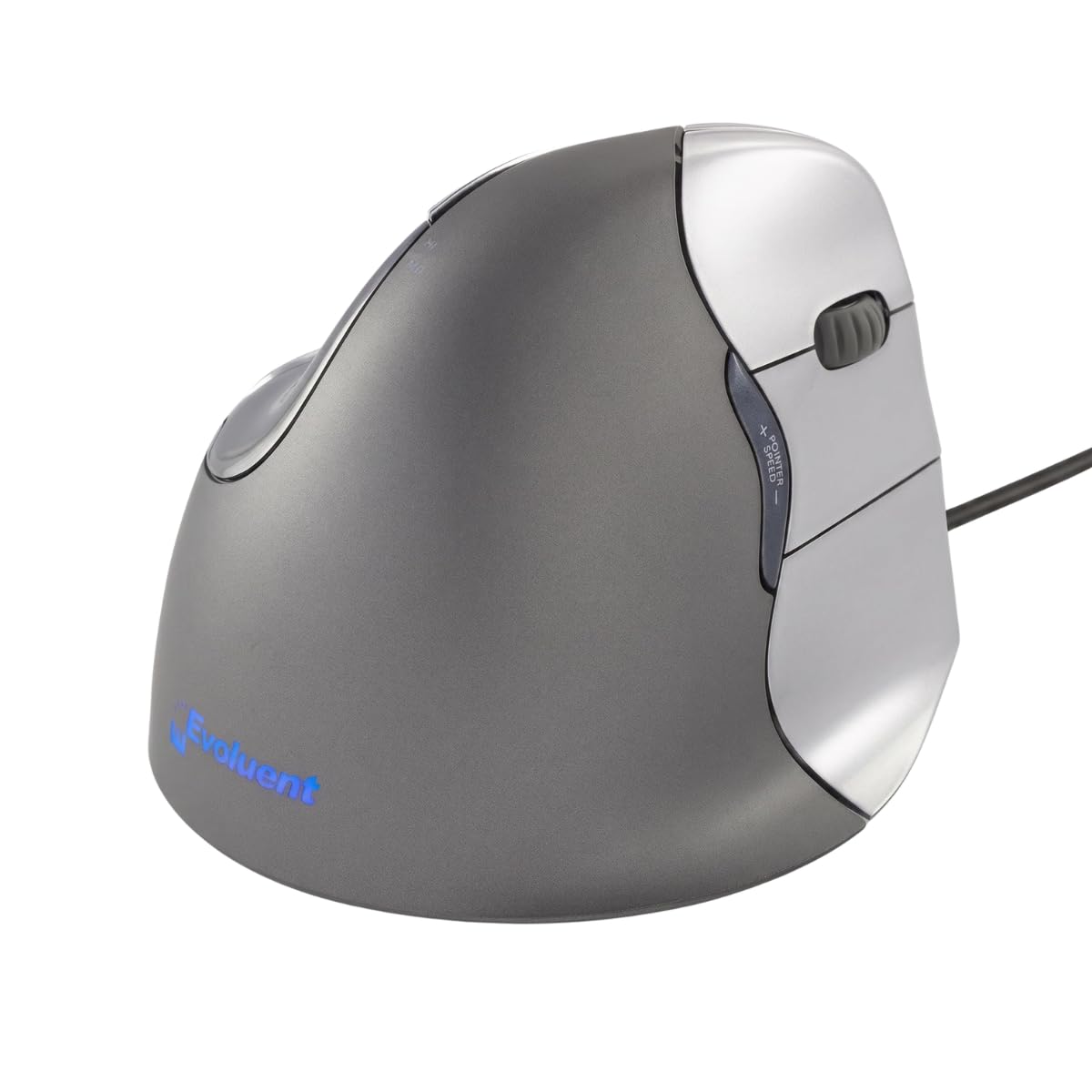
The mouse that started the vertical category — still the shape others copy.
Evoluent designed the first upright mouse, so this wired VM4R carries the original vertical idea: a near-upright handshake grip that takes the twist out of your forearm. A finger support on the side keeps the pinkie from rubbing the desk — a small detail that matters over a long day. Four pointer speeds with indicator lights and six customizable buttons give you on-mouse control, and the wired USB connection keeps the tracking reliable with no battery talk.
The shape is sculpted for medium to large right hands, and this is the pick for buyers doing heavy click-and-drag work — CAD, spreadsheets, long programming sessions. Owners say the handshake position eases wrist and forearm strain over weeks, and some report the mouse outlasting several computers. Build and ergonomics are the strong suits.
Two things to plan for. The first is a real adjustment period: vertical takes about a week to feel natural, and some buyers find fine-detail work slightly clumsier at first. The second is the shell — it is a lightweight plastic, and some longer-term owners note the surfaces can wear and, eventually, the left button can start double-clicking. Wired only, so a cable-free desk is out. For a fixed workstation it is a proven, comfortable shape.
Built for the long haul: the upright stance is designed to move load up the forearm, which is why it suits all-day CAD and spreadsheet work.
Give it a week: the vertical grip and fine-detail aim take a few days to settle in, so judge it after a full adjustment period, not an afternoon.
Best for: medium to large right hands doing heavy wired desk work who want the proven original vertical shape.
Not ideal if: you need wireless freedom or you want a shell that feels premium in the hand.
11. Evoluent VM4SW Vertical Mouse

The upright classic, shrunk and cut loose from the cable for smaller hands.
This is the wireless, small-hand version of Evoluent’s original vertical design — the same handshake stance, now on USB wireless and sized for smaller right hands. A broad bottom lip supports the hand and a finger ledge keeps the pinkie off the desk. Four pointer speeds tap on the side without breaking your grip, and six customizable buttons run through Evoluent’s Mouse Manager software, so you can shape it to Windows or Mac.
For a wireless upright, the relief is genuine: the near-vertical shape takes pressure off the inner wrist and keeps the hand neutral. Owners say the comfort arrives quickly once the upright posture clicks. It works across Windows, Mac, and Linux, and the batteries give you a wireless desk without a dongle dangle.
The catches are real for the price. Tracking is fussy — it wants a flat surface, and some reviewers point out cursor drift on uneven desks. The learning curve is steeper than most, with clicks causing a small pointer jump until your thumb steadies the shell. Battery life is rated at 3 months, shorter than several here, and some long-term users report the small side pads wearing over time. Buy it for the shape and the small-hand fit, and go in expecting an adjustment.
The small-hand upright: if the standard vertical shells feel too big, this is the one cut down for a smaller right hand.
Needs a flat desk: tracking is sensitive to surface, so pair it with a firm, even mouse pad to avoid cursor drift.
Fits: small right hands that want a wireless upright mouse with programmable buttons and multi-OS support.
Look elsewhere if: you need quick flawless tracking on any surface, or you want months-long battery life.
Know the Specs
Tilt angle and grip posture
The tilt angle is how far the mouse rolls your hand toward a handshake. A mild rake keeps a familiar grip; a true vertical (like the 57-degree Logitech Lift) rotates further. Neither is better — the right angle is the one your wrist can hold for hours without a tight grip.
DPI (dots per inch)
DPI is how far the cursor travels per inch of physical movement. Higher lets you cross a big screen with a small nudge; lower gives finer control. The mice here span a wide range, from 750/1500 on the ELECOM to 8000 on the ProtoArc — pick the top end that matches your screen and task.
Button count and programmability
More buttons only help if you assign them. A mouse with 11 programmable buttons (Razer Basilisk V3) suits macros and shortcuts, while 3–6 buttons cover browsing and typing. Check whether customization needs Windows-only software before you buy.
Connection: wired, 2.4 GHz, or Bluetooth
Wired means no battery and no pairing, ideal for a fixed desk. 2.4 GHz wireless uses a small USB receiver for a clean desk. Bluetooth frees a port but can be fussier on locked-down laptops, so confirm what your machine accepts.
Common Questions
Will an ergonomic mouse work on my Mac?
How long does it take to get used to a vertical mouse?
Is a vertical mouse better than a trackball?
Do ergonomic mice work for gaming?
How do I know which mouse size fits my hand?
Can I use a left-handed mouse if I am right-handed?
How long do the batteries last in a wireless ergonomic mouse?
Do I need to install software to customize the buttons?
Will a wired ergonomic mouse lag compared to wireless?
Can an ergonomic mouse help if I already have wrist pain?
The Bottom Line
For most desk workers, the ergonomic mouse that wins is the Razer Basilisk V3. It gives you 11 programmable buttons (keys you can assign to any task), a wheel that switches between free-spin and tactile scroll (a smooth glide or a clicky step), and a sculpted thumb rest. That makes it the most capable all-rounder whether you game or just grind through spreadsheets all day. If you have small-to-medium hands and want an upright grip, the Logitech Lift offers a 57-degree tilt (the body leans so your palm faces inward) plus up to two years on a single battery. And for a cramped desk where your arm never wants to move, the Logitech Ergo M575S trackball (a ball you roll with your thumb) keeps the cursor moving while your hand stays planted.
How we choose
We do not accept paid placement. Every pick is matched to a real buyer and a real use-case; we do not hands-on test units.
Sources
Specifications: manufacturer listings and product documentation. Review insights: verified customer reviews, as of October 2026. Pricing: not shown on this page (it changes often); check the current price via the retailer link.
As an Amazon Associate, Aappliancez earns from qualifying purchases. This does not affect which products we feature.