Disclosure: Some links in this post are affiliate links. As an Amazon Associate I earn from qualifying purchases, at no extra cost to you. Learn more
Specs are compiled from manufacturer listings and verified buyer reviews and can change over time — please confirm the key details on the product page before buying.
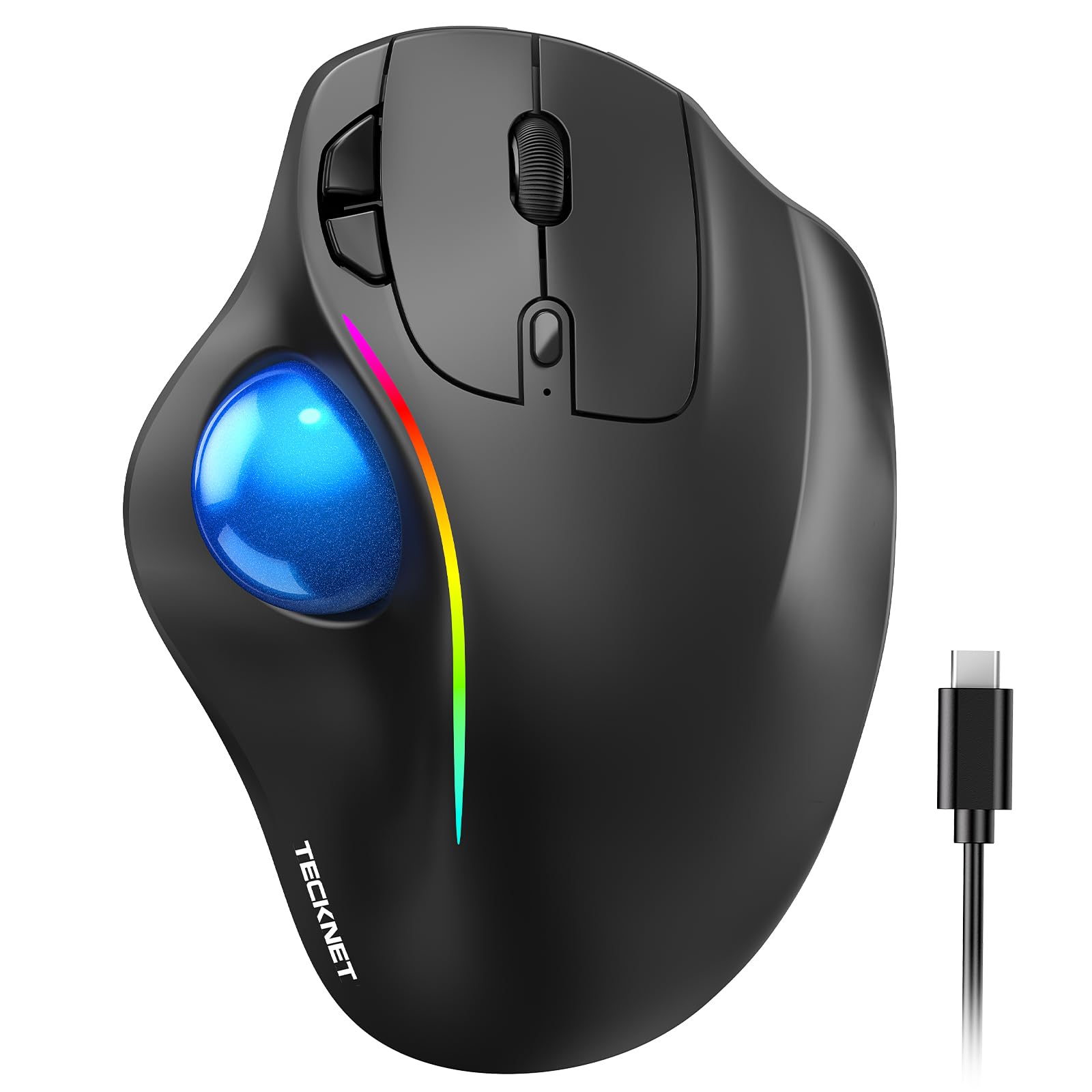
If your outer elbow aches every time you grip a mouse, the fix is rarely a softer pad — it is changing the angle your hand sits at all day. A vertical or trackball mouse tilts your palm toward a handshake position so your forearm stops doing the twisting that aggravates that tendon. For most people with tennis elbow, the TECKNET Wireless Trackball is the smart starting point: it combines a 16° tilt with thumb control so your arm barely moves.
This guide is built by comparing the manufacturers’ published specifications and the patterns across verified customer reviews, so you get each pick’s real strengths and trade-offs instead of marketing spin.
Below you will find seven desk-tested shapes, from thumb trackballs to vertical grips, each matched to a hand size and a work style. Every pick here earns its place for one reason: it takes strain off the exact muscles that make tennis elbow flare, and the best ergonomic mouse for tennis elbow is the one your hand actually settles into.
Top Picks
How To Choose The Best Ergonomic Mouse for Tennis Elbow
Tennis elbow pain comes from repeated gripping and wrist extension, and a mouse that keeps your palm flat forces your forearm into exactly that position for hours. The right shape changes your wrist angle, not just the cushion under it. Here is what to weigh before you buy.
Tilt angle: the number that changes everything
A vertical mouse rotates your hand toward a handshake pose, which takes tension off the forearm tendons. The TECKNET sits at a 16° angle, a gentle lean that suits people who still want a familiar mouse feel. The Nulea goes far steeper at 65°, and the Logitech MX Vertical uses a 57° angle that the maker rates it at 10 percent less muscular activity than a standard mouse. A steeper tilt means a bigger adjustment period but a more neutral wrist.
Thumb trackball vs moving the whole mouse
With a trackball, your thumb spins a ball while your arm stays parked, so your elbow and shoulder stop traveling across the desk. That matters when the pain spikes on gripping and small repetitive motions. If you work in a tight space or travel, a trackball removes the need for a wide mouse mat entirely.
Hand size and grip width
A vertical mouse that is too small forces your fingers to curl; one that is too big makes the side buttons a stretch. The TECKNET is built for medium to large hands at 5.5″ × 4.1″ × 2″, while the Logitech Lift is aimed at small to medium right hands. Measure across your palm before you commit.
Side-by-Side Comparison
| Model | Best For | Ergonomic Style | Max DPI | Battery | Amazon |
|---|---|---|---|---|---|
| TECKNET Wireless Trackball★ Best Overall | All-day desk work with less arm travel | 16° vertical thumb trackball | 1200 | 500mAh rechargeable | Amazon |
| Hokafenle 2 in 1 Wrist Support SetBest Wrist Companion | Pairing a wrist rest with your current mouse | Memory gel pad + keyboard rest | — | — | Amazon |
| Nulea Vertical Trackball | Steep tilt with thumb-driven navigation | 65° vertical thumb trackball | 1000 | — | Amazon |
| Logitech Lift (Renewed) | Small to medium hands wanting a simple vertical | 57° vertical | — | Up to 2 years | Amazon |
| DELTAHUB Carpio 2.0 | Gliding wrist support under any mouse | Silicone gliding wrist rest | — | — | Amazon |
| Logitech MX Vertical | High-precision vertical tracking for larger hands | 57° vertical | 4000 | 4 months | Amazon |
| Microsoft Sculpt Ergonomic Mouse | Ambidextrous shape with a thumb scoop | Ergonomic wedge with thumb scoop | — | — | Amazon |
Detailed Reviews
1. TECKNET Wireless Trackball Mouse
Our pick — 4.5+★ from 7,000+ verified ratings; the strongest balance of quality and price.
The thumb trackball that parks your arm and lets your fingers do the work.
Your hand tilts just 16° here, a gentler lean than the Nulea’s 65° — 4.1x less by the numbers — so your wrist eases toward neutral without the dramatic relearning a steep vertical demands. You move the cursor by spinning the trackball with your thumb, so your elbow and forearm stop sliding back and forth across the desk all day. If your pain flares on repeated gripping and small travel, that parked-arm setup is the whole point.
Connectivity is generous for the tier: it pairs with up to three devices across Bluetooth and a 2.4G receiver, and the 500mAh rechargeable battery gives you 15 minutes of charging for a full day. A 1200 dpi top speed (how far the cursor travels per inch of movement) beats the Nulea’s 1000 dpi, so the ball feels snappier when you need to cross a big monitor. The silent clicks keep a shared office peaceful.
Buyers report build quality as the standout, and smooth, responsive tracking comes up again and again in reviews. The honest catch is scroll-wheel durability over long heavy use. At 5.5″ × 4.1″ × 2″, the sizing suits medium-to-large hands, so smaller hands may find it a stretch — the maker itself suggests 1–2 weeks to adjust.
What works in your favor
- 16° tilt eases forearm posture while keeping a familiar mouse feel
- Thumb trackball cuts arm movement for tighter, calmer work
- 500mAh rechargeable with a 15-minute top-up for a full day
- Up to three devices across Bluetooth and 2.4G with one-button switching
Where it asks a little patience
- The scroll wheel can turn erratic under years of heavy daily use
- Built for medium to large hands, so petite hands may reach
- Allow 1–2 weeks to retrain your thumb on the ball
Reach for this if: you want the gentlest jump from a normal mouse to a trackball, with rechargeable power and multi-device switching.
Think twice if: your hands run small — this body is cut for medium to large.
2. Hokafenle 2 in 1 Ergonomic Mouse Pad Wrist Support
It does not change your mouse — it changes how your wrist lands on the desk.
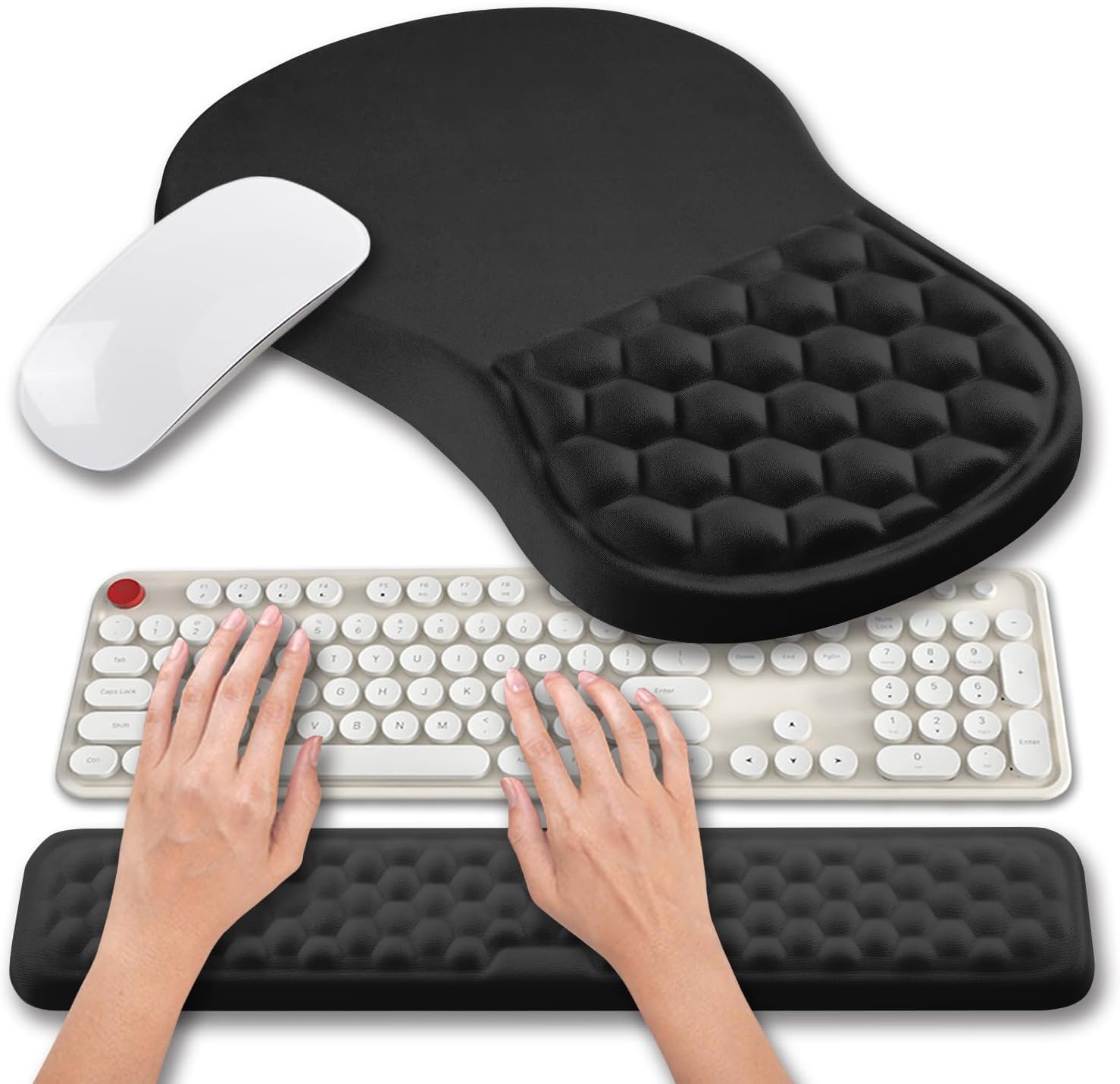
Not everyone wants to relearn pointing. This set keeps your current mouse and gives your wrist something better to rest on: a 12x8x1.2 inch mouse pad with a memory-gel massage bump, plus a 17×3.1×0.8 inch keyboard rest. The raised 0.8-inch keyboard rest lifts your typing angle so your wrist stays level instead of bending back — the same extension that aggravates tennis elbow.
The silky lycra surface tracks fast and accurate for wireless, optical, and laser mice, and the PU base grips the desk so nothing creeps while you work. The massage bead under your palm is the standout — owners keep coming back to how the padding feels and how well it supports the wrist through long desk sessions. It suits a big setup too, since the pad is wide enough for the mouse to roam.
The trade-off is upkeep. The material stains readily and is not a wipe-clean surface, which is the recurring note in the feedback, and the color can land differently than the photos suggest. As a companion to a vertical or trackball mouse rather than a cure on its own, it is a sensible, budget-friendly add.
What the padding buys you: a gel cushion that supports the wrist and keeps it from pressing flat into the desk, with a keyboard rest that steadies your typing angle.
Care routine to expect: treat it as spot-clean only — the fabric holds marks, so a darker color hides daily wear better than a pale one.
Great fit for: anyone pairing a new ergonomic mouse with cushioning under both wrist and keyboard.
Look elsewhere if: you want a wipeable surface that shrugs off coffee rings.
3. Nulea Wireless Ergonomic Vertical Trackball Mouse

A 65° tilt and a silent thumb ball for wrists that need the steepest relief.
Where the TECKNET leans at 16°, this one stands nearly upright at 65°, a far more aggressive rotation toward the handshake pose. That steeper angle keeps your wrist and arm naturally relaxed, and the wave-textured surface cradles the palm so you are not gripping to hold on. Pair it with the thumb trackball and your forearm stops doing the twisting that lights up tennis elbow.
The smart infinite scroll is the surprise feature — the wheel auto-switches between precise and fast modes based on how hard you spin, with 4-way scrolling so long documents fly by. Silent operation runs from the ball to every button and the wheel, which matters in a shared room or a late-night session. It pairs with up to three devices by Bluetooth or the included USB receiver and reaches 1000 dpi.
Owners mention solid build and comfort, though the ergonomics split opinion — some hands settle in instantly, others find the hold awkward, and a few find the cursor fast from the start until they tune it down. The forward/back buttons sit on the ergonomic ridge where only a thumb can reach them, which can feel tight for smaller hands.
The reasons it stands out
- 65° tilt gives the most upright wrist posture of the vertical picks
- Infinite scroll auto-adjusts between precise and fast
- Fully silent ball, buttons, and wheel for quiet rooms
- Three-device pairing over Bluetooth or USB receiver
The honest notes
- The steep hold is not for every hand — some find it awkward
- Cursor can feel quick at default until you adjust the dpi
- Side buttons sit on a ridge where the thumb must hunt for them
Pick this one if: you want the most upright wrist angle plus a whisper-quiet scroll wheel.
Hold off if: you prefer a gentle tilt you can adapt to in a day.
4. Logitech Lift Vertical Ergonomic Mouse (Renewed)

The compact vertical that slips into small and medium right hands.
The 57° vertical shape is the whole pitch: your forearm settles into a more natural posture and your wrist relaxes into the softly textured grip and snug thumb rest. This is the model cut for small to medium right hands, so if larger verticals feel like gripping a doorknob, the Lift’s 125 g body and 4.25″ × 2.76″ footprint sit closer to your reach.
Battery life is the quiet luxury — up to 2 years on a single set, far beyond the MX Vertical’s rated 4 months. Clicks run whisper-quiet, the SmartWheel scrolls smoothly, and it connects by Bluetooth Low Energy or the Logi Bolt USB receiver across Windows, macOS, iPadOS, Chrome OS, and Linux. Four buttons stay within easy finger reach without stretching.
Owners describe wrists and fingers that ached through long work sessions easing within days. The renewal angle is the honest catch: it arrives in a generic box with occasional light scuffs on the base, though it works and feels well-built. The thumb buttons are not silent, and there is no fast or infinite scroll like the Nulea offers.
The daily win: a comfortable, quiet vertical grip that suits smaller hands and keeps you working without a battery hunt for up to two years.
Worth knowing before you order: a renewed unit may show minor cosmetic marks, and the scroll is smooth rather than the fast infinite style.
Suits you if: small-to-medium hands and a set-and-forget battery are your priorities.
skip it if: you want infinite scroll or fast DPI switching on the fly.
5. DELTAHUB Carpio 2.0 Ergonomic Wrist Rest
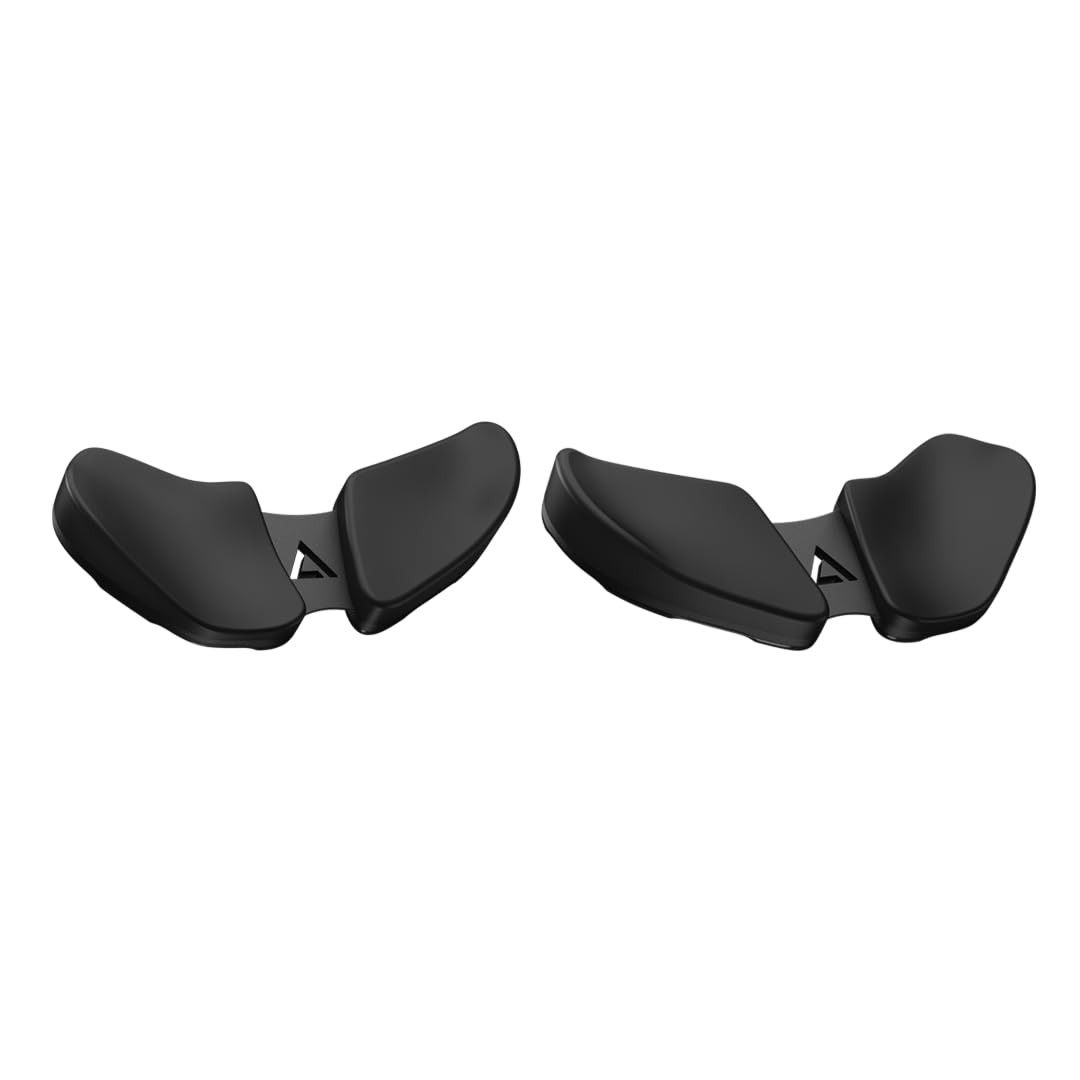
A wrist rest that glides with your hand instead of staying pinned to the desk.
Most wrist rests sit fixed and force your hand to break contact as you move the mouse. The Carpio 2.0 takes the opposite approach: silicone pads cushion your wrist while PTFE feet (a slick low-friction plastic) let the whole rest slide along with your hand. That keeps your wrist supported through the entire motion rather than only at rest — the movement that strains a tender elbow in the first place.
It is built for both hands and both jobs, working under a mouse or alongside a keyboard, at 3.74″ × 1.77″ and 150 g in the Large size. The contoured shape is aimed at cutting back the harmful wrist extension that flat surfaces encourage. Owners praise the comfort and the gliding feel, and long-term customers note units still gliding after three years.
The recurring hesitation is value — many find it effective but costly for what is essentially a smooth-bottomed support, and some struggle to re-find the exact position after lifting their hand. As an add-on to your desktop rather than a replacement mouse, it is the premium pick for wrist-first relief.
Why the glide matters: continuous wrist support through every mouse move, not just the pauses.
The premium question: the comfort is real, but the price is the most-debated point in the feedback — worth it if wrist support is your top priority.
Best matched to: high-desk or long-session workers who want support that follows their hand.
Consider skipping if: you want the simplest, cheapest wrist fix and can live with a fixed pad.
6. Logitech MX Vertical Wireless Mouse

The high-precision vertical that tracks with barely any hand movement.
Sharper tracking sets this apart from the rest of the vertical pack: the 4000 dpi sensor (dpi measures how far the cursor moves per inch of hand travel) is 4x the 1000 dpi of the Nulea, and the maker credits that sensor with 4x less hand movement than a 1000 dpi vertical. Less movement means less forearm work, which is exactly what a tennis-elbow wrist wants. The 57° vertical angle holds your hand in that handshake position while your thumb rests on the textured side grip.
A rechargeable battery runs up to 4 months, and a cursor-speed button lets you flip sensitivity on the fly without opening software. The textured rubber surface holds a natural grip, and it pairs across Windows, macOS, and iPadOS. Owners single out the ergonomics and wrist comfort above all — the handshake position that eases strain after a low-profile mouse has been aggravating it.
Durability is the real caveat. The feedback includes a strain of reliability concerns, with left-click issues and coating wear at the high-touch points appearing over time. It is also a right-hand-only shape and the priciest of the verticals here, so the value question is a fair one.
The case for the MX Vertical
- 4000 dpi sensor with 4x less hand movement, easing forearm load
- 57° handshake angle with a thumb rest for neutral wrist posture
- Rechargeable battery rated up to 4 months
- Cursor-speed button for on-the-fly sensitivity
The trade-offs to weigh
- Reliability feedback flags eventual left-click and coating wear
- Right-hand shape only
- Premium tier, so it costs more than the budget verticals
Worth it if: you want the sharpest tracking and the steepest handshake angle for larger hands.
Pause if: you are left-handed or want the longest trouble-free lifespan above all.
7. Microsoft Sculpt Ergonomic Mouse, Black

The wedge shape with a thumb scoop that keeps your wrist level.
Microsoft’s answer to wrist strain is a gently raised wedge with a thumb scoop — a carved-out side that holds your hand in the correct ergonomic position so your wrist stays level rather than tilted back. The 4-way scroll wheel (it scrolls up, down, left, and right) lets you pan sideways in spreadsheets, and a back button speeds up browsing. It is ambidextrous, so left-handers can use it too — unlike the right-hand-only verticals here.
What wins people over is the sheer comfort — a shape owners describe as the most comfortable they have used for long work hours, and one that keeps the wrist level through the day. The Windows button gives one-touch access to the Start screen, and the design suits those who want an ergonomic wedge without a full vertical rotation.
The honest limit is lifespan. Left-click sensitivity can fade after about a year of heavy clicking, and some units quit entirely around the two-year mark. A few also find the smooth surface slippery enough to drop. Treat it as a comfortable daily driver that may need replacing sooner than you would like.
The comfort you get: a level wrist and a scooped thumb hold that steadies the hand through the workday.
The lifespan caveat: click reliability is the weak point, so factor in eventual replacement if you click hard all day.
Go for it if: you want an ambidextrous wedge and pure comfort over a full vertical tilt.
Look past it if: you need a mouse that takes years of heavy clicking without drift.
Know the Specs
Tilt angle (degrees)
This is how far the mouse leans your hand toward a handshake pose. A gentle 16° like the TECKNET keeps a familiar feel, while a 57° or 65° vertical rotates your wrist much further toward neutral, which tends to ease forearm tension more but asks for a longer adjustment period.
DPI (cursor speed)
DPI means dots per inch — how far the cursor travels for each inch you move the ball or mouse. A higher number like the MX Vertical’s 4000 dpi moves the pointer with less hand travel, which reduces repetitive motion; a lower number gives finer, slower control.
Trackball vs movable mouse
A trackball keeps the body still and moves only the ball under your thumb, so your arm and shoulder stay parked. A movable mouse needs desk space and arm travel. If gripping and small repetitive moves are what aggravate your elbow, the trackball’s reduced movement can help.
Battery and charging
Rechargeable cells like the TECKNET’s 500mAh mean a quick top-up, while replaceable batteries give long stretches — the Lift is rated up to 2 years. Pick rechargeable if you want quick top-ups, or replaceable batteries if you would rather not hunt for a cable mid-task.
Common Questions
Will a vertical mouse actually help tennis elbow?
Is a trackball better than a vertical mouse for elbow pain?
How long does it take to get used to a 57° or 65° vertical mouse?
What hand size does each of these mice fit?
Can a wrist rest like the Carpio or Hokafenle replace a new mouse?
Do these mice work with Mac and Windows?
How do silent clicks help with tennis elbow?
Which mouse has the longest battery life here?
The Bottom Line
For most people with tennis elbow, the ergonomic mouse for tennis elbow that balances a gentle 16° tilt, thumb control, and rechargeable power is the TECKNET Wireless Trackball, and it carries a 4.5+ star rating across thousands of owners. If you want the steepest upright wrist angle with a whisper-quiet scroll wheel, the Nulea takes it. For the sharpest tracking and handshake posture in larger hands, reach for the Logitech MX Vertical. Whichever you choose, give your hand the two-week adjustment — that is when the relief usually arrives.
How we choose
We do not accept paid placement. Every pick is matched to a real buyer and a real use-case; we do not hands-on test units.
Sources
Specifications: manufacturer listings and product documentation. Review insights: verified customer reviews, as of October 2026. Pricing: not shown on this page (it changes often); check the current price via the retailer link.
As an Amazon Associate, Aappliancez earns from qualifying purchases. This does not affect which products we feature.