Disclosure: Some links in this post are affiliate links. As an Amazon Associate I earn from qualifying purchases, at no extra cost to you. Learn more
Specs are compiled from manufacturer listings and verified buyer reviews and can change over time — please confirm the key details on the product page before buying.
If your little finger goes numb or aches after a long day at the desk, the fix is not a wrist brace — it is a mouse that stops your hand from gripping. The picks below all keep your pinky from being crushed against the desk or curled under a narrow body, and each one approaches that job differently. Some move the cursor with a thumb trackball so your hand never travels. Others tilt your palm into a handshake position. One has a wide lip built specifically to catch that outside finger.
This guide is built by comparing the manufacturers’ published specifications and the patterns across verified customer reviews, so you get each pick’s real strengths and trade-offs instead of marketing spin.
You will see the trade-offs spelled out too, because a mouse that saves your pinky can still be too tall, too loud, or too small for your hand. By the end you will know exactly which shape fits your grip and your desk, and you can start with the strongest all-rounder in this ergonomic mouse for pinky pain roundup.
Top Picks


How To Choose The Best Ergonomic Mouse for Pinky Pain
Pinky pain rarely comes from the pinky itself. It comes from the shape of the mouse forcing your hand into a grip it does not want — a narrow body that leaves your little finger hanging, or a flat profile that makes you press your whole hand down to steer. The right mouse shifts the load off your little finger. Start with these four things.
Trackball or vertical tilt
A thumb trackball lets you move the cursor without moving your hand at all, so your pinky simply rests instead of gripping and dragging. A vertical or tilted mouse keeps a conventional layout but rotates your palm toward a handshake position. Trackball suits people who want to stop arm travel entirely. Vertical tilt suits people who want to keep the familiar mouse feel with less wrist roll.
Where your pinky actually lands
This is the detail most listings skip. Look for a mouse with a broad lip or a groove on the outside edge, because that is what gives your little finger somewhere to sit. Narrow bodies with steep sides push the pinky under the mouse or onto the desk, which is exactly the pressure you are trying to remove.
Match the body to your hand size
A shape that fits a large hand will cramp a small one, and the reverse leaves you reaching. Several picks here are sold in small or large versions or are explicitly sized for small-to-medium hands. Measure your hand before you buy, and treat the size label as the single most important line on the page.
Adjustment time and daily noise
Nearly every ergonomic shape asks for an adjustment window, so plan for a week or two before you judge it. Click volume matters too if you work in a shared room or take calls at your desk — some of these are near-silent and some click loudly enough to notice.
Side-by-Side Comparison
All four spec columns below measure the same thing on every row, so you can scan down and spot the trade-offs at a glance. Battery is listed exactly as each maker states it.
| Model | Best For | Type | Buttons | Battery | Amazon |
|---|---|---|---|---|---|
| Logitech Ergo M575S★ Best Overall | All-day desk work | Thumb trackball | 3 | 18 months (AA) | Amazon |
| Acer Ergonomic WirelessBest Value | Small-to-medium hands | 59° vertical | 8 | AAA (not included) | Amazon |
| Lekvey Rechargeable Vertical | Budget wrist relief | Vertical | 6 | 600mAh rechargeable | Amazon |
| Nulea M501 | Three-device switching | Thumb trackball | 6 | Rechargeable | Amazon |
| Nulea 21.7° Tilt Trackball | Silent shared offices | Thumb trackball | 6 | Rechargeable | Amazon |
| Evoluent VM4S | Small hands, wired | Vertical | 6 | Wired USB | Amazon |
| Logitech MX Ergo S | Premium tilt control | Thumb trackball | 6 | 1 min = 24 hours | Amazon |
Detailed Reviews
1. Logitech Ergo M575S Wireless Bluetooth Trackball Mouse
Our pick — 4.5+★ from 2,000+ verified ratings; the strongest balance of quality and price.
The trackball that keeps your whole hand parked, pinky included.
Here is why this one earns the top spot for a sore little finger: you steer the cursor with your thumb on a ball, so your hand never slides across the desk and your pinky never has to grip and drag. Logitech lists the benefit as up to 18 months of battery life on a single AA, which means you are not hunting for a cable or a spare cell mid-project. It connects over Bluetooth or the included Logi Bolt USB receiver, and the sculpted body suits most hand sizes.
Owners praise the tracking accuracy above all else, with Bluetooth pairing to an office machine the next most-cited strength. Clicks are quiet, which makes it a good desk neighbour in a shared room or on a call. One buyer sums up the fit plainly: “Great mouse! Fits my hand. So it is ergonomic. Accurate and responsive.” A regular-mouse user should expect a short adjustment window while the thumb learns the ball.
The catch worth knowing: this is a thumb-driven design, so the work moves to your thumb rather than disappearing. The other honest note is the receiver — the newer Bolt receiver will not talk to older Logitech Unifying devices unless you run both, so check what else is on your desk. Battery life also depends on use; buyers report “~3 months battery life with heavy use” rather than the full 18 months, which is still a long stretch between changes.
What earns its keep
- Cursor moves without moving your hand, so the pinky rests instead of gripping
- Up to 18 months on one AA battery, so no charging routine to remember
- Quiet clicks that suit shared offices and calls
- Connects by Bluetooth or the included Logi Bolt receiver
Where it asks something back
- Thumb does the steering, so it takes a week or two to feel natural
- Bolt receiver will not pair with older Unifying devices without both plugged in
- Heavy use shortens battery life well below the 18-month figure
Reach for this if: you want the simplest relief — park your hand, steer with a thumb, and stop gripping a narrow body all day.
Think twice if: you already have thumb or wrist strain and want the motion moved somewhere else entirely.
2. Acer Ergonomic Mouse Wireless with Side Scroll
A steep 59-degree tilt that rolls your palm off the desk edge.
If your pinky aches because your hand is rolled flat and pressed down, a vertical body is the direct fix. This Acer sits at a 59° vertical tilt, which stands your hand up into a handshake posture so your wrist and arm stay in a neutral line instead of twisting. It is built for small to medium hands, and Acer is upfront that the angle may take 1–2 weeks to feel normal.
The button count here is the headline trade-off against the rest of the list. This one carries 8 buttons, and the Logitech Ergo M575S above carries 3; the Acer’s extra controls cover forward, back, and a three-mode side scroll wheel that toggles between window switching, zoom, and horizontal scrolling. You also get four DPI levels (1200/2400/3200/4000), so you can slow the cursor for detail work and speed it up for wide screens. Build quality is the most-praised trait, and the value-for-money side follows close behind.
The honest downsides: it is not rechargeable and the AAA batteries are not included, so budget for cells. The tall body is easy to knock over on a busy desk, and the sleep timer wakes with a double click. Click volume gets noticed too — this is the loud one of the group, so it is a poorer fit for a silent shared room. Sizing is real: a large-handed owner found it comfortable, while small hands may find it a stretch despite the size label.
Why it made the cut: you get a real vertical angle plus a side scroll wheel and eight buttons for a modest outlay — the widest feature set in this lineup for the money.
The honest caveat: the loud clicks and the tall, tippy body mean it suits a private desk more than a quiet open office.
Fits you if: you want your palm rolled upright and you like having extra buttons within thumb reach.
Pass if: you share a quiet room or have small hands that need a narrower body.
3. Lekvey Ergonomic Mouse, Rechargeable Vertical Wireless

The vertical mouse owners stop noticing after a few days.
This is the most-reviewed vertical shape in the lineup, sitting at 4.0+ stars across 15,000+ owners, and the pattern is consistent: it holds your hand in a neutral handshake position and the discomfort fades. Lekvey says most buyers feel the difference after a 3–5 day adjustment. It runs on a built-in 600mAh rechargeable battery, so there are no cells to buy — one full charge is listed as about 3–4 weeks at 8–10 hours a day, and up to 2–3 months with light use.
The quiet side is a genuine plus for a desk where your pinky used to ache — light click pressure, near-silent buttons, and a scroll wheel that does not clack. It connects through one nano USB receiver that plugs and plays, with no pairing or drivers, and the forward and back buttons work on Mac OS too. All buttons are non-programmable, which keeps it simple. It is sized for medium or large hands, so small hands should look at the Evoluent below instead.
What to weigh honestly: owners praise build quality and ergonomics most, but durability is mixed long-term, and battery life draws both praise and complaints about units that stop holding a charge. A few owners find the body too light and note a slight wobble on the base. The good news is the backup — a 36-month warranty and a support team that several buyers describe as replacing units without argument. It is radio-frequency only, so there is no Bluetooth option here.
The case for it: a vertical shape with a rechargeable battery, near-silent clicks, and the longest warranty in this roundup.
Weigh this first: it runs on a USB dongle with no Bluetooth, so a tablet-only setup needs a different pick.
Best for: medium or large hands after an upright mouse with a battery you never have to buy.
skip it if: your laptop has no USB-A port and you rely on Bluetooth.
4. Nulea M501 Wireless Trackball Mouse

Three devices, one parked hand, and a thumb that does the steering.
If you juggle a work laptop, a personal machine, and a tablet across the day, this is the shape to look at. The M501 pairs with up to 3 devices over Bluetooth or the USB dongle and switches with a button on the bottom. The cursor moves on a thumb ball instead of dragging your arm across the desk, so your pinky rests on the curved body rather than gripping it. Four DPI levels let you slow the cursor for detail work or speed it up across a wide screen.
Compare it directly with the Logitech Ergo M575S above: both are thumb trackballs, but the M501 carries 6 buttons to the Logitech’s 3 and runs on a built-in rechargeable battery instead of an AA. Owners consistently rank function and reliability as the M501’s strongest traits, with ergonomics close behind. The included wedge is a small extra that several owners mention meaningfully improves the angle.
Two things to know before you commit. The buttons are not programmable, so you use them as they come. The battery and the connectivity are the mixed parts of the longer-term picture — some units lose the Bluetooth link or stop taking a charge, so keep the included cable and avoid fast chargers. Bluetooth switching also drops the mouse if you turn off the PC’s Bluetooth entirely.
Why desk-hoppers like it
- Pairs with 3 devices and switches with one bottom button
- Thumb ball keeps your hand still and your pinky relaxed
- Rechargeable battery with an included USB-C cable
- Included wedge lifts the angle for a more natural wrist position
What trips people up
- Buttons cannot be remapped
- Some units lose Bluetooth or stop charging over time
- Fast chargers should be avoided — use the PC USB port or a 5V charger
Take this one if: your day spans multiple computers and you want the hand to stay in one spot.
Look elsewhere if: you need custom button mapping for shortcuts.
5. Nulea Wireless Trackball Mouse with 21.7° Tilt Stand
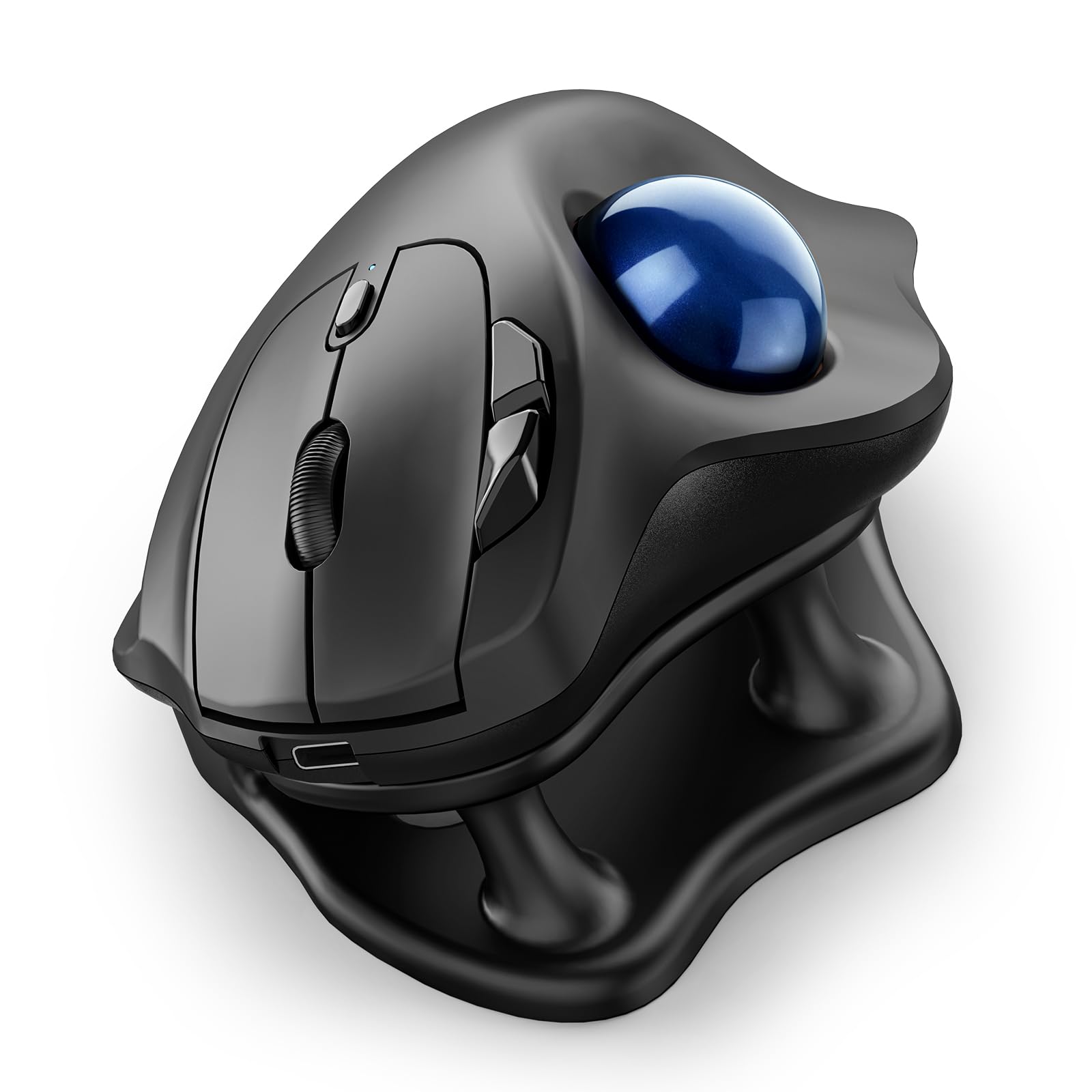
A trackball you can run in a library without a single clack.
Nulea takes the M501 formula and pushes it two ways: a 21.7° tilt stand that lifts your wrist into a more natural angle, and a fully silent build. The claim is total quiet — ball, buttons, and scroll wheel — which is the reason to pick this one over the M501 above. It also fits the pinky-pain brief with grooved slots that give your ring and little fingers a place to sit instead of curling around a narrow edge. It pairs with up to 3 devices over Bluetooth or the included USB receiver and offers four DPI levels (400/800/1200/1600).
The stand works tilted or flat, so you can drop the wedge if you prefer the lower profile — and one owner notes that the tilt raises the hand while lowering the wrist, which may not suit every wrist. The size is the other draw: owners describe the body as cradling the hand, with the ring and pinky grooves doing real work for a sore outside finger.
Honest limits: the sleep mode needs a click to wake, which is the recurring gripe, and the stand is not adjustable and runs tall for some hands. Cursor precision is reported as a touch looser than a premium Logitech. The battery and connectivity hold up well over weeks of use, and the ball pops out without tools for cleaning.
Silence and shape: fully silent controls and ring/pinky grooves make this the best match for a shared room and a tender outside finger.
One shape note: the stand is fixed, so if a raised hand does not suit your wrist, plan to use it flat.
Right for you if: you work in a quiet space and want your pinky cradled on a shaped edge.
Less right if: you want an adjustable tilt or razor-sharp cursor precision.
6. Evoluent VM4S Vertical Mouse

Built small, with a wide lip that finally gives your pinky a home.
If the fix you need is specifically for a small hand, this is the pick. The VM4S is the Small version of Evoluent’s vertical mouse, and the detail that matters for pinky pain is the broad bottom lip — it gives your little finger a wide shelf to rest on instead of letting it scrape the desk. Owners with small hands report it fits them properly, and one notes the V4 Small widened the lowest button and lip to stop the pinky scraping that earlier versions had.
You get 6 buttons that can be customized through the Evoluent Mouse Manager software, plus pointer-speed controls on the side so you can adjust sensitivity without letting go. It is wired USB, which means no battery to charge and no dongle to lose — a real advantage on a locked-down work machine. Six customizable buttons and a dedicated speed control make it a serious tool for long computer hours rather than a simple clicker.
Two honest catches. The size is fixed and small, so a large hand will feel cramped — the data is clear that the small version suits hands under a certain span while the large version is very large. And a few owners find the thumb buttons awkwardly spaced, usable one at a time, and the fixed tilt can move strain rather than erase it for some wrists. The rubberized surface runs warm in summer, and there is a logo light you can switch off by holding the speed button while plugging in.
Why it earns a place: the wide pinky lip plus a properly small body is the most targeted answer to a sore outside finger here.
The catch: it is wired only and sized small, so big hands and cord-free desks should look at the trackball picks instead.
Made for: small right hands that want a wired vertical mouse with a real rest for the little finger.
Not the one if: you have large hands or need wireless freedom.
7. Logitech MX Ergo S Advanced Wireless Trackball Mouse

The premium trackball that lets you set the tilt to your wrist.
What separates this from the Ergo M575S above is control. The MX Ergo S gives you an adjustable 20-degree tilt — flat or raised — so you can dial the angle to your own wrist instead of accepting a fixed shape. Logitech claims the 20-degree tilt cuts muscle strain by 27% versus a regular mouse and that the clicks are 80% quieter. You steer with a thumb ball, so your hand stays put and your pinky is not gripping anything. Six buttons are programmable through the Logi Options+ app.
Charging is the standout spec: a 1-minute USB-C charge gives up to 24 hours of use, and a full charge stretches to up to 120 days. The sculpted body with a soft rubber grip is built for medium to large hands, and the metal baseplate keeps it planted on the desk. It connects by Bluetooth or the included Logi Bolt receiver, with an Easy-Switch button for moving between machines.
Where it asks more: the value side is mixed — some owners see the ergonomics as worth the outlay, others find it overpriced for what it is. A few report Bluetooth cursor freezes that clear with a click, and the Bolt receiver can be finicky in hubs and docks, preferring a direct USB-A port. It is also for medium to large hands, so small hands should look at the Evoluent above.
The premium payoff: adjustable tilt plus 1-minute-to-24-hour charging are real daily conveniences you feel rather than read on a spec sheet.
What it asks: a higher outlay and a receiver that prefers a direct port, so check your dock setup before committing.
Choose this if: you want to fine-tune the tilt and value fast top-ups over a simpler shape.
Hold off if: you have small hands or dock-heavy desk and want fuss-free connectivity.
Know the Specs
Thumb trackball vs vertical tilt
A thumb trackball moves the cursor from a ball under your thumb, so your hand and wrist stay still — the biggest relief for a pinky that aches from gripping and dragging. A vertical or tilted mouse keeps a conventional layout but rolls your palm toward a handshake angle, reducing the sideways press on the outside of your hand. Trackball removes hand travel; vertical tilt removes wrist roll. Which one helps your pinky depends on whether your pain comes from gripping or from pressing down.
Tilt angle and hand posture
The degree number tells you how far the body is rotated. A 59° vertical like the Acer stands your hand up steeply, while a 20-degree trackball tilt like the Logitech MX Ergo S is gentler and adjustable. Higher angles take more adjustment but change posture more. Fixed tilts suit some wrists and not others, so an adjustable tilt is worth having if you are unsure which angle your hand prefers.
Button count and programmability
More buttons means more shortcuts within thumb reach, but only if they can be mapped. The Acer carries 8 buttons, the Lekvey 6 non-programmable ones, and the Evoluent and MX Ergo S 6 programmable ones. If you rely on shortcuts, check the mapping support before you buy — a high button count you cannot remap is less useful than a few you can.
Battery and charging
Battery is stated differently across these picks: an AA lasting up to 18 months, a 600mAh rechargeable lasting about 3–4 weeks at 8–10 hours a day, a 1-minute charge giving up to 24 hours. A wired mouse like the Evoluent sidesteps batteries entirely. Match the figure to your routine — a long-lasting cell suits a forgetful desk, a fast top-up suits a busy one.
Common Questions
Will a trackball mouse really stop my pinky from hurting?
Is a vertical mouse or a trackball better for pinky pain?
How long does it take to get used to an ergonomic mouse?
Which of these fits small hands?
Can I use these mice with a Mac or a tablet?
Do I need to buy batteries or can I recharge?
Are these quiet enough for an office or a late-night desk?
How long should an ergonomic mouse like this last?
Can I change the buttons on these mice?
Will a trackball work on a small or cluttered desk?
The Bottom Line
The ergonomic mouse for pinky pain that suits most people is the Logitech Ergo M575S — a thumb trackball that parks your hand so your pinky stops gripping, with up to 18 months on one AA and a shape that suits most hand sizes. If you want the most feature-rich vertical for the money, the Acer gives you 8 buttons and a 59° tilt, while the Lekvey is the crowd favourite for an upright shape with a rechargeable battery and the longest warranty here. Small hands should reach for the Evoluent VM4S with its pinky lip, and if you want a fully silent trackball for a shared room, the Nulea 21.7° Tilt Trackball is the one.
How we choose
We do not accept paid placement. Every pick is matched to a real buyer and a real use-case; we do not hands-on test units.
Sources
Specifications: manufacturer listings and product documentation. Review insights: verified customer reviews, as of October 2026. Pricing: not shown on this page (it changes often); check the current price via the retailer link.
As an Amazon Associate, Aappliancez earns from qualifying purchases. This does not affect which products we feature.