Disclosure: Some links in this post are affiliate links. As an Amazon Associate I earn from qualifying purchases, at no extra cost to you. Learn more
Specs are compiled from manufacturer listings and verified buyer reviews and can change over time — please confirm the key details on the product page before buying.
If you want one device that reads like a book and writes like paper, choose by stylus (the pen), not by screen. A color e-ink screen (electronic ink that looks like paper) is nice for book covers and highlighting. But what decides whether you keep using a note-taking ereader is how fast the pen marks the page and how easily your notes come back out. Each pick below solves that problem in a different way.
This guide is built by comparing the manufacturers’ published specifications and the patterns across verified customer reviews, so you get each pick’s real strengths and trade-offs instead of marketing spin.
You will see where color helps, where black-and-white still wins on clarity, and which stylus ships in the box versus which one you have to buy separately. By the end you will know exactly which ereader for taking notes fits your desk, your bag, and your handwriting.
Top Picks


How To Choose The Best Ereader for Taking Notes
The mistake most first-time buyers make is shopping by screen alone. A big, crisp display makes reading a pleasure, but it tells you nothing about whether your handwriting lands on the page without a visible delay. Start with the pen, then work outward.
Decide whether the stylus is in the box
This is the single most expensive surprise in the category. The Kobo Elipsa 2E bundles its Kobo Stylus 2, and the Kindle Scribe models ship with a pen. The Kobo Libra Colour works with the Kobo Stylus 2, which is sold separately. A BOOX Go Color 7 Gen II supports an active InkSense stylus, but that stylus is not included in the box either. Check the box contents before you fall in love with a screen.
Choose your display: color softness or black-and-white sharpness
Color e-ink uses a Kaleido layer that mutes and grays the page compared with a plain black-and-white panel. That is normal for the technology, not a fault. If you highlight in different colors or read comics, color earns its place. If you mainly write meeting notes and read novels, a black-and-white 300 ppi panel gives you the sharpest text for your eyes.
Match the screen size to your notes
A 7-inch screen slips into a jacket pocket and handles quick lists. A 10.2-inch or 11-inch screen fits a full PDF page, so you can annotate a slide deck or a journal article without panning around. The narrower the margins you need, the more inches you want.
Check how your notes get out
Some devices email pages, some sync through a cloud drive, and some put full search and handwriting conversion behind a paid subscription. If your notes need to land in a work document, confirm the export path first. This one detail decides whether the device becomes a daily tool or a drawer resident.
Side-by-Side Comparison
| Model | Best For | Screen | Storage | Stylus In Box | Amazon |
|---|---|---|---|---|---|
| Kobo Libra Colour★ Best Overall | Color highlights in a pocketable size | 7” color E Ink Kaleido 3 | 32 GB | No — Stylus 2 sold separately | Amazon |
| Like-New Kindle Scribe (16 GB)Smart Value | Focused reading plus handwriting notes | 10.2” 300 ppi Paperwhite | 16 GB | Yes — Premium Pen | Amazon |
| BOOX Go Color 7 Gen IIApp Juggler | Running Android reading apps | 7” Kaleido 3, 1680 x 1264 | 64 GB | No — active stylus sold separately | Amazon |
| TCL TAB A1 Plus NXTPAPER | Note-taking plus real apps and video | 12.2” 2.4K, 120Hz | 256 GB | Yes — T-Pen 2 | Amazon |
| Kobo Elipsa 2E | Big-page PDF markup | 10.3” E Ink Carta 1200 | 32 GB | Yes — Kobo Stylus 2 | Amazon |
| Like-New Kindle Scribe (64 GB) | AI note summaries | 10.2” 300 ppi front-lit | 64 GB | Yes — Premium Pen | Amazon |
| reMarkable Paper Pro Move | Carrying a notebook in a jacket pocket | 7.3” Canvas Color | — | Yes — Marker Plus | Amazon |
| Amazon Kindle Scribe (newest, 64 GB) | Fast writing on a large screen | 11” glare-free front-lit | 64 GB | Yes — pen with eraser | Amazon |
| reMarkable Paper Pro | Full-size color writing surface | 11.8” Canvas Color | 64 GB | Yes — Marker Plus | Amazon |
Detailed Reviews
1. Kobo Libra Colour eReader, 7” Color E Ink, Waterproof, White
Our pick — 4.5+★ from 600+ verified ratings; the strongest balance of quality and price.
Color highlights and a waterproof body in a reader that fits one hand.
The reason this one tops the list is simple: it is the most flexible note-taking reader you can buy without paying premium money, and it gets the daily basics right. A 7-inch color E Ink Kaleido 3 screen shows 4,096 colors, so your highlights, margin scrawls, and book covers arrive in something other than gray. Its 32 GB holds up to 24,000 eBooks or 150 audiobooks per Kobo, and the battery is rated at 4 weeks. It is the crowd favorite here, holding 4.5+ stars across 600+ ratings.
What wins people over is how much it does without fuss. Drawing apps aside, this is a reader that also runs a proper notebook with folder organization, and the whole thing feels light in hand at 7.05 ounces. The page-turn buttons are a real physical click rather than a tap on glass, and 43 owners single out the button response as a highlight. Cross-device contrast worth knowing: the BOOX Go Color 7 Gen II is the same 7-inch class but pushes more internal room, and the Kobo answers back with waterproofing the BOOX does not offer.
Two honest limits. The screen is softer and grayer than a black-and-white panel — that is what color E Ink does, and the adjustable front light is how you compensate. The other is the pen: the Kobo Stylus 2 is sold separately, so budget for it if note-taking is the whole point. Bluetooth also needs Wi-Fi switched on to run, which nibbles at the battery when you stream audiobooks.
Where it earns its place
- Color highlighting and margin notes on a 7-inch Kaleido 3 panel
- IPX8 waterproof rating rated for up to 60 minutes in up to 2 meters of water
- 32 GB holds a large library without a card slot
- Physical page-turn buttons plus left/right screen rotation
The parts to plan around
- Kobo Stylus 2 is not included in the box
- Color E Ink looks muted next to a black-and-white panel
- Bluetooth needs Wi-Fi on to work, which drains battery
Reach for this if: you read in color and want to underline in color, and you like buttons instead of taps.
Budget for the pen: the stylus is a separate purchase, so add it to your plan before you decide.
2. Kindle Scribe 16 GB
The big-screen notebook that arrives with its pen and a warranty.
A 10.2-inch screen at 300 ppi is the headline, and it is the number that makes long reading sessions comfortable. That resolution means small print stays legible and your handwriting lands on a surface that looks like a page rather than a screen. It ships with the Premium Pen, so there is no second purchase waiting for you. Yes — Premium Pen, in the box.
For contrast, this is the smaller sibling to the newer 11-inch Scribe. The 10.2-inch model gives up a little room but keeps the same 300 ppi sharpness, and it still handles Active Canvas, where starting to write on a page makes space for your note. Importing a PDF and marking it up works directly on the document. Battery life is quoted as months of reading and weeks of writing per charge.
The writing experience is where opinions split. Many find the pen-on-glass feel natural and the notebook organization easy to live with, while a smaller group hits a pen that will not respond the way they expect. The recurring gripe is not about writing at all — it is menus that feel slower than the pen does, and pen tips that need replacing over time. If you sketch delicately, know that fine precision is limited.
The read from here: as a refurbished unit it comes tested and certified with the same limited warranty as a new device, which makes the value case strong for a first notebook-style reader.
The catch: note export is clunky — there is no easy one-tap pipe into Evernote or OneNote, so you email pages instead.
Best fit: a reader who wants to write in the margins of books and journal on a big, sharp page.
Look elsewhere if: your notes have to sync into a work system without extra steps.
3. BOOX Go Color 7 Gen II
One screen that runs Kindle, Libby, and your own PDFs without complaint.
Storage is where this one separates itself. It carries 64 GB on board against the like-new 16 GB Kindle Scribe, the kind of headroom that matters if you keep a working library of textbooks and annotated PDFs alongside apps. It also takes a microSD card, so the ceiling is not fixed.
Under the glass sits a 7-inch Kaleido 3 panel at 1680 x 1264, which is 300 ppi in black and white and 150 ppi in color. An octa-core chip runs Android 13 with 4 GB of RAM, and that is the whole point: you install the Kindle app, Play Books, Libby, or a browser and read where you like. Two details to weigh — the active InkSense stylus is not in the box, and the screen is not waterproof. Start-up is quoted at about a minute, which is a different rhythm from a Kindle.
Owners describe it as excellent for reading and poor for almost everything else. Video and games stutter because of the refresh rate and the low-power chip, and one judgment call to note: for color e-ink, expect muted tones rather than the punch of an LCD. The physical side earns steady praise — a grippy back, configurable page-turn buttons, and a G-sensor that flips the screen with you.
Why it tempts: the color display is genuinely useful for highlighting and annotation even when the hues are soft, and running your existing reading apps on one device saves carrying three.
About that pen: budget for the active stylus, and note the manufacturer states EMR styluses are not supported at all.
Suits you if: your library lives across several apps and you want PDF markup in one place.
Think twice if: you read in the bath or need a stylus in the box on day one.
4. TCL TAB A1 Plus NXTPAPER
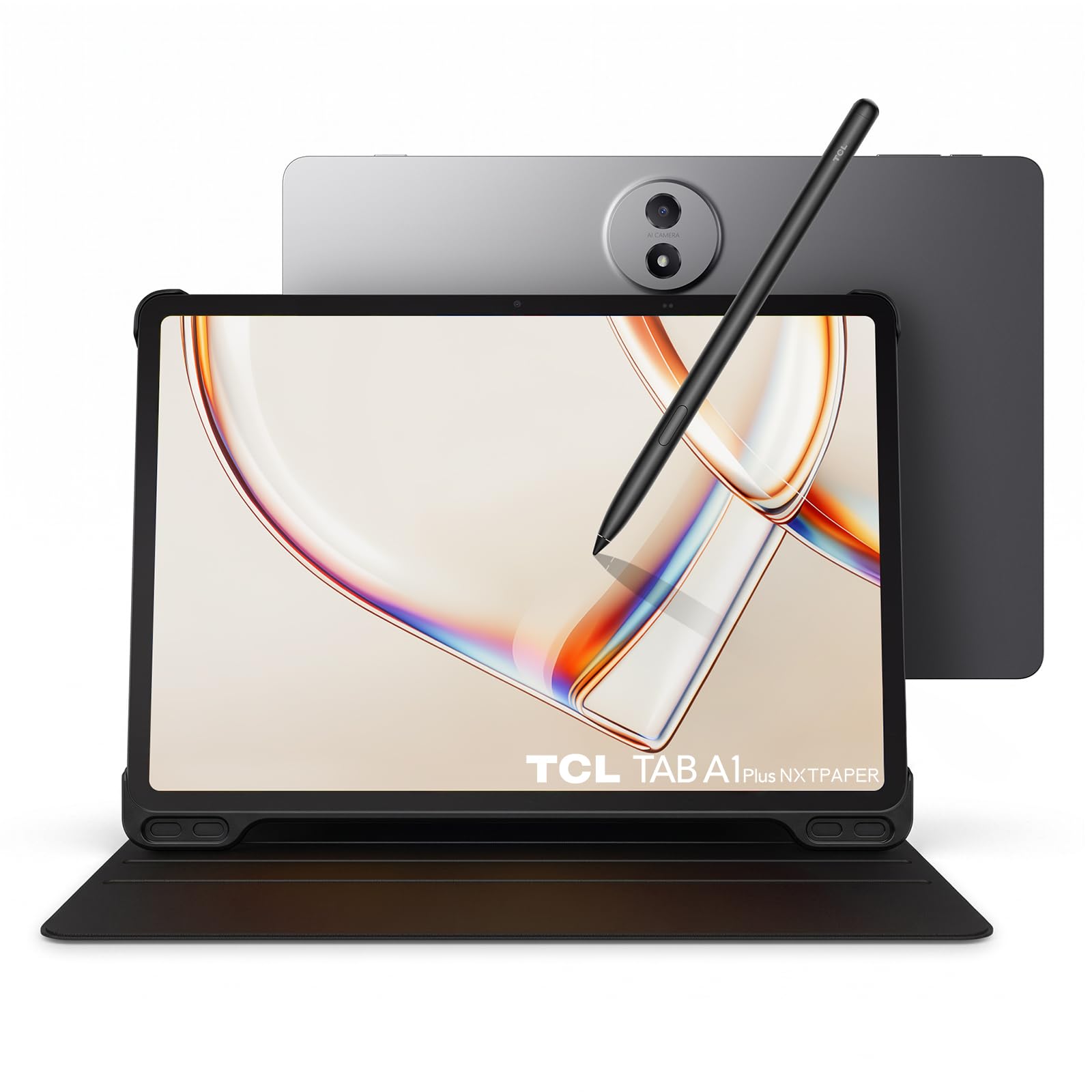
A glass tablet that turns into paper at the tap of one key.
This is the pick that refuses to choose between an ereader and a tablet, and the 12.2-inch 2.4K display is why it works. The NXTPAPER Key flips the screen into Ink Paper, Color Paper, or Regular Mode on demand, so a lecture PDF reads paper-soft while a video stays vivid. A matte finish kills reflections, which is the difference between reading outdoors and giving up on it.
The note side is well equipped. The T-Pen 2 is included, offers 4,096 pressure levels, and comes with two interchangeable tips — soft and hard — so you can match the feel to your handwriting. TCL Note adds AI-powered organization for your pages. Hardware-wise, a Snapdragon 4 Gen 2 chip with 6 GB RAM and 256 GB storage runs the daily apps, and a 10,000 mAh battery charges at 33W.
This is the biggest departure from a pure e-ink device, and you should know that going in. A 120Hz LCD means you can run OneNote, email, and calendar side by side and sync live — something an e-ink reader simply will not do. The trade is that this is a lit screen, not an e-ink one, even in its paper modes. The stylus also splits opinion: it makes writing easier for many, yet some find palm rejection unreliable in certain apps.
What the large panel buys you
- 12.2-inch 2.4K matte display with Ink Paper and Color Paper modes
- 10,000 mAh battery with 33W fast charging
- 6 GB RAM and 256 GB storage with microSD expansion up to 2TB
- Metal unibody at 1.23 lb with IP54 protection
Things that wear on owners
- Palm rejection fails in some apps, per the manufacturer’s own listing
- The cover magnet is weak and there is no pen storage on it
- Battery life reads closer to a tablet than an ereader
Choose it when: you need a notebook and a working tablet in the same bag for class or meetings.
Know before you buy: treat the screen as a lit display that imitates paper, not true e-ink.
5. Kobo Elipsa 2E

A full page of PDF on screen, with the pen already in the box.
At 10.3 inches, this display is sized so a document page fits without pinching and panning. The panel is E Ink Carta 1200 with ComfortLight PRO, which means glare-free reading with adjustable brightness and color temperature — you can warm the light at night to cut blue light before bed. The Kobo Stylus 2 ships with it and is rechargeable, so there is no second purchase and no battery to swap in the pen.
Where it pulls ahead of the 7-inch Libra Colour is page real estate: the Elipsa 2E is 10.3 inches against 7, which is the difference between writing in a margin and writing across a whole page. Storage is 32 GB, quoted as up to 24,000 eBooks. Kobo’s patented markup technology keeps your annotations visible even when you change font size, a small feature that matters if you read the same book in different settings.
Speed is the honest trade-off. Owners find large notebook operations slower and the stylus takes a learning curve to settle into, and some see page-change lag during long sessions. The flip side is a lightness that surprises people moving over from heavier note tablets, and a built-in browser that handles sideloaded public-domain EPUBs and academic PDFs well. An occasional screen surface defect has turned up in a unit here and there.
Standout detail: if you carry slide decks and journal papers, that 10.3-inch glare-free page is the reason to choose it over any 7-inch reader.
Watch for: the SleepCover is a separate item, so plan for protection as an extra.
Suitability: students and researchers who annotate full-page PDFs and want the pen bundled.
Not for you if: you expect button-driven, instant page turns every time.
6. Kindle Scribe 64GB
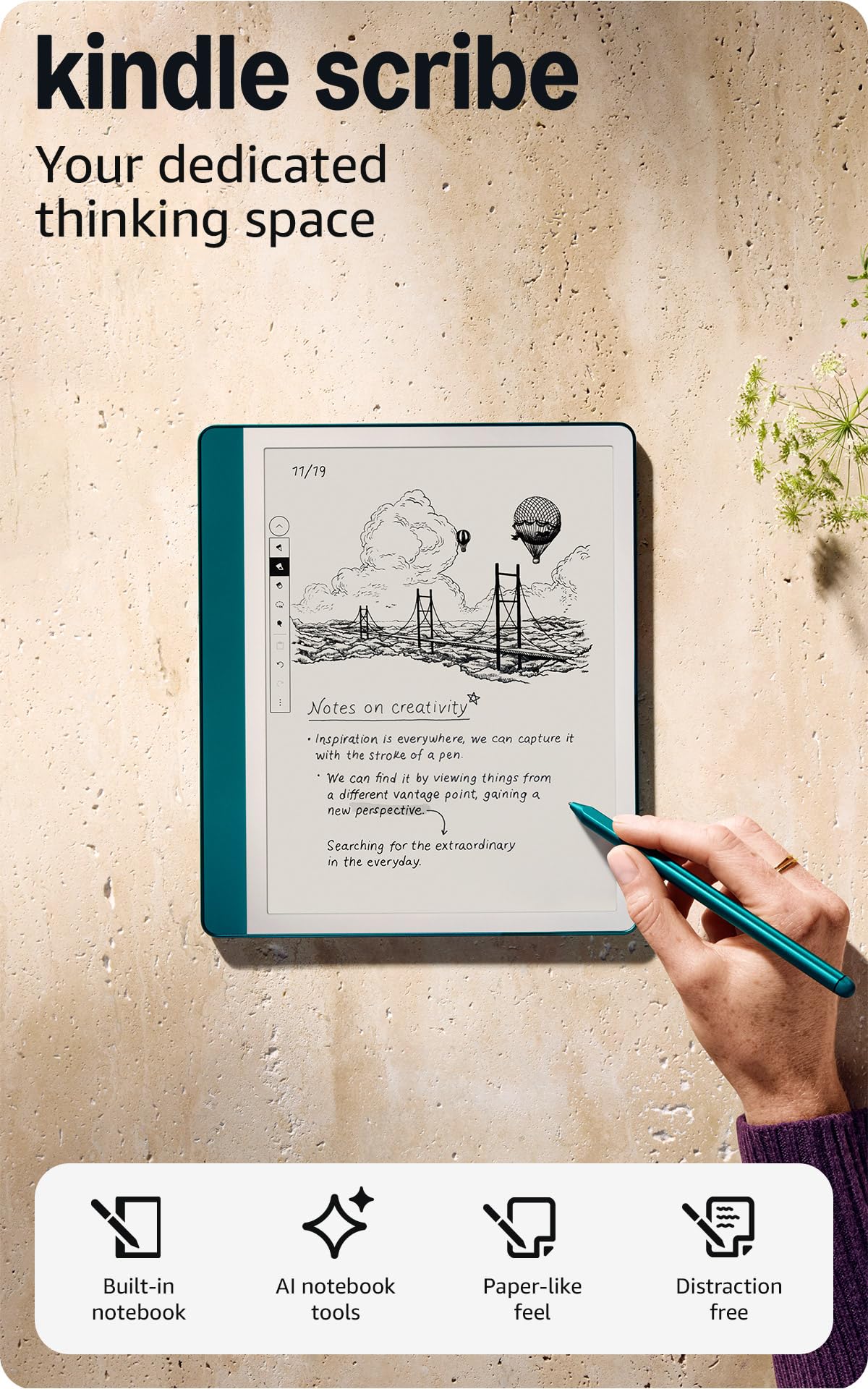
The one that reads your handwriting back to you as tidy typed text.
Built-in AI notebook tools are the reason to step up to this model. It converts messy handwriting into readable font, then summarizes your notes and changes their length and tone — genuinely useful when a brainstorming page needs to become a meeting recap. You get 64 GB to hold it all, against 16 GB on the entry Scribe, and the same 10.2-inch glare-free 300 ppi front-lit display.
The writing feel is the thing that keeps people coming back. The Premium Pen needs no setup and no charging, and the frosted-glass surface gives you that slight drag of pen on paper. Battery life is quoted as months of reading and weeks of writing per charge. Because this is a Like-New unit, it arrives tested and certified with the same limited warranty as a new device, which takes the risk out of the refurbished route.
Where it frustrates is in the interface. The system feels clumsy next to the writing, and there is no direct on-page marking of Kindle books — you leave a sticky note instead. Fine sketching is limited, and pen tips need replacing more often than you would guess. None of that touches the core job of writing and reading, which is where it shines.
The AI advantage
- Handwriting conversion, summarization, and tone changes built in
- 64 GB of storage for notebooks and a full book library
- 10.2-inch 300 ppi front-lit display for paper-like writing
- Premium Pen needs no charging and never requires pairing
Where it rubs
- Menu navigation feels sluggish against the pen speed
- Cannot mark up Kindle books directly on the page
- Pen tips wear and replacements add up over time
The right buyer: anyone who fills notebooks and then wants a searchable, summarized typed version.
The honest snag: sketching precision is modest, so this is a writer’s tool rather than an artist’s.
7. reMarkable Paper Pro Move with Marker Plus

A notebook smaller than a paperback, so ideas get caught in a jacket pocket.
The whole proposition is portability. The 7.3-inch Canvas Color display and a body that slips into a jacket pocket make this the one you actually carry, and portability is the reason people keep it on them instead of leaving it on a desk. The Marker Plus is included with 6 spare tips, so writing works the moment it comes from the start.
Writing feel is where reMarkable has built its reputation, and colors read softer than a big tablet but far beyond the gray of an e-reader. The included pen has a strong magnet for charging, and templates for meeting notes, daily journals, and project planning shape the workflow around you. Handwriting-to-text conversion and cloud sync are there when you need them, with mobile and desktop apps to pick the notes up elsewhere. The screen resolution is 954 x 1696 pixels.
The catch is a subscription. Full search through handwritten notes and template access sit behind a Connect subscription, and without it the device is much more basic. A small writing-to-screen delay shows up in some sessions, and the case is sold separately while the pen magnet on some units is weaker than you would like. Battery behaves like a tablet if you leave Wi-Fi and the light running.
The size trade: a smaller page means more panning when you want a whole meeting on one screen, so it suits short bursts of ideas over long-form notes.
The subscription question: decide whether you are comfortable paying monthly for full search before you commit.
Pick it when: you want a distraction-free notebook that lives in a jacket pocket and never shows an email.
Skip the upgrade if: you need a large page for detailed diagrams and long lecture notes.
8. Kindle Scribe 64GB newest model

An 11-inch page with a pen that never asks for a charger.
The 11-inch glare-free display is the biggest jump in this lineup, and it buys you real workspace. Writing and page turns are up to 40% faster than the previous generation, a difference you feel the moment you flip through a chapter. The pen is included, never needs charging, and carries a built-in eraser plus a shortcut button for tools like the highlighter. At 5.4mm thin and 400g, it is built to be held for long sessions.
The display handling deserves a mention. Brightness adapts to your lighting automatically, and you can warm the tone at night to keep your eyes comfortable. Inside a notebook, AI tools help you find information, ask questions about what you wrote, and generate summaries — and you can clean up handwriting or convert it to text. Documents from Google Drive or Microsoft OneDrive import and export as PDFs, and notebooks can go to Microsoft OneNote.
One heavy user reported that the AI transcribed his illegible handwriting 100% accurately. That is a single story, not a guarantee, but it says something about the state of the conversion. The recurring complaint is not the writing at all — it is uneven front lighting on some units, where the light looks blotchy against the frame. Owners also mention no tagging or hyperlinking in the notebook system, and no color if that matters to you.
Speed is the sell: near-zero pen lag plus faster navigation makes the 11-inch model feel like a modern tablet without the distractions.
The fair warning: if a perfectly even front light is a deal for your eyes, inspect your unit early and swap it inside the return window.
Made for: heavy note-takers who want the largest page and the fastest pen response.
One caveat: no color and no speaker or microphone, so it stays a reading and writing tool only.
9. reMarkable Paper Pro with Marker Plus

The biggest writing surface here, and the one built most purely for paper feel.
An 11.8-inch Canvas Color display gives you more room to write and sketch than anything else on this list. That full-size page matters when you are laying out diagrams or working a whole page of equations. The Marker Plus ships in the box with a built-in eraser and 6 spare tips, and the display uses a 2160 x 1620 resolution. An adjustable reading light means you keep working after the room lights go off.
Inside sits 64 GB of storage, a Cortex-A53 chip, and a battery rated at 2 weeks. The design keeps everything where you can find it: folders and tags for organization, handwriting-to-text conversion, and direct writing on PDFs. The paper-like friction is deliberately engineered to work with the color display, and it is why people describe the writing as the standout rather than the screen. A nursing student who switched from a first-gen Kindle Scribe uses it daily for school, saving every note as a PDF and carrying only the tablet into clinicals.
The colors are muted, and that is a fair description rather than a fault — this is a low-power writing display, not an entertainment panel. Battery takes a hit when the backlight runs high. The larger screen adds writing space but also bulk. Some buyers find the subscription requirement for saving and syncing across devices the real cost of ownership, and at least one unit arrived defective with a corrupted disk and needed a replacement.
What the extra inches deliver
- 11.8-inch Canvas Color display at 2160 x 1620 for full-page writing
- 64 GB storage and a 2-week rated battery
- Marker Plus with built-in eraser plus 6 spare tips in the box
- Folders, tags, and direct writing on PDFs
Costs and quirks
- Colors read muted next to a standard tablet
- Backlight use shortens battery life appreciably
- Full sync and saving require a paid subscription
Worth it for: writers and students who want the largest color paper surface and accept the soft palette.
Not the pick for: anyone who wants vibrant color or one-tap free cloud syncing from the start.
Know the Specs
E Ink vs Color E Ink
Standard E Ink is a black-and-white panel, and at 300 ppi it gives you the sharpest text — small print stays clean for hours of reading. Color E Ink adds a Kaleido layer so the page can show 4,096 colors. That layer mutes the whole screen, so black text looks softer and whites look grayer than you may expect. The adjustable front light is how color devices compensate. Choose color only if highlighting in different colors or reading comics is part of your day; otherwise a black-and-white panel is easier on the eyes for pure text.
Stylus pressure levels and palm rejection
Pressure levels are how many different stroke weights the pen registers as you press harder or lighter — the T-Pen 2 on the TCL offers 4,096. Higher counts give you finer control over line thickness. Palm rejection is the separate job of ignoring your resting hand so it does not leave stray marks. Some tablets handle palm rejection well in their own note app but less well in third-party apps, so test your writing in the app you actually plan to use.
Screen size and PDF markup
A 7-inch reader fits in a pocket and handles quick lists. A 10.2-inch or 11-inch screen is where a full PDF page fits without panning, which is what you need to mark up a slide deck or annotate a paper. If you write long notes, the extra inches reduce how much you scroll inside a page. If you mostly capture short ideas, a smaller device gets carried more often, and a device you carry beats a better one left at home.
How notes leave the device
Export options vary widely. Some devices email pages or notebooks, some sync through cloud drives like Google Drive or OneNote, and some put search and handwriting conversion behind a subscription. Before you buy, decide where your notes need to end up — an email inbox, a work document, or a personal computer — then confirm that path exists. This is the spec that determines whether the device joins your workflow or sits unused.
Common Questions
Can I take notes on a Kindle Scribe without buying a separate pen?
Does the Kobo Libra Colour include a stylus for writing notes?
Why does a color e-ink screen look duller than a regular tablet?
Can I write directly on Kindle books on the Scribe?
Is the reMarkable Paper Pro waterproof?
Do I need a subscription to search my handwritten notes?
How long does the battery last on a note-taking ereader?
Can I mark up PDFs and import my own documents?
How much storage do I need for a note-taking ereader?
Can I run the Kindle app on a tablet-style note device?
The Bottom Line
For most readers who want to write, the ereader for taking notes winner is the Kobo Libra Colour. It gives you a color screen you can highlight in, a waterproof body, and real page-turn buttons, in a size you will carry every day. If color is not the point and you want the sharpest text on the biggest page with the pen already included, reach for the Amazon Kindle Scribe (newest model). And if your notes have to live inside email, calendar, and shared documents, the TCL TAB A1 Plus NXTPAPER acts like a working tablet when you need it to.
One last nudge: whichever you choose, confirm the stylus is in the box and confirm how your notes leave the device. Those two details separate a notebook you use daily from one that ends up in a drawer.
How we choose
We do not accept paid placement. Every pick is matched to a real buyer and a real use-case; we do not hands-on test units.
Sources
Specifications: manufacturer listings and product documentation. Review insights: verified customer reviews, as of October 2026. Pricing: not shown on this page (it changes often); check the current price via the retailer link.
As an Amazon Associate, Aappliancez earns from qualifying purchases. This does not affect which products we feature.