Disclosure: Some links in this post are affiliate links. As an Amazon Associate I earn from qualifying purchases, at no extra cost to you. Learn more
Specs are compiled from manufacturer listings and verified buyer reviews and can change over time — please confirm the key details on the product page before buying.
If you are picking up an engraving pen for the first time, the biggest surprise is that the tool barely matters at first — your hand does. A good beginner pen has to feel light in your fingers, stay steady while you trace a letter, and stay quiet enough that you are not flinching every time you touch it to glass. The ones below all clear that bar, and the short version is this: if you want the smoothest first experience, start with the HOTO kit at the top of this list. It wins on balance, vibration, and how easy it is to hold a line.
This guide is built by comparing the manufacturers’ published specifications and the patterns across verified customer reviews, so you get each pick’s real strengths and trade-offs instead of marketing spin.
Most beginners assume more speed equals better results, which is exactly backwards when you are learning to control a spinning bit. This guide breaks down speed ranges, bit counts, and battery reality so you can pick the right engraving pen for beginners without overspending on power you will never use.
Top Picks
How To Choose The Best Engraving Pen for Beginners
Your first engraving pen has one job: let you make a clean mark without fighting the tool. That means the specs that matter most are not the ones on the box in the biggest font. Here is what actually changes your results as a beginner.
Speed range and why lower is your friend
Speed is measured in RPM (revolutions per minute — how many times the bit spins in one minute). Engraving pens typically offer a range rather than one fixed speed, and that range lets you slow the bit down for delicate work like glass or plastic. Going slow keeps the tip from skating across the surface before it bites. Most beginners do their best work in the lower half of whatever range the pen offers.
Bit count versus bit quality
A kit with more bits means more surfaces you can attempt without buying anything extra. Diamond-coated bits handle glass and stone; standard steel bits handle wood and soft metal. The catch is that cheap bits wear down, so a huge accessory count is only useful if the bits hold up. Look at the total in the kit, then judge whether the bits suit the materials you actually want to engrave.
Weight, grip, and vibration
An engraving pen is held like a pen, so an ounce or two of extra weight near the tip changes everything. A light, well-balanced body tires your hand less during a long session. Low vibration matters just as much, because a shaking tool turns a straight line into a wobbly one. This is the spec the product pages almost never lead with — and it is the one that decides whether you finish your first project or give up halfway.
Battery life and charging setup
Cordless freedom is the whole point of these tools, but battery life varies widely between models. Some run for over an hour of real work, and some give you just a few minutes of power at a time. A USB-C charging base or cable is more convenient than a proprietary charger, partly because you can top up from a laptop or power bank. Always check whether the charger itself is a standard connection before you commit.
Side-by-Side Comparison
| Model | Best For | Speed Range | Included Bits | Battery Type | Amazon |
|---|---|---|---|---|---|
| HOTO Cordless Rotary Tool Kit★ Best Overall | Steadiest first-timer control | 5,000–25,000 rpm | 35 accessories | 1 Lithium Ion (included) | Amazon |
| AM ARROWMAX Mini Engraving PenPremium Pick | Longest cordless sessions | 15,000–30,000 rpm | 30 diamond bits | 500mAh LiPo (included) | Amazon |
| HARDELL 6-Speed Engraving Pen | Fast etching on harder stock | 18,000–38,000 rpm | 41 accessories | 2000mAh (included) | Amazon |
| Electric Engraving Pen with 37 Bits | All-round beginner value | 5,000–18,000 rpm | 37 bits | 1 AAA (included) | Amazon |
| Uolor USB Rechargeable Engraving Pen | Slim, pen-like daily practice | 5,000–18,000 rpm | 42 bits | 1 Lithium Polymer (included) | Amazon |
Detailed Reviews
1. HOTO Cordless Rotary Tool Kit
Our pick — 4.5+★ from 850+ verified ratings; the strongest balance of quality and price.
The quiet one that sits in your hand like a real pen — and never buzzes your line off course.
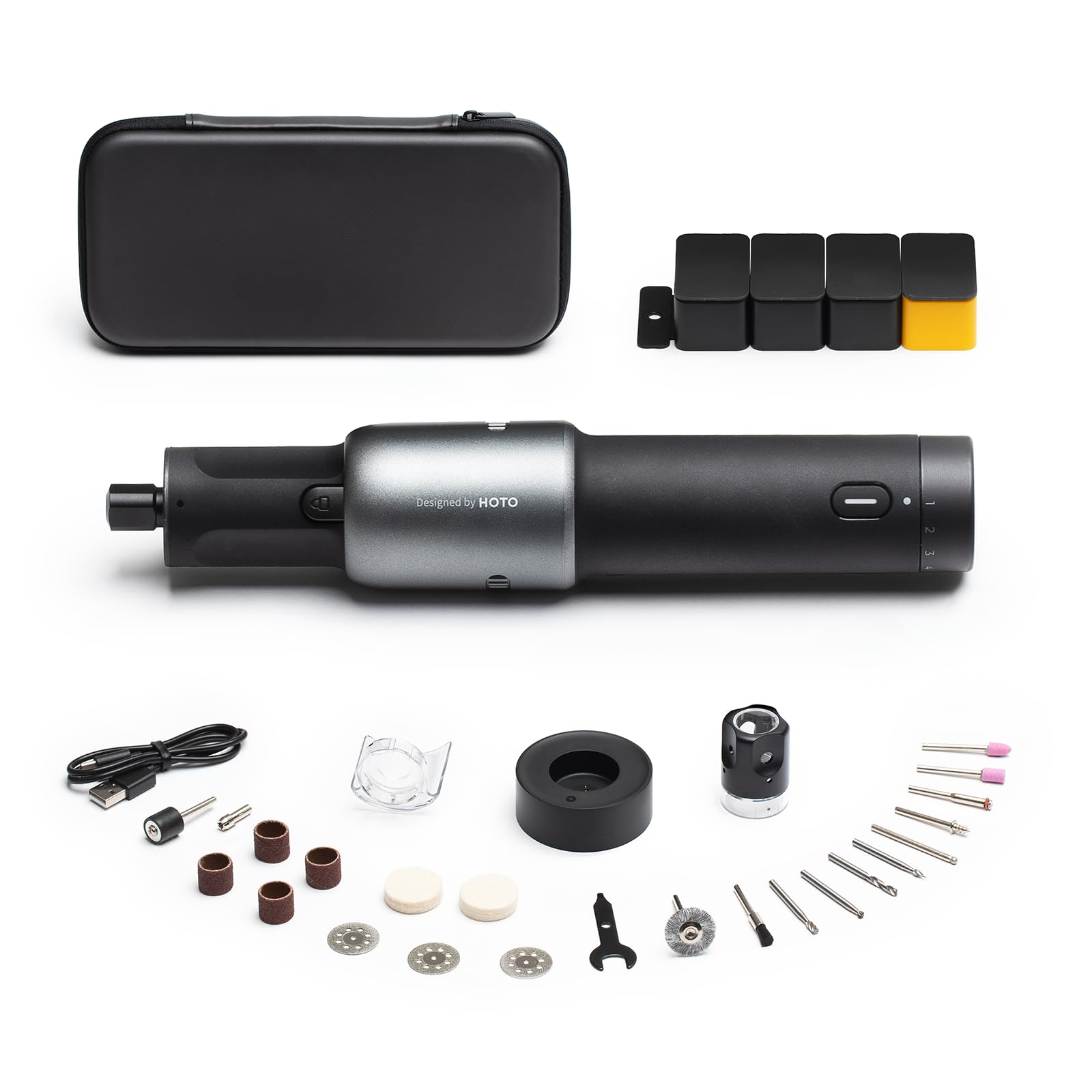
For a beginner, the HOTO kit solves the two problems that end most first attempts: vibration and hand fatigue. Its motor runs through 5 stepped speeds from 5,000 to 25,000 rpm, so you can drop to the slow end for glass and plastic and climb when you move to wood. The whole tool weighs 1.7 pounds in its kit form and stays slim and balanced in one hand — the opposite of the bulky industrial rotary tools that pull your wrist down. Owners consistently single out the build quality in their reviews.
Two details make it genuinely beginner-friendly rather than just beginner-marketed. First, the built-in LED light throws a small cone of light exactly where the bit meets the surface, which is the difference between a readable letter and a scratch when the light in your workroom is dim. Second, the snap-on dust shield keeps debris off your hands during sanding and carving. An honest note for anyone who dislikes clutter: the motor is underpowered for heavy garage work, and it will bog down on anything tedious. This is a crafting, modeling, and 3D-printing finisher, not a metal-fabrication tool.
You get a smoother, tidier experience than with cheaper pens. Compare it to the HARDELL pen: the HOTO tops out at 25,000 rpm (rotations per minute, a measure of spinning speed) while the HARDELL pushes to 38,000 rpm, but the HOTO gives you a wider accessory set — 41 versus 35 — and a charging base that keeps your workspace tidy. Buyers who use it for polishing report over an hour of work per charge. The one real caution is the charger: it is not a universal connection, so keep the base and cable together. Lose them and the tool stops being rechargeable.
What earns the top spot
- 5,000–25,000 rpm across 5 speeds, so you can slow the bit for glass and speed up for wood
- Low-vibration motor and slim, balanced body that fits one hand comfortably
- Built-in LED light and snap-on dust shield for cleaner, more accurate passes
- USB-C charging base, carry pouch, and 35 accessories including a pet nail grinding attachment
Where it runs out of steam
- Underpowered for heavy garage work — it amps out on tedious jobs, best for crafting and softer materials
- The charger is proprietary, so a lost cable or base sidelines the tool
- Some buyers feel the body reads cheaper in person than the photos suggest
Start here if: you want the steadiest, quietest first engraving experience and plan to work on wood, plastic, glass, and 3D-printed parts.
Think twice if: you need to cut or grind hard metal all day — this kit is built for detail work, not fabrication.
2. AM ARROWMAX Mini Engraving Pen
Twelve thousand more rpm than the budget pens, a screen that tells you your battery, and a reverse switch.
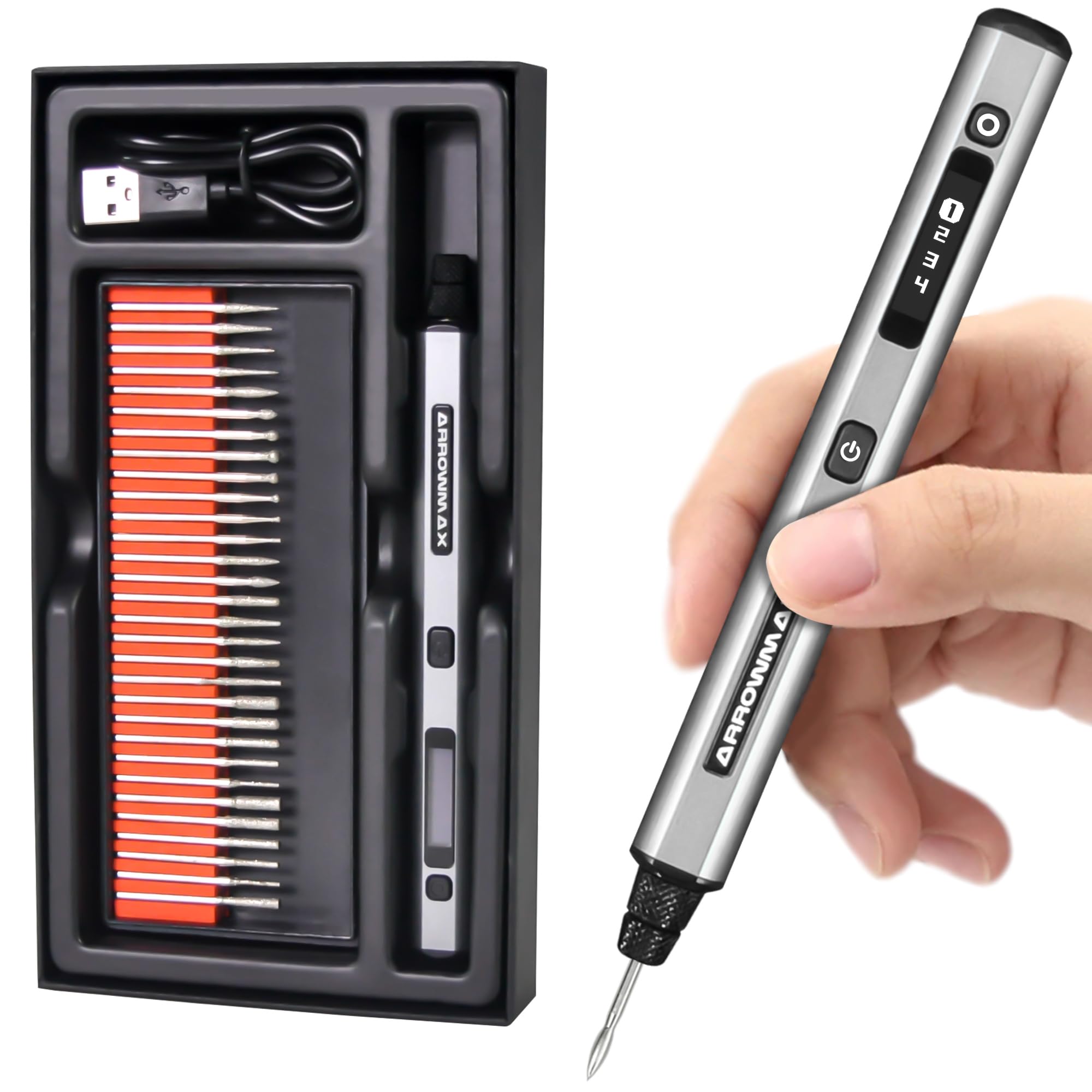
If you want one pen that stays out of your way while you learn, the ARROWMAX is the one built for it. The 4-speed motor swings from 15,000 up to 30,000 rpm, which clears the 5,000–18,000 rpm ceiling that both the HOTROSE pen and the Uolor pen stop at. That headroom means the bit keeps its bite when you move from basswood to a wine bottle to a metal keychain instead of stalling. A 500mAh LiPo battery backs it, and the manufacturer rates the 500mAh battery for up to 2 hours of cordless work.
The feature nobody else in this list offers is the forward and reverse rotation switch. Flip the bit direction with a single click and you can adjust the texture you leave behind — or just work left-handed without fighting the tool. The quadratic handle shape keeps it from rolling off your bench mid-project, which is a small thing that saves a lot of dropped bits. An OLED display (a small screen on the body) shows your speed, battery level, and rotation direction, so you never have to guess why it feels slow.
Here is the catch worth knowing before you buy. The 30 diamond bits in the kit are what the pen leans on, and they wear quickly — treating them as consumables you will replace, rather than permanent tooling, is the realistic expectation with heavy use. Performance and battery life split buyers: some get steady results for long sessions, others hit early trouble. It also does not hold up on hard metals; it shines on wood, plastic, and coated surfaces. For bead work, jewelry, and glass, though, the control is exactly what a beginner needs.
What makes it worth the upgrade: the reverse rotation and OLED readout (a small screen that shows your settings) are real usability features, not decoration — you can see your speed and battery without stopping, and left-handed engravers finally get a pen that works their way.
One thing to plan for: budget for replacement bits if you engrave often, because the included diamond bits lose their edge after short runs.
Reach for this if: you are left-handed, want a screen confirming your settings, or need the wider 15,000–30,000 rpm range for mixed materials.
Look elsewhere if: your main project is heavy metal removal — this pen is tuned for detail, not force.
3. HARDELL 6-Speed Engraving Pen
The speed-lover’s pen — 38,000 rpm of etching power when softer tools stall out.
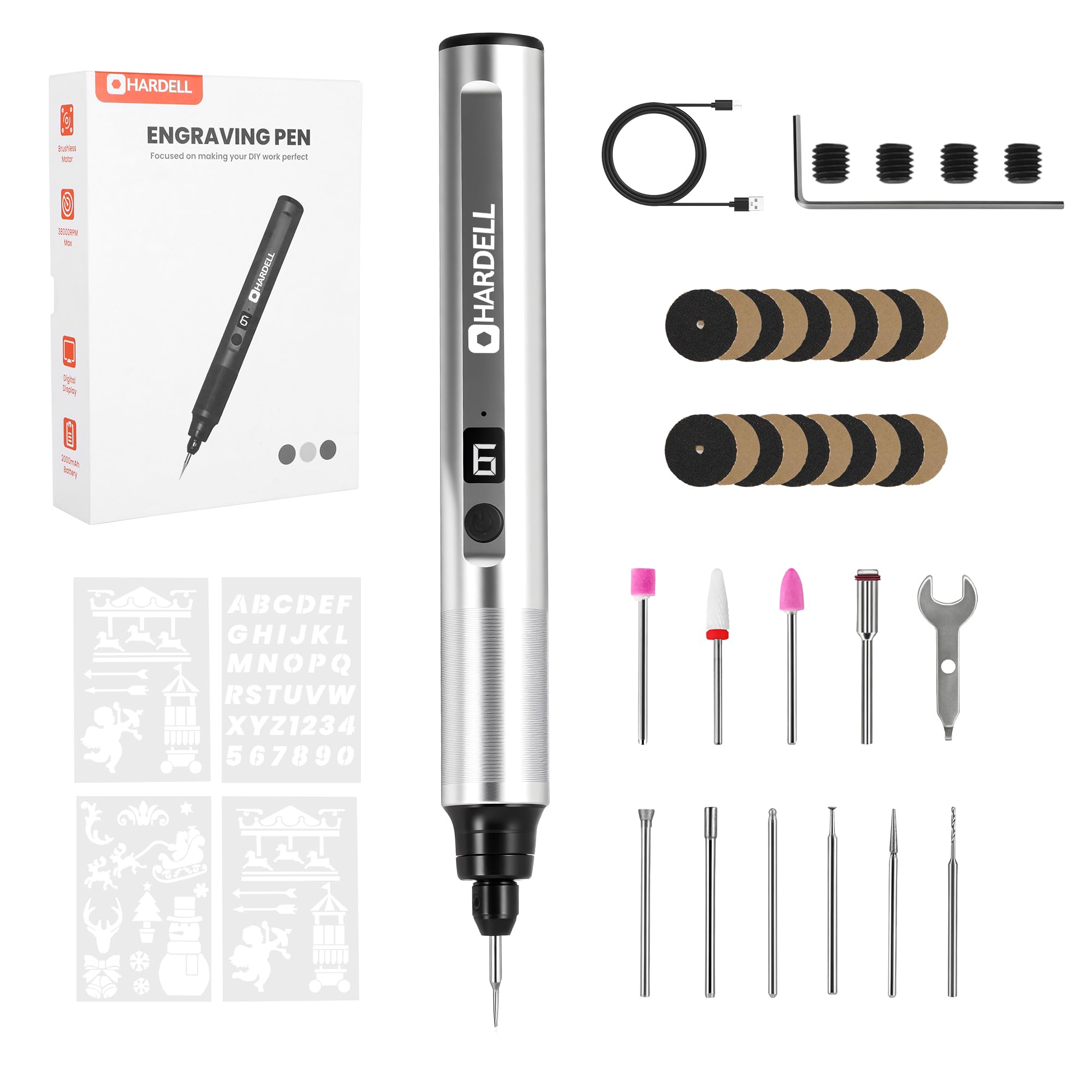
Some beginners want to grow into their tool instead of outgrowing it in a month, and that is where the HARDELL earns its place. Its 6 speeds run from 18,000 all the way to 38,000 rpm, the fastest top end here. For scale, that is well beyond the 25,000 rpm ceiling on the HOTO kit, so it can power through stone and hardwood that leave slower pens bogging down. The 4V brushless motor uses dual bearings, which keeps the bit stable instead of wobbling as you carve initials.
The 2000mAh rechargeable battery is the biggest in this lineup, and it charges over USB-C. It also brings 41 accessories, the largest set of the group, plus a pack of stencil sheets for tracing letters and numbers cleanly. Buyers who use it for tool-marking on jobsites value the simplicity: you can knock out quick initials on plastic and metal burrs without setup fuss. It is explicitly not a professional-grade machine, but it covers a lot of ground for the money.
The honest trade-off sits with durability and honesty about the kit. The accessory count is the headline, yet at least one set of hands came up short of the advertised 41 pieces, and the bits are light-duty — great on pine, balsa, and basswood, but a struggle on dense woods like wenge and black walnut. It can bog on some plastics and is best kept away from resin and epoxy. Build quality lands somewhere in the middle: functional, with a softer case than the old hard-shell versions. If you want the deepest, most powerful etching of the fast-spinning group, this is it.
The reason to pick it: 18,000–38,000 rpm across 6 speeds is the widest, fastest spread in this lineup, letting you grow into harder materials without buying a second tool.
Keep an eye on: the accessory count and light-duty bits — the kit is generous in number but the bits are best on softer stock.
Pick this if: you want maximum top-end speed, the biggest battery, and the largest accessory set for a grow-with-me tool.
Pass if: you mainly engrave dense hardwoods or resin, where the light-duty bits run into trouble.
4. Electric Engraving Pen with 37 Bits

The metal-bodied all-rounder that quietly talks you out of your first mistakes.
A beginner pen lives or dies on how gently it steers you, and this one leads with safety. A built-in overload protection chip (a small circuit that cuts the power when the bit meets too much resistance) shuts the tool off automatically if you push too hard. That protects both the motor and your first attempt — over-forcing is the number-one beginner error. It offers 3 speed levels up to 18,000 rpm for matching the bit to glass, wood, or plastic, and the housing is solid metal, so it holds a heavier, more premium feel than a plastic shell.
The kit is built for a beginner who wants options. You get 37 bits in total, including drill bits, saw blades, polishing tools, and stencils, plus a compact 4 x 4 x 1 inch body that slips easily into a drawer or bag. Buyers report it works well on wood and nails, and the 37 bits cover engraving, carving, sanding, and polishing. — reviewers emphasize its versatility across materials. The 12-month warranty adds confidence if anything goes wrong in your first year.
The whole buying decision hinges on the battery. This pen runs on a single AAA-sized rechargeable, and that is the split in the feedback: some get through a project comfortably, others find it needs a couple of charges to finish. If you plan to sit down for one small piece of work, it is fine. If you want to engrave for an hour straight without thinking about power, aim higher up this list. The quieter motor is a genuine plus, though — it will not disturb anyone else in the room, which makes it easy to practice in the evening.
Why beginners like it
- Overload protection chip cuts power automatically before a heavy hand damages the tool
- 37 bits plus 5 stencils cover engraving, carving, sanding, polishing, and drilling
- Solid metal body with a quiet motor that works well in a shared room
- Backed by a 12-month warranty
What to weigh
- Battery life splits the feedback — some owners need a couple of charges per project
- Single AAA-sized cell limits long uninterrupted sessions
- Low noise and metal body add polish that the power delivery does not fully match
Best for: the beginner who wants the most accessories and a protective chip that forgives a heavy hand.
Skip if: you plan long, uninterrupted engraving sessions — the compact battery will make you stop to recharge.
5. Uolor USB Rechargeable Engraving Pen

Thin enough to forget you’re holding it, loaded with 42 bits for whatever you try next.
If your main worry is your grip, the Uolor is the slimmest pen in this group and the closest to writing with an ordinary marker. Its body measures 4.92 x 0.63 x 0.63 inches, making it the most compact of the bunch — and compact means less wrist strain when you are tracing long curves. The 3 speed levels run from 5,000 to 18,000 rpm, so you can slow right down for fine glass work. When you hold it next to the ARROWMAX, the ARROWMAX feels noticeably larger in the hand; the Uolor is the one you can keep steady through a slow, careful pass.
The 42 bits make it the biggest kit here, and they cover drills, saw blades, cutting wheels, and a large set of diamond burr bits for detail work. It also brings 16 stencils for tracing shapes and letters. A safety circuit board inside cuts the power if the bit jams, protecting both the tool and your work. You can charge it from any USB port, including a laptop or power bank, which is handy if you tend to practice away from a wall outlet. Owners find it genuinely easy to learn on — one first-time buyer called it a neat little tool that turned into a new hobby.
The battery is the thing to be clear-eyed about. The manufacturer rates the battery for up to 30 minutes of idling per charge, and the feedback is divided: some buyers get a long run out of it, others find it draining far quicker. Plan for short-burst sessions rather than marathon engraving. The 3-month warranty is the shortest window here, so treat the low-risk price as part of the deal. For practice, small gifts, and figuring out whether engraving is for you, nothing else in this list makes the first step feel this light.
Why it fits beginners: at 4.92 x 0.63 x 0.63 inches with 5,000–18,000 rpm on tap, it handles small, slow detail work with less strain than a heavier tool.
The one to accept: the 30-minute idling rating and a 3-month warranty mean short practice sessions are the realistic rhythm.
Choose this if: grip comfort and a slim profile matter most and you are mostly practicing on small, detailed pieces.
Consider another if: you need long continuous runtime or the longest warranty coverage.
Know the Specs
RPM and speed settings
RPM stands for revolutions per minute — how fast the bit spins. A wider range gives you more flexibility: drop to the low end for glass and plastic, and climb for harder stock. More speed is not automatically better, though. A fast bit on a surface you have never engraved before will skate across it before biting. Beginners do better learning in the lower half of the range, then stepping up as their control improves. Look at both the minimum and maximum speed, because the minimum is what you will actually use while learning.
Bit type and what it cuts
Diamond-coated bits are what handle glass, stone, and ceramic. Standard steel bits work on wood, plastic, and soft metal. A kit with a bigger total of bits lets you try more surfaces without buying extras, but a big number is only useful if the bits hold their edge. Diamond bits wear down over time and should be treated as replacements, so factor that in if you plan to engrave often. Match the bits you get to the materials you actually want to mark.
Battery type and runtime
The battery tells you how long you can work in one sitting. Some pens rate in hours of cordless use, others give you just a short window before a recharge. Lithium-ion and lithium-polymer cells are rechargeable; a few pens use a single small cell that means shorter sessions. A USB-C connection is more convenient than a proprietary charger because you can top up from a laptop, power bank, or any standard port. Check the recharge method before you buy.
Grip, weight, and balance
An engraving pen is held like a writing instrument, so weight and balance near the tip decide how tired your hand gets. A slim, well-balanced body reduces strain and helps you keep a line steady. Handles that are shaped to resist rolling also save you from dropped bits mid-project. This is the spec product listings rarely promote, but it is the one that determines whether you enjoy your first engraving session or set the tool down early.
Common Questions
How fast should a beginner run an engraving pen?
Can an engraving pen work on glass and metal?
How long does the battery last on a cordless engraving pen?
Do I need a corded or cordless engraving pen to start?
How many bits do I actually need as a beginner?
Can I engrave left-handed with these pens?
What does the overload protection or power-off feature do?
Is an engraving pen good for wood and leather?
Will an engraving pen burn or scorch my material?
Do these pens come pre-charged and ready to use?
The Bottom Line
For most beginners, the engraving pen for beginners winner is the HOTO Cordless Rotary Tool Kit because its low-vibration motor, balanced slim body, and 5,000–25,000 rpm range make your first clean line the easiest to draw — rated 4.5+ stars by 850+ owners. If you want the widest speed range and the biggest battery to grow into harder materials, grab the HARDELL 6-Speed Engraving Pen. And if you want a screen, a reverse switch, and the longest cordless runtime, the AM ARROWMAX Mini Engraving Pen is the one to reach for.
How we choose
We do not accept paid placement. Every pick is matched to a real buyer and a real use-case; we do not hands-on test units.
Sources
Specifications: manufacturer listings and product documentation. Review insights: verified customer reviews, as of October 2026. Pricing: not shown on this page (it changes often); check the current price via the retailer link.
As an Amazon Associate, Aappliancez earns from qualifying purchases. This does not affect which products we feature.