Disclosure: Some links in this post are affiliate links. As an Amazon Associate I earn from qualifying purchases, at no extra cost to you. Learn more
Specs are compiled from manufacturer listings and verified buyer reviews and can change over time — please confirm the key details on the product page before buying.
If your parent or grandparent doesn’t use a cell phone, you don’t need one to get them real emergency help at home. The simplest setups are a wireless call button that rings a caregiver’s pager, or a landline pendant that dials family and 911 directly. This guide covers the seven options worth your attention, with the plain-English facts you need to pick the right one.
This guide is built by comparing the manufacturers’ published specifications and the patterns across verified customer reviews, so you get each pick’s real strengths and trade-offs instead of marketing spin.
You’ll see which systems need Wi-Fi, which ones work on a landline, which ones carry a monthly fee, and which ones dispatch help straight to a family member’s phone. Every pick is matched to a clear use case so you can decide fast — the right emergency alert for a senior without a cell phone is the one that fits your household, not the most expensive one.
Top Picks

How To Choose The Best Emergency Alert Options for Seniors Without Cell Phones
Start with what your senior already has in the house. A landline changes everything, because a landline pendant doesn’t need Wi-Fi, a smartphone, or a subscription to reach family and 911. If there’s no landline, your choice narrows to two paths: a local wireless pager that only works inside the home, or a cellular device that needs its own service plan. Getting that first decision right saves you from buying a device your senior can’t actually use.
Does the system need Wi-Fi, a landline, or a cell plan?
Wi-Fi call button systems connect to your home’s 2.4GHz network and push an alert to a phone app, so any family member with the app can see it. A landline pendant instead dials out over your existing phone service and can call a list of contacts in order before reaching 911. Cellular medical alert devices carry their own SIM card and 4G LTE connection, which is why they charge a monthly service plan. Match the connection type to what’s actually running in the house before anything else.
How far does the signal really reach?
Advertised range is measured in open air, not through drywall and closed doors. A system that lists 500 feet may still cover a two or three-story home, while a 30-foot system is best kept inside one room. If your caregiver moves between floors or spends time in the yard, choose a longer-range receiver or look for a system that lets you pair extra receivers to widen coverage. Bed pad and floor mat systems have their own range, usually a few hundred feet, which is plenty for a single bedroom.
Who gets the alert, and how do they hear it?
Some systems alert only the caregiver in the next room through a pager. Others push a phone notification so a family member across town knows within seconds. A third group calls a monitored center or dispatches directly to 911. Decide in advance who should be woken up at 3 a.m. and whether that person needs a loud alarm, a vibration, or a phone alert. For a senior who is hard of hearing, a loud two-way pendant matters more than app features.
Side-by-Side Comparison
| Model | Best For | Alert Type | Wireless Range | Monthly Fee | Amazon |
|---|---|---|---|---|---|
| Smart Caregiver Bed Exit Alarm★ Best Overall | Bed-bound seniors and overnight fall prevention | Weight-sensing bed pad with pager | 300 feet | None | Amazon |
| CallToU Caregiver PagerLongest Reach | Multi-story homes and small care facilities | Waterproof call button with number display | 500 feet | None | Amazon |
| Daytech Caregiver Pager | Homes needing multiple buttons and receivers | Wearable watch pager plus call buttons | 30 meters | None | Amazon |
| Bay Alarm Medical SOS Mobile GPS | Seniors who leave the house alone | One-button cellular SOS with operator | Cellular (nationwide 4G LTE) | Required | Amazon |
| SanJie Caregiver Call Button | Family members who want phone alerts | Wi-Fi call button with app notification | Up to 328 feet (per listing); rated 30 feet | Optional paid upgrade | Amazon |
| SecuLife Medical Alert Pendant | Family-direct alerts with fall detection | Cellular pendant with auto fall detection | Cellular (4G LTE) | Required | Amazon |
| Freedom Alert Landline Pendant | Landline homes wanting zero fees | Two-way voice pendant over landline | About 100 yards in obstructed areas | None | Amazon |
Detailed Reviews
1. Smart Caregiver Bed Exit Alarm with Wireless Pager
Our pick — 4.5★ from 350+ verified ratings; the strongest balance of quality and price.
A weight-sensing pad that knows the moment a senior leaves the bed — before they reach the floor.
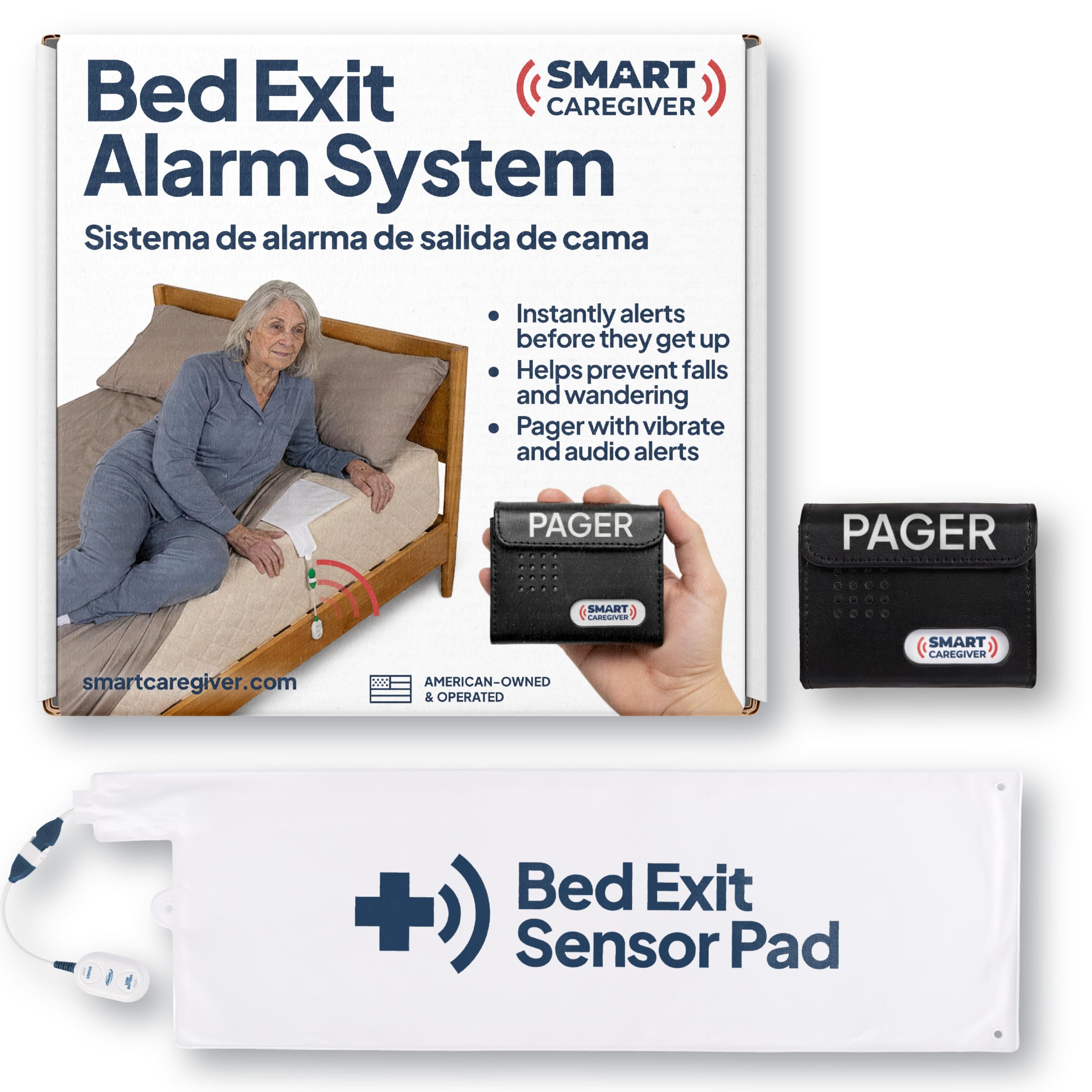
Your real worry isn’t a fall in the hallway; it’s the 2 a.m. trip to the bathroom where nobody is awake to hear a thud. This system catches that moment before it happens. A 10″ x 30″ bed pad goes under the shoulders, and a built-in weight sensor (a pad that detects when body weight is lifted off it) triggers the alert the instant your senior starts to get up. So the alarm fires before the fall, not after it. The pad has a 30″L x 10″W x 0.5″H footprint, so it disappears under a standard fitted sheet.
The included caregiver pager gives you both a vibrate mode and a sound alert. Buyers report the vibration is strong enough to wake a sleeping caregiver, so the loudness debate mostly fades into the background. As one owner puts it: “works very well, very loud so sometimes in the night I use vibrate which I can still hear.” The 70 db chime sounds like a doorbell rather than an alarm klaxon.
Setup is where some owners hit friction. Get the pad centered under the shoulders and the false alarms drop sharply. One honest quirk worth knowing: the batteries aren’t replaceable, so when the unit eventually gives out you replace the whole device instead of swapping cells. Against 380 ratings it holds a 4.5-star score, and functionality is what buyers talk about most — the pad does what it promises on night one.
What earns the top spot
- Alerts the caregiver the moment weight leaves the pad, catching get-ups before falls
- Pager supports both vibrate and sound so a light sleeper can be woken without blasting the house
- Expandable to six different Smart Caregiver sensors, so the same pager can also watch a chair, doorway, or floor mat
- U.S.-based company with a stated 1-year manufacturer warranty and a stated 30-year focus on fall prevention
Where it asks for patience
- Chime sits at 70 db, quieter than the 110 db systems below — fine for a hallway, thin for a two-story house
- Batteries aren’t user-replaceable; the whole unit gets retired when it dies
- Pad placement is fussy, and the wrong spot triggers nuisance alerts
Reach for this if: your senior is at real risk of getting up alone at night and you need the alert to fire before the fall, not after.
Look elsewhere if: your caregiver sleeps two floors away and needs a 110 db alarm to hear the chime at all.
2. CallToU Caregiver Pager Wireless Call Button System
Five hundred feet of range and a display that tells you exactly which room the call came from.
If your caregiver spends the day in the kitchen while your senior is upstairs, this is the range to buy. The CallToU receiver lists a 500-foot working distance, enough to cover a two or three-story house — and it reaches dramatically farther than the SanJie Wi-Fi button later in this list, which is rated at 30 feet. Each call button is paired with its own number, so the receiver’s display shows you who pressed, not just that someone did. For a household with more than one senior, that alone changes the experience. The receiver sits on a tabletop; the button mounts on a wall or sits within arm’s reach.
The loudness is the headline feature for anyone with hearing loss. This pager runs at 110 db with 55 ringtones and five adjustable volume levels, roughly 57% louder than the Smart Caregiver pager that anchors this list. That gap is the reason a hard-of-hearing senior can hear this unit’s confirmation chime from a room away, and it’s why the button gets installed in clinics and small care homes as well as private houses. The IP65 rating means the button tolerates splashes and dust, so it can live on a bathroom wall. The included 1 AAA battery is enough to get started.
The honest catch is setup behavior at scale. With 51 ratings and a 4.5-star score, feedback is thin compared to the Smart Caregiver and Daytech picks, but what’s there is enthusiastic: one owner mentions using it in a wellness clinic, and the receiver pairs with extra buttons or extra receivers if you want to widen coverage later. It arrives pre-paired, so most people are up and running without touching a menu. What it won’t do is reach your senior when they leave the house — that’s the job for a cellular device like the Bay Alarm Medical SOS further down this list.
Range is the whole pitch: 500 feet and a per-button number display covers a multi-story home without asking your caregiver to stay in earshot.
Waterproof matters more than you think: An IP65 button can sit on a bathroom wall, where many falls happen.
Best matched to: a two or three-story home where the caregiver works on a different floor than the senior.
Not the one for: anyone whose senior needs to reach them from outside the house — this is a local system and stops at the property line.
3. Daytech Caregiver Pager Call Button
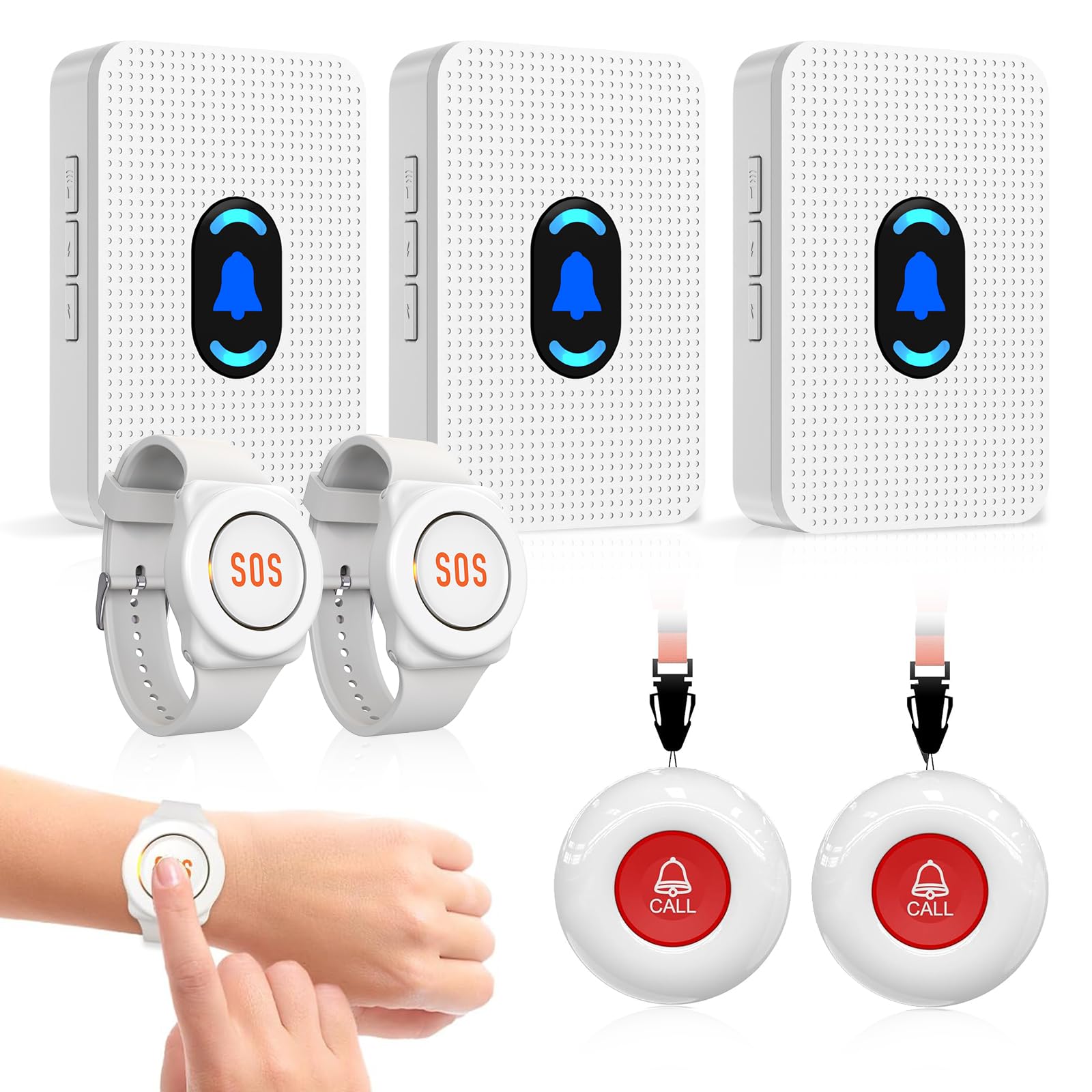
Two wrist-worn pagers, two call buttons, and three receivers that cover a whole multi-level house at once.
When a senior can’t reliably press a wall-mounted button but can tap their wrist, the watch pager changes the game. This kit ships with 2 watches, 2 call buttons, and 3 receivers — meaning the senior wears one watch, the caregiver wears the other, and the three plug-in receivers sit in three different rooms. Press the watch and every receiver fires at once. Press a wall button and the same happens. With 891 ratings and a 4.4-star score, this is the most-reviewed pick on the list, and the crowd’s read is that it just works.
Feedback on the loudness is where owners keep coming back to positives. A 55 db chime with 20 ringtones and five volumes — including a silent mode with flashing light — means each receiver can be tuned to the room it’s in. The pattern that keeps showing up in reviews is that a caregiver who sleeps through a phone alarm can still wake to this one: owners describe the tone cutting through deep sleep. Function is the aspect buyers talk about most, followed closely by how easy the whole system is to operate. The chime is quieter on paper than the CallToU unit rated at 110 db, but the multiple receivers make up for that by putting sound in every room at once.
The trade-offs are real but manageable. Several owners note that the wrist straps run large on small wrists and don’t hold up forever — the kind of thing a nylon velcro replacement strapped on once solves. One owner had a receiver that cut out every few days until a thin paper shim between the battery and its cover fixed the contact. Ranges are shorter than the CallToU system at 30 meters vs 500 feet, but because the receivers are distributed across the home the caregiver never has to rely on that range alone. Daytech pairs the kit before shipping, so unbox-to-working takes minutes, not an afternoon.
Built for a house with stairs: three receivers means the alert lands on whichever floor the caregiver happens to be standing.
Wearable beats reachable: seniors with hand strength limits can still trigger the alert by tapping a wrist strap.
Watch the straps: the included bands run large and wear over months — plan on a velcro replacement for smaller wrists.
Ideal when: more than one room, more than one floor, and more than one person might need to hit the button.
Skip if: your caregiver is happy sleeping just one wall away from your senior and a single receiver is all you need.
4. Bay Alarm Medical SOS Mobile GPS

A tiny cellular pendant that reaches a real operator from the grocery store parking lot — no cell phone required.
Most systems in this list stop at the front door. This one keeps working on the porch, in the car, at church, and anywhere else your senior goes alone. It runs on 4G LTE cellular, which is built-in connectivity the device uses to reach a trained operator without any phone or Wi-Fi in the mix. Press one button and you’re talking to a human through the built-in two-way speaker. The device weighs under 2 oz and can be worn on a lanyard or clipped to a belt — small enough to disappear under a shirt, light enough that your senior doesn’t leave it on the dresser.
Battery numbers here are what you want to hear. The listed rating is 144 hours, backed by a 420 mAh battery — that works out to genuine multi-day use between charges, and the charging dock gives a voice prompt when the unit is seated correctly. The care app shows battery level and location so you can check in without calling. Fall detection is optional, and if your senior tends to forget to press the button, that matters: the device can trigger a call without a press. The enclosure is plastic and water-resistant, so a splash at the sink isn’t a problem — but the manufacturer still rates it water-resistant, not fully waterproof like the SecuLife pendant lower on this page.
What pulls the score down to 4.0 stars across 99 ratings is execution, not design. A few owners mention units that won’t hold a charge or a connection, and low-battery notices that arrive by email instead of text. Others describe the exact opposite: activation taking about 15 minutes with help from a phone rep, four-month reliability, and one buyer replacing a previously more expensive system entirely. The subscription is required to make the device work, so this is a monthly commitment, not a one-time purchase. If your senior is housebound, a pager or a landline pendant below offers the same confidence without the plan.
Where the value sits
- 4G LTE connectivity works anywhere cellular service reaches — grocery stores, parking lots, a daughter’s house
- 144-hour battery rating off a 420 mAh cell means multi-day stretches between charges
- Under 2 oz and water-resistant, so it’s wearable and forgettable in the right way
- Caregiver app for location and battery level adds a second layer of visibility
The reality check
- Subscription required to use the device — this is a service commitment, not a one-time buy
- Water-resistant, not fully waterproof — a shower is not covered
- Some units have arrived with connection or charging faults, and low-battery notices can land as email rather than text
The clear fit: an active senior who still runs errands, walks the dog, or visits family without a phone in their pocket.
Not worth it for: a senior who never leaves the house — you’d pay a monthly plan for coverage they never use.
5. SanJie Caregiver Call Button
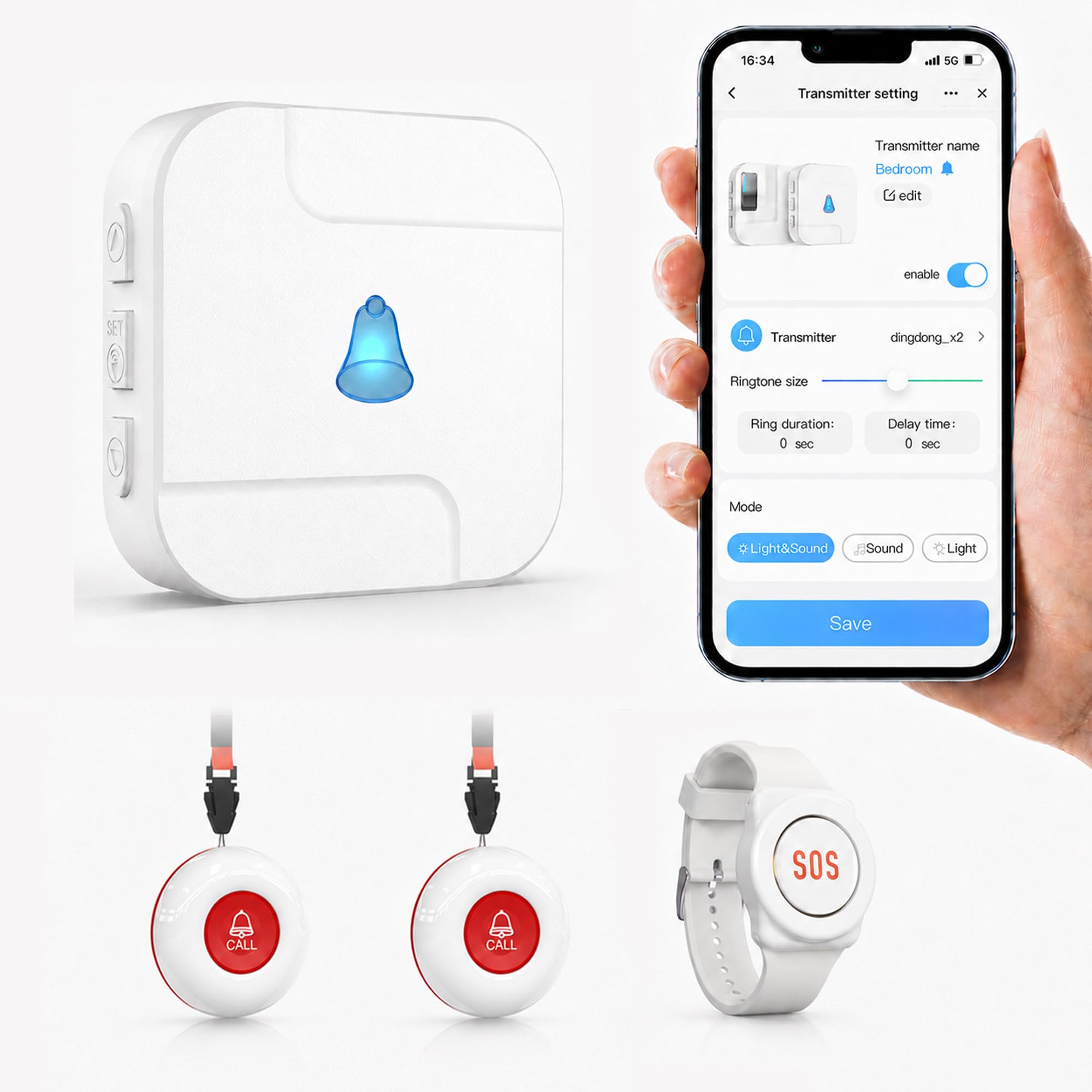
Press a button in the bedroom, and every family member’s phone lights up — even if they’re across town.
The point of a Wi-Fi call button is distance-proof notification. Your senior presses the button; the receiver chimes in the room, and simultaneously a push alert hits the phones of every family member connected through the Tuya app. The app also keeps a log of every call, so you can look back and see the pattern. If heart health or memory loss means one caregiver alone isn’t enough, this is the setup that naturally shares the load. Custom button names — “Mom,” “Bedroom,” “Bathroom” — mean the alert tells you who needs help and where, not just that someone pressed something.
The system uses 433MHz wireless (a radio frequency that travels through walls better than Wi-Fi) between the button and the receiver with a listed range of up to 328 feet, though the spec sheet separately rates it at 30 feet and warns that walls and doors reduce the reach — so keep realistic expectations for how far the button travels before the receiver ever sees it. You get five volume levels up to 110 db (about as loud as a chainsaw), 20 ringtones, and the ability to rename each button. Setup runs through the receiver connecting to your home’s 2.4GHz Wi-Fi network; 5GHz is not supported, so double-check your router’s band before you buy. Free app and receiver alerts are included — SMS and phone-call alerts require a paid upgrade.
The reliability story is what you’d hope for from an app-based system, but not always what you get. Most customers describe it as extremely reliable, and the numbers support that view — feedback on quality is what buyers praise most, followed by the overall experience. But there is a recurring gripe: some units have triggered random alerts through the day and night without anyone pressing the button. As one frustrated buyer put it, “The device sends notifications randomly through out the day and night without pushing the button.” That kind of nuisance alert burns trust fast. If false triggers would cause panic calls in your family, this is a device to test carefully before relying on it.
The family-sharing angle: multiple phones can receive the same alert at once, so the burden never sits on one caregiver’s shoulders.
Beware the false alarm: random notifications have hit enough units that the first week should be treated as a test drive, not a trusted deployment.
Made for: families spread across multiple households who want phone alerts in everyone’s pocket without paying a monthly plan.
Look past it if: your household gets anxious at stray alarms — a wired pager like the CallToU removes that risk entirely.
6. SecuLife Medical Alert Pendant
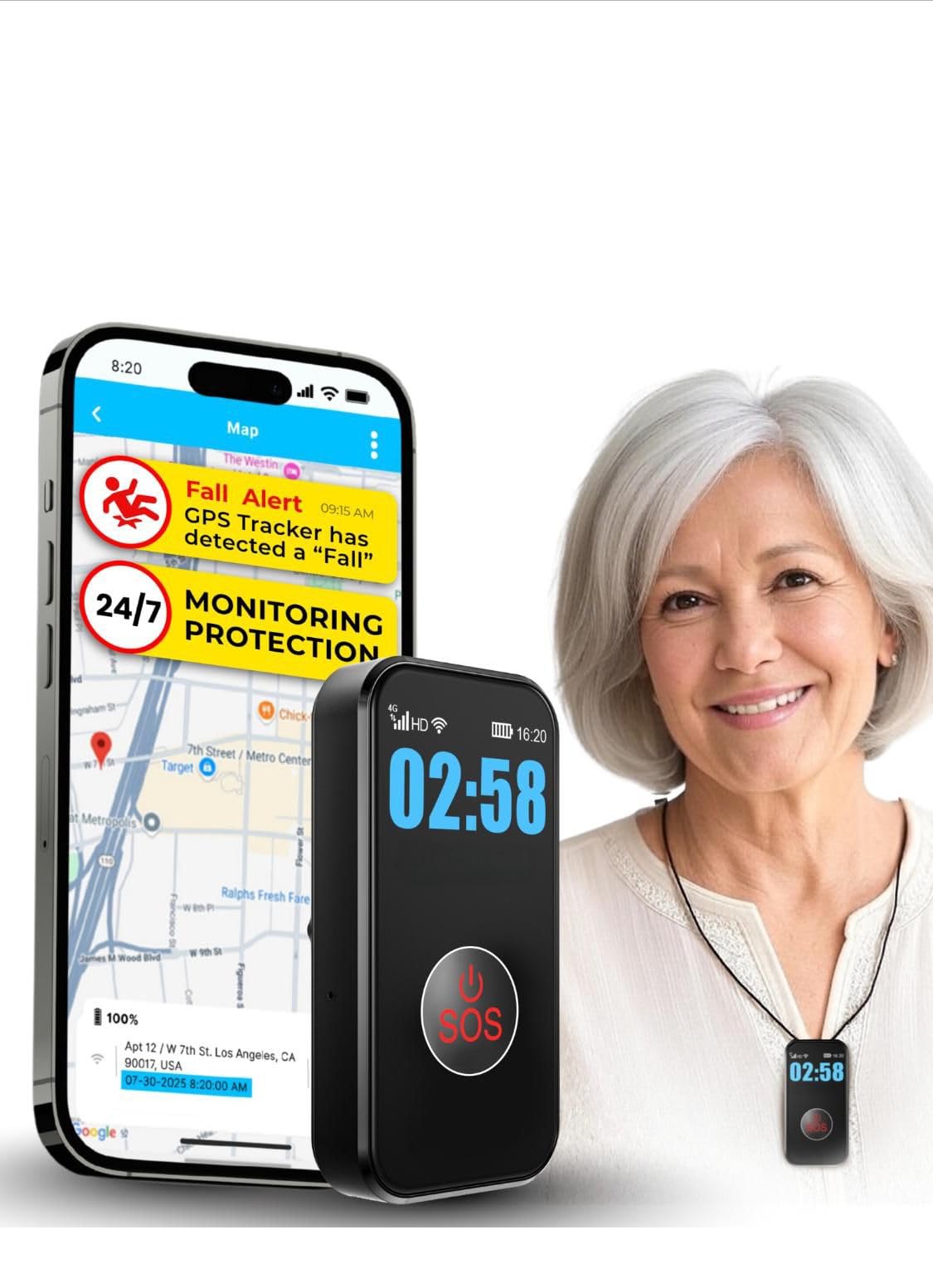
A waterproof pendant that calls your family directly when it detects a fall, with no call center in between.
If your biggest fear is your senior lying on the bathroom floor unable to press a button — even a pendant — this is the design that addresses it. Auto fall detection triggers the SOS without any input from your senior, and the alert goes to preselected family contacts rather than through a monitoring center. The device is IP67 fully waterproof — the highest rating in this list — so your senior can wear it in the shower, where many falls happen. Two-way calling and hands-free auto-answer mean a family member can talk to your senior the moment the alert fires.
Tracking is included, not an add-on. Real-time GPS plus geo-fence zones means you can set “home” and get a notification when your senior leaves that area — helpful if wandering has become a concern. The pendant’s clear display shows time, battery, and signal, so your senior can glance down and know the device is alive. The 1000 mAh battery rates at up to 5 days of use with 24-hour interval tracking, and the whole device sits inside a 3 x 1 x 1 inch plastic case. That’s a longer rest between charges than most seniors will wear the pendant anyway.
What keeps this at 3.8 stars across 277 ratings is the subscription model and daily friction. It requires a per month plan to function, and some buyers have hit billing hiccups — activation flagging a card, or a refund path that goes through email. The 2-way calling is genuinely useful, but hard-of-hearing users may struggle with garbled sound on the speakerphone. If you want the family to receive the alert directly without a monitoring company charging a service fee, this delivers that — you just have to be comfortable with the month-to-month cost and the ethics of auto-detection false alarms.
What stands out
- Auto fall detection triggers SOS even if your senior cannot press anything
- IP67 fully waterproof — safe in the shower, which is where many real falls happen
- Alerts go straight to family contacts, so there’s no call-center middle layer
- 1000 mAh battery rated up to 5 days between charges
- Real-time GPS with geo-fence zones for wandering alerts
Weigh before you buy
- per month subscription is required for the device to function at all
- Some buyers have hit card-flagging and refund friction during activation
- Hard-of-hearing seniors may find the speakerphone sound difficult to understand
Where it wins: a senior who won’t remember to press anything, plus a home with a shower they still use independently.
Where it gives ground: the monthly plan and activation friction — if you want zero recurring costs, keep reading for the Freedom Alert below.
7. Freedom Alert, Landline Personal Emergency Device

A wearable two-way pendant that runs entirely off your landline — and never sends you a bill.
For the house that still has a landline, this is the closest thing to a straight-up replacement for a medical alert subscription. The pendant connects through your existing phone service and can dial a list of up to four programmed contacts in order — skipping any that are busy or roll to voicemail — before reaching 911 as a fallback. Your senior wears the pendant and speaks into it directly. There is no call center, no monthly plan, no subscription, and no Wi-Fi to set up. The device is rechargeable, so you’re not chasing batteries, and it ships with a 24-hour battery backup so a brief power cut doesn’t leave the household unguarded.
The reason this earns a slot above its monthly-fee competitors for the right household is that it just works with what’s already there. Feedback on setup is consistently straightforward — parts arrive complete, directions are clear, and the two-way voice is loud enough for hard-of-hearing users to catch. When your senior falls, they can talk to you directly through the pendant. Range in real homes is more like 100 yards once walls and doors are involved, not the open-air 400 feet some listings suggest — so plan on coverage of a large house plus the yard, but test it room-by-room to be sure. The pendant wears on a clip, neck strap, or wrist strap.
The catch is the landline, full stop. If the household has cut the cord, this device is a paperweight. If the landline is real and staying, the trade-offs are small: the battery needs charging about weekly, the first test call takes roughly 30 seconds to cycle, and it is not rated waterproof, so it should come off before a shower. Reviews of this unit have been consistently positive over the years, with 498 ratings and a 4.3-star score. What sealed it for one buyer was the mismatch between the old subscription alerts they’d tried and this one — by the time the response team showed up, the moment had passed.
The zero-fee angle is the real win: one purchase, no recurring costs, and dial-out coverage that hits real people you already trust.
The landline is non-negotiable: no phone line in the house, no working device — check that first before anything else in this review matters.
Charging cadence: about weekly, which fits naturally into a caregiver visit rhythm rather than becoming a chore.
Made for: a household with an active landline and a senior who wants no monthly bills and direct voice contact with family.
Not the fit if: you’ve cut the phone line or your senior travels outside the home — a landline system can’t follow them out the door.
Know the Specs
Four specs separate a system that gets used from one that gets ignored. Skim them, then match against your household.
Wireless Range in Feet vs Meters
Wireless range measures how far the call button can be from its receiver before the signal drops. Buttons and pagers use radio frequencies — usually 433MHz or 2.4GHz — to carry that signal through walls. The listed number is measured in open air, so expect the real reach through drywall and closed doors to fall short. A 500-foot system can serve a two or three-story house; a 30-foot system belongs inside one room. When you compare feet against meters, remember 30 meters is roughly 98 feet.
Subscription vs One-Time Purchase
The biggest cost decision isn’t the device — it’s whether you’ll pay a monthly plan. Wi-Fi and local pager systems typically have no fee and only require your home network to run. Cellular medical alert devices need their own service plan because they carry a SIM card and connect to a nationwide network. Landline pendants fall in the middle: no monthly fee, but they need a phone line. Add up a few years of monthly fees before you fall in love with the features.
Alarm Loudness in Decibels and the Vibrate Alternative
Decibels measure how loud the caregiver pager rings. A doorbell sits around 70 dB, a smoke alarm closer to 85 dB, and the loudest pagers in this list top out at 110 dB. If your caregiver sleeps lightly, a 70 dB chime is plenty. If they sleep like the dead or are hard of hearing, aim for 110 dB — or a pager with a vibrate mode that wakes them without waking the rest of the house.
IP Ratings and Water Resistance
IP ratings are two digits: the first covers dust, the second covers water. Higher numbers mean more protection. IP65 tolerates splashes and dust without full immersion. IP67 survives full immersion in shallow water for a short window, so the device handles a shower or a rainstorm. If your senior wants to keep the pendant on through a bath or shower, choose IP67 — anything rated “water-resistant” needs to come off first.
Common Questions
Will these emergency alert systems work if my senior doesn’t have a cell phone?
Do I need Wi-Fi or a landline for a medical alert device to work?
Which emergency alert is better for a senior who often falls?
How far does the wireless call button actually reach through walls?
Do these emergency alert systems require a monthly subscription?
Can I expand the system later to cover more rooms or add another button?
Which system is best if my senior is hard of hearing?
Can a senior wear these in the shower?
What is the difference between a bed exit alarm and a call button system?
What happens if the senior accidentally triggers the alert?
The Bottom Line
The emergency alert options for seniors without cell phones winner is the Smart Caregiver Bed Exit Alarm because it catches the highest-risk moment — getting out of bed alone at night — before the fall even happens, and it does so without a subscription. If your senior is still leaving the house on their own, the Bay Alarm Medical SOS Mobile GPS keeps that same confidence working outside the front door. And for a landline household that wants zero bills and zero Wi-Fi, the Freedom Alert is the one to reach for. If your senior is hard of hearing or the caregiver works on a different floor, the CallToU pager runs noticeably louder at 110 db with a 500-foot range — that combination is worth upgrading for on its own.
How we choose
We do not accept paid placement. Every pick is matched to a real buyer and a real use-case; we do not hands-on test units.
Sources
Specifications: manufacturer listings and product documentation. Review insights: verified customer reviews, as of October 2026. Pricing: not shown on this page (it changes often); check the current price via the retailer link.
As an Amazon Associate, Aappliancez earns from qualifying purchases. This does not affect which products we feature.