Disclosure: Some links in this post are affiliate links. As an Amazon Associate I earn from qualifying purchases, at no extra cost to you. Learn more
Specs are compiled from manufacturer listings and verified buyer reviews and can change over time — please confirm the key details on the product page before buying.
A fall detection watch is only worth owning if the alert actually reaches someone who can help. That is the whole job. Everything else — heart rate, sleep scores, step counts — is a bonus you should judge second. The hard part for buyers is that two watches can both say “fall detection” on the box and behave completely differently in a hallway at 2 a.m. Some text a family member directly. Some route through a call center. Some need an app open on two phones at once to work at all. This guide separates those, pick by pick.
This guide is built by comparing the manufacturers’ published specifications and the patterns across verified customer reviews, so you get each pick’s real strengths and trade-offs instead of marketing spin.
You will see which watches fire an alert on their own, which need a monthly plan, and which trade a week of battery for a screen you can actually read outdoors. Below are the nine models worth your attention, sorted so the strongest all-rounder sits first.
Each entry below weighs alert reliability, battery honesty, and setup difficulty, so the elderly fall detection watch you choose fits the person who will actually wear it.
Top Picks
![Apple Watch Series 11 [GPS 42mm] Smartwatch with Rose Gold Aluminum Case](https://m.media-amazon.com/images/I/61T8W7-25IL.jpg)

![Apple Watch Ultra 2 [GPS + Cellular 49mm] Titanium Case](https://m.media-amazon.com/images/I/81D7OmeXqoL.jpg)
How To Choose The Best Elderly Fall Detection Watch
Start with the one question that overrides every spec sheet: when a fall happens, who gets told, and how fast? A watch with flawless health tracking but a shaky alert path is a fitness band, not a safety device.
How the alert actually travels
Some watches call your chosen family contacts directly, so help comes from people who know the wearer. Others route through a monitoring service or an app dashboard. Ask before you buy whether the wearer needs to press anything, whether a countdown runs first, and whether a caregiver must have the app open to receive the alert.
Then check what the watch needs to send that alert. A built-in SIM with included data works without a smartphone in the house. A Bluetooth-only watch needs a paired phone nearby. A 4G model needs a voice-capable SIM, and a data-only SIM will not make calls even though the watch looks ready.
Subscriptions and recurring costs
Several senior-focused watches bundle safety behind a monthly plan, and the plan decides which features switch on. Read the free tier carefully. Fall detection and SOS may be free while live tracking, caregiver alerts, or extra contacts sit behind the subscription. A watch with a low sticker cost and a mandatory plan is a different purchase than one with no monthly fee at all.
Battery measured in real days
Listed battery life assumes calm conditions. Turn on constant GPS, geofencing, and frequent health checks and the number drops. A watch rated at a single day means a nightly charging routine someone has to remember. A watch rated at a week or more tolerates a missed charge. For a wearer who will not reliably plug in a charger, longer battery life keeps the fall alert live.
Screen, fit, and wrist size
A bright screen with large text gets read; a dim one gets ignored. Look for a display that stays visible in daylight. Check band size too — a band built for small-to-medium wrists will not fit a larger one without a replacement strap, and a watch that shifts on the wrist can throw off motion-based fall sensing.
Side-by-Side Comparison
| Model | Best For | Fall Alert Path | Battery (stated) | Phone Dependency | Amazon |
|---|---|---|---|---|---|
| Apple Watch Series 11 [GPS 42mm]★ Best Overall | iPhone households wanting alerts plus real health data | Auto fall detection, calls emergency services, notifies contacts | Up to 24 hours normal use | iPhone required | Amazon |
| Google Pixel Watch 3 (41mm)Top Performer | Android users who want a polished all-round watch | Fall Detection listed among features | 24 hours | Android; does not work with iPhone | Amazon |
| Apple Watch Ultra 2 [GPS + Cellular 49mm]Most Rugged | Rugged wear and long battery with cellular freedom | Auto-connects to emergency services on a hard fall | Up to 36 hours; 72 in Low Power Mode | Cellular plan for standalone calling | Amazon |
| Amazfit Active 2 Premium | Long battery and a bright screen without a monthly plan | No fall detection listed | Up to 10 days typical use | Paired smartphone for app features | Amazon |
| SAMSUNG Galaxy Watch 7 40mm (Renewed) | A renewed premium watch for Android owners | Accelerometer-based activity tracking; fall alert not stated | 30 hours | Android; most functions need a compatible phone | Amazon |
| Seculife Medical Alert Smartband | Direct-to-family alerts with no call center | Auto fall detection, calls pre-selected contacts | 1 day | 4G 5G LTE; monthly subscription required | Amazon |
| Audar E2 Senior Smartwatch | Remote vital-sign monitoring with a built-in eSIM | Auto fall detection plus SOS panic button | Up to 7 days; up to 30 days standby | No phone, app, Wi-Fi, or Bluetooth needed | Amazon |
| COCO Emergency Alert Smartwatch | Medication reminders plus fall alerts through an app | Fall detection with 20-second countdown | 4 days | Bluetooth calling; app on caregiver phone | Amazon |
| Fajocru Fall Detection Smart Watch | Budget entry with 4G video calling and geofencing | Auto fall sensing with SOS to preset contacts | Not stated | 4G; data-only SIM included | Amazon |
Detailed Reviews
1. Apple Watch Series 11 42mm
Our pick — 4.5+★ from 9,000+ verified ratings; the strongest balance of quality and price.
The one that calls 911 by itself and still tells you your sleep score.
If the person you are buying for already carries an iPhone, this is the safest bet on the list. It can detect a hard fall or a severe car crash and then automatically connect with emergency services and alert the emergency contacts you set. That happens without anyone pressing a button — the watch makes the call. It also runs Check In, which tells a loved one when the wearer has arrived where they were going. For an older parent who lives alone but is comfortable with a phone, that combination covers the two real fears: falling unnoticed and going missing in transit.
You get a genuinely deep health kit around that core. An ECG reading on demand (a heart-rhythm trace taken from the wrist) lets you check your heart rhythm anytime. Alerts flag a high or low heart rate and irregular rhythm, so you know when to pay attention. Overnight metrics in the Vitals app and hypertension notifications (which flag possible chronic high blood pressure by reading how blood vessels respond to each heartbeat) give you a fuller picture. Sleep apnea notifications and a daily sleep score round it out. A 42mm rose gold aluminum case with a light blush sport band keeps it looking like jewelry rather than medical equipment. At 1.12 ounces it disappears on the wrist.
Battery is the honest catch. Apple rates it at up to 24 hours of normal use, with a fast charge that gives up to 8 hours of use in 15 minutes. In daily practice that means a nightly top-off — one owner describes it sitting at about 70% at bedtime and getting a quick top-off from there. If the wearer forgets to charge, the safety net goes dark, so a charging stand by the bed is not optional. The glass is rated 2x more scratch resistant than the Series 10, and the 50m water resistance plus IP6X dust rating means hand washing and rain are fine. Two things it cannot do: work without an iPhone, and go a week between charges.
What genuinely earns it first place
- Fall and crash detection that calls emergency services without a button press
- ECG, irregular-rhythm, hypertension, and sleep apnea notifications in one wrist device
- 15-minute fast charge restores up to 8 hours of use
- 50m water resistant and IP6X dust resistant with 2x more scratch-resistant glass than Series 10
Where it asks something back
- Up to 24 hours of normal use means a daily charging routine
- Requires an iPhone — no Android pairing
- Health alerts are wellness features, not a replacement for a doctor
Fits neatly if: the wearer owns an iPhone and will charge nightly.
Think twice if: a daily charger will be forgotten — the fall alert is only live while the watch is on and charged.
2. Google Pixel Watch 3 (41mm) Android Smartwatch
A Fitbit with a safety net — for the Android owner who wants style and stats.
This is the pick for the Android household. Fall Detection sits right in its feature list alongside an ECG and a body temperature monitor, so the safety layer is built in rather than bolted on. The case is aluminum and light, and the display can rotate 180° so it reads correctly on a left wrist.
Where it pulls ahead of the Apple options for some buyers is the fitness depth. Fitbit’s readiness score uses sleep, resting heart rate, and heart rate variability to tell the wearer whether to push or recover. Cardio load measures how hard the heart is working so you can spot over-training, and Fitbit Premium adds personalized run recommendations. If the wearer is an active older adult who walks or swims daily, those tools feed real motivation. Build quality and app polish sit a clear step above the dedicated senior watches here.
The catch is charging and compatibility. Google states 24 hours of battery, and that is accurate rather than generous — most owners land on a nightly charge, and the review pages are mixed on it. It pairs well with Pixel phones and does not work with an iPhone at all, which rules it out for Apple households. In exchange you get one of the best-looking watches here, with a large, bright face and health tracking that goes far beyond step counting.
Bright-face advantage: a screen twice as bright and 10% larger makes daily stats readable for eyes that struggle with small text.
The honest limit: 24-hour battery and Android-only pairing mean the wearer must remember a nightly charge and cannot be an iPhone user.
Strong match for: an Android user who wants serious fitness feedback and a good-looking wrist.
Look past it if: the household runs on iPhone — the pairing simply will not happen.
3. Apple Watch Ultra 2 [GPS + Cellular 49mm] Titanium Case
Half again the battery of the Series 11 and a case built to take a knock.
The Ultra 2’s headline number for a fall-watch shopper is 36 hours of battery life for normal use, extending to 72 hours in Low Power Mode. Compare that to the Series 11’s up to 24 hours and the difference is real: an extra day of grace before the safety features go quiet. The safety tech matches the Series 11 — it connects automatically to emergency services after a hard fall or a severe car crash, and a press of the button calls for help or sounds a siren.
The build is the other half of the story. A 49mm corrosion-resistant titanium case with sapphire front crystal is rated to MIL-STD 810H and water resistant to 100m, which is a much tougher envelope than the smaller Apple watches. It is heavier too, at 2.17 ounces, and that weight is the trade-off for the durability. A customizable Action button lets you assign the one function you reach for most. Cellular service means calls and texts go through without an iPhone nearby — useful if the wearer leaves the house without a phone.
What it will not fix is wrist size. The 49mm face is large, and the recurring note in the reviews is that the sportier bands feel rugged rather than dressy — buyers wanting a slim, jewelry-like watch should look at the 42mm Series 11 instead. The cellular freedom also depends on an active plan. But for an active older adult who walks trails, swims, or simply wants a watch that survives being banged against a door frame, this is the most durable Apple on the list.
Why it survives real life
- 36 hours of normal use and 72 in Low Power Mode — a full day more than the Series 11
- Titanium case, sapphire crystal, MIL-STD 810H rating and 100m water resistance
- Cellular plan allows calls and texts without an iPhone nearby
- Programmable Action button for one-press help
The costs it carries
- At 2.17 ounces it is the heaviest Apple watch here
- 49mm face looks oversized on small wrists
- Cellular features need a paid service plan
Built for: the wearer who is hard on a watch and wants the longest Apple battery.
Not the fit for: a slim wrist or someone who wants a discreet, dressy look.
4. Amazfit Active 2 Premium Smart Watch 1.75″ Sapphire Glass

Ten days between charges and a screen that stays readable in direct sun.
Let us be clear about the trade: the Amazfit Active 2 does not list fall detection. If the only reason you are shopping is automatic fall alerts, this is not that watch. But for a wearer who wants health monitoring and heart-rate tracking with almost no charging anxiety, the endurance is the story. Up to 10 days of typical use, up to 5 days with heavy use, and 21 hours with GPS tracking running continuously. That is the longest stated battery of any smartwatch here, so a missed charge costs little.
The screen makes that endurance usable. A 1.75″ AMOLED display at 2,000 nits brightness is visible on a sunny sidewalk, and the sapphire crystal over stainless steel resists scratching. Owners consistently praise the look: the polished steel case reads dressy rather than sporty, and appearance drew the most praise of any single aspect in its reviews. Health tracking covers heart rate, sleep, and 160+ workout modes, and the Zepp app gives you AI-generated training plans. Five satellite systems keep the GPS lock strong on walks and rides.
Two limitations to plan around. First, no fall alert means it works best as a health companion for someone whose fall risk is already covered by another device or by living with others. Second, app features lean on a paired smartphone, and message replies are limited — owners on iPhone cannot reply to texts from the wrist. Treat this as the long-battery, good-looking option, not the emergency-call option.
Endurance as a feature: up to 10 days of typical use and 21 hours of continuous GPS is a far cry from the daily charging the Apple and Pixel watches require.
Where it stops short: no fall detection is listed, and iPhone users cannot reply to texts from the wrist.
Worth grabbing for: a health-tracking wearer who hates chargers and wants a good-looking every-day watch.
Keep looking if: automatic fall detection is the whole reason for the purchase.
5. SAMSUNG Galaxy Watch 7 40mm

Renewed premium hardware for Android owners who watch their sleep and heart rate.
This is the value play for someone who wants a genuinely polished smartwatch without paying new-in-box money. It is a renewed Galaxy Watch 7, and the reports coming back describe units arriving in pristine, scratch-free condition and boxed like new. The Exynos W1000 chipset — a 3nm processor, meaning the chip is built on a very fine manufacturing process for speed without heat — keeps app navigation smooth. It tracks sleep, heart rate, steps, and workouts, and pairs nimbly with a Samsung phone.
Reviewers praise the design above every other aspect: a 40mm cream aluminum case with a silicone band looks sharp on the wrist and weighs little. Most functions route through a compatible phone, so this is not a standalone emergency device. Fall detection is not listed among its stated features — it carries an accelerometer for activity tracking rather than a stated fall-alert function. Buy it as a health and notification watch, not as a dedicated safety alarm.
Battery life is the recurring caveat: 30 hours stated, and in practice most owners get a full day of use without always-on display. Some buyers report a fast initial drain that settles after a full charge and a software update. The band is sized small-to-medium, so a larger wrist needs a replacement strap. For an Android user who wants a smart, comfortable watch with strong sleep insights, the renewed route saves real money.
What the renewed deal buys you
- 3nm Exynos W1000 chipset keeps navigation smooth
- Renewed units arriving pristine and boxed like new
- 40mm aluminum case in cream with a light silicone band
- Strong sleep, heart rate, and workout tracking
What to plan around
- 30-hour battery means a nightly charge for most wearers
- Most functions need a compatible Android phone
- Small-to-medium band size; larger wrists need a new strap
Choose it when: you are on Android and want premium feel at a renewed price.
Pass if: you need a watch that raises an alert to family on its own.
6. Seculife Medical Alert Smartband for Seniors
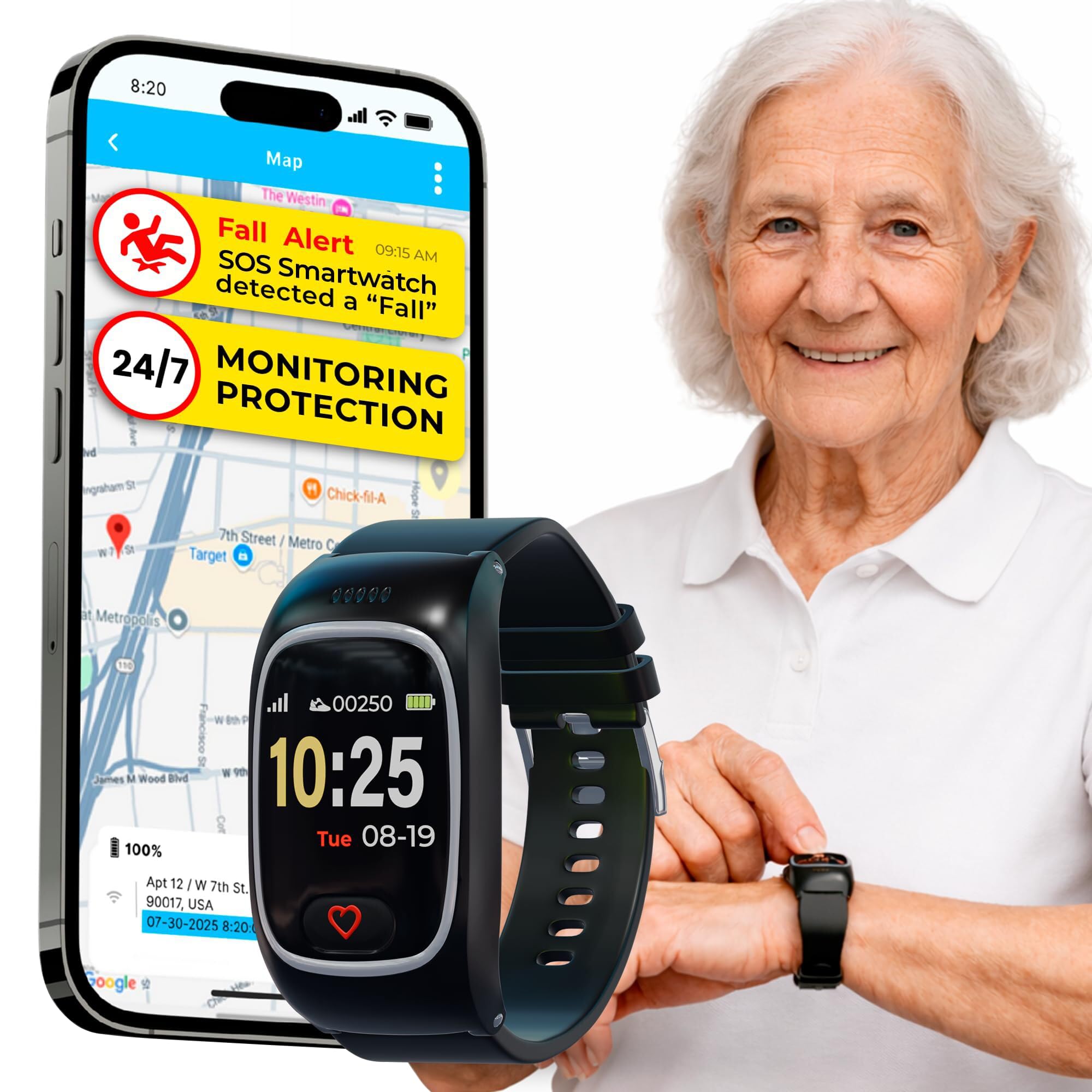
Alerts ring your family directly — no middleman, no call center in between.
This is one of the few watches here built specifically to alert family instead of a monitoring service. When it senses a fall, or the wearer holds the heart button for 3 seconds, it automatically calls the pre-selected emergency contacts. Incoming calls from approved contacts auto-answer, so the wearer never has to find a button. GPS tracking with geofence zones pings the app or sends an SMS when the wearer leaves a safe area, and a year of location history is included.
What wins people over is the build and the confidence it buys. The watch feels solid and light, with a silicone band comfortable enough that wearers forget it is on. GPS tracking is a close second — caregivers can check a location without effort. The battery is rated at 1 day with a 680 mAh cell (a measure of battery capacity), so it wants a nightly charge. Setup asks for patience: sensitivity may need adjusting so arm stretches do not trigger false alarms, and the GPS interval can be shortened to save battery. Figure about ten minutes of setup after you tune those settings.
The honest catch is the subscription. The monthly plan covers unlimited fall alerts, live tracking, the speakerphone with unlimited voice minutes, and seven-day customer care. Without the plan the full feature set does not switch on, so budget for a recurring cost. Also note the charging discipline: with 1 day of battery, the watch comes off the wrist each night, and a household that forgets to plug it in loses the alert.
Family-first design: it calls your chosen contacts directly and auto-answers their calls, which suits a wearer who will not navigate a menu.
The real cost: from per month is required for the full safety set, and 1 day of battery means nightly charging.
Best for: families who want alerts routed straight to their phones rather than a monitoring service.
Weigh it up if: a monthly subscription and a nightly charge do not fit the household.
7. Audar E2 Senior Smartwatch with Fall Detection & SOS

Built-in cellular and a week of battery — no phone, app, or Wi-Fi required.
Most watches here need a phone or a plan to reach the outside world. The Audar E2 carries its own built-in SIM (an eSIM, a chip that connects to a cellular network directly) and works across low-cost IoT networks in 20+ countries without roaming charges. No smartphone, no app, no Wi-Fi, no Bluetooth needed. Connectivity is included for the first year. For a wearer who cannot manage a phone, that removes the single biggest failure point in the whole category.
The health side is unusually thorough. Built-in sensors track heart rate, blood pressure, blood oxygen, and body temperature automatically at intervals of 30 minutes, 1 hour, 2 hours, or 4 hours, or on demand — and you can view trend charts on the Audar Health Platform. AI wellbeing reports summarize weekly trends and can be generated for an optional fee. Mobility is good too: up to 7 days of battery with hourly measurements and up to 30 days of standby, all in an IP67-rated case (a rating meaning it resists water, dust, and sweat).
Fall detection is where you need to read closely. The watch detects falls and sends alerts to designated contacts by SMS, voice, email, or platform notification, and a panic button triggers SOS manually. But the pattern across reviews is mixed: some wearers report the fall and SOS functions working, while others describe false alarms that never stop, or real falls that go undetected. The alarm functionality is the most-discussed and it is genuinely inconsistent — treat this as a vitals monitor with a fall-alert bonus, not a guaranteed fall alarm. Note too that public emergency numbers like 911 cannot be used as alert contacts.
Where it stands out
- Built-in eSIM works with no phone, app, or Wi-Fi
- Up to 7 days of battery and up to 30 days standby
- Heart rate, blood pressure, SpO2, and temperature on a schedule you set
- IP67 water, dust, and sweat resistance
Read before buying
- Fall detection reports are mixed; some real falls went undetected
- Optional SMS and voice alerts cost extra per message
- 911 and similar public numbers cannot be set as contacts
The stand-out fit: remote vital-sign monitoring for a wearer with no phone at all.
Second-guess it if: automatic fall detection is the primary requirement — the reporting on that function is not consistent.
8. COCO Emergency Alert Smartwatch for Seniors BT2-X

A large bright face, a 20-second SOS countdown, and reminders on the wrist.
The COCO goes after a specific senior problem that most smartwatches ignore: remembering medication. Caregivers can schedule and manage reminders remotely through the CoCo App, and the watch shows them on a 1.85″ HD display with a rotating crown for easy navigation. Fall detection runs with a 20-second countdown — tap “Call Now” or let it alert the Emergency Care Team automatically — and a one-touch SOS button gives a second route to help. Health tracking covers heart rate, blood oxygen, sleep, stress, and breathing, with data syncing to the caregiver app.
The hardware is nicer than the senior-watch bracket usually offers. A zinc alloy case with a sandblasted PVD finish (a hard vacuum-plated coating) looks and feels more premium than its price suggests, and the 4-day battery is generous by the standards of the dedicated fall watches here. Bluetooth calling, an AI voice assistant, and 100+ watch faces round it out. Owners rate functionality highly and call out the appearance as a genuine plus.
The plan structure is the caveat to understand before buying. A free tier keeps fall detection, health monitoring, SOS, and one or two emergency contacts active, but many of the listed features require a premium plan. Setup also depends on the app on both the wearer’s and caregiver’s phone, and the emergency call button has that 20-second delay — fine for a real fall, awkward for a false alarm. Battery in the field lands nearer a week for some, and false nighttime alerts are a known quirk that removing the watch at night solves.
What stands out: remote medication reminders plus a large 1.85″ HD display make it practical for a wearer who needs prompts to remember pills.
The fine print: many features sit behind a premium plan, and the emergency call waits out a 20-second countdown before it connects.
Fits if: medication reminders and a big, readable face matter more than raw fall-alert speed.
Think twice if: the household cannot manage a premium app subscription.
9. Fajocru Smart Watch
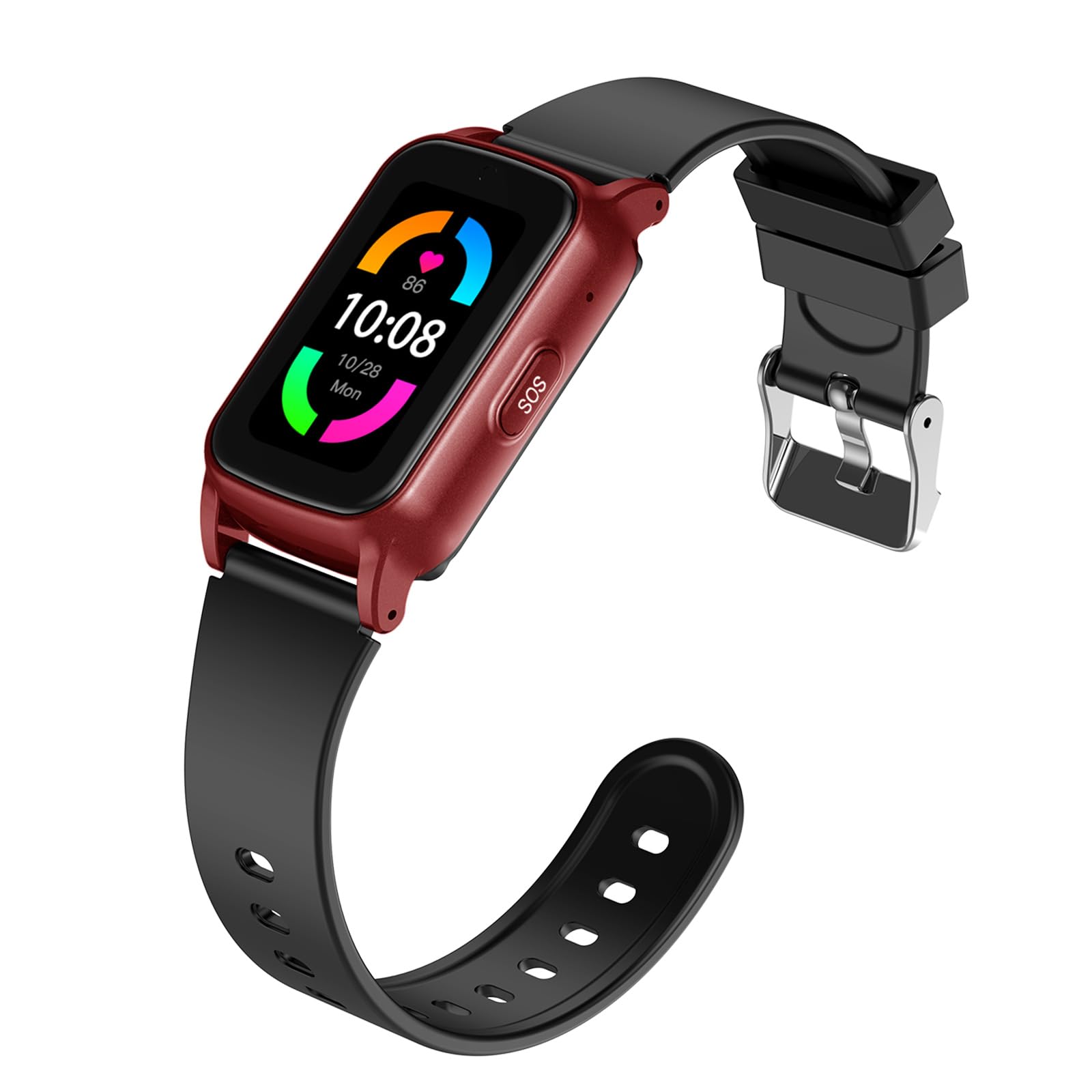
The entry-level try-it option, with 4G video calls and geofence alerts on paper.
This one aims at the budget buyer who wants the whole feature checklist. Automatic fall sensing alerts preset contacts, so help is notified if a fall happens. GPS tracking with geofence zones (virtual boundaries that alert you if the wearer leaves an area) keeps tabs on location. 4G HD video calling and voice chat let you see and talk to the wearer. Heart rate monitoring, blood pressure reference, and sleep tracking round out the health features. A data-only SIM comes pre-installed with one year of free data service, though that SIM does not support voice calls — you would install your own voice-capable SIM for calling. It is IP67 water resistant and charges magnetically, which helps hands with limited dexterity.
The reality check is that setup and reliability are the recurring struggles. One buyer reports that “you need a sim card to activate would not use it for my loved one too complicated.” Others describe setup stretching past a month, mapping that stays inaccurate, and a manual too small to read. Blood-pressure readings ran high compared with a cuff monitor, and spam calls drained minutes until a contacts-only setting was enabled. The lesson is to buy this only if a tech-savvy family member will own the setup and check it regularly, and to test the fall alert yourself before relying on it.
Where it earns a place is for the family that wants to try a fully connected GPS and fall-alert watch without committing to a premium brand. The 4G video calling is a genuine comfort for grandparents who want to see faces, and the geofencing works once configured. Just plan on investing time in the setup, and keep expectations realistic on the health metrics — these are reference readings, not clinical-grade measurements.
Reasons a budget family picks it
- Data-only SIM pre-installed with one year of free data service
- 4G HD video calling and voice chat for staying in touch
- GPS tracking with geofence alerts for wandering
- IP67 water resistance and magnetic charging for limited dexterity
Where the work is
- Setup is long and the manual is hard to read
- Included SIM cannot make voice calls
- Health readings and mapping accuracy are unreliable
Try it if: you want a full-featured 4G senior watch at the lowest commitment and have someone technical to set it up.
Avoid the gamble if: setup will fall entirely on the senior wearer alone.
Know the Specs
Fall detection vs. SOS button
A fall detection feature means the watch senses a sudden impact on its own and takes action without the wearer pressing anything. That action can be a call to emergency services, a call to family contacts, or a countdown the wearer can cancel. An SOS button is a manual trigger the wearer must press and hold. Fall detection is the safety net for an unconscious wearer; the SOS button handles everything else. Good watches carry both, and the best ones let you test them before relying on them.
Battery life in hours vs. days
A watch rated in hours needs a nightly charge, and the safety features go dark once the battery empties. A watch rated in days tolerates a missed charge. When you compare, look at what the battery figure assumes — a week of typical use often drops sharply once GPS and frequent health checks are switched on. For a wearer who will not reliably plug in a charger, the longer-endurance model is the safer choice.
How the alert reaches help
There are three routes. Direct-to-family sends a call or text to contacts you choose. Monitoring-service alerts route through a call center. App-based alerts depend on a caregiver’s phone receiving a notification. Each has a failure point — a contact who does not answer, a subscription you forget to renew, or an app that is not open. Ask which route the watch uses and whether it works with the caregiver’s phone in their pocket.
Subscriptions and SIM requirements
Some senior watches bundle safety behind a monthly plan, and the free tier often excludes live tracking or extra contacts. Others include a data SIM for a set period, after which you renew. A few carry their own cellular connection with no phone needed. Read the SIM and plan terms before buying — a data-only SIM will not make voice calls, and public emergency numbers may be excluded from the contact list.
Common Questions
Will a fall detection watch call 911 on its own?
Does the wearer need a smartphone for the watch to work?
Which watches charge a monthly subscription?
How often will the watch need charging?
Will an iPhone work with an Android watch like the Pixel Watch 3?
Can the watch detect a fall in the shower or bath?
What is the difference between fall detection and a panic button?
Does false alarm happen, and what stops it?
Which watch works best for a senior with dementia or Alzheimer’s?
How readable is the screen for someone with poor eyesight?
Is a fall detection watch a replacement for a medical alert pendant?
The Bottom Line
For most households, the elderly fall detection watch winner is the Apple Watch Series 11 because it detects a hard fall or severe crash, connects with emergency services automatically, and alerts your contacts without anyone pressing a button. It is the most complete safety-and-health package here, and it looks like a normal watch rather than medical equipment. If the wearer is on Android and wants a bright, polished wrist with serious fitness feedback, grab the Google Pixel Watch 3. For a rugged build and a battery that runs a full day longer than the Series 11, the Apple Watch Ultra 2 is the one to reach for. And if the priority is alerts that ring family directly with GPS tracking and a month-to-month plan, the Seculife Medical Alert Smartband keeps the path from fall to help short and simple.
One last word on choosing: match the watch to the routine the wearer will actually keep. A nightly charger only protects someone who plugs it in, and a subscription only protects someone whose family keeps it active. Pick the model whose alert path and charging habit fit that person, and test the fall alert together before anyone starts relying on it.
How we choose
We do not accept paid placement. Every pick is matched to a real buyer and a real use-case; we do not hands-on test units.
Sources
Specifications: manufacturer listings and product documentation. Review insights: verified customer reviews, as of October 2026. Pricing: not shown on this page (it changes often); check the current price via the retailer link.
As an Amazon Associate, Aappliancez earns from qualifying purchases. This does not affect which products we feature.