Disclosure: Some links in this post are affiliate links. As an Amazon Associate I earn from qualifying purchases, at no extra cost to you. Learn more
Specs are compiled from manufacturer listings and verified buyer reviews and can change over time — please confirm the key details on the product page before buying.
Your soundbar keeps cutting out mid-movie, and the culprit is usually a cable that cannot carry the audio bandwidth. An eARC (Enhanced Audio Return Channel, the channel that sends TV sound back down to your soundbar) cable moves uncompressed, cinema-grade audio from your TV to your soundbar or AV receiver on one single wire. Only a certified Ultra High Speed HDMI cable carries the full 48Gbps (gigabits per second, the raw data speed of the cable) that feature demands. Get the cable wrong and you lose Dolby Atmos and DTS:X even though both your TV and soundbar support them. Get it right and the whole chain just works.
This guide is built by comparing the manufacturers’ published specifications and the patterns across verified customer reviews, so you get each pick’s real strengths and trade-offs instead of marketing spin.
Every pick below has been sorted by what it actually carries, not by what the box claims. If you want the short answer before the deep dive, this guide to the earc hdmi cable covers certification, bandwidth, and which length actually suits your setup.
Top Picks

How To Choose The Best eARC HDMI Cable
Think of an eARC cable as the pipe your TV uses to push lossless audio to your soundbar. Stop asking “will any HDMI cable do?” and start asking “which cable can hold the full signal without dropping?” Three things decide whether the cable you buy actually works.
Certification is not optional
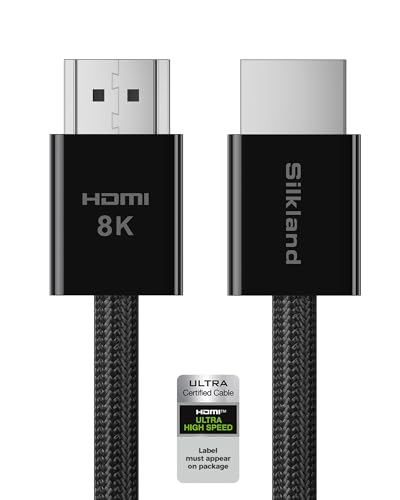
Ultra High Speed HDMI certification means a cable was tested to carry 48Gbps without degrading the signal. Without that stamp, you are gambling on an untested cable holding a bandwidth-hungry signal — and eARC audio walks out the door the moment the cable cannot keep up. A verified comparison detail worth noting: the Silkland Certified HDMI 2.1 Cable runs 5 feet while the Highwings 8K HDMI 2.1 Cable 2-Pack measures 3.3 feet. So if you need extra reach to a wall-mounted TV, the Silkland gives you more slack.
Bandwidth tells you what future-proofs
48Gbps (the cable’s raw data capacity) is the full HDMI 2.1 spec. A cable rated at this carries 8K@60Hz (8K resolution at 60 frames per second) and 4K@120Hz (4K at 120 frames per second) — so a console or PC can push smooth high-frame-rate gaming, and nature footage keeps every detail. It also carries dynamic HDR formats like Dolby Vision and HDR10+ (high dynamic range, the layer that keeps shadows and highlights from crushing together). Drop below 48Gbps and the cable becomes the bottleneck, not the TV or console.
Length and build for the real wall
Inside certified ranges, length is mostly about reaching the port without bending the cable awkwardly behind your media cabinet. A slim 17.5×8.5mm profile helps — it fits tight spaces behind wall-mounted TVs where a chunky connector simply will not sit. Gold-plated connectors resist the corrosion that dulls a signal over time, so your picture stays clean after years of use. A braided exterior survives the constant plug and unplug that comes with switching gear between the TV and a monitor.
Side-by-Side Comparison
| Model | Best For | Bandwidth | Length | Certification | Amazon |
|---|---|---|---|---|---|
| Anker HDMI 2.1 Cable, 48Gbps Ultra High Speed Cord with 8K@60Hz★ Best Overall | Everyday reliability across consoles and soundbars | 48Gbps | 6.6 feet | HDMI Forum certified | Amazon |
| Silkland Certified HDMI 2.1 Cable for PS5, Xbox Series X/S, Switch2Best for Console Owners | Gaming rigs that need a slim certified cable | 48Gbps | 5 feet | Officially certified | Amazon |
| Highwings 8K HDMI 2.1 Cable 2-Pack 3.3FT/1M | Two-device setups and multi-console benches | 48Gbps | 3.3 feet (per cable) | HDMI 2.1 standard | Amazon |
| BlueRigger 8K HDMI Cable 6 FT | Soundbar-to-TV and long cable runs | 48Gbps | 6 feet | HDMI 2.1 with HDCP 2.3 | Amazon |
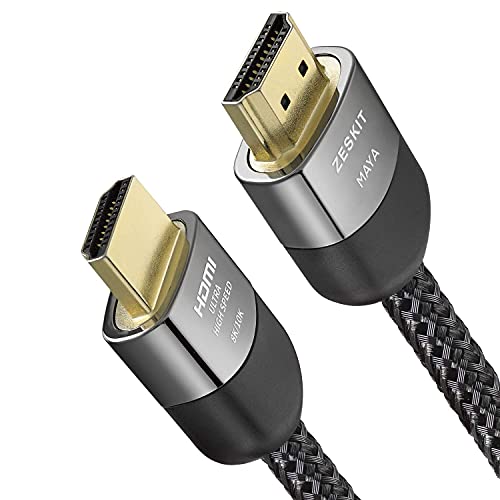
| Zeskit Certified 2.1 8K HDMI Cable 48Gbps | High-end home theater and next-gen consoles | 48Gbps | 6.5 feet | Ultra High Speed certified | Amazon |
Detailed Reviews
1. Anker HDMI 2.1 Cable 6.6ft
Our pick — 4.5+★ from 3,000+ verified ratings; the strongest balance of quality and price.
The one cable that finally holds 4K/120Hz all night without flinching
This cable earns the top spot on 48Gbps (its raw data speed) plus HDMI Forum Ultra High Speed certification — not just an advertised number, but a tested one. That is the speed your TV needs to push a full 4K/120Hz signal with HDR (high dynamic range, the layer that keeps shadows and highlights from crushing together) through to a modern display. A 4.5+ star rating across 3,400+ owners backs that up.
Gaming is where it proves itself. Buyers report it holding 4K/120Hz with HDR on an Xbox Series X paired with an LG G5 OLED. Other cables — including pricier ones — would cut the signal the moment the dashboard switched into a game. That sudden drop on a mode change is exactly where an uncertified cable struggles, and the Anker cleared it where several rivals did not. It also plays nicely with PS5, PC, and Dolby Atmos soundbars, so one cable can serve your whole A/V stack.
Build matters too. The carbon steel connectors with gold pins survive thousands of plug and unplug cycles, so you can swap a console between the TV and a monitor without wearing the port down. The double-braided nylon exterior takes the same punishment. One honest note: a small slice of owners found both the video and signal quality mixed. If you are pushing a very long run to a projector at the back of a big room, a longer certified cable may serve you better. For everything under 6.6 feet, this is the steady hand.
Owners mention: “Only cable maintaining 4K/120Hz + HDR on Xbox Series X and LG G5 OLED. Other cables cut signal when switching game/dashboard; tried 4+ brands, even pricier ones failed.”
What wins people over
- HDMI Forum certified Ultra High Speed — tested to hold the full 48Gbps signal
- 48Gbps bandwidth carries 8K@60Hz and 4K@120Hz without dropping frames
- Handles 4K Dolby Vision and Dolby Atmos soundbar chains without cutouts, so audio stays loud and clear
- Double-braided nylon jacket and gold-pinned carbon steel connectors built for thousands of swaps
- 6.6 feet of reach for wall-mounted TVs where shorter cables run short
Where it needs care
- A handful of customers note mixed video and signal consistency on very long runs
- Shorter than the 5-foot Silkland for tight cabinet setups — measure first
Lock it in if: You run a PS5, Xbox Series X, or PC into a 4K/120Hz TV and want a certified cable that does not negotiate the signal every time you switch sources.
Think again if: You need a run longer than 6.6 feet to reach a projector — a longer certified cable is the safer bet there.
2. Silkland Certified HDMI 2.1 Cable 5FT
Slim, certified, and shaped to survive the back of a crowded media cabinet
Bulky connectors are a real problem when your console ports are jammed against a wall, and this Silkland cable solves it with a slim 17.5×8.5mm profile (roughly the width of a standard USB plug). The one-piece ABS body and ultra-dense braided exterior slot into tight gaps without forcing the port. It is officially certified for the full 48Gbps, the bandwidth threshold for 4K@120Hz with VRR (variable refresh rate, which smooths out frame-rate mismatch between console and TV) and ALLM (auto low-latency mode, which flips your TV into game mode the instant a console wakes up).
Audio is the other job. eARC pushes lossless formats including Dolby Atmos and DTS:X from TV to soundbar or AV receiver on one single cable — the exact chain most console owners want, since the console feeds the TV and the TV feeds the bar. It is also backward compatible with HDMI 2.0 and 1.4, so it still works with an older TV today and upgrades cleanly when you swap displays later. What owners notice most is build quality: the triple shielding and 30AWG copper core keep interference down and reduce the screen flicker and stray white dots that come from a noisy signal. Reach this one at 5 feet onto a console shelf and it sits neatly.
The honest trade-off sits with its review count. Fewer than 130 owners have reviewed it so far, a much shorter track record than the Anker above. One four-star owner left the performance “untested” narrative intact, flagging that 4K/120Hz and 8K/60Hz verification came down to trusting the certification rather than a long personal test. That is not a knock on the cable itself — the certification stamp is real and the design is solid. It is simply the price of picking a newer model over a long-proven one.
Reviewers point out: “Works perfectly with 4K TV, BluRay player, streaming box, soundbar. Appreciates various lengths, flexible woven cable, smooth HDMI port insertion. Certified.”
Where the value stacks up: Certification plus a slim 17.5×8.5mm connector at an entry-level tier is the combination most cabinets need. You get the full 48Gbps ceiling, the audio formats, and the space-saving shape in one package.
Grab this if: You need a certified cable that sits flush inside a tight wall-mount or cabinet setup.
Pass if: You want a longer track record behind the model — the Anker and BlueRigger have more owners behind them.
3. Highwings 8K HDMI 2.1 Cable 2-Pack 3.3FT

Two braided 48Gbps cables where a single would cost nearly the same
Count the cables you actually need before you buy. If your soundbar chain, console, and streaming box all want a high-speed run to the TV, one cable leaves you short. This pack hands you two 3.3-foot (1 meter) 48Gbps cables, both rated to handle the full 8K@60Hz and 4K@120Hz signals. That jump from 18Gbps to 48Gbps (about 6GB/s of throughput) is the difference between stuttering frame drops and clean playback. Buy the pair and you cover two runs at once.
Durability is where this one earns its keep, and the numbers back it. What owners praise most is overall quality by a wide margin, with durability the next most-cited trait. The military-grade tensile nylon jacket and the aluminum alloy shell with an anti-bending tail keep the connector heads seated without wiggling. The red braiding is practical too: run two cables into one receiver or switch and the colour tells you which line is which when you are reaching behind a cabinet in the dark.
There is one size limit to know before you click. At 3.3 feet per cable, these suit a console or streaming box sitting near the TV, but they will not stretch across a room to a projector. One owner also hit a single cable head that could not seat properly into an older RCA TV because a plastic bump on the port got in the way; they returned it without faulting the cable. On modern gear with standard HDMI 2.1 ports, that is a non-issue.
Shoppers say: “Highwings 8K HDMI 2.1 2-pack: two 6.6ft cables, 48Gbps, HDMI 2.1, slim braided build, red color for easy ID. Good for gaming, PC, TV, AV. 2m length practical. Great value.”
Standout strengths
- Two 48Gbps cables in one pack covers a console-plus-soundbar setup
- Durability is the second most-praised trait after overall quality
- Red braiding makes it easy to identify each run behind a cabinet
- Aluminum alloy shell and anti-bending tail protect the connector joints
Fit notes
- At 3.3 feet per cable, this will not stretch across a room
- A recurring mixed signal-quality note appears in a small share of feedback
- Owner feedback includes one cable-head vs. a non-standard TV port mismatch
The call: Two certified-speed cables for the bench where multiple devices live close to the TV.
Reconsider if: Your run needs real length — the 6.6-foot Anker or 6.5-foot Zeskit is the reach you want.
4. BlueRigger 8K HDMI Cable 6 FT

The cable owners trust to keep sound and picture locked in for the long haul
The BlueRigger is built as an HDMI ARC cable for soundbar-to-TV use, and it carries the full 48Gbps. It supports HDR10+ color depth and HDCP 2.3 — the copy-protection handshake (a digital permission check) that lets 4K and 8K streams actually pass through without a blackout screen. That feature set makes it a natural fit beside a premium TV: Dolby TrueHD 7.1 and DTS audio, plus 8K 60Hz and 4K 120Hz video, all clear one wire. It is also rated for over 25,000 bends, a durability figure most competitors do not publish.
Reliability, not novelty, is what holds people to this brand. The connector bodies are solid, the 24K gold plating resists corrosion and keeps the signal clean, and the solid copper wires handle long cable runs that thinner builds fail on — so it survives being pulled through a wall or a tight conduit rather than only working on a stand. With a large installed base and a lifetime warranty backed by US-based support, it is the pick for anyone who wants to run the cable once and stop thinking about it.
Here is the trade-off: this cable does not carry the HDMI Forum Ultra High Speed certification stamp that Anker and Zeskit do. The 48Gbps rating relies on the manufacturer’s testing and years of owner feedback rather than a formal label. In practice the effect is small — this is a well-worn model with a huge user base and no widespread signal complaints. If a certification hologram on the box is what gives you confidence for a high-end setup, one of the certified picks above may suit you better. Reviews are overwhelmingly positive, with a small minority of buyers who hit a device-specific port limitation — normal for a product sold at this scale.
The track record case: The single biggest reason to choose this is the drawn-out confidence you get from a cable that has been in a very large number of homes for a long while — the durability and connector strength are proven, and the warranty backs the run.
Best for: A soundbar-and-TV pairing that you never want to revisit — the reliability and lifetime warranty make it the low-maintenance pick.
Not for: Anyone who insists on the HDMI Forum certification sticker for their premier home theater build.
5. Zeskit Certified 2.1 8K HDMI Cable 6ft
The certified flagship for a stack that asks for everything at once
Run down the feature list: 48Gbps, 8K@60, 4K@120, up to 10K resolution, Dynamic HDR, eARC, ALLM (auto low-latency mode, which flips your TV into game mode when a console wakes), QFT (Quick Frame Transport, which cuts latency), QMS (Quick Media Switching, which removes the blank screen when the frame rate changes), VRR (variable refresh rate, which smooths out frame-rate mismatch), HDCP 2.2 and 2.3 (the copy-protection handshake), Dolby Vision and Dolby Atmos. Every modern HDMI 2.1 feature worth naming is here on one 6.5-foot cable. Two things seal it: the Ultra High Speed certification with a hologram sticker, and a 30-gauge copper core that keeps the signal steady over the run.
Its reputation was earned over thousands of homes. Owners running it into an OLED and a Sony AV receiver report 4K/120 with no picture or connection dropouts. Some owners find the audio gains more noticeable than the video — clearer vocals and crisper highs through a soundbar chain, so dialogue stays easy to follow. Owners describe it as built for high-end setups and worth the price within that context.
Know the one catch before you commit. A subset of feedback notes that on some units the 120Hz mode dropped to 1080p, and there is disagreement about whether that came from the cable, the game, or the TV. Owners also flagged that the box itself is not sealed — a packaging observation, not a cable fault. On a well-matched TV and console, the cable performs as advertised. If you are troubleshooting a fringe 120Hz issue, try more than one source before blaming the cable.
Buyers report: “Amazing cable! Perfect for high-end setups. I bought this Zeskit MAYA Ultra High Speed HDMI cable and it works flawlessly. The build quality is amazing, and it delivers a perfect picture and sound with zero issues. It is completely worth the money. Highly recommended!”
The honest verdict: If your entire chain is next-gen and you want a cable that carries 8K60, 10K, Dynamic HDR, VRR, and Dolby Atmos without negotiating, this is the one — the hologram certification and 30-gauge core back it up. Don’t pay for it if all you need is to connect a single 4K soundbar to a TV; a simpler certified cable does that for less.
Reach for this if: You are building a full 4K/120Hz-and-beyond theater and want every feature on one certified cable.
Look elsewhere if: You only need basic eARC for a soundbar — the value tier will cover it.
Know the Specs
Bandwidth (48Gbps)
Bandwidth is the raw data capacity the cable carries — 48Gbps is the full HDMI 2.1 ceiling, versus 18Gbps on older cables. Higher bandwidth means 8K@60Hz and 4K@120Hz signals flow without dropping frames or compressing colour, so fast action scenes stay smooth instead of stuttering. If your TV and console both ask for the full signal, a lower-bandwidth cable is the piece that fails first.
eARC vs ARC
ARC (Audio Return Channel) carries compressed audio; eARC (Enhanced Audio Return Channel) carries lossless audio including Dolby Atmos and DTS:X on a single cable to your soundbar or AV receiver. It needs the full 48Gbps bandwidth to do that, which is why an uncertified or low-bandwidth cable can block the audio formats even when the TV and bar both support them.
Certification
An Ultra High Speed HDMI certification stamp means the cable was tested to carry 48Gbps without degrading the signal — a hologram sticker is the visible proof on-cable. Without it, the bandwidth rating is a manufacturer claim rather than an independently verified test result, so a certified cable is a safer bet for a signal-hungry eARC chain.
Length and Connector Build
Inside certified distances, cable length is mostly about reach — 3.3 feet for adjacent devices, 6.5 feet for wall-mounted TVs or mid-size living rooms. Gold-plated connectors resist corrosion that dulls the signal over time, and braided jackets protect against wear from regular plugging and unplugging. A slim connector profile keeps the cable seated in a tight cabinet.
Common Questions
What is an eARC HDMI cable and do I really need a special one?
Will any 48Gbps HDMI cable work as an eARC cable?
Do I need a certified HDMI cable for my soundbar and TV?
How long can an eARC HDMI cable be without losing signal?
Does an eARC cable support Dolby Atmos and DTS:X?
What is the difference between HDMI 2.0 and HDMI 2.1 for eARC?
Is a braided eARC HDMI cable better than a standard plastic one?
Can a bad eARC cable cause the picture to keep cutting out?
Do I need a 2-pack of HDMI 2.1 cables for a soundbar setup?
Will an eARC HDMI cable work with a PS5 or Xbox Series X?
The Bottom Line
For most people building a 4K/120Hz or eARC soundbar setup, the winner is the Anker HDMI 2.1 Cable because it combines 48Gbps bandwidth with HDMI Forum certification and a track record across thousands of owners — the crowd favorite with a 4.5+ rating behind it. If your priority is fitting into a tight wall-mount cabinet, the Silkland Certified HDMI 2.1 Cable in its slim 17.5×8.5mm shape is the one to reach for. And if you simply want two cables for a bench with a console and a streaming box, the Highwings 8K HDMI 2.1 Cable 2-Pack is the sharper move.
How we choose
We do not accept paid placement. Every pick is matched to a real buyer and a real use-case; we do not hands-on test units.
Sources
Specifications: manufacturer listings and product documentation. Review insights: verified customer reviews, as of October 2026. Pricing: not shown on this page (it changes often); check the current price via the retailer link.
As an Amazon Associate, Aappliancez earns from qualifying purchases. This does not affect which products we feature.