Disclosure: Some links in this post are affiliate links. As an Amazon Associate I earn from qualifying purchases, at no extra cost to you. Learn more
Specs are compiled from manufacturer listings and verified buyer reviews and can change over time — please confirm the key details on the product page before buying.
The short answer: if your library holds live in the Libby app, the safest buys are e-readers that can run Libby directly or bridge to your library’s EPUB files without fuss. Below you’ll find nine real contenders, sorted by how well each one handles library borrowing, screen comfort, and battery stretch — so you can stop guessing and start reading.
This guide is built by comparing the manufacturers’ published specifications and the patterns across verified customer reviews, so you get each pick’s real strengths and trade-offs instead of marketing spin.
This breakdown of the e-reader for libby market lines up the real trade-offs in size, storage, battery life, and library access.
Top Picks


How To Choose The Best E-Reader for Libby
Your library loans can take three different routes to your screen, and that is the first thing to sort out. On a Kindle, you borrow in the Libby app (the library app from OverDrive) and then transfer the loan across. On a Kobo, you tap straight into OverDrive (the library service behind Libby) right on the device. On an Android-based reader, you just install the Libby app the way you would on a phone. Once the book is on the screen, four things decide how good the reading feels.
Screen Size And Resolution
A 6-inch screen is the classic paperback format and slips into most jacket pockets. A 7-inch or larger panel fits more words per page, which helps if you read large-print editions or comics. Resolution matters too: a 300ppi panel (pixels per inch, meaning the sharpness of the text) keeps letters crisp the way a printed page does.
Glare-Free Lighting And Warmth Control
E Ink screens (the technology that mimics paper instead of glowing like a phone) stay readable outdoors because they reflect light instead of blasting it at your eyes. A frontlight adds brightness for night reading, and an adjustable warm tone shifts the light from white to amber so late-night sessions feel gentler.
Battery Life And Waterproofing
E-readers sip power compared to tablets because the screen only draws current when the page changes. Battery is usually quoted in weeks rather than hours, and an IPX8 rating (a water-resistance standard) means the device survives accidental dunks — worth having if your library reading happens by a pool or in the bath.
Library Access And File Formats
Most library systems hand out EPUB files, which is the universal ebook format. Knowing whether a device reads EPUB, PDF, and comic formats like CBZ and CBR without conversion saves you from extra software steps. Storage space matters next: library books are borrowed and returned, so even a modest shelf of active loans and sideloaded files adds up.
Side-by-Side Comparison
| Model | Best For | Screen | Storage | Battery | Amazon |
|---|---|---|---|---|---|
| Amazon Kindle Paperwhite 16GB★ Best Overall | All-around library reading | 7″ glare-free | 16 GB | Up to 12 weeks | Amazon |
| Kobo Clara BWBest for Direct Borrowing | Direct OverDrive borrowing | 6″ E Ink Carta 1300 HD | 16 GB | 2 weeks | Amazon |
| Kobo Libra ColourBest Color Screen | Color covers and journaling | 7″ Color E Ink | 32 GB | 4 weeks | Amazon |
| Amazon Kindle 16GB | Pocket-sized Kindle reading | 6″ glare-free | 16 GB | Up to 6 weeks | Amazon |
| PocketBook Verse Pro Color | Open, account-free reading | 6″ color Kaleido 3 | 16 GB | — | Amazon |
| Barnes & Noble NOOK GlowLight 4 Plus | Physical page buttons | 7.8″ E Ink | 32 GB | — | Amazon |
| BOOX Palma 2 Pro | Android apps plus phone-size grip | 6.13″ Kaleido 3 | 128 GB | 3,950mAh | Amazon |
| Kobo Libra Colour Case Bundle | Color reader with case included | 7″ Color E Ink | 32 GB | 5 weeks | Amazon |
| PocketBook Basic Lux 4 | Tightest budget entry | 6″ E Ink Carta | 8 GB | 4 weeks | Amazon |
Detailed Reviews
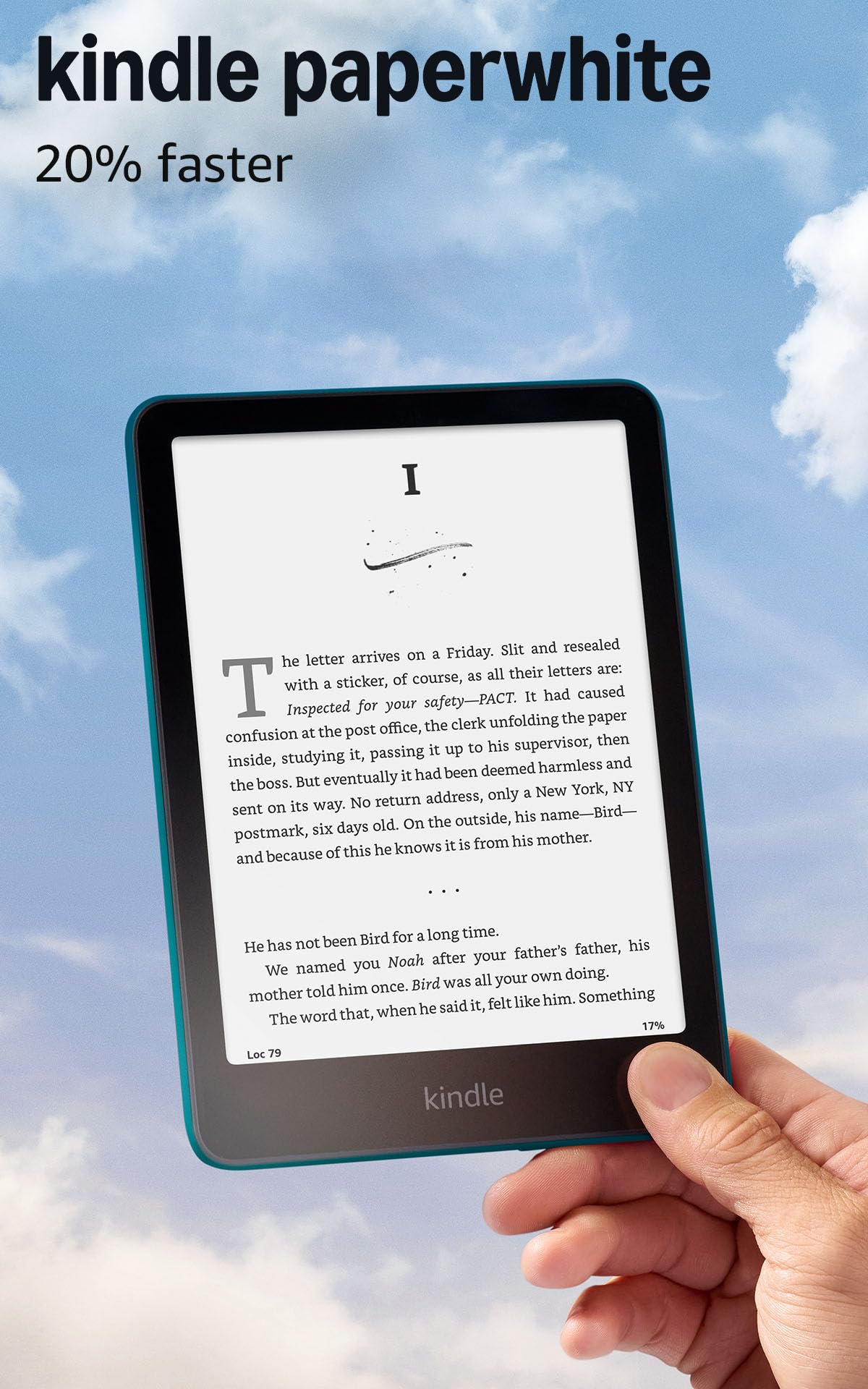
1. Amazon Kindle Paperwhite 16GB (2024 model) – Jade
Our pick — 4.5+★ from 23,000+ verified ratings; the strongest balance of quality and price.
Up to 12 weeks per charge and a 7-inch glare-free panel — that is the whole pitch.
It sits at 4.5+ stars across 23,000+ owners, the deepest review base of any pick here. For Libby users the math is simple: borrow the book on your phone, send it to Kindle, and read on a screen built for long sessions rather than a phone that pings you. The panel is a 7-inch glare-free display, which keeps pages readable at the beach or on a sunny train platform.
Battery is the headline. A single USB-C charge lasts up to 12 weeks, roughly three times the four-week stretch PocketBook quotes for its Basic Lux 4 — that is the gap that turns a reader into a leave-it-in-your-bag device. What wins people over most is exactly that endurance, and the 16 GB of storage keeps thousands of books on hand between library loans. Owners describe charging so rarely they forget to plug it in, and one daily reader reported the battery “lasts a week with hours daily reading.”
The catch is the lighting tone, not the hardware. You can slide from white to amber, and some readers want more amber range than this panel offers, though the adjustability itself draws no complaints. It also has no social media or notification apps by design, which is the point, but it means no Libby app running directly on the device — you transfer loans rather than tap them in. At 7 inches and light enough for one-handed reading, it stays out of the way of your book.
Why it earns first place
- Up to 12 weeks per USB-C charge — three times the PocketBook Basic Lux 4’s four weeks
- 7-inch glare-free display, larger than the 6-inch panel on the Kindle and Clara BW
- 16 GB holds thousands of books for weeks of library loans
- Adjustable white-to-amber lighting for bright sun or dark bedrooms
Where it stops short
- No Libby app runs on the device itself — you transfer loans through the Libby Kindle flow instead
- No expandable storage, unlike the microSD slot on the PocketBook models
- Locked to the Kindle Store rather than an open EPUB library
The reader for you: someone who wants the longest battery life, the brightest glare-free screen, and the widest support network of guides for the Kindle-Libby transfer flow.
Consider the Kobo path instead: if you would rather borrow and read in one tap with no transfer step, the Kobo Clara BW and Kobo Libra Colour skip that hop entirely.
2. Kobo Clara BW
Library loans arrive in one tap — no cable, no transfer step, no workaround.
If your whole reason for buying is Libby and OverDrive, this is the smoothest ride in the group. You borrow on the device itself, and EPUB loans land without the Kindle workaround. Owners who switched from Kindle say they have not looked back, and Libby access comes up again and again in the reviews. The screen is a 6-inch E Ink Carta 1300 HD panel — sharp text, quick page turns, and an optional Dark Mode for reading in bed without lighting up the room. At 6.14 ounces it disappears in one hand, which matters if you hold it for hours.
What wins people over is the clean interface: no ads, no storefront clutter, just your library and your books. Functionality is the aspect owners praise most, and the interface sits near the top of the list too — no ads, no storefront clutter, just your library and your books. Battery is quoted at 2 weeks, and buyers report the percentage barely moves with nightly reading. ComfortLight PRO lets you warm the screen from blue-white to amber, so late chapters stay gentle. Waterproofing is IPX8, meaning the Clara BW survives up to 60 minutes in up to 2 metres of water — bath readers, this one is yours.
The honest trade-off is that the Kobo Store is a smaller shop than the Kindle Store, which matters if you buy new releases as well as borrow them. Owners also report occasional freezes requiring a hard reset, though most readers never hit one. Note the battery gap too: the Clara BW quotes 2 weeks, while this pick’s rival above stretches to 12 — real if you travel without a charger. If borrowing is your habit and buying is occasional, though, the Clara BW has the shortest path from library card to open book of anything on this list.
What buyers rave about: the library-first workflow — borrow on the device, read in seconds, no conversion.
The trade you make: a smaller store and a shorter 2-week battery than the Kindle Paperwhite’s 12.
Buy this one if: your reading is 90% library loans and you want the fewest taps between a wishlist and an open page.
Look elsewhere if: you also buy a lot of new releases, since the Kobo Store has less selection than Kindle’s 15-million-title library.
3. Kobo Libra Colour eReader, 7″ Color E Ink
A 7-inch color panel that shows book covers the way the publisher intended — and lets you highlight in color too.
Comic readers and anyone who judges a book by its cover, this is your pick. The 7-inch Color E Ink Kaleido 3 screen renders covers, illustrations, and graphic novels in color, and a Kobo Stylus 2 turns highlighting into something you can actually see. At 7.05 ounces it stays light enough to hold one-handed, and the page-turn buttons on the side are one of the things owners praise most — right up there with the color display itself. Storage is 32 GB, which Kobo says holds up to 24,000 eBooks or 150 audiobooks.
For Libby users the workflow is the same as the Clara BW: Kobo builds in OverDrive, so library borrowing is a built-in feature, not a workaround. Battery is quoted at 4 weeks, and owners describe it as fantastic in daily use. Waterproofing matches the rest of the Kobo line at IPX8, so poolside chapters are safe. If you like to annotate, mark up, or scribble margin notes, the color layer makes that practical in a way a black-and-white reader cannot.
The honest caveat: color E Ink is a different animal from a tablet screen. Colors come out muted rather than vivid, which is normal for the technology and not a defect. Pages are also slightly slower to refresh in color mode than black-and-white, and one long-term owner noted the glass picks up scratches over months of use — worth a case. Comparing the two Kobo color options directly: the plain Libra Colour quotes 4 weeks of battery, while the case bundle lists 5 — both fine, but the numbers do differ between listings. If color is the point, this is the more established of the pair.
What makes it stand out
- 7-inch Color E Ink Kaleido 3 screen for covers, comics, and color highlighting
- Built-in OverDrive — library loans work on the device like the Clara BW
- 32 GB holds up to 24,000 eBooks or 150 Kobo audiobooks
- Page-turn buttons, left/right screen rotation, and landscape mode
What you should know
- Colors are muted compared to a tablet, which is normal for color E Ink
- The glass is not scratch-resistant — a case is a smart buy
- Kobo Stylus 2 for annotation and note-taking is sold separately
Worth it if: you read comics, illustrated books, or want to highlight and annotate in color — and you borrow through OverDrive.
Not for you if: you only read novels and prefer a white background — the black-and-white Clara BW handles that job for less.
4. Amazon Kindle 16 GB (2024 model) – Matcha

The pocket-sized Kindle that slides into a jacket, a purse, or one hand without a second thought.
This is the Kindle for readers who value a small footprint over a big screen. The 6-inch glare-free display with adjustable front light is quoted as being 25% brighter at maximum than the previous generation, and dark mode is included for late nights. Frame it against its bigger sibling: this panel is 6 inches while the Paperwhite stretches to 7, and battery is up to 6 weeks here versus up to 12 there. The trade is size and run time in exchange for a device you can forget is in your pocket.
Portability is the aspect owners rave about most. It fits a single hand, it fits a purse, and readers say it goes everywhere with them — one called it perfect for bedtime and travel alike. Storage is 16 GB, enough for thousands of books, which keeps library loans and sideloaded EPUBs on hand without juggling space. Owners also note crisp text, adjustable brightness, and page turns that feel quick for the price, plus 16 GB of storage that leaves plenty of room for your Kindle Unlimited queue.
The honest downside is battery consistency. Some owners mention weeks of reading on one charge; others describe it draining noticeably faster, especially when they browse the store or poke through settings. Page turns are also occasionally hard-pressed on this model, and a few readers mention taps skipping more than one page at once. Nothing of that disqualifies it — it is a smooth, distraction-free reader for the money — but if maximum battery life is your priority, the Paperwhite above is the safer bet.
The one-line case: a 6-inch, 16 GB Kindle that fits anywhere and reads anywhere, with battery quoted at up to 6 weeks.
Where the reviews split: portability, screen size, and store selection draw almost universal praise, but battery life gets mixed feedback — some claim weeks, some report the needle dropping fast when browsing settings.
Grab this if: you want the smallest, lightest way to read Kindle books and Libby loans in a bag you barely notice.
Think twice if: you want the longest possible gap between charges — the Paperwhite’s 12 weeks versus this model’s 6 is the deciding difference.
5. PocketBook Verse Pro Color

No account, no storefront, no lock-in — just drag your library over USB and start reading.
If you want a reader that never asks for a login, this is the one. Everything is drag-and-drop over USB Type-C — no registration, no ecosystem wall. The screen is a 6-inch E Ink Kaleido 3 color panel with a frontlight, and the device supports Bluetooth 5.4 for audiobooks, text-to-speech, and a speaker for listening on the go. Storage is 16 GB, and it handles EPUB, MOBI, PDF, and CBZ files without conversion, which is a big deal for library EPUB loans that other readers make you convert first.
The aspect buyers highlight most is the hardware itself — the build feels premium, the page buttons click cleanly, and it fits in a pocket. The color layer makes maps and illustrations pop, and text stays readable in sunlight. For Libby specifically, you sideload the borrowed EPUB over USB and open it. Physical page buttons are a nice touch too, especially for reading in landscape mode, and Night Mode plus SMARTlight tone control round out the reading experience.
The honest caveat: the software is not as polished as Kobo’s or Amazon’s. Some reviewers describe slow page turns and occasional menu lag, plus a screen that shuts itself down after ten minutes of sleep. A few note the color layer looks softer than the crisp text on black-and-white panels. If you enjoy tinkering — installing KOReader, adjusting settings — you will get the most out of it. If you want a reader that just works from the start with zero fiddling, this is a harder recommendation.
The honest verdict: the best hardware in the color e-reader space, paired with software that needs patience.
Perfect for: readers who want zero account requirements, drag-and-drop sideloading, and Bluetooth audio in a waterproof, pocketable package.
Not for you if: you want a smooth, polished interface — the slower menu response and occasional hangs make this a love-it-or-leave-it pick.
6. Barnes & Noble NOOK GlowLight 4 Plus

The biggest screen in the group, with physical buttons and a 32 GB library shelf to match.
If physical page buttons and a larger reading surface matter to you, this is the one to look at closely. At 7.8 inches it has the largest screen here, and 32 GB of storage matches the top-tier Kobo readers — four times the storage of the 8 GB PocketBook Basic Lux 4. The device supports Bluetooth for audiobooks, includes a night mode, and has a soft-touch finish on front and back with a recessed front display to keep dust out. It runs an Android-based system that can be customized with third-party launchers and readers if you know your way around.
If you would rather not buy into Amazon’s ecosystem, this is the pick that keeps you out of it. Its 7.8-inch screen makes long novels feel closer to a paperback than any 6-inch model, so you turn fewer pages per chapter. Waterproofing is rated for low-maintenance use, which means a splash by the pool is not a disaster, and the grip finish on the front and back keeps it steady in your hand through long sessions. Buyers who got a well-behaved unit call it a great value — light, easy to use, and simple to order from the Barnes & Noble store.
The honest reality check is software reliability. There are reports of devices freezing, occasionally failing to save a reading position, and overheating in direct sun until they need a cooldown. One long-time NOOK owner hit an update screen that would not clear for hours, and Barnes & Noble support only offered a discount on a newer model rather than a fix. If you are patient and view this as a secondary reader or a budget option, it can work well. If you want the smoothest possible experience, the Kindle or Kobo readers above are less of a gamble.
The appeal: a 7.8-inch screen — the biggest here — plus 32 GB of storage and real physical page-turn buttons.
The risk: software stability is the weak spot, so buy this one prepared to troubleshoot occasionally.
Buy this if: you want the largest black-and-white screen, big storage, and physical page buttons, and you value NOOK’s store over Amazon’s.
Look past it if: you need rock-solid reliability — reports of freezing and overheating make this a pick for patient readers.
7. BOOX Palma 2 Pro
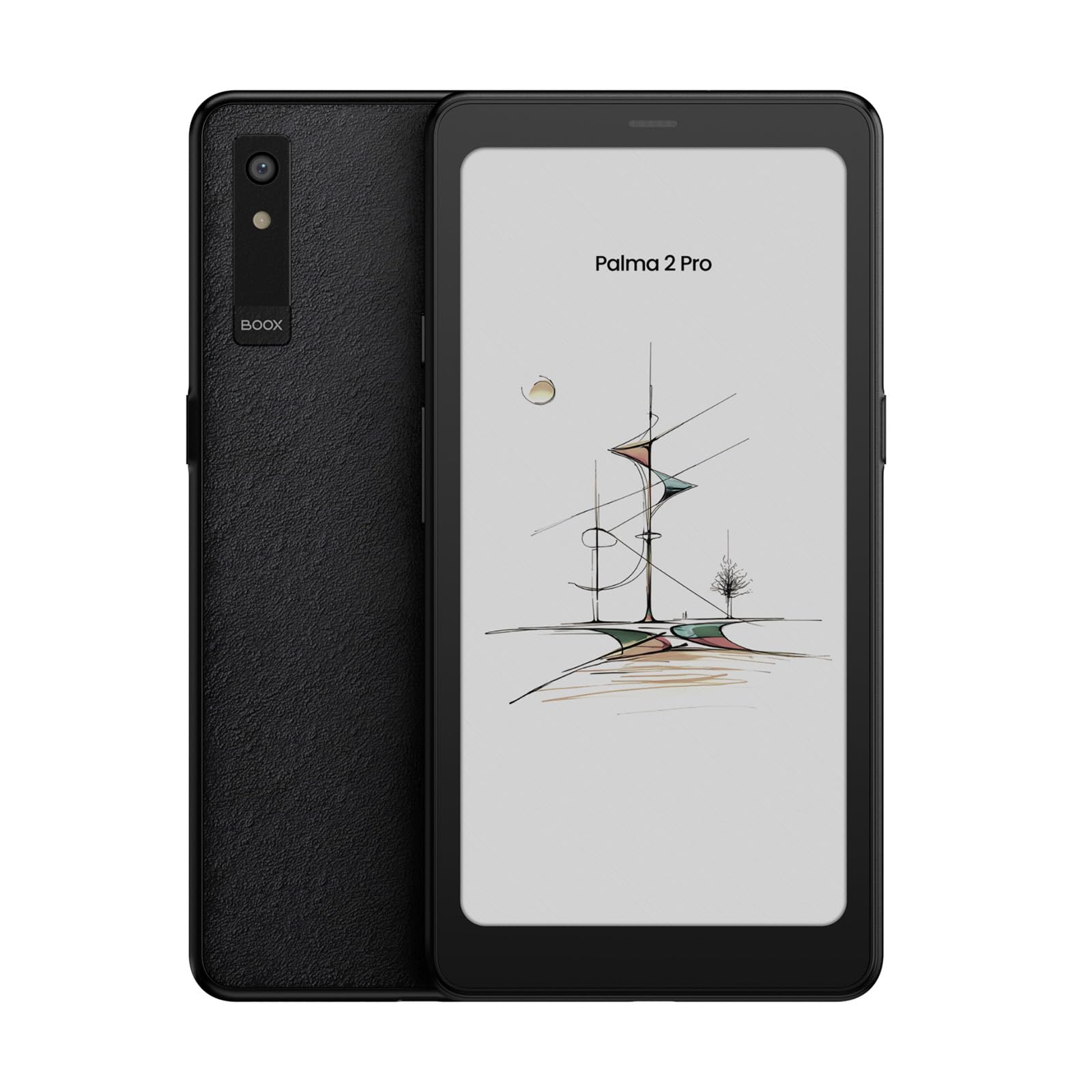
A phone-sized E Ink reader that runs Android 15 — and that means the Libby app itself.
Here is the one that rewrites the Libby conversation: because it runs Android 15, you can install the actual Libby app, along with your library’s other apps, on an E Ink screen. The 6.13-inch Kaleido 3 panel renders in color at 150ppi and black-and-white at 300ppi, so text stays sharp while covers and highlights keep their colors. Storage is a huge 128 GB, backed by 8 GB of RAM and an octa-core processor for snappy navigation. It also packs a 16 MP rear camera, front and rear microphones, dual speakers, and a 3,950mAh battery — the biggest battery on this list by capacity.
Real buttons are what separate this from every other pick here: volume and page-turn buttons, a smart button, and a power button with a fingerprint reader (so only your finger open up it). The hybrid SIM slot (a tray that takes either a SIM card or a memory card) adds an option you will not find on dedicated readers. Its phone-sized body slips into a pocket where a 7-inch reader will not. Buyers describe it as great for traveling — one reviewer in the customers-say summary calls it out for exactly that — and because it runs Android, sideloading (loading files from outside an app store), app installs, and file management all work the way they do on a phone.
The honest catch is the color screen itself. It uses the same Kaleido 3 style technology as the other color pick on this list, and the manufacturer says the darker, grayer tone next to an LCD or LED screen is normal for all color E Ink, not a defect — though the maker also notes buyers may still be let down by how muted the colors look. If you want colors that pop, this is the wrong product. But if you want an Android reader that fits in a pocket, runs your library apps directly, and still gives you weeks of e-ink reading, nothing else here does quite the same job.
what separates it: it runs Android 15 on an E Ink screen with a 128 GB drive and full app support — so you can install your library apps directly, which is rare in this category.
The catch on color: the manufacturer explicitly states the darker, grayish color rendering is inherent to color E Ink, so do not buy it for showroom-vivid covers.
Reach for this if: you specifically want to run the Libby app and other Android apps directly on an E Ink screen, with 128 GB of room for everything.
Think twice if: you want the brightest, most vivid color screen you can get — muted color is the trade-off for the E Ink panel, and the manufacturer says so in the listing.
8. Kobo Libra Colour Black eReader with Case Bundle

The same color Libra, wrapped in a Butter Yellow SleepCover for readers who want the accessories sorted on day one.
The Libra Colour itself is 7-inch color E Ink with page-turn buttons, waterproof protection rated IPX8, and 32 GB of storage — the same formula that makes the standalone Libra a favorite here. The difference is this bundle ships with a SleepCover included, and it quotes a slightly longer battery at up to 5 weeks versus the standalone’s 4. That makes it the tidier package if you know you want a case. It handles EPUB, GIF, PDF, and PNG files and works with the Kobo Stylus 2 if you plan to annotate.
Reading in color is the point: covers, comics, and highlights all render in Kaleido 3 color, and the page-turn buttons mean one-handed reading without tapping. Owners of the Libra line rate the ergonomics highly, and the built-in OverDrive support makes it another one-tap library borrower. If borrowing eBooks from your local library and marking up the pages in color is your routine, this is a strong kit to start with because the case is already in the box.
The honest note: unlike the standalone Libra, this bundle has almost no customer reviews yet, so you are buying on the strength of the underlying device rather than a track record for this specific listing. The Kobo software caveats carry over too — no SD slot, and dark mode sits buried in the settings menus rather than a quick swipe. If you would rather have a proven listing and pick your own case, the standalone Libra is the safer call; if you want the bundle and the extra week of quoted battery, this is the one to grab.
Built for: buyers who already know they want the Libra’s 7-inch color screen, page buttons, and 32 GB — and would rather have the SleepCover already wrapped around it.
The catch: this bundle is new on the shelf with almost no owner feedback yet, so the confidence sits with the Libra platform itself rather than this listing.
9. PocketBook Basic Lux 4

The lightest, thinnest, most no-nonsense way into Libby reading — if you can handle the fragile side.
At 155 g and 8 mm thin, this is the lightest and most pocketable reader in the group, and it comes with an affordable entry-level price to match. The 6-inch E Ink Carta display (a glare-free e-paper screen) stays readable in bright light, and a frontlight handles night reading, with physical page-turn buttons along the bottom edge. Storage starts at 8 GB and expands through a microSD slot — the only expandable reader here — so you can carry a bigger shelf than the built-in memory allows. It opens more than 25 book and graphic formats, including EPUB, PDF, MOBI, and CBR, which means library EPUB loans open without conversion. Battery is rated at 4 weeks on a charge.
The people who love this reader love it for its simplicity. It has no ads, no accounts, and no bloatware — you drag and drop your EPUBs via USB from a computer, and the reader just opens them. Ease of use and the backlight are what owners praise most, and the ergonomic buttons mean you never need to tap the screen when you are deep in a chapter. If your goal is a bare-bones reader that gets you into library books and refuses to nickel-and-dime you with subscriptions, it delivers exactly that.
The honest trade-off is build quality, and it is worth spelling out. Some customers note the screen cracking after a fall, even with a protective case on. The buttons feel cheap in the hand, and 8 GB of storage gets partially consumed by the operating system and the preloaded classics, leaving less free space than the number suggests. If it lives on a nightstand and gets handled carefully, the Basic Lux 4 is a strong budget choice. If it travels in a bag or goes everywhere with you, plan on a very sturdy case.
Why it earns a spot: the only reader here with microSD expansion, the lightest at 155 g, and one of the few that opens library EPUBs with zero conversion.
The build trade-off: some reviewers point out screen cracks after drops despite a case, and the 8 GB of storage has less usable room than it sounds because the OS and preloaded classics take a cut.
For you if: you want the cheapest, lightest entry into Libby reading with expandable storage and no accounts to manage.
Look elsewhere if: the reader lives in a backpack or gets knocked about — the build durability is the weak point, so a heavier-duty reader is worth the extra spend.
Know the Specs
Screen Size and Resolution
Screen size often decides comfort more than any other spec. A 6-inch panel reads like a paperback and fits a coat pocket; a 7-inch or 7.8-inch surface shows more words per page and suits large-print editions. Resolution is quoted in ppi (pixels per inch) — the higher the number, the crisper the letters. Color panels like Kaleido 3 render black-and-white text at the higher ppi and color at a lower ppi figure, because the color layer filters the pixels beneath it.
Battery Life and Storage
E-reader battery is quoted in weeks rather than hours because the E Ink screen only pulls power when the page changes. Real-world time depends on how much you read, whether you leave Wi-Fi on, and how bright you push the frontlight. Storage is quoted in GB, and the standard is 16 GB for most modern readers — a 32 GB device doubles that, and 128 GB like the BOOX Palma 2 Pro is rare in this category. Library borrows cycle in and out, so 16 GB comfortably holds a rotating shelf of loans.
Common Questions
Can I use Libby directly on an e-reader?
Does the Amazon Kindle Paperwhite work with library books?
What is the difference between EPUB and Kindle format for library books?
How many library books can I store at once?
Is color E Ink worth it for library reading?
How long does a Libby loan stay on the device?
Can I read in the bath or by the pool with these e-readers?
Which e-reader is best for one-handed reading?
Do I need Wi-Fi for Libby to work?
What file formats should I check before buying for Libby?
The Bottom Line
For most readers building a library-first routine with the e-reader for libby, the Amazon Kindle Paperwhite 16GB is the pick that balances everything: a 7-inch glare-free screen, up to 12 weeks of battery, and 16 GB of storage for a rotating shelf of loans. If one-tap borrowing with no transfer step matters most, grab the Kobo Clara BW. And for color covers, comics, and physical page buttons, reach for the Kobo Libra Colour — and while the Paperwhite’s review base is the deepest by far, the Clara BW and Libra have earned the goodwill of their own loyal readers.
How we choose
We do not accept paid placement. Every pick is matched to a real buyer and a real use-case; we do not hands-on test units.
Sources
Specifications: manufacturer listings and product documentation. Review insights: verified customer reviews, as of October 2026. Pricing: not shown on this page (it changes often); check the current price via the retailer link.
As an Amazon Associate, Aappliancez earns from qualifying purchases. This does not affect which products we feature.