Disclosure: Some links in this post are affiliate links. As an Amazon Associate I earn from qualifying purchases, at no extra cost to you. Learn more
Specs are compiled from manufacturer listings and verified buyer reviews and can change over time — please confirm the key details on the product page before buying.
If you read comics on a black-and-white screen, you already know the letdown: the splash page arrives and everything is gray mush. The honest answer is that the screen size and the color panel decide whether a comic is readable or a squint-fest. A 6-inch monochrome reader handles text fine but flattens splash pages; a 7-inch color panel like the one on our top pick keeps the art legible and the text sharp at the same time. Below are nine readers, sorted by what actually matters for sequential art — panel size, color layer, storage for big CBZ files, and page-turn speed.
This guide is built by comparing the manufacturers’ published specifications and the patterns across verified customer reviews, so you get each pick’s real strengths and trade-offs instead of marketing spin.
Start with the color screens if you read graphic novels, because a mono panel hides exactly what the artist drew; check the display layer and storage capacity before anything else. These picks cover the range for anyone shopping for the best E-Reader for Comics.
Top Picks


How To Choose The Best E-Reader for Comics
The biggest mistake comic buyers make is buying a text-first reader and assuming the art will look fine. It will not. Comic art lives in flat fills, thin outlines, and small lettering balloons, and each of those stresses a screen in a different way. Work through the four points below and the right reader almost picks itself.
Screen size: why 7 inches beats 6 inches for panels
A 6-inch screen fits in a coat pocket, but a full comic page shrinks enough that lettering balloons get tight. A 7-inch panel gives the page noticeably more room before you zoom. If you mostly read manga in single-page view, 6 inches holds up; if you read Western comics with dense caption boxes, go 7 inches or larger.
The 11-inch Kindle Scribe Colorsoft takes that logic furthest — a large 11″ display leaves real space for a two-page spread without pinch-zooming every panel.
Color E Ink versus black-and-white E Ink
Color E Ink (the Kaleido 3 layer listed on most picks here) puts a color filter over a black-and-white panel. So colors look muted, and the white background sits a little grayer than on a mono screen — that is how the technology works, not a fault. If you read only black-and-white manga, a mono panel gives you crisper line art and better contrast for the same money.
Storage: CBZ and CBR files are heavy
A single collected volume of a comic series can eat hundreds of megabytes, so storage capacity matters more here than for novel readers. 16 GB carries a large library; 32 GB and 64 GB leave room for a full run plus audiobooks and notebooks. Check that the reader opens CBZ or CBR natively, because converting each file by hand gets old fast.
Refresh modes and ghosting
E Ink screens leave faint traces of the previous page, called ghosting (a shadow of the last image that lingers on the new one). Most color readers let you switch refresh modes — a slower mode for reading, a faster one for scrolling or browsing. A reader with configurable refresh keeps panels clean; one without makes fast page-flips a smear.
Side-by-Side Comparison
| Model | Best For | Display | Storage | Waterproof | Amazon |
|---|---|---|---|---|---|
| Kindle Colorsoft Signature Edition Bundle★ Best Overall | Color comics with a 10-week charge | 7″ Colorsoft, color | 32 GB | Waterproof | Amazon |
| Kobo Clara BWBest for Library Borrowing | Black-and-white manga on a budget | 6″ E Ink Carta 1300 HD, B/W | 16 GB | IPX8 | Amazon |
| Neo 64GB eBook ReaderMost Storage for the Money | Third-party apps and huge storage | 6″ E Ink, 300 ppi, B/W | 64 GB | — | Amazon |
| Kobo Libra Colour | Color art with physical page buttons | 7″ Kaleido 3, color | 32 GB | IPX8 | Amazon |
| PocketBook Era Color | Multilingual and audio readers | 7″ Kaleido 3, color | 32 GB | IPX8 | Amazon |
| BOOX Tablet Go Color 7 Gen II | Android apps plus a stylus option | 7″ Kaleido 3, color | 64 GB | — | Amazon |
| Kindle Colorsoft Kids | Kids reading picture books and comics | Colorsoft, color | 16 GB | Waterproof | Amazon |
| BOOX Tablet Note Air 5 C | Large-screen notes and PDF comics | 10.3″ Kaleido 3, color | 64 GB | — | Amazon |
| Kindle Scribe Colorsoft | Big color spreads plus note-taking | 11″ Colorsoft, color | 64 GB | — | Amazon |
Detailed Reviews
1. Amazon Kindle Colorsoft Signature Edition Essentials Bundle
Our pick — 4.5+★ from 400+ verified ratings; the strongest balance of quality and price.
A 7-inch color panel with 32 GB of storage and up to 10 weeks per charge.
Seven inches of color is the number that decides this pick for comics. Combined with 32 GB of storage, you get room for a long run of collected volumes plus a few audiobooks. The glare-free front light adjusts itself to the room, so a bright train carriage and a dim bedroom both stay readable.
Where it pulls ahead of every other reader in this list is stamina. The spec sheet says up to 10 weeks on a single USB-C charge, and the Kobo Clara BW lists 2 weeks — that is the widest gap between any two picks here. Hook up the wireless charging dock (it ships with the bundle) and recharging becomes a drop-on-the-pad habit. There is no social media, no notification stream, no app drawer to pull you out of a story, which is the quiet reason a dedicated reader beats a tablet for comic binges. One underwater caveat worth naming: the reader is rated waterproof, but owners who take it near water describe it as safe against splashes rather than submersion.
What wins people over is how naturally the whole thing works as a reading device — the color layer for covers and comic art, the highlight colors (yellow, orange, blue, pink), and the lightness all add up. As buyers report: “I absolutely love my Kindle Colorsoft! I love seeing my book covers in color. I love the color highlights and bookmarks. The battery last forever.” The one page-turn quibble in the feedback is minor and easy to live with. Bundling the plant-based leather cover means the reader arrives ready to travel, and the auto-wake cover wakes the screen when you flip it open. This is the crowd favorite by a healthy margin — 4.5+ stars across 400+ owners.
Why comic readers gravitate here
- A 7″ color panel shows covers and interior art in color, not gray wash.
- Up to 10 weeks from one USB-C charge, with a wireless charging dock in the box.
- 32 GB stores a long run of collected volumes.
- Glare-free auto-adjusting front light reads in sunlight and at night.
- No apps or notifications to pull you out of the story.
Where it asks for care
- Wireless charging can stall with the cover attached — take the cover off and it works.
- Waterproofing covers splashes, not deep immersion.
Reach for this if: you want the widest color screen and the longest gap between charges in one package, and you read comics in color regularly.
Look elsewhere if: you only read black-and-white manga and would rather pay less for a mono panel with sharper line art.
2. Kobo Clara BW
A 6-inch mono panel with sharper text for black-and-white manga, at 6.14 ounces.
If your comic shelf is all black-and-white manga, color is money spent on a layer you will never use. The Clara BW runs a 6″ E Ink Carta 1300 HD panel — “HD” here means sharp, high-density text — and reviewers who moved to it from older readers describe the text clarity as better than the color alternative they tried. A 6″ screen holds a single manga page comfortably, and the whole device weighs 6.14 ounces (about the weight of a paperback), which is why one-hand reading comes up again and again in the feedback.
Comic buying on this reader happens through the library rather than the store. Built-in Libby and OverDrive borrowing means you can pull graphic novels from your local library card without buying each volume, and the format support covers EPUB, PDF, and MOBI. Storage is 16 GB, which Kobo describes as up to 12,000 eBooks or 75 audiobooks — fine if most of your comics are library loans you return, less so if you hoard full runs. The fit for comic readers is narrower: this is a black-and-white reader and it stays that way.
Comfort is the recurring theme in owner feedback: the 6″ size suits long sessions, the rear power button stops accidental presses, and ComfortLight PRO lets you dial brightness, color temperature, and blue light down for night reading. A note for sideloaders — one recurring gripe is that wireless and email sending of your own files has been removed, so getting fan-made or public-domain comics onto it means connecting a computer. A small number report the occasional freeze that needs a hard reset. Battery is rated at 2 weeks, which is the shortest figure in this list, though at low brightness the same buyers describe it stretching for days.
Who this fits: readers who borrow heavily from libraries and read manga page by page, where a crisp mono screen beats a muted color one and a light frame beats a bigger screen.
Who it misses: anyone whose shelf is full of color graphic novels — a mono panel cannot show you what the illustrator painted.
Best fit for: library-card comic readers who want a light one-handed device.
Think twice if: you need to email your own CBZ files over — that path has been closed off.
3. Neo 64GB eBook Reader
64 GB of storage — four times a 16 GB reader — on a 6-inch 300 ppi mono panel.
Here is a comparison worth holding on to: 64 GB on the Neo against 16 GB on the Clara BW. That is four times the shelf space, which matters when a full run of a serialized comic can run to hundreds of megabytes per volume. The 6″ E Ink panel runs at 300 ppi — 300 pixels per inch means text stays sharp at normal reading distance. A quad-core processor with 2 GB of RAM runs an Android base underneath, so you can install third-party comic apps and bring your own reading universe.
The screen is the honest trade-off. This is a black-and-white panel, so it renders manga and line art cleanly but shows nothing in color. Where it gets clever is the Android layer: turn on Google Play and you can run apps that stream comics, read your own files, and organize a library in folders. A 5.86″L body with an adjustable warm-cool backlight makes night reading comfortable. Reviewers who use it as a comics and epub machine describe it as pocketable and easy to hold with one hand, with 500-plus books loaded and room left over.
Reliability is the part to go in with your eyes open about. The feedback splits — plenty of happy long-term users, and a minority whose units failed after a reboot and could not be recovered. Ghosting (a faint shadow from the previous page) shows up occasionally, and it is adjustable through a refresh-rate setting, which helps. Speed lands on the slower side for app loading, though page turns on epub files are fine. Set your expectations at “budget Android e-reader that handles files well” and this one delivers.
Strongest argument: 64 GB and third-party app support for the price of a mid-range reader, with an adjustable backlight that beats a standard Kindle at night.
The catch: it is a black-and-white panel on an Android base, and a small number of units have locked up for good after a reboot, so buy with the return window in mind.
Good match for: readers with a huge file library who want app access and don’t need color art.
Not the pick for: anyone who wants a color panel for graphic novels or a guarantee against software lockups.
4. Kobo Libra Colour

Page-turn buttons and left/right rotation on a 7-inch Kaleido 3 color panel.
Comic reading is thumb work. The Libra Colour gives you dedicated page-turn buttons and left/right screen rotation, so you can hold it in either hand and still flip panels without tapping the screen. The 7″ Color E Ink Kaleido 3 panel handles covers, illustrations, and graphic novels in color, and the landscape mode lets a two-page spread fill the width without shrinking. File support is unusually broad for this category — CBR and CBZ (the two standard comic archive formats) are listed right alongside EPUB, PDF, and MOBI, so a comic collection drops in without conversion.
For drawing or annotating, Kobo Stylus 2 compatibility (the pen is sold separately) lets you mark up pages in color. Battery is rated at 4 weeks, and reviewers describe real-world use of 30–60 minutes of daily reading stretching a full week without a charge. 32 GB holds up to 24,000 eBooks by Kobo’s count, which is more comic capacity than most people will fill. The muted color is exactly what color E Ink delivers — the art reads clearly, but it will not glow like a tablet.
Buttons and comfort are what the feedback keeps returning to; the ergonomics are the reason people pick this over a flat-slab reader. The recurring downsides are worth knowing: there is no microSD slot, so once 32 GB fills with manga there is no expansion. The screen is also softer to the touch than a phone, and rapid page-loads take about a second. A minority report the occasional smudge or scratch on the surface over months of use, so a case is a sensible add.
Button-first reading
- Physical page-turn buttons plus left/right rotation for either hand.
- Opens CBR and CBZ comic archives directly, no conversion needed.
- 7″ Kaleido 3 color panel with landscape mode for spreads.
- Rated at 4 weeks of battery life.
Trade-offs to accept
- No microSD slot — 32 GB is the ceiling.
- Color is muted by the nature of E Ink.
- Stylus sold separately if you want to annotate.
Pick it when: thumb buttons and color art matter more to you than the biggest screen.
Pass if: you expect to fill storage with manga and need a card slot to expand.
5. PocketBook Era Color

A 7-inch color reader with built-in speakers and Text-to-Speech for listening.
The 7-inch Kaleido 3 screen on the Era Color handles comics, magazines, and ebooks with the muted color that is standard for this technology. SMARTlight brightness and color-temperature adjustment keep it readable at night or in daylight. Where this reader stands apart from every other pick here is audio: built-in speakers and Bluetooth plus Text-to-Speech turn any text into spoken word. If you read a lot of dialogue-heavy comics, or you want to listen to a prose book between volumes, that is a genuinely different feature set. IPX8 waterproofing is rated for up to 60 minutes in up to 2 metres of water, so a bath or poolside read is covered.
The size and weight run heavier than the others: the Era Color is 13.7 ounces, the heaviest handheld reader here, so it wants two hands or a prop. Storage is 32 GB with Wi-Fi, USB-C, PocketBook Cloud, Dropbox, and Send-to-PocketBook for moving files across. The reading software is where owners either love it or bounce off — the settings are deep and customizable (you can remap buttons, hide the store, sort the library), but this is not a beginner’s first reader. Format support is broad and Adobe DRM and Libby work, which matters if your comics come from a library or a store other than Amazon.
The honest trade-off on this one is screen quality and pace. The color layer reads washed out compared with a tablet, and page-turn speed is the recurring grip in the feedback — slow at times, especially right after waking. A 1 GB RAM ceiling makes the browser and heavier apps crawl. The feedback on whether it all holds together splits down the middle, so buy it for the audio features and the open file support, not for the fastest page flips in the room.
what separates it: built-in speakers and Text-to-Speech, plus IPX8 protection and open format support for readers outside the Amazon ecosystem.
What it gives up: page turns are slower than the Kindle and Kobo picks, and the color panel is muted with a heavier 13.7-ounce body.
Worth considering if: audio playback, foreign-language dictionaries, and open file support rank above raw page-turn speed.
Skip if: you want the crispest, fastest-reading color panel for straight visual comic reading.
6. BOOX Tablet Go Color 7 Gen II

Android 13 with Google Play on a 7-inch color panel, plus 64 GB and a microSD slot.
The Go Color 7 Gen II is the pick for anyone with comics split across apps. Android 13 and Google Play support mean Kindle, Comixology, and library apps all run on the same device. The 7″ Kaleido 3 screen (4096 colors) renders at 1680 x 1264, with 300 ppi in black and white and 150 ppi in color. An octa-core processor with 4 GB of RAM keeps app switching usable, 64 GB of storage holds the library, and a microSD slot lets you add more when it fills — a combination none of the Amazon or Kobo picks offer. A built-in speaker and page-turn buttons round out the hardware.
This is an e-reader with an Android core, not a tablet. The E Ink panel refreshes slowly enough that video, games, and heavy web browsing are poor fits, while reading via Kindle, Play Books, and Libby is exactly the intended use. What comic readers gain is flexibility on refresh modes: HD mode keeps static pages clean, Balanced mode suits third-party apps, and Regal mode reduces ghosting for color content. The B/W resolution holds up well for line art, and the color layer shows covers and flat fills with the expected muted tone. Weighing in at 0.39 kg with a grippy back and configurable buttons, it is comfortable for one-handed page flips.
The caveats to weigh: this unit is not waterproof, which is a real consideration for bath readers. Battery life depends heavily on settings — with Wi-Fi on and brightness up, the 2,300mAh battery drains faster, while power-saving settings stretch it out. A stylus is not in the box; the active InkSense pen is a separate purchase if you want to annotate comic panels. And the screen is darker than a black-and-white reader by nature of Kaleido 3, so if your comics are mostly manga, a mono panel will read easier in low light.
The app argument: full Google Play access on a 7″ color E Ink screen, plus 64 GB and a microSD slot for a library that keeps growing.
The limits: no waterproofing, no included stylus, and a battery that shrinks fast under bright Wi-Fi use.
Choose it for: readers who bounce between Kindle, library, and indie comic apps and want it all on one screen.
Not ideal for: poolside or bath reading, where the missing waterproof rating bites.
7. Amazon Kindle Colorsoft Kids
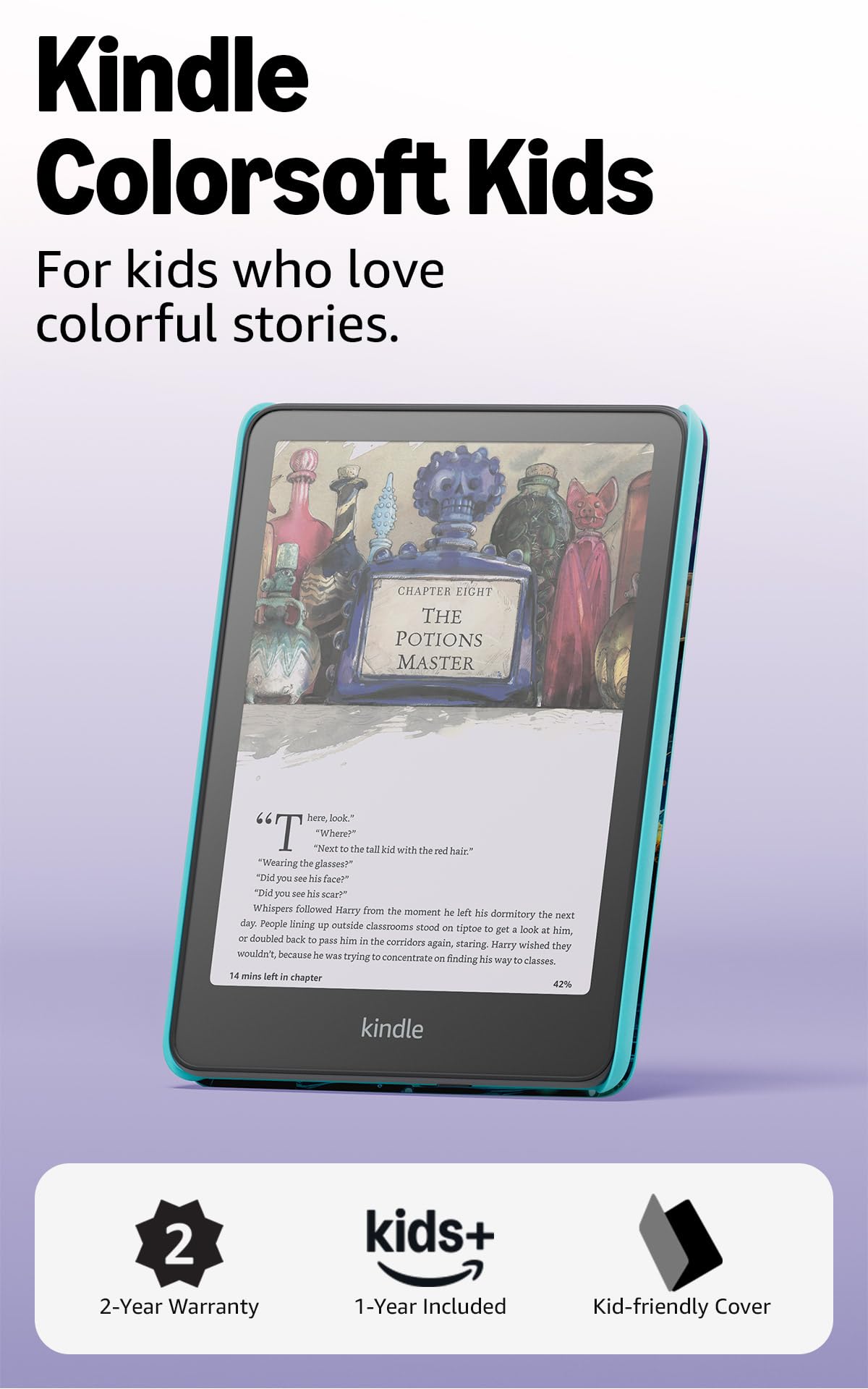
A color Kindle for kids with 12 months of Amazon Kids+ and no apps, videos, or games.
If the goal is getting a young reader into comics and picture books, this is the reader to hand them. The Colorsoft display shows covers and interior art in paper-like color, and Amazon Kids+ comes included for 12 months, opening thousands of age-appropriate books for kids aged 3-12. The parental dashboard lets you add books from your own account, watch reading progress, set age filters, and set a device bedtime. A kid-friendly cover is in the box, and a 2-year low-maintenance guarantee backs the hardware.
There are no notifications, apps, videos, or games on the device — it reads and nothing else — which is the whole point. The adjustable warm light and glare-free screen let kids read indoors or outside, and it is rated waterproof for the pool or the beach. It stores 16 GB of books, which holds a lot of comics and picture books but not a whole household’s collection. The Fantasy River cover art is a small thing that kids respond to; the appearance of the bundle comes up in feedback as a genuine plus.
What wins people over is the color and the kid-focus: the display draws kids in, and the no-apps design keeps them there. As one owner sums up the appeal: “Love this kindle so much. It’s easy to use and holds a lot of books ready at hand.” Smaller voices in the feedback flag two things worth naming: responsiveness is mixed (taps register firmly but slowly compared with a tablet), and the value math depends on whether you use the included subscription. Battery life is reported as multi-day rather than the 10-week figure the adult Colorsoft carries, which is realistic for a bright color screen.
Why parents reach for it
- Colorsoft color display makes picture books and comics readable in color.
- 12 months of Amazon Kids+ included, with parental controls in the dashboard.
- No apps, videos, or games — just reading.
- Waterproof, with a cover and a 2-year guarantee in the bundle.
What to keep in mind
- 16 GB of storage fills quicker than the adult picks.
- Touch responsiveness is mixed compared with a tablet.
Suits: households where a kid is moving from picture books into comics and you want a screen that does only that.
Consider the alternative if: multiple kids will share it and you need more than 16 GB.
8. BOOX Tablet Note Air 5 C

A 10.3-inch color panel big enough that a comic page fills the screen and a pen marks it up.
The screen is the headline: a 10.3″ Kaleido 3 panel at 2480 x 1860 with 300 ppi in black and white and 150 ppi in color. That is nearly three inches larger than the 7-inch picks here, which changes how a full-page comic layout reads — you see the whole page without pinching. Inside, an octa-core processor with 6 GB of RAM and 64 GB of storage runs Android 15, so third-party comic and reading apps install normally. A BOOX stylus is in the box with 4,096 levels of pressure sensitivity, and a microSD slot plus dual speakers and a fingerprint-reading power button round out a serious work machine.
The comic promise here is line art clarity at a larger size, and text on newer PDFs reads crisply. Where it falls short for comics is color brightness: the Kaleido layer is dark and needs the front light on in most rooms, so a dim reading corner still needs the screen lit. Images and comics can be hit or miss, and mixed feedback on that point matches what color E Ink does. As a notes-and-documents device with a pen this is excellent; as a pure comic color reader the muted display is the honest limit. 64 GB means storage is never the issue, and Android app support keeps your library in one place.
Two practical notes. It is a large, 430-gram device — comfortable on a desk or lap, awkward in one hand. And the setup is not intuitive: feedback describes a steep learning curve, with contrast, brightness, and refresh settings that need tuning before the page looks right. Ghosting is present but manageable once you set a refresh mode. The device is not waterproof. If your main goal is annotating a comic with a pen while reading, the workflow here is exactly right; if you just want to read, a lighter 7-inch color pick goes further for less bulk.
Where it shines: the largest panel color E Ink offers in this list’s mid-range, with a pen included and 6 GB of RAM to keep Android apps moving.
What you’ll hit: a dark color layer, a steep settings curve, and no waterproofing.
Great for: comic readers who also take notes and want a pen in the box and a page-sized screen.
Look past it if: you want a light one-hand reader or you read in dim light.
9. Amazon Kindle Scribe Colorsoft
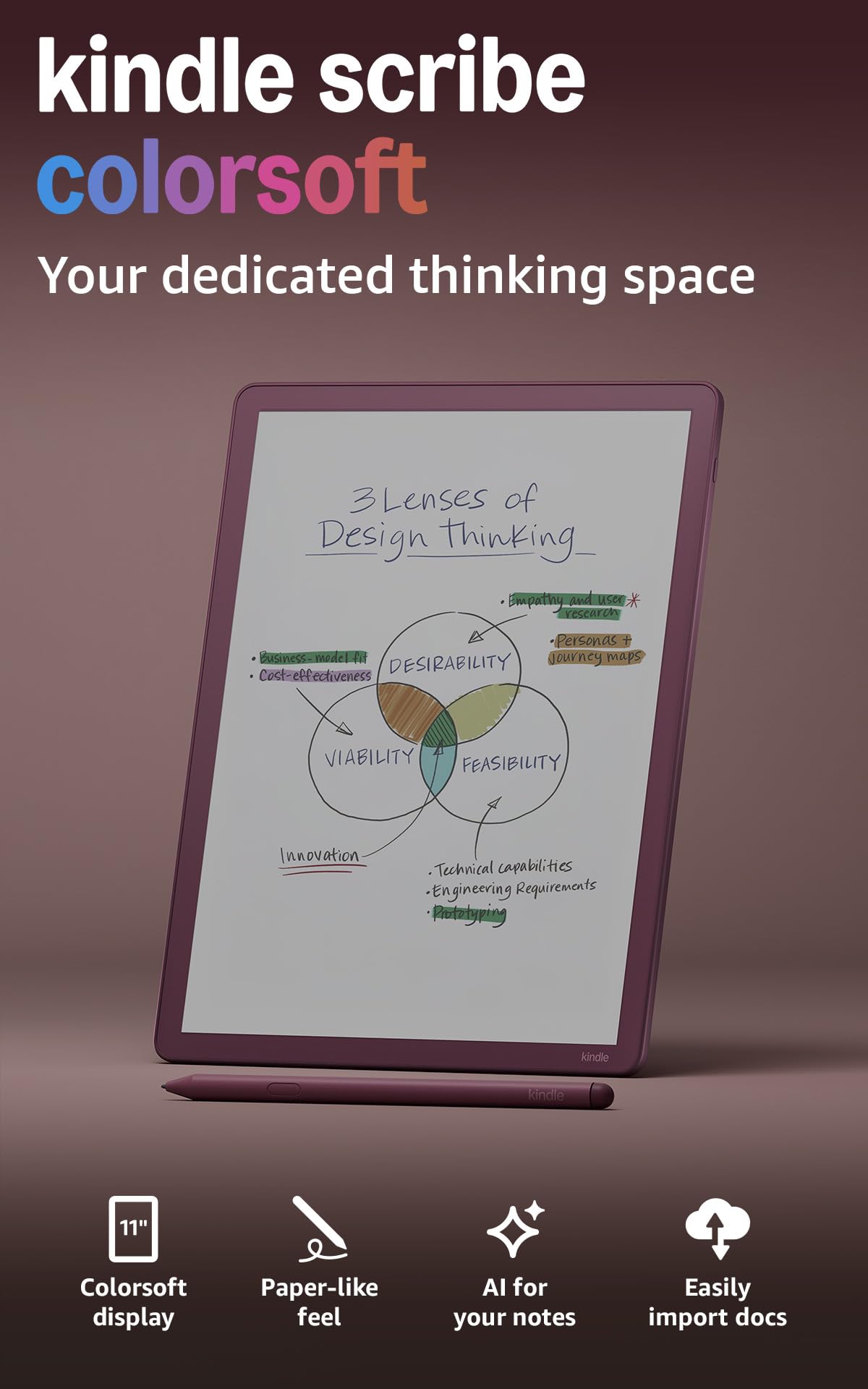
The biggest color canvas in this list — 11 inches of paper-like color with a pen that never needs charging.
An 11-inch Colorsoft display is the answer for anyone who has ever zoomed a two-page spread to pieces. That screen holds a full comic page with room for the margin notes beside it, and it is just 5.4mm thin and 400g light, so the size does not come with a slab’s weight. The included pen never needs charging and carries a built-in eraser and a shortcut button for tools like the highlighter. With 64 GB of storage, you can keep an entire library of collected volumes plus notebooks on one device.
For reading, the display stays glare-free and paper-like in bright sunlight, and you can jot notes right on the page — writing between the lines as the text shifts to make room. Color art renders with the muted tone color E Ink always produces, and the size makes the difference: a full comic splash reads with the lettering comfortably legible instead of squashed. On battery, the Scribe is quoted in weeks rather than months — the current model promises weeks of reading and writing per charge, which lands far below the 10-week figure on the smaller Colorsoft Signature Edition. A short daily session can still run for days before it needs a cable.
Where this reader earns its keep is versatility: it is a reader, a notebook, and a document annotator in one, with Google Drive and OneDrive import and PDF export. The trade-offs are the size and the setup curve — 11 inches is awkward to hold one-handed, and the notebook navigation is not as quick as flipping a paper pad. A minority of the feedback also notes highlighting inconsistencies across file formats. But for anyone who reads comics and wants to mark them up, the pen-included package and the big color screen are the closest thing here to reading on paper.
The big-screen case: an 11″ color display, a pen that never needs charging, and 64 GB for the whole library.
The honest caveat: this is a large device to hold and a slower one to navigate than a paper notebook, and its battery is quoted in weeks, not the 10 weeks of the smaller Colorsoft.
Pick it if: you want the largest color page and a pen for annotating comics, and you read at a desk or lap.
Skip if: you want a pocketable reader or the longest possible battery between charges.
Know the Specs
Color E Ink panels and muted tones
Color E Ink works by layering a color filter over a black-and-white panel, which means colors come out muted and the white background is a little darker than on a mono screen. That is normal for the technology, not a defect. If you read only black-and-white manga, a mono panel gives you sharper black text and better contrast.
Resolution and ppi (pixels per inch)
Ppi means pixels per inch — the higher the number, the sharper the letters. Color E Ink panels often run 300 ppi in black and white but only 150 ppi in color, because the color filter halves the detail. Line art and lettering balloons still read clearly; fine gradients look softer.
File formats for comic archives
CBZ and CBR are the two common comic-archive formats, essentially zipped image files. A reader that opens them natively saves you converting every volume. PDF is the format most digital comics arrive in from stores and libraries; a large screen makes PDFs easier to read.
Refresh modes and ghosting
Ghosting is a faint shadow of the previous page that lingers on E Ink screens, and refresh modes trade speed for clarity. A slower mode clears the screen more thoroughly; a faster one reduces delay but can leave traces. Readers with configurable refresh modes give you control over that balance.
Common Questions
Will a 6-inch e-reader show a full comic page without zooming?
Why do colors look washed out on a color e-reader?
Can I open CBZ and CBR comic files on these readers?
How much storage do I need for a comic library?
Is a color e-reader worth it if I only read manga?
Can I read comics in the bath or by the pool?
How well does E Ink handle scrolling through a comic app?
Do I need a stylus to highlight a comic?
Which e-reader has the longest battery life for comic reading?
Can kids read comics on a Kindle Colorsoft Kids?
The Bottom Line
For most people shopping for the best E-Reader for Comics, the Amazon Kindle Colorsoft Signature Edition Essentials Bundle wins because it pairs the widest color panel in this list with the longest battery — a 7″ display and up to 10 weeks on one charge, plus 32 GB for your volumes. If physical page buttons and direct CBR/CBZ support matter more to you, take the Kobo Libra Colour. And if you read only black-and-white manga and want crisp line art for less, the Kobo Clara BW is the one in your hand.
How we choose
We do not accept paid placement. Every pick is matched to a real buyer and a real use-case; we do not hands-on test units.
Sources
Specifications: manufacturer listings and product documentation. Review insights: verified customer reviews, as of October 2026. Pricing: not shown on this page (it changes often); check the current price via the retailer link.
As an Amazon Associate, Aappliancez earns from qualifying purchases. This does not affect which products we feature.