Disclosure: Some links in this post are affiliate links. As an Amazon Associate I earn from qualifying purchases, at no extra cost to you. Learn more
Specs are compiled from manufacturer listings and verified buyer reviews and can change over time — please confirm the key details on the product page before buying.
You want a screen that reads like paper — no glare, no blue light pounding your eyes at midnight, and no notifications dragging you out of a chapter. The short answer: pick an E-Ink display by matching the panel to your job. Read novels? A 6-inch black-and-white reader does it. Highlight comics? A 7-inch color panel. Mark up PDFs and meeting notes? A 10-inch-plus writing tablet. Every pick below is sorted by that one question.
This guide is built by comparing the manufacturers’ published specifications and the patterns across verified customer reviews, so you get each pick’s real strengths and trade-offs instead of marketing spin.
Below you’ll find nine devices split by what their E-Ink panel actually does well, from pocket readers to large color writing tablets. Each of the nine picks below is a strong E-Ink device for a specific job, from pocket novel reading to color PDF markup.
Top Picks



How To Choose The Best E-Ink Display
The E-Ink panel decides how everything else feels. Everything else — the buttons, the case, the app store — only matters if the screen underneath suits how you read. No app store or stylus makes up for a panel that fights your reading.
Color or monochrome first, everything else second
A black-and-white E-Ink panel puts pure contrast behind your text, so letters stay crisp. A color panel (the Kaleido 3 type used on several picks here) layers a color filter over that same black-and-white layer. The trade-off: small text looks a little softer and colors come out muted next to a phone. That softness is inherent to layering a color filter over the monochrome layer. Read novels and monochrome wins. Highlight, annotate comics, or color-code notes and color earns its place.
Match the diagonal to your actual reading
A 6-inch screen slips into a coat pocket and suits one-handed reading in bed. A 7-inch panel gives comics and PDFs more room without becoming a lap object. A 10.3-inch or 11-inch writing tablet is the point where handwriting on a PDF stops feeling cramped. The 11.8-inch reMarkable Paper Pro is the largest here, and it behaves like a sheet of paper on a desk, not a handheld reader.
The front light and its color temperature
E-Ink is reflective, so it borrows room light. A front light layer spreads illumination across the page for dark rooms. Warm and cool temperature control lets you shift the glow away from harsh blue at night. Look for adjustable warmth if you read after everyone else has gone to bed.
Ghosting, refresh, and why pages flash
Ghosting is the faint echo of the previous page that lingers when the panel redraws. Every E-Ink device manages it with refresh modes — a clean slow mode for reading and a fast mode for scrolling. A quick flash on a page turn is the panel clearing itself. On writing tablets, the refresh setting decides whether handwriting feels smooth or laggy.
Stylus, waterproofing, and storage
A stylus turns a reader into a notepad, but check whether it ships in the box or sells separately — several picks here require you to buy the pen. Waterproofing (an IPX8 rating means it survives full immersion) matters for bath readers and beach bags. On storage, 16 GB holds thousands of novels, while comics and manga chew through space fast and make 64 GB or a memory card far more appealing.
Side-by-Side Comparison
| Model | Best For | Screen Size | Color | Storage | Amazon |
|---|---|---|---|---|---|
| Amazon Kindle 16 GB (2024)★ Best Overall | Pocket novel reading | 6″ | Monochrome | 16 GB | Amazon |
| Kobo Libra ColourBest for Library Borrowers | Library books and comics | 7″ | Color (Kaleido 3) | 32 GB | Amazon |
| Ocean C 64GB+4GBMost Versatile | Open Android reading and notes | 7″ | Color | 64 GB | Amazon |
| SwitchBot AI Art Frame 13.3″ | Wall art and photo display | 13.3″ | 6-color E-Ink | Up to 10 images | Amazon |
| BOOX Go Color 7 Gen II | App-agnostic color reading | 7″ | Color (Kaleido 3) | 64 GB | Amazon |
| iflytek AINOTE Air 2 | Meeting notes and transcription | 8.2″ | Monochrome | — | Amazon |
| Penstar eNote 2 | Long-form note taking and PDFs | 10.3″ | Monochrome | 128 GB | Amazon |
| Amazon Kindle Scribe Colorsoft 64GB | Reading and writing in one | 11″ | Color (Colorsoft) | 64 GB | Amazon |
| reMarkable Paper Pro | Paper-like handwriting in color | 11.8″ | Color (Canvas Color) | — | Amazon |
Detailed Reviews
1. Amazon Kindle 16 GB (2024 model)
Our pick — 4.5+★ from 21,000+ verified ratings; the strongest balance of quality and price.
A six-inch E-Ink page that disappears into your coat pocket and your bedtime routine.
The Kindle takes the top spot because it solves the one problem every E-Ink buyer hits first: reading comfortably in any light without carrying a brick. You get a 6-inch glare-free panel with an adjustable front light that the maker says is 25% brighter at max than the previous version, plus a dark mode for low light. On paper that reads like a spec sheet; in real life it means the words stay readable on a dim train and in a bright window seat without you squinting or angling the screen.
Size is what wins people over here. The 6-inch panel is the smallest in this group, and that is deliberate — it drops into a purse or jacket pocket and stays light enough to hold one-handed for an hour straight. Storage is 16 GB, which the manufacturer describes as holding thousands of books. One buyer’s note shows the headroom: “First Kindle; holds 3000+ titles using barely 3 GB.” The Ocean C below packs 64 GB into its 7-inch body — a 4.0x gap — but if you only read novels, that extra space buys you nothing.
The 6-inch size also means this is the smallest screen in the comparison. The Ocean C and the Kobo Libra Colour both run a 7-inch panel, which is 17% more diagonal by the numbers — and noticeably more room for a comic page or a margin scribble. The battery rating is up to 6 weeks, and independent feedback describes getting through a month of 1–2 hours a night at about 40% drained. One thing worth knowing before you buy: this Kindle reads Kindle books only, so library borrowing through other apps is not on the menu. If you want OverDrive or Libby, look down the list.
What earns the top slot
- 6-inch glare-free panel with adjustable front light — comfortable in bed, on a bus, or outdoors
- Up to 6 weeks of battery on one charge, so the charger stays in a drawer
- 16 GB holds thousands of books; fast page turns keep reading rhythm intact
- Built with 75% recycled plastics and 90% recycled magnesium, with fully recyclable packaging
Where it asks you to compromise
- Locked to Kindle books — no library app borrowing, no sideloaded comics unless you convert
- Black-and-white only, so color covers, comics, and illustrations arrive in grayscale
- Some owners see battery that won’t hold a charge as expected; most report weeks of use
- No waterproofing, which matters if you read in the bath
Reach for this if: you read novels and want the lightest, most pocketable black-and-white E-Ink page you can buy.
Look elsewhere if: your library card, your comic collection, or a bathtub is part of the picture — the 7-inch color picks below cover all three.
2. Kobo Libra Colour eReader, 7” Color E Ink, Waterproof, White
A 7-inch color panel with physical page buttons and a bathtub-proof body.
Here is the pick for anyone whose reading list lives at the public library. The Libra Colour carries a 7-inch Kaleido 3 color E-Ink screen — the panel that layers a color filter over the black-and-white layer so book covers, graphic novels, and colored highlights show up on the page. It ships with built-in OverDrive, so borrowing library books happens on the device instead of on a laptop and a cable. That single feature is why it beats the Kindle for borrowers.
Two physical page-turn buttons sit on the side, and you can rotate the screen left or right so it works whether you hold it in your left hand or your right. It weighs 7.05 ounces, and compared with the Ocean C at 14.9 ounces that body is 2.1x lighter — the difference between holding a paperback and holding a hardback. Battery is rated at 4 weeks, which trails the Kindle’s 6-week figure, yet owners describe finishing a full week of 30–60 minutes of daily reading without reaching for a charger.
Waterproofing is the quiet hero. An IPX8 rating means it survives immersion for up to 60 minutes in up to 2 meters of water, so a dropped-in-the-bath moment is an irritation, not a funeral. The honest trade-off is the color itself: this is a muted, pastel-toned panel, not a tablet screen, and the on-page colors look softer than the store photos suggest. The 32 GB capacity holds plenty of books, though heavy manga readers will notice it fills — and there is no memory card slot to expand it.
What actually impresses: the buttons and the borrow-anywhere library access. A color screen that you can read in direct sunlight, take into a bath, and flip with a thumb is a rare combination at this size.
The honest catch: the color is gentle rather than vivid, and the page light runs harsher than some readers prefer. You are buying functionality and comfort, not a mini tablet.
Suits you when: your books come from a library card and you want a color panel you can read in the bath.
Think twice if: you expect tablet-bright color from the covers — this is a soft-palette E-Ink page, and that is the whole point.
3. Ocean C 64GB+4GB 7” Color eBook Reader
The open-platform color reader that runs every bookstore app you already own.
If you have books scattered across Kindle, Kobo, and a library app, the Ocean C is the one that stops the juggling. It runs Android on an octa-core processor at 2.2GHz with 4 GB of RAM, which means you can install the reading apps you already use rather than being locked into one store. The 64 GB of storage dwarfs the Kindle’s 16 GB — a 4.0x gap — and that headroom is what lets you keep a comic and manga library on the device without constant managing.
Performance is the standout. Speed and responsiveness dominate the feedback, and the consensus paints a device that feels snappier than its price bracket suggests. One buyer’s comparison is blunt: pages turn almost instantly. The 7-inch color E-Ink panel is recessed slightly below the bezel, which keeps fingerprints and light reflections off the reading surface — a small design choice you notice the first time you read on a bright train. Side page buttons and Google Play access complete the picture, and the 64 GB is fixed, with no memory card slot.
What people note as a snag is the stylus situation. Handwriting is listed as a supported feature, but the Musnap stylus sells separately and is not in the box, so a note-taking buyer has an extra purchase and an extra decision. Windows shoppers also point out that third-party cases are thin on the ground compared with the big brands. Neither changes how the panel reads — it stays crisp for black-and-white text and serviceable for color — but go in knowing the pen is a separate line item and the accessory aisle is short.
Why it earns the versatility label: an open Android platform plus 64 GB means your library lives wherever it lives, and you stop choosing a store before choosing a device.
The follow-up question a buyer will ask: does the stylus come with it? No — buy the Musnap pen separately if handwriting matters to you.
Pick this one if: your reading spans several apps and you want the room to keep a comic library on board.
The trade-off to accept: the pen is extra, the case selection is slim, and there is no microSD slot to grow into.
4. SwitchBot AI Art Frame 13.3”
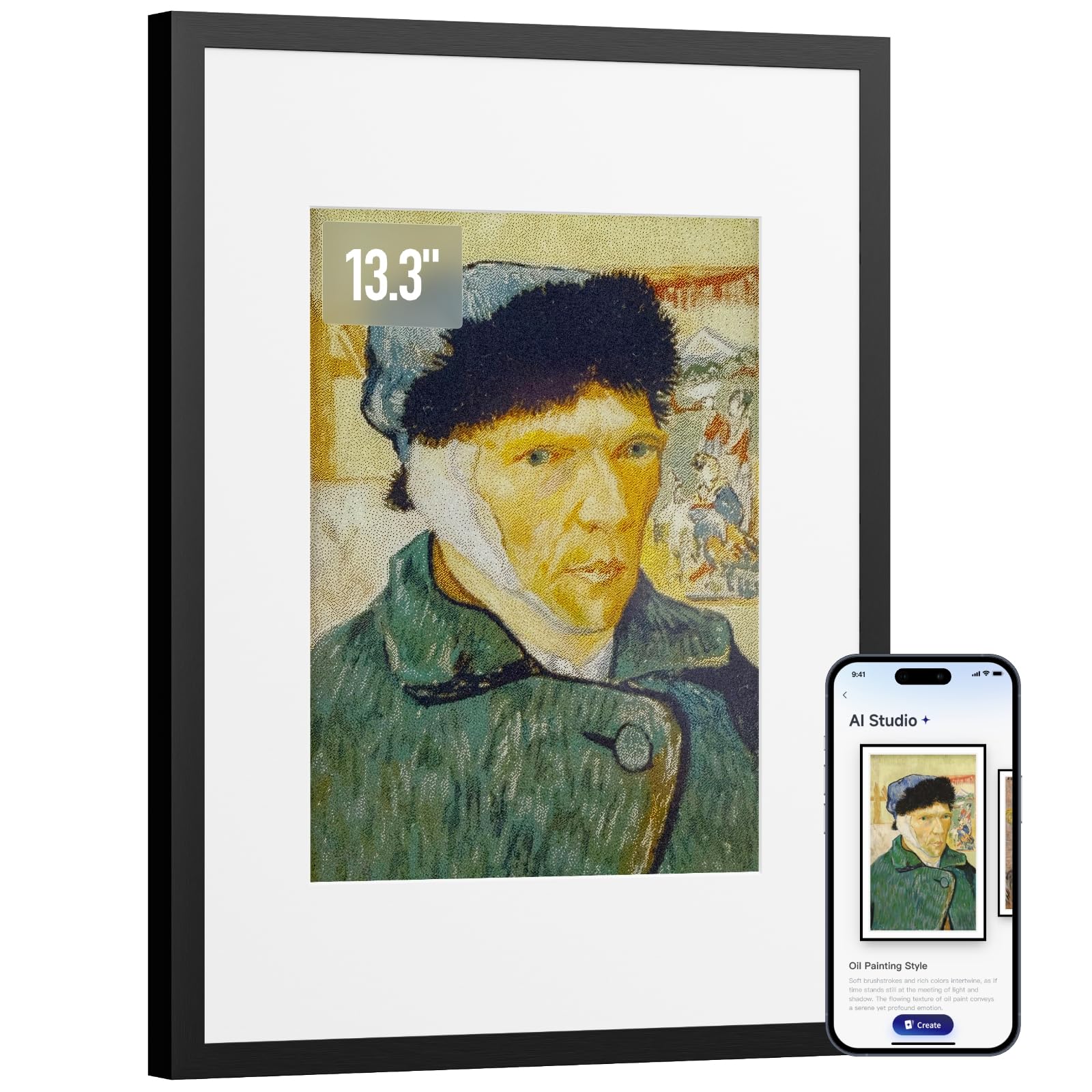
A 13.3-inch E-Ink canvas that hangs on a wall with no cord and holds an image for months.
This is the odd one out, and that is exactly why it belongs here. Instead of a page you carry, the Art Frame is a 13.3-inch E-Ink panel built into a black aluminum frame you hang or stand on a desk. The battery is a 2000mAh rechargeable cell, and at one refresh a week the maker rates it for up to 2 years. E-Ink holds its image with the power off, so when the battery finally drains the picture stays put rather than going blank.
The viewing experience is where the E-Ink choice pays off. The display reflects ambient light rather than emitting it — no glare, no blue light, and no glow at night — so in a bedroom or a dim hallway it looks like framed art rather than a screen. It supports a 6-color E-Ink canvas and a library of generated artwork through the SwitchBot app, plus Alexa voice control for changing what is on display. The frame stores up to 10 images locally and syncs over Wi-Fi, with Bluetooth used mainly for the initial pairing.
The honest trade-off is that this is not a photo display in the way you might expect. The pixels are large and the resolution is low by tablet standards, and the maker itself suggests viewing from about 3 feet away. Feedback bears that out: scanned children’s artwork looks like a framed painting, while ordinary family photos come across flatter and darker than the real thing. If you plan to fill it with snapshots, set your expectations on brightness and color before you hang it. For artwork and illustrated pieces, it earns its place on the wall.
The E-Ink advantage here: a wall piece that never glows, never needs a cord, and switches art by voice. Nothing else in this roundup runs for up to 2 years on one charge at 1 refresh a week.
The blunt limitation: photos look flatter than real prints and the resolution is coarse. It is art-first, photo-second.
Buy it for: a bedroom, hallway, or desk that wants changing art with zero glow and zero wiring.
Not your frame if: you want crisp family photos or expect a backlit screen’s vivid color.
5. BOOX Tablet Go Color 7 Gen II

A 7-inch color page with a memory card slot and more app freedom than most.
The numbers sell this one. The screen is a 7-inch Kaleido 3 color panel at 1680 x 1264 pixels, which works out to 300 ppi (pixels per inch, the sharpness measure) in black and white and 150 ppi in color — sharp text for reading, softer detail when color is on. An octa-core chip (an eight-core processor) sits behind 4 GB of RAM and 64 GB of storage on Android 13. Unlike the Ocean C above, there is a microSD card slot, so the 64 GB is a starting point rather than a ceiling.
What makes the Go Color 7 worth its spot is the crowd consensus: it feels like reading a real book. Buyers describe a paper-like screen with warm, cool, and off light options, configurable page-turn buttons, and a grippy back that keeps it steady in one hand. You can also pick a refresh mode to trade speed against ghosting. The maker lays out four settings — HD for static pages, Balanced for browsing, Fast for scrolling, and Ultrafast for video — and a fifth, Regal, tuned for color panels to cut ghosting. Set the wrong one and the page feels sluggish; set the right one and it just reads.
The straightforward caveat is that this is an E-Ink reader, not a tablet. The color layer is muted by nature, and the panel runs darker than a black-and-white E-Ink screen, so anime and comics look pleasant rather than punchy. Battery life is the other variable — a modest 2,300mAh cell that stretches to roughly a week depending on brightness and Wi-Fi, and drains noticeably faster with the network on. Keep Wi-Fi off while reading and it settles in nicely.
Strong points worth the money
- 7-inch Kaleido 3 panel at 300 ppi black-and-white for crisp text
- microSD slot expands past the included 64 GB
- Physical page-turn buttons plus a warm/cool front light
- Runs third-party reading apps on Android 13
Points to weigh before checkout
- Muted, darker color than a black-and-white E-Ink page
- 2,300mAh battery drains faster with Wi-Fi left on
- Refresh mode needs setting per app to feel smooth
- Stylus for note-taking sells separately
Best fit for: a reader who wants color, buttons, and room to grow storage through a memory card.
Less ideal if: you want a crisp black-and-white page or a battery that behaves the same with Wi-Fi on or off.
6. iflytek AINOTE Air 2, 8.2″ E Ink Tablet
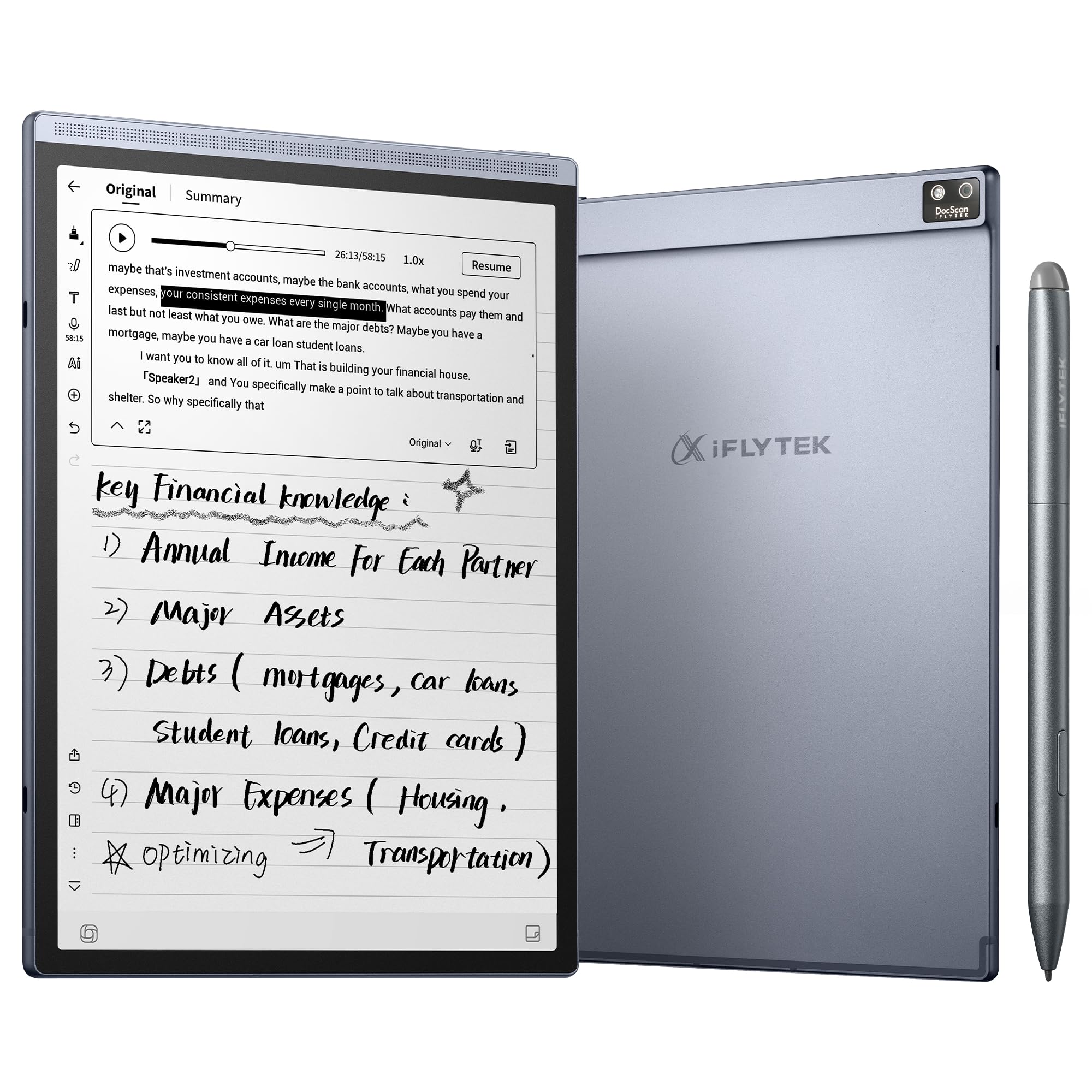
An 8.2-inch writing slate that listens to the meeting and drafts the summary for you.
Notebooks do not summarize. This one does. The AINOTE Air 2 pairs an 8.2-inch E-Ink panel with a matte writing surface and 4,096 levels of pressure sensitivity (how finely the pen reads how hard you press), then adds real-time voice-to-text transcription in 18 languages, AI meeting summaries, and questions you can ask of your own notes. For a project manager who needs to stay in the conversation instead of typing notes, that is the whole pitch — you listen, the device captures, and afterward it hands back a structured summary.
Ergonomics are built for that job. The body measures roughly 7.6 by 5.4 inches at a slim 5–6.5 mm thick and 8.1 oz (230 g) light, so it fits in a handbag and pulls out of a pocket-sized case without ceremony. Eight pen styles, adjustable warm and cool reading lights at 24 brightness levels, and handwriting-to-text in 100+ languages round it out. Note the limits spelled out on the page: voice transcription and handwriting-to-text cannot run at the same time, so you are choosing your mode before you start.
The catch is speed. E-Ink is a low-power panel, and this one shows it — pages turn and scroll with brief refreshes and occasional afterimages, and the device is not built for fast, fluid scrolling. Not every owner accepts the price against that trade, and some wanted smoother overall responsiveness than they got. If your meetings are your main use, the transcription and summaries do the heavy lifting. If you want a fast general tablet that happens to be E-Ink, this is not that device.
Where it shines: turning spoken meetings into organized, searchable text on a paper-like 8.2-inch page, with 5 weeks of battery between charges and a compact 230 g body.
The honest snag: transcription and handwriting-to-text need to be run separately, and scrolling feels E-Ink slow for owners who wanted tablet-like speed.
Built for: professionals who take a lot of meetings and want the summary written for them.
Reconsider if: you need to jump between apps quickly or expect tablet-grade responsiveness.
7. Penstar eNote 2 E-Ink Digital Notebook, 10.3″

A 10.3-inch page with the haze stripped out so black text lands like print.
The Penstar eNote 2 bets everything on clarity. Its 10.3-inch screen runs 2480 x 1860 at 300 ppi, and the maker says it removed layers to minimize the haze and refraction that normally dull an E-Ink display. The result, in their words, is whiter whites and punchier blacks — a page that reads like finely printed book. For a student or note-taker who stares at small type for hours, that clarity is the feature that matters.
The pen completes the picture. The stylus carries 8,192 levels of pressure sensitivity and needs no charging, and there is reduced lag between what your hand does and what the screen shows. A stylus-only input design is a deliberate choice — the screen has no touch layer, so there is no accidental palm press or stray page jump. For a left-handed writer, that change alone removes a daily irritation. Around it you get a 6500mAh battery rated up to 4 weeks, an octa-core chip with 4 GB of RAM and 128 GB of storage, 35-plus supported file formats, and a built-in microphone with four speakers.
What catches people out is the software, not the glass. The Android layer is its own ecosystem and will not run everything from the Play Store, so sideloading is the workaround and there is a learning curve getting the most from it. Converting handwriting to typed text is described as decent even with sloppy handwriting, but the interface takes some patience. And because the pen is the only input, losing it puts a halt on the device until a replacement arrives. Consider that when you are packing it in a bag.
The reason to pick it: this is a black-and-white screen tuned for contrast, with 300 ppi, no touch-layer haze, and a 8,192-level pen — the cleanest handwriting page in the group.
What to plan around: the software ecosystem is limited and takes learning, and the device needs its pen to function.
Worth it if: you want a large monochrome writing surface with the sharpest text and a pen that feels like a real pen.
Pause if: you need a full Android app store experience or want touchscreen input alongside the stylus.
8. Amazon Kindle Scribe Colorsoft 64GB
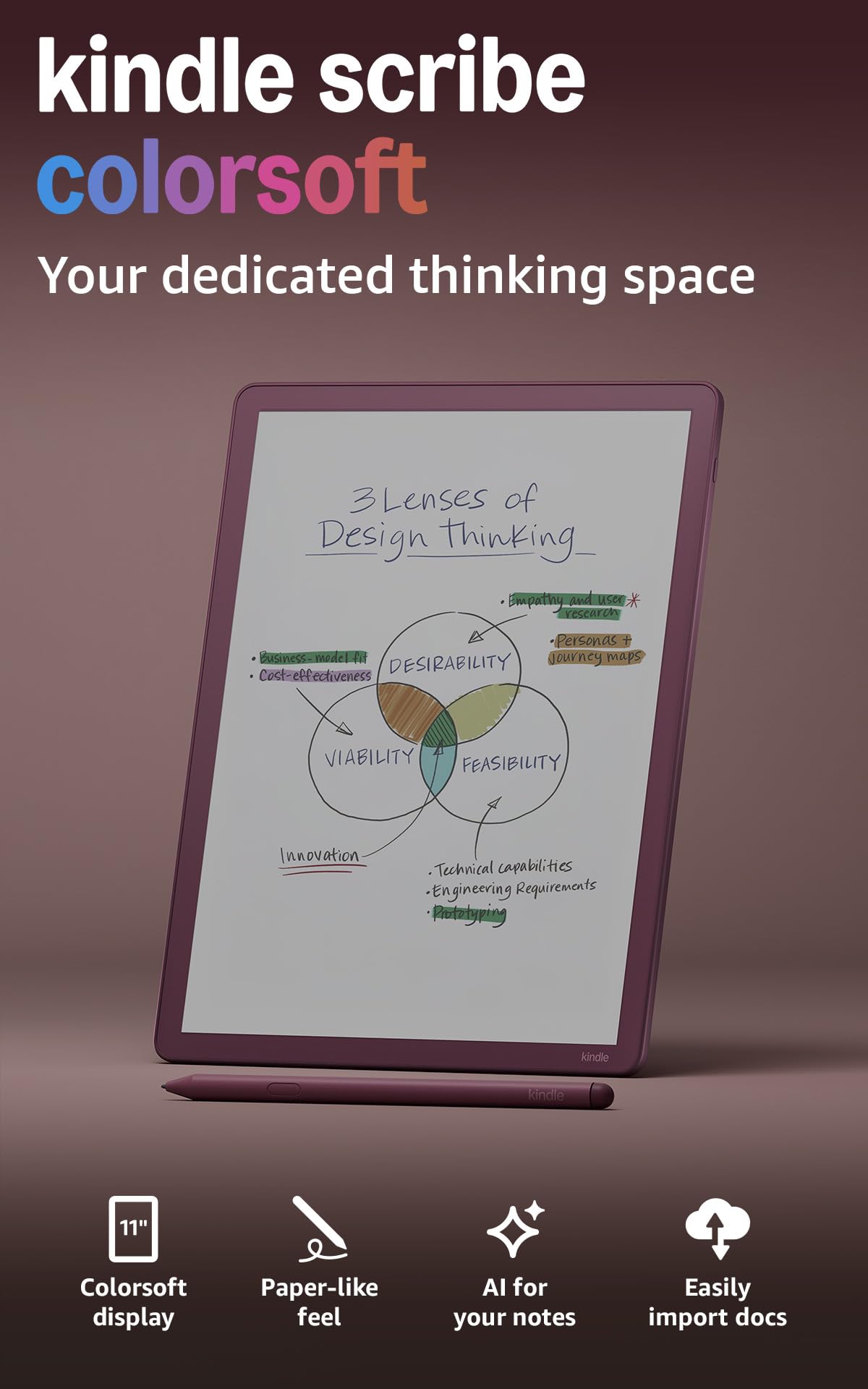
An 11-inch color page that reads like a book and writes like one, pen in the box.
The Scribe Colorsoft takes the biggest, most capable slot because it does both jobs well. The 11-inch Colorsoft panel is high-contrast and paper-like, and the maker says it displays without distracting flashes when you write. On the physical side, the body is 5.4 mm thin and 400 g light — genuinely slender for something this large — so long reading sessions stay comfortable. The included pen needs no charging and carries a built-in eraser and a shortcut button for tools like the highlighter.
The screen is what owners talk about. The color makes organizing notes vivid — colorful highlights, diagrams, and margin marks — and one nutrition student’s take is that it beats a rival color tablet for more vivid colors and note organization. The 64 GB fills slowly and handles a full library transfer with space left over. Front-lit reading means you can read in any light, and the glare-free, paper-like surface holds up in bright sunlight. For a student who both reads and takes notes, this is the one device in the group that covers both without a compromise switch.
Where the Scribe tests your patience is the writing surface and the price-value calculation. The pen has a low-friction glide, and some owners find the writing feel needs refinement rather than singing its praises. Highlighting behaves differently across EPUB, PDF, and Markdown files, and palm rejection can occasionally push you onto the next page unintentionally. For some buyers the size lands awkwardly — neither notebook nor book — and the price is the one thing you have to decide for yourself. Read the notes cases, and the trade-offs are clear.
What makes it the all-rounder
- 11-inch color Colorsoft display, 5.4 mm thin and 400 g light
- Pen included and never needs charging — eraser and shortcut button built in
- 64 GB holds a full library of books, notes, and documents
- Glare-free and front-lit for reading in any light, with AI note tools for summaries and handwriting cleanup
Where it slows you down
- Writing feel is low-friction; some find it needs refinement
- Highlighting behaves inconsistently across EPUB, PDF, and Markdown
- Palm rejection can cause accidental page turns
- The 11-inch size sits between a notebook and a book for some readers
The one to buy if: you want to read books and write color-coded notes on one big, thin page.
Slow down if: the size or the low-friction pen feel would bother you more than the color and capacity reward you.
9. reMarkable Paper Pro with Marker Plus

An 11.8-inch color sheet built around the most convincing pen-on-paper friction yet.
The Paper Pro is the largest panel in the group at 11.8 inches, and its whole identity is the writing surface. The Canvas Color display pairs with Marker Plus, a pen with a built-in eraser, and the maker tuned the two together specifically for realistic friction — that slight drag of a nib on paper that makes handwriting feel natural. Owners confirm it: the writing experience is the single most-praised quality, described as feeling like writing with a pen in a notebook. The screen size is ideal for academic papers and full-page PDFs, with an adjustable reading light for reading after dark.
Everything is included in one box: the Paper Pro, Marker Plus, six spare marker tips, a Book Folio cover in a Mosaic weave, and a USB-C cable. Notes sort by folder and tag, PDFs take handwriting directly on the page, and handwriting converts to typed text. Bookmarks are simple — the tablet slips in a bag at a slim 11.8-inch footprint, and the body is rigid and premium to hold. Colors stay pastel rather than saturated, which suits annotation better than artwork.
Two realities to weigh. First, color on this panel is gentle — for highlighting and marking up a document it works; for drawing that needs vivid hues it disappoints. Second, reliability on a small share of units has been a frustration, with screens freezing or fading after a few months and difficulty getting it covered under warranty. The writing feel and the color-coded organization are the reasons to buy it. If you want a splashy color tablet or quick-moving apps, look elsewhere.
The standout: 11.8 inches of Canvas Color with Marker Plus, a full accessory bundle in the box, and writing friction that owners describe as the closest thing to a paper notebook.
The one honest caution: colors are muted for art, and a handful of units have failed early. Buy from a seller with a clear return window.
Made for: writers, students, and academics who want the largest paper-like surface with color highlighting and a real pen-feel.
Keep shopping if: you want color that pops for artwork or you are worried enough about durability to prefer a simpler reader.
Know the Specs
Resolution and ppi, in plain terms
Pixels per inch (ppi) tells you how densely the pixels sit, and density is why small text looks sharp or fuzzy. A 7-inch panel at 300 ppi black-and-white reads cleanly at normal distance; the color layer on the same panel drops to a lower ppi because the color filter sits on top. That is why color E-Ink looks softer for comics and photos than for plain text. If your reading is mostly novels, chase ppi. If it is mostly colorful comics, accept the softer color layer and pick for tone and refresh instead.
Refresh modes and ghosting
Ghosting is the leftover trace of the last page, and refresh modes are how the panel clears it. A slow mode gives you the cleanest page for reading; a fast mode scrolls smoothly but leaves fainter trails. On writing tablets and color panels, the trick is matching the mode to the task: HD for static pages, a faster mode for scrolling apps, and a color-tuned mode to keep ghosting down. A slow mode suits static pages; a fast mode suits scrolling apps.
Common Questions
Is a color E-Ink display worse for reading black text than black-and-white?
How much storage do I need for comics and manga on an E-Ink display?
Can I read library books on these E-Ink tablets?
Do I need a stylus to write on an E-Ink tablet?
What does IPX8 waterproof mean for an e-reader?
Why does my E-Ink screen flash or ghost when turning pages?
How often will I need to charge an E-Ink reader?
Is a color E-Ink tablet better for note taking than a paper notebook?
The Bottom Line
The right e-ink display starts with the panel matching your day. If your reading is novels and nothing else, the Amazon Kindle 16 GB (2024 model) is the clean, light, weeks-on-a-charge choice — 4.5+ stars across 21,000+ ratings, thecrowd favorite that earns the Best Overall slot. If your books come from a library card and you read in the bath, the Kobo Libra Colour pairs 7 inches of color with an IPX8 body and built-in OverDrive. And if you want one big page that reads and writes in color, the Kindle Scribe Colorsoft is 11 inches, 5.4 mm thin, and ships with a pen.
The two writing-first picks split by intent. The Penstar eNote 2 gives you a 300 ppi monochrome surface with an 8,192-level pen if crisp text matters most, while the reMarkable Paper Pro gives you 11.8 inches of color and the most convincing paper friction in this group. Choose the Penstar for crisp monochrome text and the reMarkable for large color markup.
How we choose
We do not accept paid placement. Every pick is matched to a real buyer and a real use-case; we do not hands-on test units.
Sources
Specifications: manufacturer listings and product documentation. Review insights: verified customer reviews, as of October 2026. Pricing: not shown on this page (it changes often); check the current price via the retailer link.
As an Amazon Associate, Aappliancez earns from qualifying purchases. This does not affect which products we feature.