Disclosure: Some links in this post are affiliate links. As an Amazon Associate I earn from qualifying purchases, at no extra cost to you. Learn more
Specs are compiled from manufacturer listings and verified buyer reviews and can change over time — please confirm the key details on the product page before buying.
A DVR recorder for streaming TV is not the same thing as a streaming stick, and mixing them up is the fastest way to waste money. A recorder captures broadcast channels off an antenna and stores them on a drive you own, while a streaming player just pipes apps onto your screen. If your real goal is recording local news, sports and network shows without a cable bill, you want a tuner-and-DVR box, and the standouts below are the ones that actually do the job. The other half of this list covers the players worth pairing with them, so the whole setup works as one system.
This guide is built by comparing the manufacturers’ published specifications and the patterns across verified customer reviews, so you get each pick’s real strengths and trade-offs instead of marketing spin.
What follows separates true over-the-air recorders from the streaming hardware that sits beside them, with plain notes on tuners, storage and app support. Read it as your shortcut to picking the right recorder and player pair.
Top Picks


How To Choose The Best DVR Recorder for Streaming TV
Start with the antenna, not the box. Every recorder here needs a TV antenna to pull in local stations, and most ship without one — the Tablo renewal is the exception. If your signal is weak or the towers sit far away, no amount of tuner hardware will conjure channels that never arrive. Get a signal first, then buy the recorder.
Count the tuners before anything else
A tuner is the radio inside the box that locks onto one broadcast channel at a time. One tuner means you can record a show or watch live, not both. Two tuners let you record one channel while watching another, which is the practical minimum for a household that actually watches TV. Four tuners, as on the HDHomeRun Flex Quatro, mean several people can watch and record at once without fighting over the box.
Decide where recordings will live
Some boxes carry their own storage, while others expect you to plug in a USB drive or microSD card that you buy separately. The Tablo renewal includes 128GB onboard and takes up to 8TB of external USB storage. The ZapperBox and both HDHomeRun units rely entirely on storage you supply. Budget for that drive in your planning — it is not optional if you want to record anything.
Know which standard your local stations use
ATSC 1.0 is the broadcast standard most stations still transmit. ATSC 3.0, often called NextGen TV, is the newer one with 4K and HDR support, but it is not live everywhere. The ZapperBox handles both standards, while the HDHomeRun Flex models list ATSC 1.0 only. If 4K broadcast matters to you, confirm your local stations actually transmit it before paying extra for hardware that receives it.
Side-by-Side Comparison
| Model | Best For | Tuners | Recording Storage | Broadcast Standard | Amazon |
|---|---|---|---|---|---|
| Roku Ultra★ Best Overall | Streaming into a 4K TV | — | — | — | Amazon |
| ZapperBox M1NextGen Leader | 4K NextGen local recording | 2 | microSD or USB drive, sold separately | ATSC 3.0 and ATSC 1.0 | Amazon |
| Sling AirTV 2Stream Anywhere | Watching locals away from home | 2 | External hard drive, sold separately | ATSC | Amazon |
| Tablo TV 4th Gen (Renewed) | No-subscription recording from the start | 2 | 128GB onboard, up to 8TB USB | ATSC 1.0 | Amazon |
| SiliconDust HDHomeRun Flex Duo | Reliable two-tuner whole-home feed | 2 | USB drive, sold separately | ATSC 1.0 | Amazon |
| Hiseeu 4K 8 Channel DVR | Security camera recording | 8 channels, 5-in-1 | Hard drive not included, up to 16TB | AHD/TVI/CVI/CVBS/IPC | Amazon |
| AirTV Anywhere | Four-TV whole-home locals | — | Built-in DVR | ATSC | Amazon |
| SiliconDust HDHomeRun Flex Quatro | Four simultaneous recordings | 4 | USB drive, sold separately | ATSC 1.0 | Amazon |
| Amazon Fire TV Cube | Hands-free voice streaming | — | — | — | Amazon |
Detailed Reviews
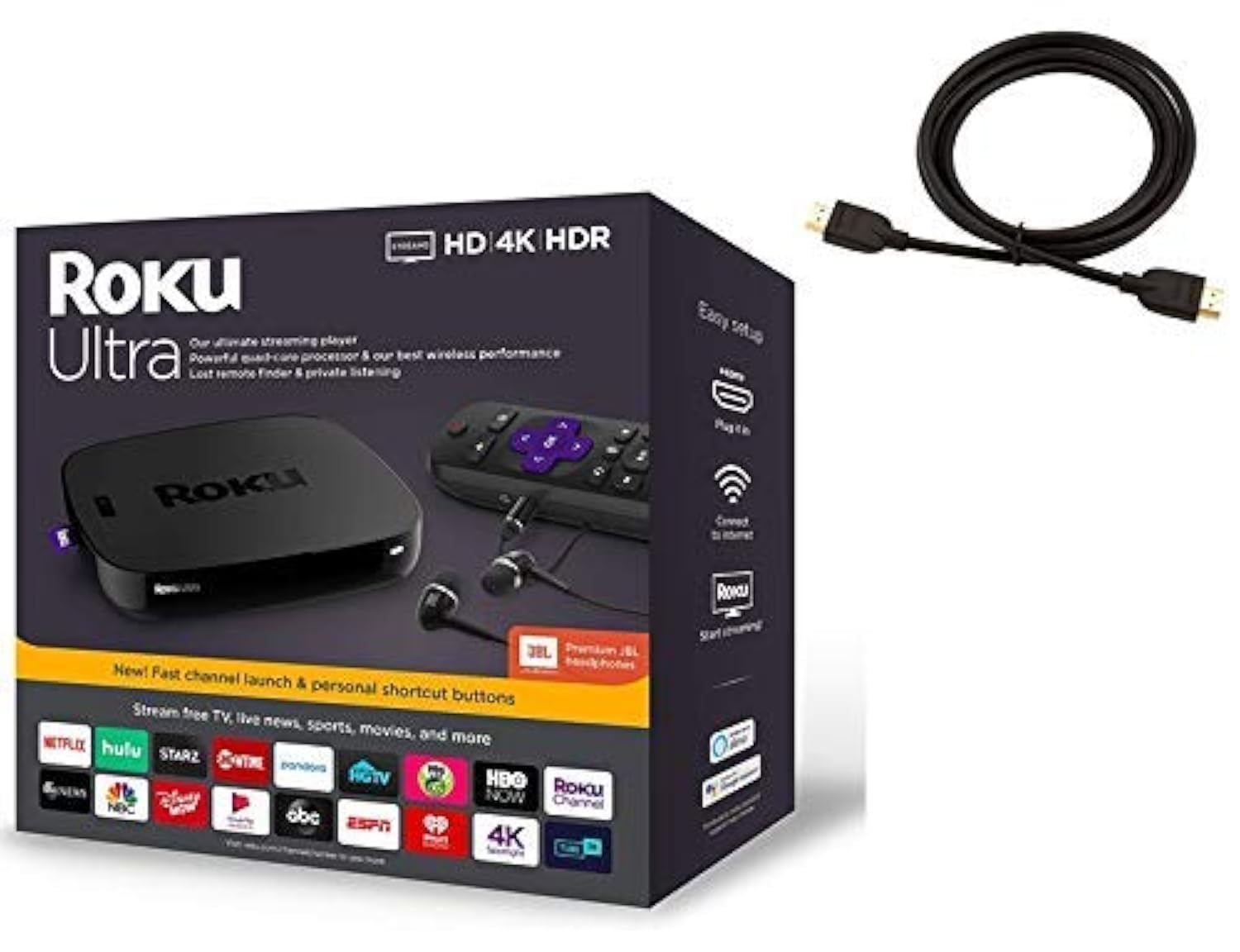
1. Roku Ultra Streaming Media Player 4K/HD/HDR
Our pick — 4.5+★ from 500+ verified ratings; the strongest balance of quality and price.
The player that makes an older 4K set feel new again, without a single new subscription.
Here is the piece most people leave out: a recorder captures the broadcast channels, but it needs a player to put them on your screen. The Roku Ultra is the cleanest version of that role, and it is why this sits at the top of the pile rather than buried in a spec table. Inside is a quad-core processor (the chip that keeps menus snappy) paired with Roku’s best wireless, so channel changes and app launches do not stall. It outputs in HD, 4K and HDR (HDR being the wider brightness range that keeps dark scenes readable), and the picture is sharpened to suit whatever TV you plug it into.
What wins people over is how little there is to fuss with. A 6-foot high-speed 4K HDMI cable comes in the bundle, so you are not hunting for one, and the enhanced voice remote learns shortcuts you set yourself. Plug the included Premium JBL headphones into the remote and the sound goes to your ears while the room stays quiet — a genuinely useful trick for late sports or a partner who is already asleep. The remote also drives your TV and sound bar, which collapses three clickers down to one, and the lost-remote finder covers the obvious household failure. The entertainment side is wide, with 500,000+ movies and TV episodes reachable across Netflix, Prime Video, Disney+, HBO, Showtime and The Roku Channel.
Know this up front: it is a player, not a recorder. There is no tuner inside (the part that pulls in an antenna signal) and no drive bay (a slot for a hard drive), so it cannot grab a station on its own or save a broadcast for later. It works alongside a recorder like the ZapperBox or the HDHomeRun, not instead of one. Expect a purple box too, not the black shown in some listing photos — as buyers report, “It came in a purple box just like the 2024 version,” and the unit itself works as intended. At 8 ounces on a 4.9″L x 4.9″W x 0.85″H footprint, it tucks behind the TV easily, so it stays out of sight. The included cables and ports, more than the size, are what clear up connection headaches.
What earns it the top slot
- Quad-core processor with Roku’s best wireless keeps app starts and channel hops quick
- HDMI cable in the box plus USB and micro SD ports means fewer add-on purchases
- Voice remote runs the TV and sound bar, so one clicker does the whole job
- Private listening through the bundled JBL headphones, no soundbar required
What to weigh before you buy
- No tuner and no DVR storage inside — it needs a separate recorder to capture broadcasts
- Listing photos and the actual purple packaging do not always match
- App-heavy home screen means more scrolling than a dedicated tuner guide
Best for: Anyone with a 4K TV who wants one clean hub for the recorder feed and streaming apps.
Not for: Buyers hoping a single box will pull an antenna signal and save shows — you still need a tuner recorder alongside it.
2. ZapperBox M1 ATSC 3.0 OTA Dual Tuner + DVR + Gateway
The only recorder here that speaks NextGen TV in full 4K with HDR and Dolby Atmos.
If your local stations have gone ATSC 3.0, this is the box built for them. It handles both ATSC 3.0 and the older ATSC 1.0 standard, plays 4K at 60, 30 and 24 frames per second, and supports HDR 10 and HLG (two versions of the wider brightness range) plus Dolby Atmos audio. The two tuners let you record one station while watching another, and the feed travels to your TVs over Wi-Fi or Ethernet. For sports, network shows and local news from ABC, CBS, FOX, NBC, the CW and PBS, the 4K recording is the reason people put up with the price.
Setup takes minutes, and buyers mention that more than anything else. Picture quality on a good signal also earns real respect. You supply the storage — a microSD card (a small memory card) or a USB drive — and the advanced DVR features ask a /year subscription. The plain recording still works, and one owner’s numbers show how far storage goes: “1TB external drive only 20% full after dozens of shows; records broadcast quality.” For connections, you get a USB 3.0 port, a USB 2.0 port, a microSD slot, Bluetooth 4.0, Wi-Fi 802.11 b/g/n/ac on 2.4 and 5GHz, and a gigabit Ethernet port (a fast wired network jack). In the box: an HDMI cable, power adapter and Ethernet cable.
The trade-offs are real and worth knowing up front. Channel availability, picture quality and value all draw mixed reactions, and a few users in weak or DRM-restricted areas simply could not tune 3.0 channels and sent it back. This is a 4.5″L x 4.75″W x 1″H unit — smaller and more compact than the Roku Ultra’s 4.9″ x 4.9″ x 0.85″ body, though it is the taller of the two. It also arrives with a 6-item box list rather than the bare minimum, which is why the bundle count stands out. For someone in a strong 3.0 market, that is a feature. For someone whose stations still broadcast 1.0, it is money spent on capability you cannot yet use.
Where it wins clearly: Nothing else on this list receives ATSC 3.0, so if NextGen local TV is your goal, this is the pick by default rather than by margin.
Where to tread carefully: Confirm your stations actually transmit 3.0 before you commit, and budget for the microSD or USB drive plus the yearly fee for advanced recording.
Worth it if: You live in an ATSC 3.0 market and want 4K local recordings with HDR and Atmos sound.
Think twice if: Your stations are still ATSC 1.0 only — the extra capability sits unused and you will feel overbilled.
3. Sling AirTV 2 Dual-Tuner Local Channel Streamer
Takes your antenna channels and follows you out the front door.
The AirTV 2 connects one HD antenna you supply to your home Wi-Fi and pushes those local channels to Rokus, Fire TVs, Android TV devices, phones and tablets. That alone is nice. The part that earns it a spot is remote viewing: open the Sling TV app on an iOS or Android phone and you can watch live or recorded content while you are nowhere near your living room. Two tuners let it record up to two shows at once, and you can pause, rewind and fast-forward live TV while a recording runs.
Functionality is where it shines, and the whole-home spread is the clearest payoff. A household can have the game on the living-room set and the news on a tablet upstairs without a second antenna. A Sling subscription is not required for local channels, which matters if you are only after the free broadcasts. Recording does need an external hard drive, sold separately, and the setup expects broadband of at least 25Mbps (recommended) plus a media player like Roku or Fire TV. The 4.3″L x 1.8″W x 7″H body is a slim upright that fits beside the router without hogging a shelf.
Setup is the honest friction point. Some users sail through in five minutes, while others fight the app and the USB drive connection. A few units lose their wireless link over time and need pulling and reconnecting. That is a small slice of the picture, but it is the trade-off: this is the pick for remote viewing, not the most bulletproof box on the shelf. If you want a recorder that simply sits and runs, the HDHomeRun models are steadier. If you want your local channels with you at the office or on a trip, nothing else here does that trick.
The bottom line: An antenna-to-app bridge for people who value watching away from home over a polished recording menu.
Choose this for: Streamlining local channels to any device in the house and out of it.
Look past it for: Plug-and-play reliability — expect to babysit the app and the USB drive now and then.
4. Tablo TV 4th Gen 2‑Tuner OTA DVR + Antenna (Renewed)

Ships with the antenna and the storage, which is more than most rivals can say.
You skip the extra shopping trips here: most recorders on this list make you buy the antenna and the drive yourself. This renewed Tablo bundles a 35-mile range indoor antenna, a 6-foot coaxial cable and an Ethernet cable. It also adds 128GB of onboard recording space — good for 50+ hours — with room to push that to 8TB over USB. There is no subscription and no contract, so you pay once and the recording keeps working. Two ATSC 1.0 tuners (the over-the-air broadcast standard) let you record one live channel while watching another. More than 100 additional free streaming channels sit alongside your antenna lineup.
Signal reception is the thing it does well, and the antenna range is honest about its limits. A flat antenna in an odd window still pulled in all the local stations and most of the secondary ones more than 20 miles from the city, plus roughly 170 channels counting the streaming side. Push much beyond the stated 35-mile range and you will want an attic or outdoor antenna instead. The whole-home trick is the quiet win — a single box streams the broadcast over Wi-Fi to every smart TV and streaming player in the house, so you are not wiring coax to three rooms.
The catch is software. The app and setup can be slow, occasionally take two tries, and behave differently from one TV to the next. Channel lineups also vary by area, so what one home gets easily another may not. That is the reason it sits in the mid-tier rather than the top: hardware and bundled parts are strong, polish is not perfect. As a renewed unit, it also pays to check that the adapter and antenna are all in the box on arrival.
Why it clears the bar
- Antenna, coaxial cable, Ethernet cable and 128GB storage all included
- No subscription and no contracts — recording keeps working after the purchase
- Two tuners with whole-home Wi-Fi streaming to Roku, Fire TV, Apple TV, Android TV and Chromecast
- Expandable to 8TB of external USB storage when 50+ hours is not enough
Where it asks patience
- App and setup can be slow or take a second attempt
- Built-in antenna tops out around the stated 35-mile range; fringe homes need an outdoor antenna
- Renewed unit — verify the antenna and cables arrive in the box
Best fit: Cord-cutters who want the antenna and drive settled in one purchase and no monthly fees.
Second-guess it if: You are far from the towers or expect perfectly smooth setup software on the first try.
5. SiliconDust HDHomeRun Flex Duo 2 x ATSC Tuners

A plain, sturdy network tuner that behaves the same way every night.
Owners talk about stability more than anything else, and that is this box’s whole personality. It puts two ATSC 1.0 tuners (over-the-air broadcast receivers) on your home network, so any Roku, Fire TV, Apple TV, Xbox, iPhone, iPad or Windows or Mac machine can pull the same live feed. The basic whole-home DVR needs no subscription, though a paid guide adds automatic recording. Plug in a USB hard drive and it records; add the paid TV guide service and it can auto-record by program name. Setup is quick — minutes rather than evenings — and it uses Ethernet on RJ45 (a standard wired network plug) to stay off shaky Wi-Fi.
The picture is genuinely clear, and reception beats what a bare TV pulls in. Owners regularly report finding more stations than their TV alone could hold, with over 40 OTA channels in strong-signal areas. It also plays well with Plex and third-party front ends if you want a slicker interface than the native app. At 7″L x 5″W x 2.2″H it is a squat slab that fits neatly in an AV stack, and it ships with a network cable and power adapter.
Two real limits. First, it needs internet for the app to function — the LAN-only tuner mode will not rescue you if the cloud servers go dark, which is an artificial restriction rather than a hardware fault. Second, format quirks: the USB drive often needs XFS formatting, which Windows cannot do from the start, so plan time for that step. The guide subscription is the other ask if you want recording to schedule itself. For a box people leave running for years, those are manageable trade-offs.
The reliability case: Dependability is what it is known for, ahead of every other metric — this is the tuner you install once and forget.
The honest ask: Expect a formatting detour for the USB drive and a small annual fee if you want scheduled recording rather than manual.
Pick it when: You want a network tuner that just works across every device you own with minimal upkeep.
Pass when: You refuse to deal with drive formatting or want the recording scheduler free of any subscription.
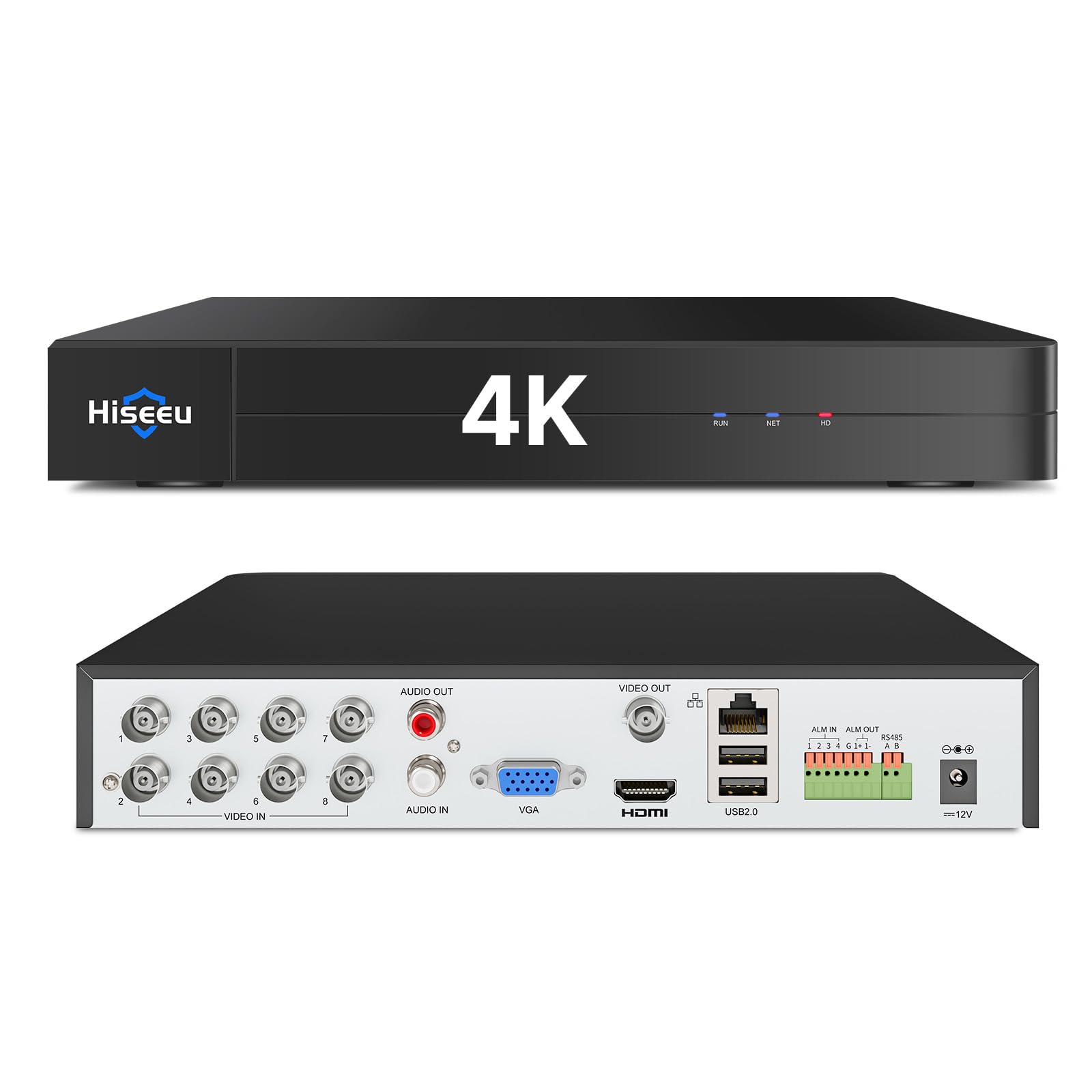
6. Hiseeu 4K 8 Channel DVR Security Digital Video Recorder
Different job entirely: this one watches your driveway, not your prime-time lineup.
One name collision needs a straight answer. This Hiseeu box is called a DVR, but it records security cameras, not broadcast TV. It is a 5-in-1 hybrid that accepts AHD, TVI, CVI, CVBS and IP cameras (five common security-camera signal types), supporting up to 8 standard cameras plus 4 extra IP units (a PoE switch is needed for the PoE ones — PoE means power and data over one cable). The maker claims its compression saves up to 80% more hard-drive space than H.264, so more security footage fits on the same drive. Smart motion detection can flag a person or vehicle entering a zone you set and push an alert to your phone. If your search was about keeping an eye on the house, this is the right tool — but it will not tune a station.
No hard drive is included, and the box cannot record a single frame without one; it accepts up to 16TB and the maker lists drive options on Amazon directly. Video quality gets strong marks — clear day and night footage, a menu designed to be read by non-technical users, and smooth playback. The Guard Viewer and Guard Station apps handle live and recorded viewing, and person and vehicle detection cuts false alerts in rain and fog compared with plain motion triggers. Support is responsive, often answering within a day and honoring a free replacement on an out-of-warranty unit.
Remote access is the uneven patch. Email alerts and RTSP connections (a common video-streaming link) have tripped up users, and one owner sums it up plainly: “The remote viewing does not work.” That is a minority experience, but check your expectations if watching from your phone away from home is the whole point for you. Local recording and on-network viewing are the reliable core.
Read the label carefully: A security recorder for cameras, not a broadcast DVR — only buy it if home surveillance is the actual goal.
Right for: Anyone wiring a multi-camera security setup who wants local 4K recording without a monthly fee.
Wrong for: Recording local TV — it has no broadcast tuner, and remote viewing can be patchy even for security use.
7. AirTV Anywhere Whole-Home OTA DVR

The no-antenna-fuss DVR that puts locals on four sets and in your pocket.
This is the step up from the AirTV 2, and the key difference is the built-in DVR — no external drive to buy, and no separate coax run to every room. Pair it with one antenna (sold separately) and it streams free HD locals from ABC, NBC, CBS and FOX to four TVs at once over Wi-Fi. The Sling app is required to run it, and that same app is how you record and play back live content on a phone or tablet when you are out. Supported audio runs to Dolby Digital with stereo output and a 16:9 aspect ratio.
When it works, it really works. An indoor antenna pulled in every network channel plus 50+ others, and the Wi-Fi distribution reached the whole house. Setup is quick for people with a decent antenna already in place. The one physical note: the built-in hard drive spins and runs warm, so give it a little breathing room on an open shelf rather than boxing it in.
The DVR side is where it wobbles. Recording can falter after a few weeks, the app can feel sluggish, and series recordings sometimes need to be set manually before airing rather than catching everything automatically. You also cannot unplug the internal drive to rescue footage if the unit fails — a real limitation next to recorders that take a USB drive. This lands as a convenience-first device for someone who wants the simplest possible whole-home setup, not the most sturdy recorder on the list.
What it gets right
- Built-in DVR means no external drive purchase
- One antenna feeds four TVs plus phones and tablets via the Sling app
- Pulled in every network channel plus 50+ others with an indoor antenna
- Watch and record remotely through the mobile app
What can frustrate
- DVR reliability is uneven; recordings can fail after a few weeks
- Internal drive cannot be removed, so a failed unit traps your recordings
- App navigation and fast-forward can feel jerky
- Runs warm due to the internal spinning drive
Go here if: You want the simplest whole-home local TV setup with the DVR already inside.
Steer clear if: Reliable scheduled recording is non-negotiable — the internal drive and flaky DVR are the weak links.
8. SiliconDust HDHomeRun Flex Quatro 4 x ATSC Tuners

Four tuners so the whole house can watch and record at the same time.
Four tuners instead of the Flex Duo’s two is the whole pitch, and it solves a specific headache: several family members can watch different channels and record different shows at once without the box choking. It slots into the same network-tuner setup — Android, Fire TV, Apple TV, Roku, Sony, Xbox, iPhone, iPad and Windows or Mac all pull the feed over Ethernet via RJ45 (a standard wired network plug). A USB drive gives you whole-home DVR with no required subscription. Performance is the headline and the most-praised quality, with picture quality, setup and channel availability all reading positive across the board.
The practical gains show up in numbers. Owners mention it recording up to four shows at once and pulling in more stations than two TVs could on their own. It works across two Apple TVs and a phone with room to grow — all without running new coax (the round antenna cable) to any room. It pairs happily with Plex and with third-party software like Channels DVR for a faster, slicker interface than the native app. The 2-year warranty also beats the standard you often see on tuner hardware.
Where it asks more of you: the interface is plainer than the competition, and the USB drive formatting step is fiddly the first time. Price-wise, some buyers feel it runs a touch high for a bare tuner with no drive included. Setup is easy up to the drive, then gets technical. If you want a single-tuner household box this is overkill; if you have three or four screens pulling local TV, the fourth tuner earns its keep.
Why it justifies the step up: Four tuners change how the household uses the TV — simultaneous live viewing and recording stops being a negotiation.
What you give up: A polished on-screen interface and a plug-and-play drive, since both demand some DIY patience.
Buy this if: You have several TVs or heavy recorders who need simultaneous access to different channels.
Skip the upgrade if: One or two screens cover your house — the Flex Duo does the same job for less complexity.
9. Amazon Fire TV Cube with Wi-Fi 6E and Alexa+

The player built for voice-first households, with the fastest chip in the group.
Talk to it from across the room: the Fire TV Cube is the other player option beside the Roku Ultra, and a built-in microphone and speaker let you control your TV, sound bar or receiver hands-free without hunting for a remote. The octa-core processor (eight cores working together to keep apps responsive) makes it the maker’s fastest streaming player. Wi-Fi 6E support (a newer, wider Wi-Fi band) is why it holds a steadier connection in a busy home network. Picture runs to 4K Ultra HD with Dolby Vision, HDR and Dolby Atmos audio, and it is the first streaming media player with Wi-Fi 6E, according to the maker.
Picture quality is where it makes its case. Owners comparing it against an Apple TV 4K on the same connection found the Cube played Prime, Netflix, Pluto and Tubi without the pixelation and buffering the other box showed. The HDMI-in port is a quiet advantage — it lets you switch between streaming, a cable box or a game console without swapping inputs. An Ethernet port is there for a wired run. And Alexa+ search can find a show across your apps just by asking.
None of this records a broadcast — there is no tuner and no drive inside, so pair it with a recorder like the HDHomeRun or ZapperBox if capturing local TV is the goal. The real gripes are the ad-heavy home screen, a steep price for a player, and a handful of audio and display settings that take fiddling to settle, with some users switching display modes back after updates. The speaker and microphone are also a step behind the previous generation in sensitivity, according to users who upgraded.
Angle: The strongest voice-and-picture player here — a streaming hub, not a recorder, so buy it to watch rather than to capture.
Best for: Voice-driven households that want the fastest app starts and the sharpest 4K picture among players.
Not ideal for: Anyone hoping for local-TV recording, or anyone irritated by an ad-rich home screen and menu tweaking.
Know the Specs
Tuner count and why it matters
A tuner is the component that locks onto one broadcast channel at a time. One tuner means either watching live or recording, not both. Two tuners, as on the ZapperBox, AirTV 2, Tablo renewal and Flex Duo, let you record one channel while watching another. Four tuners, as on the Flex Quatro, let multiple people watch and record different channels at once. More tuners never hurt, but they cost more — match the count to how many screens are actually in use.
ATSC 1.0 versus ATSC 3.0
ATSC is the standard broadcast TV uses. ATSC 1.0 is the current widespread one. ATSC 3.0, or NextGen TV, adds 4K, HDR and Dolby Atmos, but coverage is uneven by city. The ZapperBox handles both. The HDHomeRun Flex models list ATSC 1.0. If you buy 3.0 hardware before your stations transmit it, you pay for capability you cannot use yet — worth checking your local lineup first.
Where recordings are stored
Some recorders hold their own storage, like the Tablo renewal’s 128GB onboard, good for 50+ hours. Others expect you to supply a USB drive or microSD card. The HDHomeRun and ZapperBox units fall in that camp, and the HDHomeRun often wants an XFS-formatted drive that Windows cannot prepare from the start. The AirTV Anywhere’s drive is internal and cannot be removed. Plan the storage cost before you buy.
Recording subscriptions
Basic recording can be free, but advanced features sometimes cost. The ZapperBox charges a yearly fee for advanced DVR features, and the HDHomeRun TV guide costs extra if you want automatic scheduled recording. The Tablo renewal has no subscription and no contracts. Read the fine print on each: “no subscription” often means the basic recording works without one, while the TV guide or auto-record does not.
Common Questions
Do I need an antenna to use a DVR recorder for streaming TV?
Can I record one channel while watching another?
Do I need a subscription to record local TV?
Will my recordings survive if the box breaks?
What is the difference between ATSC 1.0 and ATSC 3.0, and does it matter?
Which devices can stream the feed from my recorder?
How much storage do I need for recorded shows?
Can a DVR recorder replace my cable box?
Is a recorder different from a streaming player like the Roku Ultra or Fire TV Cube?
Can I watch my recorded local channels away from home?
The Bottom Line
For most people, the right starting point is the ZapperBox M1. It is the only recorder here that handles both ATSC 1.0 and ATSC 3.0 (the old and new over-the-air broadcast standards) in 4K with HDR and Dolby Atmos, and its dual tuners let you record one station while watching another. If you want the antenna, storage and no-subscription recording settled in a single purchase, the Tablo TV 4th Gen renewal bundles all three, with 128GB onboard and room for up to 8TB over USB. And when several TVs in the house need their own live channel at once, the HDHomeRun Flex Quatro gives you four tuners on one network feed instead of one.
Pair your recorder with a player so the whole setup clicks. The Roku Ultra is the cleanest hub for a 4K TV. The Fire TV Cube suits voice-first households with its hands-free Alexa control. That two-part split — a tuner recorder plus a streaming player — is what makes local TV and streaming apps work as one system. Get the antenna right, confirm your local broadcast standard, and budget for a drive if your box does not include one.
How we choose
We do not accept paid placement. Every pick is matched to a real buyer and a real use-case; we do not hands-on test units.
Sources
Specifications: manufacturer listings and product documentation. Review insights: verified customer reviews, as of October 2026. Pricing: not shown on this page (it changes often); check the current price via the retailer link.
As an Amazon Associate, Aappliancez earns from qualifying purchases. This does not affect which products we feature.